
Lossless Audio Codecs in MP4 Containers
Let’s talk about Lossless Audio Codecs in MP4 Containers
When it comes to preserving the highest quality audio in a compact format, lossless audio codecs in MP4 containers offer an ideal solution. As an audio enthusiast and specialist, I’ve worked with these formats extensively, and I can tell you that they offer a unique combination of compression without sacrificing any of the original audio quality. In this article, I will break down the most popular lossless audio codecs, their benefits, and how they integrate into the MP4 container to enhance both music and video experiences.
What Are Lossless Audio Codecs?
Lossless audio codecs are types of audio compression algorithms that preserve the original sound quality without any data loss. Unlike lossy formats like MP3 or AAC, which sacrifice some of the audio quality to reduce file size, lossless codecs ensure that every nuance and detail of the audio is preserved. This makes them the preferred choice for audiophiles, audio professionals, and anyone who values perfect audio fidelity.
Common Lossless Audio Codecs
- FLAC (Free Lossless Audio Codec)
- ALAC (Apple Lossless Audio Codec)
- WAV (Waveform Audio File Format)
- APE (Monkey’s Audio)
- TAK (Tom’s lossless Audio Kompressor)
Each of these codecs has unique features, but they all share the same goal of maintaining high audio quality. In an MP4 container, these codecs can be paired with video streams to create media files that combine the best of both worlds: visually stunning video with perfectly preserved audio.
The Role of MP4 Containers in Audio and Video Files
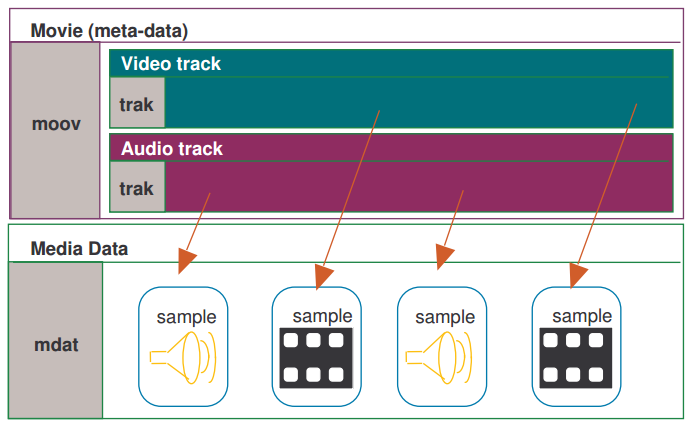
MP4 is one of the most widely used video container formats, primarily because it supports high-quality video and audio streams while maintaining relatively small file sizes. The MP4 format is versatile and can house both lossy and lossless audio codecs. It’s designed to hold video, audio, and subtitle tracks, along with metadata, all in a single file.
Why MP4 for Lossless Audio?
Many people don’t realize that MP4 containers are highly compatible with lossless audio codecs. The beauty of the MP4 container is that it allows you to store lossless audio without the file sizes becoming unmanageable. For example, when combined with a codec like FLAC, an MP4 file can hold high-fidelity audio, all while remaining relatively small compared to the same content in a WAV file. This makes it a perfect choice for streaming, archiving, and general media use.
Benefits of Using Lossless Audio Codecs in MP4 Containers
Integrating lossless audio codecs into MP4 containers offers numerous advantages, especially for people who want high-quality audio and video in a single, portable file.
High-Quality Audio Without Compromise
The key benefit of using lossless codecs in MP4 files is the ability to enjoy perfectly preserved audio. When you play a FLAC or ALAC file in an MP4 container, you’re hearing every detail of the original sound—every subtle instrument note or vocal inflection is there, untouched. Whether you’re listening to a classical symphony or the latest rock album, lossless audio in MP4 ensures that your music is as close as possible to the artist’s original vision.
Efficient Compression and Storage
MP4 containers are known for their efficiency. When combined with a lossless audio codec, they offer a perfect balance between size and quality. Unlike WAV or PCM files, which can be enormous, FLAC and ALAC files in MP4 containers offer excellent compression, reducing file sizes by 30-60% while retaining all the audio details. This is especially important if you’re archiving large music collections or need to store multiple hours of high-quality audio and video in a single file.
Compatibility Across Devices
Another reason to use lossless audio codecs within MP4 containers is their broad compatibility. Whether you’re listening on a smartphone, a desktop, or a home theater system, MP4 containers with lossless audio codecs are supported by most devices and software. Unlike other formats that may require specific players or software to decode, MP4 is universally accepted, making it incredibly convenient for everyday use.
Popular Lossless Audio Codecs in MP4 Containers
There are a few lossless audio codecs that stand out when it comes to being used in MP4 containers. Let’s explore some of the most popular options available today.
FLAC (Free Lossless Audio Codec)
FLAC is the most widely used lossless audio codec. It’s open-source, meaning anyone can use it, and it offers high-quality compression without any loss of audio fidelity. When used in an MP4 container, FLAC can drastically reduce file size while keeping all of the audio detail intact. Whether you’re listening to music on a smartphone or streaming video with high-fidelity sound, FLAC in MP4 ensures that the audio remains pristine.
ALAC (Apple Lossless Audio Codec)
For those deeply embedded in the Apple ecosystem, ALAC offers another great option. ALAC works similarly to FLAC in that it compresses audio without any loss of data, but it’s optimized for use with Apple devices. When integrated into an MP4 container, ALAC maintains high-quality audio while providing excellent compatibility with iPhones, iPads, and Macs. If you’re an Apple user and want lossless audio in an MP4 container, ALAC is a top choice.
WAV (Waveform Audio File Format)
While not technically a codec, WAV is a raw audio format that can be used in MP4 containers. WAV files are uncompressed, meaning they take up more space, but the audio quality is often unrivaled. However, for most users, FLAC or ALAC is preferable due to their more efficient compression rates. WAV is typically used for professional audio production and editing, where the highest quality is essential.
APE (Monkey’s Audio)
APE is another lossless audio codec, though it’s less widely used than FLAC or ALAC. It provides a high degree of compression without sacrificing quality, but compatibility can be an issue on certain devices. Still, when paired with an MP4 container, APE can offer high-quality audio in a smaller file size than raw WAV files.
TAK (Tom’s lossless Audio Kompressor)
TAK is a relatively niche codec that provides some of the highest compression ratios among lossless codecs. However, it’s not as universally supported as FLAC or ALAC, and it may require specific software to decode. Despite this, it’s worth considering for those who want the smallest possible file sizes without sacrificing quality.
Why You Should Use Lossless Audio Codecs in MP4 Containers
There are several reasons why lossless audio in MP4 containers is a good idea, and why you should consider it for your audio and video projects. Let’s take a look at the most significant benefits.
Perfect for Audiophiles and Professionals
As an audiophile, I can’t stress enough how important it is to preserve the full range of sound. Whether you’re mixing music, editing soundtracks, or just enjoying your favorite album, lossless audio ensures that no detail is lost in the compression process. MP4 containers provide an excellent balance between high-quality audio and manageable file sizes, making them the perfect choice for storing and sharing your audio collection.
Convenience and Flexibility
MP4 is incredibly versatile. Not only can you store high-quality audio, but you can also pair it with high-definition video. This makes MP4 containers an excellent choice for projects that require both elements, like music videos, concert recordings, or multimedia presentations. The ability to store both in one file means that you don’t need to worry about syncing audio and video separately.
Latest Words on Lossless Audio Codecs in MP4 Containers
Lossless audio codecs in MP4 containers offer a powerful combination of high-quality audio and efficient compression. Whether you’re a professional audio engineer, an audiophile, or just someone who wants the best possible sound in their media collection, MP4 containers provide an excellent option for storing and enjoying lossless audio. By using codecs like FLAC, ALAC, and others, you can enjoy perfect sound without the headache of unmanageable file sizes. For those looking for a seamless experience across multiple devices, MP4 containers are the way to go.
Frequently Asked Questions about Lossless Audio Codecs in MP4 Containers
What is a lossless audio codec?
A lossless audio codec preserves the original quality of the sound without any compression that degrades the audio. Popular examples include FLAC (Free Lossless Audio Codec) and ALAC (Apple Lossless Audio Codec). Unlike lossy formats like MP3, these codecs maintain every detail of the original sound, ensuring high-quality playback even after encoding.
Why should I use a lossless codec in an MP4 container?
MP4 containers are versatile, supporting both video and audio content. Using a lossless audio codec like FLAC or ALAC inside an MP4 container allows you to store high-quality, uncompressed audio alongside video files. This provides better audio fidelity while taking advantage of MP4’s efficient container format, which is widely supported across devices.
What is the difference between FLAC and ALAC in MP4 containers?
FLAC is a popular lossless audio codec for non-Apple devices, offering a high compression rate with excellent sound quality. ALAC, on the other hand, is designed for Apple devices, providing seamless compatibility with iTunes, iPhones, and other Apple products. Both codecs are great options for lossless audio, but your choice will depend on the devices you use.
Can I use WAV files in MP4 containers?
While WAV files are often used for lossless audio, they are quite large compared to FLAC or ALAC. Although it’s technically possible to store WAV files in MP4 containers, it’s not the most efficient choice. FLAC and ALAC provide better compression, saving space without sacrificing quality, making them ideal for use within MP4 containers.
What are the advantages of using lossless audio in MP4 over other file formats?
- Space-efficient: Lossless audio codecs like FLAC and ALAC allow you to maintain high-quality sound while reducing file size, compared to uncompressed formats like WAV.
- Compatibility: MP4 is widely supported across various platforms and devices, making it easy to share and play your high-quality audio files anywhere.
- Versatility: MP4 containers allow you to combine both audio and video content, so you can store entire media projects in a single, convenient file.
Can I use MP4 containers for audio-only files?
Yes! MP4 containers aren’t limited to video content. They can store audio-only files with any supported codec, including lossless formats like FLAC and ALAC. This allows you to enjoy the high-quality audio in a compact, widely compatible file format.
What is the best lossless audio codec for MP4 containers?
The best lossless audio codec for an MP4 container depends on your specific needs and devices. FLAC is a great choice for general use, as it provides excellent compression and sound quality. If you’re using Apple devices, ALAC is the way to go due to its seamless integration with Apple’s ecosystem.
Does using a lossless audio codec in MP4 affect playback quality?
No, using a lossless audio codec like FLAC or ALAC in an MP4 container ensures that the audio playback is as close to the original recording as possible. The container format itself does not affect the audio quality, only the codec inside it. Lossless codecs preserve every detail of the sound, resulting in the highest possible quality.
Are there any downsides to using lossless audio codecs in MP4 containers?
The main downside is the larger file size compared to lossy codecs like MP3. However, this is a trade-off for the superior audio quality that lossless codecs provide. If storage space is a concern, you may need to consider the balance between file size and audio quality when choosing a codec.



Comments:
I had no idea that MP4 containers could handle lossless audio like FLAC! This really opened my eyes to how much more I can do with my music library. Definitely going to try this out with my videos too. – MikeTheAudioLover
I’ve been using ALAC with MP4 for years and it’s the best combination for Apple users. But I never knew about TAK. Might check that out. – SaraVibes
Great article! I didn’t realize how much I was losing in terms of sound quality with MP3s. FLAC in MP4 sounds way better. Thanks for the info! – AudiophileGeek
Can someone explain why FLAC is better than WAV for
audio quality in an MP4? I thought WAV was the best, but I see now that FLAC is more efficient. – SoundWaveFan
Great explanation on how lossless audio works in MP4 containers! This is something I’ve been wondering about for a while. It’s much easier to manage FLAC or ALAC in MP4 than raw WAV files. – AudioLover22
I’ve been using WAV for my audio projects for years, but I’m going to try using FLAC with MP4 for better compression. Curious to see how it compares! – TechyGuy01
Very informative! I never realized how versatile MP4 containers are. I always assumed they were just for video. Going to start experimenting with lossless audio in my MP4 videos. – SoundExplorer
I’m new to lossless audio, but now I’m looking to convert my MP3 collection to FLAC in MP4 containers. Any tips on the best tools to do that? – NewbieAudioFan
It’s nice to see a detailed comparison of FLAC, ALAC, and WAV. I’m using FLAC for my personal music library, but I wasn’t aware of ALAC’s benefits for Apple users. Good to know. – JohnDoeAudio
Just wanted to say thanks for breaking down the advantages of MP4 containers for audio. I was skeptical about the whole thing, but I’m convinced. – SmoothBeats
Does anyone have experience with TAK codec? I read about it here, but it seems to have limited support. Would love to know if it’s worth using for high-quality audio. – SoundManiac
I’m not sure I understand the difference between FLAC and ALAC in terms of audio quality in MP4 containers. Can anyone elaborate on that? – AudioFreak77
This article made me realize how much I’ve been underusing MP4 containers. I always thought it was just for video, but now I see the potential for high-quality audio as well. – MusicMan99
FLAC in MP4 is definitely the way to go if you want to save space without compromising audio quality. I’ve been using it for a while now and love it. – DigitalSoundMaster