Understanding MP4 Atom Structure


Free Download Mp4Gain
picture

Understanding MP4 Atom Structure
MP4 Atom Structure
MP4 Atom Structure
MP4 Atom Structure
MP4 Atom Structure

What is the purpose of the atom structure in MP4 files?

The atom structure is a fundamental component of the MP4 file format, which is widely used for storing multimedia content. Atoms, also known as boxes, are the building blocks of an MP4 file and play a crucial role in organizing and representing the audio, video, and metadata within the file.

Atoms in MP4 files serve multiple purposes, including storing media data, describing the structure and properties of the file, and enabling efficient parsing and extraction of content. Each atom contains specific information related to its type, such as media samples, track metadata, timing information, or even embedded subtitles or captions. These atoms are organized in a hierarchical structure, forming a tree-like representation, allowing for easy navigation and extraction of desired data.

Atoms in MP4 files follow a predefined structure and naming convention, which ensures compatibility and interoperability across different devices and software applications. By adhering to the atom structure, developers can reliably read, write, and manipulate MP4 files, ensuring that media content is correctly interpreted and played back on various platforms.

The anatomy of the MP4 atom structure

The MP4 atom structure consists of various types of atoms that are organized hierarchically. Let’s explore some of the key atom types and their roles:

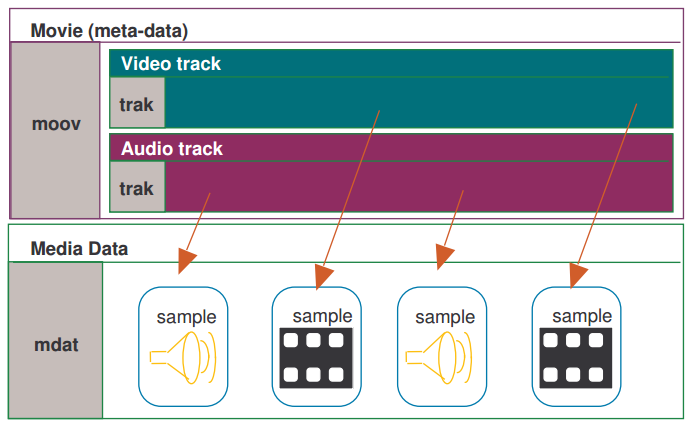
1. Movie Box (moov): The movie box contains essential information about the overall structure of the MP4 file, including metadata, track information, and media data locations. It serves as the root container for all other atoms in the file.

2. Track Box (trak): The track box represents individual media tracks within the MP4 file, such as video, audio, or subtitles. It contains information about the media type, codec, track duration, and other track-specific metadata.

3. Media Box (mdia): The media box holds information related to the media data within a track. It contains media headers, sample descriptions, and other media-specific metadata.

4. Sample Table Box (stbl): The sample table box stores the actual media samples, such as video frames or audio samples, along with their associated timing and synchronization information. It includes sub-boxes like Sample Description Box (stsd), Time-to-Sample Box (stts), Sample Size Box (stsz), and Sample-to-Chunk Box (stsc).

5. Metadata Box (meta): The metadata box stores additional metadata associated with the MP4 file, such as title, artist, album, or copyright information. It can also include custom metadata tags and XML-based metadata containers.

Working with MP4 atom structure for multimedia applications

Understanding the MP4 atom structure is essential for developers and multimedia professionals working with MP4 files. It enables efficient handling, parsing, and manipulation of multimedia content. Here are some considerations when working with the MP4 atom structure:

1. Extracting media data: By navigating the atom structure, developers can locate and extract specific media data, such as video frames or audio samples, from an MP4 file. This allows for tasks like transcoding, editing, or repurposing media content.

2. Adding or modifying metadata: The atom structure provides a framework for adding or modifying metadata associated with an MP4 file. Developers can leverage specific atom types, such as the metadata box, to embed relevant metadata information, enhancing the discoverability and organization of the media content.

3. Ensuring compatibility: Adhering to the predefined MP4 atom structure ensures compatibility and interoperability across different devices and software applications. This is crucial for seamless playback and exchange of MP4 files across platforms.

4. Handling different atom types: Each atom type within the MP4 atom structure has specific properties and purposes. Understanding the functionalities of different atom types allows developers to handle them appropriately, ensuring the correct interpretation and manipulation of media data.

Final Words

The MP4 atom structure forms the backbone of the MP4 file format, providing a well-defined framework for organizing and representing multimedia content. By understanding the purpose and anatomy of atoms within an MP4 file, developers and multimedia professionals can efficiently work with MP4 files, extract specific media data, add or modify metadata, and ensure compatibility across different platforms.

Keywords (LSI): multimedia content, media samples, track metadata, hierarchical structure, media data locations, interoperability, naming convention, media tracks, media headers, sample descriptions, metadata tags, XML-based metadata containers, parsing, transcoding, discoverability, exchange, playback.



Free Download Mp4Gain
picture


Mp4Gain Main Window
picture


Mp4Gain Features
picture


Free Download Mp4Gain
picture

MP4 Noise Reduction

MP4 Noise Reduction: Techniques for Improving Audio Quality

MP4 Noise Reduction
MP4 Noise Reduction
MP4 Noise Reduction
MP4 Noise Reduction

MP4 Noise Reduction: Why It’s Important

As someone who frequently works with audio files, I understand the importance of having high-quality audio. MP4 files are a popular format for audio and video files, but they often come with unwanted background noise. This can be distracting and take away from the overall quality of the audio. However, there are several techniques for reducing noise in MP4 files.
One of the most effective techniques for MP4 noise reduction is using noise reduction software. This software works by analyzing the audio and identifying the background noise. It then removes that noise, leaving you with clean and clear audio. One popular software for this purpose is MP4Gain. It’s a powerful tool that not only reduces noise but also normalizes the audio and improves the overall quality.

Another technique for MP4 noise reduction is using an equalizer. This allows you to adjust the levels of different frequencies in the audio, which can help to minimize the background noise. By boosting the frequencies that are important for the audio and cutting back on those that aren’t, you can achieve a cleaner sound.

As someone who has struggled with noisy MP4 files in the past, I highly recommend exploring these techniques for reducing noise. They can make a huge difference in the overall quality of your audio.

Improving MP4 Audio Quality: Techniques and Tips

In addition to reducing noise, there are several techniques and tips for improving the overall audio quality of MP4 files. One of the simplest tips is to make sure that you’re using high-quality audio equipment. This includes a good microphone and headphones or speakers. Investing in high-quality equipment can make a huge difference in the clarity and richness of your audio.

Another technique for improving MP4 audio quality is using compression. This can help to balance out the levels of the audio and make it sound more consistent. However, it’s important to use compression sparingly and not overdo it, as this can result in a loss of dynamics and make the audio sound flat.

Finally, it’s important to take the time to properly mix and master your audio. This involves adjusting the levels of different tracks and adding effects and processing to enhance the sound. It can be a time-consuming process, but the end result is worth it.

MP4 Audio Enhancement: Final Words

In conclusion, MP4 noise reduction and audio enhancement are important techniques for anyone working with audio files. Whether you’re a musician, podcaster, or video editor, having clean and clear audio is essential for producing high-quality content. By using noise reduction software, an equalizer, and other techniques, you can achieve a professional sound that will impress your listeners and viewers. And if you’re looking for a powerful tool for MP4 audio enhancement, I highly recommend checking out MP4Gain.

MP4 Quality Optimization

MP4 Quality Optimization

MP4 Quality Optimization

Do you want to increase the quality of your MP4 files? MP4 quality optimization is an excellent solution to ensure that your files look and sound their best. There are several techniques and tools that you can use to improve the quality of your MP4 files.

MP4 Quality Optimization

MP4 Quality Optimization Technologies

There are some useful technologies that you can use to optimize the quality of your MP4 files. These include:

  • Re-encoding: Re-encoding is a great way to improve the quality of your MP4 files without increasing their size. This is achieved by re-encoding the files using a high-quality codec.
  • Compression: Compression is an effective way to reduce the size of MP4 files without affecting quality. This is achieved by compressing the MP4 file using advanced compression algorithms.
  • Conversion: Conversion is an effective way to improve the quality of MP4 files. This is accomplished by converting the file from MP4 to a higher quality file format.
  • Resolution: Resolution is a way to improve the quality of MP4 files. This is accomplished by changing the resolution of the MP4 file to a higher resolution.

Tools to Optimize MP4 Quality

There are some useful tools that you can use to optimize the quality of your MP4 files. These include:

  • File Converters: File converters are useful tools for converting files from MP4 to higher quality file formats. This will help you improve the quality of your MP4 files.
  • File editors: File editors are useful tools for cropping, rotating and adjusting MP4 files. This will help you improve the quality of your MP4 files.
  • File Compressors: File compressors are useful tools for compressing MP4 files. This will help you reduce the size of your MP4 files without affecting the quality.
  • File Recoders: File recoders are useful tools for recoding MP4 files. This will help you improve the quality of your MP4 files without increasing their size.

Conclusions

MP4 quality optimization is a useful process to ensure that your files look and sound their best. There are several technologies and tools that you can use to improve the quality of your MP4 files. If you want to get the best results, it is important that you become familiar with these technologies and tools to ensure that you maximize the quality of your MP4 files. Mp4Gain is the right software for it.