Digital Audio Quality

Digital Audio Quality

Digital Audio Quality

Data rate refers to the data flow used by a video file in a unit of time, also called bit rate or bit stream rate.

Digital Audio Quality

The popular interpretation is the sampling rate, which is the most important part of image quality control in video encoding. Generally, the units we use are kb/s or Mb/s. Generally speaking, at the same resolution, the higher the code stream of the video file, the lower the compression ratio and the higher the image quality. The higher the code stream, the higher the sampling rate per unit time, the higher the data stream, the higher the accuracy, the closer the processed file is to the original file, the better the image quality, the clearer the image quality and the higher the decoding capability of the playback device is required.

Of course, the larger the code stream, the larger the file size. The calculation formula is file size = time X code rate/8. For example, a 720P RMVB file with a 1 Mbps stream of 90 minutes is common on the Internet and its volume is = 5400 seconds × 1 Mb/8 = 675 MB.

Generally speaking, a video file includes images and sounds, just like an RMVB video file, which contains video information and audio information. Audio and video have their own sampling methods and different bit rates, that is, the same video Audio and video file bit rate is not the same. And what we’re talking about is the bitrate of a video file, which generally refers to the sum of the bitrate of the audio and video information in the video file.

Taking the most popular and familiar RMVB video file in China as an example, VB in RMVB refers to VBR, which is short for Variable Bit Rate. The Chinese meaning is variable bit rate, which means that RMVB adopts dynamic encoding. In this way, a higher sample rate is used for complex dynamic images (singing and dancing, flying cars, wars, actions, etc.), while a lower sample rate is used for static images, and the resources are use rationally to achieve image quality and volume .Effect.

The most fundamental difference between code rate and sample rate is that the code rate is for the source file.


2. Sampling rate

Sample rate (also called sample rate or sample rate) defines the number of samples per second taken from a continuous signal to form a discrete signal, and is expressed in hertz (Hz). Sampling rate refers to the sampling frequency when converting an analog signal to a digital signal, i.e. how many points are sampled per unit of time. How many bits are in the data for a sample point? Bit rate refers to the number of bits (bits) transmitted per second. The unit is bps (bit per second). The higher the bitrate, the more data transmitted and the better the sound quality. Bit rate = sample rate x number of bits used x number of channels.

The sample rate is similar to the number of frames of moving images. For example, the sampling rate of movies is 24 Hz, the sampling rate of PAL format is 25 Hz, and the sampling rate of NTSC format is 30 Hz. When we play back the still images sampled at the same rate as the sampling frequency, we see a continuous image. In the same way, when a CD recorded at a sampling rate of 44.1 kHz is played back at the same rate, a continuous sound can be heard. Obviously, the higher the sample rate, the more coherent the sound will be heard and the picture will be seen. Of course, the sampling rate that human auditory and visual organs can distinguish is limited, which is basically higher than sound sampled at 44.1 kHz, and most people haven’t noticed the difference.

The number of digits in the sound is equivalent to the number of colors on the screen, indicating the amount of data per sample. Of course, the larger the amount of data, the more accurate the playback sound, so as not to confuse the sound. of the teapot with the train whistle. In the same way, it is more clear and precise for the image, so as not to confuse blood and ketchup. However, limited by the function of human organs, 16-bit sound and 24-bit image are basically the limits of ordinary humans, and the highest digits can only be distinguished by instruments.

Detailed Music Format Part 2

Detailed Music Format Part 2

Music Format
Music Format

Music CD

Music Format
Music Format


That is, CD records. A CD can play sound files of approximately 74 minutes. The Windows system comes with a CD player. Also, the software that comes with most sound cards provides CD playback functionality, and even some CD-ROM drives are offline. from computer Can be used as a stand-alone CD player when powered on.

WMA with unlimited potential

In developing its own network media service platform, Microsoft primarily promotes ASF (Audio Streaming Format), which is an open standard that supports data transmission over various networks and protocols. It supports audio, video, and a variety of other types of multimedia. And WMA is short for Windows Media Audio, which is equivalent to an ASF file that contains only audio.
The compression ratio of WMA files can be as high as 1:18 in 80kbps 44kHz mode, which is basically the same as VQF. And the compression speed is doubled compared to MP3. So it should be more competitive than VQF.

Vorbis free music format

To avoid rising royalties charged by MP3 music companies, programmers at GMGI’s iCast company developed a new free music format, Vorbis, that rivals or even exceeds MP3 in sound quality. And it will be released over the internet and can be downloaded for free without worrying about infringement issues. But MP3 has become very popular on the Internet, and Microsoft’s Windows Media technology has also started to spread, and Vorbis’s outlook is still not optimistic.

Other audio formats

AIF/AIFF: A sound file format developed by Apple, supported by the MAC platform, and supports 16-bit stereo at 44.1 kHz.
AU: SUN’s AU Compressed Sound File Format, which only supports 8-bit sound, is a commonly used sound file format on the Internet, mainly created by SUN workstations.
CDA: CD audio track file.
CMF: A MIDI-like sound file developed by CREATIVE.
DSP: Abbreviation for digital signal processing. By improving the signal processing method, sound quality will be greatly improved and songs will be more pleasing to the ear.
S3U: MP3 playback file list
RMI: MIDI Instrument Sequence

Lossy compression:

AAC – Sound quality is second only to MPC at high bit rates and looks good at both high and low bit rates. The encoding speed is too slow!
MPC: Performance is average at low bitrate, not as good as MP3 and OGG encoded by Mp3Pro, sound quality is best at high bitrate, and encoding speed is
fast.OGG: The sound quality is better at a low bitrate, and the same is true at a high bitrate. Encoding is slightly slower.
MP3 (MP3Pro): Sound quality is lower than OGG at low bit rate and other aspects are the same as MP3
WMA: High and low bit rates are average, VBR is not supported and the highest is 192Kbit/s

lossless compression:

FLAC – Worst compression ratio of the four, decent encoding speed, good platform support.
PAC: Slightly slower encoding speed, third in compression ratio, good platform support.
APE: The fastest encoding speed, the best compression rate, and the platform is generally supported.
WV: The encoding speed is very fast, the compression rate is second among the four types, and it is only supported by the Windows platform.

Detailed music format

Detailed music format

Audio File Formats
Audio File Formats

classic wave

Audio File Formats
Audio File Formats

As the most classic Windows media audio format, the WAVE file is widely used, which uses three parameters to represent sound: the number of sampled bits, the sample rate, and the number of channels.
The channels are divided into mono and stereo, and the sample rates are generally 11025 Hz (11 kHz), 22050 Hz (22 kHz), and 44100 Hz (44 kHz). The capacity occupied by the WAVE file = (sampling frequency × sampling bits × channel) × time/8 (1 byte = 8 bits).

traditional mod

MOD is a wavetable-like music format, but its structure is similar to MIDI, it uses real samples, and the volume is small. In the earlier DOS era, MOD was often used as background music for games. Modern mods can contain many audio tracks in many formats, such as S3M, NST, 669, MTM, XM, IT, XT, and RT.

midi music computer

MIDI is short for Musical Instrument Data Interface. Records the sound played by the instrument digitally (each note is recorded as a number), and then synthesizes these records via FM or wavetable during playback: FM synthesis is the sound of the instrument is simulated by mixing the multi-frequency sounds; wavetable synthesis consists of storing the sound samples of the instrument in the wavetable of the sound card and extracting the sound from the wavetable as you play.

Boss Boss MP3

It can be said that MP3 is famous, it uses MPEG Audio Layer 3 technology to compress the sound with a compression ratio of 1:10 or even 1:12, with a sampling rate of 44kHz and a bit rate of 112kbit/s. .
MP3 music is music stored in digital form. If you want to play it, you must have a corresponding digital playback and decoding system. Generally, MP3 digital music is decoded by special software and then restored to a waveform sound signal for playback output. This type of software is called For MP3 players, such as Winamp, etc.

Overlord RA series online

RA, RAM, and RM are Real’s mature network audio formats, using “streaming audio” technology, making them well suited for network streaming. Information such as copyright, singer, producer, mail and song title can be added during production.
RA can be called the supreme lord of multimedia communication on the Internet. It is suitable for streaming on the Internet and is currently the best format for listening to online music online.

VQF with high compression ratio

VQF or TwinVQ is an audio compression technology developed by Nippon Telegraph and Telephone and Yamaha Corporation.
The audio compression rate of VQF is almost twice that of standard MPEG audio and can reach approximately 1:18 or even higher. And popular compression formats like MP3 and RA are usually only around 1:12. But it still won’t affect the sound quality, when VQF compress music at 44kHz-80kbit/s audio sampling rate, its sound quality will be better than 44kHz-128kbit/s MP3, when compress at 44kHz-96kbit/s , the music is close to 44kHz-256kbit/s MP3.

MD minidisc

MD (ie MiniDisc) is a comprehensive portable music format released by SONY in 1992. The compression algorithm it uses is ATRAC technology (the compression ratio is 1:5). MD is divided into Recordable MD (Recordable, with two heads of magnetic head and laser head) and Single Play MD (Prerecorded, only laser head).
The powerful editing function is the strong point of MD. You can quickly select tracks, move tracks, merge, split, delete and edit track titles. It is more personalized than CD and you can have your own MD album at any time. MD products include MD Walkman, MD bedside audio, MD car audio, MD recording deck, MD camera gun and MD driver, etc.

What is free lossless audio codec (flac)?

What is free lossless audio codec (flac)?

FLAC

Definition – What does Free Lossless Audio Codec (FLAC) mean?
Techopedia explains the Free Lossless Audio Codec (FLAC)

FLAC

Definition – What does Free Lossless Audio Codec (FLAC) mean?
Free Lossless Audio Codec (FLAC) is an open source codec used to compress audio data without loss of audio quality. Similar to MP3 audio format, it is specially designed for audio and supports album art and audio tags, and is suitable for listening, archiving and recording.
Techopedia explains the Free Lossless Audio Codec (FLAC)
Many hardware devices support free lossless audio codecs. Completely lossless because the audio data is encoded losslessly and the decoded data is the same as the encoder input. The format uses MD5-based signatures to ensure the integrity of the audio data. Free lossless audio codec supports fast and accurate sampling. This makes the format and playback options suitable for editing applications. The metadata format is flexible and supports various lookup tables, covers, and labels. The FLAC format is suitable for archiving and is also excellent for archiving to CDs. The framing technique used in FLAC ensures that the format is error resistant.

There are many advantages to using the FLAC format. Since it is open source, no license is required. It has strong hardware support and is portable across many platforms and systems. It supports streaming and decoding is fast regardless of the compression ratio. Another benefit of using this format is the ability to partially restore damaged files.

However, the compression rates used in this format are less efficient compared to other encoders.

What makes an audio format lossless?

What makes an audio format lossless?

Lossless Audio

The best audio formats for your music library

Apple Music lossless

You might think of the word “lossless” as being used for audio formats that don’t use any kind of compression. However, even lossless audio formats use compression to reduce file sizes to reasonable levels.

Lossless formats use compression algorithms to save audio data so that the audio is exactly the same as the original source. This contrasts sharply with lossy audio formats like AAC, MP3, and WMA, which use algorithms that discard data to compress the audio. Audio files consist of sounds and silences. Lossless formats can compress silence to almost zero space while preserving all sound data, making them smaller than uncompressed files.

What lossless format is commonly used for digital music?
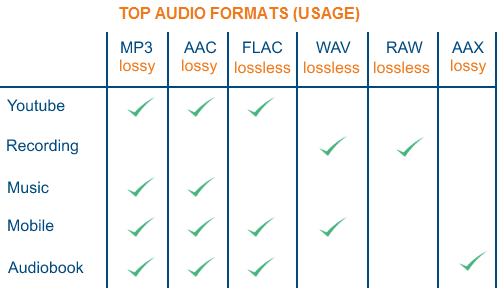
Popular lossless formats for storing music include:

FLAC
WAV
A THE C
lossless WMA
The effect of lossless formats on music quality
If you are downloading lossless music tracks from an HD music service, you would expect the sound quality to be really high. On the other hand, if you digitize a low-quality music box using a lossless audio format, the audio quality will not improve.

Is it possible to convert lossy songs to lossless?
Going from lossy to lossless is never a good idea. This is because a song that has been compressed using a lossy format always does. If you convert it to a lossless format, all you do is waste storage space on your hard drive or mobile device. There is no way to improve the quality of lossy songs using this method.

Advantages of using lossless audio formats for your music library
Using a lossy format like MP3 is still the most common method people use to store their music collection. However, there are clear advantages when it comes to building a lossless music library.

Perfect Music CD Backup: Lossless Copy to Audio Files gives you an exact bit-level copy of the original music CD. This means that no matter what audio format comes out in the future, you’ll know you have a perfect copy of the original.
Recover from lost or damaged: After playing music in lossless format, you can recover a damaged original CD or any CD that has been lost to a blank CD.
Convert to any format: Since your music is in a lossless format, you can convert it to any format and achieve the highest quality the format supports.
Disadvantages of Storing Music in a Lossless Format
Incompatible – Unlike formats like MP3, hardware devices like smartphones and tablets do not support lossless formats.
Requires more storage space: Lossless audio files generally require more storage space than lossy encoded files.

What equipment do you need to enjoy lossless audio? Part 2

What equipment do you need to enjoy lossless audio? Part 2

Apple Music Lossless Audio

digital to analog converter

Apple Lossless

Sound is an analog signal. Vibrations from objects generate it and air molecules spread it, so we can hear it. For this reason, there is no sound in space because there is no air to transmit it.

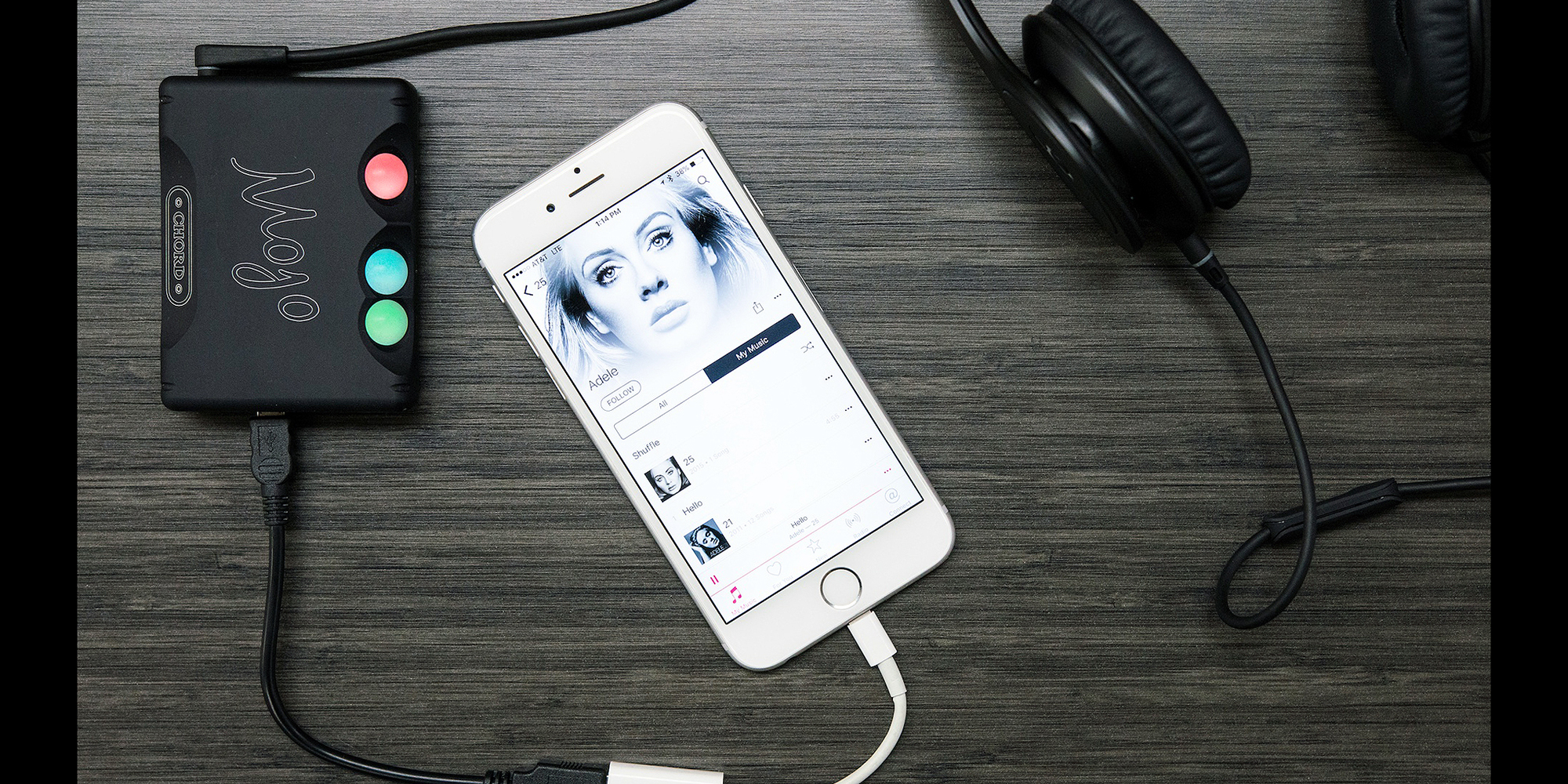
This is why you need a dedicated digital-to-analog converter (DAC). These devices are designed to convert digital signals to analog signals. While computers, smartphones, and other devices have built-in DACs, they’re often not optimized for music.

Also, analog signals are susceptible to interference. The DAC inside the device may receive interference from other components, such as the computer’s power supply or the smartphone’s 5G antenna. If you find that your audio output is too low, you definitely need a DAC with an integrated amplifier.

2.4 GHz wireless or wired speakers, headphones or earphones

If you want to take full advantage of lossless files, you need earphones or headphones capable of outputting high-fidelity audio. Unfortunately, even the best Bluetooth headphones cannot transmit uncompressed sound data.

While recent Bluetooth technology can transmit high-resolution sound, it’s still not enough for lossless audio. If you want to listen wirelessly, you must use a 2.4 GHz USB wireless connection. This is the only wireless audio technology that offers lossless transmission. Some alternatives, like Sony’s LDAC or Qualcomm’s aptX HD, come close, but it’s not “true lossless” audio.

However, if you need high-quality audio, it’s best to stick with the wired audio output. Since wired headphones are physically connected to your DAC, they receive analog audio signals directly. So your music will no longer go through conversion, compression or any other process. This ensures that you can enjoy the audio output of the DAC as it is.

High fidelity audio output

Of course, the most critical part of any listening experience is the speakers or headphones. Whether you’re playing lossy or lossless audio, if your audio equipment isn’t up to the task, you won’t be able to enjoy your music.

You need to look at various audio specifications, such as driver type, impedance, etc., to understand what makes a good speaker or headphone. Still, having impressive specs on paper doesn’t equate to great sound quality.

The only way to find the best speakers or headphones for your ears is to try them out in real life. You can also trust product reviews and comparisons from trusted sites; this way you can see other options that you haven’t considered before.

But if you have the budget, you can go ahead and invest in Bang & Olufsen. and Harman International. These speaker and headphone brands cost more than their competitors. But it is almost guaranteed that you will get the best audio quality from them.

The products of such companies are made of high-quality materials. They also have R&D facilities to ensure their speakers, headphones and earphones deliver the best sound quality possible.

What equipment do you need to enjoy lossless audio?

What equipment do you need to enjoy lossless audio?

Lossless

If you like high-fidelity audio, you’ve probably heard of lossless audio. You have probably read some articles about it and now you want to enjoy it for yourself.

Apple Music Lossless

But what hardware do you need to access high-quality audio? Can you use an existing device or do you need specialized drivers? Here’s a quick introduction to the hardware you need to enjoy lossless audio.

What is lossless audio?

Lossless recordings take up a lot of space: about 30 MB per song. But in the past, storage space was at a premium. The internet connection is also slow and unreliable. Therefore, the first iPod’s 5GB of storage could only hold about 166 lossless audio files.

That is why lossy file formats like MP3 were introduced. About 3-5 MB per song, you can store more than a thousand songs on the first generation Apple iPod. But as the Internet has gotten faster and storage space has become more affordable, the need for highly compressed audio has diminished.

File compression reduces file size by sacrificing quality. So if you’re listening to music with lossless audio, that means you’re listening to what was recorded. Lossless audio uses a compression format that does not cause any data loss or does not compress the audio at all.

Related: What’s the difference between lossless and hi-res audio?

Lossless device for lossless audio
Now that you have a lossless audio file, it’s no good if you plan to play it on an audio device that compresses the data. After all, if data is lost between the computer and the speakers, you won’t be able to enjoy the best audio quality.

So this is what you need to get the best audio out of your lossless music files.

Lossless Audio vs. Hi-Res Audio: What’s the Difference? Part 4

Lossless Audio vs. Hi-Res Audio: What’s the Difference? Part 4

Apple Music

Difference Between Lossless and Hi-Res Audio
As we explained earlier, lossless audio is an audio sample without any downstream compression on top of it. Such samples are in raw form.

Apple Music

So lossless audio does not mean higher quality audio. Any audio, hi-res or not, can be lossless.

Hi-Res Audio, on the other hand, is better quality audio with higher bit depth and high sample rate. High-Resolution Audio can be lossless or lossy.

Hi-Res Audio Format

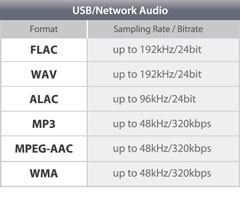
With the rise of Hi-Res Audio, streaming services have started to introduce some proprietary audio formats. Some of the more popular formats include FLAC, AIFF, WAV, and ALAC. All of these formats support High-Resolution Audio with lossy or lossless compression.

For example, Apple uses ALAC for high resolution streaming on Apple Music. ALAC is a lossless format, which means that its compression does not degrade sound quality. It is also very space efficient. Compared to WAV without applying compression, ALAC takes up half the storage space.

Related: The Most Common Audio Formats: Which One Should You Use?

Like Apple, Tidal uses its own audio format, MQA. MQA has lossless compression and offers almost the same sound quality and storage space advantages as ALAC.

Audio without loss against high resolution audio: What is the difference? Part 3

Audio without loss against high resolution audio: What is the difference? Part 3

Apple Music lossless

What is the sampling frequency and the depth of bits?

Lossless Audio

Computers are digital machines that handle 1 and 0. Therefore, any information that a computer needs to store, including audio, should be stored as a chain of some and zeros.

On the other hand, the sound is not digital. It is analog and continuous nature. Then, if we want to store the sound in the computer storage unit, we must convert it to 1 and 0.

There are many ways to make this conversion. The simplest is the pulse code modulation (PCM).

The representation of the pulse code modulation is shown below.

In PCM, we take analog audio, reproduce it and sample it at a predetermined speed in the form of some and zeros. This data is then stored in audio format.

To better understand the process, imagine a photo of you playing baseball with the children. If you take 30 photos per second in an hour, you will have enough data to make an hour of video clips of 30 fps.

The same happens when you show an audio signal. It is taking a pictorial snapshot of the audio signal at an established speed. Codify all those snapshots and you will have an audio file.

To play an audio file, your computer only needs to play the snapshot at the same speed that was captured. This frequency is called sampling frequency.

We measure the sampling frequency in KHz. The standard sampling frequency for audio CDs is 44.1 kHz.

Now, since any audio consists of multiple sounds of different frequencies, we need to store multiple 1 or 0 to store all the necessary information. Therefore, we must strive to obtain the largest possible sample size, because the greater the sample, the better the sound quality will be.

The sample size, which is the number of bits in each sample, is called depth of bits. The depth of standard bits on the audio CDs is 16 bits.

High resolution audio

In spite of all the uproar over high resolution audio music transmission services, surprisingly there is no standard definition. There is no consensus on what is high resolution audio.

That said, the consensus is that the audio samples with high sampling and high-depth bits are called high resolution.

As you can see, the previous definitions change constantly. For example, when the 8-bit audio is the standard, 16 bits / 44.1 kHz is high resolution. Nowadays, when 16 bits / 44.1 kHz is the standard, 24 bits / 96 kHz is located in the field of high resolution.

In theory, high resolution audio sounds clearer and better. It has a greater dynamic range, better separation of instruments and low noise level.