MP4 vs AVI Comparison


Free Download Mp4Gain
picture

MP4 vs AVI Comparison


MP4 vs AVI Comparison


Let’s Talk About MP4 and AVI

When it comes to digital video formats, MP4 and AVI are two of the most commonly used options. As a specialist with extensive experience in the field, I’m here to help you understand the differences between these formats and guide you through choosing the right one for your needs. To do that, let’s first discuss the basics.

MP4: The Universal Choice

MP4 vs AVI Comparison

MP4, short for MPEG-4 Part 14, is like the Swiss Army knife of video formats. It’s highly versatile and compatible with almost all devices and media players. MP4 uses the H.264 video codec, which efficiently compresses video while maintaining good quality. Think of it like a high-quality backpack that fits all your essentials.

AVI: The Old Reliable

AVI, which stands for Audio Video Interleave, has been around for a while. It uses various video codecs, and its quality largely depends on the specific codec used during encoding. While it might not be as universally compatible as MP4, it’s known for its reliability. Think of AVI as that trusted, old-school suitcase you’ve had for years.

Quality and Compression

Now, let’s delve deeper into the quality and compression aspects of MP4 and AVI.

MP4’s use of the H.264 codec strikes a perfect balance between video quality and compression. It efficiently reduces file size while preserving sharp images and smooth playback. It’s like packing a suitcase efficiently, making sure everything fits without wrinkles.

On the other hand, AVI’s quality depends on the codec used during encoding. If you opt for a codec like DivX or XviD, you can get excellent video quality. However, this might result in larger file sizes. It’s akin to choosing a suitcase with lots of space, but it might be heavier and less convenient to carry.

Compatibility

One of the key considerations when choosing a video format is compatibility. You don’t want your video to be like a foreign-language book in a library no one can read.

MP4 is the winner in this department. It’s widely supported on all modern devices, including smartphones, tablets, and gaming consoles. Most video streaming platforms prefer MP4 due to its efficient streaming capabilities. It’s like having a book that everyone can read without any translation.

AVI, on the other hand, has more limited compatibility. While it’s supported on Windows-based systems, it might not play smoothly on other platforms or devices. It’s like having a book that’s only available in one specific library.

File Size

File size matters, especially if you’re short on storage or bandwidth. Let’s look at how MP4 and AVI compare in this aspect.

MP4’s efficient compression makes it ideal for online streaming and sharing. It’s like having a compact e-book that’s easy to send via email or upload to the cloud without taking up too much space.

AVI, on the other hand, tends to produce larger file sizes, especially if you use high-quality codecs. It’s like carrying a hefty hardcover book that takes up more shelf space and requires more effort to transport.

Editing and Post-Production

If you’re into video editing and post-production, the format you choose can greatly impact your workflow.

MP4 is a popular choice among video editors because of its wide support in editing software. It’s like working with a versatile set of tools that make editing a breeze.

AVI, while not as universally supported, can still be edited using various software. However, you might need to convert it to a more editing-friendly format, which can be a bit like translating a book before you can read it.

Let’s Talk about Audio

We’ve focused on video, but what about the audio component? Both MP4 and AVI support various audio codecs, but MP4 often offers more flexibility and better audio quality. It’s like enjoying a movie with surround sound in a high-end theater.

The Future of Video Formats

As technology evolves, new video formats continue to emerge. HEVC (High-Efficiency Video Coding) is one such format that offers even better compression and quality than H.264. It’s like getting a futuristic backpack that’s not only compact but also incredibly lightweight.

Conclusion: The Choice Is Yours

In the battle of MP4 vs. AVI, it’s clear that MP4 has the upper hand when it comes to compatibility and efficient compression. However, AVI still has its place for those who prioritize quality and are working within a Windows environment. The choice ultimately depends on your specific needs and preferences.

Now, you might be wondering, how can you ensure that your video files are in the right format? Well, here’s where I’d like to mention Mp4Gain. It’s an appropriate solution for adjusting the quality and compression of your video and audio files to meet your requirements. It’s like having a trusty tool in your video editing arsenal.

Latest Words on MP4 and AVI

In the ever-evolving world of digital media, choosing the right video format is crucial. MP4 and AVI are both valuable options, but understanding their differences and applications can make your multimedia journey smoother. Remember, it’s not just about the format; it’s about what suits your needs best.

Now, let’s hear what others have to say about their experiences with these video formats and share some expert insights and opinions.

Comments:

Comment 1: Hey, great article! I’ve always wondered about the differences between MP4 and AVI. This really helped me make an informed choice for my video projects.

Comment 2: I agree with the article, MP4 is so versatile. It’s like having a multitool for all your video needs!

Comment 3: This is a good start, but I wish there was more detailed information about video codecs and how they affect quality. Could you expand on that?

Comment 4: MP4 is my go-to choice for video sharing on social media. It’s like having a format that speaks the language of the internet.

Comment 5: AVI might be old, but it’s still relevant for me as a Windows user. I find it dependable like my old leather-bound journals.

Comment 6: Can you talk more about the future of video formats? I’m curious about what’s coming next in the world of video compression.

Comment 7: MP4Gain is a neat tool! It’s like having a magic wand for adjusting audio in my videos. Thanks for the tip!

Comment 8: I’d love to hear more about the technical side of video formats. This article is informative, but I crave deeper insights into the nitty-gritty details.

Comment 9: As a Mac user, I lean towards MP4. It’s like the Mac of video formats – sleek, user-friendly, and reliable.

Comment 10: Thanks for simplifying the MP4 vs. AVI debate. This article feels like a friendly chat about digital video formats. Kudos!

Comment 11: I’ve had some issues with AVI files on my non-Windows devices. Could you recommend a reliable converter for AVI to MP4?

Comment 12: This article is like a good conversation over a cup of coffee. It made understanding video formats much easier for a non-techie like me.

Comment 13: Could you provide some tips on optimizing video quality while keeping file sizes small? That would be a game-changer!

Comment 14: I’m curious about the impact of different video formats on streaming quality. Can you shed some light on that?


Free Download Mp4Gain
picture


Mp4Gain Main Window
picture


Mp4Gain Features
picture


Free Download Mp4Gain
picture

What is Motion Estimation in Video Compression?

What is Motion Estimation in Video Compression?

Motion Estimation in Video


Motion Estimation and Compensation

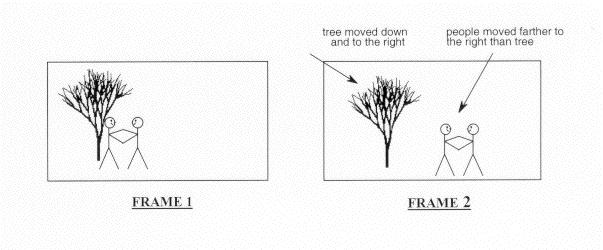
Motion estimation and compensation are fundamental techniques used in video compression. Motion estimation refers to the process of analyzing consecutive video frames to identify the motion vectors between them. Motion compensation, on the other hand, involves using these motion vectors to predict the pixel values of the current frame based on the previous frame. By utilizing motion estimation and compensation, video compression algorithms can efficiently remove temporal redundancies, resulting in smaller file sizes without significant quality loss.
I first encountered the concept of motion estimation during my undergraduate studies in computer science. We were tasked with implementing a simple video compression algorithm, and I quickly learned that motion estimation was a crucial component. As I delved deeper into the topic, I came across the book “Video Coding for Mobile Communications: Efficiency, Complexity, and Resilience” by K.R. Rao et al., which provided a comprehensive overview of motion estimation algorithms and their applications.

Motion Estimation Algorithms

There are several motion estimation algorithms used in video compression, each with its strengths and weaknesses. One of the most popular methods is block matching, which divides the frame into small blocks and compares them with corresponding blocks in the previous frame to find the best match. Another commonly used technique is optical flow, which estimates the motion vectors by analyzing the brightness patterns between frames.
In my experience with video compression software, I have found that the choice of motion estimation algorithm can significantly impact the compression efficiency and visual quality of the output. For example, block matching algorithms tend to perform well on videos with simple, uniform motion, while optical flow methods excel in more complex scenes with dynamic motion.

Video Coding Standards

Video compression standards are crucial for ensuring interoperability and compatibility between different devices and software. Some of the most widely used standards include H.264/AVC, HEVC, and MPEG-4. These standards define the encoding process, including the motion estimation and compensation techniques used, and specify the parameters required for decoding.
As someone who has worked extensively with video coding standards, I can attest to the importance of following these guidelines to ensure compatibility and optimal performance. However, it is worth noting that some proprietary codecs, such as Apple’s ProRes and Google’s VP9, may offer superior performance in certain scenarios.

In conclusion, motion estimation is a critical component of video compression, allowing for efficient removal of temporal redundancies. By utilizing motion estimation and compensation techniques, video compression algorithms can significantly reduce file sizes without compromising quality. As I have learned through my experiences with video compression, the choice of motion estimation algorithm and adherence to video coding standards are crucial factors in achieving optimal compression efficiency and visual quality.

video compression, motion estimation, motion compensation, block matching, optical flow, video coding standards, H.264/AVC, HEVC, MPEG-4, video coding research, video compression techniques, video compression software, video quality, compression efficiency, temporal redundancies, compatibility, proprietary codecs, ProRes, VP9, K.R. Rao, video coding for mobile communications, file size reduction, video frames, motion vectors, pixel values, previous frame, brightness patterns.

Video Codecs: H.264, H.265, and VP9

The Importance of Choosing the Right Video Codec


H.264, H.265, and VP9

Video Codecs: H.264, H.265, and VP9

As the world becomes increasingly digitized, the importance of video codecs in our lives cannot be overstated. Video codecs are essential in video compression, encoding, streaming, and playback. Choosing the right codec can make the difference between smooth playback and frustrating buffering, between crisp and clear images and pixelated messes. In this article, we will explore the differences between three of the most popular video codecs in use today: H.264, H.265, and VP9.

H.264 vs H.265: What’s the Difference?

H.264, also known as AVC (Advanced Video Coding), has been the dominant codec in use for the past decade. It is widely supported by devices and software and offers good compression while maintaining high video quality. However, H.265 (HEVC) is slowly taking over. It is a newer and more advanced codec that offers better compression ratios, which means smaller file sizes with the same quality as H.264. H.265 is also better at handling high-resolution videos, making it a good choice for 4K and 8K videos. However, it requires more processing power to decode, which may be an issue on older devices.

Personally, I have found that H.265 delivers noticeably better quality than H.264 for the same file size. It is especially noticeable in high-motion scenes like action movies or sports. However, it does require more processing power, so make sure your device can handle it before choosing it as your preferred codec.

VP9: The New Kid on the Block

VP9 is a newer codec developed by Google and is designed to be a royalty-free alternative to H.265. It offers better compression than H.264 while maintaining the same video quality. It is also highly efficient at handling high-resolution videos, making it a good choice for 4K and 8K videos. However, its adoption has been slow due to its lack of support in many devices and software. It also requires more processing power to decode than H.264.

One of my personal experiences with VP9 was when I was trying to stream a 4K video on my laptop. I noticed that the video was buffering a lot and the quality was not as good as I expected. After some research, I found out that the video was encoded with VP9, which my laptop did not support. I had to switch to H.264 to get smooth playback.

Conclusion: Choosing the Right Video Codec

Choosing the right video codec is crucial for ensuring smooth video playback and high video quality. H.264 is still a solid choice for most situations, but H.265 and VP9 offer better compression and handling of high-resolution videos. However, they require more processing power and may not be supported by all devices and software. Make sure to choose the codec that best suits your needs and device capabilities.

In conclusion, video codecs are an essential part of our digital lives, and choosing the right one can make all the difference in our video-watching experience. Always keep in mind the pros and cons of each codec and make an informed decision based on your needs.

HEVC: what is it

HEVC: what is it

HEVC

Since last year, users have regularly come across a new video format called HEVC. In this article, we will tell you what HEVC format is, why it is better than old video encoding formats than watching HEVC files, and also how to go back to old formats if you have an iPhone.

HEVC

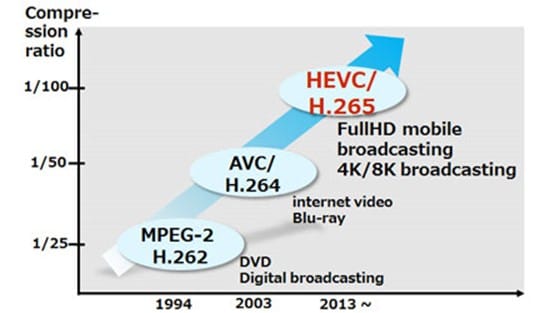
HEVC Logo The abbreviation HEVC stands for High Efficiency Video Coding, which can be translated into Russian as High Efficiency Video Coding. It is a format designed to compress video up to 8K (UHDTV, 8192 × 4320 pixels). Another name for the format is H.265, so HEVC and H.265 are one and the same.

HEVC was designed to replace the outdated H.264 / MPEG-4 AVC format. Work on the new standard began in 2004, when the Video Coding Experts Group (VCEG) began looking for new technologies that could form the basis for the new standard. This project was later given the temporary names H.265 and H.NGVC (Next Generation Video Coding). The main requirements for the standard being developed are: reducing the video bit rate, maintaining current image quality, and maintaining current computing power requirements.

development of video encoding formats

Development has continued since 2012, when this format was officially approved. But, after the launch, the format did not receive much popularity, it was used in IP cameras, television broadcasts and other specialized areas. The HEVC format became known to common users in late 2017, when iOS 11 was released.

Why HEVC is better than older formats
With the launch of the macOS High Sierra and iOS 11 operating systems, Apple began actively implementing new formats for videos and photos. So for photos the HEIF format is now used, which we already talked about, and for videos, the HEVC format.

The transition to the HEVC format occurred for two reasons. First, this format provides a higher quality image. And second, this type of video takes up less memory space and requires less network bandwidth when streaming over the Internet. Simply put, HEVC video provides a significant improvement in image quality while maintaining the same file size and bit rate. According to Apple, using the HEVC format can save up to 40 percent of memory.

Several new approaches have been taken to achieve this improvement in video compression. One of these approaches is the increased block size into which the encoded file is divided. When encoding video in H.264 format, said block is 16 by 16 pixels (256 in total), while when using HEVC, said block can be 64 by 64 pixels (4096 in total). This block enlargement shows particularly good results on high-resolution videos, which is very useful, because the HEVC format supports video up to a resolution of 8192 × 4320 pixels.