mp3 audio format, the most popular


Free Download Mp4Gain
picture

mp3 audio format, the most popular

mp3 audio format
mp3 audio format

With the rapid development of file compression technology, MP3 has become the most popular music format today.

mp3 audio format
mp3 audio format

High-quality music quickly spreads to all parts of the world with the arrangement of 0 and 1, shaking people’s hearts. What is MP3? The full name of MP3 is MPEG Audio Layer 3. It is an efficient computer audio coding scheme. It converts audio files into smaller files with .MP3 extension with a higher compression ratio and basically maintains the sound quality of the file. original. MP3 is part of the ISO/MPEG standard. The ISO/MPEG standard describes audio compression using a high-performance perceptual coding scheme. This standard has been continuously updated to meet the pursuit of “high quality and small quantity”, and now has formed MPEG Layer 1, Layer 2. Layer 3 three audio encoding and decoding schemes. The compression rate of MPEG Layer 3 can reach from 1:10 to 1:12. A 1M MP3 file can be played for 1 minute, while a 1 minute CD-quality WAV file (44100Hz, 16bit, 2ch, 60sec) occupies 10M of space, so Calculated, the time The playback time of a 650M MP3 disc should be more than 10 hours, while the playback time of a CD with the same capacity is about 70 minutes. The advantages of MP3 are unmatched by CD. 2 Analysis of the principle of MP3 2.1 MPEG audio standard MPEG (Moving Picture Experts Group) is a moving picture expert group under ISO, and the MPEG standard formulated by it is widely used in various multimedia. MPEG standards include video and audio standards, among which MPEG-1, MPEG-2, MPEG-2 AAC, and MPEG-4 audio standards have been developed. The MPEG-1 and MPEG-2 standards use the same family of audio codecs: Layer 1, 2 and 3. A new feature of MPEG-2 is the use of low sample rate expansion kits to reduce data traffic , and another feature is the multi-channel expansion kit, which increases the number of main channels to five. Fraunhofer IIS and AT&T released the MPEG-2 AAC (MPEG-2 Advanced Audio Coding) standard in 1997 to significantly reduce data traffic. The MDCT (Modified Discrete Cosine Transform) algorithm adopted by MPEG-2 AAC, The sampling frequency can be between 8 KHz and 96 KHz, and the number of channels can be between 1 and 48. MPEG Audio Layer 1, 2 and 3 use the same filter bank, bitstream structure, and header information, and the sample rate is either 32 KHz, 44.1 KHz, or 48 KHz. Layer 1 is designed for DCC (digital compact cassette) digital compression tape, the data rate is 384 kbps, and layer 2 has made a compromise between complexity and performance, and the data rate has been reduced to 256 kbps- 192kbps. Layer 3 was designed for low data rate from the beginning, and the data rate is 128Kbps-112Kbps. Layer 3 adds MDCT transform, which makes its frequency resolution 18 times higher than that of Layer 2. Layer 3 also uses information averaging similar to MPEG video entropy coding to reduce redundant information. The vast majority of MP3 uses the MPEG-1 standard. 2.2 The purpose of audio compression The MP3 format began in the mid-1980s, and the Fraunhofer Institute in Erlangen, Germany, was committed to high-quality, low-data-rate audio coding. Let’s look at an example: You want to sample a song you like that is about 4 minutes long, store it on a disc, and sample it in CD-quality WAV format at a sample rate of 44.1 kHz, which means receiving 44100 per second. , stereo, each sample data is 16 bits (2 bytes), so the space occupied by this song is: 44100×2 channels x2 bytes x60 seconds x4 minutes=40.4MB If you download this song from the Internet, assume the transmission speed is of 56kbps, the download time is: 40.4x106x8/56x103x60=96 minutes. Even a 1M broadband network takes more than 5 minutes. It can be seen that audio compression is especially important to reduce the storage space of audio data. 2.3 MP3 encoding and decoding MP3 audio compression involves encoding and decoding in two parts. Encoding is turning the data in a WAV file into a highly compressed bitstream, and decoding is taking the bitstream and reconstructing it into a WAV file. MP3 uses a distortion algorithm called Perceptual Audio Coding. The frequency range of sound perceived by the human ear is from 20 Hz to 20 kHz. MP3 cuts out a lot of redundant and irrelevant signals.



Free Download Mp4Gain
picture


Mp4Gain Main Window
picture


Mp4Gain Features
picture


Free Download Mp4Gain
picture

MP3 encoder

MP3 encoder

Mp3 Encoder
Mp3 Encoder

1. MP3 Encoder FAQ

Mp3 Encoder
Mp3 Encoder

: what is an MP3 encoder?
An MP3 encoder is a piece of software that uses the MP3 codec algorithm (compression/decompression) to create mp3 files. Most encoders only convert
a WAV file to an MP3 file, although many can convert other formats such as WMA, Real Audio, Ogg, etc.

There are only a few standalone encoders, and a lot of software also only uses 4 main encoding engines, largely due to
to Fraunhofer Gesellschaft patents and various companies helping with ISO sources. Although no company owns the license, the
Developers must pay expensive license fees no matter what proprietary MP3 encoder they use. Major MP3 encoding engines include: LAME (
non-ISO source), BladeEnc, Fraunhofer, and Real Networks’ Xing encoder.

– How does the MP3 encoder work?
The core technology under MPEG-Layer 3 is included in the MP3 encoder. The decoding process uses a series of algorithms and rules to compress audio.
The encoder also detect sounds that occur at the same time
and they try to rule out any that might be “masked” or “inaudible” by other sounds.

– What is a good MP3 encoder?
Xing is the fastest encoder in terms of speed, but the worst in quality. For smaller file sizes, Fraunhofer FastEnc
offers the best quality. LAME is a very good encoder, and one version is faster than the previous one, BladeEnc
it is the best quality for large files, but very slow.

2. Dissection of MP3 files
In addition to proficiency in using the basic features of the MP3 encoder, ordinary users do not need to know how the internal structure of the MP3 file is encoded, just like the situation when
face JPEG or DOC files. Out of morbid curiosity, here’s an X-ray view of an MP3 file:

– Box header
As mentioned above, MP3 files are made up of thousands of “frame frames”, each frame containing a part (second part) of valuable audio data.
for the decoder to reconstruct the audio data. The first part above is the box header. (Frame Header), which consists of 32-bit metadata related to the
later data, see the figure below. The MP3 header begins with an 11-bit “sync timing” block, which allows the player to seek and lock the first
legal framework available, which is useful in MP3 streaming, which can quickly move or jump ID3 from the playback source block to a normal one.
position . However, simply detecting synchronized blocks is theoretically not enough, so it is necessary to check the header.

– transmission lock
MP3 was originally designed for broadcast, and as a result it became important that the MP3 receiver could be synchronized with the signal at any part of the broadcast,
so the frame header is placed at the beginning of any frame transmission, so when an MP3 receiver “tunes” to a data stream, it picks up the
signal instantly and you can play it immediately. Interestingly, this fact makes it possible to cut MPEG files into small segments, each of which can be played independently. But unfortunately
not possible in 3-layer (MP3) files, where frames often depend on other frames, so you can’t just
Edit .

– Frames per second
Just as the movie industry has a standard for the number of frames per second in film to ensure proper viewing on any projector,
A similar standard is used in the MP3 standard, regardless of the file’s bitrate, MPEG-1 A frame in the file is 26 ms, approximately 38 fps frames per second. If the bit rate
is , the frame size is correspondingly larger, and vice versa. Also, the number of samples contained in an MP3 frame is constant, 1152 samples per frame.

The total size of any given frame can be calculated with the following formula:

FrameSize = 144 * BitRate / (SampleRate + Padding).

mp3 audio normalizer

mp3 audio normalizer


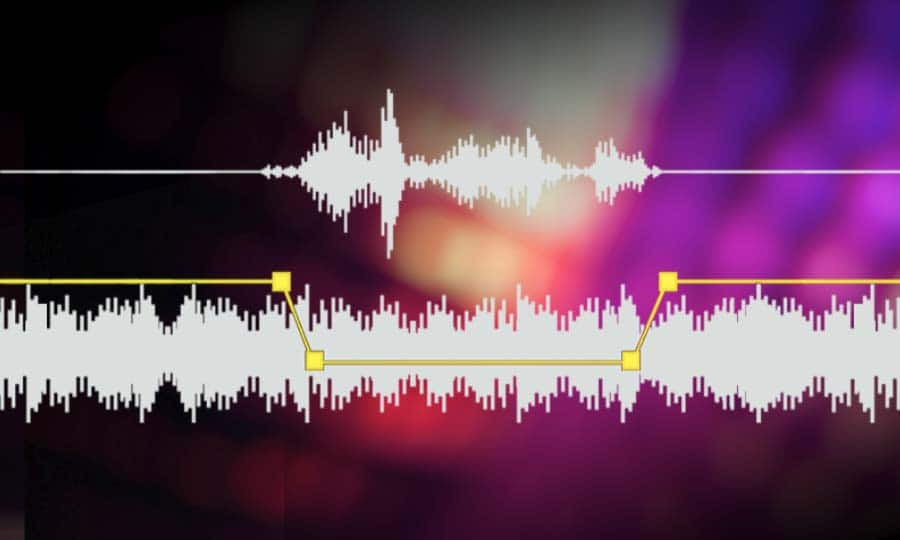
An mp3 audio normalizer is a tool to avoid differences in volume level in 2 or more audio files.

audio volume normalizer

There are various ways to do this, but the most common is to use software that can normalize the levels of the files automatically. This can be done with an audio editor, or with a dedicated mp3 normalizer program.

audio volume normalizer

Normalizing an audio file is checking each frame and adjusting it to be sure that each one is optimized to get the best possible volume without distortion.

An audio file can be normalized in two ways:

1. Peak Normalization:

This is where the audio file is analyzed and the highest peak is identified. The volume of the entire file is then increased or decreased so that this peak is at the maximum possible level without distortion.

2. RMS Normalization:

This is where the audio file is analyzed and the average volume level is identified. The volume of the entire file is then increased or decreased so that this average level is at the maximum possible level without distortion.

This behavior is similar to the compressor that keep the volume range of noisy and lower passages of the audio to keep both in a range that can sound fine.

The main difference is that the goal of an audio normalizer is not to change the sound of the audio, but to make sure that the volume levels of all the files are the same.

The most common format that is normalized is MP3, but other formats such as WAV can also be normalized.

In this times even video files can be normalized too.,

There are many reasons why you might want to normalize your audio files.

For example, if you have a number of files that were recorded at different levels, you may want to normalize them so that they all have the same volume level.

This can be useful if you want to create a playlist of files that are all the same volume, or if you want to make sure that all the files in a particular folder have the same volume level.

Another reason to normalize your audio files is if you want to make sure that they sound their best when played back on different devices.

For example, if you have an MP3 file that sounds great on your computer, but sounds terrible on your phone, you may want to normalize it so that it sounds its best on both devices.

Normalizing your audio files can also be useful if you want to make sure that they are suitable for use in different situations.

For example, if you have an MP3 file that you want to use as background music for a video, you may want to normalize it so that it is not too loud or too quiet.

Normalizing your audio files can also be useful if you want to make sure that they sound their best when played back at different speeds.

For example, if you have an MP3 file that sounds great when played back at normal speed, but sounds terrible when played back at double speed, you may want to normalize it so that it sounds its best at both speeds.

Normalizing your audio files can also be useful if you want to make sure that they sound their best when played back at different volumes.

For example, if you have an MP3 file that sounds great when played back at a low volume, but sounds terrible when played back at a high volume, you may want to normalize it so that it sounds its best at both volumes.

Normalizing your audio files can also be useful if you want to make sure that they are suitable for use in different environments.

For example, if you have an MP3 file that you want to use as background music for a party, you may want to normalize it so that it is not too loud or too quiet.

Normalizing your audio files can also be useful if you want to make sure that they are suitable for use in different places.

For example, if you have an MP3 file that you want to use as background music for a restaurant, you may want to normalize it so that it is not too loud or too quiet.

Normalizing your audio files can also be useful if you want to make sure that they are suitable for use at different times of the day.

For example, if you have an MP3 file that you want to use as background music for a morning show, you may want to normalize it so that it is.

What is a loudness normalizer or an audio volume normalizer?

What is a loudness normalizer or an audio volume normalizer?

audio volume normalizer

A volume normalizer is used to make sure that audio files play at the best possible volume without clipping and also that all audio files play at a similar volume.

audio volume normalizer

A volume normalizer analyzes an audio file and then adjusts it to sound at a specific volume level. This is often done with audio files that are uploaded to file sharing sites, so that all users can listen to the audio at a similar volume.

It is quite common to find volume differences in the files that are downloaded from the internet, since these have been created from a wav but different sampling and bit frequencies have been used to create them.

A volume normalizer can analyze an audio file and then apply gain or attenuation to adjust the volume of the file to a specified level. This is useful if you want to ensure that all audio files played on your website or in your application sound at a similar volume.

Because it’s frustrating to have a collection of audio or even video files and find that when you play them they play at different volumes.

For this reason, it is necessary to use a volume normalizer, with which you can make sure that all audio and video files are heard at a similar volume.

It is important to ask yourself if the bit rate is important for the quality of an audio or video file, the same for the sample rate.

The answer is no, not always.

Bit rate and sample rate refer to the amount of information that can be stored in an audio or video file.


The higher the bit rate, the higher the quality of the audio or video file.


However, sometimes a low-quality video or audio file can sound better than a high-quality file.


This is because the bit rate and sample rate are not always indicative of the quality of the audio or video file.


There are many factors that can affect the quality of an audio or video file, such as the encoder used to encode the file, the quality of the microphone used to record the file, the quality of the equipment used to play the file, etc.


In summary, the bit rate and the sample rate are not always indicative of the quality of the audio or video file.

MP3 file format

MP3 file format

MP3 file format
MP3 file format

The full name of MP3 is MPEG-1 or MPEG-2 Audio Layer III, which is a popular format for digital audio coding and lossy compression of minor parts, to achieve the purpose of compressing into smaller files.

MP3 file format
MP3 file format

source
The MP3 format was invented in the mid-1980s by a group of engineers at the Fraunhofer research organization in Erlangen, Germany, and standardized in 1991. The association is committed to research in low-rate, high-quality sound coding of data. Although MP3 is a lossy compression format, for the listening experience of most users, the sound quality of MP3 does not have a noticeable decrease compared to the original uncompressed audio.

Later, with the popularization of the MP3, it had an impact and influence in the music industry.

MPEG audio standard
MPEG (Motion Picture Experts Group) is a moving picture expert group under ISO, and the MPEG standard formulated by it is widely used in various multimedia. MPEG standards include video and audio standards, from which MPEG-1, MPEG-2, MPEG-2AAC, and MPEG-4 audio standards have been developed.

The MPEG-1 and MPEG-2 standards use the same family of audio codecs: Layer1, 2, 3. A new feature of MPEG-2 is the use of low sample rate expansion to reduce data traffic, and another feature is multi-channel expansion, which increases the number of main channels to five. The MPEG-2AAC (MPEG-2 Advanced Audio Coding) standard was launched by FraunhoferIIS and AT&T in 1997 to significantly reduce data traffic. The Modified Discrete Co2sine Transform (MDCT) algorithm adopted by MPEG22AAC, the sampling rate It can be between 8KHz and 96KHz, and the number of channels can be between 1-48.

All three layers of MPEG Audio Layer1, 2, and 3 use the same filter bank, bitstream structure, and header information, and the sample rate is either 32 KHz, 4411 KHz, or 48 KHz.

Layer1 is designed for DCC (DigitalCompactCassette) digital compression tape, with a data rate of 384kbps.
Layer2 balances complexity and performance, and data traffic drops to 256kbps-192kbps.
Layer3 was designed for low data traffic from the beginning, and the data traffic is 128Kbps-112Kbps. Layer3 adds MDCT transform, which makes its frequency resolution 18 times than Layer 2. Layer3 also uses EntropyCoding similar to MPEGVid2eo Redundant information is reduced.
Currently, most MP3s use the MPEG21 standard.

Change the bit rate of an MP3 file

Change the bit rate of an MP3 file

mp3 bit rate
mp3 bit rate

Do you want to change the bit rate of an MP3 file?

mp3 bit rate
mp3 bit rate

This can be useful, for example, if you need to reduce the size of an MP3 file. A 320 kbps MP3 file, the highest bit rate allowed for an MP3 file, can be lowered to 192 kbps to significantly reduce the size of the MP3 file.

There will be some loss in quality, but the difference will be negligible to most listeners using standard speakers or headphones. If you’re an audiophile, chances are you’ll never use the MP3 format outside of expensive audio equipment.

Most likely, you are using a lossless format, such as compressed or uncompressed PCM audio, WAV, AIFF, FLAC, ALAC, or APE. Uncompressed PCM audio files are approximately 10 times larger than CD-quality MP3 files.

The MP3 format is a lossy format, which means sacrificing audio quality to keep file sizes relatively small. Almost all sites will tell you that you shouldn’t convert lossless audio files to MP3 unless you can afford to lose some audio quality.

Almost all the time. The only time it might make sense is if you have a bitrate audio file in a low quality format like WAV. For example, it might make sense to convert a 96 kbps WAV file to MP3, but only if you choose a bit rate of 192 kbps or higher. A higher bit rate in an MP3 file will allow it to maintain the same quality as a WAV file even though it has a lower bit rate.
The second thing to read is that you should never switch to a lower bitrate. bitrate stream to a higher bitrate stream and hope it sounds better. You cannot gain quality by increasing the bit rate. This is absolutely true. If you try to convert the bitrate, it will actually reduce the quality of the MP3 file.