Can wireless headphones sound better than wired ones?


Free Download Mp4Gain
picture

Can wireless headphones sound better than wired ones?

wireless headphones

Yes, it can!

wireless headphones

It could be the shortest article, as the answer can generally be one word: yes or no! However, there will surely be someone who will argue with this statement. Therefore, we explain it to you! Along the way, we will of course talk about the obvious advantages of wireless headphones, but we will also mention the disadvantages.

Do wired headphones sound better than wireless headphones a priori?
Of course, this argument is correct when comparing models comparable in level and price, but, as they say, there are nuances. Usually we are talking about professional solutions and expensive equipment. If we talk about custom headphones, then the difference may be in favor of wireless solutions. Or the devices may be comparable in capabilities, being the cheapest and most comfortable wired headphones to use.

In short, wired headphones for 500 rubles are likely to lose compared to wireless headphones for 10,000 rubles. If we compare headphones in the same price category, for example, the wired AKG K371 and the wireless Plantronics BackBeat Fit 6100, then the wired solution is sure to win, with a good sound source also by a margin.

Turn on the gramophone!
Unfortunately, we often forget that headphones are needed for playback, but in addition to them, the sound source itself is important, both the playback device (player, smartphone, computer) and the sound file itself. We live in an age where there are lossless formats like FLAC and ALAC (high sound quality with minimal information compression) and lossy files like MP3 (medium to low quality with different compression ratios). Don’t forget about streaming services, which mainly stream compressed music over the network (there are lossless services too, but they’re not as widespread). All of this can affect the sound image on both wired and wireless headphones.

In a recent article on wired headphones, we noted a number of headphone characteristics that depend on the sound source. First of all, it’s about impedance, a parameter that is very different for different wired models. Without getting into the subtleties, let’s just say that not every player or smartphone can “rock” wired headphones so that they sound loud enough and at the same time high-quality.

In the case of wireless headphones, this feature is omitted, since a music player, smartphone, tablet or computer are only sources of information about the sound, and the amplifier that generates a signal for the speakers is located in the headphones themselves, And believe me, this is a harmonious tandem.

Thus, it is not uncommon for situations where, with a particular smartphone, good wireless headphones can produce a more balanced sound than comparable wired ones, because the smartphone simply “can’t cope” with the latter. . There may also be a situation where, when playing a file with poor sound encoding quality in “ears” with cable, you will hear all the imperfections of the recording, and in wireless, the sound will appear more “smooth”.

However, wireless transmission imposes restrictions on the amount of transmitted audio information, so even on a relatively inexpensive HD player, for example, the Sony Walkman NW-A105, combined with successful wired headphones worth up to 10 thousand rubles, the same files will sound better than on any smartphone with wireless headphones.

And if you have the opportunity to listen to your favorite music in high quality on an advanced player for several tens of thousands of rubles with no less expensive wired headphones, then you will no longer want to play on a smartphone again, especially on wireless headphones.

BUT! The truth of life is that the vast majority of people today listen to music from streaming services or social networks (it reads in mediocre quality). Yes, many don’t really listen to it at all, because there are also videos and podcasts, games and audiobooks, all those scenarios where the quality of wired headphones turns out to be redundant and the convenience of wireless is undeniable.


Free Download Mp4Gain
picture


Mp4Gain Main Window
picture


Mp4Gain Features
picture


Free Download Mp4Gain
picture

Questions and answers about MP4

Questions and answers about MP4

Mp4

Movies recorded in the MPEG-4 format have already gained deserved popularity among a wide audience of PC users. These films usually fit on a CD and, in terms of image quality, they can compete successfully with video tapes. Not the last factor that determines the popularity of MPEG-4 discs is their price – 60-70 rubles. against 400-600 p. for the DVD. Therefore, MPEG-4 could well become a middle ground on the path of the massive transition of home users from analog VHS video recorders to the digital standard DVD.

MP4

In the Russian-language part of the Internet, you can find a large number of materials about the MPEG-4 standard, but most of them contain a description of the complexities of the process of compressing video in this format. This is, of course, a specific question that requires detailed research, but for users acting only as viewers, these articles often cannot answer the questions that arise when they want to watch movies. Another important source of information is conferences. In the “Processors”, “Video”, “Multimedia” sections, issues related to speed, quality, optimal settings and everything related to MPEG-4 are constantly raised, but the answers received often contradict each other. Someone claims that all his life he watched MPEG-4 without brakes on Pentium 200, others complain about the slideshow,

This article attempts to clarify frequently asked questions from people who have recently encountered this format, as well as to draw the attention of those who have never encountered MPEG-4 before. Hopefully, after reading this material, the reader who is not involved in video editing and compression will be able to safely say, “Now I know enough about this.”

What is MPEG?
MPEG is an abbreviation that stands for Moving Picture Experts Group (before writing a letter the first letter is not deciphered, so go to www.mpeg.org).

It is a fairly large organization, consisting of developers of audio, video and computer equipment, as well as programmers and specialists involved in the development and implementation of standards for algorithms for compression, transmission, storage and reproduction of audio and video data.

Among the developments of this group in the field of digital video recording, the most famous are:

MPEG-1 standard. It was released in 1992. Users most often associate it with movies on VideoCD. The typical consumer video format for MPEG-1 in the PAL standard is 352 * 288 pixels, 25 frames per second. The audio part is stereo audio with a sampling frequency of 44.1 kHz, compressed in MPEG-1 Layer II. A feature film recorded in this format occupies two CDs in the VideoCD standard. The picture quality of VideoCDs is on par with a consumer VHS videotape.

MPEG-2 standard. Released in 1995. Users come across this video compression format primarily when purchasing DVD with movies. The typical frame size for a PAL / SECAM video DVD movie is 720 * 576 at 25 frames per second, or 640 * 480 at 30 frames per second in the NTSC standard. Compared to MPEG-1, the audio part adds support for multi-channel sound (Dolby Digital 5.1, DTS, etc.). Increasing the bit rate and using an improved video compression algorithm have given DVD movies much better picture quality than VideoCD. MPEG-2 is also used today in digital satellite television. Home DVD players in our country are gaining popularity. The relatively high price of DVD movies plays a big role in this.

MPEG-4 standard. Its development began in the first half of the 90s of the last century. In December 1999, a launch of this format was presented, which received the official status of the ISO / IEC standard. MPEG-4 was conceived as a way to transfer data from transmission media, mainly video, over low-bandwidth channels. The standard unexpectedly gained popularity among low-budget users: the use of more complex compression algorithms made it possible to put one-and-a-half-hour to two-hour feature films in acceptable quality on a single CD. With the same bit rate and certain encoding conditions, the image quality of a movie in MPEG-4 can be comparable or even better than when using MPEG-1 or MPEG-2. However, the use of new compression algorithms also significantly increased the requirements for the computational resources necessary for decompressing high-quality images from this format.

WHAT IS IT AND WHAT DOES THE BIT RATE AFFECT?

WHAT IS IT AND WHAT DOES THE BIT RATE AFFECT?

Bit Rate

Bit rate, a value that, in digital audio and video material, is the rate of data flow (the number of units of information) transmitted per unit of time (second). It can be indicated as the minimum value required to reproduce the original or compressed format, without delays and stops of video, audio, and the average or maximum quality value for the data storage format used. Most of the time, it is expressed in bits per second for audio and megabits for video.

Bitrate

It can have a constant, average, or variable value.

CBR (constant bit rate): data rate, remains unchanged, from the beginning to the end of the file.
ABR (Average Bit Rate): An average value, usually fixed, is used that is greater than the minimum limit, but less than the maximum possible.
VBR (Variable Bit Rate) – Bit rate varies throughout the file and depends on many factors, the end result can be unpredictable.

The higher the bitrate, the better the video and audio quality? It is not entirely true .

The bit rate, or the number of information units spent per unit of time, one second, is similar to the flow of water, the speed of which will change the filling time of the container, but the quality of the water itself.

The best quality requires high quality source video or audio material, therefore equipment capable of providing it. The same goes for water, for better water quality the composition is important first, not the force of the flow.

In other words, it makes no sense to increase the value of the bitrate (water stream), expecting to improve the quality if the quality of the initial data (water) is worse. Similarly, and vice versa, reducing the bit rate, to obtain a better material, will worsen the final result, but it will reduce the size needed to store data.

Bit rate is not a primary indicator of quality, but rather options for the minimum and maximum allowable flow conditions necessary to meet the remaining conditions to obtain the desired quality, provided that materials similar to the desired quality are used.

What is video bitrate, frame rate, and aspect ratio?

What is video bitrate, frame rate, and aspect ratio?

What is a video file?
Video, like cinema itself, is a rapid alternation of images. How fast is it? For a human, there should be 24 images in one second. In this case, images that change rapidly become moving. Film is based on this and now video. Also, each image has several properties. Which? They are wide and tall. Also, for video, these values ​​are measured in points. So many points of width and so many points of height.

video

What does the video consist of

If we zoom in on any frame in our video, then we can see the individual squares that make up our image. Each of these squares was called “Pixel”, which comes from the English “Picture element”, that is, a picture element.

pixels

Pixels on screen

So when we look at the file properties, or the project properties, we see the video formats, which indicate how much the frame is and how wide it is.

video aspect ratio

In the image we can see that the width of the frame is 1920 pixels, and its height is 1080. It is clear that the more pixels in our frames, the more details can be accommodated. And consequently, the better the image will be. At the same time, do not forget that the frame rate must be at least 24 frames per second.

Older video formats, such as the PAL standard, were 720×576 pixels. Modern HD or Full HD, already 1920×1080. Well the latest 4K format is already 4096×2304 pixels. That is, the further, the better quality is achieved.

See Also: Video Codecs, Video Formats – What Does All This Mean?
Video aspect ratio.
This is also a parameter that for many is almost a thing of the past. The fact is, there used to be a TV format that had a 4/3 aspect ratio, and a widescreen format, mainly for watching movies, that had a 16/9 aspect ratio.

Monitor with 4×3 aspect ratio

Now the television format is a thing of the past (almost) and only the wide format remains

Monitor with a 16 x 9 aspect ratio
What is the video bit rate?
Like I said, each frame is made up of a large number of pixels. If we try to put this amount on our hard drive, it will take up too much space. Strictly speaking, the arithmetic here is simple. Let’s count.

One frame – 1920×1080 = 2,073,600, that is, two megabytes (actually, this is not entirely true, but I’ll simplify it a bit)

That is, we now know that a painting we have weighs 2 mb. It seems a bit, but let’s keep counting.

One second. A second must have at least 24 frames. What do we get? 24×2 = 48 mb.

One minute. 48×60 = 2880 mb. I mean, think about it. In one minute, almost 3 gig! Well, how long will an hour take then?

One hour 2880×60 = 172800 mb. In other words, one hour of movie will take up 172 gigabytes of memory.

Well, since such a thing will not work, smart people decided: we must squeeze. We need to compress the video so that we can put everything on a computer, on a phone. What can be seen on the Internet, etc. And that is why there are various video formats. Since each format has its own rules for video compression.

See also: Do ​​you know what a chroma key is? Learn the secrets of working with chroma key in 5 minutes
But here we come to the concept of bitrate.

Bitrate: read / write speed. You are recording a video. The video camera matrix takes measurements of light, that is, it measures pixels. Transfer them to a USB flash drive or SSD. The speed of this transmission is the bit rate.

Next, we watch the video. At this time, the data is read from memory and transferred to the monitor / screen. Again, we are faced with a certain data rate.

But in video, the role of the bitrate value is somewhat different. Video Bit Rate: The video compression rate. When recording video from the matrix, the signal is immediately encoded and compressed. The more the signal is compressed, the less space it occupies, but at the same time, and the lower the quality.

What is a video codec?
Now, let’s move on to the next concept: video codec. When I said that if you lower the bitrate, the video quality will be lower.

What is the bit rate?

What is the bit rate?

Find a Video's Bitrate in Windows

The bit rate, or as they also say the width of the stream, is the amount of data transmitted or processed in 1 second. The concept mainly applies to multimedia content, for example, video bit rate is nothing more than the amount of video information that is displayed on the screen in one second. To measure the bit rate, the designation “Kbit / s (kbps)” is used, that is, kilobits per second, less frequently Mbit / s, and so on. The more information that is transmitted during a specific period of time, the higher the quality of the image.

Video Bitrate

When people say “low bit rate video” they are generally referring to low quality video. Blur, opacity, and pixelation are characteristic features of such video, while high-bit-rate video has a detailed image with a rich color gamut. Like video, audio also comes with low and high bit rates. Music with a low bit rate loses in the frequency range, words and chords become less distinguishable, and itself takes on an unnatural sound, as if it were an electronic sound.

Bit rate types

It is not enough to understand what the video or audio bit rate is. To successfully work on programs for editing and converting multimedia content, you need to know what types of bit rates exist. These are constant, variable, and average, and each of them can be used in a specific situation.

Constant bit rate

Constant refers to a bit rate that does not change throughout the file, providing an accurate estimate of the size of the output material. On the other hand, it is not very suitable for multimedia with dynamically variable audio and video streams, as it does not provide an optimal balance of size and quality. Constant bit rate is mainly used at home level, as well as when processing files with relatively constant picture and sound characteristics.

Variable bit rate

In files with variable bitrate, the latter is changed by the codec for each frame according to its characteristics. For example, in frames that are not very informative and easy to encode, the video bit rate is lowered, which saves space, and this saving can differ significantly. Variable bit rate technology is often used to achieve the best quality / size ratio. The downside of this method is the unpredictability of the final size of the media file.

Average bit rate

A more flexible option is the averaged bitrate, which is a hybrid of the first and second types. Unlike Variable Bitrate, by choosing Average Bitrate the codec can only work within the user defined range. Professionals use this method when creating large projects, allowing you to achieve high-quality encoding with a relatively small file size. The precision of calculating the size is much higher.

How to find out the bitrate of the file

Novice users are often interested in how to find out the video bit rate and if special programs are needed for this. With few exceptions, it is not necessary to use third-party tools for these purposes, since the bit rate of the file can be obtained by the operating system itself. Right-click on the video file and select “Properties” from the menu. Then switch to the “Details” tab in the window that opens and look for the item “Data transfer rate”. This will be the bitrate of the video. In the case of audio files, the item will be named “Bitrate”. If the required information is missing from the properties, for example in the case of MKV files, use the MediaInfo utility.

What bit rate value to set

But much more relevant is the question of what bit rate should be set for a video when creating or converting it. It will not be possible to answer it unequivocally, it all depends on the situation and the purpose of the content. If you focus on average values, you should configure 2.5-5 Mbit / s for video and approximately 192 kbit / s for audio. When choosing, you should also consider the video format. Therefore, for 1920 x 1080 SDR video, the bit rate is better to set 8 and 12 mbps (60 frames / s), and for HDR video with the same resolution – 10 and 15 mbps, respectively.

MP3 and audio digitization.

MP3 and audio digitization.

audio digitalization

All of humanity has become accustomed to such everyday things as recording and reproducing sound, be it a voice recorder, an answering machine, or musical recordings of their favorite artists. And people who spend most of their time near the computer probably can’t imagine life without sound. This article will focus on such a common encoding format as MP3.
audio digitalization

Well, Thomas Alva Edison started recording when he yelled the words “Mary had a lamb” on his “Talking Machine”. The “talking machine” was the world’s first device to record and reproduce sound: a phonograph that mechanically recorded a soundtrack on a wax roller. At the time, this was certainly a huge step forward, as at that time, and this was in 1877, no one came up with the idea of ​​creating something similar.

However, the biggest disadvantage of this sound carrier was the fragility of the recording. With the development of science and technology, people learned to record sound not only mechanically, as Edison did, but also electromechanically and photoelectrically, and with the advent of computers, it became possible to record sound in digital form. The main advantage of this recording method is the preservation of sound quality, regardless of how many times it has been played or rewritten, and since digital information can be processed on a computer, this opened wide doors of possibilities for working with sound. . But since in the early stage of digital sound development, recording a composition cost a lot of disk space and magnetic media had a small capacity, software developers began to baffle the fact. how to put a lot of music on a small hard drive. This led to the appearance of various programs – compressors, which reduced the size of the audio file. Compression algorithms provided the removal of certain frequencies, which led to a loss in sound quality, and then the user was faced with the choice of spending money buying additional megabytes and storing uncompressed music files, or saving money. and use compressors.

First, let’s find out what “sound” is in real life. The transmission of information at a distance using acoustic vibrations is only possible due to the properties of the acoustic environment in which these same sound vibrations occur. They are possible due to the presence of elastic bonds between particles in the conductive medium. The sound source creates an area of ​​pressure by compressing air molecules. These molecules transfer their energy to others that are nearby, and these, in turn, to others, etc., which leads to the appearance of areas of increased and decreased pressure in relation to the ambient pressure. This creates a sound wave that is continuous in nature. One of the parameters of the wave is amplitude. Let’s take a simple example: a guitar string. Everyone knows that to increase the volume of the sound it is necessary to pull the string with more force, thus increasing the amplitude of its vibration, which will lead to an increase in the pressure deviation. But a wave is not enough to transmit a sound that can be perceived by the human ear. Another important point is the vibration frequency, that is, the frequency with which the sound source creates a pressure change, and it is this frequency that determines the pitch of the transmitted sound. On a guitar, to change the pitch, you need to hold down the string at a certain fret, that is, change the length of the string and, as a consequence, the frequency of its vibrations. Another important point is the vibration frequency, that is, the frequency with which the sound source creates a pressure change, and it is this frequency that determines the pitch of the transmitted sound. On a guitar, to change the pitch, you need to hold down the string at a certain fret, that is, change the length of the string and, as a consequence, the frequency of its vibrations. Another important point is the vibration frequency, that is, the frequency with which the sound source creates a pressure change, and it is this frequency that determines the pitch of the transmitted sound. On a guitar, to change the pitch, you need to hold down the string at a certain fret, that is, change the length of the string and, as a consequence, the frequency of its vibrations.

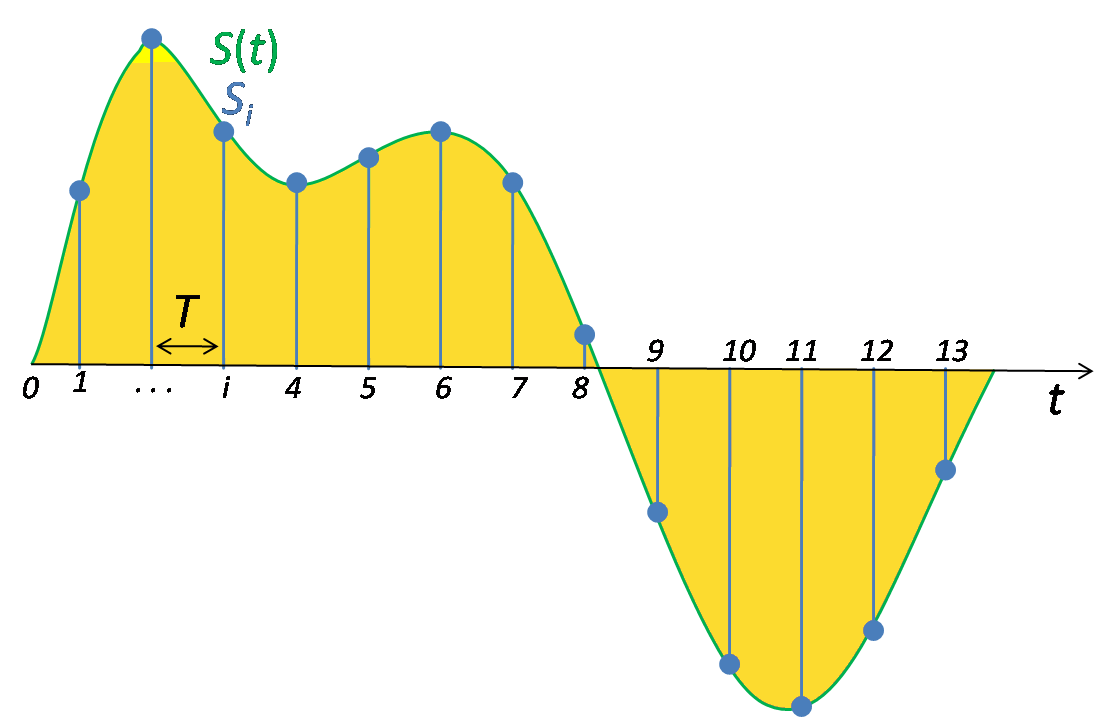
Now that we understand the nature of sound a bit, let’s move from analog to digital. To digitize “natural” sound, you must first convert it to an analog electrical signal. In this case, the analog of the amplitude of the sound wave is the amplitude of the voltage change. As mentioned above, the wave and the analog electrical signal are continuous functions, but for digitization they must be represented in discrete form. For this, an ADC (analog-digital converter) is used, which breaks the continuous wave into sections (Sample) and represents the amplitude of the wave in these sections as a number, that is, it quantifies. It is clear that for greater precision and purity of sound, the number of samples must tend to infinity and their size must go to zero. The number of samples per second is called the sample rate or sample rate and is measured in Hz. The question arises, what sample rate to use when digitizing so that the result is the most natural? It is theoretically known that for the most accurate reconstruction of a continuous analog signal from discrete values, it is necessary to use a sampling frequency at least 2 times higher than the frequency of sound (Nyquist’s theorem). It is known that the human ear can perceive sounds with a frequency of 18 to 20,000 Hz. Therefore, the optimal sampling frequency is 40 kHz or more. The most common sampling frequencies are 44.1 kHz, 48 kHz. However, due to the fact that harmonics above 20 kHz also affect the overall sound, encoders with sample rates of 96 and 192 kHz are also used. Also, the sound quality depends on the number of digits used to record the measured amplitude. The quantization error is inversely proportional to the bit width. Therefore, with 8-bit quantization, the sound level is recorded using numbers in the range [-128; 128], with 16 bits from [-32768; 32768]. For example, when recording audio CDs, exactly 16-bit quantization is used, so they have high sound quality.

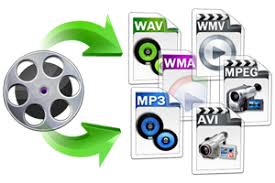
Let’s make a middle conclusion: the ADC converts the analog signal into numbers and writes them as a sequence. Then comes Wave, a sound format. Note that audio CDs record sound in the same format. However, this storage method is not economical. Many people probably prefer an MP3 disc, which can contain more than 200 songs, than a regular CD. It does this by compressing the Wave file at the expense of quality. But don’t be alarmed, as the human ear is virtually incapable of recognizing the loss of sound quality after compression. Let me explain now. It all started when, in the late 1980s, the International Organization for Standardization (ISO) created the Moving Pictrures Experts Group, whose task was to develop an international standard for the presentation of digital video and audio data. The result of the group’s work is the MPEG-1 Layer 3 format, or MP3 for short, which compresses audio data by 1/12 with virtually no loss of quality. The audio compression algorithm in this format is based on the psychoacoustic characteristics of the human hearing organ, and therefore the removal of elements that are not perceived by the ear does not affect the noticeable deterioration in quality. Suppose there are many people in the room and they are all talking to each other at the top of their voices, and if you try to call a person who is only a few feet from you without raising your voice, don’t expect them to answer your call. , since due to the noise generated, it will not hear you. This is because sounds of the same frequency with higher amplitude mask other frequencies with lower amplitude. However, this unfortunate effect is happily used to compress digitized audio. The wave stream will contain all sound information, even masked, that is not audible to the ear, but after compression this information will be removed, reducing the file size. Another important characteristic of the human hearing organ used for compression is inertia. The ear, to put it vulgarly, is an inertial device, therefore, at the limit of the difference in sound level from highest to lowest for a certain time (~ 100 ms), a person cannot hear a sound of lower amplitude Therefore, the sound in this period may not be saved. It is also possible not to save the sound that is beyond the sensitivity threshold, that is, the sound level of which is below a certain value and is therefore inaudible to a person. Another interesting property used for encoding (but not by ”

Together, therefore, all of this leads to significant savings in the disk space occupied by the audio file. An average music file that occupies 30-40 MB in “full” form, after encoding it in MP3, already occupies 3-4 MB, allowing you to record more than 11 hours of music on a disc. However, this is not the limit. In 2001, the MP3 format had a successor: the MP3Pro format. Its creators are Thomson Multimedia and the Fraunhofer Institute in Germany. A distinctive feature of the new improved format is that, with the same quality, the files in the new format take up 2 times less space compared to normal MP3s. For example, an MP3Pro file with 128 kbps sound quality will be the same size as a 64 kbps MP3 file. Another advantage is

Let’s see how this is achieved. The working principle of the MP3Pro format is quite simple. When encoding, the audio stream is divided into two parts, two streams. The first is the low-frequency one, which is encoded in the usual MP3 format, which, by the way, makes the formats backward compatible, because normal players only play this part of the file. The second stream is high frequency, which is encoded in the part of the MP3 stream that older players ignore. The new decoder combines these two streams, leading to full sound across the entire frequency band.
Regarding the promotion of the new format in the market, compared to its older brother, MP3Pro has not received such a wide distribution. Thomson Multimedia offers a free version of the MP3Pro Player / Encoder for download from their website. The limitations of this version are that only 64 kbps quality is available for encoding. WinAmp lovers have a plugin to play MP3Pro files

Of course, the light did not converge on MP3, there are other digital encoding formats, but despite this, it is still the most popular.

Sampling frequency.

Sampling frequency.

Sample Rate

What is its importance for sound recording?

Sample Rate

Time sampling is a process that is directly related to the conversion of an analog signal to digital. Along with it, the data is quantized in amplitude. Time sampling means measuring a signal at the time of its entire transmission.

A sample is taken as a unit. If in words this is not entirely clear, then in an example it seems more convincing. Let’s say the sample rate is 44100 Hz, the same as that used on audio CDs.

This means that the signal is measured 44100 times in one second.

An analog signal is always higher in saturation than a digital one. And its transformation is an inevitable loss of quality.

The sample rate serves as a kind of benchmark: the higher it is, the closer the digital sound quality is to analog. This is clearly visible in the list below. Shows which sound frequency is best.

As you study it, you will see a direct relationship between sampling and track quality:

1,8000 Hz. This frequency is typical for telephone conversations and voice recording on a dictaphone with a simple set of functions. It is used in audio converted through the Nellymoser codec.
2. 22050 Hz is used in broadcasting.
3.44100Hz. As mentioned above, this frequency is typical for audio CDs, and this figure has long been identified with the highest quality level. And today the format does not lose its positions.
4.48000 Hz. These are the DAT and DVD formats, which have replaced AUDIO.
5.16000 – DVD-Audio MLP-5.1.
6.2822 400HZ is a high-tech Super Audio SACD format.
Also read 3D Builder Windows 10 what it is
The list clearly indicates which sound frequency is the best. In addition, technologies do not stop and new formats appear.

But before making far-reaching plans, a very significant nuance must be taken into account.

Its essence is simple: the higher the sampling frequency, the more difficult it is to achieve it technologically. This requires:

Provide high intensity transmission of digital streams. And this is not possible on all interfaces. And the more channels are involved in the recording (which is typical for musical ensembles), the more complicated the process will be;
be armed with a processor capable of powerful computing operations. But even with the most advanced examples, the possibilities for ultra-high quality sound are limited;
Use it to record computer equipment with a large amount of RAM.
Considering the above information, it is not surprising that the sound frequency equal to 44100 Hz is still the most in demand today.

It has been meeting even the most demanding quality requirements for decades, and at the same time there are all the technical possibilities to achieve it. This last factor is decisive for both normal users and most recording studios.

Even knowing what the best sound frequency is, to achieve this, it is necessary to take care of the technical equipment.

Digital sound quality

Digital sound quality.

Sound quality

Sound information. Sound is a wave that travels through air, water, or other medium with a continuously varying intensity and frequency.

Digital Sound Quality

A person receives sound waves (air vibrations) supported by hearing in the form of sound of varying volume and pitch. The greater the intensity of the sound wave, the louder the sound, the higher the frequency of the wave, the higher the pitch of the sound

Dependence of the volume and pitch of sound on the intensity and frequency of a sound wave

The human ear receives sound with a frequency of 20 vibrations per second (small sound) to 20,000 vibrations per second (loud sound).

A person can receive sound in a wide spectrum of intensities, in which the highest intensity is 1014 times greater than the lowest (100 thousand billion times). To measure the volume of sound, a special unit “decibel” (dbl) is used (Table 5.1). Decreasing or increasing the sound volume by 10 dB is suitable for decreasing or increasing the sound intensity by 10 times.

The sound volume
sound in decibels
lower limit of human ear sensitivity 0
leaf whisper 10
Conversation 60
Gudok Vehicle 90
Jet engine 120
Pain threshold 140
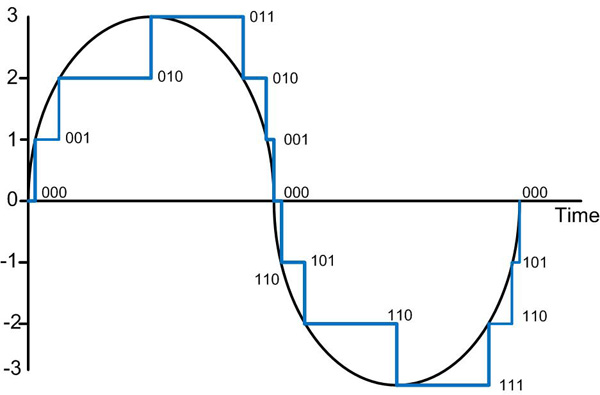
Sound time sampling. In order for a computer to process sound, a continuous audio signal must be converted to a discrete digital form with support for time sampling. A constant sound wave is divided into small separate time sections, for each section a certain value of sound intensity is set.

Therefore, the constant dependence of the loudness of the sound on time A (t) is replaced by a discrete sequence of loudness levels. On the graph, this appears to replace a smooth curve with a sequence of “steps”

Sampling frequency. To record analog sound and transform it into digital format, a microphone is used, connected to the sound card. The quality of the digital sound obtained depends on the number of measurements of the sound volume level per unit of time, that is, the sampling frequency. The more measurements that are made in 1 second (the higher the sampling frequency), the more accurately the “ladder” of the digital audio signal repeats the curve of the dialogue signal.

Audio sample rate is the number of audio volume measurements in one second.

The audio sample rate can range from 8000 to 48000 sound volume measurements per second.

Audio encoding depth. Each “step” is assigned a specific value for the sound volume level. Loudness levels of sound can be viewed as a set of probable states N, for which encoding a certain amount of information I is required, which is magnified by the encoding depth of the sound.

Audio encoding depth is the amount of information required to encode the discrete volume levels of digital audio.

If the encoding depth is known, then the number of digital sound volume levels can be calculated using the formula N = 2I. Let the sound encoding depth be 16 bit, then the number of sound volume levels is the same:

N = 2I = 216 = 65536.

During the encoding process, each sound volume level is assigned its own 16-bit binary code, the lowest sound level will correspond to the code 0000000000000000, and the highest – 1111111111111111.

The quality of digitized sound. The higher the sound sampling frequency and depth, the higher the quality of the digitized sound. The lowest quality of digitized sound, suitable for the quality of a telephone connection, is obtained at a sample rate of 8000 times per second, an 8-bit sample rate, and by recording an audio track (“mono” mode). The highest quality digitized sound, suitable for audio CD quality, is achieved at a sampling rate of 48,000 times per second, a 16-bit sampling rate, and by recording 2 audio tracks (“stereo” mode ).

It should be remembered that the higher the quality of the digital sound, the greater the volume of information in the audio file. You can estimate the volume of information in a digital stereo sound file with a duration of 1 second with an average sound quality (16 bits, 24,000 measurements per second). To do this, the encoding depth must be multiplied by the number of measurements in 1 second and multiplied by 2 (stereo sound):

16 bits 24,000 2 = 768,000 bits = 96,000 b = 93.75 KB.

Sampling, sampling frequency

Sampling, sampling frequency

Sampling frequency

Discretization (discretization frequency – ing.) – transcoding an analog signal into digital by reading the characteristics of the signal at a given moment and converting it into a digital data matrix (approx. 100010110).

Sample Rate

The sampling rate is a parameter that allows you to know the number of calls to an analog (or digital) signal in a given period of time (usually one second), to record frequencies in digital form or to convert to an analog signal.

If we rely on Kotelnikov’s theorem, then to record a lossless signal, a sample rate is required that is two or more times greater than the maximum sound frequency of the played track. That is, in theory 44,100 Hz will be sufficient for most recordings, which is more than 2 times higher than the threshold for human audible frequencies, but this is not entirely true.

The higher the sampling frequency, the more accurately the sound will be reproduced in an analog or digital signal. However, the more conversions made from analog to digital and vice versa, the more the precision and quality of the original signal recording will be lost.

The maximum sample rate for 2010 was 2,822,400 Hz and was compliant with the Super Audio CD (SACD) standard. Most multimedia centers, home theater systems have DACs (digital-to-analog converters) and ADCs (analog-to-digital converters) with a sample rate of 192,000 Hz.

To convert a signal into analog, special chips are used: DACs (digital to analog converters). To convert the signal to digital, ADCs (analog to digital converters) are used.

These microchips and chipsets have a variety of characteristics other than sample rate, such as THD, the amount of interference introduced by the transformation, the number of possible false errors, no saving a digital signal, and so on.

Audio sampling

Audio sampling

Audio Sampling

A continuous sound wave is divided into separate sections in time, each with its own amplitude value. Each step is assigned its own sound volume level, which can be thought of as a set of possible states

audio sampling

Sound quality characteristics:

1. “Depth” of audio encoding: the number of bits per audio signal
Modern sound cards provide 16-bit audio encoding “depth.” The number of levels (amplitude gradations) can be calculated using the formula

N = 2I = 216 = 65536 signal levels
(amplitude gradations)

2. The sample rate is the number of signal level measurements in 1 second.

A measurement in 1 second corresponds to a frequency of 1 Hz

1000 measurements per second – 1 kHz

The number of measurements can be in the range of 8000 to 48000
(8 kHz – 48 kHz)

8 kHz corresponds to the emission frequency,

48 kHz: Audio CD sound quality.

Sound is perceived by the human ear in the range of ~ 20 Hz to 20 kHz.

Experience shows that an exact correspondence of a digital signal with an analog signal is achieved if the sampling frequency is twice the maximum audio frequency, that is, at least 40 kHz.

In practice, the sampling frequencies used in sound systems are 44.1 kHz or 48 kHz. The higher the sample rate, the better the sound quality.

When a continuous audio signal is binary encoded, it is replaced by a series of its individual samples – samples.

Modern sound cards can encode 65536 different signal levels or states.

Therefore, modern sound cards provide 16-bit audio encoding. With each sample, the amplitude value of the audio signal is assigned a 16-bit code.

Sound is a natural physical phenomenon that propagates through air vibrations and, therefore, we can say that it is only wave characteristics. The task of converting sound into electronic form is to repeat all of these same wave characteristics. But the electronic signal is not analog and can be recorded by short discrete values. That they have a small interval between them and are practically imperceptible, at first glance for the human ear, but we must always bear in mind that we are facing the emulation of a natural phenomenon called sound.

This recording is called pulse code modulation and is a sequential recording of discrete values. The device capacity, calculated in bits, indicates how many values ​​are taken simultaneously in a recorded sample. The higher the bit depth, the more the sound will conform to the original.