Lossless video compression


Free Download Mp4Gain
picture

Lossless video compression

Lossless video

In mid-November of last year, I was struck by the news from AlparySoft R&D Company about the launch of a codec developed by it to work with video. And although there are many codecs now, Lossless Video Codec still has one distinctive feature – these are the algorithms used that allow you to compress a video signal without mathematical loss. That is, after the encode-decode process, the source and the final video will be absolutely identical, and the original video is compressed 2 to 5 times.

Lossless

And so, last Saturday (May 15), Lossless Video Codec 2.0 was released. An important innovation was the addition of a lossless compression algorithm, that is, compression in which the human eye cannot differentiate between the original and processed video. The compression ratio here, for obvious reasons, is higher and amounts to 5-15 times.

I managed to learn the details about the new product with the help of Elena, the company’s public relations manager.

– What difficulties did you face when developing lossless compression algorithms?

– As with all other algorithms for processing and analyzing large amounts of data (either by filtering or eliminating data redundancy), there is the problem of choosing between compression quality and performance.

Obviously, the more time you can spend analyzing the data (in our case, it’s a frame from a movie), the better it can be compressed. On the other hand, we are faced with the task of compressing the stream of frames in real time (that is, 25-30 frames per second). Low-level optimization of its individual parts plays an important role in the development process of a program, which, although it is a laborious process, can significantly increase the speed of algorithms.

– Okay, but what does Lossless Video Codec look like in the context of similar products and in particular DivX?

– Compared to similar products, our codec looks pretty decent. For example, the tests and the results of the comparison with the well-known HuffYUV codec can be viewed on our website (www.alparysoft.ru/prod/compression/compress-compare.php).

Comparison with DivX would be wrong as there are several fundamental differences. First, DivX is a lossy codec; In any case, during compression, some information is lost, while in our codec, as noted above, lossless compression algorithms are presented. Second, our codec does not use video information from previous frames to compress a frame, because of this, videos compressed by our codec can be much easier to use for editing in various video editing programs.

– Elena, how long has your team been working on Alparysoft Lossless Video Codec?

– Work on the codec takes just over a year. Three developers participate in it.

– How popular is the codec developed today?

– According to statistics, there were several thousand downloads from the Russian Alparysoft website alone. But our codec is hosted on many sites, mostly foreign. Among them, there are such popular resources dedicated directly to video processing as Dvdrhelp.com and Doom9.com; here we constantly post updates to our programs.

Of course, there are comments and wishes, and advice and criticism from the users of our programs, as the site has a forum: any user can express his opinion about Alparysoft products. I do not pretend to say that absolutely all reviews are positive, but on the other hand, competent criticism and professional advice is always the force that helps to advance, improve, taking into account the requirements of consumers of rapidly developing technologies.

– From what I understand, the codec is free at this stage of development …

– Yes indeed, Alparysoft Lossless Video Codec is a free product and you just need to register online to get started. We took that step to popularize the products and technologies developed.


Free Download Mp4Gain
picture


Mp4Gain Main Window
picture


Mp4Gain Features
picture


Free Download Mp4Gain
picture

Audio and Video Compression explained

Compression explained

audio and video Compression

We use compression to reduce the size of files, allowing them to load faster and take up less disk space. For example, when you take a photo, your camera captures all the light it can receive and collects the image. If you save an image in RAW format, which stores all the light data captured by the camera’s sensor, the image size can be up to 25MB. (This depends on the resolution of the image – a camera with more megapixels will create a larger image.)

Audio & Video Compression

If we simply upload these files to a social network or post them to a website, we don’t want these image files to take up so much space. A photo gallery with RAW images can take up hundreds of megabytes of space. RAW formats can be used by professional photographers to maintain high image quality while editing, but they are not intended for the average person.

Instead, our camera or smartphone converts the image to a JPEG file. JPEG files are much, much smaller than RAW images. When you convert RAW to JPEG, some of the image data is “thrown away”, creating a much smaller file. The conversion process uses a compression algorithm that works well for photos, making them look pretty good despite being compressed. You may still see compression artifacts, depending on the quality setting.

Note that lossy formats tend to have a parameter that controls their degree of loss. For example, JPEG has a variable quality setting. Poor quality makes the JPEG image file smaller, but the image quality is noticeably worse. Here’s a great example of a lossy JPEG – you can see various “compression artifacts”.

Lossless and lossy formats
We call RAW a “lossless” format because it retains all the data in the original file, while we call JPEG a “lossy” format because some data is lost when the image is converted to JPEG. However, these are not the only lossy and lossless formats.

Images: RAW, BMP, and PNG are all lossless image formats. JPEG and WebP are lossy image formats.
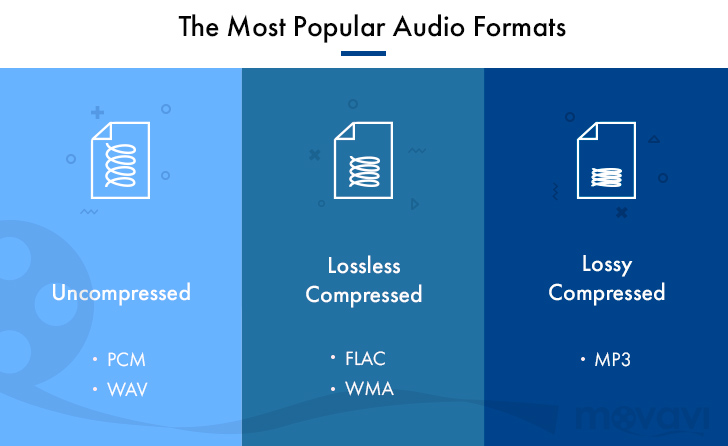
Audio: WAV is a container file that is often used to store lossless audio, although it can also contain lossy audio. FLAC is a lossless audio format and MP3 is a lossy audio format.
Video . Few lossless video formats are widely used by consumers, as video files take up a large amount of space. Common formats like H.264 and H.265 are lossy. H.264 and H.265 can provide smaller files with higher quality than previous generations of video codecs because it has a “smarter” algorithm that better chooses the data to discard.
Some of these lossless formats also provide compression. For example, a WAV file generally contains uncompressed audio and takes up a lot of space. A FLAC file can contain the same lossless audio as a WAV file, but uses compression to create a smaller file. Formats like FLAC don’t discard any data, they store all the data and intelligently compress it, just like ZIP files. However, they are still significantly larger than MP3 files, throwing out a lot of data.

Conversion can be lossy even between lossless formats. For the conversion to be truly lossless, the data in the source file must fit in the destination file. For example, lossless FLAC files only support 24-bit audio. If you converted a WAV file containing 32-bit PCM audio to FLAC, the conversion process would have to throw away some data. The conversion process between a WAV file containing 24-bit PCM audio to FLAC will be lossless.

What is lossless audio compression?

What is lossless audio compression?

Lossless audio compression

You might think that the word “lossless” is used for audio formats that do not use any type of compression. However, even lossless audio formats use compression to keep file sizes at an acceptable level.

Lossless audio compression

Lossless formats use compression algorithms that preserve the audio data, so the sound is exactly the same as the original source. This is in contrast to lossy audio formats like AAC, MP3, and WMA, which compress sound, using algorithms that discard data.

Audio files are made up of sounds and silence. Lossless formats are capable of compressing the pause to almost zero while retaining all the audio data.

What lossless formats are used for digital music?
Examples of popular lossless formats used to store music:

FLAC
Wav
A THE C
Lossless WMA

Lossless formats and musical quality
If you download a lossless music track from the HD music service, expect high-quality audio. On the other hand, if you convert low-quality music tapes by digitizing to lossless audio formats, the sound quality will not improve.

Can you convert from Lossy to Lossless?
It is never a good idea to go from one loss to another. A song that has already been compressed into a lossy format will always be like this. If you convert it to lossless format, you will only get wasted space on your hard drive or mobile device. You cannot improve the quality of a lossy song using this method.

Benefits of using lossless audio format
Using a lossy format like MP3 is still the most common way to store music collections. However, there are clear benefits to building a lossless music library.

Perfect Music CD Backup
Lossless copy of audio files gives you a bit-accurate copy of the original music CD. This means that no matter what audio formats appear in the future, you will always have a perfect copy of the original.

Lossless Compression – How It Works

Lossless Compression – How It Works
When the copy is not different from the original.

Lossless compression

Lossless Compression – How It Works
We have already discovered how sound is digitized. One of the problems: if we digitize it with high quality, then we need a large amount of data, which means large files, a large consumption of disk space, expensive flash drives, a lot of Internet traffic. I would like the files to be smaller.

Lossy Compression and Lossless Compression

For this, compression is used – various algorithms that do their magic with the data and the output is data from a smaller volume.

Lossy and lossless compression
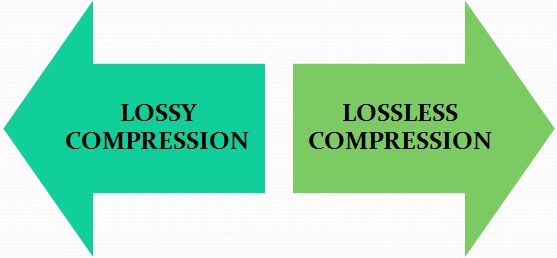
There are two main types of compression: lossy and lossless.

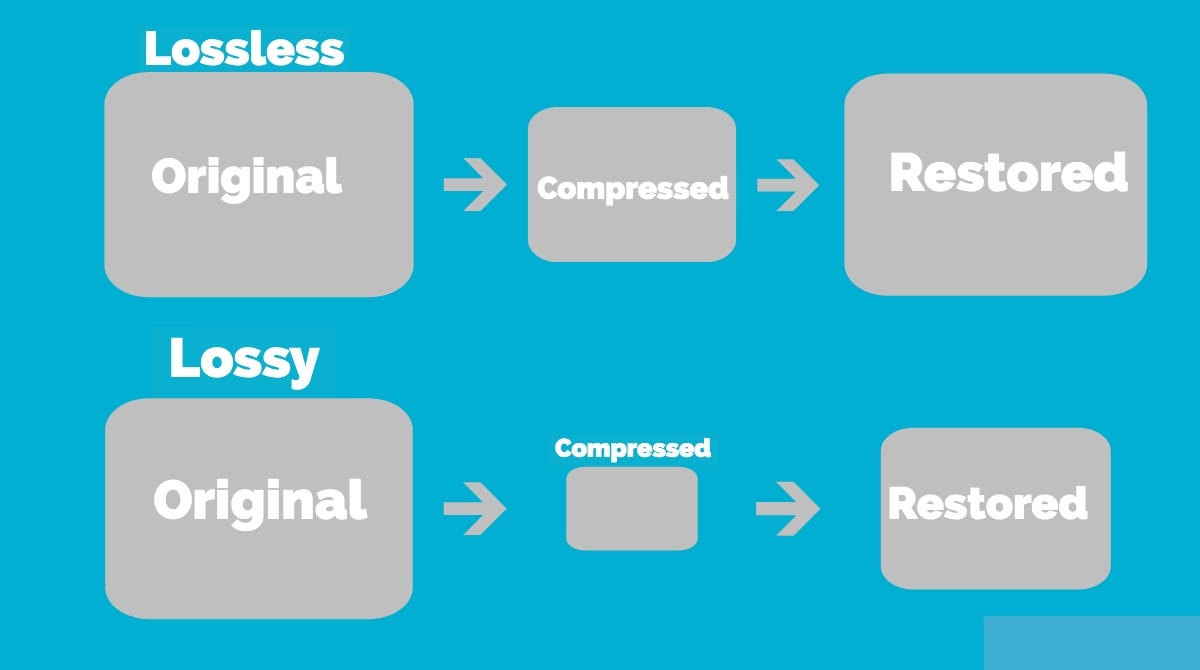
Lossy compression means that we lost some information in the process. Lossy compression algorithms try to make sure that we only lose data that is not too important to us.

Imagine that lossy compression is a short retelling of a school curriculum work: the student is not so important about the description of the author’s nature and style, the main thing is the plot. The short count kept only what was important, but conveyed it much faster.

Lossless compression is when we reduce the size of the file, without losing quality. Interesting mathematical and coding techniques are used for this. The main idea is that during decoding all the data remains in place.

Lossless compression algorithms
There are two main options: the Huffman algorithm or the LZW. LZW is used everywhere, but it is quite difficult to explain, not intuitive, and requires a full lecture. It is much better to explain the Huffman algorithm.

Huffman’s algorithm takes the file, breaks it into pieces, making it convenient to operate, and then looks at how common each fragment is. The algorithm designates the most frequent words with a short code and the rarest with a longer code. Since the most frequent words now take up much less space, the finished file becomes smaller.

But there is also a downside: sometimes you need to store this word and code mapping table directly in the same file, but it can turn out large on its own. Most often, the Huffman algorithm is used for lossless compression of text and video files.

Here’s an example: Take the song Beyonce – All The Single Ladies. There are two such passages there:

All the single women

All the single women

All the single women

Now put your hands up

If you like it then you should put a ring on it

If you like it then you should put a ring on it

Don’t be mad once you see that he wants it

If you like it then you should put a ring on it

Here are 281 signs. We see that some lines are repeated. Let’s code them:

COMPRESSION TABLE

\ a \ All single women

\ b \ Now put your hands up

\ c \ If you like it then you should have put a ring on it

\ d \ Don’t be mad once you see that he wants it

SONG TEXT

\ a \ \ a \ \ a \ \ b \

\ c \ \ c \ \ d \ \ c \

Along with the compression table, this text now occupies 187 characters; we have compressed the text by almost a third due to the fact that it is quite monotonous.

Lossless compression using audio as an example
On average, one minute of uncompressed audio takes up 10 megabytes. This is quite a lot: if, for example, you have a one-hour recording of a concert, it will be half a gigabyte. On the other hand, this recording captures all the nuances of the sound, there are many high frequencies and beauty in general.

For such situations, lossless compression is used: it shrinks the file by 2 to 3 times without distorting the sound. The algorithms that compress the audio are called codecs. FLAC and Apple Lossless are two popular lossless audio compression codecs.

Compare the size and quality of the two-minute audio yourself:

Original: uncompressed WAV format, 23 megabytes

Lossless compression: FLAC format with the same parameters as WAV, 10 megabytes

Where else is lossless compression used?
In filing cabinets. The job of archiving programs is to package selected files so that the file takes up as little space as possible, without damaging what’s inside. For example, the text version of “War and Peace” might be 4 megabytes and the archived version 100 kilobytes 40 times less.

In programming. There are special wrappers that take a ready-to-use program and optimize the code so that it takes up less space, but retains its functionality. For example:

Delete comments
Minimize function and variable names
Remove characters required for human readability

Lossless audio formats

Lossless audio formats

Lossless


Although downloadable music files and music streaming have made music CDs less popular than before, they still exist and provide an excellent means of backing up your music collection. If you don’t back up your music, you could lose it if your hard drive fails. Even if all your music is on CDs, you should make copies of them because CDs can get scratched.

Lossless vs Lossy

You want perfect copies of all your originals in the event of a disaster, so stay away from lossy formats like MP3, which can affect the quality of your recordings. Use lossless audio formats when burning your digital music library to CD.

Lossless audio formats encode and compress audio losslessly, ensuring your music is perfectly preserved digitally.

FLAC (Free Lossless Audio Codec)
Free Lossless Audio Codec (FLAC) is the most popular lossless encoding format. It is increasingly compatible with hardware devices such as MP3 players, smartphones, tablets, and home entertainment systems. FLAC is a brainchild of the non-profit Xiph.Org foundation and is also open source. Music stored in this format is generally reduced by 30-50% of its original size with no loss of quality.

Common ways to rip audio CDs to FLAC include software media players like Winamp for Windows or special utilities like Max for Mac computers.

All major operating systems are supported by FLAC, including Windows 10, macOS High Sierra and above, Android 3.1 and above, iOS 11 and above, and most Linux distributions.

ALAC (Apple Lossless Audio Codec)
Apple originally developed its ALAC format as a proprietary project, but made it open source in 2011. Audio is encoded using a lossless algorithm that is stored in the MP4 container. By the way, ALAC files have the same .m4a extension as AAC, the naming convention can be confusing.

ALAC is not as popular as FLAC, but it may be the best option if iTunes is your preferred software media player and you are using Apple hardware such as an iPhone, iPod, or iPad.

There is no loss of quality when ripping ALAC music CDs, so this is a good option if you want to keep the original audio CDs. If at any time you need to switch from ALAC to another format, there will also be no loss of quality.

WMA Lossless (Windows Media Audio Lossless)
The WMA Lossless format, developed by Microsoft, is a proprietary format that can be used to rip original music CDs without losing sound quality. A typical audio CD is compressed between 206MB and 411MB, depending on several factors. The resulting file, which is created with confusion, has a WMA extension, which is identical to files in the standard (lossy) WMA format.

WMA Lossless is probably the least supported of the formats on this list, but it may still be the one you choose, especially if you use Windows Media Player and have a hardware device that supports it.

Mono audio
The Monkey audio format is not as compatible as competing lossless systems like FLAC and ALAC, but it does provide better compression on average, resulting in smaller file sizes. This is not an open source project, but it is free to use. Files encoded in Monkey audio format have the funny APE extension.

Methods used to copy CDs to APE files include downloading a Windows program from Monkey’s Audio’s official website or using standalone CD ripping software that generates data in this format.

While most software media players don’t have built-in support for playing files in the Monkey audio format, there is a good selection of plugins available for Windows Media Player, Foobar2000, Winamp, Media Player Classic, and more.

WAV (WAVeform audio format)
WAV format is not considered the ideal choice when choosing a digital audio system to store your audio CDs, but it is a lossless option. The downside to this approach is that files created in WAV format are larger than other lossless formats, since no compression is used.

If storage space is not an issue, then the WAV format has a number of distinct advantages: it is widely compatible with both hardware and software. Converting to other formats requires significantly less CPU processing time because WAV files are already unzipped and don’t need to be unzipped before converting. You can also directly manipulate WAV files with your audio editing software without having to wait for decompression and recompression cycles to update your changes.

H.265 vs H.264 video format comparison. What is HEVC and AVC?

H.265 vs H.264 video format comparison. What is HEVC and AVC?

H.264 vs H.264

H.265 (HEVC), unlike H.264 (AVC), is becoming the most widely used format for compressing video and recording 4K / 8K UHD content, not to mention HD / SD video. Upgrading 4K and 8K video challenges the current H.264 compression standard, as it can no longer encode Ultra HD video at a satisfactory bit rate than HD content.

h.264 vs h.265

As a result, the next-generation HEVC video compression standard gains an advantage over AVC due to better compression efficiency. This allows for a 50% reduction in bit rate, but provides the same video quality.

This post shows the differences between the two standards based on file size, bandwidth usage, bitrate, quality, and compatibility.

What is H.265 (HEVC)?
H.265 is also known as High Efficiency Video Coding (HEVC). This format is twice as efficient as H.264 when encoding. It halves the transmission speed at the same quality level as its predecessor. Designed for next-generation HDTV displays and content capture systems that have progressive frame rates and resolutions, as well as improved image quality in terms of noise levels, color spaces, and dynamic range.

What is H.264 (AVC)?
H.264 or MPEG-4 AVC is a video encoding format that is currently one of the most widely used to compress and deliver video content. AVC saves the bit rate by 50% or more compared to its predecessor MPEG-2. It has a wider range of applications covering all compressed videos, from low bit rate streaming applications (YouTube, iTunes, Vimeo, Facebook, Instagram) to various HDTV broadcasts via terrestrial, cable and satellite TV. It is also widely used for Blu-ray discs, DVDs, IP networks, and digital cinema applications with virtually lossless encoding.

Comparison of video compression formats
Compression efficiency
H.265 differs from H.264 in compression efficiency. HEVC doubles the encoding efficiency of its predecessor. This means that the H.265 codec saves about 50% bit rate for the same encoding quality. Specifically, the average bit reduction for H.265 is 64% at 4K UHD, 62% at 1080p, 56% at 720p, and 52% at 480p. So if you download a movie in H.265 and play it on an Android iPhone, 50% of the mobile device memory will be saved. And the quality of the film will not suffer!

H.265 vs H.264 format comparison – compression efficiency

Broadband
H.265 also beats H.264 in terms of bandwidth usage. Because the HEVC algorithm uses efficient encoding, it promises a reduction of around 40-50% in the transmission bandwidth required to compress video (eg 720p) with the same quality. Typically, 4K H264 (AVC) streaming requires 32 Mbps of bandwidth, while 4K HEVC video is only 15 Mbps. Thus, it is possible to enjoy 4k videos smoothly even with a congested network connection.

To sum it up, let’s say avi is a heavyweight file with high quality image and audio, best suited for DVDs and home PCs.

Mp4 is a lightweight file that doesn’t require a lot of processing power to play, suitable for watching videos in a browser and on smartphones.

Difference between M4V and MP4 and MKV

Difference between M4V and MP4 and MKV

MKV VS MP4

MP4, M4V, and MKV are popular video file formats used on computers. MP4 and M4V are similar, while MKV has a completely different structure. Conceptually, they share the same principles at the elementary levels.

MP4 vs MKV

MP4

MP4 is a container file format developed by Moving Picture Experts Group for the International Organization for Standardization and based on QTFF. In fact, the original version of the format was almost identical to QTFF. However, they have the same structure, but MP4 has evolved over time and has become a more advanced container. It is currently the main component of the ISO-based media file format standards.

The most commonly used MP4 file format streams are MPEG-4 Part 10 (H.264) and MPEG-4 Part for video and Advanced Audio Coding for audio streams. The subtitles use the MPEG-4 Timed Text data stream.

Since the original design was based on QTFF, most of the MPEG-4 framework is the same. In the Apple environment (macOS or iOS), these file formats can be used interchangeably. The file format can be changed without the need to re-encode the video. MP4 has the advantage of being able to stream over the Internet, while QTFF does not. Also, MP4 is compatible with most of the operating system platforms and video editing programs. The community around the standard has grown and community opinion has made standard progress across the industry; something that QTFF does not use due to its proprietary nature.

MPEG4 files generally use the .mp4 extension, but may differ depending on the extension used. For example, only an audio file can use the extension .m4a. MPEG4 raw video bitstreams have the extension .m4v. The video file formats used in mobile phones are also developed by MPEG4-12 and use the extensions .3gp and .3g2. Audiobooks use the .m4b extension because changing the code allows the audio file to be marked.

M4V

M4V is a development from a container for MP4 files. It was developed by Apple for iTunes and related product copyright registrations. Since MP4 is based on Apple’s QTFF format, it is reasonable to say that M4V is derived from QTFF.

The structures of MP4 and M4V are practically the same, while Apple’s FairPlay DRM (Digital Rights Management) copyright protection applies to all M4V files. Also, it supports A3C (Dolby audio), which is not the standard audio stream used in MP4 format.

Unsurprisingly, M4V is the main file format used in the iTunes environment. If the file is protected, you can only open it with a licensed version of the Apple product, or you must authorize the computer using Apple iTunes. If the file is not protected, many programs that can open MP4 files can open it.

Due to the proprietary nature of the file format, it can sometimes be difficult to use if proper procedures are followed. It has all the advantages of the MP4 format with the disadvantages of proprietary file formats.

MKV

MKV is a media container format that is a free and open standard. It is named after the Russian nesting dolls and is called the Matroska Multimedia Container. This name is given precisely because of the ability of containers to store any number of data streams in a file. It is a completely open specification, platforms and open source software that are widely supported.

MKV files can contain multiple media streams in a single file. For example, a movie can be encoded in MKV to contain dual language audio tracks in one file. The desired track can be selected during playback. The individual tracks in the media file are saved as separate data lines. Conceptually, this is similar to the MP4 and AVI file formats. Due to this, it is easier to edit and store multimedia files in MKV format and it is convenient to store as much data as possible in a single file.

Many media players for Windows and Mac now support the MKV file format; otherwise, installing a universal codec such as the K-lite codec pack will allow the player to play MKV files.

MP4 vs M4V vs MKV

• MP4 was developed by MPEG ISO, based on QTFF, and is now used as an industry standard. M4V is a derivative of the MP4 format and is developed by Apple for use as a proprietary file format in its products. MKV is a fully open container specification.

• MP4 can include video, audio, text, and other multimedia files in a single file. M4V inherits this property from MP4.

What is the difference between avi and mp4 format?

What is the difference between avi and mp4 format?

AVI vs Mp4

Almost all Internet users have viewed and downloaded video files. In order not to be confused with the media of playback, it is useful to pay attention to the video format. The most common are avi and mp4.

AVI or MP4

What is avi
This format is a media container. It can contain both audio and video data. Thanks to a special data compression system, the image and sound of this file are reproduced synchronously. At the same time, avi supports multi-threaded video and audio files.

Avi has a high quality image due to its high resolution, so it is used in powerful media. This option is suitable for home DVDs and can also be opened using special programs on a PC.

On a note! Usually avi files can be read on all PCs, as Windows has a built-in media player that supports this format.

Benefits of .Avi:

high quality picture and sound;
supports multi-streaming audio and video files;
readable by almost all players.
This is a fairly old format that was used for the first time in the Windows system in 1992. At present, it has undergone changes, it does not lose its popularity and advantages.

What is mp4
You are very familiar with the famous Youtube video hosting. Mp4 is also a synchronous video and audio playback format. Also intended for displaying still images and subtitles. It does not require a powerful device processor to play it, so it is compatible with simple players on smartphones.

What is the difference
The main differences are as follows:

Quality. The first option reproduces better sound and image.
Different way of decoding.
Different file weights. Mp4 weighs less, so it fits well on phones.

mp4 vs mkv

mp4 vs mkv

MKV VS MP4

Answer 1 :
“Best” implies that it has criteria for comparison, but did not specify what those criteria might be.

MKV vs MP4

MKV and MP4 are container formats. MKV more or less allows any type of audio and video streaming to be in a container. MP4 is defined by the MPEG format and uses a simplified version of Apple Quicktime as a container and restricts the codecs used to those specified in the MPEG standard.

Regarding the characteristics of the container format, QuickTime> Matroska> MP4.

In terms of support for the container format by other programs and players, MP4 >> QuickTime> Matroska (in commercial applications QuickTime is more compatible and open source Matroska may have a slight advantage).

As for container format codec support, Matroska >> QuickTime> MP4. Matroska has been specifically designed to be a universal container and to support content in any encoding. The practical problem, of course, is that you can store content in encodings that other people don’t have a decoder for. QuickTime technically also supports any type of streaming like Matroska, but the spec only mentions about 20 videos and 12 audio codecs, so anything other than the one you don’t expect will work in situations where QuickTime is used (in fact, some of the more obscure codecs are not well supported outside of macOS). On the other hand, MP4 is quite restrictive, but this restriction is also an advantage, because something related to MP4,

As for the quality of the content, it is determined by the codecs used in the container and not by the container itself. Matroska, MP4, and QuickTime may contain HEVC (h.265) content, which is the best you’ll find today. In practice, h.264 is the most supported (mainly due to patent licensing issues), and all containers handle h.264 well.

So which one is better will depend a lot on your criteria.

Answer 2:
MKV was endorsed by a French non-profit organization founded by Steve Lomme. An open standard that can be used free of charge, and technical specifications are available for private and commercial use. The MKV development team licenses its libraries under the LGPL.

Pros:

Supports H.264 / AVC for optimal playback of HD content
Supports Blu-ray rips and HD video playback
Better support some functions like subtitles, multiple tracks and audio and video chapters.
Disadvantages:

The saved files are larger.
Additional features may require additional tools and applications.
Use different file formats for different video functions (.MK3D for stereoscopic video, .MKA for audio files, and .MKS for subtitles).
The MP4 container format was developed by the International Organization for Standardization (ISO) and is designed to support a wide variety of media players along with a variety of multimedia devices. This format is compatible with all default media players.

Pros:

Various MP4 files are easier to save
Large or separate files can be saved to a movie file
MP4 files are easier to use in terms of copying, moving, and downloading.

Disadvantages:

The highest resolution for MP4 is 1440×1080 / 30p (16: 9).
Audio channel and sample rate are only available in 2ch / 48kHz.
MP4 uses the MPEG-4 AAC LC audio codec, which is a low complexity codec.
Both have their pros and cons.

Advantages of mp4 video format

Advantages of mp4 video format

MP4 FORMAT

In this article, we will see the advantages of the MP4 format, which is designed for watching videos. We will also learn the processes of working with video recordings.

MP4

The MP4 format was developed in 1998, its purpose was focused on transferring files with video recording, as well as video over channels that have a low bandwidth, so it is very easy to download mp4 videos.

Why is MP4 good? Why did personal computer users like MP4 so much?

For starters, for a very small amount of weight of a video file, as well as a good quality recording for playback. If you transcode some cartoons from DVD to MP4 format, you will reduce the weight of the content, for example, from 5 gigabytes to 800 megabytes. This property has become the main feature of MP4, which is very popular when transferring video recordings over the Internet.

There are three types of application of this format:

• Interactive multimedia,
• Graphic applications
• Digital television.

I bet you are very interested to know what determines the quality of MP4 videos. I will say right away that there are many factors, and for convenience we will divide everything into three main categories: the quality of the original video, the settings to reduce the file size, and the characteristics of the personal computer.

• The main property is the quality of the source material, for example, the source, which has a low resolution, cannot be re-recorded in the MP4 format with a very significant quality increase at the end of the process.

• For settings that reduce file weight, it’s worth understanding: bit rate sizes, frames per second, and image stretch to enhance the image. It is very easy to find that with the lowest setting the file size will be minimal, but unfortunately the quality will be very poor.

• An important factor is the manufacturability of the computer on which the video is played. On poorly equipped personal computers, video deficiencies will be more noticeable than on an advanced computer.