Lossless audio.


Free Download Mp4Gain
picture

Lossless audio.

Lossless Audio

If an ordinary person suddenly “brings” what are considered experts in high-quality sound to the forum, they will find that 80 percent of audiophiles are talking about the bit rate problem. “If a true music lover can distinguish a recording with a good bitrate from a file ‘lossi’ or not”, the arguments on this subject with arguments for and against have not diminished in a long time. This proves that it is difficult or almost impossible to force people to abandon their beliefs, to step over their “ego”, even if the facts testify against their delusions. In this article, we will give you a little information about bit rate and how it relates to your practical experience of listening to music.

Lossless Audio

What is the bit rate?

If you love listening to music, you’ve probably heard the term “bitrate” before, so you probably have a general idea of ​​what it means, but we’ll try to jog your memory and give you the “official” definition here. So the bitrate (from the bitrate in English) is in fact a stream: the information bit rate, that is, the amount of data processed over a period of time. In audio, it is generally measured in kilobits per second. For example, the music you listen to on iTunes is 256 kilobits per second.

The higher the bit rate of a track, the more space it will need on your computer. Hence, it has become common practice to compress audio CDs so that you can put more music on a hard drive (well, or in a “cloud” like Dropbox or whatever). This is where the legs of a long-standing dispute over the quality of music from lossy and lossless files “grow”.

What is the difference between lossy and lossless?

When we say “lossless”, we mean that we did not change the original file when rewriting, and it sounds like the track from the original CD. However, most of the time we save music with “losses”. A typical lossy album (MP3 or AAC) is probably about 100MB. The same album in a “lossless” format like FLAC or ALAC (also known as Apple Lossless) would take about 300MB. For this reason, “lossy” recording is common for fast downloads and to save more disk space.

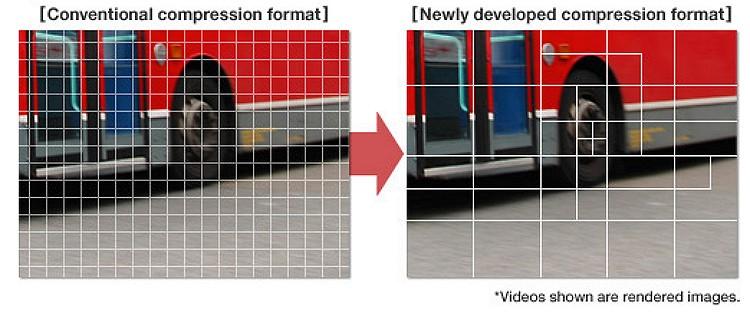
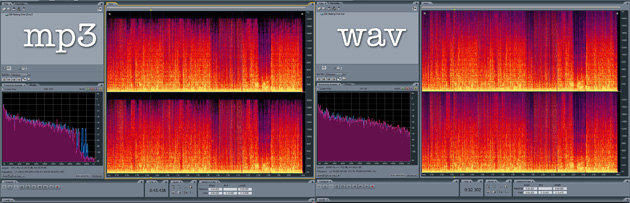
The problem is that when you compress the file to save space, you are removing blocks of data. For example, when you take a PNG screenshot of a computer screen and save it in JPEG format, you get a “flaw” in certain parts of the image, making it almost the same, but with some loss of clarity and quality. . Consider the image below as an example: on the right, it was compressed in JPG format, and its quality deteriorated as a result (when looking at the car’s color, details, and background). The same is true of music files that are “compressed” to MP3, if the comparison is correct. Loss of quality visible to the human ear or eye is called compression artifacts.

Lossy files are understandably a tradeoff, but a very significant one when it comes to hard drive space, which can make a huge difference on a 32GB iPhone. But there are also different levels of loss: 128 kbps, for example, takes up very little space, but it will be of lower quality than a 320 kbps file, which, in turn, has a lower quality than a 1411 kbps file. (which is considered true without loss). However, there are many arguments that most people may not even hear the difference between the two bit rates.

Is the bit rate that important?

As file storage becomes easier and cheaper, high bit rate music becomes more popular. But is it always worth your time, effort, and disk space?

The answer to this question is not simple, and so far, audiophiles are breaking spears in battles, trying to solve an equation with two unknowns. The first part of the equation depends on the technical implementation. If you use expensive headphones or good quality speakers, you can listen to music in a wide range of sounds. And this is where the low bit rate becomes noticeable and you can determine that low quality MP3 files lack a certain level of detail, subtle background tracks may be inaudible, highs and lows will not be as dynamic, or it may just listen to other significant sound distortions. In these cases, the lossless format is justified.

But if you listen to your favorite music through a cheap and generally bad pair of headphones on your iPod, you won’t notice the difference between a 128 kb file and a 320 kb file, let alone a 320 kb file versus one without. losses. file at 1411 kbps.


Free Download Mp4Gain
picture


Mp4Gain Main Window
picture


Mp4Gain Features
picture


Free Download Mp4Gain
picture

Opus, New codec: goodbye MP3?

Opus, New codec: goodbye MP3?

Opus format

There is a lot of talk on the web that the new Opus audio codec can replace the MP3 format. Read about how to improve the new compression algorithm in our article

Opus Codec:
Individual man-made discoveries turn out to be inventions so practical that they remain in everyday life for a long time. For example, the MP3 digital audio compression standard is about 20 years old, which is more than a long time by computer technology standards. During these twenty years, there have been many discoveries and technological advances. But for digital audio, oddly enough, little has changed so far. MP3 has found its way into all kinds of devices: smartphones, portable players, DVD players, watches, and other electronic devices.

Why is that? After all, lossy encoding is an inevitable degradation of sound quality. To the layman it may seem that MP3 has had alternatives for a long time: FLAC, APE and other algorithms for compressing audio data with the possibility of an identical restoration of the waveform after decoding. The judgment that the advent of lossless audio compression algorithms will compete with MP3 in all respects is very superficial. In addition to the sound quality that fans of music collections are so concerned with, there are many other objective reasons why MP3 cannot be forgotten and replaced by the principles of lossless compression.

First of all, because lossy audio encoding formats are used not only for music but also for voice over the Internet. The trump card of MP3 and other lossy compression mechanisms is the efficient use of transmission channels. To organize IP telephony, it is necessary to provide intelligible voice to as many subscribers as possible. In this case, the sound quality takes a back seat. Furthermore, the possibility of “instantaneous” decoding of the stream is very important, without which the synchronized exchange of information is difficult. In this case, the use (even theoretically) of lossless compression algorithms would lead to severe delays and interactive communication would simply be impossible.

However, MP3 is not without its drawbacks. It’s no secret that a low bit rate “devours” the details of the sound, endowing it with a whole host of unpleasant artifacts: overtones, hiss and timbres, all kinds of distortions. When using MP3 in IP telephony, there are long delays due to the need for additional data buffering.

⇡ # Opus: a new word in digital sound
The new open Opus codec lacks the most serious drawbacks of MP3, while retaining all the advantages of the “popular” codec and even multiplying them.

The Opus structure enables it to effectively deal with sound artifacts. For this, a multi-stage audio signal processing architecture has been proposed. The main argument that speaks in favor of the use of the new codec for IP telephony is the low delay.

The main work in creating a unique compression algorithm was done by several people: Jean-Marc Valin (Xiph.Org, Octasic, Mozilla Corporation), Koen Vos (Skype) and Timothy B. Terriberry (Xiph.Org, Mozilla Corporation) ). Not without the ubiquitous Google: According to the creators of Opus themselves, the internet giant provided significant support in the development and testing of the codec.

One of the creators of the Opus codec – Jean-Marc Valin
The new codec engine is based on two independent standards proposed by the Xiph.Org Foundation and Skype Technologies SA (owned by Microsoft). The new codec is a hybrid solution that combines the technologies of the CELT (Constrained Energy Lapped Transform) and SILK codecs. The latter is used to implement communication in Skype.

⇡ # How Opus works
The working principle of the codec is not new, but original and, most importantly, it allows to obtain a very good result in the output. The received signal is selectively encoded SEDA or CELT.

The first engine (SILK) is used for voice compression, as well as in cases where it is required to efficiently use the bandwidth of the communication channel. The processed audio signal is analyzed by the codec to detect the presence of human speech. The speech components are separated from other sounds, after which the codec analyzes the frequency response of the sound, reducing the resolution of data containing speech information, i.e. speech. Then Opus examines the noise present and optimizes the signal for a specific bit rate. The codec then converts the signal using a pre-filter. Using speech frames, the prediction module

What is the best bit rate for video and sound and what is it?

What is the best bit rate for video and sound and what is it?

Bitrate

Common characteristics of video and audio recordings include the so-called bit rate. Some users do not know how important this figure plays when playing files, along with their size and resolution.

BitRate

What is the bit rate? The bitrate is the number of bits that are used to process and transmit data during a certain period of time. This measurement is used to measure the effective transmission rate on a data stream channel. In other words, this is the minimum value of the channel capable of passing the flow without delay. The measure of video bit rate is bits per second and its derivatives (kbps, Mbps, etc.). In audio and video transmissions that use degrading compression, this term refers to the degree of compression of the transmission. Consequently, it indicates the size of the channel within which compression took place. Compression modes In practice, there are three modes of stream compression that cause quality loss: Constant Bit Rate (or CBR).

In this encoding option, the initial bit rate is set by the user and then does not change for the entire duration of the audio or video. Its advantage is that it is quite easy to calculate the size of the final file. However, this encoding is not very suitable for audio files that have dynamically changing sound, as it does not provide a good size / quality ratio. Variable bit rate (or VBR). The bitrate value is selected by the codec, depending on the parameters (the expected quality level). During the encoded fragment, the value of the bit rate may change. When audio is compressed, the required bit rate is set based on the psychoacoustic model. This encoding achieves the best sound quality ratio, but it is difficult to calculate the exact size of an audio or video recording. It can be very different. Average Bit Rate (or ABR). This is a hybrid of the first two modes.

The initial value of the bit rate is set by the user, but then independently changed by the program within certain limits. At the same time, the difference with VBR is that the codec uses the maximum and minimum values ​​within the limits set by the user, and does not exceed them. This encoding allows you to set the processing speed in the most flexible way and allows you to determine the file size with greater precision. What is the Getcontact application and how to use it

What and how is it measured? When quantifying high data rates, metric or decimal prefixes are used. It looks like this: Speed ​​1000 bps = 1 kbps (one kilobit or one thousand bits per second). Speed ​​1,000,000 bps = 1 Mbps (one megabit or one million bits per second). Speed ​​1,000,000,000 bps = 1 Gbps (one gigabit or one billion bits per second). What bit rate should I choose? In terms of the common MP3 audio format, it is the audio compression that results in data loss. The higher the bit rate, the better the sound quality. Speaking of the choice of the bit rate for this format, we can say the following: 32 kbps: very low quality sound (valid only for voice recording); 96 – May be applicable for low quality audio transmission or voice recording; 128 and 160: allows you to encode music recordings at an entry level; 192 – music encoding in acceptable quality; 256: high quality music recording; 320 is the highest quality you can get in MP3 format. In video formats, this value is calculated differently. For example, for videos on YouTube, a bit rate of 10-16 Mbps at 720p is sufficient. This will achieve a clear image and a small file size.

If better image quality is required, this value can be increased to 18-25 Mbps. The highest image quality will be achieved at 50 Mbps and 1080i resolution. In general, the effect of bitrate on video quality is expressed as follows: Yandex.Direct18 + Make money building websites! SITE.ONLINESCHOOL-PROFI.RU Make money writing articles COPYWRITING.ARTUR-GRANT.RU 400 kbps: low quality video at 240p; 750 kbps, 1 Mbps: can be used for some YouTube videos at 360p and 480p, respectively; up to 1.15 Mbps – compressed video in VCD format; 2.5 and 3.8 are compressed videos for YouTube, recorded at 720p; 4.5 and 6.8 are sharper YouTube videos but still compressed at 1080p resolution. 9.8 – DVD video recordings; 8-15 – high definition video recording using compression; 19 and 25 are HDV (high definition) recordings created at 720p and 1080i, respectively; 29.4 – high quality HD DVD video; 40 – Blu-Ray Disc recorded at 1080p; 250 – DCP format; 4Gbps: Uncompressed 1080p video recording.

Video codecs, video formats – what does this all mean?

Video codecs, video formats – what does this all mean?

video codec

What is video codec and video format?
If you are puzzled by the endless list of export options in your video editing software, this article is for you. Let’s first look at the definition of a codec. Then we will look at the concept of video format and then we will look at some of the most common codecs and their uses.

Video Codec

If you are recording or editing a video, you will almost immediately come across the term “codec”. Since there are so many and it’s hard to tell them apart, I’ve made a quick overview to help you get started. Once you understand certain terms, you can better decide which one suits your needs. Let’s start with a simple definition.

The video codec.

A codec is actually a combination of two words: an encoder and a decoder (co / dec). What are they doing? Bottom line, because video files are so large, you need a way to make them smaller. The codec encodes, compresses the data to store or send it, and then decompresses it for playback or editing.

A codec is a computer code that performs its function each time the software calls a file. Codecs can also be used on physical equipment, such as a camera, to digitize incoming video and audio.

This happens in real time, either at the point of capture or at the point of playback. However, if you are not a broadcast engineer, you must rely on your computer or device to select the codec. Hardware compresses your video and audio data for viewing, streaming, or storage.

The video format is.
The file format is similar to a container. The container contains data that has been compressed using a specific codec. And sometimes they have the same name.

For example, a file format such as Windows Media Audio contains data that is compressed using the Windows Media Audio codec. However, a file format such as Audio Video Interleaved (AVI) can contain data compressed with any of several different codecs, including MPEG-2, DivX, or XviD codecs.

AVI files can also contain data that is not compressed by any codec. Therefore, depending on the codecs installed on your system, some AVI files will play fine, while other AVI files, despite the same file extension, will not play.

It also affects the audio. Often there is a situation where when playing a video, the sound plays, but the video does not. This means that the appropriate video codec is installed on your device.

Terms display – video format

How do I determine the video format and video codec used?
Unfortunately, the tools built into Windows do not allow you to find detailed information about a video file.

What is the smallest video format?
Currently, the HEVC or H.265 codec is one of the most efficient available on the market and is commonly used to compress 8K UHD video. However, the use of the codec requires the payment of a license fee, so it is not widely supported or widely supported by different devices or browsers. For the Internet, the .WEBM format and the corresponding VP8 / VP9 codec are used. This package is widely supported and popular for reducing the size of video files.

However, it is important to consider factors other than size: where the files will be played and the required video quality.

What is the best audio format for me?

What is the best audio format for me?

Best Audio File Formats

After all, it’s not always clear which format is best for music. Some services, like Amazon, sell digital music in MP3 format. Although Apple offers song downloads from its iTunes Store in AAC format.

Audio File Formats

So the question arises what formats can your device play. If it is relatively new, it can play lossless formats like FLAC, as well as older lossy formats like MP3 and AAC.

And to add even more confusion, there is the listening factor. How important is sound quality to you?

To help you decide, here are some things you can do.

Check the format compatibility of your portable device

Before deciding on an audio format, the first thing to do is check its compatibility. This can usually be found on the manufacturer’s website or in the specifications section of the user manual (if there is one, of course).

If you are not going to use high quality audiophile equipment in the future, then lossy audio may be sufficient if you are only going to use your laptop. For greater compatibility, the MP3 file format is the safest bet. This is an old algorithm, but it works well. In fact, it is still the most compatible audio format for everyone.

However, if you are ripping tracks from a music CD, for example, it would be wise to keep a lossless copy on your computer / external hard drive and lose it for your laptop as well. This will keep your music safe in the future, even if new formats and hardware show up later.

Consider the bit rate

Bitrate is an important factor to know, especially if you are looking for the best quality music playback. However, the actual bit rate setting depends on the audio format you are using.

For example, the MP3 (MPEG-1 Audio Layer III) format has a bit rate range of 32 to 320 kbps. There are also two encoding methods you can choose from: CBR and VBR. In this case, instead of encoding using the default CBR (constant bit rate) encoding, it is much better to use VBR (variable bit rate) encoding. This is because VBR will provide you with the best file size ratio.

The encoding you use is also an important factor.

Best digital audio formats

Best digital audio formats

Digital Audio Formats

Today, there are several dozen formats (codecs) that are used to represent audio files. Among them, there are no more than a dozen running gear.
Save and read later –

MP3, FLAC, ACC, WAV

In the 20th century, we choose between the media and the media to play music. Cassettes, vinyl, CD – each multimedia format had its own player, each had its own advantages and disadvantages. In the 21st century, the focus has changed significantly. Playback tools have become omnivorous and you have to choose not the multimedia format, but the format of the audio file.

At a time when digital music had not yet penetrated the computer as it does now, the choice for connoisseurs of high-quality sound was quite simple and straightforward. The most popular CDs, and those who could afford to buy more expensive equipment and discs, opted for SACD or DVD-Audio players, or universal models that play all optical audio disc formats. Now you can get high-quality audio content without buying discs, in which case the whole choice comes down to the format for storing your music.

Today, there are several dozen formats (codecs) that are used to represent audio files. Among them, there are no more than a dozen running gear. Lossy audio compression is most often done using the MP3 (MPEG-1 Layer3) codec, less often the WMA format, which is a proprietary Microsoft development, is used for this purpose; AAC, developed by Apple or available under the GPL-free Ogg Vorbis format. We will not dwell on the topic of compressed audio in detail, we will limit ourselves to a brief description.

Saehan Information Systems F10 – The world’s first mp3 player appeared in 1998 and cost $ 250
The MP3 format and its aforementioned analogues allow you to compress CD quality music material into smaller files (the compression ratio ranges from 2: 1 to 11: 1). As the developers envisioned, compression algorithms should process the audio stream in such a way that the sound of the compressed file does not differ from the original. In fact, you can hear the difference between the sound of a compressed file and an uncompressed original, and the higher the quality class of the equipment, the more obvious these differences become. There is no difficulty in burning a CD to MP3 or getting ready-to-use MP3 files from the Internet or on physical media.

The only specificity of compression files is the ability to incorporate copy protection or unauthorized playback protection (DRM) into them. One of the main initiators and distributors of the technology to protect audio files was Apple, which, however, very early presented a proposal to abandon such solutions and urged all manufacturers of music products to distribute it without protection. Since 2009, music sold on the iTunes Store is not protected. The vast majority of compressed content sold over the Internet and on physical media is also not protected against unauthorized reproduction.

ITunes interface
There are several different formats to store digital music without losing quality. The lossless and uncompressed audio stream is saved to a WAV or AIFF file. In this case, the file type is determined by the type of operating system on which the audio stream is saved. WAV format is a joint development of Microsoft and IBM, and AIFF is the brainchild of Apple. There are also proprietary lossless audio compression formats: Microsoft’s WMA Loseless (also known as WMA9) and Apple’s ALAC. Of these, only the second has become widespread due to the fact that it is almost the only way to listen to high-quality audio from iOS devices.

Another option for storing uncompressed audio content is disc images, which are a single file with the ISO extension, which is an unmodified copy of the content on a digital medium.

The most widely used lossless music compression format is the FLAC (Free Lossless Audio Codec) format. As its name suggests, this format is distributed under a free license, which means that to ensure its support on any audio device, it is not necessary to pay royalties. FLAC allows you to store audio tracks with up to eight channels and a bit depth of up to 32 bits and a virtually unlimited sample rate, allowing it to be used to store any content, including multi-channel HD soundtracks. The popularity of FLAC as a high quality audio compression codec is as great as the popularity of MP3 among compression audio formats. The vast majority of high-quality music is stored and distributed in the FLAC format.

H.266 / VCC is now official, the new codec of the future that claims to reduce the size of videos by half

H.266 / VCC is now official, the new codec of the future that claims to reduce the size of videos by half

H.266/VCC


The history of codecs is the story of how, as video qualities superior to the previous generation arrived, better compression algorithms were needed so that the size of the files did not skyrocket. In this sense, H.264 or AVC, which is still the standard today, was a great advance over formats such as DivX and fu from the one used on Blu-Ray discs. After being the winner of High Definition, H.265 / HEVC succeeded it as the winner of Ultra High Definition (on UHD Blu-Ray and 4K video compression on smartphones.

H266

Now, facing the 8K era, there is more competition than ever, but the recently introduced H.266 / VCC is again, for what it proposes, the one that seems to be a great candidate for winner of the decade again. After five years of development, it has been presented by the Fraunhofer Heinrich Hertz Institute, and they promise that it will reduce the size of the videos in half compared to what they occupied with H.265. This means that if a current 4K movie occupies 10 GB, with this it would occupy 5 GB without losing detail.

These are the novelties of H.266, which will have more competition than ever
H266
With H.266 they have achieved the 50% bitrate reduction they were looking for
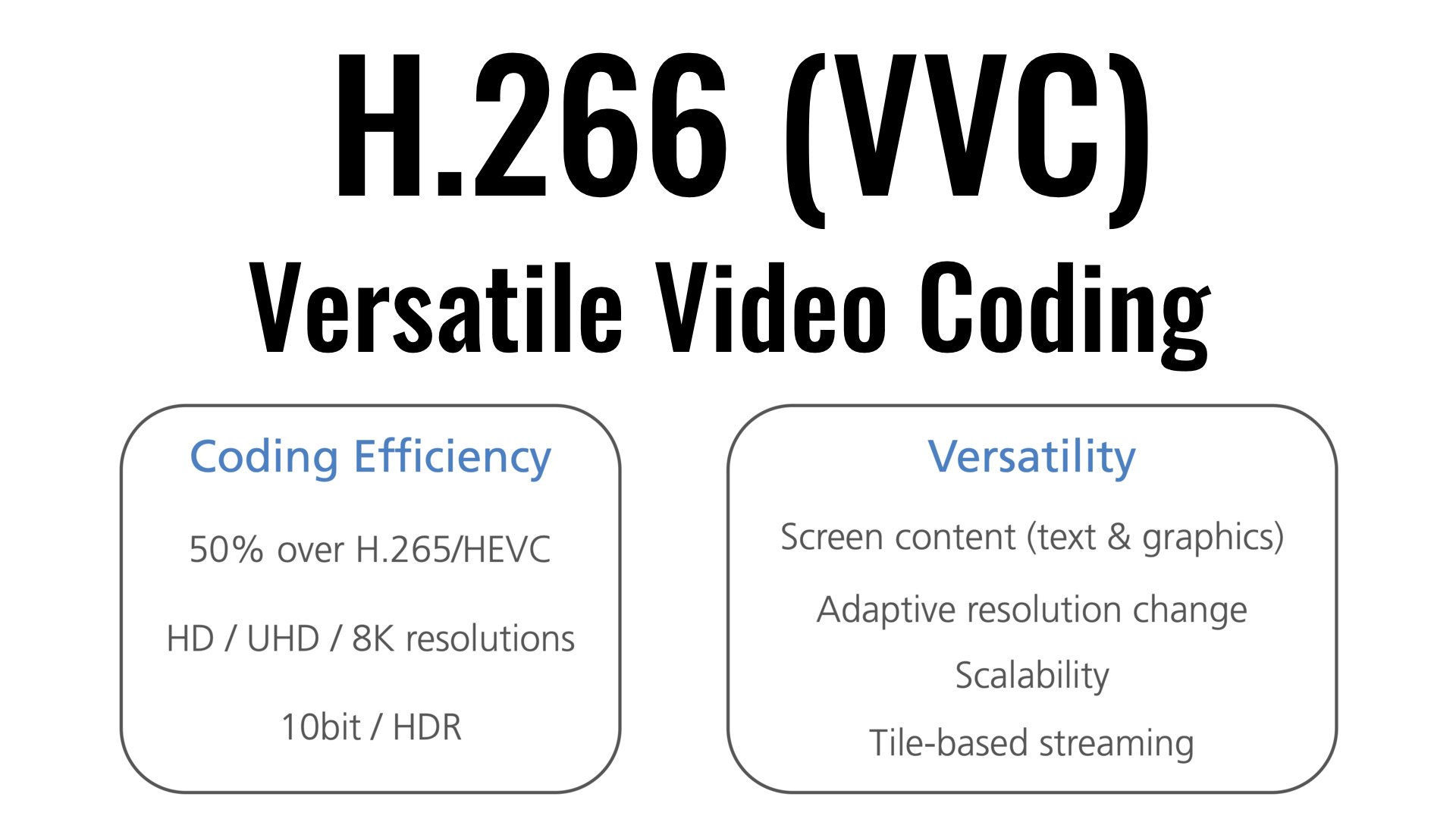
In addition to reducing the size by half, which in the official statement also relates to a 50% bitrate drop to maintain the same quality, H.266 will have support for SD, HD, 4K and 8K resolutions. In this sense, H.266 will also support adaptive resolution changes.

Additionally, how could it be otherwise, it will also support 10-bit HDR video with wide color spectra, which can be expanded in the future. This is important, because HDR formats, now being HDR10 and Dolby Vision the most popular, will also evolve. There will be support for 360 video and video streaming, such as games or shared screens.

HDR on television: this is the revolution called to eclipse 4K / UHD
IN XATAKA
HDR on television: this is the revolution called to eclipse 4K / UHD
H.266 will, according to the statement, be supported by Apple, Ericsson, Intel, Huawei, Microsoft, Qualcomm and Sony. With Apple and Qualcomm it is guaranteed that its expansion at the level of hardware support will be extensive, since chips with the ability to encode and decode need to arrive, as happened with the previous ones. Apple, for example, added these options with the A10 chip, previously, in the A9, it could only decode.

The key to adopting H.266 will be whether its advantages are worth it over being a closed standard
Even so, beyond all these advantages, the big problem with H.266 is that it is not an open codec, but a closed codec, like its predecessors. That means that, to integrate it into hardware and use it in software, you have to pay licenses, unlike the other codec called to succeed in this decade, AV1. This, which also has the support of large companies in the sector, such as Apple, Amazon, ARM, Netflix, Google, Intel, Mozilla, etc.

Being open the great asset of AV1, it will be necessary to see if its saving of 25% on average compared to H.265 compensates for its free compared to 50% of H.266. Recent history tells us that proprietary formats win.

What is the H.266 codec

What is the H.266 codec

H.266 (VVC)

The new H.266 standard, also known as VVC (Versatile Video Coding), is used to compress and decompress video files so that they take up less space when stored on a hard drive and less bandwidth when transferred through a net.

H.266/VVC

Codecs use different kinds of algorithms (similar to mathematical formulas) to reduce the size of files. The best codecs are the ones that reduce the files the most without significantly affecting the quality of the video.

codec h266 vvc compression
The new H.266 will be able to create files 50 percent smaller than the current H.265. This means that a 10 GB video encoded in H.264 occupies 5 GB in H.265 and only 2.5 GB in H.266.

H.264 Vs H.265 Vs H.266
Codec Publication year File size
H.264 2003 10 GB
H.265 2013 5 GB
H.266 2020 2.5 GB
This incredible reduction in file size will greatly help the playback and streaming of 8K HDR video content on the devices of the future.

In addition to that, the new codec will have support for 10-bit HDR and more versatility of resolutions (it will allow to scale or change the resolution adaptively).

The VVC standard specification document is over 500 pages long and it has taken Fraunhofer HHI engineers nearly 3 years to develop it together with their partners (Apple, Ericsson, Intel, Huawei, Microsoft, Qualcomm and Sony).

The Fraunhofer Institute for Telecommunications, Heinrich Hertz Institute, HHI, also known as Fraunhofer HHI or Fraunhofer Heinrich Hertz Institute, is an organization dedicated to applied research and development in the fields of physics, electrical engineering and computer science .
For photographers it could also lead to a more efficient image file format and another challenge to the dominance of JPEG as the lightweight file type of choice as the HEIF image format – implemented by Apple on the iPhone and, more recently, by Canon on the 1D X Mark III- is based entirely on H.265 / HEVC compression. For the same reason, H.266 / VVC could lead to an even more efficient “VIC” format for photos, although this is pure speculation at the moment.

As for when it will actually be applied, the adoption could end up being faster than H.265 thanks to the creation of the MC-IF (Media Coding Industry Forum or Forum of the Media Coding Industry). This industry body, made up of more than 30 companies, will be responsible for the “fair, reasonable and non-discriminatory” licensing of H.266 / VVC when encoding and decoding software (and hardware) are released to the market. end of this year.

The H.266 codec arrives to save the Internet: halves the size of streaming video

The H.266 codec arrives to save the Internet: halves the size of streaming video

H.266/VVC Codec

After three years of development, today the H.266 codec was introduced, which promises to halve the size of streaming videos without losing quality.

Codec H.266

The German Fraunhofer HHI institute has just introduced the long-awaited H.266 codec, which promises to lighten Internet traffic by halving the size of videos compared to the HEVC (H.265) codec. It is an important achievement considering that 80% of Internet traffic is streaming video.

The German Fraunhofer HHI institute, which is also behind the H.264 and H.265 formats, is part of the network of German institutions that also created the MP3 audio format. It has been working on the H.266 codec for three years together with Apple, Intel, Huawei, Microsoft, Qualcomm, Sony and Ericsson.

The main improvements of H.266 with respect to H.265 are two: the spectacular compression of the video, and its greater versatility. It is not only designed to encode streaming video or in local mode.

Register
Fraunhofer HHI claims that a 90 minute 4K video encoded with the H.265 codec occupies about 10 GB, but if it is encoded with H.266 it is reduced to 5 GB without losing image quality.

It is a format that accepts all resolutions, from low-resolution video to 8K, although it has been developed with 4K resolution in mind, so the main improvements are noticeable from this resolution.

As we have mentioned, it stands out for its versatility. It not only works well with conventional video or streaming. Also with 360-degree video, virtual reality, streaming video games like Google Stadia, screen sharing, etc. It also supports 10-bit color and HDR in all situations.

If you cut the video size in half without losing quality, the H.266 codec could be a major relief for Internet traffic, should platforms like Neftlix, Amazon Prime Video, YouTube or Disney + adapt it.

The main problem is that it is a licensed codec, only certain versions can be used for free and for non-commercial use. Netflix for example used H.264 and H.265 (HEVC), but for streaming on Android it opted for AV1, which is a free codec.

We’ll see what level of acceptance it has, but the fact that companies like Apple, Microsoft or Sony support it is important.

Software to encode and decode the H.266 codec will arrive in the fall. It will also be implemented in chips that will be used in mobiles, and devices such as Chromecast or Fire TV Stick.