AAC Normalizer


Free Download Mp4Gain
picture

AAC Normalizer: Optimize Your Audio Files for Perfect Sound Quality

 

AAC Normalizer
AAC Normalizer

AAC | LyreBeats

Audio files are an integral part of various digital media, including music, podcasts, and videos. However, inconsistent audio levels can hinder the listening experience and reduce the impact of your content. This is where the Mp4Gain – AAC Normalizer comes into play. With its advanced audio optimization capabilities, the Mp4Gain – AAC Normalizer ensures that your audio files have consistent volume levels, enhancing the overall sound quality.

Audio Level Normalization

The Mp4Gain – AAC Normalizer employs cutting-edge algorithms to normalize the audio levels of your files. It analyzes the volume of each audio segment and adjusts it accordingly to achieve a consistent level throughout the file. This normalization process ensures that listeners enjoy a seamless and immersive audio experience, eliminating the need to constantly adjust the volume.

Dynamic Range Compression

In addition to volume normalization, the Mp4Gain – AAC Normalizer also incorporates dynamic range compression. This technique balances the audio levels between the softest and loudest parts of the file. By compressing the dynamic range, it ensures that even subtle details are audible without overpowering the louder sections, resulting in a more polished and professional sound.

Batch Processing

Efficiency is key when dealing with large audio libraries. The Mp4Gain – AAC Normalizer offers batch processing capabilities, allowing you to optimize multiple files simultaneously. This time-saving feature ensures that you can enhance the audio quality of your entire collection with just a few clicks, eliminating the need for manual adjustments file by file.

Lossless Audio Compression

The Mp4Gain – AAC Normalizer employs lossless compression techniques to reduce the file size without compromising audio quality. By removing unnecessary data while retaining all the audible details, it creates more storage-friendly audio files that are easier to manage and share.

Presets and Customization

Flexibility is a vital aspect of any audio optimization tool, and the Mp4Gain – AAC Normalizer delivers on this front. It provides a range of presets tailored for different types of content, such as music, podcasts, or videos. Additionally, it allows users to customize the normalization settings, giving them full control over the output audio quality.

Multi-Platform Support

The Mp4Gain – AAC Normalizer is designed to work seamlessly across various platforms. Whether you’re using a Windows PC, macOS, or a Linux machine, you can take advantage of this powerful tool to optimize your audio files and achieve consistent sound quality across different devices.

Metadata Preservation

Metadata plays a crucial role in organizing and categorizing audio files. The Mp4Gain – AAC Normalizer ensures that all the important metadata, such as artist name, album title, and track number, are preserved during the optimization process. This means that your files remain well-organized and easily searchable, even after being processed by the Mp4Gain – AAC Normalizer.

Integration with Media Players

Seamless integration with popular media players is another highlight of the Mp4Gain – AAC Normalizer. It allows you to directly export optimized audio files to your preferred media player for immediate playback. This convenience ensures that you can enjoy the enhanced sound quality without any additional steps.

Audio Quality Analysis

Understanding the audio quality of your files is essential for making informed decisions. The Mp4Gain – AAC Normalizer includes a built-in audio quality analysis tool that provides detailed insights into the characteristics of your audio, such as frequency distribution, peak levels, and dynamic range. This information empowers you to fine-tune your audio optimization settings for maximum impact.

Compatibility with AAC Format

The Mp4Gain – AAC Normalizer is specifically designed to work with AAC (Advanced Audio Coding) files, one of the most popular audio formats. Whether your audio files are in AAC format by default or you convert them to AAC, this tool ensures optimal results by leveraging the format’s features and capabilities.

User-Friendly Interface

The Mp4Gain – AAC Normalizer features a user-friendly interface that makes it accessible to both novice and experienced users. Its intuitive design and straightforward controls enable easy navigation and quick optimization of audio files, saving you time and effort.

Real-Time Preview

When fine-tuning the audio optimization settings, it’s essential to hear the changes in real time. The Mp4Gain – AAC Normalizer offers a real-time preview feature that allows you to listen to the audio while adjusting the parameters. This instant feedback enables you to make precise adjustments and achieve the desired sound quality.

Enhanced Streaming Experience

In today’s digital age, streaming platforms have become the primary source of audio consumption. By using the Mp4Gain – AAC Normalizer to optimize your audio files, you ensure that your content delivers an enhanced streaming experience. Consistent audio levels and improved sound quality make your music, podcasts, or videos stand out among the vast array of online content.

Long-Term Preservation

Preserving the quality of your audio files for the long term is crucial, especially if you have an extensive collection or valuable recordings. The Mp4Gain – AAC Normalizer helps maintain the integrity of your files, ensuring that they retain their optimal sound quality for years to come, even through various storage and backup processes.

Professional Sound Production

Whether you’re a musician, podcaster, or content creator, achieving professional sound production is vital. The Mp4Gain – AAC Normalizer is a valuable tool in your arsenal, enabling you to elevate the audio quality of your creations and deliver a more immersive and engaging experience to your audience.

Efficient File Management

Managing audio files can be a complex task, particularly when dealing with large libraries. The Mp4Gain – AAC Normalizer simplifies file management by optimizing your audio files, making them more compact without sacrificing quality. This efficient file management ensures that you can store, transfer, and organize your audio collection more effectively.

Increased Accessibility

Optimizing audio files with the Mp4Gain – AAC Normalizer also contributes to increased accessibility. By normalizing the volume levels and improving the sound quality, you make your content more accessible to individuals with hearing impairments or those who rely on assistive technologies. Everyone can enjoy your audio content, regardless of their listening abilities.

Industry-Standard Solution

The Mp4Gain – AAC Normalizer adheres to industry standards in audio processing and optimization. It has been developed by experts in the field, ensuring that you have access to a reliable and trusted solution for enhancing the quality of your audio files. You can rely on the Mp4Gain – AAC Normalizer to meet professional standards and deliver outstanding results.

By utilizing the Mp4Gain – AAC Normalizer, you can optimize your audio files and unlock their full potential. Achieve consistent volume levels, improved sound quality, and efficient file management, ultimately enhancing the overall listening experience for your audience.



Free Download Mp4Gain
picture


Mp4Gain Main Window
picture


Mp4Gain Features
picture


Free Download Mp4Gain
picture

3GP Normalizer

3GP Normalizer

3GP Normalizer
3GP Normalizer
3GP Normalizer
3GP Normalizer

3GP file normalization

3GP file normalization is a vital process that ensures consistent audio and video quality in 3GP format files. By applying normalization, the volume levels are adjusted, resulting in a balanced and optimized playback experience for 3GP files.

How to normalize 3GP files

If you want to normalize your 3GP files, there are various methods available. You can use dedicated video editing software that offers normalization features or employ specialized audio tools to adjust the audio levels. Both options allow you to achieve a consistent volume across your 3GP files.

Benefits of normalizing 3GP files

Normalizing 3GP files offers several benefits. Firstly, it ensures that the audio levels in your videos are balanced, eliminating any sudden volume changes that may occur during playback. Normalization also enhances the overall viewing experience by providing a consistent audio level, making it easier to understand dialogue and enjoy the accompanying soundtrack. Additionally, normalized 3GP files are optimized for sharing and distribution, ensuring that your audience receives a consistent viewing experience.

Best practices for 3GP normalization

When normalizing 3GP files, it’s important to follow some best practices. Firstly, it’s recommended to work with a high-quality source file to ensure optimal results. Additionally, carefully monitor the audio levels during the normalization process to avoid introducing distortion or clipping. It’s also essential to preview the normalized files on different devices and playback environments to ensure they sound as intended.

Common misconceptions about 3GP normalization

There are a few misconceptions surrounding 3GP normalization that need clarification. One misconception is that normalization can fix all audio issues, such as background noise or audio artifacts. However, normalization primarily focuses on adjusting volume levels and does not address other audio quality problems. It’s important to note that excessive normalization can lead to a loss of dynamic range, so it’s crucial to apply normalization conservatively.

Preserving video quality during 3GP normalization

During the 3GP normalization process, it’s important to preserve the video quality as well. While the primary goal is to adjust the audio levels, any changes made to the video should not compromise its visual integrity. Choose a normalization method that maintains the original video resolution, frame rate, and other visual attributes to ensure a seamless viewing experience.

Future-proofing your 3GP files with normalization

Normalization plays a significant role in future-proofing your 3GP files. As technology advances and new playback devices emerge, normalized files ensure compatibility and consistent viewing experiences. By normalizing your 3GP files, you can be confident that they will look and sound great on various platforms, both now and in the future.

Summary

3GP normalization is a vital process that adjusts the audio levels in 3GP files to ensure a consistent viewing experience. By normalizing your 3GP files, you can eliminate volume inconsistencies and optimize the audio quality. Following best practices, such as using high-quality source files and monitoring the audio levels, is essential for successful normalization. Preserve the video quality during the process and future-proof your 3GP files by embracing normalization. Enjoy a seamless viewing experience across different devices and platforms with properly normalized 3GP files.

AVI Normalizer

AVI Normalizer

AVI Normalizer
AVI Normalizer
AVI Normalizer
AVI Normalizer

AVI file normalization

AVI file normalization is a crucial process that ensures consistent audio and video quality in AVI format files. By applying normalization, the volume levels are adjusted, resulting in a balanced and optimized playback experience for AVI files.

How to normalize AVI files

If you want to normalize your AVI files, there are various methods available. You can use dedicated video editing software that offers normalization features or employ specialized audio tools to adjust the audio levels. Both options allow you to achieve a consistent volume across your AVI files.

Benefits of normalizing AVI files

Normalizing AVI files offers several benefits. Firstly, it ensures that the audio levels in your videos are balanced, eliminating any sudden volume changes that may occur during playback. Normalization also enhances the overall viewing experience by providing a consistent audio level, making it easier to understand dialogue and enjoy the accompanying soundtrack. Additionally, normalized AVI files are optimized for sharing and distribution, ensuring that your audience receives a consistent viewing experience.

Best practices for AVI normalization

When normalizing AVI files, it’s important to follow some best practices. Firstly, it’s recommended to work with a high-quality source file to ensure optimal results. Additionally, carefully monitor the audio levels during the normalization process to avoid introducing distortion or clipping. It’s also essential to preview the normalized files on different devices and playback environments to ensure they sound as intended.

Common misconceptions about AVI normalization

There are a few misconceptions surrounding AVI normalization that need clarification. One misconception is that normalization can fix all audio issues, such as background noise or audio artifacts. However, normalization primarily focuses on adjusting volume levels and does not address other audio quality problems. It’s important to note that excessive normalization can lead to a loss of dynamic range, so it’s crucial to apply normalization conservatively.

Preserving video quality during AVI normalization

During the AVI normalization process, it’s important to preserve the video quality as well. While the primary goal is to adjust the audio levels, any changes made to the video should not compromise its visual integrity. Choose a normalization method that maintains the original video resolution, frame rate, and other visual attributes to ensure a seamless viewing experience.

Future-proofing your AVI files with normalization

Normalization plays a significant role in future-proofing your AVI files. As technology advances and new playback devices emerge, normalized files ensure compatibility and consistent viewing experiences. By normalizing your AVI files, you can be confident that they will look and sound great on various platforms, both now and in the future.

Summary

AVI normalization is a crucial process that adjusts the audio levels in AVI files to ensure a consistent viewing experience. By normalizing your AVI files, you can eliminate volume inconsistencies and optimize the audio quality. Following best practices, such as using high-quality source files and monitoring the audio levels, is essential for successful normalization. Preserve the video quality during the process and future-proof your AVI files by embracing normalization. Enjoy a seamless viewing experience across different devices and platforms with properly normalized AVI files.

M4A Normalizer

M4A Normalizer

M4A Normalizer
M4A Normalizer
M4A Normalizer
M4A Normalizer

M4A audio normalization

M4A audio normalization is an essential process to ensure consistent sound quality in M4A format files. By applying normalization, the volume level is adjusted in each track or file, helping to avoid drastic fluctuations and ensuring an optimal listening experience.

How to normalize M4A files

If you want to normalize your M4A files, there are different methods available. You can use audio editing software that offers normalization options or employ a batch processing technique to normalize multiple files simultaneously. Both options allow you to adjust the volume to achieve uniformity in your M4A files.

Benefits of normalizing M4A files

Normalizing your M4A files offers several benefits. Firstly, it helps maintain consistent volume levels throughout your audio collection, making it more enjoyable to listen to. Normalization also ensures that your audio files are optimized for different playback devices, preventing unexpectedly loud or soft playback. Additionally, when sharing or streaming your M4A files, normalization helps provide a consistent listening experience for your audience.

Best practices for M4A normalization

When normalizing M4A files, it’s important to follow some best practices. Firstly, make sure to backup your original files before applying any changes, as normalization is an irreversible process. Additionally, consider using a reputable audio editing software that provides precise control over volume adjustments. It’s also recommended to listen to the normalized files on different playback devices and environments to ensure they sound as intended.

Common misconceptions about M4A normalization

There are a few misconceptions surrounding M4A normalization that need clarification. One misconception is that normalization can completely eliminate audio imperfections, such as background noise or distortion. However, normalization primarily focuses on adjusting volume levels and does not address other audio issues. It’s also important to note that excessive normalization can lead to audio clipping or distortion, so it’s crucial to apply normalization conservatively.

Importance of metadata preservation during M4A normalization

During the normalization process, it’s essential to preserve the metadata of your M4A files. Metadata contains valuable information such as artist name, album title, and track number. When choosing a normalization method, ensure that it retains the original metadata or provides an option to reapply it after normalization. This way, your audio library remains well-organized and searchable.

Future-proofing your M4A files with normalization

Normalization plays a crucial role in future-proofing your M4A files. As audio technologies evolve and new playback devices emerge, normalized files ensure compatibility and consistent listening experiences. By normalizing your M4A files, you can be confident that they will sound great on various platforms, both now and in the future.

Summary

M4A normalization is a process that adjusts volume levels in M4A audio files, providing a consistent listening experience. By normalizing your M4A files, you can ensure uniformity, optimize playback, and improve the overall quality of your audio collection. Following best practices and preserving metadata are essential aspects of the normalization process. Future-proof your M4A files by embracing normalization and enjoy high-quality audio across different devices and platforms.

MP3 vs. AAC

MP3 vs. AAC: Audio Quality Comparison

MP3 vs. AAC
MP3 vs. AAC
MP3 vs. AAC
MP3 vs. AAC

MP3 Audio Compression

MP3, or MPEG Audio Layer-3, is a widely-used audio format known for its efficient compression. It uses perceptual coding techniques to discard certain audio frequencies that are less perceptible to the human ear. This compression allows for smaller file sizes while maintaining an acceptable level of audio quality.

AAC Audio Codec

AAC, or Advanced Audio Coding, is a successor to MP3 and offers improved audio quality at similar bitrates. AAC utilizes more advanced compression algorithms, including perceptual noise shaping and temporal noise shaping, resulting in better sound reproduction and higher fidelity compared to MP3.

Differences in Audio Quality

When comparing MP3 and AAC in terms of audio quality, there are several factors to consider. AAC generally provides better sound quality than MP3 at similar bitrates. This is because AAC is capable of preserving more audio details and nuances, resulting in a more accurate reproduction of the original sound.

Bitrate Efficiency

One advantage of MP3 over AAC is its superior bitrate efficiency. MP3 achieves good audio quality while keeping file sizes relatively small. This makes it suitable for applications with limited storage or low bandwidth, such as online music streaming or portable audio players.

Transparent Compression

AAC is often considered a “transparent” audio codec, meaning it can achieve audio quality indistinguishable from the original source, even at lower bitrates. This makes AAC a preferred choice for high-quality audio applications, such as digital music distribution and professional audio production.

Compatibility and Support

MP3 enjoys broad compatibility across various devices and platforms due to its widespread adoption. It is supported by virtually all audio players, software, and hardware devices. AAC, on the other hand, may require specific codecs or software support, although it has gained significant popularity and compatibility in recent years.

Application Considerations

Choosing between MP3 and AAC depends on the specific application and user preferences. If file size and compatibility are the primary concerns, MP3 may be the preferred choice. However, for applications where audio quality is paramount, such as music production or high-fidelity audio playback, AAC offers a superior option.

Transcoding and Conversion

Transcoding or converting audio files from one format to another may result in some loss of audio quality. If transcoding from MP3 to AAC, the original MP3 compression artifacts may be retained or exacerbated. It is generally recommended to use the highest-quality source file available to maintain audio fidelity.

Subjective Listening Tests

Subjective listening tests involving trained listeners have consistently shown that AAC often provides better audio quality compared to MP3 at similar bitrates. However, individual preferences can vary, and some listeners may not perceive significant differences between the two formats in certain scenarios.

Choosing the Right Format

Ultimately, the choice between MP3 and AAC depends on factors such as the intended use, available storage or bandwidth, desired audio quality, and compatibility requirements. Evaluating these factors and conducting listening tests can help determine the most suitable audio format for a specific application or use case.

Optimizing Audio Quality

To optimize audio quality, it is important to consider not only the choice of audio format but also factors such as the source recording quality, mastering techniques, and the playback equipment used. Additionally, using higher bitrates

OGG Normalizer

OGG Normalizer

OGG Normalizer
OGG Normalizer
OGG Normalizer
OGG Normalizer

Mp4Gain is an advanced tool designed to optimize and enhance the audio quality of your OGG files. With this powerful software, you can easily adjust and balance the volume levels of your OGG tracks, ensuring a consistent and enjoyable listening experience. Whether you have a collection of music, podcasts, or audio recordings in OGG format, OGG Normalizer provides the perfect solution for achieving optimal audio levels.

Volume Equalizer

Improve the audio quality of your OGG files with our advanced volume equalizer. This feature allows you to adjust and normalize the volume levels across all your OGG tracks, eliminating any discrepancies and ensuring a smooth and pleasant listening experience.

Sound Level Normalization

Bring uniformity to your OGG collection by normalizing the sound levels. Our OGG Normalizer analyzes each audio file and adjusts the volume to achieve consistent levels, eliminating the need to constantly adjust the volume while listening to your favorite tracks.

Audio Quality Enhancement

Elevate the audio quality of your OGG files with our advanced normalization techniques. OGG Normalizer enhances the overall sound clarity and richness, allowing you to enjoy your music or podcasts with improved dynamics and balanced volume levels.

Device-Specific Volume Optimization

Mp4Gain provides the flexibility to optimize the volume levels of your OGG files for different playback devices. Whether you’re using headphones, speakers, or car stereo systems, our software ensures that the volume is optimized for each specific device, delivering an optimal audio experience.

Volume Fluctuation Correction

Eliminate annoying volume fluctuations in your OGG tracks. OGG Normalizer detects and corrects any sudden changes in volume, ensuring a smooth and consistent playback experience without any unexpected loud or soft sections within your audio files.

Preserving Audio Quality

Our OGG Normalizer employs advanced algorithms to normalize the volume levels while preserving the original audio quality. You can confidently normalize your OGG files without worrying about any degradation in sound or loss of fidelity.

Professional-Grade Audio Output

If you’re a content creator or podcaster, OGG Normalizer helps you achieve professional-grade audio quality. By normalizing your OGG files, you can ensure that your recordings have consistent volume levels that meet industry standards.

Batch Processing Efficiency

Save time and effort with the batch processing feature of OGG Normalizer. This allows you to normalize multiple OGG files simultaneously, streamlining the optimization process for your entire audio library.

User-Friendly Interface

OGG Normalizer features a user-friendly interface, making it easy for both novice and advanced users to navigate and utilize its functionalities. The software provides clear instructions and options, ensuring a hassle-free experience in normalizing your OGG files.

Customizable Normalization Settings

Customize the normalization settings according to your preferences. Adjust the target volume, set desired loudness levels, and fine-tune the normalization process to achieve the perfect balance for your OGG files.

Compatibility with Various Audio Formats

In addition to OGG files, Mp4Gain supports a wide range of audio formats, including WAV, FLAC, AAC, and more. You can confidently normalize the volume levels of different audio file types, allowing for a unified and harmonious audio experience.

Efficient Performance and Reliable Results

OGG Normalizer is built to deliver efficient performance. The Mp4Gain software operates seamlessly, swiftly processing your OGG files and providing accurate volume normalization results, ensuring that your audio library is optimized effectively.

Enhanced Music Listening Experience

By normalizing your OGG files, you can enhance your music listening experience. Say goodbye to constantly adjusting the volume and enjoy a seamless playback with consistent volume levels, allowing you to fully immerse yourself in the music.

Optimal Sound Balance

Mp4Gain OGG Normalizer ensures optimal sound balance in your OGG files. It intelligently analyzes and adjusts the volume levels, preventing any parts of the audio from being too loud or too soft. This results in a well-balanced audio output that is pleasing to the ears.

Distraction-Free Audio Recordings

If you have audio recordings with inconsistent volume levels, OGG Normalizer is the solution. By normalizing the volume, you can eliminate distractions caused by sudden changes in volume, ensuring that your focus remains on the content of the recording.

Compatibility with Different Operating Systems

Mp4Gain OGG Normalizer is compatible with Windows.

Data Integrity and Lossless Normalization

During the normalization process, Mp4Gain OGG Normalizer ensures the integrity of your data. The software performs lossless normalization, meaning it preserves the original audio data without any degradation or loss of quality.

MP3 Normalizer

MP3 Normalizer

MP3 Normalizer
MP3 Normalizer
MP3 Normalizer
MP3 Normalizer

MP3 Normalizer is an advanced tool designed to optimize and enhance the audio quality of your MP3 files. With this powerful software, you can easily adjust and balance the volume levels of your MP3 tracks, ensuring a consistent and enjoyable listening experience. Whether you have a music collection, podcasts, or audio recordings, MP3 Normalizer provides the perfect solution for achieving optimal audio levels.

Volume Equalizer

Improve the audio quality of your MP3 files with our advanced volume equalizer. This feature allows you to adjust and normalize the volume levels across all your MP3 tracks, eliminating any discrepancies and ensuring a smooth and pleasant listening experience.

Sound Level Normalization

Bring uniformity to your MP3 collection by normalizing the sound levels. Our MP3 Normalizer analyzes each audio file and adjusts the volume to achieve consistent levels, eliminating the need to constantly adjust the volume while listening to your favorite tracks.

Audio Quality Enhancement

Elevate the audio quality of your MP3 files with our advanced normalization techniques. MP3 Normalizer enhances the overall sound clarity and richness, allowing you to enjoy your music or podcasts with improved dynamics and balanced volume levels.

Device-Specific Volume Optimization

MP3 Normalizer provides the flexibility to optimize the volume levels of your MP3 files for different playback devices. Whether you’re using headphones, speakers, or car stereo systems, our software ensures that the volume is optimized for each specific device, delivering an optimal audio experience.

Volume Fluctuation Correction

Eliminate annoying volume fluctuations in your MP3 tracks. MP3 Normalizer detects and corrects any sudden changes in volume, ensuring a smooth and consistent playback experience without any unexpected loud or soft sections within your audio files.

Preserving Audio Quality

Our MP3 Normalizer employs advanced algorithms to normalize the volume levels while preserving the original audio quality. You can confidently normalize your MP3 files without worrying about any degradation in sound or loss of fidelity.

Professional-Grade Audio Output

If you’re a content creator or podcaster, MP3 Normalizer helps you achieve professional-grade audio quality. By normalizing your MP3 files, you can ensure that your recordings have consistent volume levels that meet industry standards.

Batch Processing Efficiency

Save time and effort with the batch processing feature of MP3 Normalizer. This allows you to normalize multiple MP3 files simultaneously, streamlining the optimization process for your entire audio library.

User-Friendly Interface

MP3 Normalizer features a user-friendly interface, making it easy for both novice and advanced users to navigate and utilize its functionalities. The software provides clear instructions and options, ensuring a hassle-free experience in normalizing your MP3 files.

Customizable Normalization Settings

Customize the normalization settings according to your preferences. Adjust the target volume, set desired loudness levels, and fine-tune the normalization process to achieve the perfect balance for your MP3 files.

Compatibility with Various Audio Formats

In addition to MP3 files, MP3 Normalizer supports a wide range of audio formats, including WAV, FLAC, AAC, and more. You can confidently normalize the volume levels of different audio file types, allowing for a unified and harmonious audio experience.

Efficient Performance and Reliable Results

MP3 Normalizer is built to deliver efficient performance. The software operates seamlessly, swiftly processing your MP3 files and providing accurate volume normalization results, ensuring that your audio library is optimized effectively.

Enhanced Music Listening Experience

By normalizing your MP3 files, you can enhance your music listening experience. Say goodbye to constantly adjusting the volume and enjoy a seamless playback with consistent volume levels, allowing you to fully immerse yourself in the music.

Optimal Sound Balance

MP3 Normalizer ensures optimal sound balance in your MP3 files. It intelligently analyzes and adjusts the volume levels, preventing any parts of the audio from being too loud or too soft. This results in a well-balanced audio output that is pleasing to the ears.

Distraction-Free Audio Recordings

If you have audio recordings with inconsistent volume levels, MP3 Normalizer is the solution. By normalizing the volume, you can eliminate distractions caused by sudden changes in volume, ensuring that your focus remains on the content of the recording.

Compatibility with Different Operating Systems

MP3 Normalizer is compatible with various operating systems, including Windows, macOS, and Linux. Regardless of the platform you use, you can easily access and utilize the software to optimize the volume levels of your MP3 files.

Data Integrity and Lossless Normalization

During the normalization process, MP3 Normalizer ensures the integrity of your data. The software performs lossless normalization, meaning it preserves the original audio data without any degradation or loss of quality.

Decoding the Secrets of Video Frame Interpolation

Decoding the Secrets of Video Frame Interpolation

Video Frame Interpolation

What is video frame interpolation and how does it work?

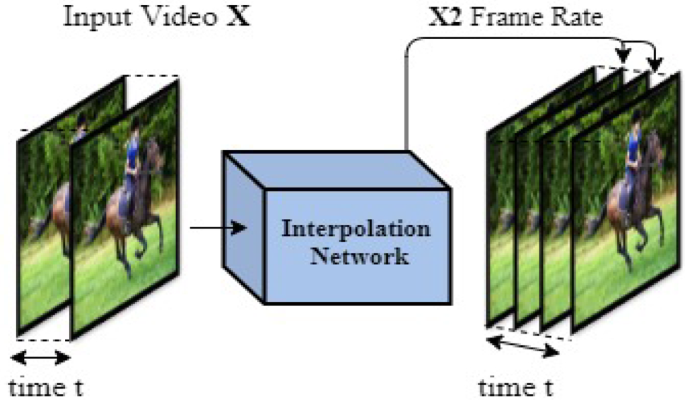
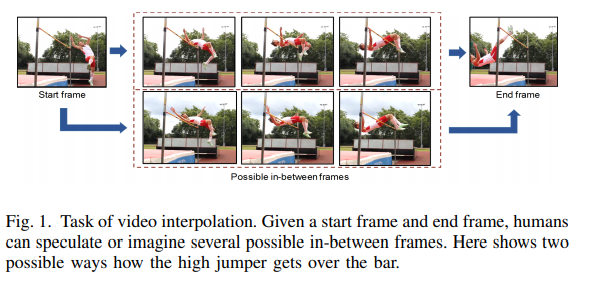
Video frame interpolation is a technique used to generate new frames of video content based on existing frames. It involves creating additional frames between the original frames to improve the smoothness and visual quality of video playback. Let’s explore how video frame interpolation works and its benefits in video production and playback.

Video frame interpolation utilizes advanced algorithms to analyze the motion and content of adjacent frames. Based on this analysis, the algorithm generates new frames that fill the gaps between the original frames. These interpolated frames are designed to seamlessly blend with the existing frames, creating the illusion of smoother motion and reducing the perception of jerkiness or choppiness in videos.

By inserting additional frames, video frame interpolation can increase the frame rate of a video. For example, if a video is originally recorded at 30 frames per second (fps), frame interpolation can create intermediate frames to enhance the perceived motion smoothness, making it appear as if the video is playing at a higher frame rate.

Improving video playback with frame interpolation

The use of video frame interpolation has several benefits in video playback and production, enhancing the visual experience and offering creative possibilities. Let’s delve into some advantages of frame interpolation in video playback.

Smooth motion: Frame interpolation reduces the visual jerkiness or stuttering often associated with lower frame rates. By adding interpolated frames, the algorithm smoothes out the motion between the original frames, resulting in more fluid and natural-looking video playback.

Enhanced visual quality: Frame interpolation can enhance the visual quality of videos by reducing motion blur and artifacts caused by rapid motion. The interpolated frames contribute to sharper and clearer visuals, improving the overall viewing experience.

In video production, frame interpolation offers creative opportunities for slow-motion effects, time manipulation, and motion control. By adjusting the frame rate and applying frame interpolation techniques, filmmakers can achieve unique visual effects and precise control over the perception of time in their productions.

In conclusion, video frame interpolation is a powerful technique that enhances video playback by creating additional frames between the original frames. By improving motion smoothness and visual quality, frame interpolation offers an enhanced viewing experience and opens up creative possibilities in video production.

Can frame interpolation affect video playback performance?

While video frame interpolation can significantly improve the visual quality and smoothness of video playback, it may also impact video playback performance in certain situations. Let’s explore the factors that can influence the performance of frame interpolation and how to mitigate potential issues.

The computational requirements of frame interpolation algorithms can be demanding, especially for high-resolution videos or when real-time interpolation is required. Processing the additional frames in real-time may strain the hardware resources of devices, leading to decreased performance or potential playback issues.

The impact on performance also depends on the complexity of the video content. Videos with highly dynamic motion or intricate details may require more computational power for accurate frame interpolation, potentially affecting playback performance on devices with limited processing capabilities.

To mitigate performance issues, it’s essential to consider the following:

Hardware capabilities: Ensure that the playback device has sufficient processing power and resources to handle frame interpolation effectively. High-performance devices with powerful processors and dedicated graphics capabilities can handle frame interpolation more efficiently.

Optimized settings: Adjusting the interpolation settings, such as the interpolation method or frame rate adjustment, can help optimize performance. Choosing a lower frame rate adjustment or utilizing more efficient interpolation methods can reduce the computational demands while still providing a noticeable improvement in video smoothness.

It’s worth noting that frame interpolation is not always necessary or desirable for all video content. Some viewers prefer the original frame rate and motion characteristics of videos, while others may appreciate

Enhancing Audio Efficiency with Variable Bitrates

Enhancing Audio Efficiency with Variable Bitrates

Variable Bitrates
Variable Bitrates
Variable Bitrates
Variable Bitrates

What are variable bitrates in audio compression?

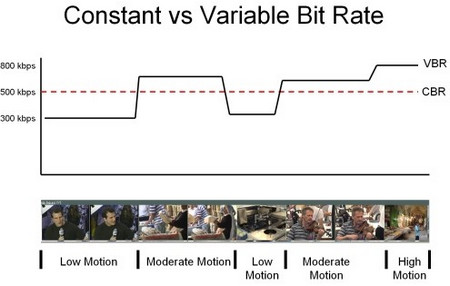
When it comes to audio compression, variable bitrates (VBR) play a crucial role in optimizing file sizes without compromising audio quality. Unlike constant bitrates (CBR), where the bitrate remains consistent throughout the audio file, VBR adjusts the bitrate dynamically based on the complexity of the audio content.

With VBR, the audio encoder allocates a higher bitrate to more intricate and demanding parts of the audio, such as music or sound effects, and a lower bitrate to simpler sections, such as silence or quiet passages. This flexibility allows for efficient compression, reducing the overall file size while maintaining excellent audio quality.

By utilizing VBR, audio files can achieve significant compression ratios without perceptible loss in audio fidelity. This makes VBR an ideal choice for various applications, including streaming services, podcasts, music distribution, and more.

Optimizing audio quality with variable bitrates

To enhance audio efficiency and deliver optimal quality, utilizing variable bitrates is essential. Let’s explore how VBR contributes to audio optimization and its benefits in different contexts.

Streaming services: With the increasing popularity of music and video streaming platforms, efficient audio compression is crucial to provide seamless playback while conserving bandwidth. VBR ensures that audio files are compressed intelligently, allocating more bits to complex audio segments and fewer bits to simpler parts. This optimization results in high-quality audio streaming with minimal buffering and bandwidth consumption.

Podcasts and spoken-word content: Variable bitrates are particularly advantageous for podcasts and other spoken-word content. These formats often contain long stretches of silence or low-intensity speech, which can be compressed efficiently with lower bitrates. However, when music or sound effects are introduced, VBR allocates a higher bitrate to ensure the clarity and fidelity of those elements, enhancing the overall listening experience.

In summary, variable bitrates offer a versatile approach to audio compression, delivering excellent audio quality while optimizing file sizes. By dynamically allocating bitrates based on the complexity of the audio content, VBR ensures efficient compression for various applications, including streaming services and spoken-word content.

How do variable bitrates impact audio file sizes?

The use of variable bitrates (VBR) in audio compression significantly impacts the file sizes of audio recordings. Let’s explore how VBR affects file sizes and the factors to consider when using this technique.

When compared to constant bitrates (CBR), which maintain a consistent bitrate throughout the audio file, VBR can produce smaller file sizes without compromising audio quality. This is because VBR allocates higher bitrates to more complex parts of the audio and lower bitrates to simpler sections, resulting in a more efficient use of data.

The actual impact on file sizes depends on the nature of the audio content. For audio recordings with a lot of silence or low-intensity passages, VBR can significantly reduce the file size by allocating fewer bits to those sections. However, when the audio contains highly dynamic or complex elements, such as music or sound effects, VBR increases the bitrate to preserve the quality and detail of those components.

It’s important to note that the specific VBR settings chosen during the compression process can also affect file sizes. Higher VBR settings generally result in larger file sizes, as the encoder allocates more bits to maintain higher audio quality throughout the recording. Lower VBR settings, on the other hand, can lead to smaller file sizes but may sacrifice some audio fidelity in more complex sections.

When determining the appropriate VBR settings for a particular audio recording, it’s essential to consider the desired balance between file size and audio quality. For applications where file size is a significant concern, such as streaming services or limited storage environments, lower VBR settings may be preferred. However, for situations that prioritize audio fidelity, such as music production or high-quality audio distribution, higher VBR settings are recommended.

In conclusion, variable bitrates have a significant impact on audio file sizes. By dynamically adjusting the bitrate based on the complexity of the audio content, VBR allows for efficient compression, resulting in smaller file sizes while maintaining audio quality. The specific VBR settings chosen during compression should align with the intended purpose and priorities of the audio recording.

Optimizing audio file storage with variable bitrates

Efficient storage of audio files is essential for various applications, including music libraries, sound libraries, and multimedia production. Variable bitrates (VBR) offer an effective solution for optimizing audio file storage. Let’s explore some considerations and benefits of using VBR for storage optimization.

Smaller file sizes: VBR allows for more efficient compression of audio files by allocating fewer bits to simpler sections, resulting in smaller overall file sizes. This is particularly advantageous for applications with limited storage capacities or when transferring files over networks with limited bandwidth.

Preserving audio quality: Despite the reduction in file sizes, VBR maintains excellent audio quality by allocating higher bitrates to complex sections, such as music or sound effects. This ensures that the integrity and fidelity of the audio content are preserved, even in compressed formats.

Compatibility: VBR-encoded audio files are compatible with a wide range of devices and software players. Whether it’s music playback on mobile devices, media editing on computers, or streaming on various platforms, VBR-encoded files can be seamlessly utilized across different environments.

By utilizing VBR for audio file storage, organizations and individuals can optimize their storage capacities, reduce bandwidth requirements, and ensure high-quality audio playback. Whether it’s managing extensive music libraries or distributing sound effects, VBR offers a practical solution for efficient storage and retrieval of audio content.

LSI keywords: audio compression, audio optimization, file size reduction, bandwidth consumption, storage efficiency, streaming quality, music distribution, podcast production, multimedia storage, storage optimization.

A Closer Look at Video Resolution and Aspect Ratios

A Closer Look at Video Resolution and Aspect Ratios

Video Resolution
Video Resolution


Video Resolution
Video Resolution

What is the difference between resolution and aspect ratio?

When it comes to video quality, two important factors to consider are resolution and aspect ratio. Although they are related, they represent different aspects of the visual experience. Let’s delve deeper into each of these terms.

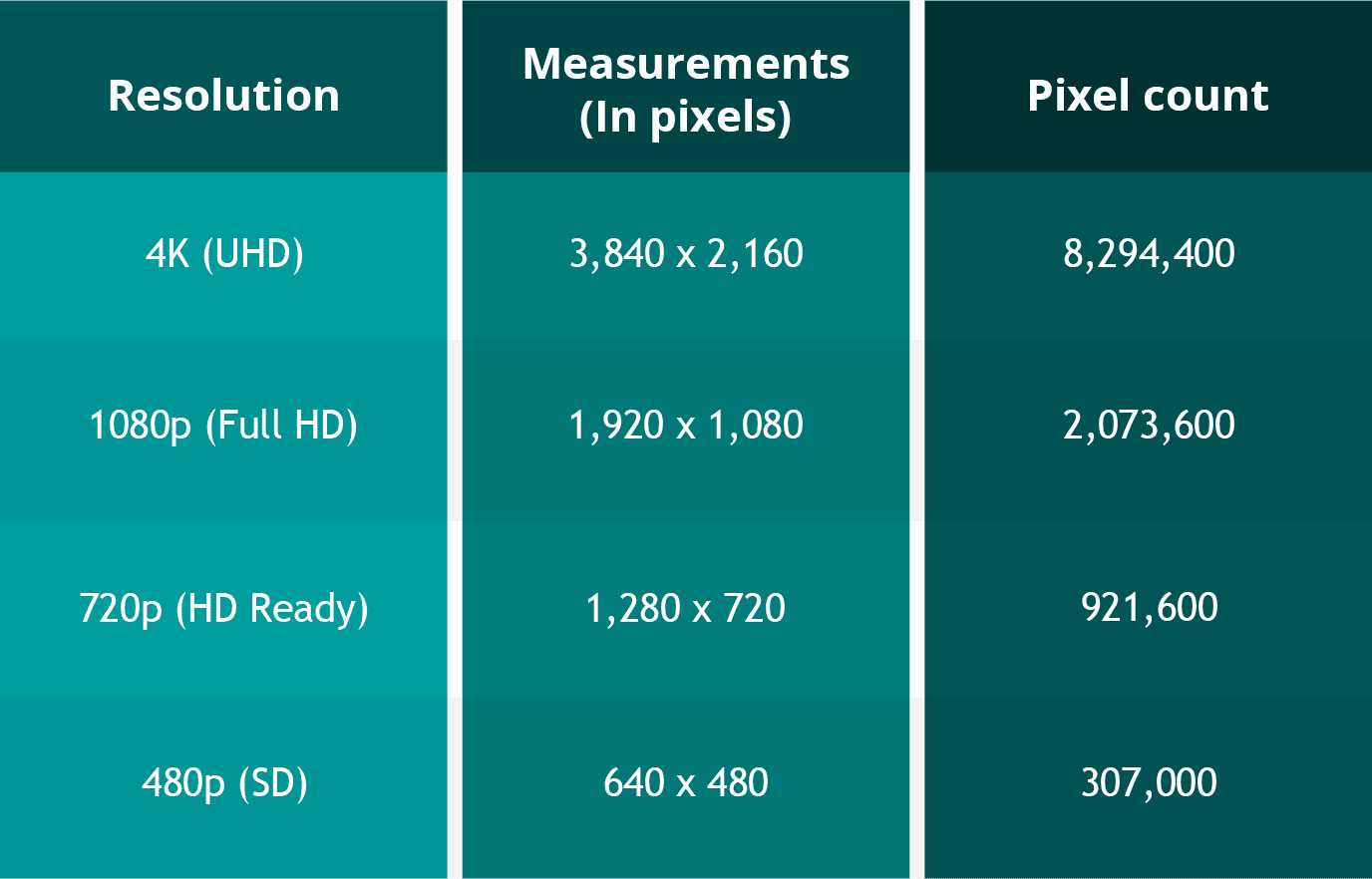
Resolution refers to the number of pixels contained in a video display. It indicates the level of detail and sharpness in the image. Common video resolutions include HD (1280×720 pixels), Full HD (1920×1080 pixels), and 4K Ultra HD (3840×2160 pixels). Higher resolutions generally offer more clarity and precision, resulting in a more immersive viewing experience.

Aspect ratio refers to the proportional relationship between the width and height of a video frame. It determines the shape and size of the video display. The most common aspect ratios are 16:9 and 4:3. A 16:9 aspect ratio is widely used in modern devices, such as widescreen TVs and computer monitors, while the 4:3 aspect ratio was common in older CRT TVs. The aspect ratio can affect the composition and visual perception of a video.

Now that we understand the basics of resolution and aspect ratio, let’s explore their impact on video quality and viewing experience.

Enhancing video quality with higher resolutions

Achieving higher video resolutions can significantly enhance the visual quality and level of detail in videos. With technological advancements, video resolutions have evolved over the years, allowing for more immersive and lifelike experiences. Higher resolutions are particularly beneficial for larger screens or when viewing videos up close.

4K Ultra HD resolution, with its impressive 3840×2160 pixel count, has become increasingly popular among consumers. This resolution offers four times the number of pixels as Full HD, resulting in exceptionally sharp and detailed images. 4K content is now widely available, allowing viewers to enjoy breathtaking visuals with rich colors and fine details. Whether it’s the majestic landscapes in nature documentaries or the intricate special effects in movies, 4K resolution brings out the best in visual storytelling.

Additionally, 8K resolution is on the horizon, with even higher pixel counts that promise an unprecedented level of detail. Although 8K content is still limited, it is expected to become more prevalent in the future, further enhancing the video viewing experience.

Aspect ratio and its impact on visual composition

The aspect ratio of a video frame plays a crucial role in the composition and overall visual experience. Different aspect ratios can evoke different emotions and aesthetics. Let’s explore two common aspect ratios and their effects:

16:9 aspect ratio has become the standard for modern video content. It offers a wider field of view, making it ideal for immersive experiences and capturing expansive landscapes. The 16:9 aspect ratio is also compatible with most modern devices, ensuring that videos fit perfectly on widescreen displays without black bars.

4:3 aspect ratio was prevalent in older TVs and has a more square-shaped frame. While it may feel outdated for some, it can be used creatively to evoke a nostalgic or vintage aesthetic. Additionally, some video content, such as archival footage or certain documentaries, may still use the 4:3 aspect ratio for historical accuracy.

In conclusion, understanding video resolution and aspect ratios is essential for optimizing the viewing experience. Higher resolutions offer greater detail and clarity, while aspect ratios influence the composition and visual appeal of videos. By considering these factors, content creators and viewers can make informed decisions to ensure the best possible video quality.

How does video resolution impact streaming quality?

When it comes to streaming videos online, video resolution plays a significant role in determining the quality of the viewing experience. Let’s explore how different video resolutions affect streaming quality and bandwidth requirements.

Streaming platforms, such as Netflix and YouTube, offer various resolution options to accommodate different devices and internet connection speeds. The available resolutions typically range from standard definition (SD) to high definition (HD) and even ultra-high definition (UHD or 4K).

SD resolution is the most basic option, with a resolution of 480p (640×480 pixels). It provides acceptable quality on smaller screens or for users with limited bandwidth. SD resolution requires less internet bandwidth, making it suitable for slower internet connections or mobile data usage.

HD resolution is a significant improvement over SD, offering a more detailed and enjoyable viewing experience. With a resolution of 720p (1280×720 pixels) or 1080p (1920×1080 pixels), HD videos are crisp and clear, especially on larger screens. HD resolution requires more internet bandwidth than SD but is still manageable for most internet connections.

4K UHD resolution is the highest available resolution for streaming. With its impressive pixel count of 3840×2160, 4K UHD videos provide unparalleled clarity and detail. However, streaming 4K content requires a robust internet connection and higher bandwidth capabilities. Viewers need a stable and fast internet connection to avoid buffering or interruptions.

When streaming videos, it’s important to consider both the resolution and available bandwidth. Higher resolutions offer better visual quality but require faster internet speeds. If your internet connection is not capable of streaming in a particular resolution, the video may automatically downgrade to a lower resolution to prevent buffering.

In summary, video resolution directly impacts streaming quality, with higher resolutions providing better visual experiences. However, it’s crucial to ensure that your internet connection can handle the required bandwidth for the selected resolution. By choosing the appropriate resolution based on your internet capabilities, you can enjoy smooth and uninterrupted streaming.

Optimizing video resolution for mobile devices

With the widespread use of smartphones and tablets, optimizing video resolution for mobile devices has become increasingly important. Let’s explore some considerations and tips for achieving the best video quality on mobile screens.

Mobile screen sizes vary significantly, ranging from smaller smartphone screens to larger tablets. It’s essential to optimize video resolution to ensure optimal viewing experiences across different devices. Choosing a resolution that balances quality and file size is crucial to avoid consuming excessive storage or bandwidth on mobile devices.

Adaptive streaming is a technique used by many streaming platforms to adjust the video resolution based on the viewer’s internet connection and device capabilities. This ensures smooth playback and prevents buffering issues. By dynamically adapting the resolution, viewers can enjoy videos seamlessly on their mobile devices, regardless of their internet speed.

Compressed file formats such as H.264 or HEVC (High-Efficiency Video Coding) can help reduce the file size without compromising video quality. These formats use advanced compression techniques to maintain the visual integrity while reducing the overall file size. By utilizing compressed formats, you can optimize video resolution for mobile devices while minimizing storage and bandwidth requirements.

In conclusion, optimizing video resolution for mobile devices is crucial to deliver high-quality viewing experiences. By considering factors such as screen size, adaptive streaming, and compressed file formats, content creators can ensure that their videos are optimized for mobile devices. Providing a seamless and enjoyable viewing experience on mobile platforms is essential in today’s mobile-centric world.

LSI keywords: video quality, display resolution, pixel density, screen aspect ratio, visual experience, video streaming, screen sizes, mobile