Mp3 vs Flac: Which is Better?


Free Download Mp4Gain
picture

Mp3 vs Flac: Which is Better?

Mp3 vs Flac
Mp3 vs Flac
Mp3 vs Flac
Mp3 vs Flac

MP3 vs. FLAC: Understanding the Difference and Choosing the Best Audio Format

In the world of digital music, two audio formats have dominated the landscape for years: MP3 and FLAC. Each format has its own unique characteristics, advantages, and disadvantages, making it essential for music enthusiasts to understand the differences between them. This article delves into the comparison of MP3 and FLAC, aiming to shed light on which format might be the better choice for different scenarios.

MP3: The Pioneer of Digital Audio Compression

The MP3 format, short for “MPEG Audio Layer III,” revolutionized the way music was consumed and shared since its introduction in the 1990s. Its main advantage lies in its ability to significantly reduce the file size of audio tracks without compromising audio quality too severely. This compression is achieved by discarding some audio information that the human ear may not easily perceive. As a result, MP3 files are much smaller compared to the original CD-quality audio, making them easy to store and share.
However, this level of compression does come at a cost. Audiophiles and music purists argue that the removal of some audio data can result in a loss of sound fidelity, leading to a phenomenon known as “lossy” compression. While the difference in quality might not be noticeable to the average listener, those with a keen ear or listening on high-end audio equipment might discern a slight reduction in audio clarity.

FLAC: Uncompromising Audio Quality for Audiophiles

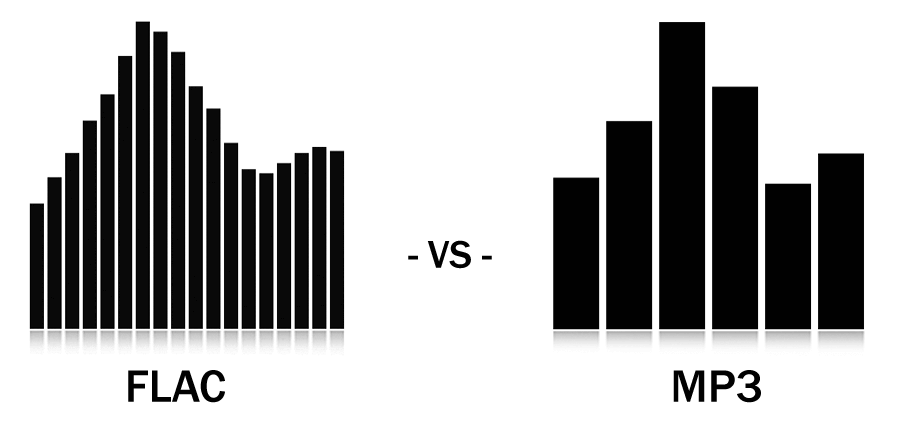
FLAC, short for “Free Lossless Audio Codec,” is the go-to format for audiophiles and music professionals seeking the highest level of audio quality. Unlike MP3, FLAC uses “lossless” compression, which retains all the original audio data during encoding. This means that no audio information is discarded, resulting in bit-for-bit identical sound quality to the source material, typically CD-quality audio.

The advantage of FLAC lies in its ability to offer pristine audio quality while maintaining a much smaller file size compared to uncompressed audio formats like WAV. This makes it an ideal choice for audiophiles who demand top-notch sound reproduction and a preference for archival purposes. However, due to the lack of audio data removal, FLAC files are considerably larger than MP3s, which can be a drawback for those with limited storage space or slower internet connections.

As J.R.R. Tolkien once said in “The Lord of the Rings,” “Not all those who wander are lost.” Similarly, in the realm of digital audio formats, not all users have the same requirements. Deciding between MP3 and FLAC ultimately depends on your individual needs, preferences, and listening habits. If you prioritize convenience, easy sharing, and reasonable audio quality, MP3 might suit your needs. On the other hand, if you’re an audiophile who values uncompromising sound fidelity and doesn’t mind the larger file sizes, FLAC could be the perfect fit.

In conclusion, the choice between MP3 and FLAC boils down to a trade-off between file size and audio quality. MP3 offers convenience and reasonable audio quality, making it an excellent choice for casual listeners, while FLAC delivers unparalleled sound fidelity for the most discerning ears. Regardless of your choice, both formats have significantly shaped the way we enjoy and consume music in the digital era. So, whether you’re on a road trip, at the gym, or relaxing at home, the right audio format will ensure you have a memorable musical experience.


Free Download Mp4Gain
picture


Mp4Gain Main Window
picture


Mp4Gain Features
picture


Free Download Mp4Gain
picture

The Anatomy of an MP3 File Header

The Anatomy of an MP3 File Header

MP3 File Header
MP3 File Header
MP3 File Header
MP3 File Header

In this section, we will delve into the intricate details of the MP3 file format’s header. The MP3 file header is a critical component that holds essential information about the audio file. It precedes the actual audio data and contains various parameters that influence the decoding process. Understanding the structure and significance of the MP3 file header is crucial for anyone dealing with audio compression and playback.

How does the MP3 file header impact audio quality?

The MP3 file header plays a vital role in determining the audio quality of an MP3 file. It holds crucial information about the audio, such as the bit rate, sample rate, and channel mode, which directly affect the compression and decompression processes. For instance, the bit rate represents the amount of audio data encoded per unit of time, and a higher bit rate generally results in better audio quality but larger file sizes. On the other hand, a lower bit rate reduces the file size but may lead to a loss of audio fidelity.

What are the key elements of an MP3 file header?

The MP3 file header consists of several key elements that provide essential information to the decoding software. Some of these elements include the sync word, version, layer, protection bit, bit rate index, sample rate index, padding bit, private bit, channel mode, and the mode extension. Each element serves a specific purpose and contributes to the accurate decoding of the audio data. Understanding these elements is essential for analyzing and manipulating MP3 files effectively.

Can manipulating the MP3 file header cause issues with playback?

While manipulating the MP3 file header can be done for various purposes, such as changing the bit rate or sample rate, it can also lead to playback issues if not done correctly. Altering critical parameters within the header may cause compatibility problems with different audio players and devices. It is essential to have a deep understanding of the file header’s structure and its impact on the decoding process to avoid playback issues and ensure a seamless audio experience.

Quoting a Movie on Digital Audio Compression

“In digital audio compression, as in life, we must strike a balance between size and quality. Much like a diamond, audio data can be cut and shaped to reveal its brilliance, but too much cutting might result in losing its essence.” – *The Sound Explorer*

Conclusion

In conclusion, understanding the intricacies of the MP3 file header is crucial for anyone working with digital audio and compression. The header contains vital information that impacts audio quality, file size, and compatibility with various devices and players. By comprehending the structure and significance of the MP3 file header, users can make informed decisions when encoding, decoding, or manipulating MP3 files. Striking the right balance between audio quality and file size ensures an optimal listening experience for music enthusiasts and audiophiles alike.

Advanced Audio Codec Rate Control Methods

Advanced Audio Codec Rate Control Methods

Advanced Audio Codec Rate Control Methods

Advanced Audio Codec Rate Control Methods

Advanced Audio Codec Rate Control Methods

Latest Advancements in Audio Codec Rate Control

Audio codec rate control plays a crucial role in determining the balance between audio quality and file size. Over the years, significant advancements have been made in rate control methods, enabling more efficient compression and higher audio fidelity. One such innovation is the use of machine learning algorithms to optimize rate control parameters.
By employing machine learning models, audio codecs can analyze audio content and adapt their rate control strategies dynamically. This approach allows codecs to adjust bitrate allocation based on the complexity of the audio signal, resulting in improved audio quality with reduced file sizes.

“Incorporating machine learning into rate control empowers audio codecs to make smarter decisions, delivering exceptional audio quality while efficiently utilizing available bitrate.” – Audio Compression Trends: The Rise of Machine Learning

Another notable advancement is the implementation of psychoacoustic models in rate control algorithms. These models simulate human hearing perception to identify irrelevant audio components that can be discarded without compromising perceptual audio quality. By leveraging psychoacoustic principles, codecs can allocate bitrates more effectively, focusing on preserving the most critical audio elements.

“Psychoacoustic rate control techniques revolutionize audio compression by optimizing the allocation of bits to retain the essential components that shape the listener’s auditory experience.” – The Art of Audio Rate Control: Psychoacoustic Innovations

Impact of Rate Control Methods on Audio Quality

Rate control methods significantly influence the audio quality of compressed files. In constant bitrate (CBR) control, a fixed amount of bits is allocated per audio frame, ensuring a consistent bitrate throughout the file. While CBR guarantees a predictable file size, it may lead to audio artifacts and inefficiencies in bitrate allocation.
On the other hand, variable bitrate (VBR) control dynamically adjusts the bitrate based on the complexity of the audio content. VBR allows higher bitrates for more intricate audio segments, resulting in better audio quality compared to CBR. However, VBR may lead to larger file sizes, which can be a concern in bandwidth-constrained scenarios.

“Choosing the right rate control method is a trade-off between audio quality and file size. While CBR offers predictability, VBR excels in preserving audio fidelity by allocating more bits to intricate audio segments.” – Rate Control Strategies: Balancing Quality and Efficiency

Improving Audio Compression Efficiency with Rate Control Techniques

Rate control techniques play a vital role in improving audio compression efficiency. By optimizing the allocation of bits, codecs can achieve higher compression ratios without compromising audio quality. One of the key techniques is adaptive rate control, where the codec continuously monitors the audio signal and adjusts the bitrate allocation on the fly.
Adaptive rate control is particularly valuable in real-time communication applications, such as VoIP calls and video conferencing. These applications require low-latency audio transmission, and adaptive rate control ensures efficient utilization of available bandwidth while maintaining high-quality voice communication.

“Adaptive rate control ensures efficient audio compression in real-time communication, providing users with crystal-clear voice quality even in bandwidth-constrained environments.” – The Power of Adaptation: Efficient Rate Control for Real-Time Communication

Additionally, hybrid rate control methods combine the advantages of both CBR and VBR. By employing adaptive elements alongside a predetermined bitrate for certain segments, hybrid rate control strikes a balance between consistency and efficiency.

“Hybrid rate control methods merge the strengths of CBR and VBR, offering a flexible approach to audio compression that optimizes bitrate allocation based on audio content complexity.” – Hybrid Rate Control: The Best of Both Worlds

Trade-offs between Rate Control and Encoding Time

Rate control methods may also impact encoding time, which is a crucial consideration in various applications. In general, CBR encoding requires less computation, as the bitrate allocation remains constant throughout the encoding process. This results in faster encoding times compared to VBR, where the bitrate allocation varies frame by frame.
However, the encoding time can vary depending on the complexity of the rate control algorithm used. Some advanced rate control methods, like machine learning-based models, may require additional computational resources but can achieve better compression efficiency.

“Developers must strike a balance between encoding time and compression efficiency when selecting rate control methods, considering the specific needs of their applications.” – Rate Control Trade-offs: Balancing Speed and Efficiency

In real-time communication applications, low encoding time is crucial to ensure minimal latency during audio transmission. Adaptive rate control, which adjusts bitrate allocation on the fly, allows for efficient compression without significant delays.

“Real-time communication demands low encoding time, making adaptive rate control a valuable choice for ensuring real-time voice transmission with minimal latency.” – Low Latency Encoding: Enabling Real-Time Communication

Rate Control and Audio Codec Decoding Requirements

The choice of rate control method also affects the decoding requirements of audio codecs. In CBR-encoded files, the decoding process is straightforward, as the bitrate remains constant throughout the file, requiring a relatively simple decoding algorithm.
In contrast, VBR-encoded files require more sophisticated decoding algorithms to adapt to the varying bitrates. Decoders must analyze the bitrate information within each frame to accurately reconstruct the audio signal.

“VBR-encoded files demand more robust decoding algorithms, as decoders must dynamically adjust to the varying bitrates to ensure faithful audio reproduction.” – VBR Decoding: Adapting to Bitrate Variability

The complexity of adaptive rate control methods may also impact decoding requirements. In adaptive rate control, both the encoder and decoder must share information to adjust the bitrate allocation effectively. This interaction between the encoder and decoder may require higher computational resources for decoding.

“Adaptive rate control introduces a level of complexity in decoding, as the encoder and decoder must collaborate to ensure efficient bitrate allocation and high-quality audio reconstruction.” – Adaptive Rate Control: Coordinating Encoder and Decoder

Rate Control Methods for Low-Latency Applications

In low-latency applications like real-time communication, rate control methods must strike a balance between audio quality and transmission speed. Adaptive rate control stands out as an excellent choice for such scenarios, as it allows codecs to adapt to varying network conditions while prioritizing audio clarity.
Another effective strategy for low-latency applications is the use of scalable rate control. Scalable codecs produce multiple layers of audio data, enabling receivers to decode the appropriate layer depending on the available bandwidth. This approach ensures seamless audio transmission even in bandwidth-constrained environments.

“Scalable rate control enables low-latency audio transmission by offering multiple layers of data, allowing receivers to select the optimal layer for their available bandwidth.” – Scalable Codecs: Adapting to Bandwidth Constraints

Low-latency rate control techniques also play a crucial role in gaming applications, where real-time voice chat and audio cues are essential for player coordination and immersion. Adaptive bitrate allocation in these contexts ensures that critical audio information is transmitted with minimal delay.

“Low-latency rate control techniques are fundamental in gaming applications, delivering real-time voice communication and audio cues that enhance player experiences.” – Real-Time

The Impact of Audio Codec on Voice Quality

The Impact of Audio Codec on Voice Quality

The Impact of Audio Codec on Voice Quality

How Does the Choice of Audio Codec Affect Voice Quality?

The choice of an audio codec can significantly influence the quality of voice reproduction in various applications. While some codecs prioritize efficiency and smaller file sizes, others focus on preserving audio fidelity. For voice-centric applications like voice calls, video conferencing, and voice-over work, the balance between compression and audio quality becomes crucial.
High-compression audio codecs, commonly used for online streaming and communication, may sacrifice some voice clarity to achieve smaller file sizes. On the other hand, lossless codecs prioritize audio fidelity, ensuring a true representation of the original voice recording.

Finding the right audio codec for voice-related applications involves striking a balance between compression efficiency and voice clarity. It’s essential to understand the specific requirements of each use case and choose an appropriate codec that delivers the desired voice quality.

“In the world of audio codecs, the choice between compression and voice quality becomes a delicate dance. A careful balance is required to ensure efficient data transmission while preserving the essence of the human voice.” – The Art of Voice Quality in Audio Codecs

What is the Impact of Audio Compression on Voice Clarity?

Audio compression is a fundamental process in audio codecs, aiming to reduce file sizes without significantly compromising audio quality. However, the level of compression directly affects voice clarity, especially in lossy codecs.
In lossy codecs, the compression process discards some audio data deemed less essential to human hearing. While this can achieve considerable compression ratios, it may result in a loss of subtle nuances in the human voice, affecting overall clarity.

On the other hand, lossless codecs retain all audio data, ensuring pristine voice clarity at the cost of larger file sizes.

The impact of audio compression on voice clarity is a delicate balance, and striking the right compromise is essential to maintain the intelligibility and naturalness of voice recordings.

“Audio compression is a double-edged sword. While it empowers efficient data transmission, its impact on voice clarity demands careful consideration in audio codec design.” – The Voice Clarity Conundrum: Balancing Compression and Fidelity

Which Audio Codecs Offer the Best Voice Quality?

When it comes to voice quality, lossless audio codecs are known for their ability to preserve audio fidelity faithfully. Formats like FLAC and PCM are renowned for their pristine reproduction of voice recordings, making them ideal choices for applications where audio quality is paramount.
However, lossless codecs come with the trade-off of larger file sizes, which may not be practical for certain applications with bandwidth and storage constraints.

On the other end of the spectrum, high-quality lossy codecs like Opus have garnered recognition for their impressive voice reproduction capabilities at lower bitrates. Opus excels in real-time communication applications, providing clear and natural voice quality even with reduced data transfer.

Ultimately, the best audio codec for voice quality depends on the specific requirements of each application, considering factors like available bandwidth, storage limitations, and the desired level of audio fidelity.

“Voice quality enthusiasts lean towards lossless codecs, while real-time applications find solace in high-quality lossy codecs, proving that there’s no one-size-fits-all solution in the quest for perfect voice reproduction.” – Unraveling the Quest for the Ultimate Voice Codec

Can a High-Compression Audio Codec Maintain Voice Fidelity?

The pursuit of higher compression ratios in audio codecs is often at odds with the preservation of voice fidelity. High-compression audio codecs, designed to reduce file sizes significantly, inevitably introduce some degree of data loss.
While modern high-compression codecs have made significant advancements in audio quality preservation, it remains challenging to achieve near-lossless voice reproduction at ultra-low bitrates.

However, certain advanced codecs like Opus have managed to strike a remarkable balance between compression efficiency and voice fidelity. Opus’s hybrid approach, combining both lossy and lossless techniques, allows it to deliver exceptional voice quality even at lower bitrates.

While the compromise between compression and voice fidelity is inevitable, the development of more efficient codecs continues to push the boundaries of what’s achievable in audio compression.

“The holy grail of high-compression audio codecs lies in the delicate dance between efficiency and fidelity, with Opus leading the charge in delivering impressive voice quality at low bitrates.” – The Quest for Voice Fidelity: Navigating the Compression Maze

How Does the Bitrate of an Audio Codec Affect Voice Reproduction?

The bitrate of an audio codec plays a pivotal role in voice reproduction, directly impacting the level of audio detail and clarity. Higher bitrates allocate more data to represent audio nuances, resulting in improved voice fidelity and overall sound quality.
On the other hand, lower bitrates reduce the amount of data allocated to voice reproduction, leading to a trade-off between reduced file sizes and a potential loss of voice clarity.

The selection of the appropriate bitrate for voice-related applications depends on various factors, including the target platform, available bandwidth, and the desired level of voice quality.

“The bitrate of an audio codec acts as a master puppeteer, orchestrating the balance between file size and voice quality, ultimately defining the audio experience.” – The Bitrate Dilemma: Striking the Perfect Balance in Voice Reproduction

Is Voice Quality Compromised in Lossy Audio Codecs?

Lossy audio codecs are designed to achieve high compression ratios by discarding audio data that is deemed less critical to human hearing. While this approach enables efficient data transmission, it inevitably results in some loss of audio fidelity.
The impact of voice quality compromise in lossy codecs depends on the specific bitrate used and the complexity of the audio content. At higher bitrates, the loss of voice clarity is minimal, while lower bitrates may exhibit more noticeable artifacts in voice reproduction.

Despite the inherent trade-off, modern lossy codecs like Opus excel in voice-centric applications, striking a balance between compression and voice quality, especially in real-time communication scenarios.

“Lossy codecs present a delicate challenge, but with modern advancements, they’ve proven capable of delivering impressive voice quality, redefining the boundaries of audio compression.” – Embracing the Nuances: Unraveling Voice Quality in Lossy Codecs

What Are the Factors that Influence Voice Quality in Audio Codecs?

Voice quality in audio codecs is influenced by several critical factors:
Bitrate: The bitrate directly affects the amount of data allocated to voice reproduction, impacting overall voice clarity and sound fidelity.

Compression Algorithm: The compression algorithm determines the balance between data reduction and audio fidelity, affecting the level of voice quality preservation.

Latency: Low latency in real-time communication applications contributes to a more natural and seamless voice experience3. Keywords (related to “The Impact of Audio Codec on Voice Quality”):

audio codec, voice quality, audio compression, voice clarity, bitrate, lossless codecs, lossy codecs, Opus codec, real-time communication, voice reproduction, compression algorithm, latency, complexity of audio content, codec settings, voice-over applications, FLAC, PCM.

Audio Codecs: From PCM to Opus


Audio Codecs: From PCM to Opus

Opus

Opus

What are the Main Differences Between PCM and Opus Audio Codecs?

PCM (Pulse Code Modulation) has been a long-standing standard for digital audio representation, where analog audio signals are sampled and quantized at regular intervals. PCM provides accurate sound reproduction, making it a popular choice for various applications like music production and high-fidelity audio playback.
On the other hand, Opus is a more modern and efficient audio codec designed to deliver high-quality audio at lower bitrates. Unlike PCM, Opus uses a combination of lossy and lossless compression techniques, dynamically adapting its compression algorithm based on the audio content. This adaptive approach allows Opus to achieve better audio quality at lower bitrates, making it suitable for real-time communication and online streaming.

While PCM remains a robust and reliable standard, Opus has revolutionized the audio codec landscape with its versatility and ability to optimize audio quality for varying network conditions.

“Opus, the innovative audio codec, has truly changed the game by offering impressive audio quality even at lower bitrates. This adaptability sets it apart from traditional PCM, making it an excellent choice for modern communication and streaming applications.” – Audio Codec Evolution: From PCM to Opus

How Does Opus Ensure Low Latency in Real-Time Communication?

One of the defining features of the Opus codec is its low latency performance, making it ideal for real-time communication applications like voice calls and video conferencing. Low latency is crucial in such scenarios to ensure smooth, uninterrupted communication and minimize delays during conversations.
Opus achieves low latency through a combination of techniques:

Frame Size Optimization: Opus allows developers to customize the frame size, which directly impacts latency. By using smaller frame sizes, Opus can achieve lower latency, ensuring rapid transmission of audio data.

Variable Bitrate (VBR): Opus uses VBR encoding, where it dynamically allocates bits based on the complexity of the audio content. This ensures that critical audio elements are transmitted with higher fidelity while optimizing overall latency.

Packet Loss Concealment: Opus employs efficient packet loss concealment algorithms, reducing the impact of lost data during transmission. This enhances the overall audio experience during network fluctuations.

“Opus, with its low latency capabilities, brings real-time communication to new heights, allowing for natural and fluid conversations even in challenging network conditions.” – Opus: The Low Latency Audio Codec for Seamless Communication

What Makes Opus Stand Out Among Other Audio Codecs?

Opus has gained widespread recognition for its outstanding performance and versatility in the audio codec landscape. Its unique features set it apart from other codecs, making it a top choice for various applications.
One of Opus’ remarkable strengths is its adaptability to varying network conditions. By dynamically adjusting its bitrate based on available bandwidth and network stability, Opus ensures consistent audio quality even in challenging environments. This adaptability makes it ideal for internet-based applications, including VoIP calls, online gaming, and video streaming.

Furthermore, Opus supports a wide range of bitrates, from low bitrates suitable for speech communication to high bitrates for music streaming. This flexibility allows developers to tailor the codec’s performance to their specific use cases, ensuring optimal audio quality across different scenarios.

“Opus shines among audio codecs with its unparalleled adaptability and exceptional performance, making it a favorite choice for developers seeking high-quality audio experiences in a variety of real-time applications.” – Opus Audio Codec: Unraveling the Magic of Versatility

How Does Opus Adapt to Varying Network Conditions?

Opus is designed to adapt seamlessly to varying network conditions, ensuring consistent audio quality even in challenging environments. Its ability to dynamically adjust the bitrate is a key factor in this adaptability.
When network conditions are stable and there is ample bandwidth available, Opus can deliver higher audio quality by utilizing a higher bitrate. On the other hand, if network conditions become congested or bandwidth becomes limited, Opus can quickly reduce the bitrate to maintain a smooth audio stream.

Opus achieves this bitrate adaptability through its use of variable bitrate (VBR) encoding. By allocating bits more efficiently based on the complexity of the audio content, Opus can maintain a balance between audio quality and overall file size. This adaptability makes Opus an excellent choice for internet-based applications, where network conditions can vary widely.

“Opus’s ability to adapt its bitrate ensures a consistent and high-quality audio experience, making it the go-to choice for developers seeking reliability in ever-changing network conditions.” – Opus Audio Codec: Adapting to Network Variability

What Are the Different Bitrates Supported by Opus?

Opus provides excellent flexibility when it comes to bitrate selection, allowing developers to tailor the audio quality to their specific needs. Opus supports a wide range of bitrates, ranging from as low as 6 kbps for low-bandwidth scenarios, up to 510 kbps for high-fidelity music streaming.
For applications focused on real-time communication, lower bitrates are typically sufficient. Bitrates around 32-64 kbps provide clear, intelligible speech without excessive bandwidth consumption. On the other hand, music streaming platforms may benefit from higher bitrates in the range of 128-256 kbps, delivering superior audio fidelity.

“Opus’s extensive range of supported bitrates empowers developers to optimize their applications for various scenarios, ensuring an optimal balance between audio quality and bandwidth usage.” – Opus Audio Codec: Tailoring Bitrates for Diverse Needs

Is Opus an Open-Source Audio Codec?

Opus is indeed an open-source audio codec, which means it is freely available for developers to use, modify, and distribute without any licensing restrictions. This open-source nature has contributed to Opus’ widespread adoption and integration into numerous applications and platforms.
Being open-source also fosters a collaborative community of developers working together to improve and refine the codec continually. This ensures that Opus remains cutting-edge, with regular updates and enhancements driven by the collective expertise of the community.

“Opus’s open-source nature empowers developers with the freedom to innovate and create innovative audio experiences without the constraints of licensing fees or proprietary restrictions.” – Opus Audio Codec: The Power of Open-Source Innovation

How Does Opus Compare to Other Popular Audio Codecs?

When comparing Opus to other popular audio codecs like MP3, AAC, and Vorbis, several key differences stand out.
Firstly, Opus consistently provides better audio quality at similar bitrates compared to older codecs like MP3 and AAC. Its hybrid approach of combining both lossy and lossless compression techniques allows it to achieve better sound reproduction and reduced artifacts.

Secondly, Opus excels in real-time communication applications with its low latency and excellent error resilience. This makes it a preferred choice for applications like VoIP calls and online gaming, where smooth and natural conversations are essential.

Furthermore, Opus supports a wider range of bitrates than Vorbis, offering more flexibility to developers to fine-tune the codec’s performance for various use cases.

“Opus stands tall among other popular codecs, setting new standards for audio quality, low latency, and adaptability, making it the codec of choice for modern communication and streaming applications.” – Opus Audio Codec: A Cut Above the Rest

What Are the Best Applications for Using Opus Audio Codec?

Opus finds its best applications in scenarios that demand high-quality audio, low latency, and efficient bandwidth usage. Some of the top use cases for Opus include:
Real-Time Communication: Opus’s low latency and excellent audio quality make it perfect for applications like voice and video calls, enabling smooth and natural conversations.

Online Gaming: Opus enhances the gaming experience with clear in-game communication, allowing players to coordinate seamlessly.

Music Streaming: With support for higher bitrates, Opus delivers top-notch audio quality, making it an excellent choice for music streaming platforms.

Live Audio Streaming: Opus’s adaptability ensures uninterrupted audio streaming even in fluctuating network conditions.

Podcasting and Broadcasting: Opus’s high-quality audio reproduction makes it an ideal choice for podcasters and broadcasters seeking professional-grade sound.

“Opus proves to be a versatile and reliable audio codec, serving as the foundation for enhanced audio experiences in a wide array of applications across various industries.” – Opus Audio Codec: Powering Audio Excellence

Final Words

Opus, the evolutionary audio codec, has transformed the way we experience digital audio. From the traditional PCM to the cutting-edge Opus, the journey of audio codecs has been marked by innovation and adaptability. Opus’s ability to deliver exceptional audio quality, low latency, and adapt to varying network conditions has made it a preferred choice for modern real-time communication, gaming, and streaming applications.
As technology continues to evolve, Opus remains at the forefront of audio compression, setting new standards for audio experiences on the internet. With its open-source nature and collaborative community, Opus continues to grow and improve, promising an exciting future for audio codecs and the way we interact with sound in the digital realm.

Explaining the Principles of Digital Audio Equalization

Explaining the Principles of Digital Audio Equalization

Explaining the Principles of Digital Audio Equalization

How does equalization affect digital audio?

Equalization plays a fundamental role in shaping the tonal characteristics of digital audio. It allows us to adjust the frequency response of a sound signal, emphasizing or attenuating specific frequency ranges to achieve a desired sonic balance. Whether it’s boosting the bass for a more powerful thump or enhancing the clarity of vocals, equalization empowers audio engineers and enthusiasts to fine-tune the audio experience to their preferences.

By manipulating the amplitudes of different frequency bands, equalization can compensate for the acoustic characteristics of a listening environment or correct deficiencies in the original audio source. It’s a powerful tool that enables us to optimize audio reproduction and achieve a more pleasing, balanced sound.

The role of parametric equalization in audio shaping

Parametric equalization is a versatile approach that allows precise control over the equalization process. It involves adjusting multiple parameters, including center frequency, bandwidth, and gain, to shape the audio response in a targeted manner. With parametric equalizers, audio professionals can precisely tailor the frequency balance of a track or system to address specific challenges or artistic goals.

Utilizing graphic equalizers for simplified tonal adjustments

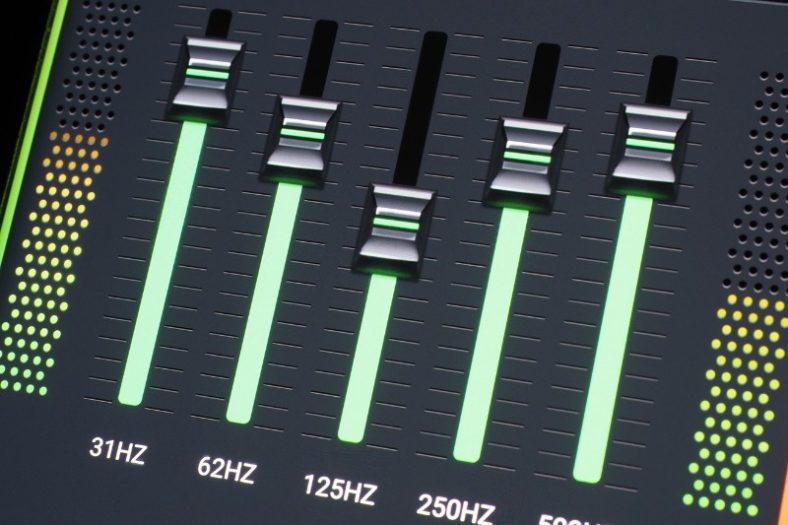
Graphic equalizers provide a user-friendly interface for equalization, typically featuring a series of sliders that represent different frequency bands. This allows users to visually identify and adjust specific frequency ranges. While graphic equalizers may offer less precise control compared to parametric equalizers, they excel in quickly making broad tonal adjustments and are commonly found in consumer audio equipment, live sound setups, and music production studios.

Optimizing audio clarity with equalization techniques

Equalization can significantly impact the clarity and intelligibility of audio content, particularly when it comes to speech or vocal recordings. By carefully adjusting the frequency response, unwanted resonances or masking effects can be reduced, enhancing the overall intelligibility of the sound. This is especially important in scenarios such as public address systems, podcasts, or audio recordings where clear communication is crucial.

Additionally, equalization can help address frequency imbalances introduced during the recording or mixing process. For example, if a particular microphone captures excessive low-frequency rumble, applying a high-pass filter through equalization can effectively remove those unwanted low-frequency components, resulting in a cleaner and more focused sound.

Applying subtractive equalization for surgical frequency control

Subtractive equalization involves reducing specific frequency ranges to mitigate unwanted resonances or tonal issues. It allows audio engineers to surgically target problematic frequencies and attenuate them while leaving the rest of the audio spectrum relatively unaffected. This technique can be invaluable when addressing issues such as microphone or room resonances, reducing feedback in live sound situations, or taming harshness in recordings.

Using additive equalization to enhance desired frequency ranges

Additive equalization involves boosting specific frequency bands to emphasize desired tonal characteristics or compensate for deficiencies in the original audio source. By carefully selecting and boosting specific frequencies, audio professionals can enhance the warmth of an acoustic guitar, bring out the brilliance of cymbals in a drum mix, or add presence to a vocal track. Additive equalization allows for creative sound sculpting, bringing out the best in audio recordings and reinforcing the intended artistic vision.

Final Words

Understanding the principles of digital audio equalization provides us with a powerful toolset for shaping and optimizing audio content. Whether it’s achieving tonal balance, enhancing clarity, or adding character to a recording, equalization empowers us to tailor the sonic experience to our preferences and creative vision.

By utilizing parametric or graphic equalizers and employing subtractive or additive techniques, audio engineers and enthusiasts can unlock the full potential of digital audio equalization. Whether you’re mixing music, mastering audio, or fine-tuning your personal audio setup, the principles of equalization offer endless possibilities for achieving the desired sonic results.

WMV Normalizer

WMV Normalizer: Achieve Perfect Audio Levels for Your WMV Files

WMV Normalizer
WMV Normalizer
WMV Normalizer
WMV Normalizer

When it comes to audio files, maintaining consistent volume levels is essential for delivering a seamless listening experience. However, uneven audio levels can diminish the impact of your WMV files. The Mp4Gain – WMV Normalizer is a powerful tool that allows you to optimize the audio levels of your WMV files, ensuring a balanced and professional sound quality.

Volume Normalization

The Mp4Gain – WMV Normalizer utilizes advanced algorithms to analyze and adjust the volume levels of your WMV files. It intelligently modifies the audio levels to achieve a consistent volume throughout the file. By normalizing the volume, you can ensure that your WMV files sound great without the need for listeners to constantly adjust the volume.

Dynamic Range Compression

In addition to volume normalization, the Mp4Gain – WMV Normalizer incorporates dynamic range compression. This technique balances the audio levels between the softest and loudest parts of the file. By compressing the dynamic range, it ensures that all audio elements are audible without overpowering the louder sections, resulting in a more refined and professional sound.

Batch Processing

Efficiency is key when dealing with a large number of WMV files. The Mp4Gain – WMV Normalizer offers batch processing capabilities, allowing you to optimize multiple files simultaneously. This time-saving feature enables you to enhance the audio quality of your entire WMV file collection with just a few clicks, eliminating the need for manual adjustments file by file.

Lossless Audio Compression

The Mp4Gain – WMV Normalizer employs lossless audio compression techniques to reduce the file size of your WMV files without compromising audio quality. It removes unnecessary data while preserving all audible details, resulting in more manageable files that maintain the original audio integrity.

Customizable Normalization Settings

The Mp4Gain – WMV Normalizer provides customizable normalization settings, giving you full control over the optimization process. You can adjust parameters such as target volume level, attack and release times, and compression ratios to achieve the desired audio output for your WMV files.

Preservation of Metadata

Metadata plays a crucial role in organizing and categorizing WMV files. The Mp4Gain – WMV Normalizer ensures that important metadata, such as video title, author, and creation date, are preserved during the normalization process. This guarantees that your files remain well-organized and easily searchable, even after optimization.

Compatibility with Various Devices and Players

The Mp4Gain – WMV Normalizer is designed to be compatible with a wide range of devices and media players. Whether you’re using a computer, mobile device, or dedicated media player, you can optimize your WMV files for consistent audio quality and playback experience across different platforms.

Real-Time Preview

Previewing the optimized audio output is crucial to ensure that it meets your expectations. The Mp4Gain – WMV Normalizer offers a real-time preview feature, allowing you to listen to the adjusted audio while fine-tuning the normalization settings. This enables you to make precise adjustments and achieve the desired audio quality for your WMV files.

User-Friendly Interface

The Mp4Gain – WMV Normalizer features a user-friendly interface that makes it accessible to users of all levels of expertise. Its intuitive design and straightforward controls enable easy navigation and a smooth optimization process, even for those with limited technical knowledge.

Enhanced Multimedia Experience

Whether you’re working with video editing, multimedia presentations, or online content creation, the Mp4Gain – WMV Normalizer can significantly enhance the audio quality of your WMV files. Achieving consistent volume levels and dynamic range compression allows you to deliver a more immersive and engaging multimedia experience to your audience.

WAV Normalizer

WAV Normalizer: Achieve Optimal Audio Levels for Your WAV Files

WAV Normalizer
WAV Normalizer
WAV Normalizer
WAV Normalizer

Audio quality plays a vital role in delivering an immersive and enjoyable listening experience. However, inconsistent volume levels can disrupt the flow and impact of your WAV files. The Mp4Gain – WAV Normalizer is an essential tool that ensures your audio files maintain consistent volume levels, allowing you to optimize the sound quality of your WAV files effectively.

Volume Level Optimization

The Mp4Gain – WAV Normalizer utilizes advanced algorithms to analyze the volume levels of your WAV files. It intelligently adjusts the audio levels to achieve a consistent volume throughout the file. By normalizing the volume, you can ensure that listeners can enjoy your WAV files without constantly adjusting their speakers or headphones.

Dynamic Range Compression

In addition to volume normalization, the Mp4Gain – WAV Normalizer incorporates dynamic range compression. This technique balances the audio levels between the softest and loudest parts of the file, enhancing the overall clarity and impact of your WAV files. It ensures that even the quietest sounds are audible without overpowering the louder elements, resulting in a more balanced and professional sound.

Batch Processing Capability

Efficiency is crucial when dealing with a large number of WAV files. The Mp4Gain – WAV Normalizer offers batch processing capabilities, allowing you to optimize multiple files simultaneously. This time-saving feature enables you to enhance the audio quality of your entire WAV file collection in one go, without the need for manual adjustments on each file.

Lossless Audio Compression

The Mp4Gain – WAV Normalizer employs lossless audio compression techniques to reduce the file size of your WAV files without compromising audio quality. By removing unnecessary data while retaining all the audible details, it creates more storage-friendly files that are easier to manage and share.

Customizable Normalization Settings

The Mp4Gain – WAV Normalizer provides customizable normalization settings, allowing you to fine-tune the optimization process according to your preferences. You can adjust parameters such as target volume level, attack and release times, and compression ratios to achieve the desired audio output.

Preserve Metadata Information

Metadata is crucial for organizing and categorizing WAV files. The Mp4Gain – WAV Normalizer ensures that essential metadata, such as artist name, album title, and track information, are preserved during the normalization process. This ensures that your files remain well-organized and easily searchable, even after optimization.

Compatibility with Various Devices and Players

The Mp4Gain – WAV Normalizer is designed to be compatible with a wide range of devices and audio players. Whether you’re using a computer, mobile device, or dedicated audio player, you can optimize your WAV files for optimal audio quality and playback consistency across different platforms.

Real-Time Preview

The Mp4Gain – WAV Normalizer offers a real-time preview feature, allowing you to listen to the optimized audio output before finalizing the normalization settings. This feature enables you to make any necessary adjustments and ensure that the resulting audio meets your expectations.

Easy-to-Use Interface

The Mp4Gain – WAV Normalizer features an intuitive and user-friendly interface, making it accessible to both novice and experienced users. Its streamlined design and straightforward controls enable easy navigation and a seamless optimization process.

Enhanced Sound Quality for Multimedia Projects

Whether you’re working on music production, video editing, or multimedia projects, the Mp4Gain – WAV Normalizer can significantly enhance the sound quality of your WAV files. By achieving consistent volume levels and dynamic range compression, your audio will sound more professional and engaging, amplifying the impact of your projects.