Low-pass Filtering in MP3 Compression


Free Download Mp4Gain
picture

Low-pass Filtering in MP3 Compression
Low-pass Filtering in MP3 Compression

Let’s talk about low-pass filtering in MP3 compression

Low-pass filtering in MP3 compression is crucial for reducing audio file sizes without a noticeable drop in sound quality. As an expert in audio processing, I’ve come to rely on low-pass filtering to shape audio in a way that cuts down unneeded data, especially higher frequencies that most people can’t hear clearly. It’s like if we’re creating a custom sound experience, leaving in the essentials and trimming away what won’t be missed. Imagine it as curating the highlights of a song, where only the most impactful sounds remain clear. This not only saves space but also keeps the audio enjoyable.

What is Low-pass Filtering?

Low-pass filtering allows only frequencies below a certain threshold to pass through while filtering out higher frequencies. It’s like listening through a wall, where only the deeper, less tinny sounds come through. In audio terms, it removes the high-frequency data that’s often imperceptible to human ears. By applying this in MP3 compression, we can keep the parts of audio that are actually heard by listeners and remove what isn’t, making it easier to achieve smaller file sizes without significantly affecting the sound.

Why Low-pass Filtering is Key in MP3 Compression

In MP3 compression, size reduction is paramount, but keeping the core of the audio quality is essential. Low-pass filtering helps achieve both by shaving off data that contributes little to the overall listening experience. I’ve worked with plenty of audio files where cutting high frequencies—those above 16 kHz or so—doesn’t change how the file sounds to most listeners. Think of it as packing a suitcase: we focus on essentials and skip the extras. With low-pass filtering, MP3s can be compressed to smaller sizes without drastically reducing sound quality.

How Low-pass Filters Work in Digital Audio Processing

Digital audio processing uses algorithms to apply low-pass filters that analyze and remove high-frequency sounds in real time. These algorithms are designed to recognize frequencies that are less likely to be heard by human ears, especially above 20 kHz. In my work, I often compare it to tuning a radio, focusing on just the strongest signals. The low-pass filter in MP3 compression operates similarly, ensuring that the “important” parts of the sound are preserved while filtering out unnecessary frequencies.

Comparing Low-pass Filtering to Other Frequency Filtering Methods

Low-pass filtering isn’t the only option in frequency filtering; there are high-pass, band-pass, and notch filters, each serving different purposes. High-pass filters, for instance, do the reverse, filtering out low frequencies while allowing high ones. Band-pass filters allow a certain range of frequencies to pass, cutting both high and low ends. However, for MP3 compression, low-pass filtering is particularly useful since it targets and reduces high frequencies that humans are less sensitive to. I’ve found that, for audio meant to be played on everyday devices, the low-pass filter is the most efficient choice for retaining sound quality while reducing size.

Benefits of Low-pass Filtering in MP3 Compression

Low-pass filtering in MP3 compression saves space, enhances playback performance, and maintains a quality listening experience. Since MP3s are typically played on portable devices, retaining only essential audio elements is beneficial. By filtering out high frequencies, MP3s become less complex and easier for devices to decode, making playback smoother. It’s like streamlining a car for better fuel efficiency—fewer parts to handle mean it can run smoother and faster.

  • Reduces file size by eliminating inaudible frequencies
  • Ensures smoother playback on various devices
  • Retains core audio quality for a better listening experience

Challenges with Low-pass Filtering in MP3 Compression

While low-pass filtering helps compress MP3 files, it’s not without challenges. Removing too many high frequencies can lead to a dull sound, especially if listeners are using high-quality audio equipment. I’ve had clients who noticed a difference when using studio headphones—while they could barely hear the change on regular devices, the filtering was more noticeable in high-end setups. There’s always a balance to strike, ensuring that the final product sounds good across all devices without losing too much detail.

How Low-pass Filtering Affects Audio Quality

Low-pass filtering has a subtle effect on sound, focusing on reducing the “brightness” or clarity of the audio in exchange for file size reduction. For most listeners, especially on standard headphones or speakers, this difference is negligible. However, in professional settings or high-resolution listening, the absence of those high frequencies can be noticeable. It’s a bit like watching a video in HD versus standard definition: both are clear, but one has that extra level of detail.

Optimizing Low-pass Filter Settings for the Best MP3 Compression

Setting the right frequency threshold for low-pass filtering is key to balancing audio quality and file size. Most MP3s are filtered between 16 and 20 kHz, as this range captures the critical frequencies heard by most people. In my experience, adjusting the filter to the lower end of this range saves more space but can impact clarity. Fine-tuning these settings allows us to control the “sharpness” of the sound and the file size precisely.

Common Misconceptions About Low-pass Filtering in MP3s

One common misconception about low-pass filtering in MP3s is that it always reduces quality. In truth, the effect on quality depends largely on the listening environment and the audio equipment used. On standard devices, the difference is hardly noticeable. Another myth is that low-pass filtering is necessary for all MP3s; however, in some cases, higher fidelity MP3s might not require as aggressive filtering. I’ve seen plenty of instances where higher bitrates made filtering less necessary, showing that it’s not a one-size-fits-all approach.

Real-life Examples of Low-pass Filtering in MP3s

Low-pass filtering in MP3s is everywhere, from streaming services to music apps. Whenever we download a compressed song or stream on platforms like Spotify or Apple Music, we’re experiencing low-pass filtering at work. Even my personal library, filled with MP3s for various purposes, relies on filtering to keep the files compact and compatible across devices. It’s fascinating to think how this single technique has shaped our digital audio landscape.

Practical Applications and How to Use Low-pass Filtering in Audio Projects

For anyone looking to compress audio files, low-pass filtering is a practical first step. When I work with audio files for projects, I usually start by setting a low-pass filter around 16-18 kHz, which ensures quality while keeping the file size down. It’s a method that can be applied across different audio types, from voice recordings to music, making it versatile. It’s as if we’re packing only the essentials, a smart approach that saves space without sacrificing too much quality.

Implementing Low-pass Filtering: Tips for Beginners

If you’re new to audio editing, implementing low-pass filtering can seem intimidating, but it’s actually straightforward. Start by experimenting with different cutoff frequencies; a range between 16-20 kHz works well for most projects. Try listening to your audio at different settings to hear how each cutoff point affects the sound. It’s like adjusting a camera focus—finding the right clarity level is key.

  • Set a frequency range between 16-20 kHz for MP3s
  • Experiment with different cutoff points
  • Listen to the audio on different devices to test quality

Latest Words on Low-pass Filtering in MP3 Compression

Low-pass filtering in MP3 compression is an invaluable tool for balancing quality and file size. By understanding how to manage and set cutoff frequencies, we can create MP3s that retain essential audio characteristics while being compact and playable across devices. It’s a powerful technique that has shaped how we consume music, whether streaming on a phone or playing through high-end headphones. MP4Gain offers effective solutions for optimizing MP3 files, ensuring that low-pass filtering is just right for any audio project.


Free Download Mp4Gain
picture


Mp4Gain Main Window
picture


Mp4Gain Features
picture


Free Download Mp4Gain
picture

Lossy vs Lossless Audio in OGG

Lossy vs Lossless Audio in OGG

Lossy vs Lossless Audio in OGG

Let’s talk about Lossy vs Lossless Audio in OGG

When it comes to audio quality, choosing between lossy and lossless audio can make a big difference. In audio compression, “lossy” means some data gets removed to make the file smaller, while “lossless” keeps all the original audio information. OGG is a popular format known for flexibility with both lossy and lossless compression, so you can get high-quality sound in a smaller file size. As an audio expert, I’ll walk you through the ins and outs of these formats, drawing from my years of experience with audio compression, so you can make the best choice for your needs.

Understanding OGG Format Basics

The OGG format is like a sturdy container, housing different types of audio codecs. It’s especially popular for its open-source, patent-free nature, and high-quality sound. With OGG, you can have lossy or lossless compression, depending on what matters more—quality or file size. Think of it like packing for a trip: sometimes you need to pack light (lossy), and other times, you want to bring everything (lossless). The flexibility of OGG makes it perfect for anyone who values good sound, but also wants control over file size.

What is Lossy Audio Compression?

Lossy audio compression removes “unnecessary” parts of audio that our ears may not easily pick up, which makes the file size much smaller. It’s like skimming off the less noticeable sounds in a song or recording. MP3 and OGG Vorbis are common lossy formats. If you’re streaming music online, lossy formats are everywhere. But while the space savings are great, there’s a trade-off: you lose some detail in sound quality. For casual listeners, it’s often a non-issue, but for audiophiles, those subtle sounds matter.

What is Lossless Audio Compression?

In lossless audio compression, all the original audio data is preserved. This format, like OGG FLAC, doesn’t cut any corners. Imagine you’re saving a photo without changing a single pixel; that’s what lossless does for sound. The file is bigger, yes, but you get pure, untouched audio. In my experience, musicians, DJs, and audio engineers often prefer lossless formats because every sound, every subtle tone, is kept intact. For casual listening, though, the larger file size might be more of a hassle than it’s worth.

Comparing OGG Vorbis (Lossy) with OGG FLAC (Lossless)

Comparing OGG Vorbis and OGG FLAC is a bit like comparing a paperback book to a hardcover. OGG Vorbis reduces file size by about 90%, perfect for quick downloads or streaming. OGG FLAC, on the other hand, maintains top quality, but it’s bigger. OGG Vorbis is great for everyday listening, but if you’re an audio purist, OGG FLAC is where you’ll hear the difference. You’ll notice richer, fuller sounds in OGG FLAC, especially in classical or jazz music where subtlety is key.

  • Quality Differences: Audible or Not?

  • File Size Considerations

  • Performance for Streaming vs. Offline Playback

How Lossy Compression Works in OGG Vorbis

OGG Vorbis, the lossy version of OGG, uses advanced algorithms to remove sounds our ears aren’t as sensitive to. It’s like compressing a sponge and squeezing out the excess water, keeping the sponge itself intact but smaller. This way, you get a smaller file size with audio that’s nearly identical to the original. It’s commonly used for streaming music because it keeps quality high and file size low—essential for avoiding buffering issues on slow networks.

The Science Behind Lossless Compression in OGG FLAC

Lossless compression in OGG FLAC is more like folding a sheet—no material is removed; it’s just compacted in a way that you can unfold it back to its original form. The audio data is untouched, making it a favorite among sound engineers who need top fidelity. OGG FLAC is especially valuable in professional settings, like when recording a song or podcast, where every little detail counts.

Pros and Cons of Using Lossy OGG for Audio

Using lossy OGG has a lot of perks, especially if you need to save space. It’s like having a lighter suitcase for travel—you can take it anywhere without the bulk. However, lossy compression may sacrifice some subtle details, so it’s not ideal for everyone. Here are some quick points:

  • Smaller File Size

  • Great for Streaming and Download Speeds

  • Minor Loss of Audio Detail

  • Not Ideal for High-End Sound Systems

Pros and Cons of Using Lossless OGG for Audio

Lossless OGG, like FLAC, maintains full sound quality. It’s like a heavy-duty suitcase that carries everything you need. While the file size is larger, the quality remains top-notch. Here’s a rundown of pros and cons:

  • Exceptional Audio Quality

  • Perfect for Archival Storage

  • Larger File Size

  • More Demanding on Storage Space

Is Lossy or Lossless Better for Music Streaming?

If you’re streaming music, you’ll likely lean toward lossy OGG, especially with slower internet speeds. Lossy compression keeps file sizes manageable and minimizes buffering. But for platforms dedicated to high-quality sound, lossless is increasingly common. Lossy streaming is a compromise between quality and accessibility, while lossless streaming is all about giving you the best audio, especially on platforms where fidelity is a top priority.

Best Scenarios for Choosing Lossy OGG

Lossy OGG is perfect for everyday listening, especially when you’re on the go. Whether it’s on a jog or commuting, lossy audio offers high-quality sound without filling up your phone’s storage. When you’re not looking for flawless quality but still want something that sounds good, lossy OGG is the way to go. It’s especially great if you’re listening on devices where audio fidelity isn’t as noticeable.

Best Scenarios for Choosing Lossless OGG

Lossless OGG really shines when quality is paramount, like for a professional DJ or a music producer. It’s also ideal for creating a digital archive of your favorite albums. Lossless OGG ensures every note, every instrument, is perfectly preserved. If you’ve got the storage space and care about every detail in the music, go for lossless OGG. It’s also an excellent choice if you plan to listen on high-quality sound systems where every sound matters.

Do File Size and Storage Space Matter to You?

Lossy OGG saves a ton of space, perfect if you’re low on storage. However, if storage is abundant, lossless OGG is a good way to get premium sound without compromise. I always ask myself, “How important is quality versus storage for me?” If I want to fit more music on my phone, I’ll go lossy. If I’m working on a sound project where I need the best quality, lossless OGG it is.

Final Words on Lossy vs Lossless Audio in OGG

Ultimately, the choice between lossy and lossless OGG depends on your needs and setup. For most listeners, lossy OGG offers a great balance between quality and file size. But for audiophiles, sound engineers, and music lovers who want every detail, lossless OGG can’t be beat. If you’re still on the fence, try testing out both formats in your own environment to hear the difference. And when you’re ready to optimize your audio, MP4Gain is here to help ensure every sound, whether lossy or lossless, is just right.

Comments:

Jackson: Really helpful breakdown! I didn’t even know the difference between lossy and lossless. Helped a lot for my project!

Marie123: Finally I get it! All the tech words usually confuse me but this article was simple and super clear.

SoundwaveMike: Good info, but I’d love to see more on how the lossy compression actually affects different genres of music.

LeeGuitarist: Wow, never knew OGG was that versatile! I always stuck with MP3, but now I’m gonna try OGG FLAC!

BobTheBuilder: Too much detail for my taste, but good for people who want to learn everything about audio!

Anna_Loves_Music: This explained a

lot! I’ve been trying to figure out how to save space on my phone without losing my fave tunes.

https://x.com/ricardo_mx_news/status/1850633331957813490

What are lossy and lossless audio formats, and what are common audio formats? Part 2

What are lossy and lossless audio formats, and what are common audio formats? Part 2

lossy and lossless audio formats

Audio Formats:

lossy and lossless audio formats

2. WAVE is a sound file format developed by Microsoft, it is used to save the audio information resources of the WINDOWS platform, and is compatible with the WINDOWS platform and its applications.

3. AIFF format (Audio Interchange File Format) and AU format, AIFF is the English abbreviation for Audio Interchange File Format. It is an audio file format developed by APPLE and supported by the MACINTOSH platform and its applications. Many compression techniques are supported.

4.MPEG is the English abbreviation for Motion Picture Experts Group Currently, MP3 is the most common music format on the Internet. Although it is lossy compression, its biggest advantage is a higher compression ratio in exchange for very little sound distortion.

5. MP3 MPEG audio file compression is lossy compression. MPEG3 audio encoding has a high compression ratio of 10:1~12:1, while basically keeping the low audio part undistorted, but at the expense of the high 12KHz to 16KHz. in the sound file. The quality of the audio part is changed by the size of the file. Music files of the same length are stored in *.mp3 format, usually only 1/10 of *.wav file, so the sound quality is lower than CD or WAV format.


6. MPEG-4 Adopts object-based compression coding technology. Before encoding, the video stream is first analyzed, and each video object is segmented from the original image, and then the shape information, motion information, texture information is encoded separately, and temporal redundancy between consecutive frames is eliminated thanks to better motion prediction and compensation than MPEG-2. Its core is content-based scalability, which can assign priorities to each object in the image, express the most important objects with high spatial and temporal resolution, and express the less important objects (such as surveillance systems, background) are rendered. with a lower resolution. or even not displayed. Therefore, it has the ability to adaptively allocate resources and can perform low-speed, high-quality video transmission and image communications. It occupies less resources, has great flexibility, good network performance, and has a wider range of applications.

7. The MIDI (Musical Instrument Digital Interface) format is used by people who often play music, MIDI allows digital synthesizers and other devices to exchange data.

8. WMA (Windows Media Audio) format is a heavyweight player from Microsoft. The background is harsh, the sound quality is stronger than MP3 format, and it is much better than RA format. It is the same as the VQF format. developed by the Japanese company YAMAHA. However, the method to maintain sound quality can achieve higher compression ratio than MP3. The compression ratio of WMA can generally reach around 1:18. Another advantage of WMA is that content providers can use DRM (Digital Rights Management) like Windows Media. Rights Manager 7 adds copy protection.

What are lossy and lossless audio formats, and what are common audio formats?

What are lossy and lossless audio formats, and what are common audio formats?

lossy and lossless audio formats

We often hear some terms like MP3, lossless, CD sound quality, and even come into contact with them. So what are lossy and lossless audio formats? What are their differences? Apart from the ones I heard above, what other common audio formats exist? Next, I will share with you the relevant knowledge of audio formats and answer your questions.

lossy and lossless audio formats


First, let’s briefly popularize the audio format:

The audio format is the music format. Audio format refers to the process of digital and analog conversion of audio files for playback or processing on a computer. At present, music file playback formats are divided into two types: lossy compression and lossless compression. When using different music file formats, there is a big difference in sound quality performance.

Difference Between Lossy and Lossless Compression:

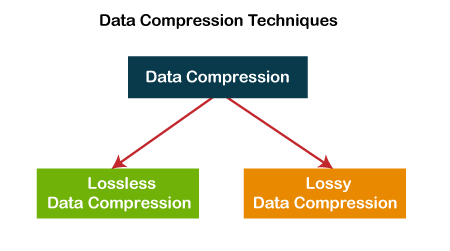
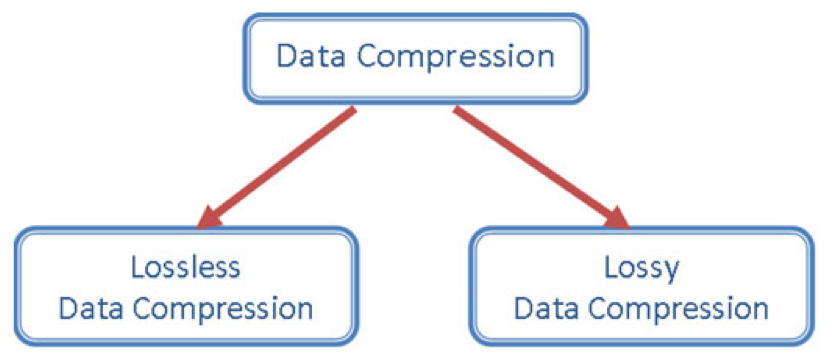
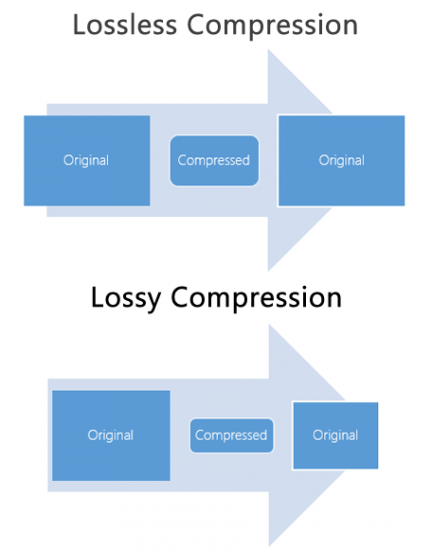
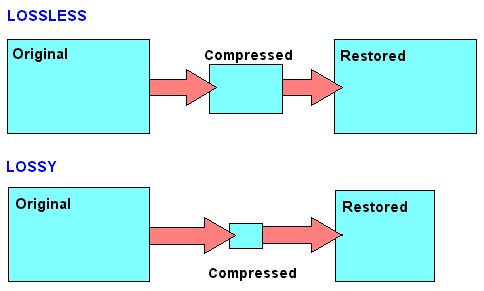
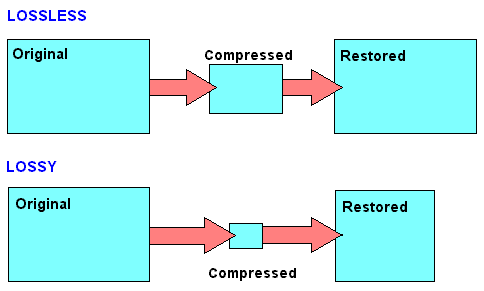
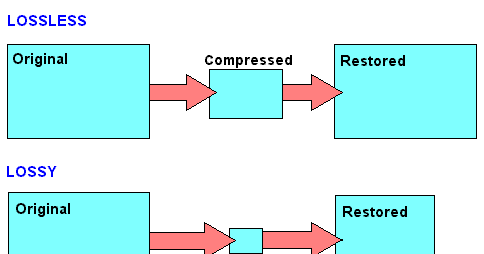
Lossy compression is to reduce the audio sample rate and bit rate, and the output audio file will be smaller than the original file. Lossless compression, on the premise of saving 100% of all the data in the original file, can compress the audio file to a smaller size, and after restoring the compressed audio file, it can achieve the same size and code. than the source file. Speed.

Here are the common audio formats:

1. CD The standard CD format is the sampling frequency of 44.1K, the rate is 1411K/second, and the quantization number is 16 bits. Since the CD track can be said to be approximately lossless, its sound is basically faithful to the original sound.

Lossy vs Lossless, Audio Quality

Lossy vs Lossless, Audio Quality

Lossy vs Lossless
Lossy vs Lossless

Much is said and has been said about the difference between the formats that generate a loss of information (lossy) versus those that do not generate any loss (lossless).

Lossy vs Lossless
Lossy vs Lossless

What is Lossy?

To compress a file, so that it occupies less space on the disk, we must necessarily use two techniques, the first is pure compression, which does not lose quality and which we will explain later PLUS compression by discarding information.

It is omitting information that we know, after studies, that the human ear will hardly perceive. At least the average human ear.
Younger people listen to more frequencies than from the age of 30, when we listen to fewer frequencies.

But not only does age count, but other phenomena also enter, for example what is called masking and which could be summarized by saying that if two frequencies occur with similar frequencies, and one occurs an instant before the other, in general the second that masked… that is, it is not audible to the human ear, so we could discard it and save space.

There are also all the frequencies that the human ear does not perceive, there we have more information that we can discard without damaging the quality or at least maintaining a very similar quality of perception.

LossLess

There are other formats that do not lose quality because they only use mathematical methods to save space. Imagine the following line:

1111111000001110000000

This consumes a space, but this information could be summarized, for example as follows:

1(7)0(5)1(3)0(7)

This second way of storing information takes up much less space WITHOUT discarding anything. It simply explains that from the number 1 there are 7, followed by 5 zero numbers, then 3 from the number 1 and finally 7 zeros.

It’s the same, we just tried to save space by finding a compressed way to write it, but we didn’t rule anything out.

This is exactly how the zip and lossless music methods work.

Is there a difference in the human ear when listening to one and the other?
We will answer that in another article.

Lossy Audio File Types: How It Is Different From Lossless

Lossy Audio File Types: How It Is Different From Lossless

Lossy Compression vs Lossless Compression

Lossy is a word used in digital audio to describe the type of compression used to store audio data. The algorithm used in the lossy audio format compresses the audio data in such a way that it discards certain information. This loss of signal means that the encoded sound is not identical to the original.

lossy vs lossless

Lossy audio produces lower quality audio and has a smaller file size.

Lossy compression is also called irreversible compression because data that has been deleted is impossible to recover.

What is the difference between Lossy and Lossless?
When you create MP3 files by ripping one of your music CDs, some details of the original recording are lost, making it a lossy format. This type of compression isn’t just limited to audio; for example, JPEG image files are also lossy compressed.

Sheets of colored paper compressed into a ball

This method is the opposite of lossless audio compression used for formats like FLAC, ALAC, and others. In this case, the audio is compressed in such a way that the data is not deleted. The sound is identical to the original source.

Lossy archives take priority when it comes to compatibility. While lossless files are only supported by some devices and apps, a lossy audio format like MP3 will work on almost any device.

How Lossy Audio Compression Works
Lossy compression makes certain assumptions about frequencies that the human ear is unlikely to detect.

When a song is converted to a lossy audio format such as AAC, the algorithm analyzes all frequencies and then discards the frequencies that the ear should not be able to detect. These low frequencies are filtered or converted into mono signals that take up less disk space.

Another technique eliminates very quiet sounds that the listener is unlikely to notice, especially in the loudest part of the song. This approach reduces the size of the audio file while maintaining the highest possible audio quality.

What happens to the audio when it is compressed?
Lossy compression introduces artifacts. These artifacts are unwanted sounds that are not in the original recording but are a by-product of compression. This noise degrades sound quality and is noticeable when music files are converted using low bit rates.

Various types of artifacts affect the quality of the recording. Distortion is one of the most common artifacts. For example, distortion makes the drums feel weak, without any real beat. Song voices can also be affected, resulting in harsh vocals and lack of detail.

In many cases, casual listeners can’t tell the difference between lossy and lossless encoding, although some audiophiles using very expensive equipment claim to hear the difference. The difference in quality is only noticeable when very low data rates or aggressive compression algorithms come into play.

Why compress audio files?
Most digital audio formats use some form of compression to efficiently store sound. Without compression, the file sizes would be very large.

For example, a typical 3-minute song stored as an MP3 file is between 4MB and 5MB. Using the WAV format to store the same song, but without compression, results in a file size of approximately 30MB, at least six times that size. Fewer songs fit on your smartphone or hard drive when you choose uncompressed audio formats

Data compression: lossless or lossy

To be able to store large amounts of data, a huge amount of storage space is required. When the space is at some point full, a new storage space is usually made available. Mainly in the form of new hard drives, server systems or the like. But there is another way to store more data: data compression.

Lossless vs Lossy

Data compression works like a pillow you squeeze
Figuratively speaking, data compression works the same way as when you squeeze a pillow. Not all air is required between the pillowcase and the feathers. By squeezing the pillow, you compress it by removing the air (as much as you can); the pillow becomes smaller, that is, more compressed than before.

It is similar with data compression. Here also items that are not absolutely necessary, in this case data, are removed and the storage space still required by the remaining data is reduced.

Lossy vs Lossless Compression

Different lossless compression encoding methods.

When it comes to data compression, a distinction is made between lossless compression and lossy compression, so it can be further subdivided into different types of compression.
Lossless compression is generally only done with text files. If the text is saved as a character string and not as an image or the like, the storage space can be saved using the dictionary method, for example. Recurring parts of the string are simply replaced by abbreviations.

Text: Hello world. Hello user
Encoding: world X5. X5 users.

With the help of Run Length Encoding (RLE), identical text components that are placed one after the other are only saved once. This can also save storage space.

Text: Today was beautiful, beautiful, beautiful and tomorrow will be more beautiful.
Coding: Today was / 3 / beautiful, / and tomorrow will be more beautiful.

In entropy encoding, as is the case with Huffman code or arithmetic encoding, for example, text elements are sorted in binary and encoded according to their frequency, and the most frequently occurring element is given the binary number smaller.

With these numbers, the text elements are stored in a separate dictionary.

Text: IF YOU FLY BACK, FLY, FLY, FLY, FLY AFTER.
Coding: 10100 1 1 1101 1 1 1 11

Difference between lossless and lossy compression

The benefit of lossless encoding is clear: it ensures that all “compressed” data in the compressed data packet can be accessed and restored.

In addition to lossless compression, there is also lossy compression. Irrelevant information is not encoded here, but is directly removed. Therefore, we speak of a reduction in irrelevance.

Lossy compression: the MP3 format

Of course, this procedure can lead to extremely high compression rates. However, this irrelevant information is irrevocably deleted. This means that the original state cannot be restored after compression.

Lossy compressions are often used for image, audio, and video files, as they often have to handle large volumes. The MP3 format is a classic example in this context. Here, frequency patterns are removed from an audio file that are almost inaudible to the human ear. This saves storage space.

If you compress data packets, you can use your own data storage capacity better than uncompressed data packets. However, you should always consider the type of compression you are using. Because lossy compression is not always desirable.

Uncompressed and compressed formats

Popular audio formats

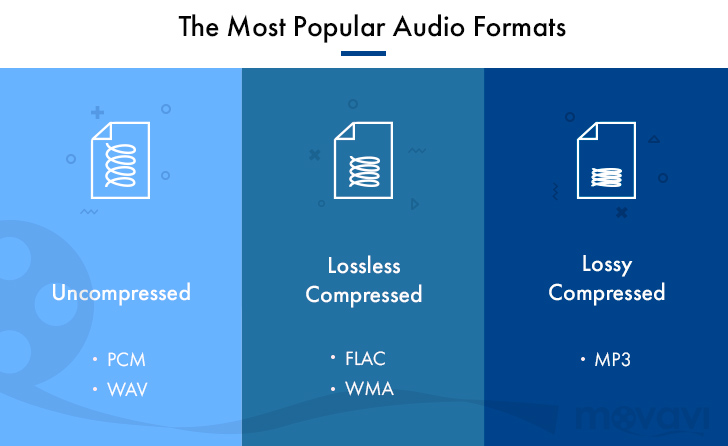
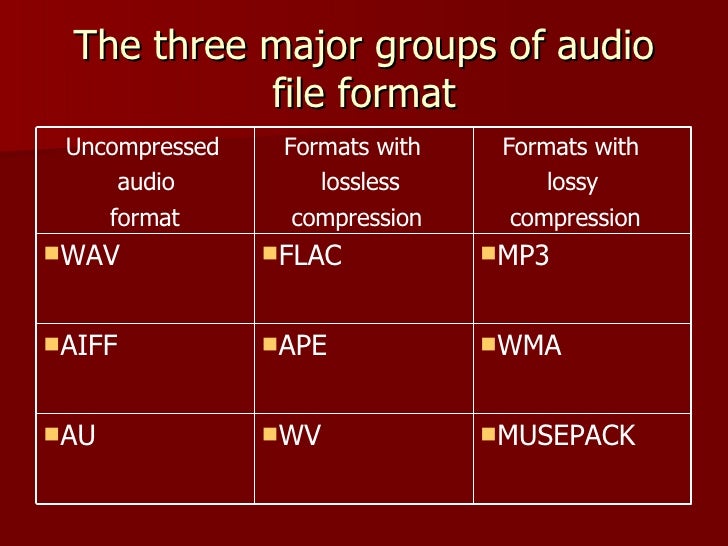
Uncompressed formats

There are audio formats that do not have compression and are the best in terms of sound quality. On the other hand, they take up much more memory space and a lower transmission speed than compressed formats. With professional software such as Pro Tools, SuperCollider or Max, you generally work with files of this type. The two main formats are:

WAV (wave). Audio format developed by Microsoft and IBM for compatible IBM PCs. In this format, musical instruments feel the same regardless of the PC on which the file is played (with the same acoustic quality of the hardware components, of course).

AIFF (Audio Interchange File Format). The format developed by Apple is also called the Apple Interchange File Format.

Audio formats

Lossy compression

It allows for more compression, but at the expense of sound quality. Lossy compression methods generally tend to discard information considered useless, keeping only the essential ones and arise from the idea that not all frequencies contained in a sound spectrum are perceived by the human ear. Then the high frequencies are cut off, which are believed to be the least distinct in our hearing. Obviously, the more frequencies you cut, the more the space occupied by the audio track decreases and with this also the quality of the result as a reconversion process. It does not allow the complete restoration of the cut-off frequencies. Let’s see what are the main audio formats of this type:

MP3 (MPEG-1/2 Audio Layer 3). Audio compression algorithm capable of drastically reducing the amount of data required to reproduce a sound, compromising obtaining an almost faithful reproduction of the original uncompressed file. The best codec for compression is Lame. maximum achievable bit rate 320 Kbps.

WMA (Windows Media Audio). Audio file standard invented by Microsoft. Audio compression format very similar to an MP3.

OGG (Vorbis). It is an open source algorithm and with the same perceived quality, it allows greater compression than the MP3 format, obtained through advanced psychoacoustic research.

AAC (advanced audio coding). It is an audio compression format officially included in MPEG-4. Provides superior audio quality to MP3 format with more compact encoding. Currently it is used mainly by Apple, which in the variant that manages copyright has a compression of 128 Kbps (the standard of the iTunes Store) and corresponds to that of an MP3 at 192 Kbps at constant bitrate. Conversion times are a bit slower than other formats.

AC3 (Dolby Digital). Dolby Digital is a multi-channel audio coding system developed by Dolby Laboratories Inc and used in film, digital TV, laser discs, DVDs, and other digital audio streaming or playback media. It works from a minimum of 96 kbps to a maximum of 640 kbps. In cinema, Dolby Digital is used with only 320 kbps of bandwidth, as it prints in the limited space available between the slide holes of the films. Generally, in DVD it is used with a bit rate of 192 kbps to encode stereo signals (2.0, 2.1) or stereo surrounds, and with a bit rate between 384 and 448 kbps for 5.1 signals.

Lossless compression

These compression methods try to reduce the space occupied by the track without going to touch the sound. The compression rate is much lower than with lossy methods, but there is no loss of quality and the sound is identical to the original when converting. Let’s see what are the main audio formats of this type:

FLAC (Free Lossless Audio Codec). The widespread open source audio codec is currently well supported by various audio software. Unlike most lossless compression algorithms (like ZIP and gzip, for example) that only achieve 10-20% compression, it achieves significant compressions, on the order of 30-50%.

APE (Monkey’s Audio). No lossy format that allows us to reduce the space our music occupies by approximately 50% (in some cases even more). Currently it is no longer developed.

ALAC (AApple Lossless Audio Codec). The format developed by Apple stores data in an MPEG-4 container with the extension .m4a. It does not have Digital Rights Management (DRM) and is now deprecated.

Music quality of files (lossless and lossy)

Music files can be the product of the perfect extraction of the music contained in CDs, called bit by bit. With this phrase we immediately clear the field of feeding unjustified prejudices towards the archives. The files are not of the same quality as CDs when using lossy formats: MP3, AAC, M4A. Besides these, there are formats that do not use any type of compression: WAV and AIF, which are the exact copy of the songs stored on CDs or even the original master recording format used to create CDs. Or there are formats that even using compression are “lossless”, called lossless: the most widespread of them is the FLAC format, not surprisingly adopted as a standard in the distribution of content in CD quality or higher. The FLAC format uses a type of compression that does not remove the original data. When unzipped, FLAC files have exactly the same bits that were present before compression.

Lossy - Lossless

Before there are misunderstandings about the relationship between lossy and lossless files, we specified that if you have an MP3 file and convert it to FLAC, the data removed from MP3 transformation will not magically appear again. No conversion can regenerate the lost data into a lossy file. You can convert FLAC files to WAV or AIF because the compression used was lossless.

Lossy and lOOSLESS

The FLAC format also has advantages over WAV and AIF, the applied compression reduces its size and saves storage space and data bandwidth in reception / transmission when transmitting over the network. Besides this function, FLAC has another advantage over WAV, the information describing the tracks and the cover image can be inserted into the files. The information inserted in the files is called TAGs, the FLAC format provides for the insertion of this information that software applications and APPs read to recognize the content of the audio tracks. This simplifies the management of music collections, which without TAGs would present indistinguishable lists of audio files. Unfortunately, the standard WAV format does not allow the inclusion of TAGS in files.

Let’s continue the discussion on the playback chain of a portable Hi-Fi system. The technical quality of the content to be reproduced affects the final quality of the reproduction.

After adopting quality headphones, it would be wise to switch to lossless audio formats, to at least benefit from the original quality found on CDs.

Lossless music

Most of the sites that sell music online offer it in lossy formats, so the problem is how to get music without loss. Anyone with a CD can start by ripping them. Ripping is the term used to describe the transformation of the tracks contained in a CD into files. Anyone who wants to delve into the subject can read the writings dedicated to Ripping and the creation and management of music collections: What software for ripping and Creation and management of music files luquida.

In addition to CD ripping, there are websites that sell lossless music online in CD quality and Master Quality (Hi-Res), the latter is superior to CD and in many cases coincides with the original recording made in the Recording Studio.

High Resolution Music (HRA) has higher technical specifications than expected for CDs. Resolution ranges from 16 bit to 20/24 bit and sampling from 44.1 kHz to 48 / 88.2 / 96 / 176.4 / 192 kHz. For a description of the processes and characteristics of digitization, read the following text: The digitization of sound. With respect to these specifications we believe that the determining factor is the 24-bit resolution combined with sampling performed at least at 48 kHz.

Speaking of MP3 files, we usually refer to the bit rate, which with this format does not exceed 320 Kbps. The bit rate indicates the bits per second transmitted in a music stream. It is quite evident that a music stream consisting of more bits will contain more audio data. To orient yourself between these parameters, it is good to bear in mind that an uncompressed CD quality audio stream (16 bit 44.1 kHz) is 1,411 Kbps, converted to FLAC the stream will decrease between 30 and 50% of the format’s bit rate. uncompressed. Therefore, the CD quality stream generated by a FLAC will vary approximately between 705 and 988 Kbps. Obviously for high resolution formats the data stream will be proportionally higher depending on the specifications offered by the individual files.

The technical quality of the content to be reproduced as well as the reproduction devices are essential complements to obtain the best sound result.

MP3 audio files and lossless files, which one is the best?

For your music collection, is an mp3 audio file or a lossless file better? Let’s see together the differences and which format to choose

Lossy Compression vs Lossless Compression

In the transition from analog music (vinyl records, cassette tapes and other similar media) to digital music (audio CDs, mp3 audio files, etc.) a few decades ago, compression algorithms have played a fundamental role. to say the least. To avoid taking up too much space on the data storage media (when the transition was launched, every available byte of space was worth as much as gold) it was necessary to develop algorithms that would help compress the size of the files without affecting the quality of the file too much. Audio .

Lossless vs Lossy compression

It was during these years that names like mp3 audio files, WMA files, WaV files, and OGG files began to circulate quite frequently in musical (and non-musical) circles around the world.

Losseless vs Lossy

Over the years, the panorama of audio formats expanded dramatically and we witness the curious formation of two opposing blocks. On one side, in fact, so-called lossless files were ‘stacked’ (literally lossless), while on the other side of the musical ‘iron curtain’ were lossy files (literally lossy). As the names suggest, the distinction between one format and another is given by the possible loss of musical information.

Lossless files guarantee (and guarantee) the same depth of sound and quality of an audio CD, while lossy files (like mp3 audio files) allow you to reduce the size of a music track in the order of 10 times in partial detriment of audio quality. For example, if a lossless file takes up 40 megabytes of space, an mp3 audio file of the same song will take up just over 4 megabytes.

The bitrate

What makes the difference between the two audio file formats is the bit rate used in the analog-to-digital conversion process. When we speak of bit rate (sometimes also written bit rate) we refer to the number of bits that we can process in the unit of time. In music, the bit rate measures the amount of data contained in each second of the audio track: the higher the value of the bit rate, the better the quality of the music.

For an mp3 audio file, this value can range from 32 kbps (kilobits per second) to 320 kbps. In a lossless file, however, there is no compression, and with a bit rate of around 1,411 kbps, the audio quality is comparable to that of an audio CD. According to the numbers, therefore, lossless files are better than mp3 audio files, ensuring deeper sound that is true to the original. However, as experience teaches us, numbers are not always everything.

Diluted differences

The reality of the events seems to be quite different. The human ear, in fact, would not be so sensitive as to be able to notice differences between an mp3 audio file of excellent quality (with a 320 kbps bit rate) and a lossless file.

To understand this, simply run one or more ABX tests. One such test consists of cross-comparing two known files (named A and B) and two unknown files (X and Y, which are the same as A and B but with different bit rates). At the end of the test, two pairs of files should be formed, matching the originals with their modified files. If you use an mp3 audio file with a high bit rate (320 kbps or slightly lower), even the most musically trained ear will not be able to tell the difference.

Despite this, a music file made up of lossless files still guarantees a substantial advantage over a file made up of mp3 audio files. The first, in fact, can be converted to other audio formats without losing quality; Any conversion of a lossy file, on the other hand, will cause further loss of music information and deterioration in audio quality.