How Audio Sample Rate Affects Sound Quality

How Audio Sample Rate Affects Sound Quality

Audio Sample Rate
Audio Sample Rate
Audio Sample Rate
Audio Sample Rate

Audio Sample Rate Explained

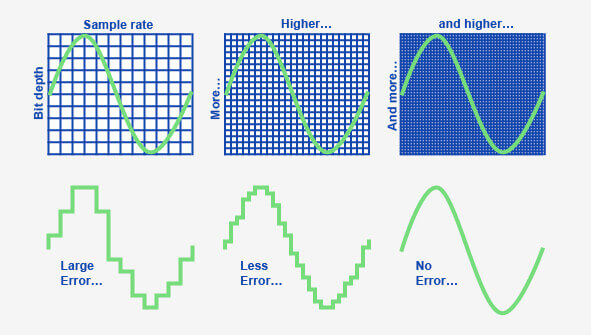
When it comes to digital audio, sample rate refers to the number of samples of sound that are taken per second to create a digital representation of an analog signal. In other words, it’s the number of times per second that the analog sound wave is measured and converted to a digital signal. The higher the sample rate, the more accurately the sound can be represented in the digital domain.

Personally, I’ve noticed that when I’m working on a music production project and I choose a higher sample rate, the resulting audio files tend to sound clearer and more detailed. As an avid music listener, I also appreciate the difference in sound quality when listening to high sample rate audio files on my headphones or speakers.

According to Ethan Winer, author of “The Audio Expert”, “In general, using a higher sample rate than the minimum required for the material being recorded or processed is good practice. However, there is no benefit to using a higher rate than twice the highest frequency that needs to be captured or processed.”

The Relationship Between Audio Sample Rate and Sound Quality

As mentioned earlier, the higher the sample rate, the more accurately the sound can be represented in the digital domain. This means that a higher sample rate can lead to a higher quality sound, with more accurate representation of the original analog sound wave.

I’ve also found that the relationship between sample rate and sound quality is not always linear. That is, going from 44.1 kHz to 48 kHz may not make as much of a difference as going from 48 kHz to 96 kHz. This is because the higher sample rates allow for more accurate representation of the sound wave, even in the higher frequency ranges.

As Julian Dunn, author of “Mastering Digital Audio”, explains, “Higher sample rates…provide more ‘headroom’ in the recording, which means that the recording can capture more of the dynamic range of the original sound. This can result in a richer, more natural sound.”

Choosing the Right Sample Rate

When it comes to choosing the right sample rate, it’s important to consider the specific needs of your project. If you’re recording a podcast or a voiceover, a sample rate of 44.1 kHz may be sufficient. However, if you’re recording music or other complex audio, a higher sample rate may be necessary to capture all the nuances and details of the sound.

It’s also important to note that a higher sample rate means larger file sizes, which can impact storage and processing requirements. So, it’s important to find a balance between the sample rate and file size that works best for your specific needs.

As author and sound engineer Bob Katz explains, “The most important factor is not the numbers, but how the system sounds. Choose the sample rate that sounds best to you, taking into account the practical considerations of your production environment.”

Final Words:

In conclusion, the sample rate of digital audio plays a significant role in the quality of the resulting sound. By understanding the relationship between sample rate and sound quality, and choosing the right sample rate for your specific needs, you can ensure that your digital audio sounds as good as possible.

How does lossless compression work for audio?

How does lossless compression work for audio?

Lossless Audio
Lossless Audio

Lossless audio compression is a crucial technology for digital music distribution and storage. With the rise of streaming services, high-fidelity audio has become a priority for many listeners. However, uncompressed audio files can be quite large, making them impractical for mobile devices and slower internet connections. This is where lossless compression comes in.

Lossless Audio
Lossless Audio

Why is lossless audio compression important?

Lossless compression allows digital audio files to be compressed without losing any of the original data. This means that the sound quality is preserved, while the file size is reduced. With lossless compression, music files can be stored and transmitted more efficiently, without sacrificing quality. In addition, lossless compression makes it possible to enjoy high-fidelity audio on devices with limited storage capacity.

How does lossless compression work?

Lossless compression works by identifying and removing redundancies in the data. This is done through a process called entropy encoding, which analyzes the statistical properties of the audio data to find patterns that can be represented more efficiently. These patterns are then replaced with shorter codes, which are stored in a compressed file. When the file is decompressed, the original data is restored exactly as it was before compression.

Common lossless compression formats

  • FLAC: Free Lossless Audio Codec
  • ALAC: Apple Lossless Audio Codec
  • WAV: Waveform Audio File Format
  • AIFF: Audio Interchange File Format

How to use lossless compression

To use lossless compression for your audio files, you’ll need to choose a suitable codec and software. There are many options available, but some of the most popular choices include FLAC and ALAC. Once you’ve selected a codec, you can use a program like Foobar2000 or dBpoweramp to compress your files. You can also use lossless compression for streaming, by selecting a service that supports lossless audio, such as Tidal or Qobuz.

Lossless compression is an essential tool for anyone who wants to enjoy high-quality audio in a digital format. With lossless compression, you can store and transmit audio files more efficiently, without sacrificing fidelity. Whether you’re an audiophile or a casual listener, lossless compression is an important technology to be aware of.

The History of Lossless Audio Compression: From Analog to Digital

Lossless audio compression has come a long way since the early days of digital audio. In this article, we’ll take a deep dive into the history of lossless audio compression, from its roots in analog tape to the latest developments in digital audio.


Analog Roots

The history of lossless audio compression can be traced back to the days of analog tape. Tape-based audio recording was the dominant technology for several decades, and various techniques were developed to compress audio data without sacrificing quality. One of the most popular techniques was noise reduction, which involved boosting the level of low-level audio signals while reducing the level of high-level signals. This allowed audio to be recorded at a higher signal-to-noise ratio, resulting in a cleaner, clearer sound.

The Digital Revolution

The introduction of digital audio in the 1980s marked a major turning point in the history of lossless audio compression. With digital audio, it became possible to represent audio data as a series of numbers, which could be manipulated and compressed using a wide range of mathematical algorithms. One of the earliest lossless compression algorithms was the Audio Processing Technology (APT) algorithm, which was developed in the early 1990s. APT used a combination of linear prediction and residual coding to compress audio data without losing any information.

The Rise of Lossless Audio Formats

In the early days of digital audio, lossy compression formats like MP3 and AAC dominated the market. These formats achieved high levels of compression by discarding some of the original audio data, resulting in a loss of quality. However, as storage capacity and internet speeds increased, there was a growing demand for high-fidelity audio that could be stored and transmitted efficiently. This led to the development of lossless audio formats like FLAC and ALAC, which could compress audio data without sacrificing quality.

  • FLAC: Free Lossless Audio Codec
  • ALAC: Apple Lossless Audio Codec


The Future of Lossless Audio Compression

The latest developments in lossless audio compression are focused on improving the efficiency and speed of compression algorithms. One promising approach is the use of machine learning, which can be used to identify patterns in audio data that can be compressed more effectively. Another area of focus is the development of lossless compression formats that are optimized for streaming, allowing high-fidelity audio to be delivered over the internet in real time.


Why isn’t “high resolution audio” worth promising higher quality than CD?

In recent years, Neil Young has been the most outspoken advocate of “high resolution audio” or HRA. These are huge audio files that in theory sound much better than any other digital file. To put this sound in everyone’s hands and ears, he created the PonoPlayer, a portable device that promises the highest fidelity.

He is not alone. Last week at CES, Sony announced a series of new products with high-resolution audio. The main one: an absurdly expensive $ 1,200 Walkman, with hardware that supposedly optimizes the playback of songs recorded on it.

PonoPlayer

At the most basic level, the desire for high-resolution audio is based on reality. We sacrifice audio quality for convenience by adopting digital formats like MP3 and lossy encoding from streaming services like Spotify. A music lover should be concerned with improving audio quality using better files.

This is fair! But from there, the arguments for high-resolution audio crumble.

There are no scientific bases

Although the term “high-resolution audio” is freely used, it generally refers to music that has been digitally encoded at a high sampling rate and bit depth. Specifically, we are talking about higher rates than the CD-quality digital standard, adopted for decades.

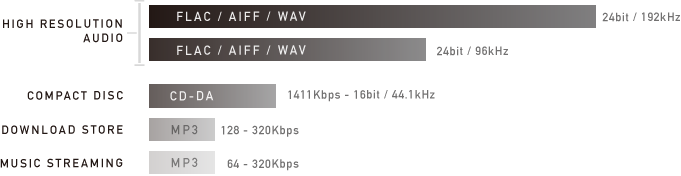
Below is a Pono chart that describes various levels of audio quality. At the bottom, we have lower quality files for streaming; in between, we have the CD-quality 44.1 kHz / 16-bit standard; And on top, we have absurdly high resolution files that are 192 kHz / 24 bit encoded.


High Resolution Audio

The logic behind HRA is that by maximizing the sample rate and bit depth, you also maximize the sound detail and dynamic range of the music you are listening to. This sounds great in theory, but in practice it is an absolute fantasy.

The CD quality standard, which is insufficient for the Young and HRA defenders, has not been adopted at random. It is not a number taken from the air. It is based on sampling theory and the real limits of human hearing. For the human ear, audio above 44.1 kHz / 16 bit does not show an audible difference.

Still, this does not prevent people from claiming that they can hear the difference in the highest quality audio. The “proof” that PonoPlayer is superior begins with a testimonial video, posted on Pono’s Kickstarter page. Young used his connections to the music industry to fill the PonoPlayer with high definition audio tracks and bring it to famous musicians. They, of course, say they got goosebumps and say that Pono is the best they have ever heard.

This proves nothing. I am not calling Norah Jones and Dave Grohl liars, but I am saying that they are succumbing to confirmation bias, that natural urge to see what you want to see, or hear what you want to hear. If Neil Young pushes a device into his hands and says, “Listen to this, man, you won’t believe it,” you will probably hear exactly what Neil Young wants you to hear.

There is a scientific way to overcome confirmation bias, called a double-blind test, in which two alternatives are presented at random, so you have no idea which is which. There are some issues with the double-blind test, but it’s generally accepted as a good practice, especially when it comes to evaluating something as elusive as the audio quality.

Young and Pono do not cite studies of this type on the benefits of high audio rates or their music player. But there were those who investigated this problem: in a study published in 2007 in the Journal of the Audio Engineering Society, Brad Meyer and David Moran did a double-blind test with a large sample of “serious” listeners. In it, the 44.1 kHz audio was compared to “the best high-resolution discs we could find.” The goal was not to show which one was better, but to find out if you could tell the difference.

“None of these variables showed a correlation with the results, and there was no difference between the responses and the results of tossing a coin,” they write in the conclusion. I mean, people couldn’t figure out what the high-resolution audio was and what the CD-quality audio was.

In general, expensive hardware is unnecessary for music to sound good, especially if it promises a quality that human ears cannot perceive.

Neil Young even upholds a commendable principle: We should be listening to higher quality music, but high-resolution audio promises more than it has to offer.

HIGH RESOLUTION AUDIO: HOW TO LISTEN TO MUSIC WITH THE HIGHEST QUALITY

Many of our clients, simple music fans or professionals in the sector, constantly seek perfection. Some are willing to spend even thousands of euros to assemble a high-quality hi-fi system. Many come to us for advice, and we are happy to accommodate them. First, however, it is good to gain some (really few) insights into the world of music and the media through which we generally hear it.

Sony High-Resolution Audio

We will start from the beginning.

Digital music is distributed in many formats. Some are compressed, others are not compressed. However, all files are nothing more than a sequence of bits whose value can be 1 or 0. These bits are grouped into bytes, that is, words of 8 bits each. A series of bytes forms a file or an audio track that we can listen to.

High resolution audio: recording and playback

Once recorded, to be played by us, this digital music file is sent to an analog-to-digital converter (DAC), converted to an analog signal, and finally sent to an output circuit, either a preamplifier or analog output

The quality of the file to be reproduced is given by two factors: resolution and sampling frequency.
Resolution is expressed in bits, while the sampling value is expressed in kilohertz (kHz).

Word length (bit)
= resolution Dynamic range Reproducible tones
12 bit 72 dB 4,096
16 bit (CD) 96 dB 65,536
24-bit (DVD) 144 dB 16,777,216
32 bit 192 dB 4,294,967,296

In simple terms, all this means that the denser the digital information, the closer the “digital” version of the signal gets closer to the original analog signal.

“The highest possible quality is the closest to the original as it was produced.”

For example, if you have digital music on CD in 16 bit / 44.1 kHz, this corresponds to a dynamic range of 96 dB with 65,536 gradations. However, music is rarely written to CD under these conditions, because the recording was originally made in only 16 bits (other recording defects may further reduce the signal).

Today, however, recordings are made at 24-bit / 192 kHz (in part also at 32-bit / 384 kHz), which means that the length of the information is significantly longer (and therefore has a greater dynamic range) and a higher sampling rate thus increasing the bandwidth.

The higher the resolution of the audio file, the higher the sample rate and the better the final audio signal.

Please note that the increase in “information content” resulting from higher resolution / sampling is exponential: consequently, the qualitative difference between a 16-bit audio file and 24-bit recordings could be so subtle that only be perceived by a trained ear and obviously well equipped.

HIGH DEFINITION: COMPRESSED AUDIO FORMATS AND UNCOMPRESSED AUDIO FORMATS

Audio files can be compressed (with or without loss of quality) and uncompressed (without loss of quality).

Some examples:

Uncompressed audio formats

WAV – Waveform Audio File Format (.wav)
AIFF – Audio Interchange File Form (.aiff, .aif or .aifc)

Compressed audio formats (no quality loss)

ALAC: Apple Lossless Audio Codec (.mp4 or .m4a)
FLAC: Lossless Audio Codec (.flac)

Compressed audio formats (with loss of quality)

MP3: MPEG-1 or MPEG-2 Audio Layer III (.mp3)
AAC: Advanced Audio Coding (.aac, .mp4, or .m4a)

To make a “visual” example and clarify the concept, let’s take a photograph: on the left, the original version, in good resolution; On the right, the same photo, saved in compressed format, which reduces its quality:

high rsolution audio

music in high definition, example of maximum quality

In summary: CDs (compact discs) offered good quality (not maximum) and a certain “portability”, but their capacity was limited.
Mp3 files certainly helped share music over the network, at the price of a substantial loss in terms of playback quality.

HIGH DEFINITION SOUND: A SMALL GLOSSARY TO BETTER UNDERSTAND

Bit rate

The bit rate is the amount of data per second required for a transfer from A to B. The bit rate is always expressed in kilobits (Kbps) or megabits (Mbps) per second. For example, an mp3 plays an audio track from 96 to 320 kbps; a FLAC file can exceed 5000 kbps.

Bit depth (resolution)

This value describes the number of bits recorded in a single audio sample. Therefore, it is equivalent to termination. An example: the quality of a CD (compact disc) supports up to 16 bits; An audio DVD supports up to 24 bits.

What is high-resolution audio?

High Red Audio

With more accurate analog sound sampling, this technology promises better digital sound than traditional audio CDs.
Marketing requires manufacturers not to miss the opportunity to put beautiful acronyms on their devices to indicate the presence of new “revolutionary” technologies. Therefore, in recent months, some headphones and speakers have blossomed, especially the labels “HD audio” or “high-resolution audio”. What does “high resolution audio” (or high definition) mean? In particular, it is a digital sound of at least 24 bits / 96 kHz, so it offers better quality than the 16 bits / 44.1 kHz of the audio CD. If we synthesize too much, we could say that it is a sampling gap similar to that which can separate Blu-ray from DVD.

How is it possible ? To fully understand it, it is important to go back to the beginnings of digital sound. Originally, the sound is analog data, such as the variation in air pressure or an electrical signal over time. To digitize the sound, samples are regularly taken and encoded in a series of bits. When creating the audio CD, manufacturers agreed on 16-bit encoding and sampling at 44.1 kHz, or 44,100 times per second. Therefore, one minute of mono sound requires about 5.3 MB of data and 10.6 MB of stereo per minute. When the first audio CDs were released in 1984/85, vinyl fans cried as a betrayal, accusing the digital sound of not reproducing the warmth of analog sound from the former 33rpm.

Is there really a difference?

We had the opportunity to test the entire high-resolution audio system multiple times: 192 Hz FLAC audio files, on a NWZ-A compatible high-resolution player and MDR-1A headphones, also Hi-Res. The reproduction is of course very good by ear and it seems that the songs on our test album (Play MemoriesDaft Punk) have been given precision. Even when the volume is pushed to the limit of the maximum threshold, the reproduction is still excellent and well detailed. But we also listened to the same MP3 album, in a (relatively) high 320 kbit / s sample, even with Sony’s portable music player and high-resolution headphones. And it is clear that the difference was frankly not clear. Our perception of representation was just as good. We continue the experience by listening to the MP3 version of the Daft Punk album, this time with less high-quality headphones than the Sony MDR-1A. And there the register was even worse: muted, less accurate in the treble and less powerful in the bass. Result: By ear sampling of the file had less influence on the reproduction because the quality of the products used to reproduce the sound, ie the player and the headphones. So a question about everything from a material order. For the right choice, go to our helmet department and our two specific comparisons:

– Comparison of headphones for less than 100 euros
– Comparison of headphones for more than 100 euros

What is high-definition audio?

Most digital audio systems encode analog sound, ie perceived sound, in digital form for archiving and transmission using a system called pulse code modulation. The quality of the digital recording is determined by two factors: Bit depth and sampling rate: The bit depth determines the number of “passes” available to describe the sound: the more bits used, the greater the dynamic range (the difference between the loudest and the lowest Sound) to be recorded.

high resolution audio

At the same time, the higher the sampling rate (ie how often a “snapshot” of the sound is recorded per second), the more precisely music can be analyzed and converted into digital data. The sampling rate refers to the frequency range of the audio from the lowest to the highest pitch that can be stored.

The higher the bit depth and the higher the sampling rate, the more information can be saved.

The CD uses 16-bit / 44.1 kHz encoding, which was best available at the time the CD was introduced in the early 1980s. However, progress has been made since then, and it is now possible to record and distribute music at bit depth and bit rates at higher sample rates. These formats have been used for recordings and recordings for several years, but are now also available to all households.

high resolution formats

High Resolution Audio (HRA) is any format that goes beyond the standard 16-bit / 44.1 kHz CD, and HRA recordings generally use 24-bit encoding, which enables a very dynamic range. wider than CD and sampling rates up to 192 kHz, which is the maximum level for commercial HRA recordings. All of this aims to achieve a sound that is as similar as possible to that of the recording studio.

High resolution audio formats

There is a wide range of HRA formats, so it is important that the HRA team supports them as fully as possible. Technics products are compatible with all common HRA formats (some are still in the introductory phase) and will ensure simple, practical and sustainable HRA reproduction in the future as the market develops.

CD quality music is also available in various formats. Below is a list of the most common formats used for CD quality music as well as music with loss of quality and for HRA playback.

FLAC: Studio Master sound quality (24 bit) and CD quality (16 bit)

Most music files available online (HRA and CD quality) are in FLAC (Free Lossless Audio Codec) format (the format is free, no music). 24-bit FLAC files are generally available in 96 kHz and 192 kHz, although some albums are in 24-bit / 44.1 kHz or 24-bit / 48 kHz format. These 24 bit / 192 kHz are usually the best files available and identical to the Studio Master version.
Unlike MP3, which reduces size at the expense of content, the FLAC format is lossless and works like a zip file on your computer. It is unpacked “on the fly” during playback and offers exactly the same data as in the file before compression.
Apple has its own format that means no loss: Apple Lossless (ALAC) works like FLAC, but is compatible with iTunes. Some companies that provide Studio Master downloads offer these in FLAC and ALAC formats.
An additional advantage of the FLAC and ALAC formats is that they store information about music in the form of metadata, including general parameters such as artist, album title, title / track number, music genre, composer, catalog number, etc.
This information is contained in Studio Master or HRA files that can be purchased online or added when creating a personal CD: the burning software uses a search in the Internet database to identify the hard drive to be archived and provides all the information. You can also edit this data or enter it manually.

WAV / AIFF: uncompressed file

You can also copy CDs as files without compression, e.g. B. as a direct copy of data to the hard drive. Windows computers save them as WAV files (Waveform Audio File Format), Macs as AIFF (Audio Interchange File Format), but the two formats are interchangeable and, of course, Technics systems are both reproduced.

High resolution audio: how to listen to music with the highest quality

High resolution audio: how to listen to music with the highest quality

Many of our clients, simple music fans or professionals in the sector, constantly seek perfection. Some are willing to spend thousands of euros to put together a high-quality hi-fi system. Many come to us for advice, and we are pleased to accommodate them. First, however, it is good to gain some (really few) insights into the world of music and the media through which we generally hear it.

high resolution quality

Let’s start from the beginning.

Digital music is distributed in many formats. Some are compressed, others are not compressed. However, all files are nothing more than a sequence of bits whose value can be 1 or 0. These bits are grouped into bytes, that is, words of 8 bits each. A series of bytes forms a file or an audio track that we can listen to.

High resolution audio: recording and playback

high resolution audio

Once recorded, to be played by us, this digital music file is sent to a digital-to-analog converter (DAC), converted to an analog signal, and finally sent to an output circuit, either a preamplifier or analog output

The quality of the file to be reproduced is given by two factors: resolution and sampling frequency.
Resolution is expressed in bits, while the sampling value is expressed in kilohertz (kHz).

Word length (bit)
= Resolution Dynamic range Playable tones
12 bit 72 dB 4,096
16 bit (CD) 96 dB 65,536
24-bit (DVD) 144 dB 16,777,216
32 bit 192 dB 4,294,967,296

In short, this all means that the denser the digital information, the closer the “digital” version of the signal gets closer to the original analog signal.

“The highest possible quality is the closest to the original, as produced.”

For example, if you have digital music on CD in 16 bit / 44.1 kHz, this corresponds to a dynamic range of 96 dB with 65,536 gradations. However, music is rarely written to CD under these conditions, because the recording was originally made in only 16 bits (other recording defects may further reduce the signal).

Today, however, recordings are made at 24-bit / 192 kHz (in part also at 32-bit / 384 kHz), which means that the length of the information is significantly longer (and therefore has a greater dynamic range), and the higher sampling frequency thus increasing the bandwidth.

The higher the resolution of the audio file, the higher the sample rate and the better the final audio signal.

Please note that the increase in “information content” resulting from the higher resolution / sampling is exponential: accordingly, the qualitative difference between a 16-bit audio file and 24-bit recordings could be so subtle as to be perceived only by a trained ear and obviously well equipped.

HIGH DEFINITION: COMPRESSED AUDIO FORMATS AND UNCOMPRESSED AUDIO FORMATS
Audio files can be compressed (with or without loss of quality) and uncompressed (without loss of quality).

Some examples:

Uncompressed audio formats

WAV – Waveform Audio File Format (.wav)
AIFF – Audio Interchange File Form (.aiff, .aif or .aifc)

Compressed audio formats (no quality loss)

ALAC: Apple Lossless Audio Codec (.mp4 or .m4a)
FLAC: Free Lossless Audio Codec (.flac)

Compressed audio formats (with loss of quality)

MP3: MPEG-1 or MPEG-2 Audio Layer III (.mp3)
AAC: Advanced Audio Coding (.aac, .mp4, or .m4a)

To make a “visual” example and clarify the concept, let’s take a photograph: on the left, the original version, in good resolution; On the right, the same photo, saved in compressed format, which reduces its quality:

music in high definition, example of maximum quality

In summary: CDs (compact discs) offered good quality (not maximum) and a certain “portability”, but their capacity was limited.
Mp3 files certainly helped share music online, at the price of a substantial loss in terms of playback quality.

HIGH DEFINITION SOUND: A SMALL GLOSSARY TO BETTER UNDERSTAND
Bit rate

Bit rate is the amount of data per second required for a transfer from A to B. Bit rate is always expressed in kilobits (Kbps) or megabits (Mbps) per second. For example, an mp3 plays an audio track from 96 to 320 kbps; a FLAC file can exceed 5000 kbps.

Bit depth (resolution)

This value describes the number of bits recorded in a single audio sample. Therefore, it is equivalent to termination. An example: the quality of a CD (compact disc) supports up to 16 bits; An audio DVD supports up to 24 bits.