Critical Bandwidths in MP3


Free Download Mp4Gain
picture

Calculating Critical Bandwidths in MP3 Compression

Critical Bandwidths in MP3

As an expert in the realm of MP3 compression and audio technology, I’m here to unravel the intricate world of critical bandwidths in MP3 compression. Understanding this concept is pivotal in achieving optimal audio quality while minimizing file size. Let’s dive into the details and explore this fascinating topic.

What Are Critical Bandwidths in MP3 Compression?

Critical bandwidths, often referred to as critical bands, are a fundamental concept in the field of psychoacoustics. They relate to the way our ears perceive different frequencies and play a vital role in audio compression, particularly in the MP3 format. To put it simply, critical bandwidths represent the range of frequencies that our ears can distinguish and process.

Real-Life Example: Think of critical bandwidths as a set of buckets, each representing a range of frequencies. Our ears can only fill a limited number of buckets at once, and these buckets are wider for low frequencies and narrower for high frequencies.

MP3 compression exploits the knowledge of critical bandwidths to remove audio information that falls outside the range of human hearing. This selective approach allows for significant data reduction while retaining audio quality. It’s akin to trimming the fat while preserving the meat, resulting in a leaner audio file.

How Are Critical Bandwidths Determined?

Critical bandwidths are not fixed; they vary depending on the specific frequency and the environment in which the sound is heard. Psychoacoustic studies have led to the development of critical bandwidth curves, which provide a graphical representation of how our ears perceive different frequencies.

Real-Life Example: Imagine you’re in a noisy cafĂ©, trying to listen to a conversation. Your ears focus on the frequency range of the voices while ignoring the surrounding noise. This selective attention is similar to how critical bandwidths work in audio compression.

In the context of MP3 compression, these critical bandwidth curves are used to determine which parts of the audio spectrum can be discarded without a noticeable impact on the listening experience. This fine-tuned approach ensures that the compression process is both efficient and transparent to our ears.

Balancing Compression and Quality

The art of MP3 compression lies in finding the delicate balance between reducing file size and maintaining audio quality. Critical bandwidths are a crucial tool in achieving this equilibrium. By identifying and preserving the most relevant audio information while discarding what falls outside the critical bandwidths, MP3 compression delivers impressive results.

Real-Life Example: Consider the act of watching a high-definition movie on your smartphone while saving data. The device adjusts the video quality based on the screen size and your internet speed, providing a smooth viewing experience without unnecessary data consumption. MP3 compression operates in a similar fashion, optimizing audio for digital consumption.

In essence, critical bandwidths in MP3 compression serve as a guide to ensure that the compression process is as imperceptible as possible to the human ear. By focusing on the audio information that matters most, we can enjoy high-quality audio experiences with smaller file sizes.

Last Words about Critical Bandwidths in MP3 Compression

In my journey through the realm of audio compression, I’ve come to appreciate the profound impact of critical bandwidths. These frequency ranges shape the way we perceive sound and play a pivotal role in the world of MP3 compression. By understanding this concept, we can navigate the intricacies of audio technology, striking a harmonious balance between quality and efficiency.


Free Download Mp4Gain
picture


Mp4Gain Main Window
picture


Mp4Gain Features
picture


Free Download Mp4Gain
picture

Audio File Size Optimization

Audio File Size Optimization


Audio File Size Optimization


Audio File Size Optimization


Audio compression techniques

When it comes to optimizing audio file sizes, employing effective audio compression techniques is crucial. These techniques aim to reduce the size of audio files while maintaining acceptable audio quality. Here are some key audio compression methods:

  1. Lossless Compression: Lossless compression algorithms, such as FLAC (Free Lossless Audio Codec), reduce file sizes without compromising audio quality. They achieve this by eliminating redundant data and optimizing the file structure. FLAC is a favorite among audiophiles as it retains high-quality audio while saving space.
  2. Lossy Compression: Lossy compression formats like MP3 and AAC sacrifice some audio quality to achieve significantly smaller file sizes. They do so by removing audio data that may not be perceptible to the human ear, resulting in smaller files but a potential loss in audio fidelity.
  3. Variable Bitrate (VBR): VBR encoding adjusts the bitrate dynamically based on the complexity of the audio content. In simpler parts of the audio, it uses a lower bitrate to save space, while it uses a higher bitrate for more complex segments, preserving audio quality where it matters most.

Reducing audio file size

Reducing the size of audio files can be essential for various reasons, such as conserving storage space or improving the efficiency of data transmission. Here are some strategies to effectively reduce audio file sizes:

  1. Bitrate Adjustment: Lowering the bitrate of an audio file decreases its size but can lead to a noticeable loss in audio quality. Finding the right balance between file size and audio quality is crucial.
  2. Choosing the Right Audio Format: The choice of audio format can significantly impact file size. Formats like MP3 and AAC offer good compression ratios while maintaining acceptable audio quality, making them suitable for various purposes, including streaming and mobile devices.
  3. Efficient Audio Encoding: Using efficient encoding techniques and algorithms can help reduce the file size without compromising audio quality. Advanced audio codecs and encoding settings can make a significant difference in achieving optimal compression.

Minimizing audio file size

Minimizing audio file size is essential for optimizing storage and ensuring smooth audio streaming. Here are some additional tips to achieve this:

  1. Removing Unnecessary Data: Eliminating metadata and unused audio tracks can trim down the file size without affecting the core audio content. This is particularly useful for audio files with extensive metadata.
  2. Space-Saving Audio Formats: Some audio formats, such as Opus, are known for their efficient compression algorithms. Consider using these space-saving formats when file size reduction is a priority.

By implementing these audio compression techniques and file size reduction strategies, you can optimize your audio files for various purposes while maintaining acceptable audio quality. Whether you’re streaming music, archiving audio recordings, or simply looking to save storage space, these techniques will help you strike the right balance between size and quality.

Final Words

Optimizing audio file sizes is a valuable skill in today’s digital age. It allows you to make the most of your storage space and ensures efficient audio streaming and sharing. Remember that the choice of compression method and encoding settings should align with your specific needs and priorities. Whether you prioritize audio quality or file size, there’s an optimization strategy that suits your requirements.

MPEG Format

MPEG Format

MPEG Format
MPEG Format
MPEG Format
MPEG Format

What is the MPEG standard?

MPEG, which stands for the Moving Picture Experts Group, represents a family of standards used for coding audiovisual information in a digital format. Established by the group of experts who designed it, MPEG is widely recognized in the realm of multimedia content. Digital videos and audio tracks, which you might stream or download, often use the MPEG standard because of its reliable compression techniques.

Such compression allows large multimedia files to be condensed into smaller sizes without sacrificing significant quality. The versatility of the MPEG standard has made it an indispensable tool for various media applications.

“The digital revolution is far more significant than the invention of writing or even of printing.” – Douglas Engelbart

History of the MPEG format.

The MPEG format, as we know it today, was initiated in 1988. The goal was to create standards to address the growing demands of the digital multimedia landscape. Over the years, several versions of MPEG have been released, each catering to specific needs and evolving technologies.

From its inception, the format’s emphasis has been on providing high-quality digital audiovisual content. As technologies advanced and the requirements of multimedia shifted, the MPEG standards continually adapted, remaining relevant in every era of digital media evolution.

“Innovation is the calling card of the future.” – Anna Eshoo

How does MPEG compression work?

MPEG compression is a marvel of digital engineering. It uses a combination of temporal and spatial compression techniques. Temporal compression reduces redundancy between consecutive frames of a video, while spatial compression lessens redundancy within individual frames.

By analyzing patterns and repetitive information, MPEG compression discards data that won’t be missed by the human eye or ear. This results in significantly reduced file sizes without a noticeable drop in quality, making it efficient for storage and transmission.

“Simplicity is the ultimate sophistication.” – Leonardo da Vinci

Differences between MPEG versions.

There are several MPEG versions, each designed to address unique challenges in the multimedia world. MPEG-1, for example, was created for video CDs and can support low-resolution videos. MPEG-2, on the other hand, was designed for DVDs and broadcast television.

Subsequent versions, like MPEG-4, introduced enhanced functionalities and catered to newer technologies, such as internet streaming and mobile devices. Each version marked an evolution, offering better compression, improved quality, or both.

“Progress is impossible without change.” – George Bernard Shaw

MPEG format’s impact on multimedia.

The MPEG format revolutionized the multimedia industry. Its efficient compression algorithms made it possible to store and transmit high-quality video and audio in considerably smaller files. This played a crucial role in the rise of digital streaming platforms, online video sharing, and digital broadcasts.

Furthermore, the format’s adaptability ensured its continued relevance, influencing the development of various multimedia technologies over the years.

“Without change, there is no innovation.” – C. Frank Wang

Understanding MPEG’s video and audio components.

MPEG encompasses both video and audio components. The video aspect is primarily about compressing visual data effectively, while the audio component focuses on achieving high-quality sound with minimal file size. Together, they provide a holistic approach to multimedia compression, ensuring that both sight and sound are preserved with integrity.

“Sound and vision become poetry when woven together.” – Anonymous

Evolution and significance of MPEG.

Over the years, MPEG has evolved to meet the changing demands of technology and media consumption. Its significance lies in its adaptability and its ability to maintain high-quality standards. From facilitating DVD technology to enabling online streaming, MPEG’s influence is pervasive in the multimedia realm.

“Adaptability is the simple secret of survival.” – Jessica Hagedorn

Advantages of using MPEG.

MPEG offers numerous advantages, including efficient compression, versatility across platforms, and compatibility with a wide range of devices. Its ability to condense large media files without a significant loss in quality makes it ideal for both storage and transmission.

“In every challenge lies an opportunity for growth.” – Unknown

Limitations of the MPEG format.

While MPEG is highly efficient, it’s not without limitations. Lossy compression means some data is discarded, which might affect quality in specific applications. Additionally, certain MPEG versions may not be suitable for all media needs, requiring careful selection based on the intended use.

“Every limitation is an opportunity in disguise.” – Anonymous

Real-world applications of MPEG.

From streaming services and broadcasting to video conferencing and digital advertising, the applications of MPEG are vast. Its universal appeal and efficiency have made it the go-to choice for various multimedia needs across industries.

“The real world is where the monsters are.” – Rick Riordan

Final Words

MPEG’s indelible mark on the multimedia landscape underscores its importance. As technologies continue to evolve, the adaptability and efficiency of formats like MPEG will be crucial in shaping the future of digital media.

What is Motion Estimation in Video Compression?

What is Motion Estimation in Video Compression?

Motion Estimation in Video


Motion Estimation and Compensation

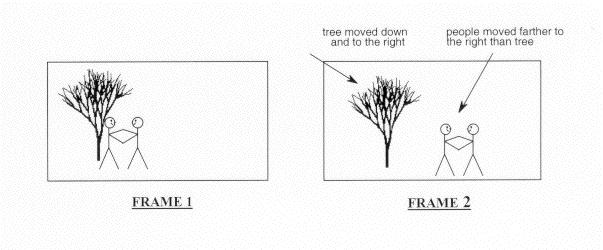
Motion estimation and compensation are fundamental techniques used in video compression. Motion estimation refers to the process of analyzing consecutive video frames to identify the motion vectors between them. Motion compensation, on the other hand, involves using these motion vectors to predict the pixel values of the current frame based on the previous frame. By utilizing motion estimation and compensation, video compression algorithms can efficiently remove temporal redundancies, resulting in smaller file sizes without significant quality loss.
I first encountered the concept of motion estimation during my undergraduate studies in computer science. We were tasked with implementing a simple video compression algorithm, and I quickly learned that motion estimation was a crucial component. As I delved deeper into the topic, I came across the book “Video Coding for Mobile Communications: Efficiency, Complexity, and Resilience” by K.R. Rao et al., which provided a comprehensive overview of motion estimation algorithms and their applications.

Motion Estimation Algorithms

There are several motion estimation algorithms used in video compression, each with its strengths and weaknesses. One of the most popular methods is block matching, which divides the frame into small blocks and compares them with corresponding blocks in the previous frame to find the best match. Another commonly used technique is optical flow, which estimates the motion vectors by analyzing the brightness patterns between frames.
In my experience with video compression software, I have found that the choice of motion estimation algorithm can significantly impact the compression efficiency and visual quality of the output. For example, block matching algorithms tend to perform well on videos with simple, uniform motion, while optical flow methods excel in more complex scenes with dynamic motion.

Video Coding Standards

Video compression standards are crucial for ensuring interoperability and compatibility between different devices and software. Some of the most widely used standards include H.264/AVC, HEVC, and MPEG-4. These standards define the encoding process, including the motion estimation and compensation techniques used, and specify the parameters required for decoding.
As someone who has worked extensively with video coding standards, I can attest to the importance of following these guidelines to ensure compatibility and optimal performance. However, it is worth noting that some proprietary codecs, such as Apple’s ProRes and Google’s VP9, may offer superior performance in certain scenarios.

In conclusion, motion estimation is a critical component of video compression, allowing for efficient removal of temporal redundancies. By utilizing motion estimation and compensation techniques, video compression algorithms can significantly reduce file sizes without compromising quality. As I have learned through my experiences with video compression, the choice of motion estimation algorithm and adherence to video coding standards are crucial factors in achieving optimal compression efficiency and visual quality.

video compression, motion estimation, motion compensation, block matching, optical flow, video coding standards, H.264/AVC, HEVC, MPEG-4, video coding research, video compression techniques, video compression software, video quality, compression efficiency, temporal redundancies, compatibility, proprietary codecs, ProRes, VP9, K.R. Rao, video coding for mobile communications, file size reduction, video frames, motion vectors, pixel values, previous frame, brightness patterns.