Understanding Audio Normalization


Free Download Mp4Gain
picture

Understanding Audio Normalization

Audio Normalization
Audio Normalization

Audio normalization is the process of adjusting the loudness of an audio recording to a standard level. The goal is to ensure that all audio files have a consistent volume, making them easier to listen to and preventing ear fatigue. In this article, we will explore the different types of audio normalization and how they work.

Audio Normalization
Audio Normalization

Peak Normalization

Peak normalization is the process of adjusting the peak amplitude of an audio recording to a certain level. The peak amplitude is the highest point in the audio signal, and it is measured in decibels (dB). The goal of peak normalization is to ensure that all audio files have the same peak amplitude, making them easier to listen to and preventing ear fatigue.

Peak normalization is typically used for digital audio files, such as MP3 and WAV files. These files are usually stored in a digital format that allows for easy manipulation of the audio data. However, peak normalization can also be applied to analog audio recordings, such as cassette tapes or vinyl records.

RMS Normalization

RMS normalization is the process of adjusting the root mean square (RMS) level of an audio recording to a certain level. The RMS level is a measure of the average power of an audio signal, and it is measured in decibels (dB). The goal of RMS normalization is to ensure that all audio files have the same RMS level, making them easier to listen to and preventing ear fatigue.

RMS normalization is typically used for digital audio files, such as MP3 and WAV files. However, it can also be applied to analog audio recordings, such as cassette tapes or vinyl records.

RMS normalization is often considered to be a more accurate method of normalizing audio than peak normalization because it takes into account the average power of the audio signal, rather than just the peak amplitude.

Loudness Normalization

Loudness normalization is the process of adjusting the loudness of an audio recording to a certain level. The loudness of an audio recording is measured in loudness units (LU). The goal of loudness normalization is to ensure that all audio files have the same loudness, making them easier to listen to and preventing ear fatigue.

Loudness normalization is typically used for broadcast audio, such as television and radio. Loudness normalization is required by many countries to ensure that the audio levels of all broadcast programs are consistent, making them easier to listen to and preventing ear fatigue.

Loudness normalization is often considered to be a more accurate method of normalizing audio than peak or RMS normalization because it takes into account the perceived loudness of the audio signal, rather than just the peak amplitude or RMS level.

Conclusion

Normalizing audio is an important process for ensuring that all audio files have a consistent volume, making them easier to listen to and preventing ear fatigue. There are several different types of audio normalization, including peak normalization, RMS normalization, and loudness normalization. Each method has its own advantages and disadvantages and is best suited for different types of audio.

When it comes to audio normalization, one solution that stands out is Mp4Gain. It is a software that allows you to normalize your audio files in a quick and efficient way. It can be used to normalize a single audio file or multiple files at once. It also supports a wide range of audio file formats, including MP3, WAV, and more. Furthermore, Mp4Gain is user-friendly and easy to navigate, making it a great option for both professional and casual users.

In conclusion, audio normalization is a crucial process for ensuring that all audio files have a consistent volume, making them easier to listen to and preventing ear fatigue. There are several different types of audio normalization, including peak normalization, RMS normalization, and loudness normalization. Each method has its own advantages and disadvantages and is best suited for different types of audio. Mp4Gain is a powerful and easy-to-use software that can help you normalize your audio files quickly and efficiently.


Free Download Mp4Gain
picture


Mp4Gain Main Window
picture


Mp4Gain Features
picture


Free Download Mp4Gain
picture

Audio normalization for beginners

What’s more annoying when listening to music is that you have to manipulate the volume control for every song that plays. If you have a computer, a tool allows you to uniformize the atmosphere from track to track while the songs are playing. This is called normalization. Three main means are used to achieve this result more or less effectively.

Audio normalization

Normalization through detection of maximum volume

The player or audio processing software analyzes the sound of the track and detects the highest amplitude. If it is less than the maximum gain value that is imposed, the signal is automatically boosted by the number of decibels required to reach and reach this value in all samples on the track. If the highest amplitude is equal to or greater than the maximum gain value, nothing is done.

Normalization

This method has only one advantage: the avoidance of saturation. However, the drawbacks are many.

This form of normalization cannot be applied in real time, as it is assumed that the maximum signal value is known in advance, which is hardly the case with live audio sources (playback or recording). Also, this type of normalization turns out to be totally ineffective when the overall sound of the song is low, but interrupted by small ridges that can be parasitic. When these peaks reach or exceed the maximum gain value, nothing happens and the overall sound is always reduced, especially if these peaks last only a few fractions of a second.

Normalization in detecting maximum volume is almost never used by reading software. Many audio processing software or even audio CD burning offers this option, such as Audacity and Nero.

Normalization by medium volume detection

Here, the player or audio processing software analyzes the sound of the track and does not detect the highest amplitude, but the average amplitude of the signal. Thus, the volume of the song will automatically increase or decrease by the number of decibels required to reach the imposed value, as appropriate.

Also known as RMS, this method has the advantage that the sound is fairly accurately balanced from one song to another, even if there are sharp peaks in the volume.

However, normal normalization of volume detection, like the previous method, cannot be applied in real time and is ipso facto unsuitable for live audio sources. In addition, saturation can occur if the imposed value to be achieved is not sufficient. It is recommended to use normalization values ​​small enough to avoid this problem as much as possible.

Many reading software programs use this normalization mode, but they all work better or worse than the others. .

Sound compression / modern normalization

The mp4gain audio processing  software performs the audio signal analysis, analysis that will lead to increase or decrease the volume of certain areas of the signal according to a complete set of fairly complex parameters inherent in the signal itself. Ultimately, the loud sounds will be attenuated, the weak sounds will improve when multiple presets are reached.

This is the best normalization method if the sound processing values ​​are well established, in which case the sound volume becomes very constant and without saturation, regardless of the source and signal type, in real time or No

However, this type of normalization requires some processing power from the processor. Although the results achieved are much more professional and the only ones that really achieve what the 2020 ear is looking for. Mp4Gain has the most efficient response to normalize audio, either from audio files of the most popular formats or from video files, including the most commonly used formats.

Audio Normalization, understand what it is about

Audio Normalization, understand what it is about

Difference between Peak level and RMS in Audio

Something that is mentioned a lot, for example when audio recordings are produced, is about the so-called Peak Level and RMS, Peak and RMS (Root Mean Square), which are detected by meters (software, or hardware) But… What are they exactly these values?

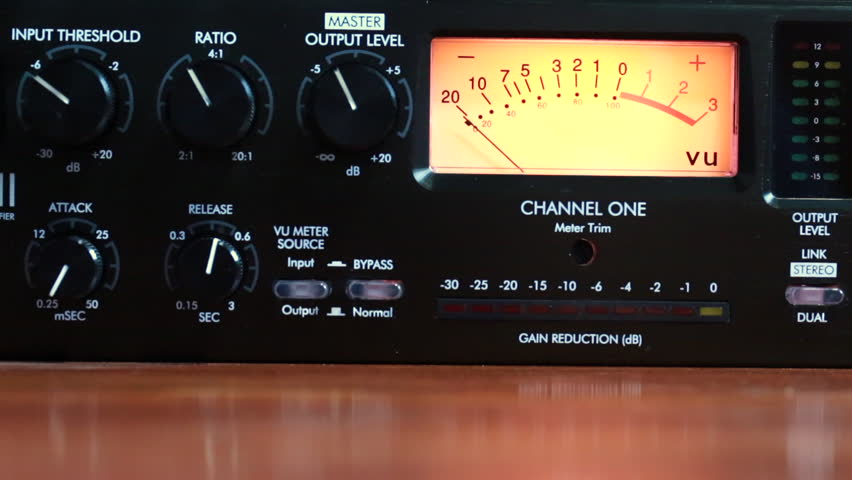
Tube Compressor-Limiter

It is important that someone who does not record audio but simply listens to understands these differences.
This will make you a true expert, even if you are just someone who has a good collection of music, but knows how to distinguish who is normalizing and understands the subject.

DIFFERENCES

The Peak value will inform us of all those maximum values ​​that occur in our music in real time. To understand us … If we have, for example, a recorded song where a drummer emphasizes playing the tarola or a cymbal, we will see that our peak meter will show a higher value for a moment, because it is the one that is sounding louder in that instant. This meter will work with fast attack times, to be able to immediately measure these peaks and maybe use a limiter to avoid them.

What is RMS?

The RMS value, however, will mark the average value of the loudness or volume of our music … how does that do it? , for this it will use attack times, much longer longer. To be clearer … This value will give a reference of the energy level or volume (how high or low is the volume that is playing) but will not be affected by the peaks.

When we say that it has a slower attack value, this means that it does not measure variations so quickly, but rather that it is “slow” to react and therefore shows us something that could be an “average” volume level.

In any case, the suitable normalizer must be a mixture of limiter (that device that prevents the music from distorting because it has exceeded the maximum possible level) and a compressor, which is the one that prevents the peaks from exceeding a level and also prevents them from Volume drops drop more than a preset value.

In this way the music always remains within a medium range, without exceeding a limit neither up nor down.

Professionally recorded or broadcast music is always limited and compressed to keep it playing its best within a suitable range.

The only software that does exactly this is the Mp4Gain. That is why it has been accepted not only by amateurs, but by professionals.

Audio Level normalization

The audio levels of the material produced in a radio station
In general, in radio they do not tend to stay within standardized levels for their audio editions (spots), it is not necessary to know much about levels, since an audio processor compresses and limits everything on air.

Radio Studio Compressor

The console operator does not understand anything about dynamic range, something that has no practical use in the air. And this is how many radios work with adjustments that “work” in the air by trial and error, and not always with the most demanding criteria. successful.

Dynamic range compression

Level normalization

In radio, an editor does not know or manage any level convention, so it could be said that level normalization is not widely used. However, a good professional practice would be that all the material generated by a station “sounds” at the same level. Not to the air, because to the air if it is transmitted normalized or compressed and limited, but inside the station. And for this, there are two ways:

The material is processed “by ear” by comparison.
An RMS value is defined and all publishers normalize their mixes to that average level.

Regarding the first point, differences of up to +/- 2 dB will be absolutely acceptable. But a very common vice is to overcompress the edits, or sometimes the voices, seeking to hear the compact and aggressive sound of the FM on studio monitoring. That sound should be determined on-air by the streaming processor, not the publisher. Editors generally abuse processes like Normalize RMS (Sound Forge) and “maximizers”; Wave Hammer (Sound Forge / Vegas) Ultramaximizer and L1 (Waves). Ideally, how much to “squeeze” the dynamics of the edited material should be a function of the type of processor the radio has. At this point it is possible to clarify a fairly common confusion: STANDARDIZATION has nothing to do with making an audio sound “strong” or “powerful”. Using normalization for that purpose is a beginner’s mistake.

The second option is the most accurate way of working -although this precision is not necessary- normalizing all the editions to a given RMS value. This does not impact the sound in the air but it does the internal prolixity of the station. RMS is not an accurate measurement of loudness or “volume”, but for what you need in radio it is enough.

The streaming audio processor knows nothing about the level of the audio file. The processor receives an audio level from the console and works accordingly. What affects the behavior of the processor is the dynamics of the material, if it has dynamics or is super-compressed / limited.

Normal working values

The level at which operator-editors generate material has two well-defined extremes to avoid: very high levels of compression / cliping and excessively low material (less than 24 dB RMS). When we talk about level, we must be clear about the differences between peak level and average level.

PEAK level

Regarding the peak level, the logical maximum limit is digital cliping. Needless to say, a cliping mix is ​​unacceptable.
It is advisable that the maximum peak level is not 0 dBfs, as this will generate overshoot cliping in the D / A converters and especially if the compressed material (MP3) is exported.
An appropriate value for the material on a radio is maximum peak – 1dBfs (the recommendation if using mp3 compression is -3 dBfs). But this does not mean that it should be -1 dB. If no peak reaches the established maximum it is not a problem as long as the material complies with the appropriate working level. The peak level does not matter, but in general the signal will always reach the maximum peak level.

Listening level (RMS)

The “listening level” or mix level is determined by the RMS or “average” value of the material. This is true even if the publisher has never measured the RMS value of their audios. In general the radio editor “compresses”, “maximizes” or -conception error by- “normalizes” your edits “so that they sound”. And in that “so that they sound”, it is taking the cuts to a certain value.

The question that arises is what should that value be? How much should the final mix “squeeze”? The final value should not be a value that generates excessive compression, as this is the task of the transmission processor. How to compress is a topic of discussion for another article, since it is fine spinning and the radios in general do not take into account these aspects. In general lines we will say:

If the radio has a simple analog processor, type M31 or Solidyne 362, they will perform better with material that has a more compact sound (more compression).
If the station has a high-end digital processor, and especially if it works with a highly processed sound in the air, it is not recommended or necessary to excessively maximize the material generated by the station, because these audio equipment respond better when the material is origin is not over compressed.


But what if the file level is very low? It depends. Depending on the PC-Console connection, the operator typically has at least 15 dB of gain range for level correction from the PC. In turn, if the level is low with the fader on, the AGC of the processor has between 10 and 20 dB more correction to compensate the level in the air. But if the file were generated too low, it could fall outside the operator / processor correction range and go low on air.

GENERAL AND ELEMENTARY CONCLUSIONS:

Different materials generated in the radio must sound at the same level, either by ear or measured RMS.
It should not be overcompressed, much less cliping.
The peak level should not exceed -1 dB.
It should not be too low as it may fall outside the processor’s AGC / operator correction ranges.

Put in values:

RMS values ​​between -16 to -13 dB RMS are acceptable.
Values ​​between -13 and -10 dB RMS generally indicate strong compression.
Values ​​less than -10 dB RMS indicate excessive compression, not recommended as it generates a very loud but “muffled” sound that cannot be “improved” by the air processor.

DIFFERENCES BETWEEN NORMALIZE AND MASTERIZE

The process and the differences between normalizing and mastering are often confused. Although it may seem to be the same, it is not.

Mastering can be of crucial importance according to which processes, for example: in musical matters, there are mastering engineers who are dedicated exclusively to that.

That does not mean that we cannot learn or acquire the necessary knowledge to be able to properly use some processing effect or some plugin in an appropriate way to be able to get more out of our audio file.

But you have to keep in mind that this audio processing helps your audio montage, song … sound with more punch, more strength, more energy, have more life.

Is mastering compressed or limited?

Rather those two processes and some more are done.

volume booster

Its mission is to maintain the same volume amplitude throughout the audio file, that is, it compresses when it has to compress and limits when it has to limit.

I’m going to give a rough example of what manual mastering would be like.

Can you still imagine the sound technician who detects when the signal volume is too high (the singer gets too close to the microphone, shouts …) and lowers the fader. Or the opposite case, when it detects the low volume (the singer moves too far from the microphone, does not speak with enough force …) and raises the fader. Always trying to maintain the same volume amplitude.

I’m going to give you a homemade definition: “lower what is high and raise what is low“.

As before it was an invented example, to do the job of processing the sound we regulate the different parameters available to the “processor” (Mastering is also called “processing” since in the past a device called “processor” was used which comes from “dynamics processor”). These parameters are:

The threshold (threshold): fundamental characteristic of the compressor that represents the point or level from which if the volume of the sound exceeds or lowers it, the dynamics processor is put into operation.

Ratio (Attenuation or Gain Ratio): Defines the amount of attenuation or gain that is applied to the signal. At noise gates the attenuation can be preset so that it really is a mute.

Attack time: This is the time it takes for the signal to attenuate, limit, mute or amplify. In general, slower times work best at low frequencies and fast ones at high frequencies. When processing a signal containing all frequencies, a compromise situation is forced.

To maximize the energy of the signals, particularly in broadcasting applications, there are multiband compressors that divide the spectrum into several bands and apply different times to each.

Release time: It is the opposite of the attack time, that is, the time it takes to go from the state where the processing is running to rest. They are usually longer times than those of attack.

Hold (maintenance time): Specifies the minimum time that processing will take place.

Stereo link (stereo link): With dynamics processors in general when used to process a two-channel (stereo) signal, it is necessary to link the processing action of both channels to happen on both at the same time. Otherwise, the sound image will be confusing and changing from the center to one side or the other.

Automatic: This function allows you to control any of the parameters listed automatically depending on the characteristics of the signal.

By pass (deactivation): Activating it allows you to hear the unprocessed signal, while if it is not activated you hear the processed signal.

Normalization is a process by which the highest peak is sought and reduced or increased (dB) as adjusted. Never pass the 0dB in normalization or mastering, because then it would be itching “clipping”.

Sound formats and audio normalization


WAV: It is the “pure” sound format, without any compression. Its weight is huge, as is its quality. Only recommended for professional works or to edit the audio before transferring it to a format with compression.
MP3: We’ve talked about him in the previous pages. Without a doubt, it is the most popular and widespread format. His appearance changed the way we listen to music.
OGG: It is the audio format of GNU / Linux, the free software MP3 version. It has all the virtues of MP3 (and more), but not all portable players can use it, but it is getting more and more.
WMA: Microsoft format, your own version of the MP3. It compresses quite well, but it is not as widespread as the MP3. Nor can all portable players use it.
MID: It is the audio format also known as MIDI (Musical Instrument Digital Interface). It is the only format that can not play more than music simply because what it contains inside are not sounds. Simplifying, it contains a series of instructions for special software included in all systems, a kind of digital synthesizer that can generate sounds like those of many musical instruments. The MID has inside what notes they have to sound and with what instruments: a score.

It is important to clarify the distinction between audio format and audio codec. The codec encodes and decodes the audio data while this data is archived in a file that has a specific audio format.

Most of the formats listed below are container formats, formats that group different types of data. Most of these container formats have only one codec associated, next to which metadata is stored. However, there are formats that group audio and video data produced by different codecs. Some of these container formats that group different types of data are: MP4, Ogg, WAV, QuickTime Format, AVI.

In this article we talk about audio formats, but we are really discussing the properties of the codec associated with the format.

When classifying audio formats we can distinguish three large groups.

No data compression: These are real sound waves that have been captured and converted to digital format without further processing. As a result, uncompressed audio files tend to be the most accurate.
With compression, without loss of data: Compression algorithms are used to reduce file sizes; It basically works by eliminating redundancy.
With compression and data loss: It is a form of compression that loses data during the compression process. In the context of audio, that means sacrificing quality and fidelity to decrease file size. The good news is that, in most cases, we will not notice the difference when listening.

volume booster

Compression

Compression is a process that involves reducing the dynamic range of an audio signal.

An apparatus, called a compressor, analyzes the gain of the input signal and, according to certain parameters set, those parts that exceed a level or threshold determined according to the desired configuration are attenuated.

In principle, compression is perceived a decrease in overall volume; In fact, this is because the compressor reduces the gain of the “peaks”, that is, of the parts that accumulate greater sound energy.

However, several very interesting objectives are achieved:

The resulting sound sounds more balanced and compensated, there is not much difference between the soft and strong parts of the signal
We gain headroom space (the difference between the nominal level and the saturation point) and we can increase the overall volume of the signal a little more without “touching the ceiling” (the peaks were attenuated). As a consequence, the parts that previously sounded with little force will now be heard better.
It will allow to integrate the signal with greater ease and clarity in the general mix.

Standardization

Normalization is an atypical dynamic process, very different from compression, limitation, expansion or noise reduction:

It does not reduce the relative dynamic range of the audio signal.
It is not applied in “real time”, or at the moment, but it is a process that is carried out “a posteriori”, on the previously recorded material.
The process to normalize audio is summarized as follows:

Normalization analyzes the material and detects its highest volume peak. It then increases its gain to the maximum possible without exceeding the reference level (from which distortion would occur).
Taking as reference the same proportion of increase applied in the previous step increases the level of the rest.
The signal, in general, will sound with a greater volume. The maximum volume level that we can reach depends on the limit marked by the highest peak.

Mp3 Normalizer – Mp3 Increase Volume

With the quality of devices that we have today, is no longer sufficient normalization method offered by the audio normalizing a decade ago.

Once I considered sufficient to make a simple scan looking for the volume peaks, to amplify ALL that song by the same ratio. That is, if the peak volume was by 305 below the limit possible, then the entire song simply by 30 percent was amplified. True, it was ingenious, but very innocent and inefficient.

Seeking then calculate the loudness of the entire song and compare it with all the tracks that formed a CD. ID3 tag type is generated (which are not at all standard, that is, most players today olos ignore) and it was like automatically turn the volume knob.

Today we come to the time where you can perform complex and sophisticated frequency sweeps (practically isolating each instrument) in each frame, in order to modify differently the various sound within a song or video.
Not everything is amplified at the same ratio, every sound is treated separately, to achieve the proper normalization in 2016.


Increase Mp3 Volume – Mp3 Volume Booster

Increase Mp3 Volume – Mp3 Volume Booster


The need to increase or enhance the volume of a volume file (mp3, mp3, mp2, flac, ogg, m4a, AAC, wav or ac3) is increasingly necessary as quew usually tend to have a volume level too different, because, above all, they have very different sources.
Some have obtained downloading them from the Internet, others have inefficient encoded with encoders, etc.
The result is always the same volume levels very different audio, which must be normalized to avoid having to handle the volume knob every new song.
This happens in all formats, for example mp3, mp3, mp2, flac, ogg, m4a, AAC, wav or ac3.

Mp4Gain is software that normalize to perfection these audio volume levels, driving the volume normalizing volumes of each audio file.
Mp4Gain also do this with video files of major formats, which you would have resolved the issue of uneven volume levels of both audio files and video files.

Today, a whole range of devices, which are used for playing audio and video, Mp4Gain is the solution that makes all your audio or video sound at the same volume level.


With Mp4Gain, it will be very easy for you to standardize your files one by one or in batches and ensure that all audio or video files have a level of optimum volume.
Why Mp4Gain analyzes each loa million frames that the file contains and also sweeps the frequencies, which offers normalization algorithm truly sophisticated and modern, suitable for reproduction in the most modern audio devices and video .