What is video encoding?


Free Download Mp4Gain
picture

What is video encoding?
Video Codecs

Video encoding is the process of converting digital video files from one format to another.

Codecs

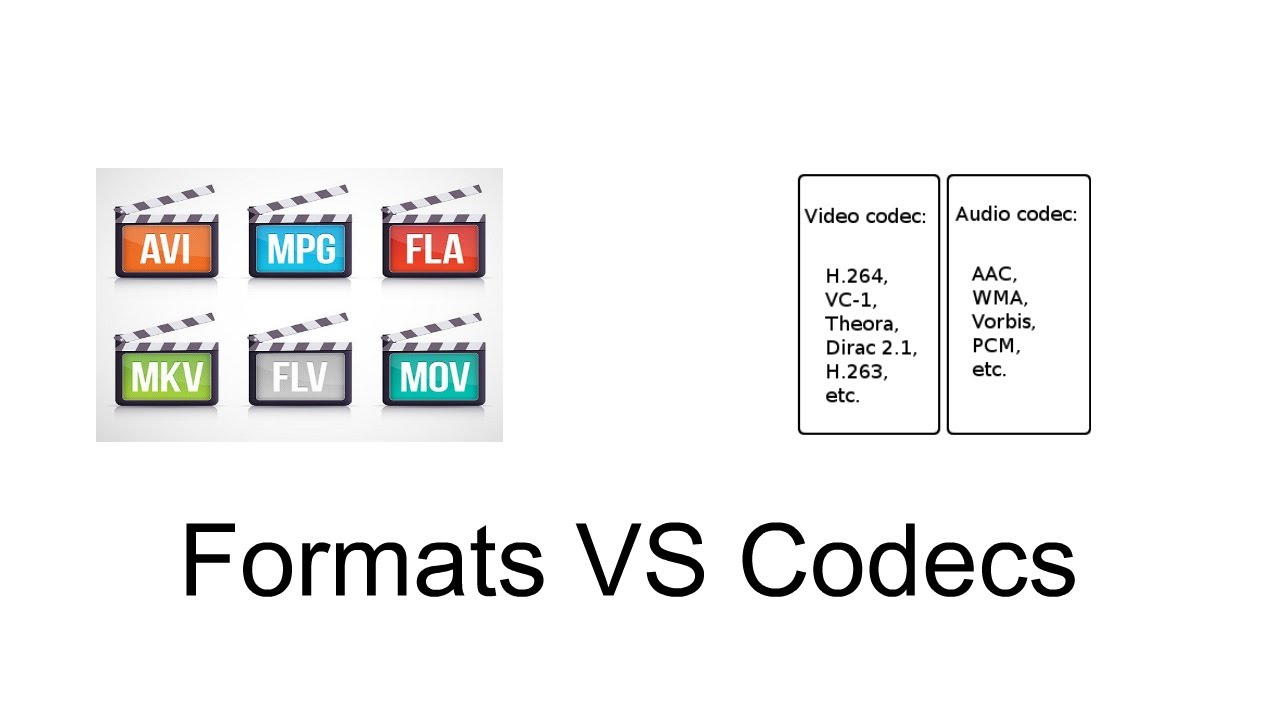
Encoding is also known as “transcoding” or “video conversion.” During recording, the device provides a video file in a specific format and other specifications. If the owner of a video wants to publish a video, he must consider the different devices on which the video can be played. All the videos we watch on our computers, tablets, and mobile phones have gone through an encoding process that converts the original video so that it can be viewed in a variety of output formats. This is because many types of devices and browsers only support certain video formats. Often times, the goal of a video editor is to ensure compatibility with different formats. Digital video can exist in many different formats, each with specific variables such as video containers (.MOV, .FLV, .MP4, .OGG, .WMV, WebM), codecs (H264, VP6, ProRes), and bitrates (in megabits or kilobits per second).

Different devices and browsers have different specifications, most of which are associated with one or more of these variables, and other variables. When encoding video, you should consider (a) the original source format and video capture method, (b) any subsequent encoding operations that have been performed on the video source, and (c) the required output formats.

There are many reasons why you would like to convert your videos. Also, if we talk about DVDs, they have a huge file size and are impractically divided. Honestly, the only reason we still use this format is because many people still use DVD players today. This format is incredibly outdated and has lagged behind current coding developments for several years. As for other video files, time is evolving.

The same file size that allowed us to watch mediocre AVI videos in the past now allows us to store 720p HD videos in MP4 format. Technology moves and so do we. Converting video files is a long and complicated process. While there are free apps that can get the job done, there is still a great deal of technical gibberish. If you want to know what happens during this process, read this article to the end.

Video containers Video containers are what most people use to differentiate between different video files. You should know most of them by name. The most popular ones are: AVI MPEG / MPEG-4 MKV RM / RMV MOV WMV The container is designed to store different types of data.

This includes audio, video, and sometimes subtitles. They are like the boxes in which we put our sweets. Note that the biggest difference between these containers is the support they provide for the basic bits of information. Different containers provide support for different audio and video compressions. Some will allow multiple audio tracks or subtitles to be included, while others will allow only one or none. If you want to add subtitles to an AVI or WMV file, you may need to burn them to the image. Video / Audio Codecs The actual difference between most video files depends less on the container used, but more on the video or audio codec in the container. The video codec determines how the information is processed. Some of the most popular video codecs include DivX / XviD h264 / x264 FFMPEG Theora You must remember that the content or how the content is stored is not always determined by the container, although it is often limited (for example, some containers support multiple streams audio, while AVI only supports one). As a result, there are several different combinations available between containers and codecs. Different codecs provide different picture or sound quality depending on the file size. The best known and most used are AVI containers, with DivX or the (free) XviD codec (but they are a bit outdated and have a terrible quality / file size ratio). There is also a newer x264 codec (which has an excellent quality / file size ratio). You can use it with the MKV container if you plan to use multiple audio tracks and subtitles, and also with the MP4 container. The MP4 container only supports one video stream and one audio track, but it has a higher support speed and can be played on iPod, PSP and most newer mobile phones. Bitrate The bitrate determines the data transfer rate. For video, this means that more data is included in a shorter audio / visual range. of the


Free Download Mp4Gain
picture


Mp4Gain Main Window
picture


Mp4Gain Features
picture


Free Download Mp4Gain
picture

Why do we need codecs and why are there different encoding qualities?

Why do we need codecs and why are there different encoding qualities?

What Are Codecs

Modern realities, namely the wide distribution of video on the Internet, require fast and high-quality data compression, and preferably with minimal requirements for the hardware part both during encoding and during decoding already on the client device.

How to Understand Codecs

To implement this idea, special algorithms (programs), called codecs, are introduced that are used to compress data. But, unfortunately, compression occurs with loss of information, that is, after decompression, the video becomes of lower quality, various problems appear, among them:

Decreasing colors (thicker gradients)
Average of adjacent areas (loss of detail and clarity)
Deterioration of the quality of moving objects (gaps in objects, artifacts, violations of object boundaries, mixing of objects with the background)

Freeze frame with video defects
However, currently widespread codecs are capable of compressing video into a very small amount of data with virtually no loss, but this is achieved through a significant increase in the requirements for calculations. In other words, compression takes a long time.

For video compression when it is done in advance, that is, not on the real-time playback scale, this problem is not that big. After all, if streaming a compressed stream is not important to stream in real time, you can either extend the stream, that is, assign a higher video bitrate for compression or compress the video as long as possible. And in any case, obtaining high quality, although with different data compression.

However, this scenario is not always available. If you want to stream a streaming, the encoding rate must be equal to or greater than the video playback rate. In this case, hypothetically, you can increase the bitrate and therefore use simplified compression methods, losing less detail during compression. And this would be so if modern streaming sites didn’t limit the bitrate available for a video stream.

In other words, to lose less quality when streaming video, you inevitably need to use data compression algorithms that consume more resources.

What are the configuration presets?
For both the x.264 codec and the more modern x.265 codec, there are many parameters that affect the quality of the encoding. Dozens of options with the ability to change many parameters, which form tens of thousands of combinations of settings. And so that the user does not have to waste time selecting optimal settings, out-of-the-box configuration presets were introduced. And for the x.264 codec and for the x.265 codec there are 10 presets.

Ultrafast
Super fast
Very fast
Faster
Fast
Means, medium
Slow
Slower
Very slow
Placebo
The default names convey their essence. And to be more precise, they characterize the video encoding rate. That is, the “Ultra Fast” preset allows you to encode ultra-fast video, “Slow” – to encode slowly, and the most “voracious” – “Placebo” was just invented “so was it” and to prove that this quality is also possible , but the possibility of its real application is more self-hypnosis than reality.

We discovered the presets. Now we need to understand the testing methodology and the quality criteria and evaluations.

Difference between vbr and cbr

Difference between vbr and cbr

CBR and VBR

Bitrate (English): means the value (number) of bits that are used to record or transmit multimedia material that lasts one second. When multimedia content (audio and video) is fixed in MP3 format, it is compressed block by block using certain procedures (algorithms). And these algorithms are divided into types based on the bit rate (its value). Each of these blocks (frames) is assigned from thirty-two to three hundred and twenty bits.

VBR vs MBR vs CBR

Coding
The VBR, CBR and ABR algorithms used to encode in MP3 format do not provide complete quality preservation, it is lost. However, this can only be felt when viewing (playing) only on high-quality equipment.

For the non-professional look, material recorded with VBR, CBR, and ABR mechanisms will be of fairly high quality.

Let’s analyze the differences in the VBR, CBR and ABR algorithms to know which of them is correct to use for recording and later storage or transfer of files. Which is better for quality or for other tasks.

Constant bit rate
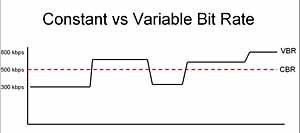
As the name implies (constant – constant, English), in this version of the algorithm, a constant number of bits per second of material is assigned. All blocks are equal to each other.

By using CBR it is possible to know in advance the size of the source file or the width of the sequence. This is important for transmitting information over channels with limited width.
Constant Bitrate Algorithm

Applying such encoding is not ideal:

When recording empty segments, the consumption of the selected bits remains the same;
when recording complex fragments, for which, in principle, it would be worth allocating more space, the bit rate, again, remains set.
The quality disadvantages of recording “difficult” sections are solved by increasing the bit rate, for example to a maximum of 320 kbps, but this increases the width of the transmission stream or the size of the file.

Variable bit rate
It is easy to guess that this type of method (VBR) is a variable (variable).

For such encoding, it is characteristic that the bit rate in this case changes during the encoding process by the codec program. And the bit rate in this case depends on the saturation of the audio or video material.

That is, when choosing VBR encoding, the program will select a lower bit rate to record an empty image and a higher bit rate to record saturated images or images that change quickly.
Variable bit rate algorithm

The negative aspect of this algorithm is the difficulty of anticipating the next changes. Increasing the recording bit rate will occur with a delay.

Furthermore, snippets that sound quiet are perceived during VBR encoding as unimportant snippets, and are assigned a minimum bit rate on this basis.

Therefore, CBR with a maximum of 320 kbps will provide better quality.

It is true that now VBR 2 Pass encoding has appeared.

Its essence is that the program first analyzes the multimedia stream (for the first time) and then makes a record, compressing it based on the data obtained during the primary scan. This results in the best quality and, in this sense, this encoding is better.

Average bit rate

Average is translated from English as average. This is a type of ABR, which is somehow a cross between VBR and CBR.

By choosing ABR mode, the user sets part of its value in kilobits per second. The codec can change it one way or the other, sticking to the set average value.

Average Bitrate Algorithm

The ABR method compares favorably with others in the allocated number of bits per second. You can choose absolutely any numeric parameter from 8 to 320. Whereas CBR encoding can only use sixteen times the value.

It follows from the above that if the size of the resulting file is important to the result, then for the highest quality it is better to take a close look at the ABR or CBR encoding.

About Lossy

About Lossy

Lossy

We all love good music. More recently, the audio CD was good digital music. This is 44100 Hz, stereo, 16 bits (linear) per channel, not compressed in any way, which means, according to Wikipedia, 1411.2 kbps.

Lossy

But at the end of the 20th century, in the era of the birth of multimedia, when music began to be played not only on players, but also on computers, it turned out that the audio CD (that is, naked PCM) is even better. . compress. There was, for example, Microsoft ADPCM, which compressed this case a bit, without losing quality, in WAV files. But generally speaking, the original 44 kHz stereo would still require a lot of space this way. Hence, the quality dropped to 22 kHz mono. One of the first multimedia albums of that time: “Immersion” from the group “Nautilus Pompilius”, is still around, and I did.

So MP3 won. To store and distribute compressed music. At 128 kbps “CD Quality”.

MP3 came up strangely. Technically, this is MPEG-1 Audio Layer 3. A layer for compressing audio data into a modern, progressive standard for storing video data on Video CDs. Just packed in its own .mp3 file format. The video CD is no longer interesting to anyone. The following MPEG-2 standard is used in DVD and digital television broadcasts (not HD). And the next MPEG-4 standard is now used for HD video and continues to evolve.

MP3 was revolutionary. It was (almost) the first lossy compression format. When we don’t try to preserve everything that was in the original signal, but, based on some psychoacoustic model, we cut out what a person is not going to hear anyway, and compress the rest. Like JPEG.

Then I tried digitizing the accumulated audio collection. Compact cassettes (just “cassettes”, but more correctly “compact cassettes”) turned out to be complete shit. The frequency range is such that it makes no sense to sample with more than 22 kHz. There were no reel-to-reel recorders in the house. But vinyl records shook the sound quality. With good equipment, you can draw better quality than a CD. You just need to get rid of the clicks.

And then I realized that MP3 is shit too. At these same 128 kbps, the sound quality suffers greatly. And the scariest thing is that vile metallic hues appear where they shouldn’t be. My ears need at least 192 kbps, and the more the better.

Let’s take a hint from a famous punk rock band in the past. Like FLAC. It is such a modern lossless compression standard that it has successfully replaced WAV. Because it is free.

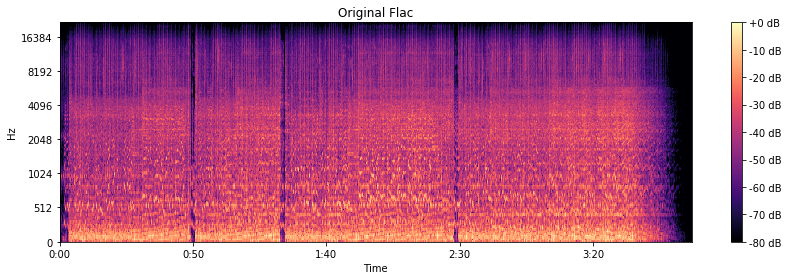
The original is CD quality, so frequencies up to 22 kHz are present as expected.

Original flac

We are going to harvest with FFmpeg, or rather with LAME.

At 320 kbps and 256 kbps, the spectrogram looks almost like the original.

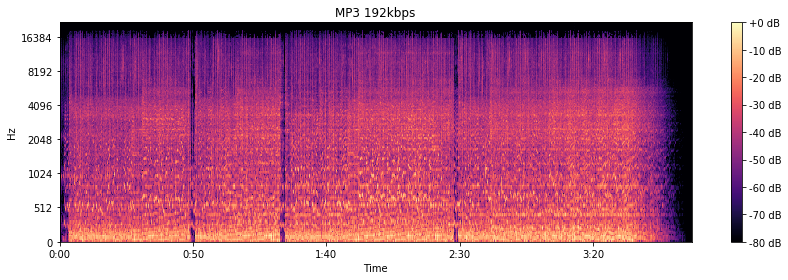
At 192 kbps, there are signs of a 16 kHz cutoff. The spectrogram “darkens”, apparently, the psychoacoustic model has cut something out. By ear, the higher frequency “bursts” really disappeared.

MP3 192 kbps

At the notorious 128 kbit / s, everything is already specifically cut off at 16 kHz. Background sounds are “fuzzy” and begin to bubble. Nothing to do with the original in terms of enjoying the musical details.

MP3 128 kbps

But you can do 64 kbps in MP3. The stereo is gone. Everything gurgles terribly and irritates with completely strange sounds.

Mp3, the star format, the reasons

Mp3, the star format, the reasons

MP3

Another interesting property of hearing is that the lower the volume level, the lower its resolution, the lower the number of sounds perceived. When the volume is lowered the high frequencies are better perceived, when the volume is increased the low frequencies are perceived. And they do not complement each other, but rather replace each other.

File MP3 Icon - Silverblue Icons - SoftIcons.com

A person does not perceive some sounds, focusing on others. Pay attention: an instrument, or a voice, is usually audible clearly and consciously. Everything else becomes a background or a single tune. And no matter what we focus on in composition, we cannot increase the number of basic sounds perceived.

How to create the mp3

All these data obtained from experimental studies are gathered and presented in the form of an ideal model of human hearing. The MP3 standard focuses on this.

Everything that a person does not hear unambiguously is immediately cut off. Post-processing degrades the sound according to the understanding of this model.

Thanks to the great work done, modern psychoacoustic models accurately evaluate human hearing and do not stand still.

In fact, despite the assurances of music lovers, musicians and audiophiles, to the inexperienced middle ear, the highest quality MP3 has almost extreme parameters.

There are exceptions, they cannot cease to exist. But they are not always easily noticed by blind listening. And they are no longer derived from the mechanisms of hearing, but from the algorithms for processing sound information in the brain.

And here only personal factors play a role. All of this explains why we love different headphone models and why the numerical characteristics of the audio cannot unequivocally determine the sound quality.

MP3 fits everything: analog quality

Audiophiles’ insistence on picky FLACs is worth going through another serious sift. Most analog recordings do not contain enough information for lossless formats.

All CDs are recorded at 44.1 kHz sample rate and 16-bit quantization. Where does 192 kHz and 24/32 bit come from, which is used when encoding in FLAC? They are not, this is a doll!

You will object that these parameters are higher for analog sound … But for an audio cassette and a magnetic tape (unless, of course, it is a Japanese master tape), the characteristics of an audio CD are NOT ACCEPTABLE. For conventional studio equipment, the ability to record analog sound corresponding to AudioCD is relatively new.

Therefore, it makes no sense to digitize recordings from the pre-digital era in frenetic quality, especially those made on magnetic media. They do not contain those spectra and the amount of information that containers can store without compression.

Everything fits in MP3: digital

Strictly speaking, with most digital recordings, the image is the same. In the 90s and later, cheap plastic boomboxes appeared. The sound engineers had to take care of the uniform sound on all devices: the dynamic range of the recordings was reduced to 10-12 bits.

One more point. Until recently, no one recorded in a very high-quality studio. Because it is difficult to work simultaneously with several dozen audio tracks with high recording quality, and sometimes there are simply not enough human and technical resources.

Why mp3 is enough for you, but Lossless is not necessary

Why mp3 is enough for you, but Lossless is not necessary

Mp3

Did you finish the greenhouse? So you don’t need to lose, listen to high quality mp3.

MP3

Very often there are people who, in principle, despise compressed formats. You should not be guided by your opinion. The following mods that in the studio with a 90% probability will not hear the difference between compressed and uncompressed audio.

What is mp3

MP3 isn’t just about cutting quality. It was developed by the Fraunchhofer Society, an association of applied research institutes in Germany. Later they came up with AAC, which could become the main compressed audio format … But it didn’t work.

Did you know that MP3 comes with variable (VBR) and constant (CBR) bit rate? The constant bit rate, due to the operation of the algorithm, is encoded each time as the first. Therefore, it can produce uneven quality, which means that not all sounds in this situation will be recorded in high quality.

Since MP3 has been around for a long time, it has many limitations. Bit width is 16-24 bits. The sample rate is represented by the following set of options: 8; 11,025; 12; sixteen; 22.05; 24; 32; 44.1; 48. The maximum bit rate does not exceed 320 kbps. The maximum number of channels is 2. But we are still talking about music, we still have to search for multi-channel recordings.
25104704-2
Now let’s see how MP3 is encoded. The illustration shows the time-frequency distribution of sound. Same recording: Audio CD, OGG file, MP3 well encoded. What we observe is that the pieces on the right and left almost completely coincide. This means that the MP3 file sounds almost the same as the original CD recording.

Human hearing and its limits – psychoacoustics

The fact is that the main task of the Fraunchhofer Society is the development of psychoacoustic models of human perception of sound. And here are many subtleties. The main thing is that we are not dolphins.

Second, there are certain restrictions on the number of sounds perceived simultaneously. A person cannot simultaneously hear more than 250 sounds of 24 ranges (in addition, the number of simultaneous sounds in the range is also quite small).

Third, the audible range is 16 Hz to 20 kHz and at the age of 60 it is reduced by almost half. Ideally, and during training (yes, you have to train it!).

All frequencies below 100 Hz are perceived not by the hearing cells, but … by the skin. Then the low waves are reflected in the ear canal; these waves are perceived as infrabass. (This is from the bone conduction area).
and
Also, the number of cells that register acoustic waves is different for each one. But what is there? For each individual, their number in the right and left ear is different.

By the way, the perception of each ear is different. Change channels of your favorite song – get a new sound.

If you dig deeper, it turns out that each sound frequency is perceived only at a certain volume. When it is reached, the silence is replaced by a sharp and quite different sound. After that, a person can hear a lower sound of this frequency.

Differences between FLAC or MP3 formats, which is better

Differences between FLAC or MP3 formats, which is better

FLAC vs MP3

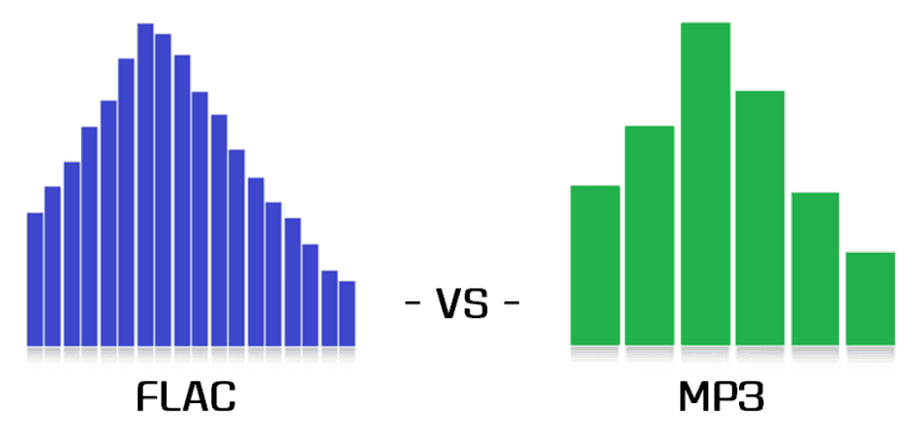
With the advent of digital technologies in the world of music, the question arose about the choice of methods for digitizing, processing and storing sound. Many formats have been developed, most of which are still used successfully in certain situations. Conventionally, they are all divided into two large groups: lossless audio and lossy audio. Among the former, the FLAC format is in the lead, among the latter, the real monopoly was for MP3. So what are the main differences between FLAC and MP3, and are they really important to the listener?

FLAC vs. MP3

What is FLAC and MP3?

If the audio is recorded in FLAC format or converted to it from another lossless format, the entire frequency spectrum and additional information about the file content (metadata) is saved. The file structure looks like this:

four-byte identification string (FlaC);
Streaminfo metadata (required to configure playback equipment);
other metadata blocks (optional);
audiofrems.
It is common practice to directly record FLAC files while playing “live” music or from vinyl records.

Play music on iPhone

When developing algorithms for compressing MP3 files, the psychoacoustic model of a person was used. In short, during the conversion, those parts of the spectrum that our ears do not perceive or do not perceive completely will be “cut off” from the sound flow. Also, if the stereo broadcasts are similar in certain stages, they can be converted to mono sound. The main criterion for audio quality is the compression ratio – bit rate:

up to 160 kbit / s – low quality, a lot of third-party interference, frequency drops;
160-260 kbps – medium quality, mediocre peak frequency playback;
260-320 kbps – Deep, smooth, high-quality sound with minimal interference.
Sometimes a high bit rate is achieved when converting a low bit rate file. This will not improve the sound quality in any way – files converted from 128 to 320 bps will still sound like a 128-bit file.

Table: Comparison of characteristics and differences between audio formats
FLAC indicator MP3 low bit rate MP3 high bit rate
Lossless lossy compression format
Sound quality high low high
Volume of a song 25-200 Mb 2-5 Mb 4-15 Mb
Appointment listening to music on high-quality audio systems, creating a music file, installing ringtones, storing and playing files on devices with limited memory, home listening to music, storing the catalog on portable devices.

Compatibility PC, some smartphones and tablets, high-end players most electronic devices most electronic devices
To hear the difference between a quality MP3 and FLAC file, you must have an excellent ear for music or an “advanced” audio system. The MP3 format is more than enough for listening to music at home or on the road, and FLAC is still the plethora of musicians, DJs, and audiophiles.

Three steps to quality sound.

Three steps to quality sound.

Sound Quality

We all listen to music every day, but did you ever think about the fact that you’ve probably never heard your favorite bands, albums, and songs? That it was just an empty shell of a “real” melody?

Sound Quality

If this question is interesting to you, you want to feel new emotions from compositions that you already know, then you are welcome.
Three steps to quality sound
First, let’s find out what makes high-quality sound. I won’t delve into technical definitions, after all, this article isn’t about numbers, but I’ll try to describe the main postulates that will hopefully help you open up music from a slightly different angle.

Step 1: Headphones
I focused on headphones, not speakers or an audio system, as headphones are the cheapest way to play music and get to know the world of good sound. To get similar sound quality from an audio system, you will have to spend an amount several times, or even tens of times more than the cost of decent “ears”.
Image for publication
B&W and Beats, headphones for a completely different kind of music
Many believe that it is the purchase of expensive headphones that guarantees high quality sound, but this is only partially true. In fact, buying expensive hearing aids without thinking is not the best solution. First of all, the make and model should be chosen based on your musical preferences, not price. Almost all headphones (except booster headphones) have their own “sound color”, which means that the models are perfect for listening to jazz and classical music, and quite often do some nasty work with D&B or hard rock. Find the right headphones for you and the genres you love to avoid muffled sound or overly overbearing bass (hi Beats).
You have finally chosen and purchased headphones and are now ready to enter a wonderful new world of good sound! But don’t be too quick to rejoice, this was just the first step …
Step 2: Source
Today, almost everyone has a sound source in their pocket: their smartphone. However, the quality of this font tends to be poor. It doesn’t matter iPhone, Sony or Samsung, sound is almost equally common everywhere. If you plan to listen to music from your phone, then you can safely remove your expensive high-impedance headphones, which you have chosen so carefully, their potential will simply remain untapped.
Image for publication
To get the most out of your headphones, you need the right equipment. It can be a Hi-End player (Sony, Astell & Kern, COWON), amplifier, DAC or sound card.
You don’t have to start with expensive hardware. Trust me, even a portable amplifier or USB-DAC is enough to get you started.
Image for publication
AudioQuest DragonFly: Miniature USB DAC, great value for money.

Step 3: Source
And now we come to the main point, without which even buying an expensive source and headphones is useless. If you want quality sound, forget about MP3 and streaming services (except Tidal, maybe). Only no losses! And stock up on hard drive space, you’ll need it …
Lossless Data Compression (Engl. Lossless Data Compression) – A method of data compression (video, audio, graphics, documents sent in digital format), whereby encoded data can be recovered with unique bit precision.
If lossless is lossless compression, then as you understand, there is lossy compression. You are most likely listening to the latter. I will not dwell on the characteristics of lossless and lossy in detail, I will limit myself to listing their fundamental differences and basic formats.
Lossless: FLAC; A THE C; APE
lossy: MP3; AAC; WMA; OGG

Bluetooth codecs

Bluetooth codecs

Bluetooth

Today, music playback over the Bluetooth protocol is gaining immense popularity.

Bluetooth

This function is not only integrated into all modern audio systems. This algorithm is based on the operation of portable speakers and most models of wireless headphones. At the same time, the sound quality in practice can vary greatly, and here is why. The secret lies in the use of one or the other codec (not to be confused with profiles) when transmitting the source sound to the playback device. What codecs are there and what properties are they endowed with, let’s find out.

BLUETOOTH CODES

SBC (SubBand Codec) is a codec that is present in all devices without exception and provides basic sound quality, at the level of compressed files of an average bit rate.
AAC (Advanced Audio Codec) is an encoding algorithm based on a complex mathematical model. In terms of sound quality, it beats the SBC, but falls short of the next. It is used massively in Apple technology, which is why today it is the most preferred option for transmitting audio over Bluetooth.
AptX is an algorithm developed by Qualcomm with a sound quality similar to that of a CD. The source signal is compressed in a 4: 1 ratio with a 352 kbps bit rate and a 16 bit / 44.1 kHz bit rate. The AptX LL (low latency) variant with reduced playback delays stands out.
AptX HD is a further development of the AptX algorithm with the ability to transmit a signal with 24-bit / 48 kHz parameters. At the same time, the bit rate increases to 576 kbps. By ear, the differences to plain AptX are palpable, and the higher the class of technique, the more obvious the advantage of AptX HD.
AptX Adaptive is a new version (introduced in 2018) of the AptX codec, the key feature of which is the ability to compress audio with variable bit rate (dynamic quality setting). This is necessary in an environment where there are many “competing” wireless signals. In this case, it is possible to increase the compression of the original data to preserve the stability of the connection and, in the presence of “free air”, the sound quality will be maximum.
LDAC is a Sony creation and one of the highest quality codecs. The bit rate reaches 990 kbps at 24 bit / 96 kHz. By ear, this results in clear and dynamic music reproduction, free of digital artifacts. With the release of Android 8.0 Oreo, the LDAC codec has become part of this operating system as Open Source, but its presence on a particular device depends on the manufacturer of the gadget.
HWA (Hi-Res Wireless Audio) is a competitor of LDAC proposed by Huawei. The technology is based on the LHDC codec, developed by the Chinese Savitech, with a bit rate of up to 900 kbps and a maximum stream parameter of 24 bit / 96 kHz. In terms of sound quality, HWA is similar to LDAC, but so far the latter has a larger number of supported devices.
UAT (Ultra Audio Transmission) is the latest development from Hiby with a maximum bit rate of 1.2 Mbps and transmission parameters of up to 24-bit / 192 kHz. Due to the increase in the volume of data transmitted, UAT requires Bluetooth version 4.2 or higher. In order for the technology to work, any compatible Android smartphone with the Hiby Music app installed and a suitable receiver can be used, for example a compact Hiby W5 Bluetooth receiver.
BT-UHD (Bluetooth Ultra High-Definition Audio) is the next-generation protocol designed for maximum fidelity in high-resolution audio recordings. The maximum bit rate is 2.3 Mbit / s. Implemented for the first time on the Huawei Kirin A1 microprocessor using Bluetooth 5.1.
LC3 is the latest audio codec in the Bluetooth LE Audio specification, theoretically capable of delivering better sound quality than standard SBC at half the bit rate. As stated by the developers of the Bluetooth SIG (Special Interest Group) consortium, devices with LC3 will receive increased operating time (by reducing power consumption) and the ability to transmit the signal to multiple receiving devices at the same time (Broadcast Audio). Support for enhanced sync (multi-stream audio) is also noted. According to experts, the LC3 codec will be more relevant in wireless headphones, where one of the most important indicators is the battery life.

What is bitrate?

What is bitrate?

Bitrate

Bitrate

Bitrate

Bit rate: the number of bits of information used to store or transfer one second of data transmission: video and / or audio recordings, including compressed ones.

Bit rate is expressed in bits per second (bit / s, bps), as well as derived values: kilo (kbps, kbps), mega (Mbps, Mbps), etc.

For streaming video and audio formats (such as MPEG and MP3) that use lossy compression]], the bit rate expresses the degree of compression of the stream. Most of the time, the video and audio bit rate is measured in megabits per second.

Increasing the bitrate provides a significant increase in video recording quality, which is especially noticeable when shooting dynamic scenes and small details.

Encoding modes
There are three compression modes for data transmission:

CBR (constant bit rate): with constant bit rate;
VBR (variable bit rate): with variable bit rate;
ABR (Average Bit Rate): with an average bit rate.

Constant bit rate
Constant Bit Rate, CBR – A variant of streaming data encoding, in which the required bit rate is initially set, which does not change throughout the file.

Its main advantage is the ability to predict the size of the final file fairly accurately.

However, the constant bitrate option is not very suitable for video or audio content, the dynamics of which change over time, as it does not provide an optimal size / quality ratio.

Variable bit rate
With a variable bit rate, the VBR codec selects the value of the bit rate based on the parameters (the level of the desired quality), and during the encoded segment, the bit rate may change.

This method provides the best quality / size ratio for the output file, but its exact size turns out to be very unpredictable. Depending on the nature of the sound (or image, in the case of video encoding), the size of the resulting file may differ several times.

Average bit rate
Average bit rate, ABR is a hybrid of constant and variable bit rates: the value in Mbps is set by the user and the program varies it within certain limits. However, unlike VBR, the codec is careful to use the maximum and minimum possible values, without risking going beyond the average specified by the user. This method allows the most flexible setting of the processing speed and with much higher precision (compared to VBR) in predicting the output file size.