What is digital audio?


Free Download Mp4Gain
picture

What is digital audio?

Digital Audio

Digital sound is nothing more than a combination of numbers.
DIGITAL AUDIO

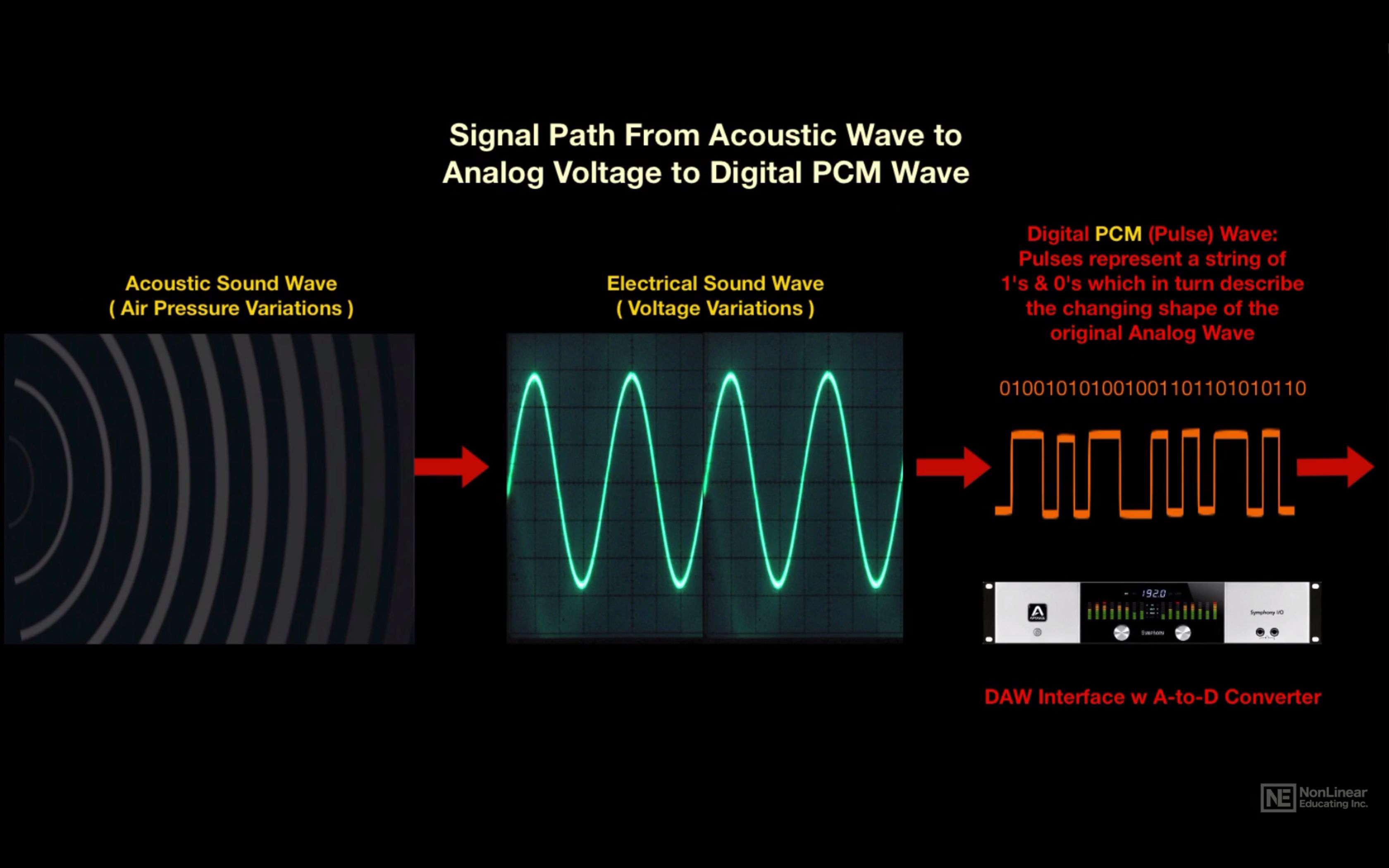
With a certain algorithm, sound, such as air pressure, is converted into data streams and encoded for further processing and playback. Depending on the algorithm used, the music file has one format or another, one or another extension.

Remember that along with digital sound, there is analog sound, which is represented by a continuous electrical signal that reflects the change in the sound wave. The analog to digital sound conversion is a setting of the numerical value of the amplitude at a given time with a given density of values. Consequently, the more values ​​that are recorded, the more reliable and accurate the image of the digitized sound fragment is recreated. With such digitization, very voluminous data matrices emerge that, depending on the format used, differ in the sound quality / volume ratio of the final file.

Perhaps the main advantage of digital audio over analog is the ability to store and copy data indefinitely without losing the original quality (whereas when copying from one analog medium to another, a decrease in recording quality is quite noticeable).

The most widespread and popular digital audio format today is MP3 (MPEG Layer 3). It was developed, after a series of intermediate formats and investigations, started in 1987, by the Fraunhofer Institute in Germany.

The developers of the format were faced with the task of simplifying and reducing the cost of shipping long musical fragments. As you know, one minute of a stereo signal from a CD (16 bit, 44.1 kHz sample rate) takes up about ten megabytes of memory. At the same time, unlike text or graphic files, the audio signal cannot be compressed without loss of quality. Thus, modem transmission of an uncompressed composition from an audio CD lasting 3 minutes at a data transfer rate of, say, 24 kbps will take several hours. Scientists at the Fraunhofer Institute managed to achieve multiple file size compression: on average, one minute of a compressed audio signal in MP3 format takes about 1 megabyte. The principle of compression is based on the removal of “unnecessary” sounds from the music file, to which the human ear is immune, or which duplicate each other.

The main factor that determines the relationship between file size and sound quality within a given format is the bit rate. Bit rate is an indicator of how much information a second of sound encodes. The higher it is, the less distortion and the closer the encoded composition is to the original. The most common on the Internet are compositions with 128 and 192 Kbps bitrates. The maximum bitrate supported by programs and devices that work with MP3 is 320 Kbps. In practice, only an expert or a professional who works with sound can notice the differences between an MP3 file with a 320 bit rate.

To optimize the size of MP3 music files while maintaining decent quality, a variable bit rate (abbreviation VBR – variable bit rate) is used. In this case, the encoding program divides the file into fragments of different spectral saturation and encodes them with a suitable bit rate. Most modern MP3 players support variable bit rate playback. A significant advantage of MP3 files is that they can contain the name of the artist, the name of the track and the album, the year of its release, etc. The set of this data is called ID3 tags. Most modern gamers can read and display them on the screen.

In 2001, Swedish Coding Technologies and Thomson Multimedia developed the MP3 Pro codec. It is MP3-based and as a result is fully MP3 backward compatible and only partially forward compatible. It uses SBR (Spectral Band Replication) technology, so the codec provides good quality at low bit rates. However, the encoding quality at medium to high bit rates is inferior to that of most other codecs. For this reason, this format is mainly used for broadcasts on the Internet and demonstrations of fragments of new musical compositions.

Another type of MP3 was the development of MP3 Surround, recently introduced by the creators of MP3: the Fraunhofer Institute. This format repeats all the characteristics of multi-channel sound, while still being compatible with standard stereo MP3: information describing the spatial characteristics of the sound is recorded on an additional track. By playing files of this format on special equipment capable of reading this track, you can obtain surround sound that conforms to the Surround 5.1 standard.


Free Download Mp4Gain
picture


Mp4Gain Main Window
picture


Mp4Gain Features
picture


Free Download Mp4Gain
picture

What is the video and audio bit rate?

What is the video and audio bit rate?

Bit Rate

Do you like video production or do you value high quality in movies? You’ve probably come across something like bitrate. It always accompanies the technical characteristics of video recordings and its value determines the quality of the image in the file. When working with converters, you will come across this feature more than once, so it is advisable to fully understand what it is responsible for and how it affects the final product: a video or an audio file.

bitrate

To find out what bit rate is, it is worth understanding how video information transmission works. Any video is a rotating sequence of images. In order not to have a “slideshow feel”, the image change speed must be at least 24 frames / sec. Each box has parameters: width and height. The higher they are, the more pixels are placed in an image, the higher the quality.

Each “point” that makes up a frame has a weight and is equal to 1 byte. Let’s take a Full HD picture and calculate its weight – about two megabytes will be released (1920 x 1080 = 2073 600). So one second of video, containing 24 frames, would weigh 48MB. This is where the concept of bitrate comes in: it is the power to compress a video.

Those. the required file, being encoded, loses weight. But due to strong compression, it may also lose quality. Of course, in reality, not everything is so simple; Much depends on the codec used for encoding. This is the name of the direct compression method. So videos in different formats, but with the same bitrate, can produce images of different quality. The concept of “audio bit rate”, denoting the strength of compression, is also applicable, but for an audio stream.

Bit rate types
Delving into the topic, it is worth noting that the bitrate is not always the same. And now we are not talking about a quantitative indicator, but about a division into types. To work competently with media conversion, read about three types of bitrate: constant, variable, and average, which is a hybrid of the first two.

Constant Bit Rate (CBR)
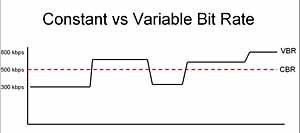
As the name implies, this type of bit rate does not change during file playback. This compression method allows you to fairly accurately determine the size of the output file and ensure consistent quality throughout your listening or viewing session. But in the entertainment industry, constant bitrate is rarely used due to the impossibility of adjusting it. for dynamic playback, because the files get bigger than they could be.

Variable Bit Rate (VBR)
This type of bit rate is flexible and resistant to change, as a result of which it can be adjusted to the playback object and produce an optimal size / quality indicator. For example, for pictures or musical pieces with a reduced information density, the bit rate will decrease, thus reducing the weight of the object.

Average bit rate
This view is a compromise between the previous ones. The problem with variable bitrate is that changes are automated, and sometimes overcompression can occur. Average bitrate allows the user to set the range in which compression variation will occur. True, the technique of its use is not so simple and is mainly used in professional studios when working on serious projects. An additional advantage of the average bitrate is that it allows you to more accurately calculate the file weight even when the compression force changes.

Modification of the Bluetooth stack to improve the sound in headphones without AAC, aptX and LDAC codecs

Modification of the Bluetooth stack to improve the sound in headphones without AAC, aptX and LDAC codecs

Bluetooth

Some wireless headphone users notice poor sound quality and a lack of high frequencies when using the Bluetooth SBC standard codec, which is supported by all audio devices. A common recommendation for improving sound is to buy devices and headphones that support aptX and LDAC codecs. These codecs require license fees, so the devices that support them are more expensive.

Bluetooth

It turns out that the poor quality of the SBC is due to artificial limitations of the Bluetooth stacks and the headphone configuration, and this limitation can be avoided on any existing device by software changes on the smartphone or computer.

SBC codec
The SBC codec has many different parameters that are negotiated during the connection establishment phase. Among them:

Number and type of channels: Joint Stereo, Stereo, Dual Channel, Mono;
Number of frequency bands: 4 or 8;
Number of blocks in a pack: 4, 8, 12, 16;
Quantization Bit Allocation Algorithm: Loudness, SNR;
The maximum and minimum value of the group of bits used for quantization (group of bits): usually 2 to 53.

The decoder MUST support any combination of these parameters. The encoder may not do everything.
Existing Bluetooth stacks generally match the following profile: Stereo set, 8 bands, 16 blocks, Loudness, bitpool 2..53. This profile encodes 44.1 kHz audio at 328 kbps.
The bitpool parameter directly affects the bit rate within a profile: the higher it is, the higher the bit rate and therefore the quality.
However, the bitpool parameter is not tied to a specific profile; Other parameters also significantly affect the bit rate: the type of channels, the number of frequency bands, the number of blocks. You can increase the bitrate indirectly by agreeing on non-standard profiles without changing the bit group.

SBC bit rate calculation formula

For example, dual channel mode encodes channels separately using the full bit set for each channel. By forcing the device to use Dual Channel instead of Joint Stereo, we get almost double the bitrate with the same maximum bitpool value: 617 kbps.
In my opinion, the use of a non-profiled bitpool value in the negotiation stage is a flaw in the A2DP standard, which led to an artificial limitation of the SBC quality. It would be more prudent to agree on the bitrate rather than the bit group.

These fixed Bitpool and Bitrate values ​​originate from the table of recommended values ​​for high quality audio. But the recommendation is no reason to limit yourself to these values.

SBC Bluetooth Profile Table

The A2DP v1.2 specification, which was active from 2007 to 2015, requires all decoding devices to function properly with bit rates up to 512 kbps:

The SNK decoder shall support all possible values ​​of the bit combination that do not exceed the maximum bit rate. This profile limits the maximum bit rate available to 320 kb / s for mono and 512 kb / s for two-channel modes.

In the new version of the specification, there is no bit rate limitation. Modern headphones released after 2015 that support EDR are supposed to be able to support bit rates up to ≈730 kbps.

For whatever reason, the Bluetooth stacks I have tested for Linux (PulseAudio), Android, Blackberry, and macOS have artificial limits on the maximum value of the bitpool parameter, which directly affects the maximum bitrate. But this is not the biggest problem, almost all headphones also limit the maximum bitpool value to 53.
As I’ve already seen, most devices work fine on a modified Bluetooth stack with a 551 kbps bit rate, without any dropouts or crackles. But that bitrate would never be constant under normal circumstances, in normal Bluetooth stacks.

Modify the Bluetooth stack
Any Bluetooth stack that is compatible with the A2DP standard supports dual channel mode, but it cannot be activated from the interface.

Let’s add a switch to the interface! I made patches for Android 8.1 and Android 9 that add full dual channel support to the stack, add mode to the mode switch menu in developer tools, and treat dual channel SBCs as if they were an additional codec like aptX, AAC or LDAC (Android calls it HD Audio) by adding a check mark to the Bluetooth device settings.

The mp3 phenomenon

The mp3 phenomenon

MP3

The MP3 music format (MPEG-1 Layer 3) is one of the most widely used digital audio formats in the world. It is compatible with all portable and stationary audio devices. In May 2017, the developers of the format announced his “death”.

mp3

On April 23, 2017, the Technicolor and Fraunhofer IIS licensed commercial program was canceled: the last patent included in the program expired, making the format standard in the public domain. Can we say that the days of the most popular format are numbered? MP3 development began in the late 1980s at the Fraunhofer Institute for Integrated Circuits (IIS).

In 1987, the University of Erlangen-Nuremberg and Fraunhofer IIS teamed up to work on the EU147 EUREKA Digital Audio Broadcasting (DAB) project. The first result of the alliance’s work was the LC-ATC codec, which made it possible to encode stereo music in real time. The next step was the development of an optimal frequency domain (OCF) coding algorithm, which already had some of the characteristics of the future MP3 codec. For the first time, it is possible to encode music in good quality at 64 kbps for a mono signal. OCF was the beginning of the path towards the standardization of MPEG (Moving Picture Expert), an organization, responsible for the development and implementation of international standards for the compression and transmission of digital video and audio content.

In 1989, MPEG received 14 proposals for the implementation of an audio coding standard, so participants were invited to combine their developments. This led to the emergence of four potential candidates, including MUSICAM from the Institute of Broadcasting Technology IRT and Philips and ASPEC (Adaptive Spectral Perceptual Entropy Coding), which is the result of further enhancements to OCF Fraunhofer IIS, as well as contributions from the University of Hannover in collaboration with AT&T and Thomson. After extensive testing, MPEG proposed combining MUSICAM and ASPEC to create a family of three encoding methods: Level 1: a low-complexity version of MUSICAM; level 2 – MUSICAM codec; Level 3 (later called MP3): based on ASPEC.

Technical development of the MPEG-1 standard was completed in December 1991. In 1994, Fraunhofer IIS introduced the world’s first MP3 encoder, the L3enc, and in 1995 the Fraunhofer researchers unanimously accepted “.mp3” as the file extension for MPEG Layer 3 [1]. Thanks to the compression algorithm used in the MP3 audio format, the size of the data required to reproduce the recording and ensure the quality of sound reproduction is significantly reduced to 10-12 times the original, depending on the recording bit rate. . Bit rate refers to the encoding / decoding rate of a digital audio stream; sound quality improves with increasing bit rate. The MP3 format has the following bit rates: 32 kbps (very low quality, acceptable only for voice), 96 kbps, 128 kbps (medium quality), 160 kbps, 192 kbps, 256 kbps, 320 kbps (highest best quality). The principle of the compression algorithm is as follows: during the compression process, the audio codecs analyze the signals, focusing on the audible fragments, which are saved for later playback or transmission.

This rules out sounds beyond the perception range of the human ear (20 to 20,000 Hz). That is why MP3 is called lossy. There are three ways to encode MP3 files: constant bit rate (CBR), variable bit rate (VBR), and medium bit rate (ABR). CBR is the default encryption mode. In this mode, the bit rate is constant for the entire file. This means that each part of the MP3 file uses the same number of bits. Regardless of the complexity of a piece of music, the encoder uses the same bit rate, so the quality of the final file is variable. Complex parts will be of lower quality than simpler ones. The main advantage of this mode is that the size of the final files does not change and can be accurately predicted.

When encoding in VBR mode, the user selects the desired quality on a scale of 9 (lowest quality, highest distortion) to 0 (highest quality / lowest distortion). The codec then tries to maintain a certain quality throughout the file by choosing the optimal number of bits for each part of the audio recording. The main advantage is the ability to specify the level of quality to be achieved, but a significant disadvantage is the unpredictability of the final file size. In ABR mode, the user sets the bit rate and the encoder tries to keep the average bit rate constantly while using higher bit rates for the parts of the music that require more bits. The

Bluetooth problems Part 4

Bluetooth problems Part 4

Bluetooth

AptX is a popular marketing codec

Bluetooth

Often times, in a new market, it is not the one who came up with the best solution that becomes the leader, but the one who came up with their solution first. This was the Apt-X codec, which was developed by Professor Stephen Smith of Britain’s Queen’s University in the 1980s for fast transmission of high-quality sound to various laptops and generally for fast recording. high-quality audio. Subsequently, the rights to the then Apt-X were bought by CSR, which made the codec wireless in 2009 and renamed it AptX. Well, in 2015, Qualcomm bought this company, which now owns the rights to AptX and voluntarily sells it to everyone.

The main idea behind AptX is to offer audio CDs with almost original quality. In fact, we see a 4: 1 compression, that is, the bitrate was up to 352 kbps at 16 bits and 44.1 kHz. Therefore, we are not talking about “almost” here: the maximum lossless compression does not exceed 2: 1, so data is still lost when transmitting sound using AptX. But how strong? We will talk about this below.

Since AptX is a purely mathematical codec that always covers the entire audio range up to 22 kHz; it seems like it should be better compared to the SBC, which often turns off the high frequencies. In fact, sadly, this is not the case. The basic principle of this codec is quantization, that is, the allocation of a certain number of bits for each subband: for example, 8 bits are used to transmit sound from 0 to 5500 Hz, from 5500 to 11000 Hz – 4 bits, 11000 to 16500 Hz and 16500 to 22000 Hz are 2 bits.

Bluetooth problems Part 2

Bluetooth problems Part 2

Bluetooth

As a result, SBC starts to sound even worse in the context of more “advanced” codecs.

Bluetooth

However, there is an interesting point: it can sound even better than AptX HD with a bit rate of 576 kbps. How is that? It’s simple: as I wrote earlier, this codec can be scaled within a very wide range, and its theoretical maximum is just over 1.5 Mbit / s, that is, it can even pass CD Audio without compression! Of course, in fact, in our noisy 2.4 GHz band, that speed is only possible in dreams, and not all headphones support it. However, the vast majority of solutions on the market are capable of working with SBC at a bit rate of 400 to 600 Kbps.

As a result, this is enough for psychoacoustics to stop cutting off frequencies, and in theory SBC starts to introduce even less distortion into the sound than Qualcomm’s newer codecs (yes, AptX belongs to them). But here everything was spoiled by the drivers: neither in Windows, nor macOS, nor iOS, you can in any way change the standard bitrate of 328 kbps upwards. The so-called SBC HD with a higher bit rate is available only for Android with LineageOS custom firmware. So, as I said initially, SBC wasn’t “killed” by a bad implementation – it was killed by bad drivers, and this codec itself is very good.

In 2020, we still cannot hear stereo sound through Bluetooth when we use the headset microphone

I think many users have found that when answering a call with wireless headphones, the sound quality drops significantly. What happens is that the headphones go into headphone mode (HFP, Hands-Free Profile). In this mode, they can transmit sound from the microphone of the headphones to the smartphone, but the sound of the smartphone is output only in mono. Of course, this is enough for a conversation – you don’t need stereo for clear speech understanding. But in 2020, we are often used to talking and listening to music or playing at the same time, and in this case, obviously, flat mono sound with low quality spoils everything.

Therefore, if you want to listen to music in stereo and chat at the same time, you will have to use an external microphone (for example, a smartphone). In this case, the standard profile A2DP (Advanced Audio Distribution Profile) will be used with at least SBC (or other “full” codec). But, of course, you will not have freedom of movement. This limitation was logical in the early 2000s, when Bluetooth sound was in its infancy – headphones were used only for communication, and the weak processors in the headphones were simply not enough to simultaneously work with stereo sound and a microphone.

But in the modern world, where headphones support complex mathematical codecs, such as AAC or LDAC, with noise cancellation and other chips, it was quite possible to expand the A2DP profile to the ability to receive and transmit sound in stereo.

Bluetooth issues

Bluetooth issues

Bluetooth

How 3.5mm Jack Rejection Caused A Complete Disaster With Wireless Sound

Bluetooth

In 2016, Apple shocked the world once again with the release of the iPhone 7 without our usual 3.5mm audio jack. The company then explained its move to the fact that it interfered with the creation of normal water protection. Whether it is true or not, you can argue for a long time, but with that step, Apple pushed the development of wireless headphones, actively participating in this, launching various AirPods.

As a result, at the moment, the absence of a 3.5mm jack on a smartphone no longer seems to be unusual, as does the dominance of various wireless headphones of all shapes and sizes on the market. You can buy both models for a conditional thousand rubles, such as Xiaomi AirDots, with minimal features and mediocre workmanship, and the flagship Sony WH-1000XM4 at the price of some of the best smartphones, which have excellent noise control and many configurations.

However, with the transition to Bluetooth sound, a new problem has arisen: When connecting wireless headphones to any device, the only thing you can know for sure is what the sound will be. But its quality and latency can be questionable, and to fix this you’ll have to dive into the hell of Bluetooth codecs, which I’ve been boiling over on my own for a couple of years. So you are welcome.

SBC is a good standard codec that drivers have drowned out

Of course, when creating any data transmission standard, in our case sound, you need to make it a basic and accessible implementation for everyone – this is how the SBC Bluetooth codec, or SubBand Codec, appeared. It has minimal hardware requirements and even simple button phones can work with it. It has a basic psychoacoustic model and extensive customization options. It’s free and open source and available to everyone for over 15 years. All of this should have made the rest of the codecs just unnecessary, if not for one thing.

In 99% of devices, this codec has a 328 kbps bit rate. Just for comparison: Standard 16-bit 44.1 kHz CD audio has a 4 times higher bit rate, slightly over 1.4 Mbps. As a result, even when listening to music from streaming services, the rate bit rate is no longer enough and psychoacoustics can start to turn off the upper frequency ranges, above 16-18 kHz, so that the lower ones, which everyone hears, get more space at the “narrow” bit rate. As a result, when listening to multiple compositions with a wide stage (for example, with female voices), the sound quality can drop significantly, which is why the SBC codec is traditionally considered unsuitable for transferring high-quality music.

Adding fuel to the fire is the fact that many headphone manufacturers simply do not configure DSP (Digital Signal Processing) for this codec. Headphones have a processor of the same name, which is responsible for preparing the sound before its direct output, and it can be made to do many useful things, for example, it is the DSP processor that is responsible for noise cancellation. You can also fix codec glitches by working with an equalizer. And if for several AACs or AptX the makers of the headphones still go off and “tweak” the sound, then even Sony doesn’t do anything with SBCs in their WH-1000XM line of overhead audiophile solutions, let alone simpler headphones.

Size and quality of MP3 files

Size and quality of MP3 files

MP3 File

The MP3 file format is an “open format” supported by most manufacturers.

mp3 file

The MP3 format is one of the most common digital audio encoding formats. One feature of MP3 audio encoding is lossy encoding. However, the coding is based on a special model that takes into account the peculiarities of auditory perception. Therefore, the presence of losses does not lead to catastrophic sound degradation.

MP3 files have become a de facto standard and are compatible with the most popular operating systems, many CD and DVD players, and other devices.

Interestingly, the standard describes the actual storage format and not the way the sound is encoded. As a result, there are many tools available to play MP3 audio.

Special codecs are used to encode audio in MP3 format.
An audio codec can be of two types: hardware codec and software codec.

Hardware coding is done by special microcircuits.
Software coding is done using special computer programs.

Audio quality in MP3 format (all other things being equal) depends on the compression ratio (read the amount of loss) and the encoding program. That is why brand name players using well-known brand codecs and audio signal processing systems are significantly superior in playback quality to conventional devices assembled from standard assemblies.

The quality of actual playback depends on the size of the media data stream. The amount of data stream is sometimes called the stream width. There is a special term: bit rate. The data flow rate is defined in kilobits per second and is denoted kbs, kbps, kb / s. Recording can be encoded in several ways: constant bit rate and variable bit rate. Variable bit rate helps preserve details by increasing the amount of data.

Not all bit rates are suitable for high-quality music playback

What is the best bit rate for video and sound and what is it?

What is the best bit rate for video and sound and what is it?

Audio bit depth - Wikipedia

Common characteristics of video and audio recordings include the so-called bit rate.

bit rate

Some users do not know how important this figure plays when playing files, along with their size and resolution. What is the bit rate? The bitrate is the number of bits that are used to process and transmit data during a certain period of time. This measurement is used to measure the effective transmission rate on a data stream channel.

In other words, this is the minimum value of the channel capable of passing the flow without delay. The measure of video bit rate is bits per second and its derivatives (kbps, Mbps, etc.). In audio and video transmissions that use degrading compression, this term refers to the degree of compression of the transmission.

Consequently, it indicates the size of the channel within which compression took place. Compression modes In practice, there are three modes of stream compression that cause quality loss: Constant Bit Rate (or CBR). In this encoding option, the initial bit rate is set by the user and then does not change for the entire duration of the audio or video. Its advantage is that it is quite easy to calculate the size of the final file. However, this encoding is not very suitable for audio files that have dynamically changing sound, as it does not provide a good size / quality ratio.

Variable bit rate (or VBR). The bitrate value is selected by the codec, depending on the parameters (the expected quality level). During the encoded fragment, the value of the bit rate may change. When audio is compressed, the required bit rate is set based on the psychoacoustic model. This encoding achieves the best sound quality ratio, but it is difficult to calculate the exact size of an audio or video recording. It can be very different. Average Bit Rate (or ABR).

This is a hybrid of the first two modes. The initial value of the bit rate is set by the user, but then independently changed by the program within certain limits. At the same time, the difference with VBR is that the codec uses the maximum and minimum values ​​within the limits set by the user, and does not exceed them. This encoding allows you to set the processing speed in the most flexible way and allows you to determine the file size with greater precision. Where are the Users and AppData folders and what is stored in them What and how is it measured? When quantifying high data rates, metric or decimal prefixes are used. It looks like this: Speed ​​1000 bps = 1 kbps (one kilobit or one thousand bits per second). Speed ​​1,000,000 bps = 1 Mbps (one megabit or one million bits per second). Speed ​​1,000,000,000 bps = 1 Gbps (one gigabit or one billion bits per second). What bit rate should I choose? When it comes to the common MP3 audio format, it is the audio compression that results in data loss. The higher the bit rate, the better the sound quality. Speaking of the choice of the bit rate for this format, we can say the following: 32 kbps: very low quality sound (valid only for voice recording); 96 – May be applicable for low quality audio transmission or voice recording; 128 and 160: allows you to encode music recordings at an entry level; 192 – music encoding in acceptable quality; 256: high quality music recording; 320 is the highest quality that can be achieved in MP3 format. In video formats, this value is calculated differently. For example, for videos on YouTube, a bit rate of 10-16 Mbps at 720p is sufficient. This will achieve a clear image and a small file size. If better image quality is required, this value can be increased to 18-25 Mbps. The highest image quality will be achieved at 50 Mbps and 1080i resolution. In general, the effect of bit rate on video quality is expressed as follows: Yandex.Direct18 + Start your journey from the station Start on your home planet, explore the universe and find intelligent life in the universe. MORE DETAILS XCRAFT.RU 18+ Read Glukhovsky’s new novel “Post” Exclusively on Booknet, a new post-apocalyptic novel by Dmitry Glukhovsky. MORE DETAILS LITNET.COM 400 kbps: low quality video at 240p; 750 kbps, 1 Mbps: can be used for some YouTube videos at 360p and 480p, respectively; up to 1.15 Mbps – compressed video in VCD format; 2.5 and 3.8 are compressed YouTube videos recorded at 720p; 4.5 and 6.8 are sharper, but still compressed YouTube videos using 1080p; 9.8 – DVD video recordings.

Data compression modes: CBR and VBR

Data compression modes: CBR and VBR

CBR and VBR

Often times an inexperienced (and even sophisticated) DVR owner has a question: “What’s behind the CBR and VBR abbreviations in the recording channel settings?”

CBR and VBR in mp4 H264 video files | Internet with a BrainCBR and VBR

In fact, if everything is clear with the video settings (720p, 1080N, 1080p are already established formats in the world of video surveillance), then with the audio settings not everything is so transparent.

The sound from the microphone connected to the recorder is encoded in MP3 format. Today, the MP3 format is the most popular audio file encoding format of all the existing ones. It is generally accepted that the quality of an audio track depends on its bit rate, therefore the most optimal bit rate for an audio track is 192 kbps. This statement, however, is one-sided, because in addition to the bit rate, the sound quality depends on the codec in which the audio was recorded.

There are three main types of MP3 file encoding: CBR, VBR, and ABR. The ABR type is intermediate between the other two and is not used in video surveillance. Therefore, in this article, we will only consider the CBR and VBR encoding types.

CBR (constant bit rate) stands for constant bit rate, which was set by the user during recording or encoding and does not change in the future. That is, regardless of the data type (even if you are recording silence), the number of bits specified by the user is constantly encoded in 1 second. The consequence of this type of encoding is the cumbersome amount of data received, which is a waste of disk space.

VBR (Variable Bit Rate) translates from English as a variable (variable) bit rate. By encoding in VBR, we get a file, the bit rate of which changes depending on the density of the data stream (that is, for example, the bit rate of silence will be less than the bit rate of any sound). This type of encoding continues to improve, reaching new indicators of the amplitude of changes in the bit rate of the data stream. The main disadvantage is that it is impossible to predict the future size of the encoded file. Despite this, this minus sign does not obscure the overall picture in any way – the file size turns out to be smaller than when encoded as CBR. This is due to the fact that the bit rate of silence (s) is lower. Obviously, this format is more acceptable for video surveillance tasks than CBR.