H.264 OR H.265? Part 2


Free Download Mp4Gain
picture

H.264 OR H.265? Part 2

H.265 / HEVC Codec

Optimized H.264 encoding technologies

Despite the above arguments, the main reason we believe that H.265 will not become the dominant encoding solution anytime soon is the simple lack of demand – several innovative vendors have implemented optimized H.264 encoding technologies. and the need for H .265 remains simply no. This fact can be called “a solution to a problem that has not yet arisen”.

Optimized H.264 technologies use predictive coding to reduce the bit rate spent on an unchanging background image.

Since the launch of H.264 technology in 2003, the security industry has been developing high-performance video encoders in an effort to improve image quality for video surveillance systems. Add to this the growing popularity of high-quality video, increasing demands for bit rate and resolution, and it becomes clear that the cost of the components of the system as a whole has increased. The large amount of video data captured by CCTV cameras means that users must invest in increasing storage requirements.

Predictive coding
How is the H.264 codec improved? First, basic research on video compression is being done in various industries. For example, in any video from cameras, users first pay attention to moving objects and then to the static part of the image. If the background does not change, it can be encoded as a keyframe. Optimized H.264 technologies use predictive coding to reduce the bit rate spent on a static background image. By applying this predictive coding throughout the system, users save significant bandwidth and storage costs.

Noise reduction
Another important element of H.264 optimization is noise reduction.

Noise or unwanted electrical signal displayed in the video stream is serious interference to the digital video signal. This leads to the fact that many strange pixels appear in the background of the image, caused by fluctuations in light, temperature or other signals in the air. But optimized H.264 technologies using mining algorithms suppress most of the noise by encoding the foreground object in the image at a higher bit rate relative to the background image. The result: sharp, color-accurate images.

Long-term bit rate control
Finally, the bitrate requirements for a particular scene can fluctuate throughout the day. For example, in a typical street scene at night, there is little movement in the foreground, so the bitrate requirements are low. During the day, the demands are greatly increased by vehicles and pedestrians moving in the foreground and in the background. Modern H.264 encoding technologies manage this timing by calculating the overall average bit rate and then automatically assigning the required bit rate at the time of day when needed. This happens at the level of the decoder set points. Here, the main benefit of long-term bitrate control is that users have the ability to accurately predict their video storage requirements in order to measure the required storage size.

***

Today, these advantages of H.264 exceed what the H.265 standard offers. Among other things, H.264 has other advantages: compatibility with existing systems, lower cost of production, a wider range of products in which the codec can be applied, and less patent risk.

Video compression designs tend to adhere to a cycle of approximately 10 years. In 1994, the MPEG2 format was introduced. H.264 was released in 2003 and H.265 was released in 2013. In this case, the historical context is important because video encoding standards respond not only to technological change, but also to trends in the video industry. When the MPEG2 format was the standard, the industry focused mainly on DVD players and TV resolutions where this format was used. The emergence of H.264 coincided with the introduction of HD technology, advanced IT technologies, and the mobile Internet.

H.264 uses include HD digital TV, Internet video, mobile video, CCTV, Blu-ray, and more. Since H.265 is just entering the scene, we believe it will be the most widely used in ultra-HD technology. development and cloud storage applications.


Free Download Mp4Gain
picture


Mp4Gain Main Window
picture


Mp4Gain Features
picture


Free Download Mp4Gain
picture

H.264 OR H.265? The Future Of Video Compression Technologies

H.264 OR H.265? The Future Of Video Compression Technologies

CODEC H.265

Video compression technology has been a stumbling block in video surveillance design since the advent of the Internet Protocol (IP) in the 1990s.

H.265

Since then, video encoding standards have gone through many stages of research. Today, the industry’s attention is focused on the H.265 or HEVC (High Efficiency Video Coding) compression standard. It is the next version after H.264, which is currently the dominant IP video encoding technology. We will try to find out what your prospects are today and in the future.

The integration of H.265 technology may be hampered by the availability of optimized H.264, better encoding for CCTV systems.

H.265: understand what and why
The H.265 standard is a significant step forward in video encoding. One of its advantages is that it doubles the compression efficiency of H.264. So when streaming images of similar quality, H.265 uses only half the bit rate of the previous codec. This dramatically reduces bandwidth and storage requirements, allowing better use of both hardware and software. Users, in fact, get more features at a lower cost. Because of this, most hardware manufacturers support the implementation of the H.265 compression standard for video surveillance. Very soon we will be able to see H.265 as the next standard.

But despite all the advantages, H.265 is still far from being massively adopted. The question arises: can users somehow optimize image transmission before the revolution in the field of video surveillance occurs? After all, the popularity of high-definition video is growing, and demand creates supply.

Recent advancements for the current H.264 codec optimize bitrate in three ways: predictive encoding, noise suppression, and “long-term” bitrate control. This has resulted in a 75% reduction in memory requirements for H.264. Due to these innovations and some other factors, it is very likely that in the next 5 to 10 years, both standards will peacefully coexist in the market.

Barriers to H.265 adoption
The integration of H.265 technology is likely to be hampered by the availability of optimized H.264 encoding, as well as the cost of upgrading existing systems to H.265. Additional complications will also arise with the change in production processes for the launch of equipment that supports H.265 and with patents, which we will talk about later. In principle, H.264 remains a viable and viable standard for the vast majority of CCTV systems. Today it fully fulfills its functions and certainly quite well.

At the higher cost, users should be sure that the upgrade to H.265 is really worth it.

Limitations of laboratory tests
In testing by the Joint Collaborative Team on Video Coding (JCT-VC), the compression ratio of H.265 has doubled compared to previous H.264. But unsurprisingly, these tests were conducted in a laboratory setting and are far from many of the difficulties that arise in the process of actually using the standard.

Real-time encoding with a balance between algorithm complexity and compressibility is what one wants to see in the development of H.265. In practice, the compressibility of the H.265 codec may not provide a 100% improvement over H.264, even though this has been claimed.

The H.264 standard has been implemented for more than 10 years in the industry in which it has evolved, with the support of all chipset manufacturers and with access to a wide variety of encoders and decoders. This has been tried and tested in practice. In this sense, H.265 technology has a lot to make up for.

Patent price
Another problem that can hinder the massive distribution of the H.265 standard is the need to acquire a patent. Many business owners already have a patent for H.264, whereas H.265 was not very common in the industry in its early days, and the companies that own it are unrelated. Low demand for the new standard results in a much higher patent cost, a key issue that security companies must seriously consider, how this will affect production and, as a result, price to the end user. When introducing a new standard, price really matters, especially if users have to replace both the front and rear of the system to benefit from improved video compression. Paying several times more

The adaptive transmission bit rate. Part 2

The adaptive transmission bit rate. Part 2

Adaptive Bitrate

Current usage
Post-production buildings, content delivery networks, and studios use adaptive bitrate technology to provide consumers with higher-quality video using less manpower and fewer resources.

Adaptive Bitrate

Creating multiple video outputs, especially for adaptive bit rate streaming, adds a lot of value to consumers. Whether the technology works as designed, it must be completely unknown to the end user or consumer. Therefore, even though adaptive bit rate technology has been actively used by media companies for many years, and it has essentially become common practice for today’s high-end providers, mainstream consumers are relatively ignorant. of your need.

Adaptive Bleed Bitrate Benefits
Adaptive streaming bitrate provides streaming media consumers with the best possible experience as the media server automatically adjusts to any changes in the network and the playback conditions of each user.

The media and entertainment industry also benefits from adaptive streaming bitrate. As the video space grows, content marketing networks and video providers can provide customers with a superior viewing experience. Adaptive bit rate technology requires additional coding, but it simplifies the overall workflow and produces better results.

Scalable CDN is used to deliver streaming media to an Internet audience. The CDN receives the stream from one source on its origin server and then copies it to many or all of its edge cache servers. The end user requests a transmission and is redirected to the “closest” end server. This can be verified using libdash and the Distributed DASH (D-DASH) dataset, which has multiple mirrors in Europe, Asia, and the US Using HTTP-based adaptive streaming allows Edge Server to run server software Simple HTTP that is cheap or free to license, reducing software licensing costs compared to expensive media server licenses (such as Adobe Flash Media Streaming Server).

History
Adaptive Bitrate was created by the DVD Forum at the WG1 Special Current Group in October 2002. The group was co-chaired by Toshiba and Phoenix Technologies, a group of experts in collaboration with Microsoft, Apple Computer, DTS Inc., Warner Brothers, 20th Century Fox, Digital Deluxe, Disney, Macromedia and Akamai … The technology was originally called DVDoverIP and was a composite effort from the DVD ENAV book. The concept came from storing DVD TS Sector MPEG-1 and MPEG-2 in small 2KB files to be served using an HTTP server for the player. MPEG-1 segments provided a lower bit rate stream, while MPEG-2 provided a higher bit rate. The original XML schema provided a simple playlist of bit rates, languages, and URL servers. The first working prototype was presented at the Phoenix Technologies DVD Forum at the Harman Kardon laboratory in Willingen, Germany.

Implementation
Traffic Networks introduced adaptive bit rate streaming and it is now being developed and used by Adobe Systems, Apple, Microsoft, and Octoshape. In September 2010, Traffic Networks received a patent for its adaptive bit rate transmission.

The adaptive transmission bit rate.

The adaptive transmission bit rate.

Adaptive bitrate

Adaptive streaming bitrate is a technique used in streaming multimedia over computer networks.

Adaptive bitrate

While much of video is in the past, current technologies are used by current protocols such as RTP with RTSP, today’s adaptive technologies are almost exclusively based on HTTP and designed to work efficiently over large, distributed HTTP networks. like the internet.

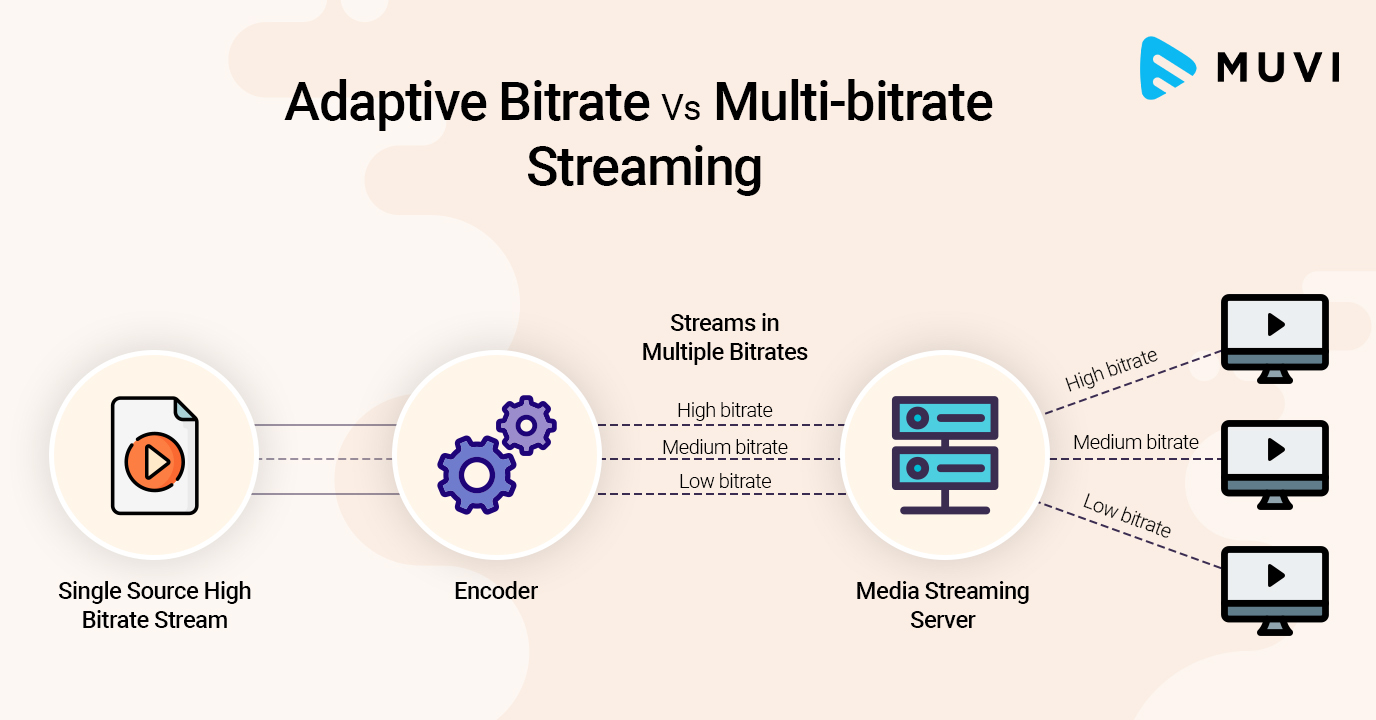
It works by detecting user bandwidth and CPU capacity in real time and adjusting the quality of the video stream accordingly. This requires the use of an encoder that can encode single source video at multiple bit rates. The player client switches between streaming different encodings based on available resources. “The result: very little buffering, fast startup times, and a good experience for both high- and low-level communications.”

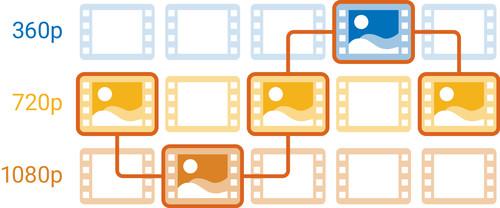
More specifically, and as implementations are in use today, adaptive streaming bitrate is a method of streaming video over HTTP where the original content is encoded at multiple bit rates, then each of the different bit rates. Bit rate transmissions are segmented into small parts of several seconds. Today’s customer is aware of streams available at different bit rates and stream segments by explicit file. Starting, the client requests segments of the lowest bit rate stream. If the client finds that the download speed is higher than the bit rate of the downloaded segment, then it will ask for the next higher bit rate segments. Later, if the client finds that the download speed of the segment is lower than the bit rate of the segment and therefore the network bandwidth has deteriorated, then it will request a lower segment of the bit rate .

Bit Rate – Fixed Quality

Bit Rate – Fixed Quality

Bitrate

A VBR encoder repaired by quantizer or fix quality.

bit rate

This is usually a single pass encoding. The user determines a given subjective quality value and the encoder allocates bits as necessary to achieve a given quality level. This ensures that the product flow is of constant quality at all times. The quality score usually has a bit rate range associated with it. The downside to this encoding method is that the average bit rate (and thus the file size) will not be known in advance, and reaching a certain average bit rate requires trial and error. In general, this is more of a concern for video than audio, as file sizes are much larger and encoding can take much longer.

Bit rate row
This VBR encoding method allows the user to specify a bitrate range: the minimum and / or maximum bitrate allowed. Some encoders extend this method with an average bit rate. The minimum and maximum bit rate allowed sets the limits over which the bit rate can change. The downside to this method is that the average bit rate (and thus the file size) will not be known beforehand. Bitrate range is also used in some fixed quality encoding methods, but generally without permission to change the particular bitrate.

Average bit rate
The average bit rate (ABR) that encoding can be used to ensure that the output stream achieves a predictable average bit rate over the long term. This is typically accomplished by multi-pass encoding, where one or more initial passes are used to collect data about the stream, and the final pass uses that data to achieve uniform quality at a specified average bit rate.

Alternatively, periodic averaging can be used, either by performing ABR on smaller chunks of output or responding to fluctuations in ABR, increasing or decreasing overall quality. They can achieve ABR in a single pass, but they do not produce the same degree of uniformity as a multi-pass ABR. Some encoders use “ABR encoding” and “multi-pass encoding” to refer to single and multi-stream ABR encoding, respectively.

Some encoders also allow the user to specify the maximum allowable bit rate or the maximum quality cost. This is sometimes called a variable constrained bit rate (CVBR) and is generally applied to ABR algorithms.

The downside of a single pass ABR encoding (with or without CVBR) is the opposite of a fixed VBR quantizer: the size of the output is known in advance, but the resulting quality is unknown, although it is even better than CBR. Specifying a higher average or maximum can simply make the file larger without noticeable quality effect, and an increased maximum bitrate can introduce stuttering when the file is filtered. However, reducing these criteria to too low a level will ultimately lead to rather drastic quality losses. The effect on video is usually squared because the textures are no longer fully detailed in their rendering.

Multi-pass ABR encoding is more similar to fixed VBR quantizer because higher average will increase quality.

There is no one ideal “one size fits all” setting for ABR in video encoding. For low resolution video (320 or 640 lines) encoded with MPEG-1 or MPEG-2, the average bit rate can be as low as 1,000 kbps and still achieve acceptable results. For high definition video like 1080, this average may need to be 6,000 kbps or more. The main factor in determining the minimum video bitrate is the efficiency with which the video can be encoded. Using more efficient video encodings like MPEG-4 will help promote a lower bit rate, while a significant amount of movement or white noise will require a higher bit rate to encode without visible artifacts. In the end, the user may have to use trial and error to reach the minimum file size for a given video stream, encode at a given bit rate, and then review the results.

File size
VBR encoding that uses a file size setting is typically multi-pass encoding. This allows the user to define a specific size for the final file. In the first pass, the encoder analyzes the input file and automatically calculates the possible bit rate range and / or the average bit rate. In the last pass, the encoder distributes the available bits throughout the video to achieve uniform quality.

Variable bit rate

Variable bit rate

VBR

Variable Bit Rate (VBR) is a term used in telecommunications and computing that refers to the bit rate used in encoding audio or video.

VBR

Unlike constant bit rate (CBR), VBR files change the amount of output per time slice. VBR allows you to allocate a higher bit rate (and therefore requires more storage space) to more complex segments of media files, while less space is allocated to less complex segments. The average of these rates can be calculated to generate the average bit rate for the file.

Opus, Vorbis, MP3, WMA and AAC audio files can optionally be encoded in VBR. Variable bit rate encoding is also commonly used in MPEG-2 video, MPEG-4 Part 2 video (Xvid, DivX, etc.), MPEG-4 Part 10 / H.264 video, Theora, Dirac, and other video formats. video compression. Additionally, floating rate encoding is inherent in lossless compression schemes like Apple’s FLAC and Lossless.

Advantages and disadvantages of VBR
The advantages of VBR are that it produces a better quality-to-space ratio than a CBR file of the same data. The available bits are used more flexibly to encode audio or video data with greater precision, with fewer bits used in less demanding passes and more bits used in difficult-to-encode passes.

The downsides are that encoding can take longer as the process is more complicated and some hardware may not be compatible with VBR files. VBR can also pose problems during transmission when the instantaneous bit rate exceeds the data rate of the communication path. These problems can be avoided by limiting the instantaneous bit rate during encoding or (at the expense of higher latency) by increasing the playback buffer.

Additionally, encryption of VBR encoded voice (or other signals, including video) provides only limited privacy, as bit rate patterns can show which language is spoken.

In the past, many hardware and software players could not correctly decode variable bit rate files, in part because the various VBR encoders used were not well developed. This led to the widespread use of CBR over VBR for the sake of compatibility. As of December 2006, devices that only support CBR encoded files are mostly obsolete as the vast majority of portable music devices and software today support encoded VBR files.

VBR support for AAC and MP3 files is found in most modern digital audio players, including those released by Apple, Microsoft, Creative Technology, and SanDisk. Early VBR algorithms sometimes introduced audible artifacts by encoding monotony or minimal tones (such as audiobooks and acoustic music). These displays often mimic the “digital chirp” during the quiet parts of a song, or when only speaking. As VBR improved the encoding algorithms, these problems were addressed in later generations of the VBR standard.

VBR encoding methods
Note that choosing the Variable Bit Rate (VBR) method only affects the encoding process. Decryption of the VBR stream is performed identically in all cases, regardless of how the encoder decides to allocate the bits.

Multi-pass encoding and single-pass encoding
VBR is created using so-called single-pass encoding or multi-pass encoding. Single pass encoding analyzes and encodes data on the fly and this is also used in constant bit rate encoding. Single pass encoding is used when encoding speed is more important, for example for real-time encoding. Single-pass VBR encoding generally controls a fixed quality setting or bitrate range (minimum and maximum allowable bitrate), or an average bitrate settling. Multi-pass encoding is used when encoding quality is most important. Multi-pass encoding cannot be used when real-time encoding, live coverage, or live streaming … Encoding a multi-pass takes much more time than encoding a single pass because each pass means one pass through the input data (usually the entire input file). Multi-pass encoding is only used for VBR encoding because CBR encoding does not offer the flexibility to change the bit rate. The most common multi-pass encoding is two-pass encoding. The first step of two-step coding analyzes the input data and stores the result.

Constant bit rate (CBR) vs variable bit rate (VBR), which one should you choose?

Constant bit rate (CBR) vs variable bit rate (VBR), which one should you choose?

CBR vs VBR

How do you save memory when encoding in VBR?

CBR & VBR

What type of encoding to choose: variable or constant?
If you want to rip music from CDs or other media where it is stored uncompressed in lossy formats like MP3, WMA, AAC, and others, you have to choose what bit rate you will do it with. Constant (CBR) or variable (VBR).

Constant Bit Rate (CBR) encoding method

CBR (Constant Bit Rate) – When encoding in CBR throughout the music file, the bit rate will remain unchanged and equal to the value you selected.
The most common values ​​are: 128, 192, 256, 320 kbps.

The advantage of CBR encoding is that the file will be processed faster, both when encoding and decoding. Also, absolutely any program or hardware that is capable of playing music from MP3, WMA, AAC formats can do it if it is encoded in CBR, which cannot be said for the variable bit rate. Older hardware or software is not always compatible with CBR music playback.

However, it should be noted that CBR encoded music eventually takes up more memory than the same VBR encoded music.

Very often, CBR encoding is used for those cases where it will be transmitted over the network or when it is known in advance that it will be played on older equipment.

A constant bit rate is important for the music that will be streamed over the network, as the data flow will be stable and if it is within the bandwidth of the network channel, the playback will be smooth, without jerks or interruptions. . But if you stream music compressed with a variable bit rate, difficulties can arise when a part of a song that is encoded with the maximum bit rate does not pass the channel bandwidth, causing gags during playback.
Back to content

Variable Bit Rate (VBR) encoding
VBR (Variable Bit Rate) – When encoded in VBR, it is not constant but constantly changes as it is played.

This encoding method allows you to increase the bit rate in difficult musical sections and decrease it in simpler musical sections, allowing the quality to remain roughly the same level, but at the same time saving memory space.

VBR is used successfully and is compatible with most formats and software.

VBR Supported Formats: MP3, WMA, OGG, AAC and others.

The main advantage of variable over constant bitrate is to save memory space for storing music.

When encoding in VBR, more complex and resource-intensive algorithms are used, so playback requires more computing power from the device. For this reason, some older computers may not play music from VBR.
Back to content

How do you save memory when encoding in VBR?
Compression algorithms analyze not only the sound itself, but also its complexity, breaking it down into elementary components. Therefore, complex areas of music, where many instruments play at the same time, or the sound of an instrument often changes its pitch and volume, are encoded with the highest quality. But if simple seconds appear in the music, or if there is silence at all, these pieces are encoded at a much lower bitrate.

Due to this approach, memory savings are achieved.

But you should always remember that the main disadvantage of VBR is the inability to play music on old hardware or old software.
Back to content

What type of encoding to choose: variable or constant?
If you are absolutely sure that your encoded music will play on modern hardware, I recommend using a variable bit rate.

If your music will be played on a wide range of computers, it is best to play it safely and encode it at a constant bit rate.

All phones, players and computers that have been released in the last 10 years should support VBR playback without any problem, so in the vast majority of cases I recommend using VBR.

In this way, the music will take up less memory, but at the same time it will retain high quality.

It is especially important to use VBR if the music will be stored on portable devices such as mp3 players or phones. Although a large amount of memory has been incorporated lately, it is desirable to use it sparingly.

Video codecs for 4K

Video codecs for 4K

4K codecs

If you are experienced in streaming or recording video signals, you probably know what video codecs are.

4K Codecs


Video codec – a device or program that allows you to compress (encode) large video files for viewing or editing; the name is formed at the same time as these words in English: «co the mpressor / dec ompressor» (to mpres-sor / December ohm-pres-sor) and «co de / dec ode» (to di-ro-vat / december hate-ro-vat).

In the context of the characteristics of professional environments or for live-pi-si codecs, reduce the size (or bit rate) of the data stream, allowing the transfer of data to a wide audience. For example, a compressed 1080p30 signal typically takes 4-8 Mbps, while an uncompressed version of the signal would require 1.5 Gbps – that’s 250 times longer! Given current network bandwidth limitations, it would be nearly impossible to stream at such a high bit rate without using video codecs.

Live streaming in 4K?
Streaming or recording in 4K resolution, if possible, definitely has its advantages. This is, first of all, the quality and clarity of the video, as well as ample opportunities for further processing.

In terms of formats and codecs, 4K resolution (3840×2160 pixels) contains four times as many pixels as the most popular modern Full HD resolution (1920 × 1080), meaning in one go, you can stream much more data to your audience.

Fortunately, new codecs have already appeared that allow you to work with 4K and higher resolutions.

H.265 codec: the best choice for 4K
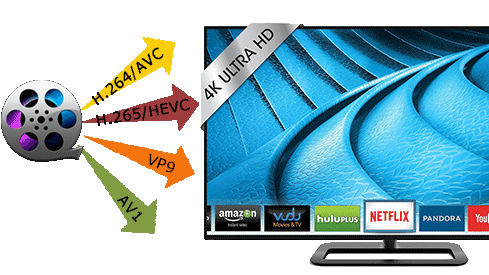
H.265, also known as HEVC, is the successor to the modern generation H.264 codec (known as AVC), which is capable of encoding / decoding 4K video. HEVC is installed on most 4K televisions and computer monitors. When encoded, H.265 consumes up to 8-10 times more processing power than H.264, making HEVC unsuitable for transmitting small to medium-sized data using the latest technologies. Video-on-demand resources like Netflix generally encrypt their video content before making it available to users. In addition, these resources can be allowed as additional computing power,

Note that older formats and codecs (AVC / H.264) are still capable of handling 4K video, but the difference is that newer ones like HEVC do it more efficiently. At the same time, the video quality with the increased compression ratio improved and this did not affect the bit rate. Capable of supporting resolutions up to 8K (8192 × 4320), HEVC is the video format of the future.

At the same time, there are no end-user costs associated with HEVC / H.265, while equipment manufacturers, providers of paid programs and streaming services must pay royalties for using HEVC technology in their products and / or services. A good example would be modern 4K televisions or monitors, in which the H.265 codec is integrated during production and users get it for free with the purchase of the corresponding device.

Free video streaming services (such as YouTube) have traditionally been exempt from royalty payments, but this has not affected HEVC. This exclusion has generated a series of interesting collaborations between renowned high-tech companies in the creation of new open source video formats.

Alliance for Open Media
Dissatisfied with the licensing rules and patent royalties associated with HEVC, tech giants like Microsoft, Google, Mozilla, Cisco, Intel, Netflix, and Amazon have formed a new consortium: the Alliance for Open Media (AOM). It is a non-profit organization dedicated to the development of the next generation of video codecs, video encoding formats, and related technologies. For 2016-2017, AOM plans to introduce new technology that enables more efficient compression of video data, which in turn will significantly reduce the load on the Internet connection and significantly increase the capabilities of modern web networks that transmit video to personal computers, smart phones. , game consoles, streaming consoles, televisions, etc. Also, when using the new format, no royalties will be paid. It follows that any company can create software that can convert,

Many of the group’s members have already contributed to the development of the next generation of 4K codecs; Cisco created Thor, Mozilla worked with Daala and Google with VP9. AMD, ARM, Intel, and Nvidia have recently joined the Alliance.

VP9 is the most popular of the 4K codecs
The VP9 codec is open source and royalty free. It owes its popularity to its use in web applications during the gradual transition from Flash to HTML5 technology.


H.264 compared to H.265

H.264 compared to H.265

H.265 VS H.264

One of the main decisions in the use and design of video surveillance systems is the choice of codec. The correct choice and setting of the codec allows you to achieve the optimal balance between the quality of the resulting image and the efficiency of video transmission over the network.

H.264 vs H.265

The most common video surveillance codec is H.264. And although it is demanding in the computational part of CCTV, it allows you to compress video of a high enough quality for transmission over a local network or the Internet. But progress does not stop, and in 2012 the first chip capable of encoding a video signal in H.265 format was presented at the Mobile World Congress. This codec, according to the creators, is capable of halving the size of the resulting file compared to a file compressed with the H.264 codec. Such statements could not fail to arouse interest among manufacturers of video surveillance systems. This is understandable – the end result of using a more efficient codec should be direct savings. The widespread use of this codec in the market has not yet been observed, but the first cameras compatible with H.265 have already started to appear in Russia.

Assistive technologies such as Zipstream (created by Axis Communications) and H.264 + (Hikvision) are also capable of reducing network bandwidth and video storage requirements. There are many articles on the net that describe tests, comparisons of the quality of codecs with each other, manufacturers give many arguments in favor of their solutions. We decided to see in practice if all these technologies really work, if they can be effective competitors for the new H.265 codec.

H.265 codec
First, a little theory.

H.265, or HEVC (High Efficiency Video Coding in English), is a video compression format that uses more efficient algorithms compared to H.264 / MPEG-4 AVC. ITU-T Recommendation H.265 and ISO / IEC 23008-2 MPEG-H Part 2 have been jointly developed by the ITU-T Video Coding Expert Group (VCEG) and the MPEG Moving Picture Expert Group . The standard recommendation was developed in response to the increasing demand for higher compression rates for moving images for a wide variety of applications, such as webcasting, data transmission, video conferencing, digital storage, and television broadcasting.

To be honest, we walked in circles around the H.265 codec for a long time, not knowing which side to approach. There were many difficulties. The main one is that the cameras that support it can be counted on one hand. We took BEWARD B2250 and ActiveCam. Also, it turned out to be not so easy to play the recorded video stream compressed with the new codec, as manufacturers use modified codecs and the standard playback tools gave them up. The only player that did not refuse to play the received files is VLC Player. We started recording video under different conditions, changed the bitrate, plunged the scene into darkness, but the size of the video stream remained the same for H.264 and H.265. As well as the quality of the image, which could not be discerned with the naked eye.

Until the lowest quality of the resulting image from the cameras was established, the bit rate was 200 kbps, it was then that the fundamental difference between the two codecs became visible. The new codec works differently from the old one. H.265 is capable of encoding 64×64 pixel blocks, which improves encoding efficiency and reduces decoding time. In practice, a video stream encoded with the H.265 codec, at the same bit rate, provides more details than H.264. With the maximum setting (bit rate 8000 kbps and above), this is impossible to notice, but at the minimum (200 kbps), the difference is obvious.

Where are the savings? And you can save traffic and file space by reducing the bit rate of the H.265 codec and obtaining an image comparable to that of the compressed H.264 codec. Will the file size in H.265 be 50% smaller than that of files compressed with the H.264 codec? That is unlikely.

Most likely, the H.265 codec works well when using video surveillance features such as license plate recognition, as at the maximum setting the image is more detailed. However, it is not possible to test this theory in practice; There are still no similar solutions on the market that work with a video stream using a compressed H.265 codec. And until the new codec began to massively take over the market, vendors are actively introducing new technologies that lower the video bit rate without a significant difference in image quality. They all work well with the standard H.264 codec.

Video encoding methods

Video encoding methods

Codec

Average video converter should have three encoding modes: CBR, VBR1 (1 step), VBR2 (2 steps).

Video Codecs

CBR is a constant bit rate that compresses all scenes equally. If there are static and dynamic scenes in the movie, then the CBR dynamics may be of insufficient quality and the static may be of excessive quality, which is completely unnecessary.

→ CBR can be used if the movie is small and can provide the highest encoding quality: 8500-9000 kbps.

VBR: variable bit rate. We set limits, for example, from 2000 to 9000 kbps. In static scenes, the encoder automatically reduces the bit rate and in dynamic scenes it increases. VBR1 is a single pass variable bit rate encoding. Its only advantage is speed, that is. the encoding time will be spent 2 times less than with VBR2. But the quality at average bitrate values ​​(5000-7000 kbps) will be lower than that of VBR2.

Having reached the first complex fragment, the encoder will be afraid to set the maximum bit rate, because it does not know what will happen next. What if suddenly dynamic scenes, and then we will not meet! And in simple, static scenes, the encoder is again afraid of reducing the bit rate considerably; if there are more scenes of the same, then we will not get the desired bitrate. As a result, the deviations from some average bit rate will be small. The quality is certainly better than CBR, but not enough.

→ If the film is smooth enough or pressed for time, use VBR1. Also, this method can encode a less important part of the disc, as a bonus.

VBR2 is a two-step variable bit rate encoding.
In VBR2 encoding mode, the encoder performs two passes, thus lengthening the encoding time. But after the first pass, you have all the information about the number and duration of the dynamic and static fragments, so the encoder safely increases the bitrate to the maximum or reduces it to the minimum. As a result, we will obtain the highest quality.

→ The VBR2 encoding method offers the best quality in a movie with scenes of different dynamics.