Sample rate and bit depth


Free Download Mp4Gain
picture

Sample rate and bit depth

uno2

When describing digital recording devices, two fundamental concepts are used: sample rate and bit depth. In this article, we will see what it is.

Sampling rate
The sample rate is the rate at which the logger captures samples of the input signal. When recording sound in digital form, in fact, individual samples or, in other words, values ​​of sound intensity are recorded at separate points in time.

The sample rate for recording devices is usually the following standard values: 44.1 kHz; 48 kHz and 96 kHz. The higher the sample rate, the more samples will be taken in 1 second and the better the digital sound quality we will get as a result.

What is the meaning of these numbers? They mean the number of times the recorder reads the sound intensity value from the input signal per second. The sample rate is measured in kilohertz (kHz), 1 kHz = 1000 samples per second.

For example, if the recording is made with a sampling frequency of 48 kHz, this means that the sound recorder measures and records the sound intensity value 48,000 times per second.

This number may seem unimaginably huge, but here the phenomenon called Nyquist frequency is worth remembering. The Nyquist frequency is named after the person who first discovered it. Defines the highest sound frequency that can be recorded at a given sample rate.

In short, the maximum tone that can be digitally fed is about half the sample rate.

Therefore, when recording at a sampling frequency of 48 kHz, the maximum audio frequency that can be recorded is 24 kHz. This is sufficient, considering that the human ear hears frequencies on average from 20 Hz to 20 kHz.

Bit depth
When talking about digital recording devices, you can often hear the words “16-bit”, “24-bit”, and so on. Some mean the number of information units with which the value of each sample obtained from the digital recording can be represented.

The higher the value of this number, the more accurately you can record the value of each sample and the higher the sound quality you will get as a result.

Do not think that the greater the number of bits, that is, the greater the bit depth, the greater the intensity value that can be set. Here is meant representation precision.

Modern recorders are usually 24 bits wide. It should be noted that recording with a large bit depth takes up a lot of space on the storage device, but this is not so important, because modern media has a huge volume and is becoming more and more affordable.


Free Download Mp4Gain
picture


Mp4Gain Main Window
picture


Mp4Gain Features
picture


Free Download Mp4Gain
picture

Why can the difference in bitrate make it sound great (high, medium, low)?

Why can the difference in bitrate make it sound great (high, medium, low)?

Bit Depth vs. Bit Rate

Reply:
Just to make sure this is clear, let’s differentiate

BIT RATE BIT DEPTH

sample rate vs bit depth

as much as

Bit rate

how they relate to audio in the digital domain …

Sampling frequency:

The sample rate is specified as a frequency (samples per second), for example, 44.1 kHz for CD. Other common values ​​are 48, 88.2, 96, 176.4, and 196 kHz, although some formats (such as DSD) have sample rates greater than 2.8 MHz. The sample rate indicates

how often the audio signal is measured

While some people view lower readings as a tiered bar graph, I prefer to view them as a child bitmap. If you take the outline of a horse and simplify it to 20 points so the child can connect, it’s not so much that you end up with steps (using straight and curved lines to connect 20 correctly spaced points can lead to a decent figure), but there won’t be without subtlety. Whereas with 200 (or 2000) points, you could approximate the wavy strands along the horse’s mane.

In audio, a lower sample rate does not make the sound “bad” (eg, fuzzy, fuzzy, or distorted), but rather limits the maximum frequency (pitch) that can be recorded / played back as intended.

Nyquist theorem formula

, The 44.1 kHz sampling rate was chosen for CD because it can record and play back frequencies up to 20 kHz. To record a spoken word (such as a speech, a sermon, or an audiobook), it would be difficult to detect a much lower sample rate, as the human voice has less and less harmonic information above 10 kHz.

Depth bits:

Considering that the sampling frequency determines how

often

audio signal is measured, bit depth indicates

scale accuracy

Since we are talking about digital audio, we describe this measurement scale in bits, where each bit is 0 or 1, and we concatenate a certain number of them to represent the value. When we have 8 bits, there are 256 possible numerical values, including zero. With 16 bits, there are 65,536 possible values. A 24-bit register can use 16,777,216 values.

When we convert analog audio to digital representation (A-to-D) and vice versa (D-to-A), we find interesting mathematical relationships. Each bit (digital) doubles the number of possible values ​​… And doubling the amplitude (approximately 4 times the power) of the sound wave (analog) corresponds to + 6 dB of loudness. Therefore, we can estimate the maximum dynamic range * of a digital recording at 6 dB / bit. Therefore, 8-bit recording has ~ 48 dB of dynamic range, 16-bit recording (such as a CD) has ~ 96 dB, and 24-bit recording has ~ 144 dB.

* For those of you unfamiliar with this term, dynamic range basically describes the difference between the quietest and loudest sound waves that can be recorded / played back. The CD has a difference of approximately 96 dB, which can be used to represent the most subtle pause compared to the incredibly loud burst of the cannon at Tchaikovsky’s climax.

1812 Overture

,

Three quick notes for those interested in delving into the rhythm …

There is a formula for the actual dynamic range of a digital recording that may differ slightly from the previous estimate, but it is a fairly minimal deviation, so an estimate of 6 dB / bit is what you normally see in quotes.
The latest 32-bit floating point representations combine a 24-bit number and an 8-bit exponent to represent many more possible values ​​than 24-bit registers. The dynamic range estimate is getting a bit dubious, but suffice it to say it’s well above 144 dB.
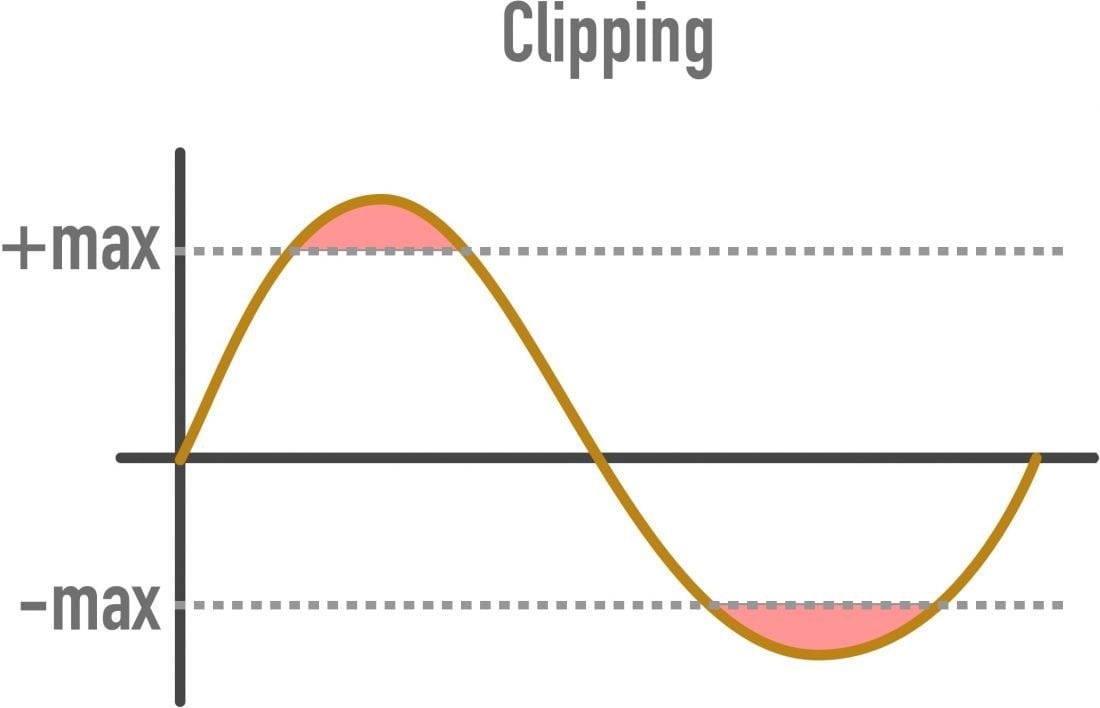
Using a lower bit depth, while you might think in terms of warp plugins with names like “bit-grinder”, doesn’t have to sound “bad” (eg fuzzy, fuzzy, or distorted), but just represents a reduced dynamic range. But since a 16-bit recording with a dynamic range of 96 dB (65,536 numerical values) cannot be represented in 8 bits (48 dB and 256 numerical values), to reduce the bit depth of the already digitized audio, a mathematical correction of the numbers down. (for example, 65535 becomes 255) using a compressor or limiter, which can cause the quietest recording bits to be lost so that the difference between soft and loud parts is <48 dB. Without such scheme, the transformation will cause clipping (numerical values ​​above the maximum),
Bit rate:

In digital audio, the bit rate is a measure of

how many bits are transmitted / processed per second

What is the fundamental difference between 44100 and 48000 Hz?

What is the fundamental difference between 44100 and 48000 Hz?

44100 vs 48000 hz
44100 vs 48000 hz

In fact, this is just a question of long-standing standards.

44100 vs 48000 hz
44100 vs 48000 hz

44100 vs 48000 hz

44100 is the CD standard.
48000 is the standard for DVD.
The difference in practice is so small that it will be impossible to notice it (I’ll tell you more: many people feel the difference between mp3 and wav, but they can’t tell which is better).
The stereotype has persisted that if you need to work with TV or movies / soundtracks, it is better to do it in 48000, suddenly some old equipment will not understand sampling.
But this is very, very unlikely these days, so there isn’t much of a difference.
It can record at 96000. There is a small chance that some plug-ins / sound effects can handle such recordings better, but it requires more CPU / RAM and much more hard disk space.
Between 16 and 24 bits, it will also be difficult to feel the difference, but at the request of the sound engineer, we wrote in 24 with the same thoughts (for plug-ins).
In general, write to 44100 if you don’t need to work with a specific television crew.

44100 vs 48000 hz
44100 vs 48000 hz

Choosing the Right Sample Rate: 44100 or 48000 hz


In the world of digital audio, the choice between 44,100 Hz and 48,000 Hz sample rates is a critical one. As an audio expert, I’ve spent years diving deep into this topic, examining the real-world scenarios where this choice can make or break a sound. In this article, I’ll guide you through this audio journey, shedding light on the differences and helping you make an informed choice.

44100 Hz – The Analog Heartbeat

When we talk about 44,100 Hz, it’s like stepping into a cozy vinyl record shop, where the warm crackles and pops surround you. This sample rate mirrors the heartbeats of analog audio, capturing the subtleties of your audio source much like a vintage vinyl record player.

Imagine: You’re in a dimly lit jazz club, and a saxophonist takes the stage. You close your eyes as the music begins. 44,100 Hz is akin to capturing every breath, every emotion, and every nuance of the saxophonist’s performance. It’s the sample rate that preserves the soul of analog sound.

48000 Hz – The Digital Precision

Contrastingly, 48,000 Hz feels like entering a state-of-the-art recording studio with a digital mixing console at the heart of it all. It’s the precision tool for audio in the digital age, where every sound wave is charted with utmost accuracy.

Visualize: You’re in a high-tech laboratory, and a scientist is conducting a finely tuned experiment. 48,000 Hz is like the precise instruments that measure every data point with accuracy. It’s the sample rate that excels in capturing the clarity and detail of digital audio.

The Real-World Decision

The choice between 44,100 Hz and 48,000 Hz ultimately depends on the nature of your audio project.

Subtitle: For Vintage Vibes

If you’re aiming for a warm, nostalgic sound reminiscent of classic records, 44,100 Hz is your choice. It’s like using a vintage camera to capture that old-world charm. This sample rate will maintain the character and imperfections of your audio source.

Subtitle: For Contemporary Clarity

When you require crystal-clear audio for modern projects, such as podcasts, video games, or high-quality music production, 48,000 Hz is your ally. Think of it as upgrading to a high-definition TV for the audio world. This sample rate ensures every detail is captured and reproduced faithfully.

Last words about right sample rate for your digital audio

As an audio expert, my journey has led me to understand that the choice between 44,100 Hz and 48,000 Hz is about preserving the essence of your sound in the most appropriate way. Each sample rate has its place in the vast world of audio, just as a painter chooses different brushes for different strokes on their canvas.

So, whether you’re embracing the warmth of the past or striving for the precision of the future, remember that the right choice of sample rate can be the difference between an audio masterpiece and a missed opportunity. Choose wisely, and let your sound shine in all its glory.


The fundamental difference between them in the coverage of the frequency range on the track (from 20Hz), the 44100 sample rate allows you to work in the range up to 22kHz, 48000 to ~ 25kHz, 96000 to ~ 35kHz, etc. 48 parameters o 96kHz are used in large studios where the reproduction of these frequencies and sound engineers strive for the slightest increase in sound quality, before and after conversion to the 44100 standard, the sound of the track objectively looks better, even though the human ear does not hear these frequencies, the psychoacoustic effect remains (the closest example: if you shoot video and plan to play back in fHD, you will prefer to shoot 4k with rear cropping for the sake of image quality, and no one will say there is no point in shooting 4k, the same is here).

It’s even more interesting in movies … because 44100Hz is the playback frequency at 24fps and 48000Hz is 25fps. If you record a video at 25 fps and the sound is separately on the recorder at 44100Hz, then the length of the tracks will not match and you will have to change the timbre of the original with a small time interval.

Sample rate and bit depth

Sample rate and bit depth

Sample Rate Bit Depth

When describing digital recording devices, two fundamental concepts are used: sample rate and bit depth. In this article, we will see what it is.

Sample Rate, Bit Depth

Sampling rate
The sample rate is the rate at which the logger captures samples of the input signal. When recording sound in digital form, in fact, individual samples or, in other words, the sound intensity values ​​are recorded at separate points in time.

The sample rate for recording devices is usually the following standard values: 44.1 kHz; 48 kHz and 96 kHz. The higher the sample rate, the more samples will be taken in 1 second and the better the digital sound quality we will get as a result.

What is the meaning of these numbers? They mean the number of times the recorder reads the sound intensity of the input signal per second. The sample rate is measured in kilohertz (kHz), 1 kHz = 1000 samples per second.

For example, if the recording is carried out at a sampling frequency of 48 kHz, this means that the sound recorder measures and records the sound intensity value 48,000 times per second.

This amount may seem unimaginably huge, but a phenomenon called the Nyquist frequency is worth remembering here. The Nyquist frequency is named after the person who first discovered it. Defines the highest sound frequency that can be recorded at a given sample rate.

In short, the maximum tone that can be digitally fed is about half the sample rate.

Therefore, when recording at a sampling frequency of 48 kHz, the maximum audio frequency that can be recorded is 24 kHz. This is sufficient, considering that the human ear hears frequencies on average from 20 Hz to 20 kHz.

Bit depth
When talking about digital recording devices, you can often hear the words “16-bit”, “24-bit”, and so on. Some mean the number of information units with which the value of each sample obtained from the digital recording can be represented.

The higher the value of this number, the more accurately you can record the value of each sample and the higher the sound quality you will get as a result.

Do not think that the greater the number of bits, that is, the greater the bit depth, the greater the intensity value that can be set. Here is meant representation precision.

Modern recorders are typically 24-bit wide. It should be noted that recording with a large bit depth takes up a lot of space on the storage device, but this is not so important, because modern media has a huge volume and is becoming more and more affordable.

How does the bit rate affect the quality of the music?
How does the bit rate affect the quality of the music?

Audio Bitrate Quality

Does the bit rate affect the quality of the music?

There is a lot of talk these days that we have lost real music with the advent of compressed audio formats like MP3, AAC and the like. Is it really so? Will lossless music save music? Can an inexperienced listener tell the difference between MP3 and FLAC music? Let’s take a look at this problem.
Audio Bitrate

What is Bitrate?

You’ve probably heard the term “bitrate” before and you probably have a basic idea of ​​what it means, but it might be a good idea to familiarize yourself with its official definition so you know how it all works.

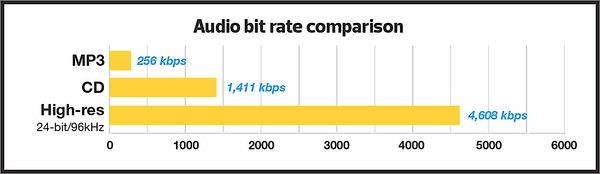
Bit rate is the number of bits or the amount of data that is processed over a period of time. In audio, this generally means kilobits per second. For example, the music you buy from iTunes is 256 kilobytes per second, which means that every second of the song contains 256 kilobytes of data.

The higher the bit rate of the track, the more space it will take up on your computer. Audio CDs typically take up quite a bit of space, so it has become common practice to compress these files so that you can burn more music to your hard drive (or iPod, Dropbox or whatever). This is where the “lossy” and “lossy” formats conflict.

Lossless and Lossy formats: what’s the difference?

When we say lossless, we mean that we haven’t really changed the original file. That is, we copy a track from the CD to our hard drive, but we do not compress it to the point of losing data. Essentially the same as the original CD track.

However, most of the time, you will probably extract your music in Lossy format. That is, you took a CD, copied it to your hard drive, and compressed the tracks so they don’t take up a lot of space. A typical MP3 or AAC album is probably about 100MB. The same album in a lossless format like FLAC or ALAC (aka Apple Lossless) will be around 300MB, so it has become common practice to use lossy formats for faster downloads and more hard drive savings. .

The problem is that when you compress a file to save space, you are removing chunks of data. Just like when you take a high quality image and compress it to JPEG, your computer grabs the raw data and “tricks” certain parts of the image into being basically the same, but with some loss of clarity and quality.

An example of how the JPEG graphics compression algorithm works
Remember that you are saving hard drive space by compressing music in lossy formats, which can make a big difference for an iPhone with 32GB of storage, but is only a trade-off in terms of size / quality.

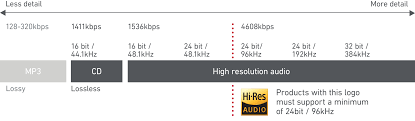
There are different levels of compression: 128 Kbps, for example, takes up very little space, but it will also have a lower quality of playback than a larger 320 Kbps file, which in turn is of lower quality than the 1,411 reference file Kbps. From. 1,411 kbps is an audio CD level quality, which is more than sufficient in most cases.

The problem is not how much the music is compressed, but what equipment you listen to it on.

Does bit rate really matter?

As memory gets cheaper every year, listening to sound at a higher bit rate, or even lossless formats, is starting to become more and more popular. But is it worth the time, effort, and storage space on your phone or computer?

I don’t like answering questions this way, but sadly the answer is: it depends.

Part of the equation is the hardware you use. If you are using a good quality pair of headphones or speakers, you are used to wide frequency and dynamic range. As such, you are more likely to notice the downsides that come with compressing music into lower bitrate files. You may notice that low-quality MP3 files lack a certain level of detail; Subtle backing tracks may be harder to hear, the highs and lows won’t be as dynamic, or you may hear distortion in the lead vocal. In these cases, you may want a higher bit rate track.

However, if you’re listening to your music with a cheap pair of headphones on your iPod, you probably won’t notice the difference between a 128Kbps file and a 320Kbps file, let alone 1,411Kbps lossless music. Remember when you I showed the image a few paragraphs above and noticed that you probably had to look at it to see the flaws? Your headphones are like a truncated version of the image: they will make these imperfections difficult to perceive, as they are not physically capable of reproducing the music for you the way you want them to.

The other part of the equation is, of course, your own ears. It can be very difficult for some people to distinguish between two different bit rates for the simple reason: they listen to little music. Listening skills, like any other, develop with practice. If you listen to your favorite music often and a lot, your hearing becomes more accurate and begins to pick up small details and midtones. But until then, doesn’t it really matter what bitrate you use?

So what format and bit rate should you choose yourself? Is 320 Kbps enough for you or do you definitely need Lossless format?

The point is that it is difficult to hear the difference between a lossless file and a 320Kbps MP3 file. To hear the difference, you need serious high-quality equipment, good hearing, and some kind of music (for example, classical or jazz). .

For the vast majority of people, 320 Kbps is more than enough to listen to.

What else should you consider?

Music recorded in the Lossless format can be useful. Lossless files are more reliable in the future, in the sense that you can always compress them to Lossy format when you need to, but you can’t do the opposite and restore original CD quality from MP3 file. This, again, is one of the fundamental problems of online music stores: if you have created a huge music library on iTunes and one day you decide that you need more bitrate, you will have to buy it again, but this time only in CD format . …

Whenever I can, I always buy or copy music in Lossless format for backup.

I understand that audiophiles are like a needle under your nails. Like I said, it all depends on you, your audition and the equipment you have.

Compare two tracks recorded in Lossless and Lossy formats. Try a few different audio formats, listen to them for a while and see if it makes a difference for you or not.

Sample rate and bit depth

The comparison with the digital or film camera is not completely random: the sampling frequency of the audio signals, that is, the frequency of the samples per unit of time (usually given per second), is comparable to the frame rate per second from a film camera. The number of pixels in each individual image could be equated with the bit depth: HD movies “look better” than Super 8 movies. The higher the number of pixels on the sensor and the more often a photo is taken, more precisely, the “light to be recorded”, the landscape, can be digitally reproduced.

Bit Depth

Bit depth

Fortunately for us, a certain Harry Nyquist inspired a certain Claude Shannon long ago to support him with a theorem (a theoretical statement or theorem) that stated that an audio signal at twice the frequency must be sampled uniformly to match. with the original signal. to be able to rebuild sufficiently. Limiting the bandwidth of audible frequencies practically frees us from our hearing, which is basically only capable of consciously perceiving frequencies between a maximum of 20 Hz and 20,000 Hz.

Sample rate

The expense of completely and exactly reconstructing the analog output signal is theoretically infinite, since digital signals are discontinuous by nature in any case, while analog signals are always continuous. Unfortunately, it is inevitable that digital information is only suitable for rough storage of analog signals. The starting signal is “rough”, good word, right? Nyquist’s theorem also applies to digital cameras: they also deal with frequencies, that is, those of light.

digital audio

For signals up to 20 kHz more or less relevant to humans, a sampling frequency of 40 kHz is sufficient according to the aforementioned theorem. The 44.1 kHz sample rate common for CD quality comes from the 1970s or Sony’s “pulse code modulation (PCM) process for storing digital signals on video tapes. Later, Sony developed the Red Book standard for audio CDs with Philips.

The frequency, which is slightly wider by an additional 4000 Hz than twice that audible to humans, has its origin in the simplest possible filters, which are intended to remove so-called aliasing effects from the audible range of the reconstructed analog signal. during digitization: the wider this “corridor”, the simpler the filter technology.

PCM pulse code modulation method

Exactly 44.1 kHz got out of this, because sample rate converters can be more easily designed (used for studio technology or data carrier transfer) if the sample rate is an integer multiple of the output frequency. The output frequency here was the 60 Hz network frequency used for video digitization with 525 lines to digitize the TV signal. Changing 60 Hz would have been very laborious, it stuck. It is not a coincidence that multiplying 525 by an integer factor results in a frequency greater than 44,000 Hz, which we want to achieve to keep filters for anti-aliasing simple: the next largest integer that is divisible by 525 is 44,100. The multiplication factor is 84, as a whole number is desired, which should not interest us otherwise.

What is the audio bit depth?

Understand what bit depth is, how it works, and how this feature will affect the quality of music during auditions;

Currently, many of those who are looking for quality audio or quality music keep mentioning “Hi-Res”, FLAC 24-bit, and MQA (Master Quality Audio) files. This is a growing trend in high-end smartphones that are trying to offer higher audio quality both in their DAC and in support of advanced Bluetooth audio codecs like LDAC, developed by Sony. Additionally, there are music streaming services that promise lossless audio quality, like Tidal.

BitDepth

The promise made by audio equipment manufacturers, developers of audio streaming and music streaming formats, is simple: superior audio quality due to the increased amount of data, also known as bit depth or English bit depth . There are 24 bits of 1 and 0 versus 16 bits on the CD. Of course, these high-resolution files are more expensive due to their quality, but the more bits, the better the result will be when listening to music, right?

Bitdepth

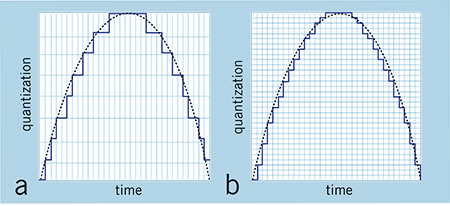
Low resolution audio is usually displayed using a jagged wave graph (with ladders). Source: soundguys
Well, the answer to the previous question is: not necessarily. The argument for a value in increasing bit depth is not based on something scientific, but on the distortion of what is actually happening and the exploitation of consumer ignorance about the media they are consuming. That is, it is a fact that stores selling 24-bit tracks reap far more benefits than a real improvement in promised sound quality.

Bit depth and sound quality.

The greatest example of companies selling 24-bit audio is the demonstration of a jagged sine wave, like stairs. When we look at a file that has a resolution of 16 bits, we see an irregular line, but when we look at the same song in 24 bits, it seems to be a practically smooth line, with better definition. It is a basic visual illustration, but depending on the person’s knowledge of the subject, he can be easily fooled.

Why use 24-bit or more audio files?

The utility of using a high-level bit depth applies to studios, because with each filter and conversion that is applied, the background noise increases. This increase in noise occurs due to the insertion of a new wave, as explained above. In other words, when using a higher bit depth level, the sound engineer prevents the original audio from generating noise by manipulating it for mixing and mastering.

However, remember that this will be more useful for audio production and not for the listener, as explained above.

conclusion
What will make the difference will be the balance between the sounds made in the mastering and not the bit depth itself, since the 16 bits of the CD are already more than enough for music listeners.

Multimedia formats: Digital audio


Sound is a continuous signal. To be stored with computer systems
it must be sampled, thus obtaining a digital signal.
The parameters that characterize the sampling are basically three:

 The sample rate
 Bit depth
 The number of channels
these parameters influence both the space occupied and the quality of the audio file
digital obtained.

Digital Audio

Sampling rate

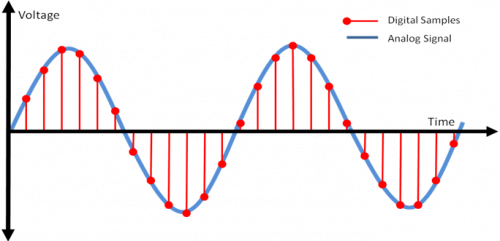
The sampling frequency is the measurement expressed in Hertz (Hz) of the number
of times per second in which an analog signal is measured and stored
in digital form.

Sampling rate
The higher the sampling rate, the more the sequence of the samples
digital will be close to that of the original analog waveform.
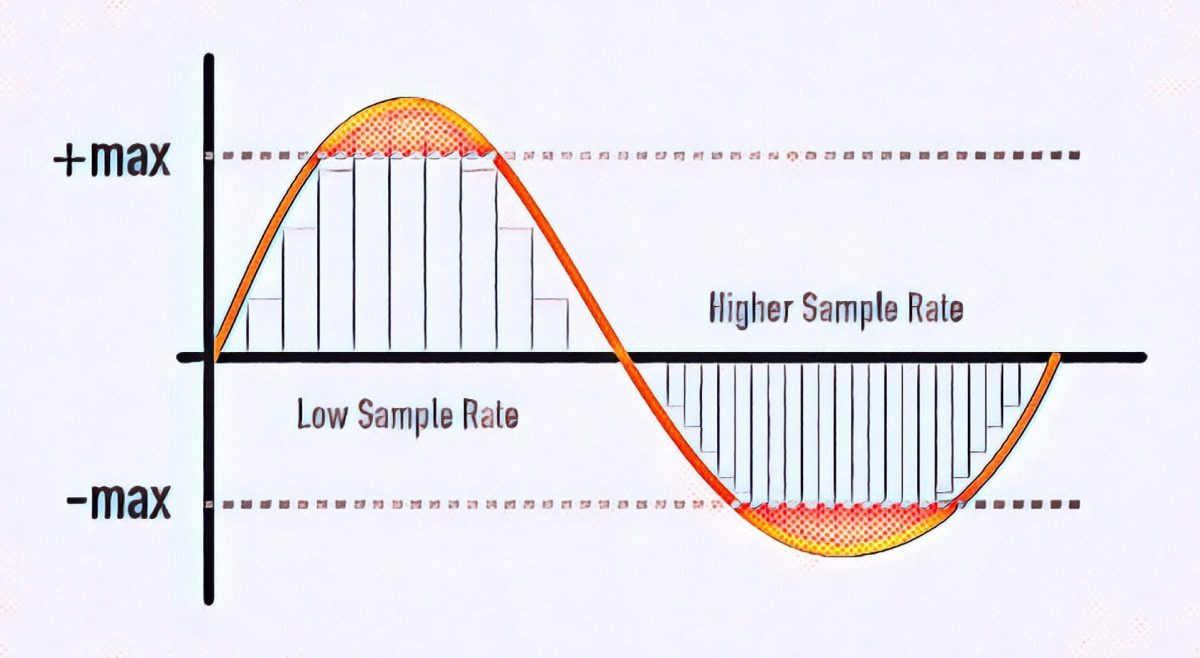
Low sampling rates limit the frequency range that is
can record, which in turn can generate a recording that
poorly reproduces the original sound.
Two sampling frequencies:
A. Low sampling rate,
which distorts the wave of the original sound
B. High sampling rate,
which perfectly reproduces the wave of
original sound
To reproduce a certain frequency, the sampling frequency
it must be at least double it (Nyquist theorem).
For example, audio CDs have a sampling rate of 44.100 Hz,
so they can reproduce frequencies up to 22.050 Hz, which are hardly found
beyond the limit of human perception of 20,000 Hz.
The following table shows the most common sampling rates for
digital audio.

Bit depth

The bit depth represents the number of bits used to store a
single digital sample.
When a sound wave is sampled, each sample is assigned
the amplitude value closest to the original wave amplitude. A depth
in high bits it provides as many amplitude values ​​as possible, which results in a
greater dynamic range (the difference in decibels between the maximum volume that the component can sustain without
distort the waves and the background noise it produces), lower and higher background noise
fidelity.
For example if you use 8 bits you have 256 possible values ​​(28
) that, being
relatively few, offer less sound quality than a
tape; if instead 16 bits per sample are used, 65536 values ​​are obtained
possible (216).
The most common examples are the audio CD, recorded in 16 bit, and the DVD, which
supports up to 24 bit depth.

Compression formats

Hand in hand with the advent of digitalization, multimedia applications have
they are increasingly widespread until they become commonplace. One of
multimedia features is certainly the use of digital audio
vowel and sound. The biggest obstacle associated with digitizing audio is
the large size of the files that are produced, which puts them at
sector operators (especially those linked to the internet) the problem of
reduce the space occupied by the data to obtain the double advantage of:
 save in terms of memory occupation;
 save in terms of transfer time on the network.

For this reason, speaking of digitizing the audio, it is necessary to speak
also of data compression techniques. The compression techniques of the
data, of whatever nature they are, are divided into:
 lossless: compress data through a lossless process
of information that takes advantage of redundancies in data encoding
 lossy: compress data through a lossy process
of information that takes advantage of redundancies in the use of data.

Lossless formats

Lossless compression formats are more suitable for archiving rather than
to reproduction, since most of them require complete
decompression before they can be played.
One of the most common lossless compression formats is FLAC (Free Lossless Audio Codec).

Lossy formats

Lossy compression formats use compression algorithms capable of
drastically reduce the amount of data required to store a sound,
guaranteeing however an acceptable and faithful reproduction of the original file uncompressed.

Some details of the sample rate

For many years it was thought that the sample rate or sampling frequency did not decisively influence the final quality of the digital audio; There are currently several engineers who record in 44.1K or 48K without really knowing why they do it. With the advent of new and better computers, interfaces, ports and protocols, 88.2K, 96K and up to 192K entered the discussion table on the best sample rate to use. It has always been the subject of discussion between engineers and audiophiles; some argued that they did hear the difference between different sample rates and others that did not, and the topic has been subjected to millions of A / B tests with very high quality equipment, causing all kinds of opinions found and uncompromising, fights and friendships of years broken

samplerate

While this is a basic issue of digital audio, it is always surrounded by a halo of mystery, mysticism and magic (like every sound theme), which is well worth clarifying.

 What is the sample rate?

This topic, although it occurs in the first or second class of digital audio, is not always understood correctly. In scholastic thinking, sample rate is defined as the amount of audio samples transported and taken per second. Since this is a unit of measurement over a second and with events that occur cyclically, the Hertz (1 / Frequency) is used as a unit. Obviously we cannot talk about this subject without referring to the Nyquist sampling theorem, which was tested by Shannon almost twenty years after its publication and in which it is stated that for a signal of limited bandwidth (B) (for example, a vibraphone reaches 14.917Hz), the sampling frequency must be twice its bandwidth (2 * B). Then, taking the previous example, we can say that: 2 * B → 2 * 14.917Hz → The sampling frequency for 14.917Hz should be 29.834Hz. This would be equivalent to 29,834 samples per second (1/29, 834) to be able to regenerate the signal of a vibraphone without error. Hence, it is taken that the highest frequency that human beings listen to is 20kHz and if we apply Nyquist it should be 40kHz, but it takes 44.1kHz to meet the demanding ears and for a matter of multiples.

44.1K or 48K to 88.2K or 96K, the correct division

At the dawn of the digital audio era, Nyquist was used to use the sampling resolution of 44.1K, used at that time audio CD format that played at 16bit / 44.1kHz. With the advent of DVD and Blu Ray as video and audio formats, resolutions such as 24Bits / 48K or 24Bits / 96kHz began to be used. Although for many years there were recordings that were made in 24Bits / 88.2kHz or 24Bits / 96kHz, at a certain time of mastering, before sending it to the disk duplicator, the audio suffered a mutilation that reduced it to 16Bits / 44.1kHz as It was ordered by the CD format. This process should be carried out with equipment specially designed for this function and in stages so that the audio did not suffer a very noticeable cut and the bad conversion was evidenced. Although the old and dear Dither was applied since then to compensate for this process (something like “grain” in the cinema. Watch a film without “grain” and it will look like HD even though it was filmed in 1980 on tape and goes to notice until the makeup of the actor and the assembly of the special effects, something otherwise disagreeable).

Generally, to prevent the audio from mutilating or applying several conversions that degrade it, it was decided at what resolution to record before pressing the REC button (we will not mention those that come down directly with your DAW from 24Bits / 96kHz to 16Bits / 44.1kHz in one step to export the audio … there is a place reserved especially for them in hell). If the audio was going to end on CD, a 88.2kHz sample rate was generally applied, since at the time of mastering, with the symmetric re-sampling at “half”, it was 44.1kHz.

Sounds better?

The subjective point of this is that we expect recordings to “sound” better at a higher sample rate. The reality is that if we record in high sample rates, with very good sampling, our sound will not “sound better”, but will be more detailed. Obviously, if our sound source is bad, our microphones and preamps too and so on, no matter how much we record at 192K, the result will not be the best. Now, if we use a good sound source, good audio chain and a good converter, everything will be obviously good. But don’t confuse; We are talking about detail here, not if it will sound more “warm,” “fat,” or “full-bodied.” This translates into a more homogeneous capture of the entire frequency spectrum, both audible and non-audible.

sample rate

CPU, disk and plug-ins

Obviously, having a higher sample rate means that our processor must do more calculations, since it has to process more samples (or audio samples). Depending on the amount of plug-ins that we use before a multitrack in high resolution, our use of both DSP and native processors (the computer equipment), will increase significantly, making it very difficult or impossible to work. There are several options to overcome this problem, from buying more processor or DSP, using fewer processes or external equipment (hybrid mixing), to borrowing a machine. The only option that should never go through our minds is to lower the resolution of the audio, process and upload it again. The serious problem that comes with this is a cut in the audio, which is not reversible and what is limited and trimmed, so it stays.

Another aspect to consider is that the storage speed must be in accordance with the audio resolution we use. Suppose we want to record at 24Bits / 96kHz; The transfer rate would be: 2304kbits / second. Now, calculating the amount of tracks, we should use a disc that really reaches us in speed for this transfer rate (topic to be developed in another article).

In these times, storage size is not a problem, but speed is. Having three terabyte disk drives are generally used for 5400 rpm dish disks; the least that should be used if they are not solid state disks, would be 7200 rpm plate disc drives. Obviously, with 5400 rpm discs, we would have a third reduction in the final transfer speed and reading and writing possibilities called “iops” (in out per second or in and out per second), which have a certain number, depending on the disk, capacity and arrangement of the same (RAID) which, depending on how much we demand in the resolution of the audio, amount of channels, processing (plug-ins) and expected latency (if we record with real-time monitoring), we will surely face some problems like “clicks” and / or “pops” in our audio.

Clock

The importance of using a good clock (or clock) and being in sync with all the elements that belong to our audio chain is vital. Recall that a few articles ago we have exposed this topic in detail, but it should be reinforced in this article. Several ADC and DAC converters of economic interfaces do not perform sampling and quantization in the correct or expected manner; External clocks or protocols such as Dante help the synchronization between several devices to be correct and improve the audio quality. Much of the final quality of our work in audio is in this part of the process and it is important that if we take our work and passion seriously, we begin to pay attention to these kinds of details that are generally overlooked.