Organization of high-quality sound on the computer.


Free Download Mp4Gain
picture

Organization of high-quality sound on the computer.

Music PC

A modern computer can be used in a variety of areas, from creating a mathematical model of a thermonuclear reaction to displaying all sorts of nonsense on the internet.

music pc

As they say, who is in the lot. Between these two extremes, there are many useful tasks that can be performed on a PC. Many of them are united by the presence of the soundtrack, which you want to provide in the best possible way when watching movies, while gaming, and when working in office applications. But you never know during which job you want to enjoy your favorite music! Turning your computer into a high-end audio player, home theater, home recording studio, and game center is easy. We will try to understand the aspects of various dubbing of “profiles” in this series of articles.
Taking into account the specific characteristics of the national market and the priorities of its buyers, the word “computer” will mean an X86 machine (a family PC) running under the Windows XP operating system.

The structure of the PC audio path

In terms of its internal structure, a personal computer (PC) is in many respects similar to stationary audio equipment, but a PC is a modular design, allowing us to flexibly vary the settings within a device (unit of the system). This is one of the main advantages of computer systems over pre-built audio components: Instead of buying a new device, you can change one or more units, which will be much cheaper.

In most cases, the sound generation scheme through a PC looks like this: a stream of digital audio from any medium (CD, DVD), hard drive or through a local network enters the computer. More precisely, on your system board (or, as it is also called, motherboard), on which the central processor, RAM, chipsets, controllers, etc. are installed. Thanks to the interaction of the sound subsystem and the software with the main part, the spine, the computer, the sound flow is processed or fed as is to the sound subsystem, where it is converted into analog form and sent to speakers assets, headphones or other equipment.

The main part of the computer in general remains unchanged (changing the processor or motherboard does not directly affect the sound quality, more precisely, it should not, although there are pitfalls here, which we will discuss below). Consequently, possible directions for improving sound quality are the selection of an appropriate sound card and speaker systems. Apart from the acoustic treatment of the room and the correct placement of both the listeners and the speakers in the room (in the case of using headphones, points about the acoustics of the room can be excluded).

Sound cards

How to choose a sound card? The first step is to decide: for what purpose to buy this PC component and if it is necessary to buy it. After all, if your goal is to listen to background music through cheap plastic speakers, then there is no point in purchasing an audio card separately; a sound chip built into the motherboard of a computer or laptop is sufficient. Yes, the sound quality will not be high, but in cheap acoustics, these defects are unlikely to manifest themselves, as the sound as a whole will be drowned out by distortions due to poor-quality speakers, cabinet resonances, and the amplifier. said speakers. In all other cases, the implementation of a high-quality audio path on a PC is impossible without a good sound subsystem, which the user purchases according to her own preferences.


Free Download Mp4Gain
picture


Mp4Gain Main Window
picture


Mp4Gain Features
picture


Free Download Mp4Gain
picture

How to get the best sound from your music player

How to get the best sound from your music player

Music Player

Over the past decade, the way music is consumed has changed dramatically. File downloads and streaming services are widespread these days, but with the right approach, digital first can be a lot of fun.

Music Player

Many of us still have CD players, while others are thinking about buying a new model. Here’s how to get the most out of your new music component and collection. After all, we still buy CDs in packages ourselves.

Ease of handling

Most ascetic CD players get by with a minimum of buttons: one to open and close the disc receiver, two more to start and stop playback, and a couple to move back and forth through the song list. A headphone output with its own volume control is useful for listening at night.

The player usually comes with a remote control that allows you to control a variety of functions, including those for which there are no buttons on the front panel, as well as pause playback, change songs, and more. If your amplifier is the same brand as your CD player, you can probably control these components with a single remote.

Filters and upsampling

The function of changing the parameters of digital filters is much more common. Audiolab has widely practiced this approach in its CD players and digital-to-analog converters. Try different options as you see fit.

The basic set of settings is usually the best measured, but some other option may sound better. They are also worth experimenting with.

The top sampling feature is not to our liking. If its implementation is not entirely perfect, you will get a smoother and more detailed sound, but the attack and zest of the music will be noticeably weaker.

System component selection

Almost any CD player is theoretically capable of working with almost any amplifier. The analog outputs of most turntables produce about 2 volts, plus or minus a few microvolts, which is exactly what the line input of the amp craves. If you are using older amplifiers from before the CD era, you may have problems, but a little modification will fix them.

Finally, one cannot help but remember an important rule: the system as a whole does not sound better than its weakest link. If the other components are not very good or go well together, the font update will go almost unnoticed.

HD sound: a new world of quality

HD sound: a new world of quality

HD Sound

For a long time, for movie lovers, the combination of quality video and sound was almost impossible.

HD SOUND

For many years, the best that could be achieved was a VHS cassette sound, which was monaural with limited quality. Only with the arrival of Hi-Fi VHS in 1985, the cassettes acquired good quality stereo sound and even the possibility of surround sound through Dolby Pro Logic decoding. However, this luxury came at a price, as the first high-fidelity VHS recorders sold for more than $ 2,500 on the market. However, only the LaserDisc provided high-quality video to a wide mass of consumers: a laser disc with a diameter of 30 cm could fit up to an hour of video per side, along with digital stereo sound, which could be transformed into three-dimensional sound after Dolby Pro Logic decoding. But the life of the LaserDisc was short lived, as they have given way to much less bulky DVDs with Dolby Digital (5.1) sound. I must say that Dolby Digital appeared on some versions of the LaserDisc, but expensive equipment was required to reproduce it.

The DVDs appeared in 1997 in the United States and in 1998 in Europe. Over the years, they have won over the majority of moviegoers and home theater enthusiasts, after which the general public has taken an interest in them. In addition to much better picture quality compared to traditional VHS cassettes, the discs allowed you to select one of several surround sound tracks (Dolby Digital and often DTS), optionally display subtitles, making it possible to watch a movie. with the original soundtrack. This is very important for the sound, as dubbing often distorts the original soundtrack, even if it is superimposed very carefully, which is also rare. After years of service, the DVD format is leaving the scene, giving way to HD-DVD and Blu-ray. As is common in times of major change, many questions arise ranging from technical difference to areas of use. And the answers are not always as obvious as we would like.

Maintaining compatibility

Viewers will immediately begin to highlight compression and loss of surround sound standards, which they believe has a serious impact on quality. But not all is so easy. Of course, lossy compression is bad, but our world is not binary. During the long process from shooting a movie to playing it in the living room, quality loss occurs much more frequently than most users realize. In either case, the quality of the playback depends in part on the available bitstream. The Dolby Digital standard, which is the main standard for DVD, provides a transmission of up to 448 kbps, in HD-DVD it reaches only 504 kbps and the absolute limit is 640 kbps. Therefore, for a higher flow, it is necessary to change to another standard. So Dolby Digital Plus streaming can be up to 3 Mbps by current standards, but its maximum level is 6 Mbps. Surround sound standards include DTS with a 768 kbps to 1.5 Mbps stream on DVD. In theory at least, since DTS didn’t appear in every movie. But two versions of DTS-HD go even higher.

Dolby and DTS were carefully designed in the transition to high definition to maintain compatibility with existing equipment (in particular, home theater systems), as the fleet cannot be magically changed and cinema systems at home Full HD will remain for a long time. in minority. Therefore, HD formats must provide streaming in accordance with the surround sound standards that this home theater system can decode. In any case, the quality of high-definition discs is superior to that of DVDs, and the original disc is recorded in high quality. In addition, compatibility with other transmission media (cable, satellite and terrestrial television) should be considered, as well as possible developments such as video on demand.

How to digitize sound quality

How to digitize sound quality

digital sound

Many books and articles have been written on how to use a sound card, including on our website.

DIGITAL SOUND

However, this time we will not talk about what every regular reader of the Multimedia section already knows, but about what is called the practice of digital sound recording. Surely any owner of a multimedia computer sooner or later starts this exciting activity. Actually, for this (and not only) you buy a computer. However, this process is not that simple and requires some skill to achieve the highest quality. The purpose of this article is to give the readers of the site (and the owners of SB Live! Among them in particular) some useful recommendations in this area, which for one reason or another are not adequately covered by the press or the Web. .

To begin with, at one point I was faced with the question of converting my music library on cassettes to MP3 files, and I had to spend more than one night for the process of transferring audio information to a computer to be the highest quality. and as versatile as possible for most audio recordings. I will say right away that despite my solid experience in recording (both analog and digital), this, at first glance, an innocent occupation required a lot of mobilization of my forces and knowledge.

However, the user of a decent sound card is by no means obliged (as I am) to have a higher education in radio engineering and yet has the right to demand a decent quality of the received recording. I consider it my duty to provide the iXBT audience with that minimum of information which, I hope, will avoid many of the problems associated with digitizing audio (such as interference, interference, etc.). I think some of the information in this material will be useful for advanced users. In order not to go beyond the limits of decency, I will also say that everything that is written below is the result of generalizing the experience of many people, but of course it does not claim to be the ultimate truth. Reasonable reviews from readers are always good! (You can also write your comments on our conference articles About Site Materials.)

General remarks
Most of the time, multimedia users have to digitize the following sources:

Vinyl records . The main thing here is a good turntable and a preamplifier-corrector (the one that is built into expensive amplifiers). Of home turntables, I recommend Phoenix EP 009S (diamond ellipse head, auto arm). And then, we record the record on a computer, clean it from clicks (Click Elimination), filter the infrasound below 16 Hz (to eliminate noise), and cut the recording into songs. It is better not to eliminate the noise, since the noise of 65-70 dB at the output of the player (or the equalizer) is not that great. For example, 65-70 dB is the analog output of most CD-ROMs and nothing. But with the background (an unpleasant low-frequency tone of 50, 100, 150, etc.) it is better to find out before digitizing: the earth is hanging somewhere or the poles inside the player are confused.

Microphone I mean a good mic and mic amp. And about that, and about another, you can find a lot of information in print media, and also on the Web. I will give advice on only one thing.

The point is, in the practice of the study, there is a very clever principle for patch cords. Everyone already knows the twisted pair of signal lines, but here is how to solder the cables at the ends of the cables, only the dedicated ones, and even then not all.

The following image shows how to properly make a cable that will not contribute to the recording quality if it consists of quality cables. A copper braid is used as a screen (copper is desirable everywhere!). The signal wires inside the shield are a twisted pair of copper twisted wires. It is better to buy such a cable from a store that sells professional microphones, guitars, etc. (the cable will cost less than the interference). It is worth noting that only with a microphone it is necessary to be so scrupulous with the cable, otherwise you will switch microphone amplifiers and microphones to the Greek calendars.

In simple words about 4K video codecs

In simple words about 4K video codecs

Codecs of 4K Videos

If you have experience streaming or recording video signals, you probably know what video codecs are. Video codec – a device or program that allows you to compress (encode) large video files for viewing or editing; the name is formed at the same time as the English words: «co the mpressor / dec ompressor»

4K codecs

In the context of the characteristics of professional environments, live or recording codecs reduce the size (or bit rate) of the data stream, allowing the transfer of data to a wide audience. For example, a compressed 1080p30 signal typically takes 4-8 Mbps, while an uncompressed version of the signal would take 1.5 Gbps – that’s 250 times longer! Given current network bandwidth limitations, it would be nearly impossible to transmit at such a high bit rate without using video codecs.

Live streaming in 4K?
Streaming or recording in 4K resolution, if possible, definitely has its advantages. This is, first of all, the quality and clarity of the video, as well as ample opportunities for further processing.

In terms of formats and codecs, 4K resolution (3840×2160 pixels) contains four times more pixels than the most popular modern Full HD resolution (1920 × 1080), meaning in one frame, you can transmit much more data to your audience.

Fortunately, new codecs have already appeared that allow you to work with 4K and higher resolutions.

H.265 codec is the best choice for 4K
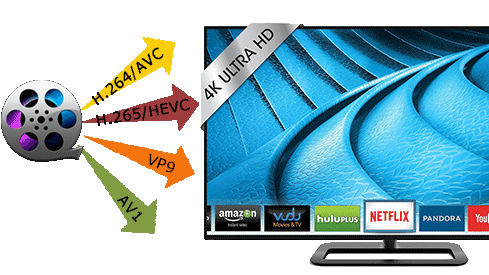
H.265, also known as HEVC, is the successor to the modern generation H.264 codec (known as AVC), which is capable of encoding / decoding 4K video. HEVC is installed in most 4K televisions and computer monitors. When encoded, H.265 consumes up to 8-10 times more processing power than H.264, making HEVC unsuitable for transmitting small to medium-sized data using the latest technologies. Video-on-demand resources such as Netflix generally encode their video content well before making it available to users. In addition, these resources can be allowed as additional computing power,

Обратите внимание, что старые форматы и кодеки (AVC / H.264) по-прежнему способны обрабатывать видео с разрешением 4K а разница заключается в том, что новые, типа HEVC, делают это более эффективно. При этом качество видео при увеличенной степени сжатия стало лучше, и это не сказалось наебитрей. HEVC, способный поддерживать разрешения до 8K (8192 × 4320) – это видео-формат будущего!

At the same time, there are no end-user costs associated with HEVC / H.265, while hardware manufacturers, providers of paid programs and streaming services must pay royalties for using HEVC technology in their products and / or services. . A good example would be modern 4K televisions or monitors, in which the H.265 codec is incorporated during production, and users get it for free with the purchase of the corresponding device.

Free video streaming services (such as YouTube) have traditionally been exempt from royalty payments, but this has not affected HEVC. This exclusion has generated a series of interesting collaborations between renowned high-tech companies in the creation of new open source video formats.

Alliance for Open Media
Dissatisfied with the licensing rules and patent royalties associated with HEVC, tech giants like Microsoft, Google, Mozilla, Cisco, Intel, Netflix, and Amazon have formed a new consortium: the Alliance for Open Media (AOM). It is a non-profit organization dedicated to the development of the next generation of video codecs, video encoding formats, and related technologies. For 2016-2017, AOM plans to introduce new technology that enables video data to be compressed more efficiently, which in turn will significantly reduce the load on the Internet connection and significantly increase the capabilities of modern web networks that transmit video to personal computers, smart phones, game consoles, streaming consoles. , televisions, etc. Also, when using the new format, no royalties will be paid. It follows that any company can create software that can convert,

Many of the group members have already contributed to the development of the next generation of 4K codecs; Cisco created Thor, Mozilla worked with Daala and Google with VP9. AMD, ARM, Intel, and Nvidia have recently joined the Alliance.

VP9 is the most popular 4K codec
The VP9 codec is open source and royalty free. It owes its popularity to its use in web applications during the gradual transition from Flash to HTML5 technology.

ABR – Average Bit Rate

ABR – Average Bit Rate

ABR

Average Bit Rate (ABR) is the average amount of data transferred per unit of time, usually measured per second, usually for digital video or music.

ABR

For example, an MP3 file with an average bit rate of 128 kbps transfers an average of 128,000 bits per second. It can have higher and lower bitrate portions, and the average bitrate for a particular time period is obtained by dividing the number of bits used during the time period by the number of seconds in the time period. Bitrate is unreliable as an independent measure of audio / video quality because more efficient compression methods use lower bit rates to encode material of similar quality. Average bitrate can also refer to a form of variable bit rate (VBR) encoding in which the encoder will try to reach the average bitrate or target file size, allowing the bitrate to vary between different parts of the audio or video. Since it is a kind of variable bit rate, it allows more complex parts of the material to use more bits and less complex areas to use fewer bits. However, the bit rate will not change as much as with variable bit rate encoding. At a given bit rate, VBR is usually higher quality than ABR, which is higher quality than CBR (constant bit rate). ABR encoding is desirable for users who want the general benefits of VBR (optimal frame-to-frame rate) encoding, but with a relatively predictable file size. Accurate ABR encoding generally requires two-pass encoding, as in the first pass, the encoder has no way of knowing which parts of the audio or video require the highest bit rate to encode.

VBR Variable bit rate

Average Bit Rate (ABR) is the average amount of data transferred per unit of time, usually measured per second, usually for digital video or music. For example, an MP3 file with an average bit rate of 128 kbps transfers an average of 128,000 bits per second. It can have higher and lower bitrate portions, and the average bitrate for a particular time period is obtained by dividing the number of bits used during the time period by the number of seconds in the time period. Bitrate is unreliable as an independent measure of audio / video quality because more efficient compression methods use lower bit rates to encode material of similar quality. Average bitrate can also refer to a form of variable bit rate (VBR) encoding in which the encoder will try to reach the average bitrate or target file size, allowing the bitrate to vary between different parts of the audio or video. Since it is a kind of variable bit rate, it allows more complex parts of the material to use more bits and less complex areas to use fewer bits. However, the bit rate will not change as much as with variable bit rate encoding. At a given bit rate, VBR is usually higher quality than ABR, which is higher quality than CBR (constant bit rate). ABR encoding is desirable for users who want the general benefits of VBR (optimal frame-to-frame rate) encoding, but with a relatively predictable file size. Accurate ABR encoding generally requires two-pass encoding, as in the first pass, the encoder has no way of knowing which parts of the audio or video require the highest bit rate to encode.

Advantages and disadvantages of VBR The advantages of VBR are that it offers a better quality / footprint ratio than a CBR file with the same data. The available bits are used more flexibly to encode audio or video data with greater precision, with fewer bits used in less demanding passages and more bits used in difficult-to-encode passages. The downsides are that encoding can take longer because the process is more complex and some hardware may not be compatible with VBR files. VBR can also create problems during transmission when the instantaneous data rate exceeds the data rate of the link. These problems can be avoided by limiting the instantaneous bit rate during encoding or (increasing latency) by increasing the playback buffer. In the past, many hardware and software players could not correctly decode VBR files, in part because the various VBR encoders in use were not well developed. This led to the common use of CBR instead of VBR for compatibility reasons.

How to achieve high-quality videos with low bandwidth

How to achieve high-quality videos with low bandwidth

Video Bandwidth

The bit rate can be reduced, in particular, due to noise reduction. Noise is quite a damaging factor causing clogging of the encoding process. It leads directly to an increase in the bit rate.

Video bandwidth

Optimize bitrate to reduce streaming

The classic noise reduction systems are of two types. Spatial noise reduction techniques are applied within the frame to help reduce noise, while temporal noise reduction averages the pixels over multiple frames. These are very effective techniques for still images, but they can cause problems when there is movement. In the event that temporary noise reduction is applied to a moving image, a ghost image may appear.

By combining spatial and temporal noise reduction with the ability to dynamically adjust them based on lighting levels and the detection of moving objects, we obtain images with low noise, maximum detail and low bit rate. The bit rate can be optimized by adjusting the amount of noise reduction based on the analysis of important moving objects in the surveillance camera’s field of view. When there is no movement, the bit rate is kept to a minimum. If an important object is detected, the bit rate increases, allowing you to capture as much detail as possible. The result is that the network bandwidth requirements remain low until something major happens in the frame.

Other ways to reduce the bit rate
For some megapixel surveillance cameras, the bit rate is limited by default. Constant bit rate is often used for this. The constant bit rate is kept at a fixed level. This can result in a consistently high bit rate, and setting a low bit rate can result in poor image quality.

In contrast, a variable bit rate preset a certain level of image quality that is maintained regardless of whether there is movement in the frame or not. The bit rate will change depending on the shooting conditions and the presence of motion.

Dynamic noise reduction, as described above, works on the same principle as variable bitrate, but with the addition of intelligent decision-making capabilities based on the presence or absence of motion. This can reduce the bit rate by 50 percent over the standard variable bit rate in non-motion scenes.

Priorization
In addition to reducing noise, prioritization can help lower bit rates. By setting priority areas, you adjust the level of compression for different parts of the image. Multiple areas can be marked on the image, each of which is assigned compression level parameters. A less important area can be configured to use a higher compression rate and therefore a lower bit rate, while important areas can be assigned a lower compression rate to display in more detail.

Take video surveillance at the entrance of a building, for example. Some parts of the image showing the sky can be considered unimportant for better compression. The area of ​​the entrance to the building can be marked as important and assigned a lower compression ratio to ensure recognition of facial features and other identifying details. Finally, the driveway can be defined as a zone with normal compression.

Reduce costs with dynamic noise cancellation
The combination of noise reduction and image area prioritization produces measurable results. The key benefit of this combination is that you get a significantly lower bit rate without losing image quality. A lower bitrate, in turn, reduces bandwidth and memory usage.

Take, for example, a shopping center with a video surveillance system with 200 surveillance cameras installed throughout the premises inside and outside the facility. Let’s say the mandatory requirement for 1080p HD video surveillance cameras is to record continuously for 12 hours a day and once the mall closes, they can only record when motion is detected. In this case, storing video recorded at a rate of 10 frames per second will require almost 70 TB, allowing you to store it for 30 days. The introduction of surveillance cameras that use dynamic noise reduction can save more than 7 TB of required storage capacity. This translates to over $ 10,000 depending on the storage devices used …. Additional savings can also be achieved by adding priorities in certain areas, which will further reduce the bitrate.

Bit rate, what is it?

Bit rate, what is it?

Bit Rate

as a feature of digital audio and video

Bit rate

Bitrate: literally, the information bit rate. It is common to use the bit rate when measuring the effective information transmission rate through the channel, that is, the “payload” transmission rate (in addition to that, the channel can transmit service information, for example, start and stop symbols for asynchronous transmission or control symbols for redundant coding). The baud rate, which takes into account the total bandwidth of the channel, is measured in baud.

Bit rate is the number of units of information required to store (transmit) one second of a stream of data (generally audio and video files). It is generally measured in ‘kbps’, kilobits per second.

The term bit rate is used in two basic meanings
: channel or device characteristic: the maximum number of bits that can be transmitted per unit of time.
– The size of the data stream transmitted in real time (the minimum size of the channel that can pass this stream without delay).
– A special case is the compressed video or audio bit rate.
Bitrate is expressed in bits per second (bit / s, bps), as well as values ​​derived with the prefixes kilo, mega, etc.

The term bit rate (in conjunction with subjective quality criteria) is often used as a characteristic to evaluate the performance of lossy compression algorithms.

Bitrate characterizes both the density of the information package and its quality. For example, out of two MP3 files compressed with different bit rates, a file with a higher bit rate will have higher sound quality (close to the original). At the same time, a file of a different format, with the same bit rate, can offer both better and worse sound quality.

On an audio CD, information is losslessly encoded at a constant 1407 kbps bit rate.

The MP3 format allows you to encode audio information with constant or variable bit rates from 32 to 320 kbps, that is, they provide five times the compression compared to CD.

Bit rate as a characteristic of digital video and audio

In streaming video and audio formats (such as MPEG and MP3) that use lossy compression, the bit rate parameter expresses the degree of compression of the stream and therefore determines the size of the channel for which it is compressed data transmission. Most of the time, the audio and video bit rate is measured in kilobits per second (kilobits per second in English – kbps), less often – in megabits per second (for video only).

There are three compression modes for data transmission:

– with a constant bit rate (constant bit rate in English – CBR)
– with a variable bit rate (variable bit rate in English – VBR)
– with an average bitrate (English Average Bitrate – ABR)

Variable and average bit rate

The codec chooses the required bit rate based on the parameters (the level of the desired quality) and, during the encoded chunk, the bit rate may change. When compressing audio, the desired bit rate is determined based on the psychoacoustic model. ABR is a variation of VBR in which the codec is compressed to a specified average value.

Choosing high-quality sound: which headphones do you need?

Choosing high-quality sound: which headphones do you need?

Headphones high quality

Choosing high-quality sound: which headphones do you need?

Best Quality Headphones

Sound quality also depends on the source (player, smartphone, tablet) and the headphones. You cannot achieve a good result by focusing on one link in the chain and forgetting about another. The absence of external noise significantly improves perception, so choose headphones with the highest degree of passive noise isolation. The best option in this case are earplugs. Much also depends on the quality of the recordings. MP3 in this situation is not the best option. A truly natural sound is only possible with uncompressed (WAV) or lossless compressed (APE, FLAC) audio files. It is important that the device you choose supports these formats.

Which player do you prefer?

Typical models, the size of a cigarette lighter and generally costing little money, can provide very good sound, by music lover’s standards without audiophile requests, if you use high-quality headphones and encode music files in formats no loss like FLAC or APE. Of course, the player must be compatible with such recordings.

One step higher are pocket media players. Their sound path is usually of better quality. Firstly, by the use of a more powerful amplifier capable of offering a fairly dynamic sound with clearly articulated bass. True, the owner receives support for video files, a calendar, and a host of other, often useless, functions on upload.

The best sound is provided by a set of a portable “audiophile” player mounted on a discrete element base and headphones of a comparable class. In terms of sound quality and power, these instruments come close to stationary home equipment. Another thing is that the “pocket” of the tandem will be very conditional, and the price can become a serious obstacle.

Specialized audio player or smartphone?
Choosing high-quality sound: which headphones do you need? rice-2
It is impossible to answer this question unequivocally, as there are quite musically sensitive smartphones for sale, as well as very mediocre players. An average modern smartphone, it is comparable in sound quality and power output with a budget discreet player on average, in rare cases, with a middle-class multi-format player. Smartphones cannot compete with specialized audio players.

An additional advantage of a separate music device is its energy independence (the player can be downloaded, but will not go offline), and the disadvantage is the risk of missing an important call.

What headphones to choose?
The most convenient option to carry and transport are in-ear headphones called “earplugs.” They also have the highest efficiency and the best passive noise isolation. The price is also nice: for an acceptable sum, you can easily get high-quality sound. It makes sense to choose a different type of headphones only when plug-in headphones don’t suit you for some reason.

The optimal electrical impedance for portable headphones is in the range of 16 to 32 ohms and the sensitivity is 105 to 110 dB / mW. Both are listed on the back of the box or on the manufacturer’s website. The higher the resistance and / or lower the sensitivity, the higher the requirements for the signal source (player, smartphone). In this case, the power of a standard device may not be enough.

Headphones with an active noise cancellation system are significantly more expensive than conventional ones (and at the same price they sound worse than analog ones without electronic filling), but they are effective only when the noise is monotonous. Such models are more suitable for air travel.

Much depends on the device you are using and under what conditions you intend to listen to music. The best and most versatile solution is in-ear headphones with silicone seals. Due to their low impedance (usually up to 24 ohms) and high sensitivity (over 110 dB), they are a fairly light load for any device, allowing you to get the required sound pressure without distortion. In addition, it is these headphones that provide the most effective passive sound isolation and are pocket-friendly.

Why is today’s audio and video called digital?

Why is today’s audio and video called digital?

digital audio

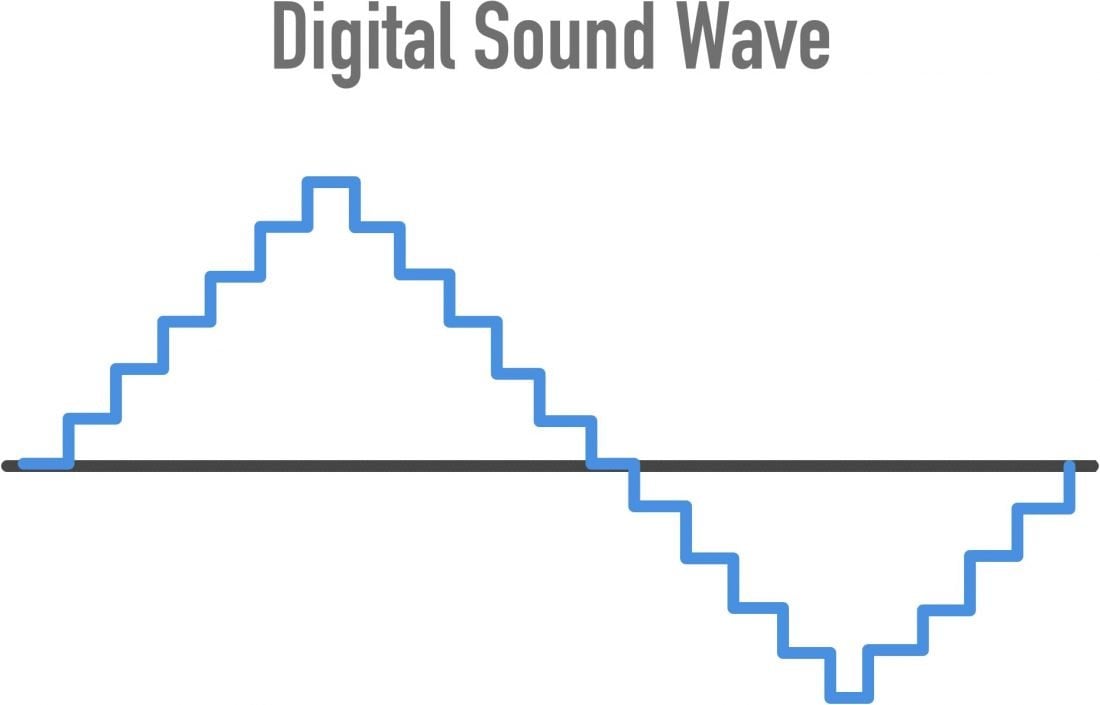
The current heyday of mobile devices, computers, and the World Wide Web is called the digital age. This is due to the rise of digital information: everything we read and write, see and hear, is translated into a form that a computer can understand. The computer, in turn, opens up a whole universe of possibilities for working with such information: it is becoming easier to copy, transfer and store melons. MTS / Media will help you understand the theory of creating a digital world.

DIGITAL AUDIO

Binary and decimal number systems

Before understanding how an image obtained by the lens of a smartphone, or a book, or is converted into a file on a computer, you must understand at least a first approximation of how this same computer works.

At the most basic level, the computer, despite the buzz attributed to intelligence, operates with absolutely primitive categories: yes, no, no, no. In the jungle of microcircuits, this dualism is expressed in the presence or absence of an electrical signal. Everything that a computer has to digest must first be “chewed”, decomposed into simple elements, reduced to a set of two opposing concepts.

“No” in computer language replaces the number 0, “yes” – 1. That is why computer information is called digital. Everything your computer or smartphone stores, all the complex algorithms built into the most complex programs, and a masterpiece frame from the last party, and your favorite song, and an unfinished letter to your boss with the title “let’s go. … “, this is all just a long string of zeros and ones.

The base number in our daily life is 10; We use numbers from 0 to 9, that is, the decimal number system is familiar to us. In the world of computers, the base number is 2 (just two digits, 0 and 1), and the number system is called binary or binary. In the decimal system, to go from single-digit numbers to two-digit numbers, you must first count to nine, to go to three-digit numbers, up to 99. The principle of digit formation in systems is the same: appears a new digit in a number after all available digits in the current one have been used up.

Now we understand how any number can be converted to a digital form, understandable to a computer. Also, we can see what it is, the minimum information is 1 or 0. This minimum piece is called a bit. To write the number 2 in the binary system, you need 2 bits of information (10), to write the number 4 – 3 bits (100), for 15 – 4 bits (1111).

Letters in numbers

In fact, most of the time we are not dealing with bits of information, but with bytes. A byte has 8 bits. If you see that we are talking about the amount of information, say 10 MB, then the letter “B” is exactly one byte, not one bit. In cases where bits are indicated, the word “bit” is written in its entirety.

A byte is an analog of a word in machine language. At the dawn of the computer age, 8 bits of information corresponded to a memory cell of machines, the 8 bits were transmitted together as a whole. Then the “words” from the machine started to get longer, but they were still multiples of eight times the number of bits.

Why exactly 8? It happened like that. 8 bits were needed to represent 1 character of text in one of the earliest computer encodings. An encoding is a table of correspondence between text characters and binary numbers. If you try to type all variants of eight-digit numbers consisting of zeros and ones, from 00000000 to 11111111, there will be 256 such variants, that is, how many characters are in many existing encodings, and they are all called 8-bit.

A coding table is a kind of instruction for a computer with which it translates the letters of a text into binary numbers and vice versa. However, not all characters from all languages ​​fit in one encoding, and each language needs its own instructions. For this reason, national encodings have become widespread in the world. So, in the Cyrillic encodings (KOI-8, Windows-1251, MacCyrillic) there are large and small letters of the Russian and Latin alphabets, numbers, punctuation marks and auxiliary symbols. If support for Cyrillic encoding is not installed on a computer somewhere in China, you will not be able to type Russian characters and the operating system will not be able to display them.

Later, along with 8-bit encodings, 16-bit encodings became widespread, in which almost every imaginable character of every language can be found. However, each letter in this encoding already has two bytes.

So 1 letter is 1 or 2 bytes.