Digital sound


Free Download Mp4Gain
picture

Digital sound

Digital Sound

Unlike the analog signal, the digital signal does not simulate acoustic sound.


Digital Sound

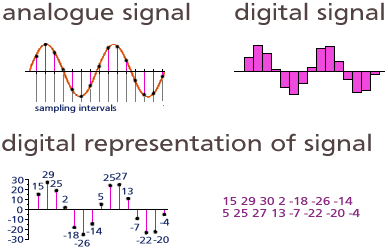
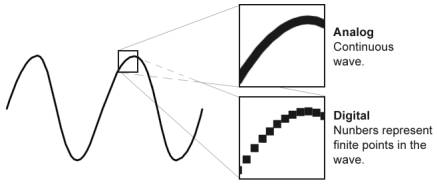
Digital sound assigns digital values ​​to individual points in time that reflect the height of the amplitude at a given point. The second difference between digital and analog audio is that digital audio is discrete.

As you know, digital information is stored in bytes, each of which consists of 8 bits. A bit is the smallest unit of digital information that can take only two values: zero or one.

So how do you convert a continuous analog signal into a sequence of zeros and ones, and even link this information correctly to the timeline? Converting audio to digital format is divided into two operations: sampling and quantizing. Sampling – sampling and quantization time – amplitude. It is these operations that your audio interface performs.

Any audio interface has an ADC (analog-to-digital converter) and a DAC (digital-to-analog converter). Let’s consider how audio recording works when used to record a microphone and a computer with an audio interface attached.

When you speak, your voice creates fluctuations in air pressure, which the microphone picks up and translates into an alternating voltage electrical signal. The received electrical signal is very weak, so it is amplified and then sent to the audio interface for digital conversion. Based on its internal clock, the ADC divides time into many different points. Time sampling occurs according to the set frequency, which indicates how many dots will be divided by 1 second of sound. At each received time point, the ADC measures the voltage of the input signal and assigns the corresponding digit to the amplitude value. The data obtained as a result of this conversion can be saved on a computer.

Digital sound

When you start playing the audio file, the reverse process will start. The digital information will be sent from the computer to your audio interface. Your DAC will provide a reverse conversion of the received information into a continuous electrical signal with alternating voltage. The signal will then be amplified and reproduced through your speaker system.

So what is the sample rate to get digital sound that can then be converted back to analog? According to Kotelnikov’s theorem, each band-limited signal can be sampled and then recovered in digital form, as long as the sample rate is at least twice the highest frequency of the original signal.

This means that our signal must have a maximum frequency that will never be exceeded. When we set the highest frequency, all that remains is to multiply it by two and get the desired sample rate. Also, according to the theorem, all frequencies above half the sample rate must be removed from the input signal.

Since a person hears sounds from 20 Hz to 20 kHz, a sample rate of 40 kHz should be adequate to encode any sound audible to a person. With a small margin for the filter, which is calculated before converting to digital format, in the CD audio standard, sounds above 22,050 Hz are cut off and the sample rate is 44,100 Hz.

Now let’s see exactly what numbers the ADC assigns to the amplitude values ​​when converting an analog signal.

The computer can assign a finite number of values ​​to the amplitude. As mentioned above, any information in a computer is a sequence of bits, each of which takes on values ​​of zero or one.

A numeric expression of n bits assumes 2 n different variants of values, that is, 2 n different variants of sequences of zeros and ones. The table shows the sequence options for n = 2,3,4.


Free Download Mp4Gain
picture


Mp4Gain Main Window
picture


Mp4Gain Features
picture


Free Download Mp4Gain
picture

The quality of digital sound reproduction.

The quality of digital sound reproduction.

Digital Sound Quality

Audio coding. Before converting music to another format, you must “unzip” it to WAV.

SOUND QUALITY

Sound information. Sound is a wave that travels through air, water, or other medium with a continuously changing intensity and frequency.

A person perceives sound waves (air vibrations) with the help of hearing in the form of sound of varying volume and pitch. The greater the intensity of the sound wave, the louder the sound, the higher the frequency of the wave, the higher the pitch of the sound (Fig. 1.1).

Dependence of the volume and pitch of the sound on the intensity and frequency of the sound wave.

The human ear perceives sound at a frequency of 20 vibrations per second (low sound) to 20,000 vibrations per second (high sound).

A person can perceive sound in a wide range of intensities, in which the maximum intensity is 1014 times greater than the minimum (one hundred thousand billion times). To measure the volume of sound, a special unit “decibel” (dbl) is used (Table 5.1). Decreasing or increasing the sound volume by 10 dB corresponds to a decrease or increase in sound intensity by 10 times.

The sound volume the volume of the
sound in decibels
lower limit of human ear sensitivity 0
leaf whisper 10
Conversation 60
Gudok Vehicle 90
Jet engine 120
Pain threshold 140

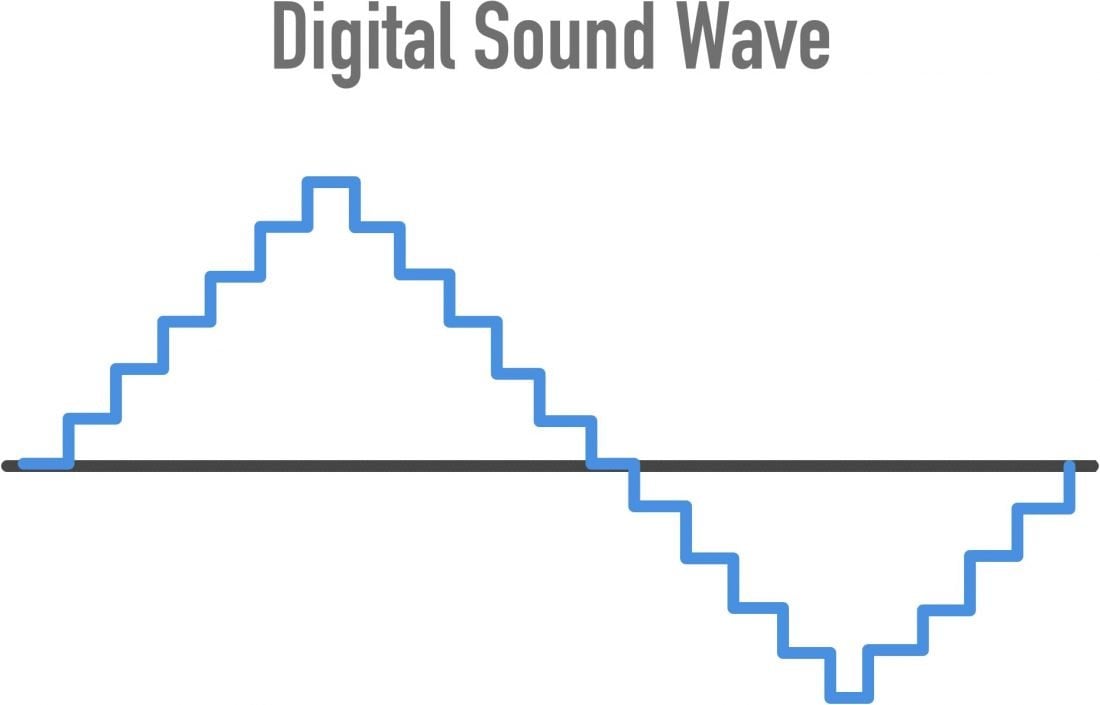
Provisional discretization sound. In order for a computer to process sound, a continuous audio signal must be converted to a discrete digital form using time sampling. A continuous sound wave is divided into separate small time sections, for each section a certain value of sound intensity is set.

Therefore, the continuous dependence of the loudness of the sound at time A (t) is replaced by a discrete sequence of loudness levels. On the graph, this appears to replace a smooth curve with a sequence of “steps” (Fig. 1.2).

Sync Audio Sampling

Sampling frequency. A microphone connected to the sound card is used to record analog sound and convert it to digital format. The quality of the digital sound obtained depends on the number of measurements of the sound volume level per unit of time, that is, the sampling frequency. The more measurements that are made in 1 second (the higher the sampling frequency), the more accurately the “ladder” of the digital audio signal repeats the curve of the dialogue signal.

The audio sample rate is the number of sound volume measurements in one second.

The audio sample rate can vary between 8000 and 48000 sound volume measurements per second.

Audio encoding depth. Each “step” is assigned a specific value for the sound volume level. Loudness levels of sound can be viewed as a set of possible states N, for which a certain amount of information I is required, which is called audio coding depth.

Audio encoding depth is the amount of information required to encode the discrete volume levels of digital audio.

If the encoding depth is known, then the number of digital audio loudness levels can be calculated using the formula N = 2I. Let the audio encoding depth be 16 bit, then the number of sound volume levels is:

N = 2I = 216 = 65536.

During the encoding process, each sound volume level is assigned its own 16-bit binary code, the lowest sound level will correspond to the code 0000000000000000 and the highest – 1111111111111111.

How is sound represented digitally?

How is sound represented digitally?

Digital Representation of Sound

The original shape of an audio signal (a continuous change in amplitude over time) is represented digitally by “cross-sampling”, in time and level.

Representing Sound Digitally

According to Kotelnikov’s theorem, any continuous process with a limited spectrum can be completely described by a discrete sequence of its instantaneous values, following with a frequency at least twice the frequency of the highest harmonic of the process; the sampling frequency Fd of instantaneous values ​​(samples) is called the sampling frequency.

It follows from the theorem that a signal with a frequency Fa can be successfully sampled in time at a frequency 2Fa only if it is a pure sinusoid, because any deviation from the sinusoidal shape leads the spectrum to go beyond the frequency Fa. Therefore, for temporal sampling of an arbitrary audio signal (which normally has, as is known, a spectrum that falls smoothly), it is necessary to select a sampling frequency with a margin or to forcefully limit the spectrum of the input signal below half the sample rate.

Simultaneously with time sampling, amplitude sampling is performed: measurement of instantaneous amplitude values ​​and their representation in the form of numerical values ​​with some precision. The precision of the measurement (binary width N of the obtained discrete value) determines the signal-to-noise ratio and the dynamic range of the signal (theoretically these are reciprocal values, but any real path also has its own level of noise and interference).

The resulting stream of numbers (a series of binary digits) that describe an audio signal is called Pulse Code Modulation (PCM), since each pulse of a time-sampled signal is represented by its own digital code.

Linear quantization is most often used when the numerical value of the sample is proportional to the amplitude of the signal. Due to the logarithmic nature of hearing, logarithmic quantization, when the numerical value is proportional to the magnitude of the signal in decibels, would be more appropriate, but this is fraught with difficulties of a purely technical nature.

Time sampling and amplitude quantization of the signal inevitably introduce noise distortions in the signal, the level of which is generally estimated using the formula 6N + 10lg (Fdiscr / 2Fmax) + C (dB), where the constant C varies for different types of signals: for a pure sinusoid it is 1.7 dB, for sound signals – from -15 to 2 dB. Thus, it can be seen that a decrease in noise in the operating frequency band 0..Fmax leads not only to an increase in the bit depth of the sample, but also to an increase in the sample rate relative to 2Fmax, as the quantization noise is “smeared” across the band up to the sample rate, and the audio information occupies only the smallest part of this strip.

Most modern digital audio systems use the standard 44.1 and 48 kHz sample rates, but the frequency range of the signal is usually limited to about 20 kHz to keep it clear of the theoretical limit. Also the most common is 16-bit level quantization, which provides a limit signal-to-noise ratio of approximately 98 dB. The studio equipment uses higher resolutions: 18, 20, and 24-bit quantization at 56, 96, and 192 kHz sample rates. This is done to preserve the higher harmonics of the sound signal, which are not directly perceived by the ear, but affect the formation of the overall sound image.

To digitize lower-quality, narrow-band signals, you can lower the sample rate and bit depth; for example, telephone lines use 7 or 8 bit digitization with frequencies 8..12 kHz.

The representation of an analog signal in digital form is also called Pulse Code Modulation (PCM), since the signal is represented as a series of pulses of constant frequency (time sampling), the amplitude of which is transmitted digitally (amplitude sampling ). A PCM stream can be parallel, when all the bits in each sample are transmitted simultaneously over several lines with one sampling frequency, or sequential, when the bits are transmitted one after another at a higher frequency on a line.

Digital sound itself and related elements are often denoted by the general term Digital Audio; The analog and digital portions of a sound system are called the Analog Domain and Digital Domain.

Introduction to digital sound

Introduction to digital sound

digital sound

The computer operates on digital data. Therefore, for translation to a computer, an analog audio signal must be converted to digital.

Digital Sound

For playback, on the contrary, the digital signal must be converted to analog. For this, special devices are used: an analog-to-digital converter (ADC) and a digital-to-analog converter (DAC). Both devices are built into your computer’s sound card.
Recording scheme: sound reproduction

Recording and digitization
Tape recording is an example of analog recording. The computer operates on digital data. Digital recordings have many advantages over analog ones:

Digital files can be copied as many times as desired without loss of quality.
The digital files can be burned to a CD and posted on the website.
Digital recordings are easier to edit.
To convert an analog signal to digital, a special device is required: an analog-to-digital converter (ADC). The ADC converts an analog signal into a sequence of digital values ​​that are sent to a computer. The method used to convert the analog signal to a digital technique called pulse coding (PCM pulse code modulation). The essence of this method is that the amplitude of the analog signal is sampled at regular intervals:

Digitized sound

To convert a lossless signal, it is necessary to sample 2xPi times more often than the highest frequency in the signal spectrum:

It’s easy to guess that two parameters determine the quality of a digital recording:

Sampling frequency: the speed at which samples are taken. Measured in Hertz (Hz). 1 Hz = 1 / P.
Audio CDs, for example, use a sample rate of 44,100 Hz.

Resolution (sample format or sample size): the precision of the representation of each sample, that is, what number describes each sample. Audio CD is represented by 16 bits.

Bitrate

The human ear recognizes sounds in the 15 Hz to 20 KHZ frequency range. Therefore, the ideal sample rate is 128 kpc. This frequency is used in DVD format. Recently, the frequency of 192 kHz with sampling of 24 and 32 bits is becoming common. This resolution allows you to transmit completely realistic sound, but requires high-quality acoustics.

For the audio format, the selected frequency is 44,100Hz with 16-bit sampling (see “What is sound”); this corresponds to the ability to reproduce most speaker systems.

The digitization of the analog signal is done using the pulse modulation method (PCM stands for Pulse Code Modulation).

Reproduction
For playback, a digital signal must be converted to analog, amplified, and routed to a sound-reproducing device – speakers or headphones.

To convert a digital signal to analog, one device is used: a digital-to-analog converter (ADC).

Typically ADC and DAC are built into a computer sound card

How to digitize sound quality

How to digitize sound quality

digital sound

Many books and articles have been written on how to use a sound card, including on our website.

DIGITAL SOUND

However, this time we will not talk about what every regular reader of the Multimedia section already knows, but about what is called the practice of digital sound recording. Surely any owner of a multimedia computer sooner or later starts this exciting activity. Actually, for this (and not only) you buy a computer. However, this process is not that simple and requires some skill to achieve the highest quality. The purpose of this article is to give the readers of the site (and the owners of SB Live! Among them in particular) some useful recommendations in this area, which for one reason or another are not adequately covered by the press or the Web. .

To begin with, at one point I was faced with the question of converting my music library on cassettes to MP3 files, and I had to spend more than one night for the process of transferring audio information to a computer to be the highest quality. and as versatile as possible for most audio recordings. I will say right away that despite my solid experience in recording (both analog and digital), this, at first glance, an innocent occupation required a lot of mobilization of my forces and knowledge.

However, the user of a decent sound card is by no means obliged (as I am) to have a higher education in radio engineering and yet has the right to demand a decent quality of the received recording. I consider it my duty to provide the iXBT audience with that minimum of information which, I hope, will avoid many of the problems associated with digitizing audio (such as interference, interference, etc.). I think some of the information in this material will be useful for advanced users. In order not to go beyond the limits of decency, I will also say that everything that is written below is the result of generalizing the experience of many people, but of course it does not claim to be the ultimate truth. Reasonable reviews from readers are always good! (You can also write your comments on our conference articles About Site Materials.)

General remarks
Most of the time, multimedia users have to digitize the following sources:

Vinyl records . The main thing here is a good turntable and a preamplifier-corrector (the one that is built into expensive amplifiers). Of home turntables, I recommend Phoenix EP 009S (diamond ellipse head, auto arm). And then, we record the record on a computer, clean it from clicks (Click Elimination), filter the infrasound below 16 Hz (to eliminate noise), and cut the recording into songs. It is better not to eliminate the noise, since the noise of 65-70 dB at the output of the player (or the equalizer) is not that great. For example, 65-70 dB is the analog output of most CD-ROMs and nothing. But with the background (an unpleasant low-frequency tone of 50, 100, 150, etc.) it is better to find out before digitizing: the earth is hanging somewhere or the poles inside the player are confused.

Microphone I mean a good mic and mic amp. And about that, and about another, you can find a lot of information in print media, and also on the Web. I will give advice on only one thing.

The point is, in the practice of the study, there is a very clever principle for patch cords. Everyone already knows the twisted pair of signal lines, but here is how to solder the cables at the ends of the cables, only the dedicated ones, and even then not all.

The following image shows how to properly make a cable that will not contribute to the recording quality if it consists of quality cables. A copper braid is used as a screen (copper is desirable everywhere!). The signal wires inside the shield are a twisted pair of copper twisted wires. It is better to buy such a cable from a store that sells professional microphones, guitars, etc. (the cable will cost less than the interference). It is worth noting that only with a microphone it is necessary to be so scrupulous with the cable, otherwise you will switch microphone amplifiers and microphones to the Greek calendars.

How digital sound works. (Part 1)

How digital sound works. (Part 1)

digital sound

In this post, I’d like to talk about digital sound and, along the way, expose such a popular form of freestyle as audiophilia.

Digital Sound

Unfortunately, lately I see more and more manifestations of this phenomenon, penetrating the minds of even quite reasonable people and causing them to spend money on technological analogues of homeopathic pills. I say “sadly” because everything that I will write in this article should, in principle, be known to all the people who graduated from school. But for some reason that I do not understand, they forget or do not want to apply in practice the knowledge they once acquired. The belief in audiophilia at this point has even penetrated and spread widely among engineers, although that’s really who, and they should understand these things thoroughly.

I originally wanted to write this article in a more aggressive style. But in the end I decided that it would be better for me to do without curses and provocations. On the contrary, I really hope that audiophiles read this article and reflect on what they believe and if they have enough reason to believe. Therefore, I will do so without provocation and will focus solely and exclusively on the facts.

And the most important thing I want to say right now: the audiophile arguments are not arguments related to any technical or engineering aspect. Audifilov’s arguments contradict science, specifically physics and mathematics. They also contradict technical and engineering aspects and audiophiles don’t know how their audio systems work, but this is a small problem compared to how they contradict physical or mathematical laws, showing a complete ignorance of the basics. It is the scientific aspects that I will focus on instead of explaining what the different types of CAD are and other details that are not of fundamental importance.

1. Basics: how sound is reproduced on a computer and any other electronic device

To begin with, an audio file is on a digital medium, such as a hard drive. This audio file has a certain internal format, but they are all a set of zeros and ones (0110010101 …), that is, any file can be represented as a very large number. This number can be easily converted to the usual decimal number system (189208 …).

The direct consequence of this is that the copies of the same file are all exactly the same. It doesn’t matter what medium they are in or how they were transferred or created: if the copies are correct, then they are exactly the same. The difference in playing the same file can only be caused by some other element in this play chain.

And this string is like this:

File -> audio player program -> digital to analog converter (DAC) -> amplifier -> speakers or headphones.

It works like this:

First, the player program loads (or receives from outside) an audio file into memory.

The software then decodes it, if necessary, into an uncompressed digital stream, which is digital audio. We will simply call this uncompressed digital audio .WAV and assume that this is the format in which music is delivered on conventional audio discs (two-channel stereo, 16-bit, 44.1 kilohertz per channel).

After that, this sound enters a digital to analog converter, which takes each number and converts it to an analog value that corresponds to it, most of the time it is a voltage measured in volts (from a certain minimum value that corresponds to a digital number 0 and up to a maximum value that corresponds to the number 65,536 – this is the maximum number that can be written in 16 bits).

After that, the sound, already in the form of electric current, enters the amplifier, the task of which is to raise the voltage to a value that suits the speakers. The amplifier must amplify the signal linearly, that is, each value that reaches it at the input must increase in the same proportion at the output.

In the speakers, the electric current is converted into physical vibrations, which are transmitted to the air and thus the sound we hear is obtained.

This chain, which from now on we will call the audio path, is present in one form or another in any digital audio system. The elements themselves may look very different on different systems (MP3 players, smartphones, computers, etc.), but they are necessarily present. When it comes to a computer, the DAC and amplifier are on the sound card (which is often built into the motherboard). Speakers often have their own built-in amplifier, and some of them may have their own DAC (and connecting to them bypasses the sound card).