Formats: what is digital sound Part 3


Free Download Mp4Gain
picture

Formats: what is digital sound Part 3

digital sound

JointStereo, which is one of the features of MP3, means that instead of encoding stereo as two independent channels, it encodes calls. center channel and the difference from the original stereo channels.

DIGITAL SOUND

Many audio components on stereo channels are the same, and encoding them on the common channel allows you to free up additional bandwidth for more detailed encoding of the difference, leading to improved quality.

Be sure to mention the variable bit rate or VBR. This means that the encoder changes the compression ratio on the fly, depending on the nature of the sound. This approach results in a smaller total file size or, if quality requirements increase, the same file size may produce better sound.

MP3 Pro

Introduced in 2001, the MP3 Pro codec was developed by Coding Technologies in association with Thomson Multimedia. It is MP3-based and as a result turned out to be fully MP3 backward compatible and only partially forward compatible. It uses SBR (Spectral Band Replication) technology, so the codec provides good quality at low bit rates. However, the encoding quality at medium to high bit rates is inferior to almost all other codecs. As a result, MP3 Pro is used more for streaming on the Internet and demonstrating snippets of new musical compositions.

WMA

The WMA codec, or Microsoft Windows Media Audio, is a serious alternative to MP3. Files in this format have the extensions .WMA and .ASF, have a clear advantage over MP3 at low data rates (bitrates) and lose it when the data feed rate to the codec is increased.

Based on WMA, the WMA DRM standard has been developed to provide copy protection so appreciated by record companies. Files based on this format can be recorded on playback devices such as MP3 flash players, but cannot be copied from there.

ATTRAC

ATRAC (Adaptive TRansform Acoustic Coding) is based on a stereo audio format with 16-bit quantization and a sample rate of 44.1 kHz. When compressed, each frame is divided into 52 frequency bands, resulting in a transmission rate of 292 kbps (1: 5 compression). Used in MiniDisk system.

Ogg Vorbis

The Ogg Vorbis format is a relatively new universal lossy audio recording format. It belongs to the same type of audio compression formats as MP3 and WMA, and the psychoacoustic model that describes the characteristics of the human ear, according to which compression is performed, is similar in principle to MP3. The radical difference of this format was the mathematical processing and the practical implementation of this model. In this format, the maximum threshold sample rate is not 44 kHz as in MP3, but 48, which theoretically improves the sound quality. It should also be noted that the theoretical number of channels is not limited to two, as usual, but reaches 255. Files encoded in this format are smaller than the same MP3 files. The spread of the format was slowed by insufficient support from hardware manufacturers.


Free Download Mp4Gain
picture


Mp4Gain Main Window
picture


Mp4Gain Features
picture


Free Download Mp4Gain
picture

Formats: what is digital sound Part 2

Formats: what is digital sound Part 2

Digital Sound

Historically, digital sound was undoubtedly the initiative of company engineers who adopted Philips-developed Audio-CDs, also called CDDA – Compact Disk Digital Audio.

DIGITAL SOUND

As a result, digital audio media led to a massive transition in recording studios to digital DAT tape recorders and digital editing equipment with S / PDIF and other interfaces. And then digital sound began to penetrate deeper into our lives from CD players, and as it was transmitted via S / PDIF, it became digital switches, equalizers, and noise reduction systems. Today this series ends with Dolby Digital surround sound processors.

Who needs it

CDDA’s sound quality is satisfactory for most end users, ie listeners, but the amount of data required to present sound in this way is critical. As a result, several compressed digital audio formats appear, one of which is the old MS ADPCM, and among which are quite acceptable Sony ATRAC, PASC or Fraunhoffer MP3. Each of the encoding methods has an important characteristic – the bit rate, with which the compressed information enters the decoder when the audio signal is restored.

For example, when you talk on a cell phone, the sound of your voices is digitally converted and compressed, degrading its performance. Various algorithms compress speech hundreds of times, preserving the basic characteristics.

Let’s move on to specific audio file formats and audio compression formats. The most common format today is, of course, MP3. However, historically, to understand the evolution of sound formats, it is necessary to start with a different type of file, with the extension .WAV.

Variety of formats

Wav

It is the primary format for many, many digital audio playback systems and is used as a standard audio file format on personal computers. In addition, it has a strong set of specifications, which has grown considerably lately. Its full name is Microsoft RIFF / WAVE – Resource Interchange File Format / Wave – Resource Interchange File Format / Waveform, and it was created by Microsoft and Intel engineers. In turn, WAV is short for Waveform Audio File Format.

Apple AIFF

This type of file is standard for Apple Macintosh systems and sound processing systems based on it. Apple AIFF stands for Audio Interchange File Format: an audio interchange file format, it is somewhat similar to WAV. Its peculiarity is that it allows additional information to be placed next to the sound wave, in particular WaveTable samples (examples of the instrument sound together with synthesizer parameters), which improves the quality of the final result. Although today Apple computers are capable of playing files in almost any format, including MP3.

RAW

Yes, this is not just the image format in which some digital cameras take pictures. In fact, RAW is the call. “Pure Digitization”, which does not contain a title and only contains a sequence of samples of a sound wave. Typically, the scan is stored in 16-bit format.

MP3

The most popular compression format today is MP3. The MP3 (MPEG Layer 3) format was developed, after several intermediate formats, by the Fraunhofer Institute in Germany. Actually, the .MP3 format is based on fooling the human ear. After some research, it turned out that human hearing tends to adapt to the appearance of new sounds, which is expressed in an increase in the hearing threshold. Therefore, some sounds are capable of masking (that is, making them subjectively inaudible) others. So in this format, some of the sounds that, according to the corresponding theory, are made inaudible, are simply removed from the general sound. The resulting “semi-finished product” is then encoded using the Hoffman method. Be sure to note that in MP3 format, programs that compress the sound of the original are not standardized, that is, each competent programmer can implement their own compression scheme. And only decoders meet the standards, which leads to the fact that the quality of MP3 playback does not always depend on the player that plays this file. Due to the different skills and predilections of implementers of various encoders, some of them are better at handling symphonic music, some with rock and metal, some with rap and rave, etc.

Formats: what is digital sound

Formats: what is digital sound

Digital Sound

Sound plays an increasingly important role in the modern world, having long since separated itself from the close link with the image that emerged during the heyday of television and cinema.

digital sound

Modern multimedia equipment has the widest possibilities not only for playback, but even for changing the sound. It is no longer a dead record, a static reproduction of events from the past, firmly imprinted on its medium. The most important role in transforming our ideas about sound was played by the development of a digital method of recording sound, turning it into a data stream that can be easily and naturally operated with modern devices.

The basics of “numbers”

Each of the multimedia devices on sale today, be it a CD player, a voice recorder or a flash memory player, uses many different types of presentation of data streams, which are then converted into sound. And even more sound formats used for professional purposes have been invented. An inexperienced buyer is forced to gather information about designations on boxes and devices from a variety of sources, often receiving incorrect information or even more confusion.

Almost all devices in the “Portable Audio” section of the ZOOM.CNews.ru catalog support multiple sound formats at the same time, and many devices that do not belong in this category are also tagged with support for playing sound files. To help our reader, we decided to create a short glossary of abbreviations and talk about the most common formats. We plan to leave it open for updates and modifications, adding new formats and describing in more detail the advantages and disadvantages of the already common or forgotten ones.

A little theory

To begin with, remember that digital sound is nothing more than a collection of numbers. The determining factor is the system by which sound as air pressure is converted into data streams and encoded for further processing and reproduction. Consequently, digital sound is usually included in computer files with various extensions, which more often (but not always) can determine their format. And the same concept of format can have, paradoxically, two meanings. First, the format may exist as a general characteristic that includes both the type and the physical characteristics of the medium (disk or cassette), the method of recording, the principles of encoding, and protection against errors. Second, the format can only be understood as the method of audio encoding and compression, as standard means are used for transfer, for example,

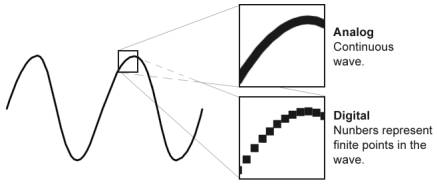
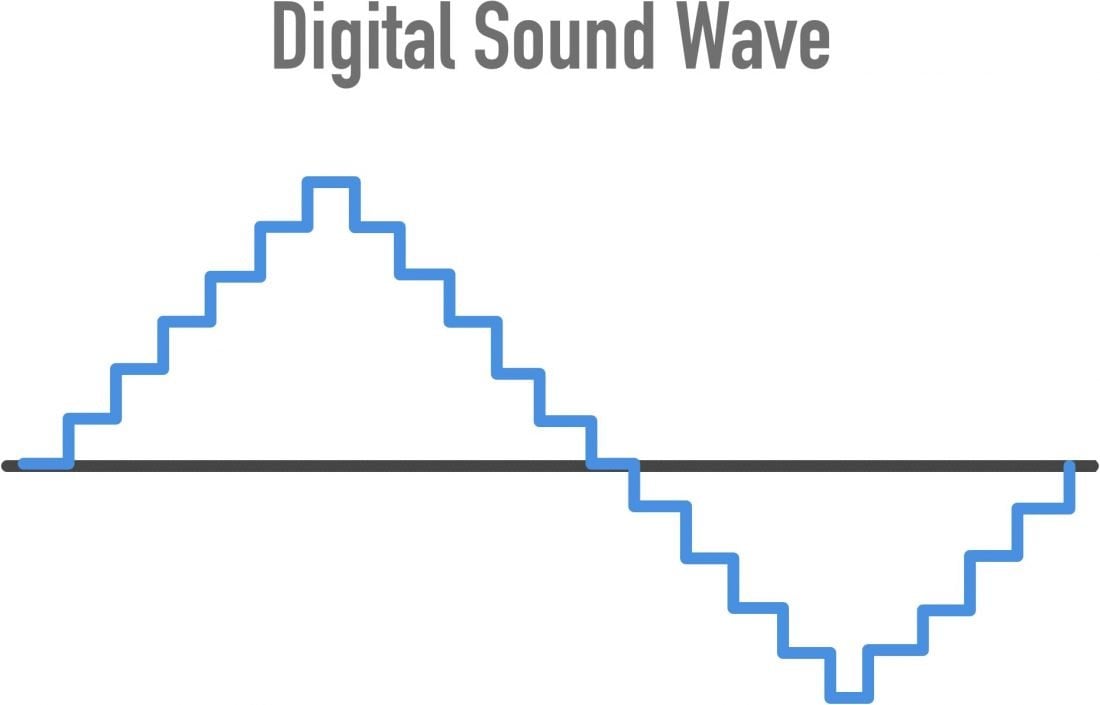
Analog sound, unlike digital, is reproduced on analog devices and has a number of significant differences. While not a data stream, analog audio is represented as a continuous electrical signal that represents a change in the sound wave. To translate it into digital format, the sound is “digitized”, that is, it is divided into certain segments, in which the numerical value of the amplitude is fixed at that moment. We will not delve into the principles of digital sound creation, but it is absolutely necessary to note that the more often a sound segment is divided and its characteristics described, the clearer and more complete the sound image itself is created.

This process generates a large amount of data that describes the sound, and it is clear that each digital audio format is nothing more than a compromise between the need to present the sound as loudly as possible and the memory limitations of a computer or device. Of reproduction.

A little more theory. In most cases, the human ear perceives sound with a frequency no higher than 22,000 Hz and, to describe it fully in digital form, a sampling frequency of at least 44.1 kHz is required. Since it is absolutely impossible to determine the value of the signal at any given moment, during digitization quantization occurs, that is, the replacement of the actual values ​​of the signal by approximate values. The more levels of audio quantization, the more accurately the signal level is described. As a result, each standard CD carries an audio signal with a sampling frequency of the same 44.1 kHz and a 16-bit quantization level, and in some devices, sampling is done at 48 kHz.

The benefits of digital audio

And now, briefly on why this algorithm was developed. Digital sound has enormous advantages over analog, although we must not forget its certain disadvantages. The main value of digital sound is the possibility of infinitely long storage and playback

Introduction to digital sound

Introduction to digital sound

digital sound

The computer operates on digital data. Therefore, for translation to a computer, an analog audio signal must be converted to digital.

Digital Sound

For playback, on the contrary, the digital signal must be converted to analog. For this, special devices are used: an analog-to-digital converter (ADC) and a digital-to-analog converter (DAC). Both devices are built into your computer’s sound card.
Recording scheme: sound reproduction

Recording and digitization
Tape recording is an example of analog recording. The computer operates on digital data. Digital recordings have many advantages over analog ones:

Digital files can be copied as many times as desired without loss of quality.
The digital files can be burned to a CD and posted on the website.
Digital recordings are easier to edit.
To convert an analog signal to digital, a special device is required: an analog-to-digital converter (ADC). The ADC converts an analog signal into a sequence of digital values ​​that are sent to a computer. The method used to convert the analog signal to a digital technique called pulse coding (PCM pulse code modulation). The essence of this method is that the amplitude of the analog signal is sampled at regular intervals:

Digitized sound

To convert a lossless signal, it is necessary to sample 2xPi times more often than the highest frequency in the signal spectrum:

It’s easy to guess that two parameters determine the quality of a digital recording:

Sampling frequency: the speed at which samples are taken. Measured in Hertz (Hz). 1 Hz = 1 / P.
Audio CDs, for example, use a sample rate of 44,100 Hz.

Resolution (sample format or sample size): the precision of the representation of each sample, that is, what number describes each sample. Audio CD is represented by 16 bits.

Bitrate

The human ear recognizes sounds in the 15 Hz to 20 KHZ frequency range. Therefore, the ideal sample rate is 128 kpc. This frequency is used in DVD format. Recently, the frequency of 192 kHz with sampling of 24 and 32 bits is becoming common. This resolution allows you to transmit completely realistic sound, but requires high-quality acoustics.

For the audio format, the selected frequency is 44,100Hz with 16-bit sampling (see “What is sound”); this corresponds to the ability to reproduce most speaker systems.

The digitization of the analog signal is done using the pulse modulation method (PCM stands for Pulse Code Modulation).

Reproduction
For playback, a digital signal must be converted to analog, amplified, and routed to a sound-reproducing device – speakers or headphones.

To convert a digital signal to analog, one device is used: a digital-to-analog converter (ADC).

Typically ADC and DAC are built into a computer sound card

How to digitize sound quality

How to digitize sound quality

digital sound

Many books and articles have been written on how to use a sound card, including on our website.

DIGITAL SOUND

However, this time we will not talk about what every regular reader of the Multimedia section already knows, but about what is called the practice of digital sound recording. Surely any owner of a multimedia computer sooner or later starts this exciting activity. Actually, for this (and not only) you buy a computer. However, this process is not that simple and requires some skill to achieve the highest quality. The purpose of this article is to give the readers of the site (and the owners of SB Live! Among them in particular) some useful recommendations in this area, which for one reason or another are not adequately covered by the press or the Web. .

To begin with, at one point I was faced with the question of converting my music library on cassettes to MP3 files, and I had to spend more than one night for the process of transferring audio information to a computer to be the highest quality. and as versatile as possible for most audio recordings. I will say right away that despite my solid experience in recording (both analog and digital), this, at first glance, an innocent occupation required a lot of mobilization of my forces and knowledge.

However, the user of a decent sound card is by no means obliged (as I am) to have a higher education in radio engineering and yet has the right to demand a decent quality of the received recording. I consider it my duty to provide the iXBT audience with that minimum of information which, I hope, will avoid many of the problems associated with digitizing audio (such as interference, interference, etc.). I think some of the information in this material will be useful for advanced users. In order not to go beyond the limits of decency, I will also say that everything that is written below is the result of generalizing the experience of many people, but of course it does not claim to be the ultimate truth. Reasonable reviews from readers are always good! (You can also write your comments on our conference articles About Site Materials.)

General remarks
Most of the time, multimedia users have to digitize the following sources:

Vinyl records . The main thing here is a good turntable and a preamplifier-corrector (the one that is built into expensive amplifiers). Of home turntables, I recommend Phoenix EP 009S (diamond ellipse head, auto arm). And then, we record the record on a computer, clean it from clicks (Click Elimination), filter the infrasound below 16 Hz (to eliminate noise), and cut the recording into songs. It is better not to eliminate the noise, since the noise of 65-70 dB at the output of the player (or the equalizer) is not that great. For example, 65-70 dB is the analog output of most CD-ROMs and nothing. But with the background (an unpleasant low-frequency tone of 50, 100, 150, etc.) it is better to find out before digitizing: the earth is hanging somewhere or the poles inside the player are confused.

Microphone I mean a good mic and mic amp. And about that, and about another, you can find a lot of information in print media, and also on the Web. I will give advice on only one thing.

The point is, in the practice of the study, there is a very clever principle for patch cords. Everyone already knows the twisted pair of signal lines, but here is how to solder the cables at the ends of the cables, only the dedicated ones, and even then not all.

The following image shows how to properly make a cable that will not contribute to the recording quality if it consists of quality cables. A copper braid is used as a screen (copper is desirable everywhere!). The signal wires inside the shield are a twisted pair of copper twisted wires. It is better to buy such a cable from a store that sells professional microphones, guitars, etc. (the cable will cost less than the interference). It is worth noting that only with a microphone it is necessary to be so scrupulous with the cable, otherwise you will switch microphone amplifiers and microphones to the Greek calendars.

How digital sound works. (Part 1)

How digital sound works. (Part 1)

digital sound

In this post, I’d like to talk about digital sound and, along the way, expose such a popular form of freestyle as audiophilia.

Digital Sound

Unfortunately, lately I see more and more manifestations of this phenomenon, penetrating the minds of even quite reasonable people and causing them to spend money on technological analogues of homeopathic pills. I say “sadly” because everything that I will write in this article should, in principle, be known to all the people who graduated from school. But for some reason that I do not understand, they forget or do not want to apply in practice the knowledge they once acquired. The belief in audiophilia at this point has even penetrated and spread widely among engineers, although that’s really who, and they should understand these things thoroughly.

I originally wanted to write this article in a more aggressive style. But in the end I decided that it would be better for me to do without curses and provocations. On the contrary, I really hope that audiophiles read this article and reflect on what they believe and if they have enough reason to believe. Therefore, I will do so without provocation and will focus solely and exclusively on the facts.

And the most important thing I want to say right now: the audiophile arguments are not arguments related to any technical or engineering aspect. Audifilov’s arguments contradict science, specifically physics and mathematics. They also contradict technical and engineering aspects and audiophiles don’t know how their audio systems work, but this is a small problem compared to how they contradict physical or mathematical laws, showing a complete ignorance of the basics. It is the scientific aspects that I will focus on instead of explaining what the different types of CAD are and other details that are not of fundamental importance.

1. Basics: how sound is reproduced on a computer and any other electronic device

To begin with, an audio file is on a digital medium, such as a hard drive. This audio file has a certain internal format, but they are all a set of zeros and ones (0110010101 …), that is, any file can be represented as a very large number. This number can be easily converted to the usual decimal number system (189208 …).

The direct consequence of this is that the copies of the same file are all exactly the same. It doesn’t matter what medium they are in or how they were transferred or created: if the copies are correct, then they are exactly the same. The difference in playing the same file can only be caused by some other element in this play chain.

And this string is like this:

File -> audio player program -> digital to analog converter (DAC) -> amplifier -> speakers or headphones.

It works like this:

First, the player program loads (or receives from outside) an audio file into memory.

The software then decodes it, if necessary, into an uncompressed digital stream, which is digital audio. We will simply call this uncompressed digital audio .WAV and assume that this is the format in which music is delivered on conventional audio discs (two-channel stereo, 16-bit, 44.1 kilohertz per channel).

After that, this sound enters a digital to analog converter, which takes each number and converts it to an analog value that corresponds to it, most of the time it is a voltage measured in volts (from a certain minimum value that corresponds to a digital number 0 and up to a maximum value that corresponds to the number 65,536 – this is the maximum number that can be written in 16 bits).

After that, the sound, already in the form of electric current, enters the amplifier, the task of which is to raise the voltage to a value that suits the speakers. The amplifier must amplify the signal linearly, that is, each value that reaches it at the input must increase in the same proportion at the output.

In the speakers, the electric current is converted into physical vibrations, which are transmitted to the air and thus the sound we hear is obtained.

This chain, which from now on we will call the audio path, is present in one form or another in any digital audio system. The elements themselves may look very different on different systems (MP3 players, smartphones, computers, etc.), but they are necessarily present. When it comes to a computer, the DAC and amplifier are on the sound card (which is often built into the motherboard). Speakers often have their own built-in amplifier, and some of them may have their own DAC (and connecting to them bypasses the sound card).