What is digital audio?


Free Download Mp4Gain
picture

What is digital audio?
DIGITAL AUDIO

In fact, there can be several types of “digital sound”, more precisely, the types of its representation on a computer.
Digital Audio

The now familiar “digitized sound” is an analog of a photograph, an exact digital copy of sounds input from outside. It can be a microphone recording of your voice, a copy of audio tracks from a CD, or other sources. Like photography, this sound takes up a lot of space … however, the appetite for photography compared to sound is simply negligible! One minute of digital audio recorded at the highest quality requires approximately 10 megabytes. It is true that there are special compression methods that reduce the volume of computer sound ten times. But more on that later.

Besides “digital”, there is also “synthesized” sound – more precisely, music in MIDI format. Well, you are probably familiar with synthesizers. Briefly, the essence of MIDI technology can be summed up as follows: the computer not only plays the melody you need, but synthesizes it using a sound card. MIDI melodies are just command systems that control a sound card, note codes that it should “display” (indicating instruments, duration and some other parameters of this note). This technology is ideal for computer composers, as it allows you to easily change any parameter of the melody created on the computer: replace instruments, add or remove them, change the tempo and even the style of the song. And files with MIDI music are small, only a few tens of kilobytes. But MIDI has drawbacks too: you can’t record a voice to a MIDI file, and music sounds good only on a very high-quality sound card. Transfer the file you created to a neighbor’s computer equipped with a $ 10 card, and you will long think where all the charm and beauty of the melody has evaporated. It is true that MIDI can be relatively easily converted to digital sound format; reverse conversion, unfortunately, is impossible at the current level of computer technology development.

Finally, there is a third type of sound you can work with at home: “tracker” or “sampler” technology, a kind of love that comes from digital and synthesized sound. When you work with programs of this type, you will “build” a musical composition from small “pieces” of digital or synthesized sound that are repeated periodically: loops or samples. It is on this principle that compositions are created in the current popular style of “house”, “trance”, “techno” …

In short, all simple dance (not to say grosser, primitive), rhythmic music. This type of music, a cross between digital and synthesized, is called “tracker” and has a limited but loyal audience of fans.


Free Download Mp4Gain
picture


Mp4Gain Main Window
picture


Mp4Gain Features
picture


Free Download Mp4Gain
picture

What is digital audio?

What is digital audio?

Digital audio

Today we hear everywhere: high-quality digital sound, digital photography, digital video.

Digital Audio

What does this buzzword mean: digital? The key lies in modern methods of recording, processing and storing a wide variety of information, which appeared simultaneously with the advent of personal computers. The first PCs were designed only for settlement operations, but later they discovered that they can operate with texts, images, sounds and videos. You just need to translate everything into the computer language.

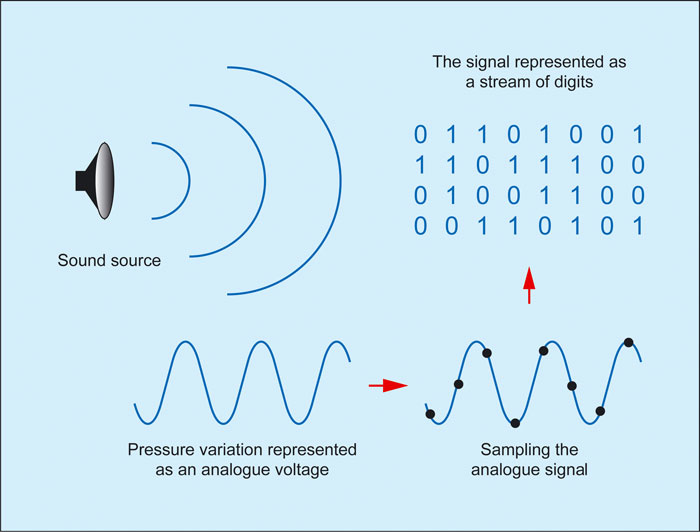
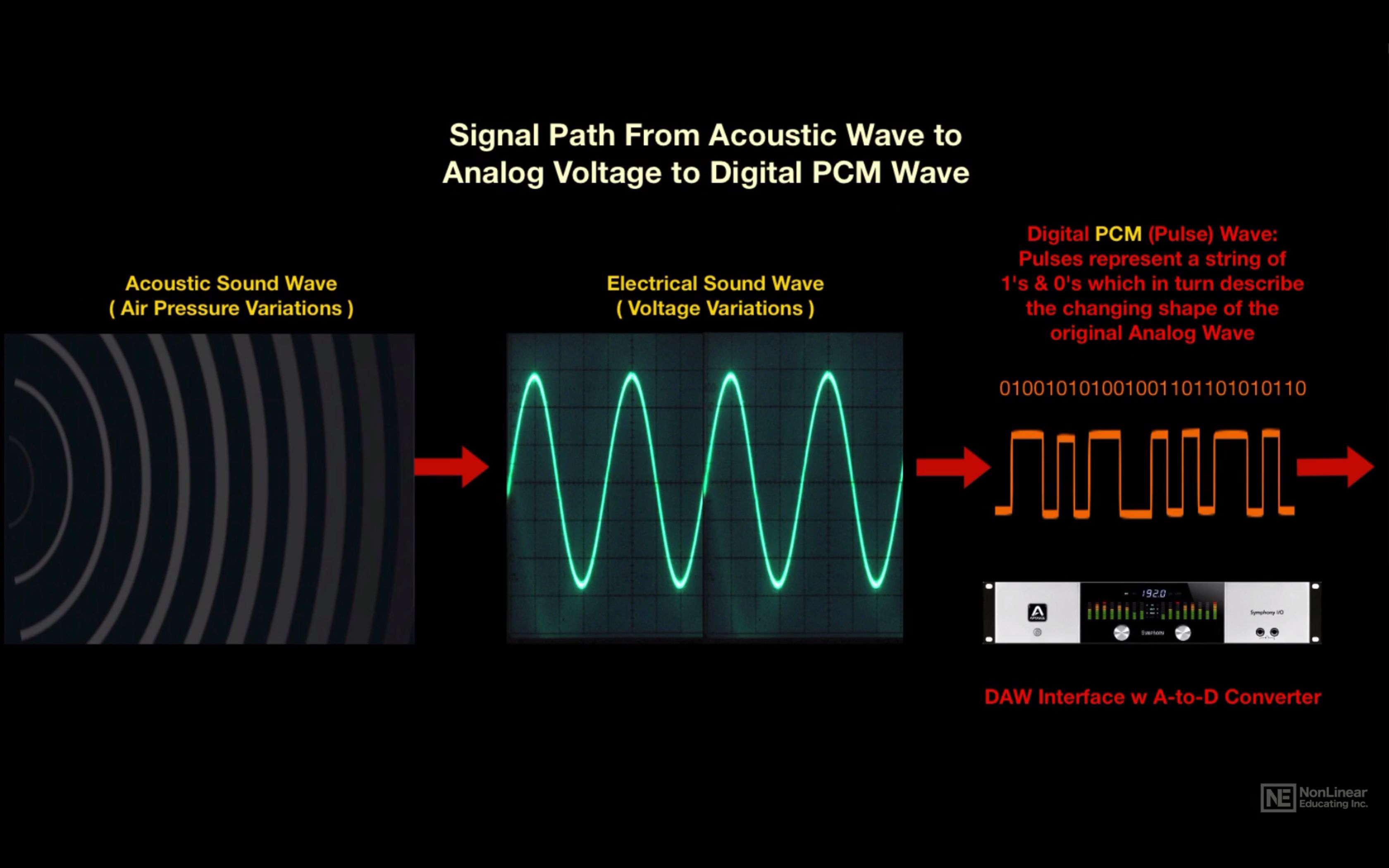
Let’s take a look at how you can record and play sound with a PC. First, the sound vibrations are converted to an alternating voltage using a microphone. This voltage is fed into the input of a special computing device – a sound card. The computer cannot register voltage. Like any electronic device, it can only record the voltage value of two levels: “there is voltage” (we should say a logical unit) or “there is no voltage” – logical zero.

It is in the form of combinations of logical zeros and ones that the PC records numbers, letters, words, or formulas. It is clear that recording a large amount of information requires many memory cells, because only one binary number can be written in a cell: 1 or 0. To write a digit or letter, 8 memory cells are needed. The number 3 is written as 00000011, the number 5 is 00000101, the letter k is 01101001, and the like.

How to record sound?
PC audio processing device control panel Very simple! The alternating voltage that reaches the sound card receives multiple measurements, the results of which are carefully recorded by the PC in memory. The computer measures the voltage approximately 44,000 times per second at any given time and records its value in memory. This is similar to how students keep a weather calendar: every day, at the same time, they record the readings of a thermometer, a barometer. The PC also records voltage values, but it does so much more frequently. How do you manage? Easy! Modern computers can do more than a billion simple operations per second, so the 44 or even 98,000 measurements required to record high-quality audio are not a problem for a computer. At the same time, the PC has to do a lot of work: drawing on the screen, writing the measurement results to disk, keeping an eye on which key you pressed, where the mouse moved, measured new voltage values, etc. Despite the fact that a voltage measurement consists of several dozen simple operations, the speed of modern processors is sufficient for it.

Large amounts of memory are required to store digital audio. One second of sound takes up the same space as 88,000 letters! This is how sound is recorded: voltage measurements are recorded on a large CD. Compare: You can record in text format a small library of 4-5 thousand books for several hundred pages or … 76 minutes of quality music.

Modern computers have learned to “cheat.” They record very quiet sounds with less precision, the ear will not yet hear them clearly. Sounds that are masked as loud sounds are also digitized less precisely. Why record in detail how smooth the violin sounds when the drum is struck hard? Therefore, the amount of memory occupied by sounds can be reduced ten times. This (and not only this) is done in the popular MP3 computer audio formats, which are common on the Internet, and in portable MP3 players, and Atrac, which is used in minidisc players.

How do I play the sound?
How is digital sound recreated? Even easier than typing it! In math lessons, you probably had to graph a function by points, and in physics lab work, you had to draw a graph based on measurements. During playback, the PC reads the voltage value from memory at all times and, using a sound card, resumes almost the same alternating voltage that was digitized.

These methods of recording and reproducing sound are used not only by computers, but also by various CD, MD and MP3 players, which, in fact, are also microcomputers, albeit without the usual keyboards, mice and monitors.

It is convenient not only to record and store digital sound, but also to transmit it remotely. The convenience lies in conserving airtime and battery life. During a conversation on a mobile phone, the voice is converted into digital form and memorized. When, say, 1/5 of a second of sound has accumulated, the phone’s transmitter turns on and the sound is transmitted for 1/100 of a second.

Fundamentals of digital audio

Fundamentals of digital audio

Digital Audio

Digital audio is based on the mathematical representation of the sound wave.

digital audio

The digital world is evolving very rapidly and it is no wonder that many people find digital technology complex. The purpose of this article is to explain what digital audio is without going into complicated mathematical details. To understand what digital sound is, you must first understand that there are no sounds inside a computer and there is only one math.

What is sound
Sound is the vibration of molecules. Mathematically, sound can be accurately described as a “wave.” It has a maximum peak value (wave hump) and a minimum value (deflection). If you have ever seen a graphical representation of a sound wave, you will notice that sound is always represented by a curve that constantly crosses the X-axis. This means that the nature of sound is “periodic”. Any sound has a crest and deflection, a positive and a negative period. This is called a loop. So the basic concept is that all sounds have at least one cycle.

The next important idea is that any periodic function can be represented mathematically as a series of sinusoids. In other words, even the most complex sound is just a collection of sine waves. A voice can constantly change its volume and pitch, but anytime it sounds, the voice is just a set of sine waves.

And finally, third: people do not hear sounds with a frequency higher than 22 kHz. Therefore, it is not necessary to record everything above 22 kHz.

So once again, the fundamentals of sound are as follows:

Sound waves are periodic and therefore can be described as a collection of sine waves.
We are not interested in waves with a frequency higher than 22 kHz, because we cannot physically hear them.
Analog to digital transition
Let’s say I’m speaking into a microphone. The microphone turns my voice into a continuous electrical current. This electrical current passes through a wire through an amplifier of some kind and eventually enters an analog-digital converter (ADC). Remember that the computer does not store sounds, but mathematical values, so we need something that converts the analog stream into a sequence of ones and zeros. This is what the ADC is doing. In simple terms, the converter takes quick snapshots of the sound wave, called samples, and assigns an amplitude value to each sample. And here we come to two basic concepts that will help explain the nature of digital sound. These concepts are time and breadth.

Sound bitness
Sound bitness
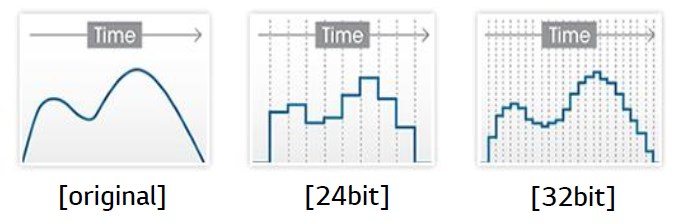
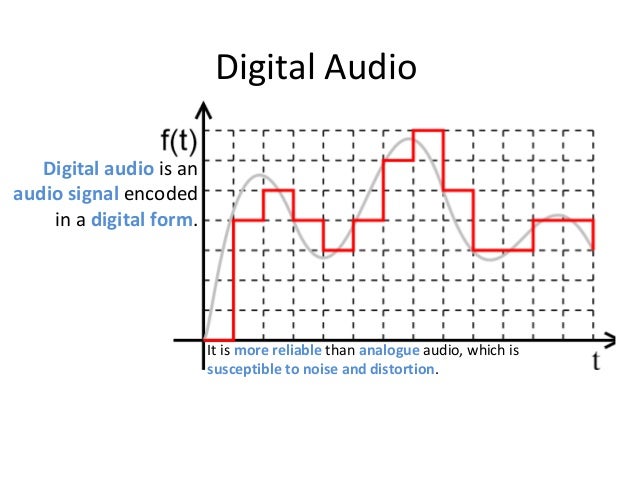
In the digital world, nothing is continuous, everything has a certain mathematical meaning. In the analog world, the sound wave will reach its peak and all values ​​from 0 dB to the peak will exist. And in a digital signal, there are a limited number of possible amplitude values. Think of analog audio as someone who gently walks up an escalator, while digital audio is someone who walks up a staircase and, over time, is on one rung or the other. Or let’s say there are values ​​50 and 51. So in analog sound there may be some intermediate value of 50.46, but in digital sound this value will be rounded to 50. This means that in fact the sound wave is distorted as it passes through the ADC … And since the analog signal is continuous, then this rounding of values ​​occurs constantly during the conversion process. This is called a quantization error and it sounds like a strange noise. But imagine a ladder with more steps that are less high. Now we have the values ​​50, followed by 50.2, followed by 50.4, and then 50.6, etc. An analog signal with an amplitude value of 50.46 will now be rounded to 50.4 instead of 50. This is a major improvement that does not completely eliminate quantization errors, but significantly reduces their impact. An increase in bitness is essentially an increase in the number of steps on a stair with a decrease in their height. As the quantization error decreases, the noise level decreases. Now we have the values ​​50, followed by 50.2, followed by 50.4, and then 50.6, etc. An analog signal with an amplitude value of 50.46 will now be rounded to 50.4 instead of 50. This is a major improvement that does not completely eliminate quantization errors, but significantly reduces their impact. An increase in bitness is essentially an increase in the number of steps on a stair with a decrease in their height. As the quantization error decreases, the noise level decreases.

What is digital audio

What is digital audio

digital audio

Digital audio is a numerical representation of sound.

Digital Audio

Recording sound as digital sound is similar to recording sound on a tape recorder. Let’s say you have a microphone connected to your computer. Whenever a sound is heard (speaking, singing, playing a musical instrument or just any noise), the microphone “hears” it and converts the sound into an electrical signal. The microphone then sends the signal to the computer’s sound card, which converts the signal into numbers. These numbers are called samples.

A sound card is a device that is inserted into a computer that allows it to understand the electrical signals from any sound device. You can think of a sound card as a “translator”. When an audio device (such as a microphone, electronic musical instrument, CD player, or other device capable of outputting an audio signal) sends signals to the computer, the sound card receives the signals and converts them into numbers that computer can understand.

The samples contain information that tells the computer what the recorded signal sounded like at specific times. The more samples that are used to represent the signal, the higher the quality of the recorded signal. For example, to create a digital sound recording that has the same quality as a CD recording, the computer must receive 44,100 samples per second. The number of samples taken per second is called the sample rate.

The size of each individual sample also affects the quality of the recorded sound. This size is called the bit depth. The higher the bit depth, the higher the sound quality. For example, to create CD-quality digital audio, each sample must be 16-bit.

Computers use the binary form to represent numbers. The place of a binary number is called a bit, each bit represents one of two numbers: 1 or 0. By combining bits, computers can display any number. For example, any number between 0 and 255 is represented as an eight-bit number. With 16 bits, it can represent numbers in the range 0 to 65,535.

Your computer can save all submitted samples. The temporal characteristics of the sample are also saved. Later, the computer can send samples to the sound card at the same intervals, so you hear the sound exactly the same as what was recorded. The basic concept is as follows: a sound card records an electrical signal from an audio device (such as a microphone or a CD player). The sound card converts the signals into sets of numbers, called samples, that are stored on your computer. During playback, the samples are sent back to the sound card, which converts them into an electrical signal. The signal is sent to the speakers (or other audio device) and you hear the sound exactly as you recorded it.

So what is the difference?
After reading the description of MIDI and digital audio, you may still be confused about the difference between the two. After all, both processes record the signals sent to the computer and then reproduce them, right? The point is, when you record MIDI data, you are not recording actual sound. Just record the instructions for playback. It is like a musician playing notes, where the notes are MIDI data and the musician is the computer. The musician (or computer) reads the notes (or MIDI data) and then stores them in memory. The musician then plays a melody on a musical instrument. What if the musician takes another instrument to play? The game will remain the same, but the sound will change. The same is true for MIDI data.

A keyboard synthesizer can produce any sound, but playing the same MIDI data using the keyboard will be exactly the same.

When you record digital audio, you are recording real audio. If you record a performance of a piece of music as digital sound, you cannot change the sound of that performance as described above. Due to these differences, MIDI and digital sound have their own advantages and disadvantages. Since MIDI is recorded as data for playback, rather than actual sound, you have much more freedom to manipulate the sound than with digital sound. For example, you can easily correct the error by changing the pitch. MIDI data can be converted to standard music notation, which is not possible with digital sound.

Digital sound

Digital sound

Digital Sound

Unlike the analog signal, the digital signal does not simulate acoustic sound.


Digital Sound

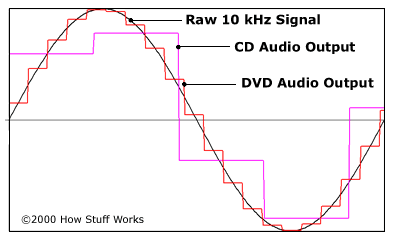
Digital sound assigns digital values ​​to individual points in time that reflect the height of the amplitude at a given point. The second difference between digital and analog audio is that digital audio is discrete.

As you know, digital information is stored in bytes, each of which consists of 8 bits. A bit is the smallest unit of digital information that can take only two values: zero or one.

So how do you convert a continuous analog signal into a sequence of zeros and ones, and even link this information correctly to the timeline? Converting audio to digital format is divided into two operations: sampling and quantizing. Sampling – sampling and quantization time – amplitude. It is these operations that your audio interface performs.

Any audio interface has an ADC (analog-to-digital converter) and a DAC (digital-to-analog converter). Let’s consider how audio recording works when used to record a microphone and a computer with an audio interface attached.

When you speak, your voice creates fluctuations in air pressure, which the microphone picks up and translates into an alternating voltage electrical signal. The received electrical signal is very weak, so it is amplified and then sent to the audio interface for digital conversion. Based on its internal clock, the ADC divides time into many different points. Time sampling occurs according to the set frequency, which indicates how many dots will be divided by 1 second of sound. At each received time point, the ADC measures the voltage of the input signal and assigns the corresponding digit to the amplitude value. The data obtained as a result of this conversion can be saved on a computer.

Digital sound

When you start playing the audio file, the reverse process will start. The digital information will be sent from the computer to your audio interface. Your DAC will provide a reverse conversion of the received information into a continuous electrical signal with alternating voltage. The signal will then be amplified and reproduced through your speaker system.

So what is the sample rate to get digital sound that can then be converted back to analog? According to Kotelnikov’s theorem, each band-limited signal can be sampled and then recovered in digital form, as long as the sample rate is at least twice the highest frequency of the original signal.

This means that our signal must have a maximum frequency that will never be exceeded. When we set the highest frequency, all that remains is to multiply it by two and get the desired sample rate. Also, according to the theorem, all frequencies above half the sample rate must be removed from the input signal.

Since a person hears sounds from 20 Hz to 20 kHz, a sample rate of 40 kHz should be adequate to encode any sound audible to a person. With a small margin for the filter, which is calculated before converting to digital format, in the CD audio standard, sounds above 22,050 Hz are cut off and the sample rate is 44,100 Hz.

Now let’s see exactly what numbers the ADC assigns to the amplitude values ​​when converting an analog signal.

The computer can assign a finite number of values ​​to the amplitude. As mentioned above, any information in a computer is a sequence of bits, each of which takes on values ​​of zero or one.

A numeric expression of n bits assumes 2 n different variants of values, that is, 2 n different variants of sequences of zeros and ones. The table shows the sequence options for n = 2,3,4.

How is the video format different from the codec?

How is the video format different from the codec?

Video format and codec

What is the video format?

Codec Video Format

Although there are many video formats, from analog recording methods (VHS, for example) to digital (Betamax, DV and others), in everyday life we ​​often talk about file formats that contain digital video. In fact, these files are containers that contain not only video, but also various audio tracks and / or subtitles. Each file format has its own characteristics: some allow streaming, some do not. Some may contain multiple audio and video tracks, while others may contain only one. The container only provides one header – “instruction”, which describes how and how to open the tracks stored in it. All information is contained in compressed form, and each object packed in a container is processed in a specific way, characteristic of the selected container type.
The most common container formats are:
1. AVI (Audio and Video Interleaved) developed by Microsoft for Windows. In theory, it can store various audio and video streams, in practice it is rarely used.
2. FLV (Flash Video) is optimized for streaming video over the Internet; Advantages: quality preservation even at low bitrate, the ability to view from anywhere, regardless of the operating system.
3. 3GP focuses on mobile devices that provide the ability to record / view audio and video.
Most of the listed formats are commercial, but there are projects based on completely open standards. The most popular among them is MKV (Matroska).
Although it is more correct to use the term “media container”, in colloquial speech the word “format” has become more popular. There is no crime in this, so in the communication process you can safely operate with the data, leaving the “containers” for professional discussions.
It is sufficient that the player program understands how to correctly identify the type of container to correctly reproduce the data stored in it. Consequently, the user must know which formats the player supports and install the necessary set of several on the computer (if one cannot play all of them).
Generally, a splitter program is involved in unpacking file and media containers (it can also be part of a player). Your task is to extract the content and only then transfer each audio / video stream for decoding using codecs.

What is a video codec?
To decrypt the contents of a media container and convert it into a video stream, you will need codecs, programs of formula similar in principle to filing cabinets. Having the required codec will allow you to correctly decompress the compressed image, so it is important to have as complete a set as possible of these algorithms so as not to find a message about an unsupported video format. From an academic point of view, it is more correct to speak of decoders, but, as in the previous case, it is easier to operate with the concept of “codec”, it is universal for both digitization and video playback.

What are the codecs?
The most popular video codecs used for home use are Xvid and DivX. Movies distributed on DVD are encoded with the MPEG-2 codec.
In general, DivX is the most common proprietary MPEG-4 codec. And the Xvid codec is based on one of the versions of DivX, but open source. There is also x264 (a codec for compression in the H.264 standard) and TrueMotion VP6 (used as one of the main encoding options in the Flash Video format). The rest of the codecs, and there are many, you may not need them in practice, but it is better to have them all the same. As a general rule of thumb, the full set can be obtained by installing the K-Lite Mega Codec Pack, but some of them may have to be added manually later.

Conclusions
The video format is determined by the extension of the container file, but it is not always known which codec was used to compress the information it contains. And if to play the required format it is only important to know if the media player supports it, then to determine the codec you will have to use a third-party utility (for example, AVIcodec or GSpot), and only then add the missing codec to the system.

HEVC: what is it

HEVC: what is it

HEVC

Since last year, users have regularly come across a new video format called HEVC. In this article, we will tell you what HEVC format is, why it is better than old video encoding formats than watching HEVC files, and also how to go back to old formats if you have an iPhone.

HEVC

HEVC Logo The abbreviation HEVC stands for High Efficiency Video Coding, which can be translated into Russian as High Efficiency Video Coding. It is a format designed to compress video up to 8K (UHDTV, 8192 × 4320 pixels). Another name for the format is H.265, so HEVC and H.265 are one and the same.

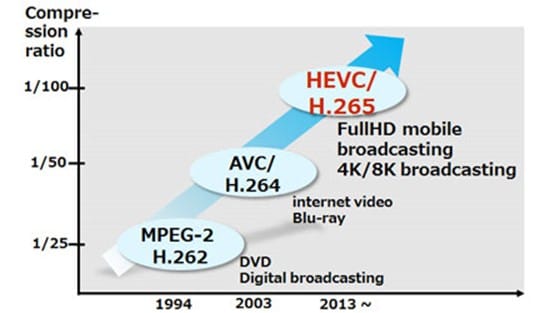
HEVC was designed to replace the outdated H.264 / MPEG-4 AVC format. Work on the new standard began in 2004, when the Video Coding Experts Group (VCEG) began looking for new technologies that could form the basis for the new standard. This project was later given the temporary names H.265 and H.NGVC (Next Generation Video Coding). The main requirements for the standard being developed are: reducing the video bit rate, maintaining current image quality, and maintaining current computing power requirements.

development of video encoding formats

Development has continued since 2012, when this format was officially approved. But, after the launch, the format did not receive much popularity, it was used in IP cameras, television broadcasts and other specialized areas. The HEVC format became known to common users in late 2017, when iOS 11 was released.

Why HEVC is better than older formats
With the launch of the macOS High Sierra and iOS 11 operating systems, Apple began actively implementing new formats for videos and photos. So for photos the HEIF format is now used, which we already talked about, and for videos, the HEVC format.

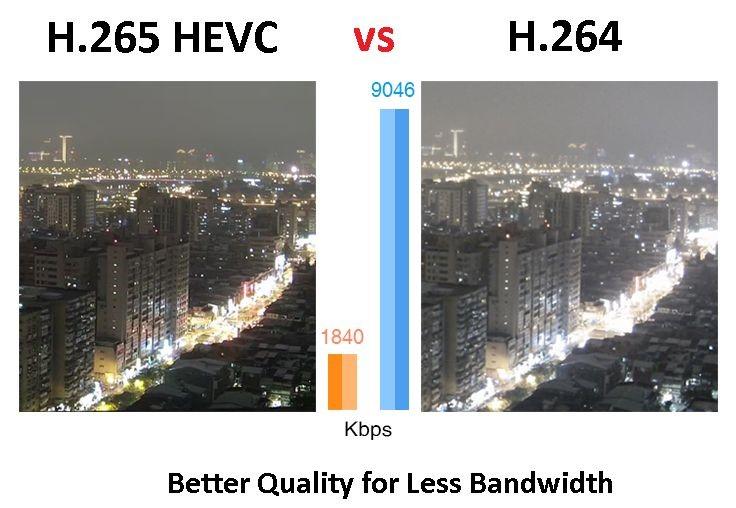
The transition to the HEVC format occurred for two reasons. First, this format provides a higher quality image. And second, this type of video takes up less memory space and requires less network bandwidth when streaming over the Internet. Simply put, HEVC video provides a significant improvement in image quality while maintaining the same file size and bit rate. According to Apple, using the HEVC format can save up to 40 percent of memory.

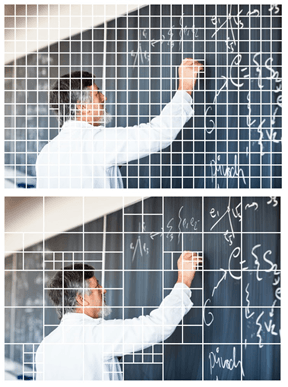
Several new approaches have been taken to achieve this improvement in video compression. One of these approaches is the increased block size into which the encoded file is divided. When encoding video in H.264 format, said block is 16 by 16 pixels (256 in total), while when using HEVC, said block can be 64 by 64 pixels (4096 in total). This block enlargement shows particularly good results on high-resolution videos, which is very useful, because the HEVC format supports video up to a resolution of 8192 × 4320 pixels.

What is H.265 and why is it better than H.264?

What is H.265 and why is it better than H.264?

H265/HEVC

Known as High Efficiency Video Coding (HVEC) and MPEG-H Part 2, H.265 is a video compression standard designed for the latest generations of high definition video. It is the successor to the widely used H.264 codec (also called AVC or MPEG-4 Part 10) and offers some significant improvements over the current compression scheme. H.265 was developed by the Joint Video Coding Collective Group (JCT-VC), a group of video encoding experts that began work on the compression standard in 2010.

H.265

The H.265 codec offers some significant improvements over the H.264 codec, which was first developed in the cloudy days of 2003. There are so many improvements to consider, but here are the highlights for consumers.

Better compression

H.265 offers significantly improved compression over H.264. The new codec can do almost twice the compression of its predecessor. With H.265, video with the same visual quality would only take up half the memory. Alternatively, videos with the same file size and bitrate can be significantly better. Part of this improvement comes from increasing the size of the macroblock. H.264 only allows 16 x 16 pixel macroblocks, which are too small to be really effective in higher resolution video. H.265 provides 64 x 64 pixel macroblocks (now called Coding Tree Units, or CTUs) to improve encoding efficiency at all resolutions.

Improved intraframe motion prediction

Video compression is based on predicting movement between frames. When there are no changes to a pixel, a video codec can save space by referencing it instead of playing it. Therefore, improved motion prediction means improved file size and compression quality. Along with the improved compression standards in H.265, we also found significant improvements in motion prediction and compensation.

Improved intra-frame prediction

Video compression also benefits from individual frame “motion” analysis, allowing you to compress individual video frames more efficiently. This can be achieved by describing the pixels with a mathematical function instead of the actual values ​​of the pixels. The function takes up less space than pixel data, which reduces file size. However, the codec must support a sufficiently advanced mathematical function for this method to be really useful. The H.265 intra-prediction function is much more detailed than H.264, it allows 33 directions of movement in nine directions of H.264.

Parallel processing

H.265 uses tiles and fragments that can be decoded independently of the rest of the frame. This means that the decoding process can be divided into multiple parallel streaming processes using more efficient decoding capabilities in modern multi-core processors. At higher video resolutions, this improved efficiency is necessary for decoding tempo-controlled video on lower hardware.

Larger maximum frame size
The world is getting higher resolution and H.265 supports it. With H.265, video can be encoded up to 8K UHD or 8192 pixels × 4320 pixels. Currently, only a few cameras can produce 8K video and very few monitors can display this resolution. But just as HD is the current standard, we can expect 4K and ultimately 8K to get the same level of attention.

Hardware support

The H.265 codec is specifically supported by the current generation of Intel processors. The Kaby Lake line of processors contains dedicated instruction sets for encoding and decoding H.265 video, as for future generations. This gives the codec many speed and consistency benefits over other high definition video codecs. Given the popularity and technical superiority of the H.264 codec, it’s not surprising that Intel prefers to ditch its hardware. Of course, this doesn’t limit the use of H.265 to Kaby Lake processors, but it does mean that computers using Kaby Lake chips will be more flexible for playing H.265 video. And considering that the computational overhead required to encode and decode high-definition H.265 video is quite significant,

Conclusion: where to find H.265?

H.265 is still less common than H.264, but it is rapidly gaining ground in the market. Apple’s new iPhone and iPad operating system, iOS 11, saves all video files in H.265. The next-generation MacBook Pro includes hardware support for Kaby Lake for codec decoding.

Everything you need to know about HEVC / H.265

Everything you need to know about HEVC / H.265

H.265

You may have heard a lot about HEVC / H.265 lately. With the rise in popularity of 4K video, Apple has embraced this new industry standard on Mac Hight Sierra and iOS 11. Compared to H.264, H.265 / HEVC has great advantages, but what are they? And can you really take advantage of that H.265 / HEVC? I will go into HEVC / H.265 in detail below and hope it is helpful.

H.265

What is HEVC / H.265?

HEVC stands for High Efficiency Video Coding, also known as H.265 and MPEG-H Part 2, it is the latest and most advanced video compression standard jointly developed by MPEG and VCEG, which offers higher encoding efficiency and better improved video quality. HEVC is capable of compressing video with twice the data compression rate, but only requires half the bit rate to maintain the same video quality and halve the storage space compared to H.264.

Why does HEVC / H.265 come?

As you may know, more and more 4K and 8K videos are appearing in the world, while these HD videos require a lot of space, making it impossible to download and stream them in the best quality. To reduce storage space while maintaining the same H.264-based quality, it uses HEVC encoding technology.

HEVC can easily deliver video content to your Apple TV, computer, even iPhone or other portable devices with high quality and less space. If you like to play HEVC / H.265 videos, you can decode the files first and play them through the media player. However, you can also convert DVD to H.265 codec to get half the size but the same video quality. Therefore, many consumer devices and operating systems gradually support HEVC / H.265.

H.265 performance, advantages and disadvantages

H.265 is designed to deliver higher quality video with limited bandwidth that is cut in half. This means that we can enjoy 1080p high definition video with our smartphone and tablets online. The H.265 standard keeps pace with the high resolution display.

The main advantage of H.265 is that H.265 has better compression performance and lower bandwidth utilization, which can further reduce the design bit rate to reduce transmission and storage costs. And now, many high-definition 4K devices, such as 4K Blu-ray player or other streaming media players, support H.265. By the way, you can also convert H.265 to other supported formats with a free H.265 converter to play on your devices.

It is worth noting that the investment in H.265 is huge, especially after H.264; many industrial companies will hesitate to choose H.265. On the other hand, H.265 has 3 groups of patents with different price structures and terms. Lack of clarity on royalties stopped the adoption of H.265.

Development and current status of H.265

H.265 is now increasingly supported by many platforms and operating systems, but it is not widely supported. The successful popularization of a video standard depends on several aspects, including the decision of the standards organization, the emergence of competitors, applications, and royalties. Unlike H.264, H.265 requires high license fees, which are charged by HEVC Advance, an independent license manager.

Like the development of a high-resolution display, H.265 will also evolve. Despite its industrial rival VP9 and other limiting factors, H.265 will find a way out and gain massive popularity.

H.266 / VVC codec approved for 4K and 8K video compression

H.266 / VVC codec approved for 4K and 8K video compression

H.266 (VVC)

H.266 / VVC codec approved for 4K and 8K video compression
The Fraunhofer Institute for Telecommunications has announced the approval of a new video codec.

H.266 (VVC)

H.266 / VVC was developed with the need for ultra-high definition content in mind and is intended to be the successor to the popular H.264 / AVC and H.265 / HEVC standards, used by more than 10 billion devices. to handle more than 90% of the global video volume.

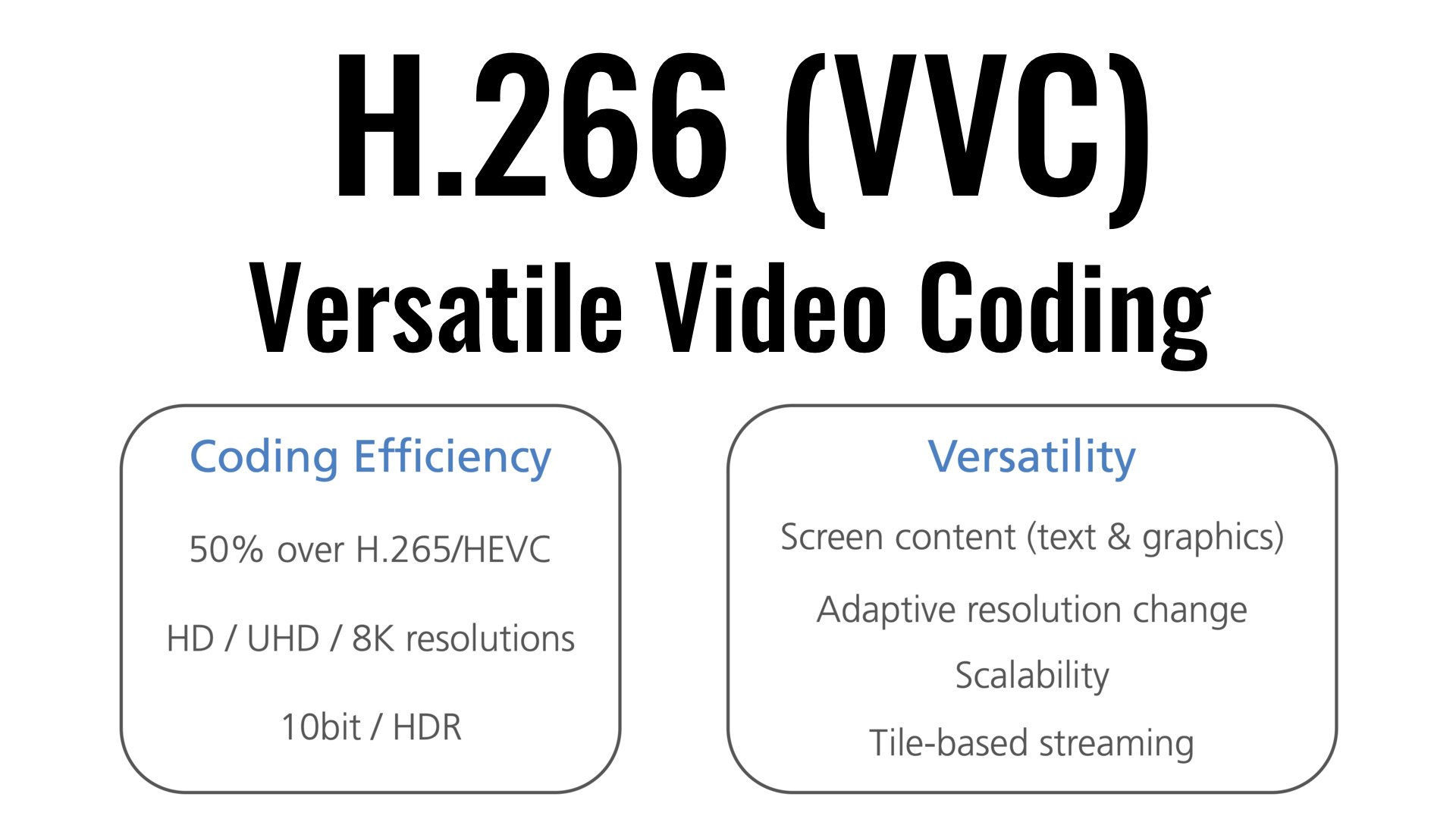
H.266 / VVC (Versatile Video Coding) provides highly efficient transmission and storage of all screen resolutions (from SD and HD to 4K and 8K), supports High Dynamic Range (HDR) video and video 360 degree panoramic … Supports YCbCr color space with 4: 4: 4 and 4: 2: 2 color conversions, color depth from 8 to 16 bpc, and auxiliary channels for data such as depth and transparency.

It is claimed that compared to H.265 (HEVC), the new standard will demonstrate a significant increase in compression ratio and allow a 50% lower bit rate to be used for streaming video with the same quality. For example, if a 90 minute video in UHD quality in H.265 required 10 GB of data transfer, then H.266 will fit in 5 GB while maintaining the same quality level. In comparison, the AV1 format in terms of compression efficiency outperforms HEVC by an average of 17% (at a high bit rate by 30-43%).

The standard has been created for 5 years by the MPEG (ISO / IEC JTC 1) and VCEG (ITU-T) working groups with the participation of Apple, Ericsson, Intel, Huawei, Microsoft, Qualcomm and Sony. The MC-IF (Media Encoding Industry Forum) was established to license overlapping patents, with more than 30 companies and organizations owning the intellectual property used in H.266 / VVC.

The cost of increasing compression efficiency is a significant complication of algorithms, leading to increased computational resource requirements (up to 10 times for encoding and up to 2 times for decoding compared to H.265). Unlike the AV1 video encoding format, the use of H.266 / VVC in your products requires a royalty fee. A reference implementation of an encoder and decoder for H.266 / VVC is expected to be released in the fall.