Formats and codecs for conversion


Free Download Mp4Gain
picture

Formats and codecs for conversion.

Video File Formats and Codecs

Since it is impossible to capture the immensity, we will touch only the most widespread and demanded multimedia formats, codecs, we will give a brief description and an explanation in which cases they are the most used.
Video File Formats and Codecs

In the description, we will also present a list of programs that are somehow related to this format. We will not give links, you can find all programs on the site.

Video standards
MPEG -1

MPEG -1 is a standard adopted by MPEG (Moving Picture Experts Group) video experts. Currently, MPEG-1 video is used on video CDs (VCD quality is closest to that of VHS video cassettes).

Initially, the use of MPEG -1 video is limited to a bit rate of 1.5 Megabits / s and a resolution of 352 × 240. However, this standard allows you to use any resolution up to 4095 × 4095.

MPEG -2

The MPEG-2 standard is used to convert video and audio for broadcast, including satellite broadcasting and cable television. It has strict restrictions on resolution (no more than 720 × 576), frame rate (25 fps and 29.97 fps), bit rate, etc.

MPEG -3

An audio and video coding standard for high definition television (HDTW) with data rates ranging from 20 to 40 Mbps. Work on MPEG-3 was discontinued after the modification of MPEG-2 (when the MPEG-2 standard 2 was no worse than MPEG-3 in coping with video processing).

Do not confuse MPEG-3 with the MP3 music format (MPEG-1 Part 3 Layer 3 / MPEG-1 Audio Layer 3).

MPEG -4

MPEG -4 is used to compress digital video and audio. Designed for Internet transmission (video transmission, video telephony), encoding and recording of movies on CD, (videophone) and transmission.

Video codecs
DivX (digital video express)

The most popular video codec for Microsoft Windows and Mac OS X platforms, used to compress most movies today. Compression allows you to fit an hour and a half of video material onto 1 or 2 CDs. It is distributed in two versions: DivX and DivX Pro. DivX is free (AdWare), you can use it without restrictions, the second is paid. The “Pro” prefix costs $ 19.99 along with additional package features and benefits over the free version. That:

– Better compression (about 25%) for video,
– Support for GMC (Global Motion Compensation) technology, which improves video quality and slightly improves compression ratio,
– DivX Pro provides full support for bidirectional encoding (B frames),
– Includes additional tools for video encoding.

Xvid

MPEG-4 Video Conversion Library, licensed under the GNU General Public License. Unlike the DivX codec, which was released for Microsoft Windows and Mac OS X platforms only, Xvid is a cross-platform product (used on all platforms and operating systems for which the codec source code can be compiled).

As you can see, the codec name is DivX “flip”. In practice, Xvid is the alternative to DivX. The codec is characterized by fast operating speed and acceptable image quality. Configurable both through third-party programs and through its own configuration window.

Windows Media Video

An encoding system developed by Microsoft. Included with Windows Media Multimedia Pack. It exists in several versions: Microsoft MPEG-4 Video Codec, Windows Media Video 9, etc. Although WMW video cannot compete with DivX, it is actively used in the development of multimedia and game applications for the Windows platform.

Programs to work with WMV

The Windows Media Encoder is a codec and a container for the encoder.

Windows Media Video 9 VCM – Similar to above, but does not include a graphical shell.

Indeo links

Intel initially developed the Ligos Indeo codec, but was later taken over by Ligos for review. Now the codec allows you to watch videos at different bit rates respectively with adaptive quality. Ligos Indeo supports the MMX processor instruction (although DivX has many more supported instructions).

Programs to work with Ligos Indeo

Intel Codec Installer: Offers the codec named I263, which makes it possible to play back electronic cards and videos in Ligos Indeo format.

The Intel JPEG Library Video Codec (ijlvid) is a dedicated driver based on the Intel JPEG Library that supports RGB24 decompression and RGB24 and YUY2 compression.

Intel Music Coder: Thanks to this package, you can listen to AVI video with IMC encoded sound.


Free Download Mp4Gain
picture


Mp4Gain Main Window
picture


Mp4Gain Features
picture


Free Download Mp4Gain
picture

Video formats for mobile devices

Video formats for mobile devices

VideO FOR MOBILE PHONES

A natural and logical stage in the development of mobile communications is the ability to stream and view videos on mobile phones.


video for mobile phones


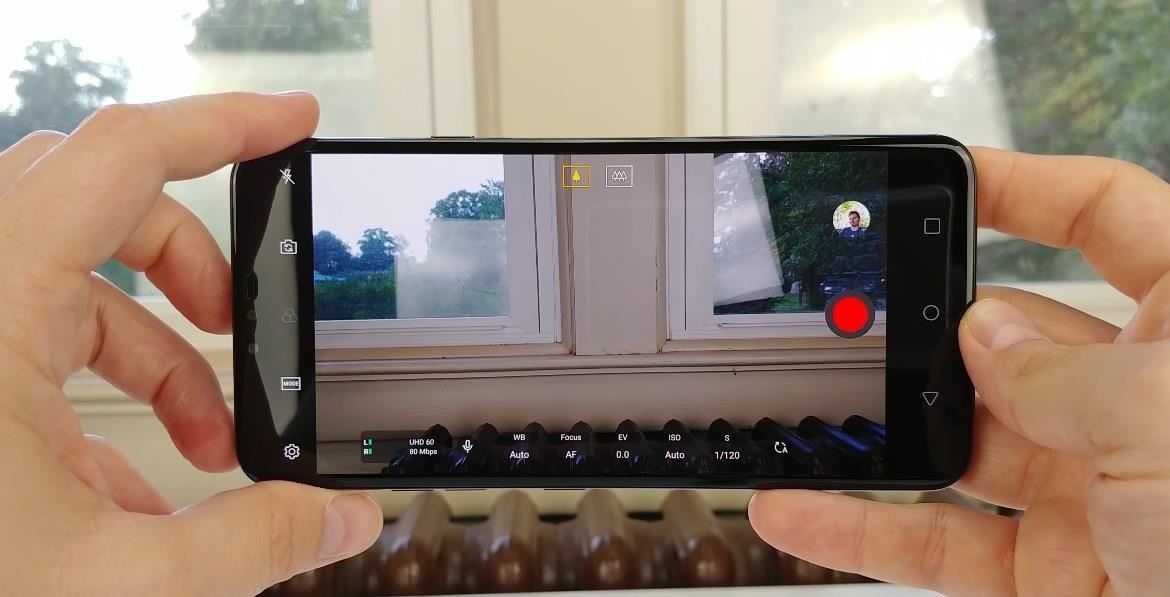
Currently, almost all mobile devices are equipped with built-in cameras with the ability to record and play video files. The video format used in this case is based on the MP4 / 3gp protocol, but this does not at all mean that modern phones cannot understand other formats for presenting video data. Videos take up much more space than audio files or images. This leads to the fact that the video has to be highly compressed.

Mobile video generally has the following resolutions:

640 × 360
320 x 240
176×144
Also, many modern devices have the ability to record and play back Full HD format.

Examples of video formats for mobile devices:

MP4
It is an abbreviation for MPEG-4 Part 14. This format may also be called MPEG-4 AVC, where AVC stands for Advanced Video Coding. As the name of the format suggests, it is designed to work with video files and was first proposed in 1998. MP4 is a container format that allows you to combine audio, video, subtitles, and images into a single file. Video files of this standard have the extensions * .mp4 and * .3gp. All players capable of playing MP4 can play 3GPP and vice versa.

3GP
* .3GP (3GPP file format) is a multimedia container defined by the Third Generation Partnership Project (3GPP) for 3G UMTS multimedia services. Many modern mobile phones (not necessarily 3G) have the capabilities of recording and viewing audio and video in .3GP format.

This format is a simplified version of the ISO 14496-1 multimedia format, which is similar to the MOV used by QuickTime. Video clips ending in 3GP are small compared to similar videos in other formats, however this is justified by the low quality, for example many frames are often presented as colored squares. 3GP is a special case of MP4 video. This standard has been used relatively recently, thanks to Philips, which has gone to great lengths to adapt the MPEG-4 standard for transmission.

The 3GPP standard has become the leading standard in camera phones with video recording capabilities. Initially, it was the staple on SonyEricsson smartphones; PacketVideo – PVPlayer even developed special viewing software for them, which allows you to play video in full screen. Currently, this player is available for almost all smartphones based on Symbian and Windows Mobile operating systems, as well as for PocketPC PDAs.

The advantages of the format include the fact that if the original image size does not match, it is automatically converted to the size supported by the phone. However, the quality of the videos is very low. Initially, this format was intended for the rapid recording of video material using the built-in camera, for later viewing and sending as an attachment in MMS (limited to 100 Kb).

The low video quality is due to the low resolution of the image, which can be QCIF (176 × 144) or sub-QCIF (128 × 96), the low frame rate, no more than 15 per second, and the peculiarities sound recording. The sound that accompanies the video clip can be recorded in AMR (12.2 kbps maximum stream) or WB AMR (23.05 kbps stream) format.

Other formats

There is also the classic MobiClip-MPEG-1 video format. In October 2003, MobiClip introduced a very interesting format. The format is inherently universal. Files converted to this format have the * .mo extension and can contain sound, video, and flash animation. On the manufacturer’s website, this format is advertised as full-screen mobile video without brakes. Its essential limitation is its non-transmission nature, that is, to view it it is necessary to download the complete file. Another limitation, not fundamental, but significant, of the format is the large size of the files received. Thus, a video format appeared on phones, capable of providing high image quality at almost cinematic frame rate. The quality of the playback depends solely on the amount of memory available. The video plays in full screen.

Modern smartphones have a wider range of playable video formats. In addition to the above, smartphones can read * .rm files, the quality of which is superior to both 3gp and mp4, as well as the * .avi format, after installing the appropriate programs (eg SmartMovie).

Best digital quality audio formats

Best digital quality audio formats

WAV vs MP3

It is often a measure of the quality of a track. There is a lot of debate about which is the best music format. So I recently witnessed a similar dispute. Not virtual, but real. In general, I decided to write an article on audio formats and try to explain in human language which is the best audio format. I’ll try to avoid abstruse terms and feature descriptions, so as not to hurt the brains of readers again.

High quality audio formats

I immediately admit that I am not going to sing praises in honor of any particular audio format, just as I am not going to “disappoint” anyone. Let everyone decide for themselves. I will not go into the “jungle” and review the most famous formats of high quality music.

I believe that these disputes are conducted by people, to put it mildly, not well versed in this matter. Because professionals (that is, people who know what they are doing and why they are doing it) will not do it. With today’s abundance of audio formats, anyone who needs it will find what they need. Agree, a dispute between a tractor driver and a driver about which is better – a tractor or a car will look silly. For some purposes a tractor, for others a machine. Here it is the same.

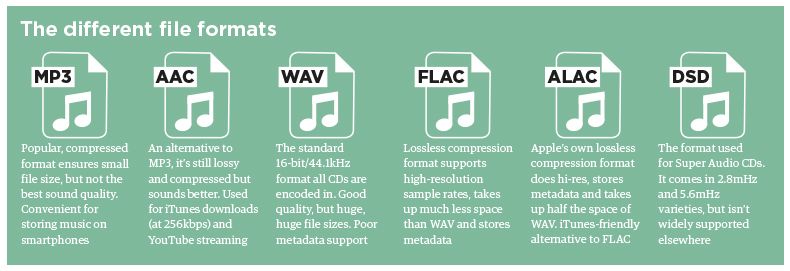
WAV is rightly considered the highest quality music format. This audio format is not compressed or lossy. Used for recording and processing sound, this is the highest quality sound, as the WAV recording is not compressed. Encoded to any other audio format. Well, as a result, it “weighs” a lot, so it is mainly used for sound recording.

Lossy audio compression

I’ll start with the well-known and widely used (though not always loved) MP3 format. This audio format is actively used everywhere and everywhere, where it is needed and where it is not needed. But this does not mean that it is not worthy of the place it occupies in its niche. Very worthy. Although he has been “sitting” in his niche for about two decades, no one has “kicked” him out of there yet. And there were many who wanted to say it. And the main favorite of them is WMA (Windows Media), which was conceived by Microsoft as an alternative to MP3. As a result, it is an alternative and it is, despite the best efforts of the developers. The next character is OGG. Despite the broader possibilities than MP3, for example, it never received widespread acceptance. Although it is compatible with many operating systems. Perhaps the AAC audio format is worth mentioning, which was supposed to change on the relay. Encoding quality has been improved and compression loss reduced. But Ay.

The main advantage of these formats is their small size. The downside is the loss of quality.

Lossless audio compression
FLAC is perhaps the most popular lossless audio format and encoding codec. Music lovers are gradually switching to this format. WavPack competes with it, but it is not that popular. It’s the same story with Apple Lossless, which reduces the size to 60%.

Here the story is exactly the opposite: the quality is better and the size is greater.

Skeptics say that it is almost impossible to distinguish MP3 (320 kbps) from Losless by ear. “And if there is no difference, why pay more?” In fact, on ordinary equipment, it is quite difficult to feel the difference in audio formats, even for music lovers. But there are those who immediately feel this difference (they personally attended the experiment). But when listening to a good device, the difference is huge. The problem is that not everyone can afford a good device.

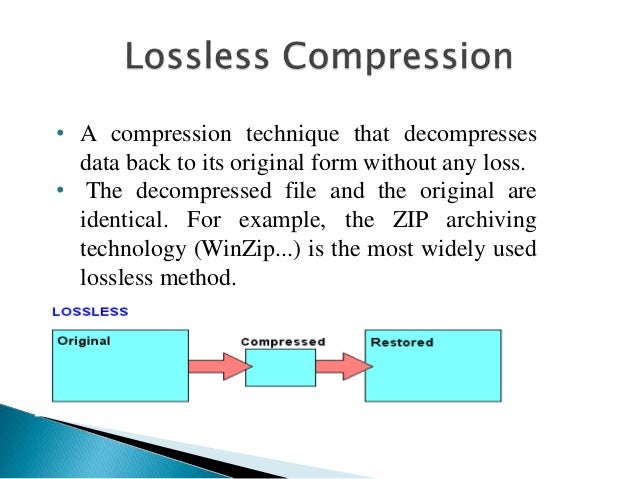
Compressed using special lossless audio codecs, it can be restored with absolute precision if desired.

If you take a normal audio CD with analog sound, record it in WAV format for uncompressed sound, then compress WAV using lossless codec, then decompress the resulting sound file into WAV and burn the result to a blank CD, you can get two completely identical audio files COMPACT DISCS.

The advantage of lossless for storing an audio collection is that the quality of the recordings is much higher than that of lossy codecs and they take up less space than uncompressed audio. It is true that lossy files are smaller than lossless music files. Most modern playback programs understand the lossless format. Programs that cannot play it can easily learn it using the lossless plugin. What are lossless audio formats?

Audiophiles versus compressed music

Audiophiles versus compressed music

COMPRESSED VS UCOMPRESSED

Most audiophiles – people with superior hearing, premium audio equipment, and great quality for the best sound quality – tend to put off MP3, AAC, and other digital audio formats because they use compression to create small files.

compressed vs uncompressed audio

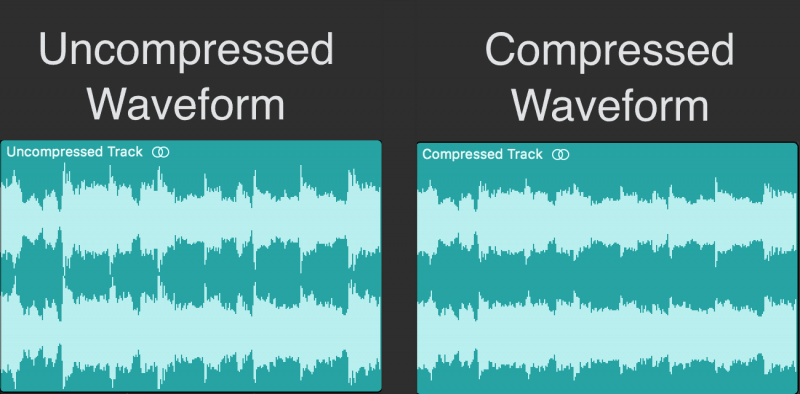
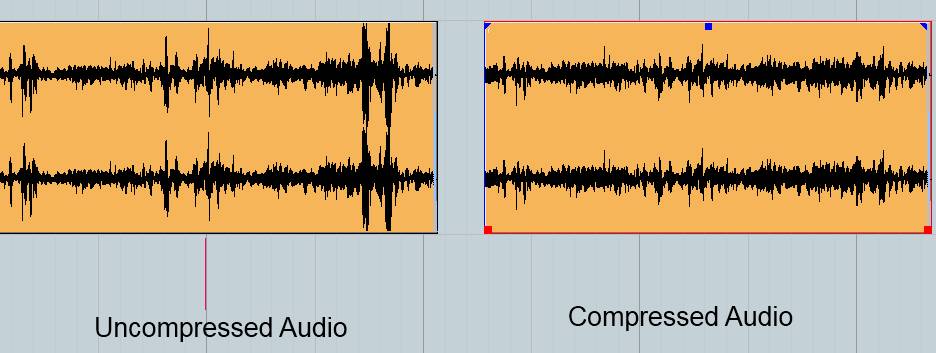
The trade-off for small files created by compression is that some of the information is removed, usually the highest and lowest parts of the audio range. Most average listeners don’t hear loss.

While many audiophiles have strong feelings about compressing music, this article is not really directed at them. This article is aimed at the average listener – someone with a standard iPhone or iPod, decent but not very expensive speakers or headphones, and average listener.

AAC vs. MP3

AAC music files, the preferred audio format of iTunes and Apple Music, are widely believed to sound better and take up less space than MP3s of the same song. I put this theory to the test to help you decide which file format to use for the songs in your iTunes library, as well as your iPhone and iPod.

To play this audio file format, I encoded two songs differently: 128 Kbps AAC and MP3 files, 192 Kbps AAC and MP3 files, and 256 Kbps AAC and MP3 files.

The higher the Kbps, the larger the file, but the better the quality, at least in theory. For all files, I used the built-in encoder in iTunes.

If you haven’t already, you can also read AAC and MP3: Which One to Choose for iPhone and iTunes for more helpful information.

In what format and with what quality is music heard on the radio?

In what format and with what quality is music heard on the radio?

Radio most used audio file formats

In fact, we can say that there are currently two main audio formats: lossy (compressed) and lossless (uncompressed). They are classified into many types.

Radio audio file formats

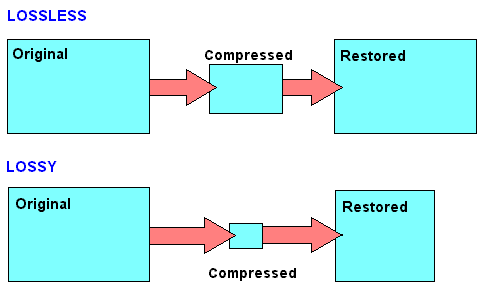
Lossy takes up less disk space, but degrades the quality of the audio track. When compressed using the MPEG protocol (hence the name mp3 – mp4 for files containing video sequences), the hues and transition tones, which are barely noticeable to the ear, are cut off. This makes the file clearer, but it also degrades it. The last place is occupied by the bit rate of that file: the degree of compression of each second of the audio track. The lower the bitrate, the less space the file will occupy and the worse the quality. Thus, a composition of three minutes in mp3 with a bit rate of 320 kilobits per second will occupy up to 3 megabytes on disk; a similar composition with a 96 kilobit bit rate will occupy about 400 kilobytes.

Lossless is as close to the original analog sound as possible *, making it much loved by sound engineers. Lossless formats take up much more disk space even compared to mp3-320. Among these formats, the most common are WAV (standard), FLAC (economic), AIFF (Apple). The former is used most often.

Professional sound recording is done only in uncompressed format. Only with him do sound engineers work.

On the radio, the situation is somewhat more complicated. This is due to the peculiarities of the work of the media, namely, efficiency and commercial profitability. The use of high-capacity servers is expensive and therefore most radio stations encode audio tracks in mp3 format at a bit rate of 256 kilobits per second. However, this is typical mainly of national stations. Equipment purchased from abroad has standard configurations that assume WAV encoding.

Why are software developers focusing on WAV? Because the radio signal cannot propagate without interference. Therefore, the listener still receives a small and sometimes significantly distorted signal. Therefore, broadcasters are faced with a reasonable question: what quality of sound will the listener perceive best: distorted ideal or distorted distortion? For this reason, in Europe and the United States, the WAV standard (AIFF, if the station operates with Apple equipment) is adopted, in Russia – mp3 with a bit rate of 256 kilobits per second.

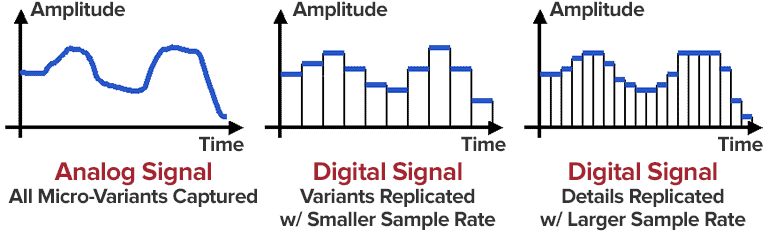
Analog data transmission is based on the physical properties of sound. The record-playback mechanism is based on the principles of human auditory perception. That is, the sound wave vibrates the membrane (by analogy with the tympanic membrane of the ear) and is fixed with a needle in the carrier in the form in which it was obtained. Reproduced, therefore, also without deviations and changes associated with digital conversion.

The Audio Files category includes compressed and uncompressed audio formats that contain a data signal and can be played by audio programs. This category also includes MIDI files, music scores, and audio project files, which generally do not contain audio data.

The most common extensions are .WAV, .AIF, .MP3, and .MID.

Lossy audio compression

Lossy audio compression

MP3: Lossy compression

I’ll start with the well-known and widely used (though not always loved) MP3 format.

Lossy audio format

This audio format is actively used everywhere and everywhere, where it is needed and where it is not needed. But this does not mean that it is not worthy of the place it occupies in its niche. Very worthy. Although he has been “sitting” in his niche for about two decades, no one has “kicked” him out of there yet. And there were many who wanted to say it. And the main favorite of them is WMA (Windows Media Audio), which was conceived by Microsoft as an alternative to MP3. As a result, it is an alternative and it is, despite the best efforts of the developers. The next character is OGG. Despite the broader possibilities than MP3, for example, it never received widespread acceptance. Although it is compatible with many operating systems. Perhaps, it is worth mentioning the AAC audio format, which was supposed to replace MP3 in the relay. Encoding quality has been improved and compression loss reduced. But Ay.

The main advantage of these formats is their small size. The downside is the loss of quality.

Different formats
In today’s world, you can find a large number of different sound extensions. Let’s remember at a glance:

MP3 (Well where without it?)
WMA
OGG
CAA
And many others
Of course, each of these formats is good, especially MP3, which is probably the most popular format. But today we are not talking about popularity. MP3 and other similar formats, no matter how good they sound, are compressed originals. And even if you set the maximum quality to 320 btrate, it still won’t be of the highest quality. It was compressed, reduced, so there will be certain losses.

Lossless audio compression

Lossless audio compression

Lossless Audio compression

FLAC is perhaps the most popular lossless audio format and encoding codec. Music lovers are gradually switching to this format. WavPack competes with it, but it is not that popular. It’s the same story with Apple Lossless, which reduces the size to 60%.

Lossy file compression

The story here is: quality is better and size is bigger.

Skeptics say that it is almost impossible to distinguish MP3 (320 kbps) from Losless by ear. “And if there is no difference, why pay more?” In fact, on ordinary equipment, it is quite difficult to feel the difference in audio formats, even for music lovers. But there are those who immediately feel this difference (they personally attended the experiment). But when listening to a good device, the difference is huge. The problem is that not everyone can afford a good device.

In what format and with what quality is music heard on the radio?
In fact, we can say that there are currently two main audio formats: lossy (compressed) and lossless (uncompressed). They are classified into many types.

Lossy takes up less disk space, but degrades the quality of the audio track. When compressed using the MPEG protocol (hence the name mp3 – mp4 for files containing video sequences), the hues and transition tones, which are barely noticeable to the ear, are cut off. This makes the file clearer, but it also degrades it. The last place is occupied by the bit rate of that file: the degree of compression of each second of the audio track. The lower the bitrate, the less space the file will occupy and the worse the quality. Thus, a composition of three minutes in mp3 with a bit rate of 320 kilobits per second will occupy up to 3 megabytes on disk; a similar composition with a 96 kilobit bit rate will occupy about 400 kilobytes.

Lossless is as close to the original analog sound * as possible, making it much loved by sound engineers. Lossless formats take up much more disk space even compared to mp3-320. Among these formats, the most common are WAV (standard), FLAC (economic), AIFF (Apple). The former is used most often.

Professional sound recording is done only in uncompressed format. Only with him do the sound engineers work.

On the radio, the situation is somewhat more complicated. This is due to the peculiarities of the work of the media, namely efficiency and commercial profitability. The use of high-capacity servers is expensive and therefore most radio stations encode audio tracks in mp3 format at a bit rate of 256 kilobits per second. However, this is typical mainly of national stations. Equipment purchased from abroad has standard configurations that assume WAV encoding.

Why are software developers focusing on WAV? Because the radio signal cannot propagate without interference. Therefore, the listener still receives a small and sometimes significantly distorted signal. Therefore, broadcasters are faced with a reasonable question: what quality of sound will the listener perceive best: distorted ideal or distorted distortion? For this reason, in Europe and the United States, the WAV standard (AIFF, if the station operates with Apple equipment) is adopted, in Russia – mp3 with a bit rate of 256 kilobits per second.

H.264 efficiency

H.264 efficiency

H.264

H.264 takes video compression technology to the next level.

High Efficiency Video Coding H.264

The H.264 standard introduces a new advanced intra prediction scheme to encode I-frames. This scheme can significantly reduce the size (in bits) of an I frame while maintaining high quality by successfully predicting small blocks of pixels within a macroblock within a frame. It does this by trying to find matching pixels between the previously encoded pixels that constrain the new 4×4 pixel block for internal encoding. By reusing already encoded pixel values, the bit size of the data can be significantly reduced. The new intra prediction is a key element of H.264 technology and has proven to be very effective. For comparison: even if only I-frames are used in H.264 streaming, the resulting file size will be much smaller than for Motion JPEG streaming.
Illustrations of how some intra-prediction modes can be used when encoding 4×4 pixels within one of the 16 blocks that make up a macroblock. Each of the 16 blocks within a macroblock can be encoded using different modes.

H.264 also improves block-based motion compensation for P and B frame encoding. The H.264 encoder can choose to search for matching blocks (up to sub-pixels

precision) of some or many sections within one or more reference frames. You can also adjust the size and shape of the blocks to improve your search for matches. In areas where matching blocks cannot be found within the frame of reference, internally coded macroblocks are used. The high degree of flexibility of block-by-block motion compensation in H.264 is effective in high-density video environments where image quality must be maintained for the application. Motion compensation is the most requested aspect of a video encoder, and the various ways and levels in which it can be implemented with an H.264 encoder help improve the efficiency of video compression.

With the H.264 standard, typical blocky objects seen in highly compressed Motion JPEG and MPEG (as opposed to H.264) videos can be reduced with the built-in unblocking filter. This filter automatically smooths the edges of the blocks to produce a nearly perfect unwrapped video image.

conclusion
H.264 represents a major step forward in video compression technology. This standard offers various technologies to achieve better compression efficiency through the use of more accurate intra prediction schemes, as well as more robustness. It opens up new possibilities to create advanced video encoders that can significantly improve image quality, increase frame rate and resolution while maintaining the same bit rate (compared to previous standards) or, conversely, provide video of the same quality at a lower bit rate.

H.264 is the first example of a collaboration between the International Telecommunication Union, the International Organization for Standardization and the International Electrotechnical Commission on International Model Video Compression Standards. Due to its flexibility, H.264 has found applications in areas as diverse as high definition DVD (such as Bluray), video streaming including HDTV streaming, online video storage (such as YouTube), 3G mobile phone. , in programs such as QuickTime, Flash, and the MacOS X operating system on Apple computers, as well as on video game consoles such as PlayStation 3. With the support of many industries and software development,

With the wider adoption of the H.264 format in network cameras, video encoders, and video management software, system designers and integrators must be confident that their chosen products and vendors are compliant with this new open standard. Today, network video equipment that supports H.264 and Motion JPEG is the ideal choice, offering the highest degree of versatility and integration.

H.264 Profiles and Levels

H.264 Profiles and Levels

H.264

The joint group involved in defining the H.264 standard has focused on creating a simple and clear solution that minimizes options and parameters.

H.264

The most important aspect of this standard, as is the case with other video standards, is the provision of various capabilities within profiles (sets of algorithmic parameters) and levels (performance classes) to optimally support popular products and common formats. .

There are seven profiles in H.264, each of which is tailored to a specific application. Each profile determines which set of parameters the encoder can use and limits the complexity of the decoder implementation.

Network cameras and video encoders are likely to use a so-called baseline profile, designed primarily for use in areas with limited computing power. The baseline profile is best suited for use in modern real-time encoders embedded in network video equipment. This profile also provides low latency, which is an important requirement for video surveillance, and is essential for real-time control of pan, tilt and zoom of network PTZ cameras.

H.264 has 11 levels or degrees of limitation in terms of functionality, bandwidth, and memory requirements. Each level defines the bit rate and encoding rate in macroblocks per second for resolutions ranging from QCIF to HDTV and beyond. The higher the resolution, the higher the required level.

How the video is compressed

How the video is compressed

Video Compression

Video compression is the reduction and elimination of redundant video data to optimize the storage and transmission of digital video files.

video compression

During this process, the original video signal is processed by an algorithm to create a compressed file ready for transmission and storage. To play a compressed file, use

a reverse algorithm that actually produces the same video image as the original video source. The time it takes to compress, send, decompress, and display a file is called latency. With the same processing power, the more complex the compression algorithm, the higher the latency.

A couple of algorithms that work together is called a video codec (encoder / decoder). Video codecs that use different standards are often incompatible with each other, so the video data,

tablets with one standard cannot be decompressed with another standard. For example, an MPEG-4 Part 2 decoder will not work with an H.264 encoder. The reason for this is the fact that one algorithm cannot correctly decode the result obtained using the work of another algorithm, however it is possible to equip software or hardware with many different algorithms so that it can compress different formats.

Different video compression standards use different methods to reduce data size, and therefore results differ in bit rate, quality, and latency.

Compression results may also differ between encoders using the same standard, as the developer of the encoder is free to choose which standard-defined tool sets to use in it. As long as the result in the encoder output corresponds to the standard’s format and decoder, several implementation methods are possible. This is beneficial because different implementation methods have different goals and different budgets. Professional software encoders for non-real-time optical media should be able to provide better encoded video than hardware encoders for real-time video conferencing built into handheld devices.

Therefore, a specific standard cannot guarantee a specific data speed or quality. Also, the performance of a standard cannot be properly compared to other standards or even to different implementation methods of the same standard without first defining a specific implementation method.

The decoder, unlike the encoder, must implement all the necessary elements of the standard to decode the corresponding bit stream. Therefore, the standard clearly specifies how exactly the decompression algorithm should retrieve each bit of the compressed video image.

The following chart compares the bit rate at the same level of image quality for the following video standards: Motion JPEG, MPEG-4 Part 2 (without motion compensation), MPEG-4 Part 2 (motion compensation), and H. 264 (baseline profile).

For the selected sequence of video frames, the H.264 encoder generates up to 50% fewer bits per second compared to the motion compensated MPEG-4 encoder. The H.264 encoder is at least three times more efficient than an MPEG-4 encoder without motion compensation and at least six times more efficient than Motion JPEG.