Data compression techniques


Free Download Mp4Gain
picture

It is evident that coding techniques for multimedia information contain large amounts of data that require memory space for recording and high transmission speed for transfer to other digital systems.

These needs can be met by reducing the space occupied by the data with special compression techniques. Compressed data cannot be used directly for processing, viewing, or playback. Compression techniques are used by special programs immediately before data storage or transmission. During the read or receive phase, similar programs perform decompression. Compression can be done on the basis that information encoding techniques dedicate an always equal amount of memory to each information element (be it a character, a pixel or a sound sample), regardless of their statistical frequency and its significance.

The compression techniques developed so far are more than a hundred but grouped into two categories:

Compression without loss of information.

Lossless compression techniques are based on compact coding of the same data streams or coding with a small number of bits of the most statistically frequent data.

Picture
This compression is completely reversible and the decompression program returns the exact bit sequence as it originally was. For this reason, loss-free technique is applicable to any type of data, including executable texts and programs, although the achievable compression factor is not very high: values ​​usually range from 2: 1 to 4: 1. Of course, these results vary depending on the type of input data.

RLE encoding
Data Compression

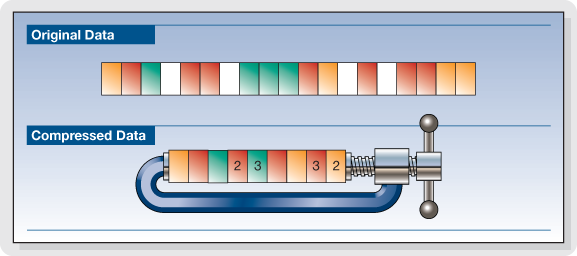
The RLE (Run Length Encoding) compression technique is oriented to equal byte sequences. In the original version, it provides the introduction of a special character that indicates the beginning of a sequence, and instead of encoding the same characters in the sequence one by one, it encodes only the first one, followed by a number indicating where many times drawn and repeated. Specifies with the Sc character at the beginning of the sequence, the statement

these ******** are eight stars… these Sc * 8 are eight stars

where 8 is not encoded as an ASCII character but as a binary number.

The decompression program interprets the next byte as a counter and rebuilds the original sequence.

For image compression, RLE encoding only works well with images that contain large areas of uniform color, but are not very effective with complex images.

Compression with loss of information.

Loss-free compression techniques are not sufficient to solve the problem of the huge amount of data generated by encoding multimedia information, e.g. Video images while allowing better use of memory space on disks or data transmission lines. High resolution. , audio or video.

However, to try to solve this problem, it is necessary to remember that multimedia information, although subject to transformation, can remain understandable; This allows for compression factors that are higher in some orders of magnitude than those observed.

These interventions can be studied based on the behavior (vision and hearing) of our sensory systems to reduce the required memory without obvious changes in information content. Compression techniques that do this are called “lossy” since the least significant piece of information is irreversibly suppressed. Therefore, it appears that the bitstream after decompression is different from the original, and therefore these techniques cannot be used for other types of information, e.g. Text. Furthermore, the information thus compressed is not suitable for further processing as the loss introduced with each subsequent step becomes more and more apparent.


Free Download Mp4Gain
picture


Mp4Gain Main Window
picture


Mp4Gain Features
picture


Free Download Mp4Gain
picture

Some of the most popular digital audio formats.

Main audio formats without loss of quality.


WAVE (.wav) – This is the most common uncompressed audio file format. When you rip audio from a music CD on your computer, this will be the format you get. It takes up a lot of space (1411 KB of information per second on 4400 Hz / 16 bits of stereo music), but reproduces the sounds in a quiet way. In terms of quality and amount of information, it resembles the AIFF (.aif) format, which is mainly part of the Mac world. Suitable for audio files and those that record music.

FLAC (.flac) – Free Lossless Audio Codec: It is an open source codec that is often used to store music CDs on the computer without loss of quality. While .wav offers uncompressed audio, .flacs are called “lossless c compressed”. However, compression is minimal and the vast majority of people do not notice differences between a Wave file and a FLAC file. However, they take up less space than WAV files. This is possible because they use a variable amount of compression as needed. This means that, in the case of very complex and rich music parts, it uses encodings that are equal to WAV files (1411 Kb / s data). However, in the case of the “simpler” parts, the number of bits used to represent them will be smaller. It is suitable for demanding ears who also want to save some space on their hard drives.

APE Monkey’s Audio is one of the most powerful and popular lossless multimedia compression algorithms for audio files.
The lossless format, that is without data loss, ensures that the original sound quality is maintained in smaller files than compressed sample formats (such as WAV).
The format used is “.ape”, Monkey’s Audio allows compression of a WAVin mono source and also the opposite procedure, ie mono decoding for other formats such as WAV or MP3

ALAC Apple Lossless Audio Codec: Similar to FLAC, which always uses maximum compression. The quality is good on average, but the format is not as effective as FLAC in terms of weight. Not all players support it, so if your life is not exclusively dedicated to Apple and its products, it’s not a recommended format. Other important but less popular lossless audio formats are Monkey’s Audio (.ape) and OptimFROG (.ofr).

AIFF Audio Interchange File Format is a standard file format used to store audio recordings on a personal computer. The format was developed by the Apple computer based on Electronic Arts electronic exchange format and is often used on Apple Macintosh systems, which is why it is also called Apple Interchange File Format.
The audio data in the AIFF file is not compressed, so the file tends to be much larger than other formats, both lost and lost, such as ALE or MP3. One minute sound records approx. 10 MB of data, this is because it is a format created for sharing, although it is also used for editing.
However, there are compressed formats, called AIFFC (AIFF compressed), that can reduce the file size by a third (AIFF3) or a sixth (AIFF6), but this results in a great loss of quality, so there is virtually no use.

The most important sound quality formats in loss quality.

MP3 (.mp3) or MPEG-1 or MPEG-2 Audio Layer III – is the best known compressed audio standard. It was the forerunner of the category (it was published as an international standard in 1998) and is still the most widely used. Minifying a WAV file to MP3 makes it up to 90% easier for MB. The quality varies depending on the bit rate, ranging from 32 to 320 Kbit information for every second of music. The default is 128 Kb / s. At 320 the performance is pretty good.

AAC (.aac) – Advanced audio coding. It’s an Apple standard that iTunes uses by default when importing music. It works like MP3, and with the same bit rate, it takes the same space. The difference is in the way compression is handled. In simple words, “music” sums up another way. According to many people it sounds better than MP3. Especially suitable for those who use iPhone and iPod to listen to music.

WMA (.wma) – This is a proprietary format from Microsoft and is considered Redmund’s response to MP3. Its incompatibility with the iPod makes it very uncomfortable. Incidentally, although most players support MP3, WMA does not. Basically, unless your music world starts and ends with Windows Media Player, it’s a generally discouraged format. It is not compatible with Mac and iTunes.


OGG VORBIS: It is an open source or free format, which means that it does not require any license to be implemented in an audio player (the details are irrelevant for us users). The quality is comparable to MP3, perhaps a little higher. A noble and well-made creation, but not widespread enough to justify its massive use. In light of all this, therefore, recording music in WAV and broadcasting it in MP3 or AAC is the most reasonable option. In this way, you will have quality when you need it and the guarantee of usability of music wherever you are.

What is video encoding and how does it work?

The technique of compressing videos

What do we mean when we talk about video coding or, as industry experts generally call it, video coding?

YOUTUBE VIDEO FORMAT

Simply put, video encoding is the process of compressing and converting video content. The ultimate goal is to use less storage space, use less bandwidth, and make the user experience smoother. It goes without saying that the compression process causes a significant loss of information. The more data that is applied, the more data is deleted in the video. The result is a different version of the original due to missing data.

mp4 videos

Why is video coding so important?

Video encoding is essential for transmission because it simplifies the transmission of video on the Internet through a compression process. Compression reduces the bandwidth required while providing a high quality experience. Without this, raw video content would not allow many users to view content on the Internet due to insufficient connection speeds. The protagonist of this process is the bit rate or the speed of digital data transmission that can be transmitted in a certain time interval in a communication channel. When streaming, the bit rate determines whether users can easily view the content or are exposed to video buffering.

Another fundamental aspect of video coding is compatibility. Indeed, sometimes the content is already compressed to an appropriate size, but it still needs to be encoded to be compatible with different devices and applications, although this is often referred to as transcoding.

The video encoding process is governed by video codecs, which are compression standards that are created through software or hardware applications. Each codec consists of an encoder for compressing the video and a decoder for restoring an approximation of the video for playback. The name codec is actually derived from the merging of the words “encoder” and “decoder”.

But what is the best codec?

It depends on the type of video. On this occasion we will describe the most commonly used.

To stream high quality video over the Internet, H.264 is arguably the most widely used codec for most multimedia traffic. This codec is considered to be of excellent quality, coding speed and compression efficiency, although it is not as efficient as the later HEVC (High Efficiency Video Coding) compression standard, also known as H.265. H.264 also supports 4K video streaming, a real advance for a codec created in 2003.

Now that we have an overview of codecs, let’s look at some compression techniques.

Compression techniques

The most common compression technique is scaling the resolution. The higher the resolution of a video, the more information is contained in each picture. One way to reduce the amount of data is to reduce the size of the image and then scan it again. As a result, fewer pixels are generated, which reduces the level of detail of the image, which has a positive effect on the amount of information required. This process allows you to set multiple quality levels for a video that correspond to different resolutions created. A practical example is if you are watching a movie in streaming before playing it, you can actually choose the resolution at which you want to watch it, provided your device
Support him

One video compression technique that may not be widely used is the interframe. This process reduces “redundant” information from one frame to another.

Another technique is the P-frame, short for predictive frame, which means that it can look back at an i-frame or another P-frame and understand whether the same images are present. In this case, this part is excluded for reasons of space.

B-Frame, on the other hand, is the bidirectional predictive frame that offers good compression without affecting the viewing experience. However, this technique requires a higher coding profile.

Another technique is that which makes it possible to intervene in the color. This process, called “chroma subsampling”, tries to maintain the brightness of the image, which affects the quality of the color. Finally, another method of compressing videos is to reduce the number of frames per second.

Audio formats

Audio formats

Compression

Compressions are systems for reducing the file size by using different types of algorithms and / or encodings.

compressed audio

There are two types of compression: lossless (compression), which compresses the file without deleting information. Decompression can therefore exactly return the original and lossy (lossy) compression, eliminating redundant parts that are considered irrelevant or irrelevant and the decompression does not return to the original.
It is clear that the first system preserves the integrity of the original, but less compressed, while the second implies a loss of quality, but compresses much more, in proportion to the degree of loss one is willing to accept. Let’s look at a few examples.

Lossless compression

Lossless compression is based on reducing the redundancy typical of human production.

human perception
For example, in a book dedicated to experimental music, the phrase “experimental music” is repeated many times with 19 characters. At this point, simply replace it with a symbol that is normally not included in the text, e.g. ‘# 1 #’ to reduce a term from 19 characters to one of 3 and store 16 characters for each occurrence. Actually we have to say “for every occurrence after the first”, because in order to unpack the text, we also have to create an index of the substitutions in which it is written in this case
# 1 # = “experimental music”.
Obviously, many other words or phrases are repeated several times in the book, and each of them can be replaced by a symbol such as # 2 #, # 3 #, …, # n #, where n is a progressive number, which ultimately makes significant savings.
The Lempel-Ziv (LZ) algorithm uses a similar system, the derivatives of which underlie many modern lossless compression programs, including the well-known ZIP.
In fact, the ancestor of many lossless encoders is the so-called Huffman coding. It is a redundancy elimination system that was developed in 1952 by the researcher of the same name, then an MIT student. His algorithm solves the problem of encoding a series of strings (string = any character set) as compactly as possible, taking into account the frequency with which strings occur: the most common is assigned the shortest symbol in to maximize compression. Here is a good example dealing with Huffman coding issues.

Another type of lossless compression, which is always based on reducing redundancy, is the so-called Run Length Encoding (RLE), which works in a very simple way. Suppose we have the following string of 20 characters
ABBBBBBBBBCDEEEEFGGG

By applying the RLE it will
A 9BCD * * * 4EF 3G

for a total of 13 characters with a saving of 35%.
In practice, a code consisting of the character and the number of repetitions was inserted instead of the repeated characters. The asterisk indicates that the following is the number of repetitions and is not part of the chain (this is of course the basic principle; the details of the coding may vary).
Of course, this system is not productive with text, but it is the case with images where long stripes of the same color are fairly common.

Lossy compression

Lossy compression is based on the elimination of the information components that are considered to be more or less irrelevant depending on the compression level required. At low compression levels, only the really irrelevant details are removed, while at higher levels, the sensitive details are also removed.
An example that is not audio is the encoding of JPEG images, in which nuances are eliminated by assigning neighboring pixel groups the same color if their difference is less than a value that is proportional to the degree of compression. On this page you can see the effect of the size reduction and the corresponding loss of quality when increasing the compression levels.

Further information on compression on Wikipedia (free, community-created encyclopedia) can be found here in English. Wikipedia also exists in Italian, but the content is smaller.
First class compressed audio formats
Lossless (lossless)
These formats work similarly to zip. You compress the content without removing anything. At the time of listening, it is necessary to perform a decompression and to return to the original in one of the linear formats already shown.
Since it is lossless compression, the comparison between these codecs is not made in

Audio compression, an explanation

Audio compression can be somewhat confusing at first due to the fact that the tools to implement it often have many elements that interact with each other and can be a headache.

Added to all this is the fact that audio / sound compression is often confused with compression in terms of digital formats (MP3 for example), which is a much more complex principle.

That is why we made this guide that aims to attack the most common doubts regarding compressors. The ones I had and the ones you probably have at the moment.

Let’s move on to the important:

What are compressors?

They are essentially an automatic volume or level control.

Let me explain: They are the equivalent of the fader of a console operated by a person in real time, that person has the function of lowering the fader when the volume of an element suddenly rises excessively. All this to control the dynamic range of said element and prevent it from going out of plane.

So what the compressor does in essence is reduce the level of a signal with parameters that are set by the user and that modify how it behaves.

How do they work?

Threshold and knee audio compression
An example of an acting audio compressor showing a 4: 1 reduction contrasting it with the signal without any reduction (1: 1)

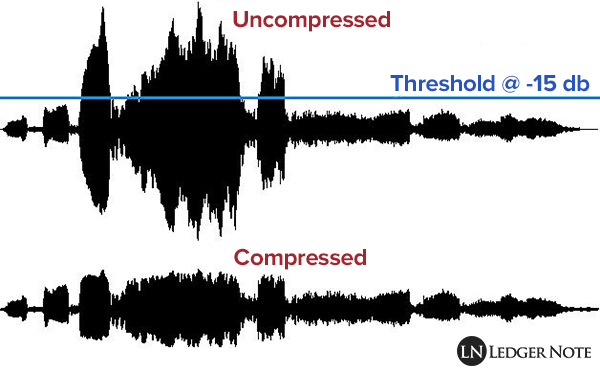
Comparing signals, that is to say: a signal enters the compressor, for example the voice we were talking about before and we set a certain level (threshold or treshold) which, if exceeded, causes the compressor to act reducing the level of said voice at the output as if it were the fader on a console.

So the compressor is all the time comparing the input signal against this threshold and reducing the signal at the output if it passes it. On the other hand, the amount of reduction at the output is not always the same, but can be modified by the user with another parameter.

What are all those knobs?

Compressors have various user-modifiable parameters that appear in the form of knobs on both digital and hardware models. Let’s see what they are:

Threshold or Treshold: we tell the compressor that if the signal goes above a certain level, it reduces it in gain. The lower the amount of signal enters the compression and therefore there will be greater reduction in gain. A detail to keep in mind is that in digital models the threshold will appear as a negative number, in essence the more negative that number is, the lower the threshold and the more signal is compressed.
Compression ratio or Ratio: here we tell the compressor to reduce the signal that exceeds the threshold by a certain proportion established by us. For example, if our signal passes the threshold by 10 decibels and we want it to decrease by 5 decibels, we put a ratio of 2: 1 (it works as a division). At higher rates, there will be a greater reduction, but also the compression may start to be noticeable, which that we generally don’t want to happen. What is sought is that it be transparent so that the listener does not realize that the signal was manipulated.

Attack or Attack: it is the time in seconds (generally in the order of milli seconds) that the compressor takes from the moment the signal passes the threshold to the complete reduction in gain that we set with the compression ratio. Keep in mind that the compressor essentially acts immediately, but it is this time that determines how it interacts with the envelope of the signal to be compressed.

Release: is the time in milli seconds that the compressor takes to return to unity gain once the signal stops being above the set threshold. In the same way that with the attack the release can modify the envelope of the sound in question and therefore is very important in the operation of the compressor.

Knee: it is a parameter found in some compressors that modifies the way in which the compressor begins to act, the name is due to the fact that the curve that describes the way in which the compressor begins to act is similar to a knee (knee in English ).
So that we understand better when we talk about soft knee we are talking about that the compressor starts to act gradually before the set threshold and reaches its compression ratio established in this way. Instead, a hard knee compressor will only act when the signal goes beyond the established threshold and therefore more aggressively.

Make up gain or output gain: is the parameter that controls the compressor’s output gain, after having activated and reduced the signal by a number of decibels. What is sought in general is that what was reduced in level is re-gained and therefore make the parts that had less volume now approach those that were compressed.

Digital Music: A Quick Guide to Having the Best Lossless Files

Digital Music: A Quick Guide to Having the Best Lossless Files

Digital Music

Surely changing our music from one side to the other, from an analog format to a digital one or even music already stored in digital format on a compact disc towards one for use on mobile devices, would result in a loss of sound quality that would exceed convenience and comfort.

This has been the main vision of people who care about sound quality, since the concept of digital music files was born. A reference generated by the common use of highly compressed lossy formats such as MP3.

wHowever, it is an opinion that simply “cannot take any more water.” Yes, popular formats like MP3 and AAC sacrifice some quality to keep file sizes small, but the emergence of lossless digital audio formats that are capable of preserving every piece of information from a CD recording means that a ripped file It may sound indistinguishable from the original.

You may still be wondering why you should spend precious time ripping up your CD collection. It’s all about convenience: a lossless digital music collection saves shelf space, is easy to move and to back up; for larger collections, it also makes locating individual songs and albums much easier and faster. You can also access a digital music library from multiple sources simultaneously, for example, from multiple network music players located in different rooms in your home.

Additionally, thanks to higher quality file acquisitions with popular streaming and download sites like B&W Society of Sound, higher quality music files can now be accessed as part of a subscription-based model without taking up space valuable on shelves – or even the attic – with physical means.

On the hardware side, storage devices like NAS and external hard drives offer huge amounts of space at ever lower prices. And with increasingly better and less expensive, widely available high-quality DACs, computers now offer excellent reproduction and can be easily connected to your existing hi-fi system, either wired or wireless.

When streaming or ripping discs, the file format option may seem complicated by too many options. This is what we think of the main formats that can be the salvation of true audio enthusiasts:

FLAC

Free Lossless Audio Codec is a popular choice for many audiophiles. Like MP3 and AAC, FLAC is compressed to keep file sizes relatively small, but unlike those formats, it is lossless and therefore – in theory – indistinguishable from the quality of a CD. In theory. Audio from CD converted to FLAC will typically shrink about 50 percent from its original size; a typical three-minute song on a CD will take up 30-40MB of space, while a ripped FLAC version of that song results in 15-20MB.

FLAC supports metadata (artist and song information can be embedded in the file and artwork can be referenced by the file) and will be played on a wide variety of software and hardware. Crucially for many, it is currently not compatible with Apple products like iTunes or the iPhone.

However, there are downsides to FLAC from an audiophile perspective and a lot of that comes during encoding and decompressing the file for playback. Because FLAC is unzipped on the fly, the sound quality is highly dependent on the software you are using to do that. Therefore, although it is theoretically lossless, there are still barriers to overcome when listening to the music contained in FLAC.

Apple Lossless

As you might guess from the name, Apple Lossless Audio Codec (or ALAC) was developed by Apple and works with company products like iTunes, iPod and iPhone (as well as supported by a number of other computers and players on software); If you are an avid user of the Apple team, it will be very attractive to you. However, like FLAC, this format is compressed, and files ripped from a CD are typically around 40-60 percent of their original size. Furthermore, ALAC suffers from the same decoding problems as FLAC.

AIFF

AIFF is a lossless format, but also without compression. While this means that it takes up as much space as the source file when ripping from a CD, it also avoids any compression issues, making it the ideal file for people who are concerned about sound quality.