Youtube: best formats and resolutions for Youtube

Youtube: best formats and resolutions for Youtube

YouTube Video Formats

Which configuration to choose for the best result

YouTube Video size

Google Corporation sets a number of requirements and offers many recommendations on video format, codec, bit rate, and resolution to upload to YouTube servers. Clips should be added in the highest resolution available, ensuring high image quality when viewed on large screens, flexibility when converting or rendering after editing.

Videos intended for rental should have a frame size of at least 1080p (Full HD) and an aspect ratio of 16 to 9, the parameters of most modern monitors. For commercial videos where you plan to insert ads, there are no frame size restrictions. However, you should not upload files with frame sizes below 720p at 16: 9 and 480p at 4: 3. With low quality, users with large monitors will find it uncomfortable to watch video footage, they may miss its content.

It is worth knowing that after downloading the video, YouTube always re-converts the material to optimize the playback quality.

In what format can you upload videos to YouTube?
In search of information on what video format is needed to upload to YouTube, you can re-read dozens of pages of information in articles and forums, and when you try to upload a finished file, you run into a problem. The service will not read it. At the same time, a file of a certain format may be compatible with a video hosting service, but the video codec used to encode it is not. To avoid duplicate work, convert or save your work in the following formats:

3GP;
AVI;
CineForm;
DNxHR;
FLV;
HEVC (compressed with H.265 codec);
MOV;
MP4;
MPEG4;
MPEGPS;
ProRes;
WebM;
WMV.

The platform does not support pure audio files, even in such common formats as WAV and MP3. If you want to share your own composition or track that does not violate the rights of its owner, convert the audio to MP4 or other format by adding a video sequence in the form of a cover or a series of thematic images. The following types of files can be used as an audio track:

AAC (in a MOV container);
FLAC;
MP3 (included in a WAV container);
PCM (to WAV).
Buy Video Downloader for YouTube (download videos, change video …
The resource administration does not give recommendations on the most suitable format, however, it is advisable to give preference to MP4 due to a number of characteristics of the container. For example, most digital devices write in MP4, many media players are sharp for it, the format has a higher compression ratio than AVI.

Video size (resolution and aspect ratio)
The size of a video to upload to YouTube depends on the way it is viewed: in an Internet browser, an application for the Android or iOS mobile platform, a third-party player, and the format: classic horizontal or vertical, shot on a mobile device. The player for mobile platforms adapts to the dimensions of the video, regardless of its orientation, trying to fill the maximum area of ​​the screen with useful content. In this case, the frame is neither stretched nor compressed.

The YouTube video player window has a length-to-height ratio of 16 to 9. Deviating from the royalties is not recommended; this is a classic format, the most widespread in the world.

When playing videos with different settings, gray or white bars may appear in the corners or at the top and bottom of the screen, depending on the active theme. They will be black in the internet browser. Avoid the appearance of these stripes in the video during recording and eliminate them during editing. They make it more difficult to automatically resize the player window.

VDSLR.RU – Export Premiere video to Vimeo and Youtube without black …
The optimal video size for YouTube in 16: 9 progressive scan is shown in the table. Meeting the requirements will prevent solid color streaks on the sides or below and above the image when viewed on most mobile devices, televisions and monitors.

Height (p) Resolution (px)
2160 3840 x 2160
1440 2560 x 1440
1080 1920 x 1080
720 1280 x 720
480 854 x 480
360 640 x 360
240 426 x 240
It is advisable to take care of the video transmission format (1080p) and MPEG-2 or MPEG-4 for DVD players. The following features ensure that there are no playback issues in any way, regardless of device and platform.

WHICH VIDEO FORMAT IS BEST AND WHY: A DETAILED DESCRIPTION

WHICH VIDEO FORMAT IS BEST AND WHY: A DETAILED DESCRIPTION

Video Format

Not all video fans understand how some video formats differ from others. And in vain! After all, if you accidentally or intentionally install the wrong extension in the video editor while saving the project, then serious difficulties with the clip playback can arise. In this article, you will learn about the features of popular extensions and when and which one to choose.

Video File Formats

What video format is better?

Learn about the characteristics of the formats, then you can watch videos on any device!

WHAT IS FORMAT
The format is the structure used to store data. Its designation is an identifier, separated by a period at the end of the name: .wmv, .avi, .mp4, etc.

For a video file, the media container and codec are responsible for the extension. When recording or rendering a movie, the data, including individual frames and an audio track, is compressed and placed in a special container. For later playback, the same video codec is used, which can decode information and display it in its original (or almost original) form. The media container itself cannot determine how the data is encoded, but it works fine with certain codecs. It also stores meta information about the object: size, duration, author, etc.

Both codecs and multimedia containers are involved in the recording and playback process, but the format is indicated precisely by the type of container used: AVI, MPEG-4, MKV and others. Codecs also have their own names: H.264, DivX, Theora. But most of the time they are distributed in packages, and the description does not indicate their names, but the media containers with which they work. This is a simplified answer to the question of what is a format. A more complex one involves many terms that are unnecessary for the average user.

WHAT ARE THE DIFFERENCES BETWEEN CONTAINERS?
In the simplest cases, they only store video and audio streams. In more complex ones, you can save multiple video tracks, synced subtitles, and chapter marks for quick navigation through content.

When choosing which format is best for converting video, you need to remember that certain media containers are used for minimal compression to get an accurate image, but this often results in a large size. Others compress the material more, saving space on the media. Some of them support tracks that are only compressed in specific ways. For example, MPEG-4 Part 14 works with files compressed with H.265 / HEVC, H.264 / AVC, and MPEG-4 Part 2.

WHICH VIDEO FORMAT IS BEST?
Almost any of the extensions have their own advantages, otherwise their existence would be meaningless. But when creating your own movie or, for example, choosing a movie to watch, you have to rely on two components: opportunity and prevalence.

Choose the format according to the device you will see the video on

Capacities mean the number of video tracks that will be stored there, subtitles, chapters, and more. The prevalence depends on the probability that a movie will run on a device without installing additional codecs. If you directly answer the question of which video format is better, then the answer will be one of the three most common: AVI, MKV or MP4.

What is bit rate and what is it for?

What is bit rate and what is it for?

bitrate

If you become familiar with the term, you can understand that there is nothing supernatural about it.

Bit-Rate

This value can be found in multi-server settings when people are streaming video and audio.

For example, when making desktop and online converters. To understand how to change the video and audio bitrate, you need to go to a specialized site, where, in principle, more information on how to do it.

Also, it should be borne in mind that you can not do without a special program. It should be used 100 percent and only after that will it be possible to see the result on whether the bit rate has been changed in the video or audio file.

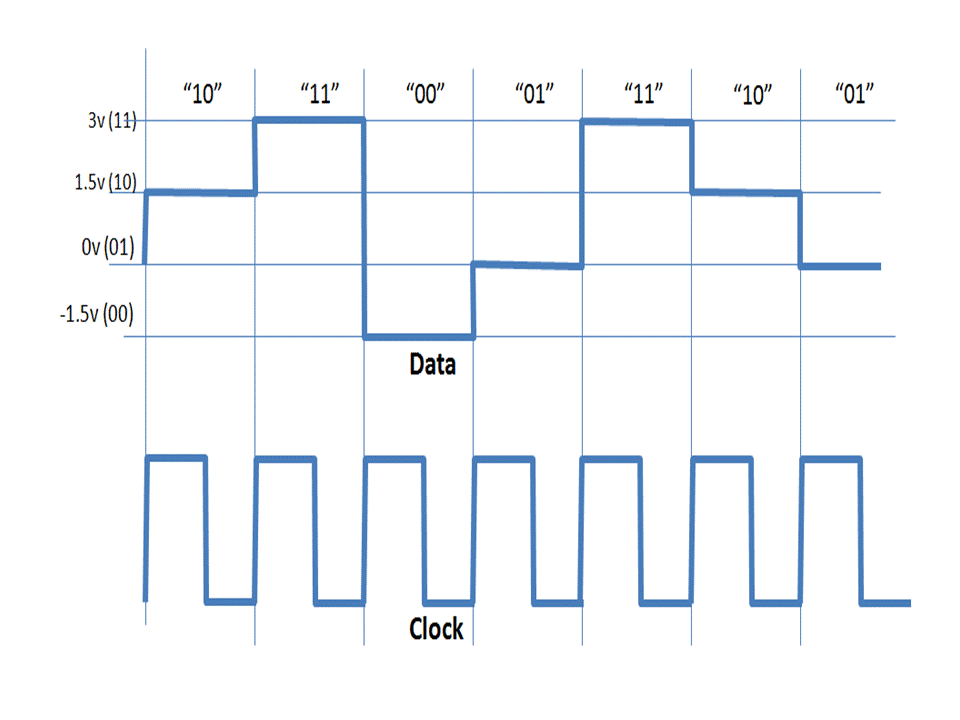
There really is a lot that you can achieve with modern software. What features of the term should I pay attention to? It should be noted that the bit rate is translated exactly as the width of the stream. Basically, it is the amount of information that is transmitted or processed per second of time.

This concept is more related to the multimedia sphere, for example, the video information that can be seen on the screen in one second – this is the bit rate. Among the characteristics are the following: To measure bit rate, one must understand what a kilobit per second is. This is the transmitted information that can be viewed. Thanks to the VideoMaster program, the kilobit can be tracked visually.

A video clip where the low bit rate is one that is low quality in digital format. Also, you can see how the video looks blurry, dull, and pixelated during streaming. At a high quality bit rate, you can see a wide color gamut, as well as hear a high enough quality sound, because the music gamut will be really distinguishable and clear. Varieties include: a constant type of bitrate, variable, averaged.

All of them can be viewed using the VideoMaster program, which directly adjusts the video to every second. Bitrate can be used in the program in any specific situation to remove one second or another from the video, or leave it.

What is the bit rate?

What is the bit rate?

What is bit rate

What is the bit rate? It is difficult to do without this term when we talk about audio and video files. It is not difficult to understand what you need to see behind this term. Even someone who is far from any modern technology.

What is bit rate

First, you need to understand that there is a general principle for compressing and encoding files. For example, MP3 encoding assumes that the original audio file must be cut into chunks, the length of which will be 50 milliseconds. Each of these fragments is analyzed separately to break down into harmonics.

A person perceives the sound with the ear so that it throws out those harmonics that it perceives worse. That is, quieter sounds, when the loudest are heard, you do not perceive them. Therefore, due to the inertia of hearing, a person makes masked sounds. This means that you will not be able to hear any short-term signals that will pass in a fraction of a second, for example for a clap.

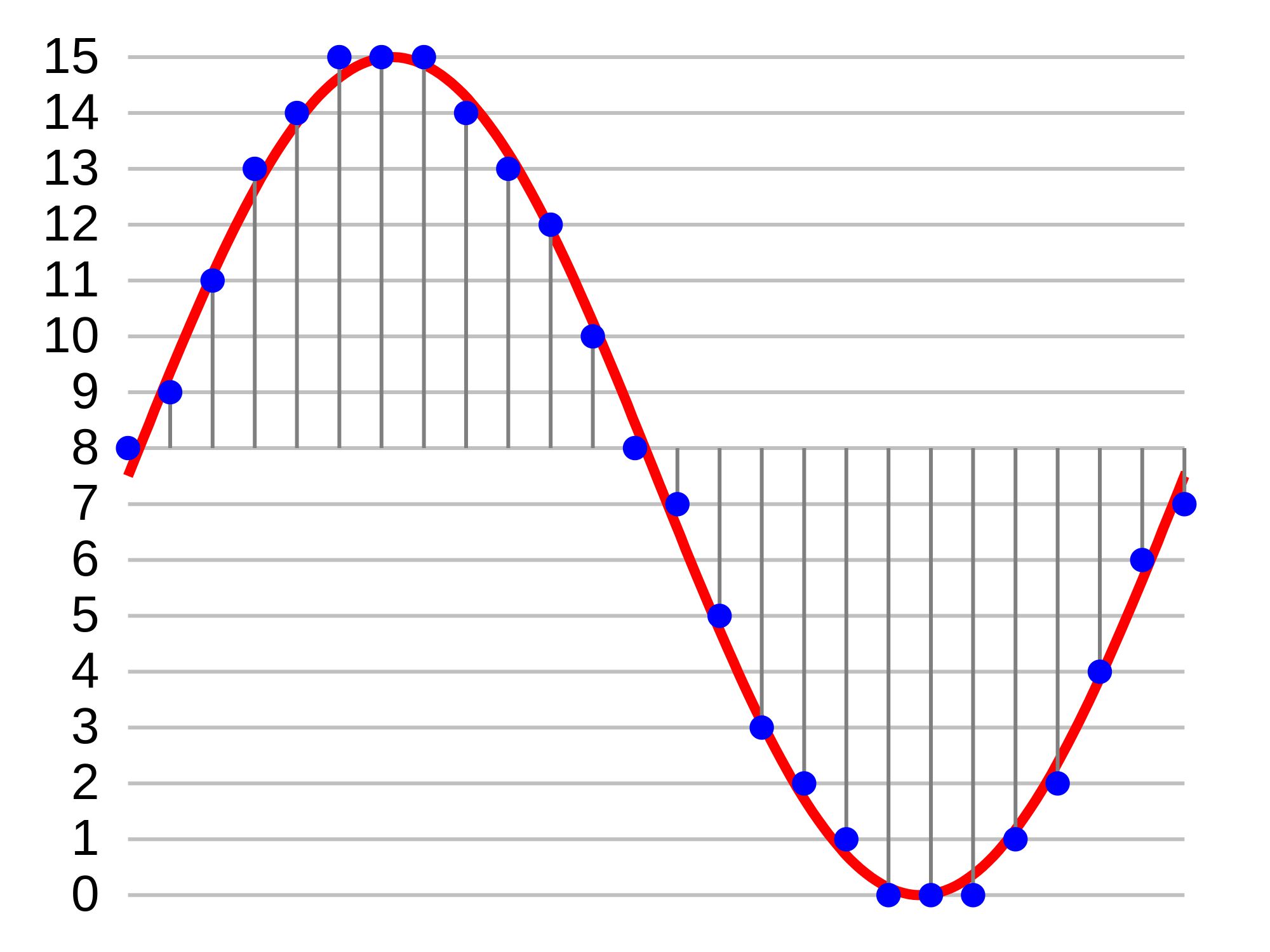
Information about the harmonics remaining after filtering is recorded in an MP3 file. It is significantly smaller than the original WAV. A WAV file is a complete repository of information about the original sound, which is digitized and quantized at 44 kHz. The resulting information is stored on normal audio CDs.

When playback is in progress, reverse conversion is performed. That is, the remaining harmonics are transformed back into a sound wave. Some of the information about the original signal is lost because the sound does not match the original. Since insignificant sounds were removed, the human ear does not distinguish the signal from the original. The same as it was before packing in MP3.

This means that the bit rate should be called the amount of information per unit of time. The essence of the bit rate is how much information we can spend on each second of recording. The smaller it is, the smaller the size of the files of the same length in time. This means that it will be necessary to eliminate a greater number of “extra” harmonics.

The higher the bit rate, the larger the file size and the higher its quality. For bit rates, units of measure are provided: kilobits per second (Kbps) and megabits per second (Mbps). The MP3 audio compression algorithm is mainly used with 128 kbps compression.

There are also two types: constants and variables. For example, in video compression, when using a constant bit rate, a fixed amount of data is used to encode one second of a movie. With a variable bit rate, depending on the scene in the movie, the codec sets its own bit rate value.

Speed ​​of sound

Speed ​​of sound

speed of sound

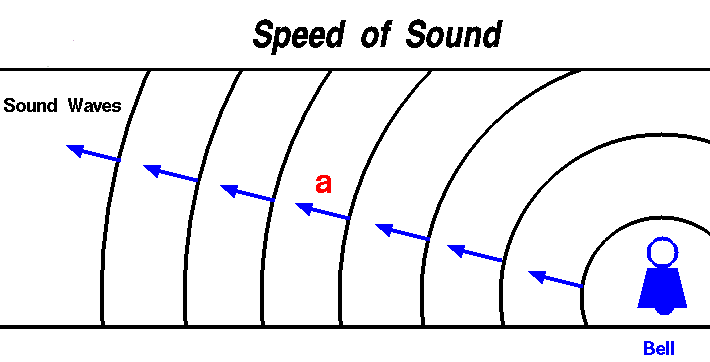
Sound travels through sound waves. A vibrating object transmits its vibration to neighboring molecules or particles. There is a transfer of motion from one particle to another, which results in the appearance of a sound wave.

SPEED OF SOUND

The means of propagation of sound waves can be made of various materials: wood, air, water; therefore, the speed of propagation of sound waves must be different. If we talk about the speed of sound, we must ask ourselves: in what environment? The speed of sound is a characteristic of the medium in which the wave propagates.

The speed of sound in air is about 335 m / s. But this is at a temperature of 0 ° C. With an increase in temperature, the speed of propagation of sound also increases.

Sound travels faster in water than in air. At a temperature of 8 ° C, the speed of its propagation is about 1435 m / s, or about 6 thousand km / h. In metal, this speed reaches about 5,000 m / s, or 20,000 km / h.

Audio compression for music lovers

Audio compression for music lovers

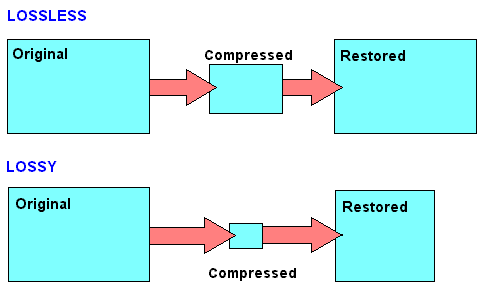
Lossy compression


the truth about high bitrate lossy compression

lossy compression

In the opinion of most people, the word music lover is most often associated with a person who not only loves and collects music, but also appreciates high-quality music, and not only in artistic and aesthetic terms, but also the quality of the recording of the phonogram itself. Just think, a few years ago, an audio CD was considered the standard for music quality, whereas a computer, even in dreams, could not compete with the quality of a CD. However, time is a great joker, and he often likes to turn things upside down. It would seem that quite a while, a year or two passed and … that’s it, the CD on the PC went into the background. Don’t ask “why?”, You know the answer to this question yourself. Everything is to blame for the revolution in the world of computer sound: audio compression (hereinafter referred to as audiolo compression which means lossy compression to reduce the size of the audio file), which made it possible to store music on disk hard, lots of music! In addition, it was possible to exchange it over the Internet. New sound cards have been released, capable of almost “squeezing” studio quality out of a piece of hardware that seems useless in terms of music. Today, even having a computer that is not very smart in performance, having bought a Creative SoundBlaster Live! and remembering that since Soviet times there is a good amplifier and good acoustics, you will get nothing but a high-quality music center, the sound of which is inferior only to very expensive audio equipment (average or even the highest Hi-Fi category ). Add to this the general availability of music files and you understand that you have the power in your hands. And then there is a revolution, and you understand that a compact disc is no longer so convenient, you are fascinated by something completely different: the magic “MP3” signs. You cannot eat or sleep; you are faced with the seemingly insoluble “chicken and egg” question: how to “squeeze” and, most importantly, how to “squeeze” …

This is where I will help you. This article is the beginning of my new series of informational materials on music on the computer. For over a year developing OrlSoft MPeg eXtension and maintaining an extensive database of MP3 files, I have accumulated a great deal of research on audio compression. It is these studies that I will try to share with you. Many articles have been written on audio compression by different respected authors, so I will try not to write what I can easily find in other sources of information. I would like to put my position on the subject we are considering simply and clearly. We will not consider audio compression to be as compact a tool as possible put audio information on your hard drive (so that you can record so many hours of music there). Yes, compression allows you to record music more compactly, but my goal is to minimize quality loss by converting “pure” audio to compressed audio. This is why only high bit rates and qualitatively compressing encoders are considered in these modes. So it is much more convenient to work with compressed audio – instant access to any track from any album, convenient software for playback. And, of course, the financial issue has not been forgotten either.

Of the audio compression formats that exist today, in my opinion, three deserve attention: MP3 (or MPEG-1 Audio Layer III), LQT (as representative of the MPEG-2 AAC / MPEG-4 family) and a Completely new OGG format (Ogg Vorbis) developed by a group of enthusiasts:

MP3 is by far the most used of these (mainly because it is free). Let me remind you that it was thanks to the MP3 format that the victorious procession of compressed audio took place. However, as often happens with pioneers, little by little it is losing ground and giving way to new and better formats.
The second format, LQT, is a representative of a new direction of audio coding algorithms, a representative of the AAC family. This is a fairly high quality, but commercial and highly classified format.
OGG became widely known to the public this summer and is currently developing rapidly, soon (with the launch of the Encoder and Decoder) it should beat MP3 with better sound quality with smaller file size.

What is the difference between bitrate 128 and 320.

What is the difference between bitrate 128 and 320.

128 kbps vs 320 kbps MP3

Have you ever wondered what exactly you lose by compressing from lossless to 128kbps or 320kbps mp3?

128 kbps and 320 kbps MP3

I checked it and the result seemed interesting to me. First of all, I propose to take a survey to understand for yourself if you hear the difference. If you are not sure what you are hearing or you are sure you are not listening, then I bring you a simple and elegant idea: you should take and collide with your forehead two sound waves, one of which will be in antiphase, respectively, when you mix two. tracks, you will mainly hear what is not extinguished. I don’t promise cool graphics yet, but on your own system you can hear exactly what sounds were lost when compressed from flac to mp3 128 \ 320 kbps, file with examples at the end of the article.

You need to download and listen to 12 tracks for 30 seconds. Then specify one of the 3 options for each of the 4 songs (128 kbps, 320 kbps, or lossless).
The survey is anonymous, but you can specify a unique hash and tell me, as a last resort, post your opinion here, but always under the spoiler. The survey will last until February 25, after you publish the key and statistics.
Files on Yandex Disk, mirror on Dropbox (~ 80Mb).

Description of the experiment

Source files are cut into 10-second chunks, each chunk is exported to wav. After importing the resulting tracks, 2 seconds of silence and a second tone signal are added at the beginning of each, then converted to mp3. After importing mp3 files, it turns out that relative to the original, the resulting file “went ahead”. This is not a bug, it is. We sync against the given pitch signal from the original (I tried various values ​​for each mp3 file, which I then refined to get the best result), remove the pitch signal, mute, and export the resulting tracks to wav. Now it remains to invert the tracks so that we obtain multidirectional peaks, and mix with the original.

Outcome

Yes, there is a difference. Yes, especially when compressing up to 128 kbps. Yes, it depends on the music. Yes, even more of the audio path.
You can draw an independent conclusion and hear the difference by downloading the files at
Bit rate is indicated as one of the main characteristics of video and audio recordings. Most users are used to thinking that it determines the quality of the downloaded file. But what are bit rates and how do they really characterize music files and videos?