APTX AND APTX HD: WHAT IS IT AND WHAT IS THE DIFFERENCE BETWEEN THEM?


Free Download Mp4Gain
picture

APTX AND APTX HD: WHAT IS IT AND WHAT IS THE DIFFERENCE BETWEEN THEM?

aptX, aptX HD, SBC o ACC

Wherever we read about Bluetooth, in addition to the name itself, we also constantly come across all kinds of incomprehensible numbers and letters. Nowadays the designation aptX HD is “in vogue”, which has recently replaced the shorter aptX.

APTX y APTX HD

It is clear that HD means “high definition”, but how high and what does aptX mean? And how is aptX different from the new aptX HD?

In general, let’s find out.

So:

WHAT IS APTX?
aptX is a digital technology (also known as the Bluetooth codec) that allows audio to be transmitted at 16-bit / 44.1 kHz at a compression rate of 4: 1 and a data rate of 352 kbps.

This is brief. Actually, you can easily find all of this in any aptX codec description. And it will probably also be written that thanks to aptX your smartphone, laptop, AV receiver can transmit sound through a Bluetooth channel “with a quality close to that of a CD”. Which sounds a lot more encouraging than the boring spec numbers.

In general, aptX technology is capable of providing CD-like sound quality to music, and as a rule it does.

Another thing is that you need to distinguish between “near” and “true” CD quality. And the difference between these two “qualities” is only the level of compression (compression), which aptX, like any other Bluetooth codec, is used to reduce unavoidable delays. that arise during the encoding and transmission of stereo sound. Simply put, aptX always compresses the signal before sending it, and the receiving device (headphones, external speaker, etc.) decompresses this signal during playback. It takes time, otherwise nothing.

When you listen to music, any delay in the operation of the devices does not matter, and you simply do not notice them. Also, when transmitting a wireless audio signal, even between your smartphone and headphones, the delays can be very significant. But when you watch a video, the delays appear almost immediately. The actors suddenly stop “putting their lips to words”, the sound of the sequence clearly does not match what is happening on the screen, etc. If you watch Netflix or other video streaming services, then this is all familiar to you too.

Therefore, a special version of the codec, aptX LL, which stands for Low Latency, that is, “short delay”, has been developed specifically for the transmission of sound in video (and for all other cases where the minimum delay It is important). aptX LL also offers the same “CD-like” sound quality, but reduces the time required for data transfer and decompression to 32 milliseconds. Technically, this is also a lot, but the user’s brain does not notice such a delay. Therefore aptX LL is used in gaming headsets and headphones, where minimal latency is even more important than sound quality.

aptX and aptX HD: what is it and what is the difference between them?
Sennheiser’s new MOMENTUM Free mobile headphones with low latency aptX codec support

Now we can summarize: with aptX, Bluetooth headphones, earphones, external speakers and other devices sound better, moreover, aptX also works more efficiently than most other Bluetooth codecs, hence aptX support is provided in almost all devices that send and / or receive audio signal through the Bluetooth channel.

WHAT IS APTX HD?
aptX HD is the same Bluetooth aptX codec, but with an improved one, it can stream 24-bit / 48kHz audio at 4: 1 compression rate and 576kbps bitrate.

Yes, numbers again. But there are not many yet, and as we can see, they are somewhat different. It’s easy to see that aptX HD is capable of delivering higher quality audio at a much higher speed (less latency). And files in 24-bit / 48 kHz format already have real HD sound, which is so appreciated by owners of expensive wired headphones, and in which there is very little background noise and even the smallest sound nuances are clearly audible.

It should be noted that some “musical” smartphone models (eg the LG V series) can transmit such sound, but only in wired mode, that is, through a 3.5 mm “mini-jack” for headphones. , and the 24-bit / 48 kHz quality for them is actually the limit.

However, there is a difference between 24-bit / 48kHz cabling and 24-bit / 48kHz wireless (i.e. Bluetooth). And it consists of signal compression. The new aptX HD differs from the usual aptX in a more efficient compression algorithm (also called “smooth” in the descriptions), but not flawless.


Free Download Mp4Gain
picture


Mp4Gain Main Window
picture


Mp4Gain Features
picture


Free Download Mp4Gain
picture

Which audio codec for Bluetooth is better?

Which audio codec for Bluetooth is better?

Bluetooth Audio Codec

The best codec is the one that can deliver the best sound quality. But if they were considered among the popular formats, it was difficult to choose the right option. Each one has positive and negative characteristics that influence the final choice.

Bluetooth audio codec

Which audio codec is better?
When choosing codecs, the following nuances should be taken into account:

Experts believe that the sound quality should be similar to that of CD audio. The sampling frequency must be 44.1 kHz and 16 bits. These are average values, they are observed only in the rarely used LDAC algorithm;

The aptX codec has modest performance, but it provides high-quality audio files. It is popular as the only high-definition Bluetooth codec;

All algorithms perform audio compression. This is necessary to reduce the bitrate to the maximum allowed for a particular codec. This means that when using any algorithm, the music will sound a bit distorted, in some it will be more obvious (for example, in the SBC format), in others it will be almost invisible (LDAC, aptX);

When choosing codecs, do not forget about the model and operating system of the smartphone, tablet and other devices. For Android devices, SBC or aptX is better, but for Apple it is recommended to use Advanced Audio Coding with an improved algorithm.
Below is a table with the main indicators and supported formats of popular algorithms.

Codec Sampling frequency (kHz) Bit rate indicator (kbps) Audio formats
SBC 46-48 328 MP3
CAA 42-44,1 250 MP3, AAC
LDAC 94-96 990 Lossless Formats, Hi-Res Audio
aptX 42-44,1 352 Audio CD
aptX HD 46-48 576 Lossless Formats, Hi-Res Audio

The SBC format codec is considered obsolete and is rarely used for playing music and audio files. It was originally created for the transmission of voice and sound data via Bluetooth. Over time, improved algorithms have appeared. If you want to buy wireless headphones for normal use, then it is better to give them to aptX based devices, these will transmit sound without obvious distortion, noise, squeak.

If you are using Apple devices, only AAC headphones will work. The algorithm is adjusted for this technique, you will be able to transmit the quality of the music. But when using it for Android OS devices, the sound will be distorted with interference.

For music lovers who value sound quality, the aptX HD algorithm is suitable. It has good sample rates, bitrate levels, and supports modern audio file formats. The codec characteristics convey high quality sound, the acoustics are delivered without distortion.

But if the price is not an obstacle, you can afford wireless headphones, devices, smartphones, tablets, LDAC-based players from the famous Sony company. The technique is quite expensive, the cost can amount to several hundred dollars, but the characteristics of the algorithm fully justify it.

Codecs are an important prerequisite for high-quality sound reproduction when using Bluetooth-based wireless devices and headphones. Without them, the music will be poor quality, distorted, and constant interference will make the melody shrill and vague. When using popular brand devices (Huawei, Xiaomi, iPhone), it is worth applying suitable algorithms that suit the device and the device’s operating system.

What are audio codecs?

What are audio codecs?

Audio Codec

High-quality music without interruptions or interference is every music lover’s dream. Devices with a Bluetooth system are popular. Wireless headphones provide free, wire-free listening for lightness.

Audio Codecs

When using them, it is fashionable to do movements, running, playing sports, this will not affect the operation of the device. For its operation, the Bluetooth LDAC, AAC, APTX, SBC codecs are used. Each of them has distinctive characteristics, specific functions that must be considered in advance, this will help to break the principle of operation of these systems.

Why are codecs needed
Codecs are used to improve the quality of music file transfer via Bluetooth to wireless headphones. The system was originally created for data transmission, but it had problems with audio quality. The sound was distorted by noise and the development of codecs helped eliminate the annoying problems.

The operation of the algorithm is determined by the following criteria:

Sample rate indicator. Expressed in Hz. Indicates the data recording frequency for 1 second of sound. The higher the criteria, the better the sound quality;
The bitness of the recording ((Bit-depth). The bit is used for the measurement. If we consider a CD, then 16 bits is enough to record. The indicator is enough to record music up to 96 dB. But they have progressive recording methods , for which 24 to 32 bits are used.;
Bit rate. The indicator is expressed in kb / s. Reflects the amount of data the device processes to play 1 second of audio. A high value records a large amount of audio data for 1 second.
For reference! Voice transmission between carrier networks is regulated by the session border controller. This is carrier-class software that is part of carrier’s NGN networks. It issues signaling protocols and their dialects, analyzes the quality of the media channels through which voice traffic is routed.

Types of data storage and transmission formats
There are three formats for storing and transferring data: uncompressed, lossy (lossy compression), and lossless (lossless compression).

TOP 5: Bluetooth audio codecs: aptX + (HD), LDAC, AAC and SBC

TOP 5: Bluetooth audio codecs: aptX + (HD), LDAC, AAC and SBC

Bluetooth audio codec

There are 5 main Bluetooth audio codecs, with which sound is transmitted from a source to headphones (or speakers) via Bluetooth: SBC, AAC, aptX, aptX HD, and LDAC. As wireless connectivity becomes more and more popular, it is a good idea to understand what Bluetooth codecs are and how they work.

Bluetooth Audio Codecs

Bluetooth aptx

It is worth noting 2 points at once:

-Bluetooth sound is still noticeably worse than wired sound in all quality parameters;
-At this stage, wireless sound with high-quality codecs can meet the needs of most users.
We will no longer focus on these “axioms”. In general, they are clear. And many people with experience in listening and comparison are unlikely to argue with them.

How to choose, change and learn the Bluetooth codec on an Android phone?

Which is better: listening to music via cable or via Bluetooth?

Basics of Bluetooth audio streaming

Bitrate
What is bitrate, I think everyone knows. This is the number of bits that are used to transfer data per second. The higher it is, the better, obviously. But the more resources required, in particular power consumption, disk space, etc.

Compression has long been used to optimize resources, lossy and lossless. Lossless compression uses algorithms to reduce the bit rate and file size without altering the original. That is, without loss, you can restore an exact copy of the original uncompressed file.

Maximum bit rate of bluetooth codecs
Maximum bit rate of Bluetooth codecs

Lossless processing allows you to reduce the bit rate a maximum of 2 times. More or less. For example, for a CD quality file (1411 kb / s) compressed without loss, we will see values ​​of 770-900 kb / s. Anything below is lossy compression.

When the bit rate and / or file size needs to be further reduced, it is compressed by discarding the “irrelevant” bits of information. That is, the selected codec, according to its algorithms, “decides” in which frequency range there is no data (or it can be neglected), and discards it. The uncompressed original cannot be recovered from the resulting file.
The algorithms for the codecs are different: some exclude only high-frequency sounds, some are based on psychoacoustics. For most, the difference between a good lossy track and its lossless version is negligible or non-existent.
In addition to “discarding” in lossy compression, “overlapping” information blocks are added. This part of the algorithm aims to flatten the signal and correct for quantization errors.
Sample rate and bit depth
The sample rate shows how many “discrete” segments the analog signal is divided into for digital recording. The larger it is, the closer the “figure” is to the original. Measured in Hertz. This concept is inextricably linked to the frequency range.
A person hears sounds from 20 Hz to 20 kHz. It has been shown that to quantize (digitize) a lossless audio signal, the sample rate must be more than 2 times the frequency range of the original audio signal. Consequently, the 44.1 kHz CD quality is sufficient: the creators of the format relied on this law.
Bit depth determines how many bits are needed to quantize each of the preceding segments. The bigger the better. It is logical that the audio format (or codec) is considered better the higher its bit rate and sample rate. 16 bit 44.1 kHz for CD versus 24 bit 88.2 (or more) kHz for Hi-Res Audio.
Sampling rate
Sampling rate

Background noise level
The background noise level determines when the desired signal becomes indistinguishable from the “noise” of the codec compression algorithm, in this case. The lower this level, the wider the dynamic range of the final signal, the quieter the sounds we can distinguish.

Noise level LDAC (990 kbps) (CD)
Example: LDAC noise level 990 kbps

On the charts, it is more correct to navigate from the highest peak, it can drown out the lowest sounds. It is not only the level of the peaks that is important, but also how smooth (“dense”) they are. Typical background noise levels are indicated in graphics by a dotted line for 16-bit quality and a top red area for 24-bit quality.

All codecs “try” to save bandwidth. In addition to all other settings, quantization noise is removed, if possible, in the HF range above 20 kHz. A person does not hear these sounds, so the algorithm is justified.

H.266 / VVC (video compression standard)

H.266 / VVC (video compression standard)

VVC (H.266) CODEC

A new standard for video compression without quality loss appeared
On July 7, 2020, the Fraunhofer Heinrich Hertz Institute research organization introduced a new video compression standard: H.266 / VVC. The codec created will reduce the size of video files in half, while ensuring fast data transfer between devices.

H.266 CODEC

Fraunhofer HHI explained that the new solution focuses on efficient data compression while maintaining original quality. The codec is capable of performing tasks twice as efficiently as the HEVC solution, which was introduced in 2013. The codec does an excellent job of handling ultra high definition video (4K, 8K, 360 degree video) as well as with more common formats (480p, HD (720p) and FullHD (1080p)).

A new video compression standard has been released. The size is reduced by half without loss of quality.
For example, the HEVC codec above would require 10GB for 90-minute long UHD video. The VVC codec will compress video down to just 5GB. H.266 / VVC is also well suited for text, graphics encoding, the solution supports adaptive resolution switching, 10-bit and HDR. H.266 / VVC was developed in partnership with Apple, Intel, Huawei, Ericsson, Qualcomm, Sony, and Microsoft.

Fraunhofer HHI intends to create a uniform licensing model for patents related to basic codecs, adhering to the FRAND principle (“fair, reasonable and non-discriminatory”). Fraunhofer HHI will present a list of the first applications that support encoding and decoding using the H.266 / VVC standard in Autumn 2020. It is assumed that before 2021-2022, hardware solutions that support the new standard, although chip development aimed at accelerating H.266 at the hardware level is actively underway by July 2020.

How is the video format different from the codec?

How is the video format different from the codec?

format vs codec

How is the video format different from the codec?
What is the video format?
What is the video codec?
What codecs are there

format vs codec

What is the video format?
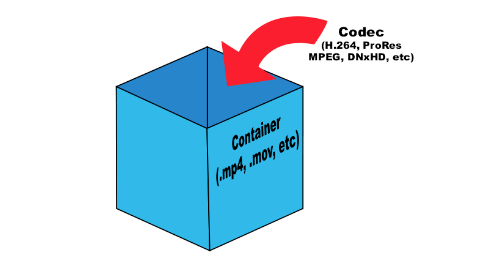
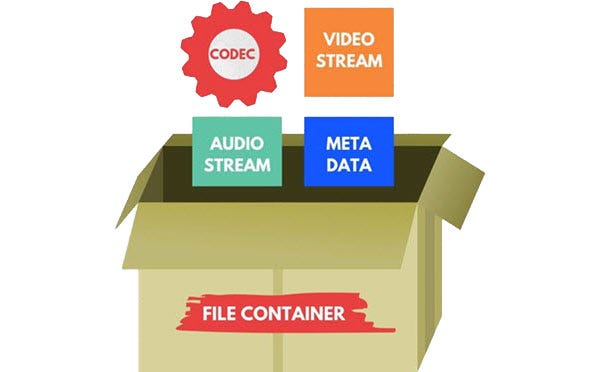
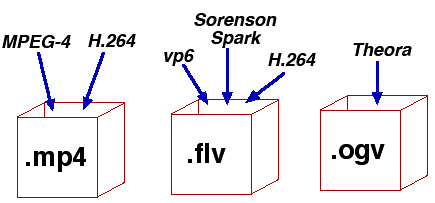
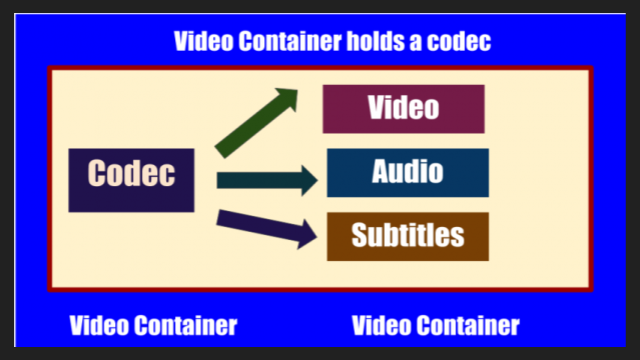
Although there are many video formats, from analog recording methods (VHS, for example) to digital (Betamax, DV and others), in everyday life we ​​often talk about file formats that contain digital video. In fact, these files are containers that contain not only video, but also various audio tracks and / or subtitles. Each file format has its own characteristics: some allow streaming, some do not. Some may contain multiple audio and video tracks, while others may contain only one. The container only provides one header – “instruction”, which describes how and how to open the tracks stored in it. All information is contained in compressed form, and each object packed in a container is processed in a specific way, characteristic of the selected container type.
The most common container formats are:
1. AVI (Audio and Video Interleaved) developed by Microsoft for Windows. In theory, it can store various audio and video streams, in practice it is rarely used.
2. FLV (Flash Video) is optimized for streaming video over the Internet; Advantages: quality preservation even at low bitrate, the ability to view from anywhere, regardless of the operating system.
3. 3GP focuses on mobile devices that provide the ability to record / view audio and video.
Most of the listed formats are commercial, but there are projects based on completely open standards. The most popular among them is MKV (Matroska).
Although it is more correct to use the term “media container”, in colloquial speech the word “format” has become more popular. There is no crime in this, so in the communication process you can safely operate with the data, leaving the “containers” for professional discussions.
It is sufficient that the player program understands how to correctly identify the type of container to correctly reproduce the data stored in it. Consequently, the user must know which formats the player supports and install the necessary set of several on the computer (if one cannot play all of them).
Generally, a splitter program is involved in unpacking file and media containers (it can also be part of a player). Your task is to extract the content and only then transfer each audio / video stream for decoding using codecs.

What is a video codec?
To decrypt the contents of a media container and convert it into a video stream, you will need codecs, programs of formula similar in principle to filing cabinets. Having the required codec will allow you to correctly decompress the compressed image, so it is important to have as complete a set as possible of these algorithms so as not to find a message about an unsupported video format. From an academic point of view, it is more correct to speak of decoders, but, as in the previous case, it is easier to operate with the concept of “codec”, it is universal for both digitization and video playback.

What are the codecs?
The most popular video codecs used for home use are Xvid and DivX. Movies distributed on DVD are encoded with the MPEG-2 codec.
In general, DivX is the most common proprietary MPEG-4 codec. And the Xvid codec is based on one of the versions of DivX, but open source. There is also x264 (a codec for compression in the H.264 standard) and TrueMotion VP6 (used as one of the main encoding options in the Flash Video format). The rest of codecs, and there are many, you may not need them in practice, but it is better to have them all the same. As a general rule of thumb, the full set can be obtained by installing the K-Lite Mega Codec Pack, but some of them may have to be added manually later.

Conclusions
The video format is determined by the extension of the container file, but it is not always known which codec was used to compress the information it contains. And if to play the required format it is only important to know if the media player supports it, then to determine the codec you will have to use a third-party utility (for example, AVIcodec or GSpot), and only then add the missing codec to the system.

The battle of the codecs: H.265 vs VP9 vs AV1

The battle of the codecs: H.265 vs VP9 vs AV1

VP9 vs HEVC (h265)

In this post, we are going to try to shed some clarity on a fundamental question: which codec is better?

AV1 vs VP9 vs H.265

There are numerous studies that focus on analyzing in detail the performance of video coding systems and, in Digital-Content.es, we are going to try to summarize some of their results to clarify the battle between the H.265, VP9 and AV1.

At the beginning of this decade, work on high-efficiency video coding with standards such as H.265 (MPEG-H Part 2 or HEVC, High Efficiency Video Coding) or VP9 saw the light. In recent years, the Alliance for Open Media has focused on the development of AV1. As we already commented from this blog, “AV1 aspires to become the industry standard, displacing VP9 and competing directly with HEVC / H.265, being more efficient than this and, also, open source” (Why should you start to use the AV1 codec?).

The questions that arise are: is it true that AV1 is much better than the rest of the standards? … And, between H.265 and VP9, ​​which one is better?

Regarding the bit rate, according to a study entitled “Comparison of Compression Efficiency between HEVC / H. 265, VP9 and AV1 based on Subjective Quality Assessments”, it is shown that the AV1 and H.265 codecs account for 28% and a 27% bitrate savings respectively compared to VP9. However, the same analysis specifies that, although it is true that H.265 assumes a bitrate gain in relation to VP9, ​​the differences are not very significant when working with very high bit rates. For its part, the fight in this regard between AV1 and H.265 is served, with very similar performances, although slightly favorable to H.265, largely conditioned to the audiovisual content used for encoding.

In terms of encoding time, another study titled “Future Video Coding Technologies: A Performance Evaluation of AV1, JEM, VP9, ​​and HM” reveals that AV1 requires more time to achieve greater efficiency in video compression. In this sense, the analysis specifies that AV1 requires approximately 58 times more execution time than VP9. For its part, the research entitled “Study on H.265 / HEVC against VP9 and H.264: On Space and Time Complexity for Codecs” concludes that VP9 consumes approximately 35-45 times more encoding time than its competitor H.265 .

Following the data of these two parameters in the studies presented, the H.265 codec clearly outperforms its competitors. If we analyze the visual distortion generated by these encoders, according to parameters analyzed in “Comparison of Compression Efficiency between HEVC / H. 265, VP9 and AV1 based on Subjective Quality Assessments”, we can determine, based on objective and subjective metrics, that AV1 contains lower distortions than H.265 and VP9. This same analysis clarifies that at very high bit rates, the differences between all of them are not significant. AV1 and H.265 are subjectively perceived as very similar, so they compete strongly.

Therefore, taking into account the three factors that we have determined in this analysis and following the studies presented, we can consider H.265 as the winning codec in this battle. We trust in the evolutionary power of AV1, especially considering that it is an open and royalty-free solution.

The H.265 War vs. AV1 is still open!

Everything you need to know about video codecs and containers

Everything you need to know about video codecs and containers

Video Container Formats and Video Codecs

Today, everyone seems to be aiming to become filmmakers. People use a wide variety of gadgets and devices for filming, including mobile phones and digital cameras, as well as portable and professional video cameras. The latest generation of digital SLR cameras can record high definition video, which is being replaced by Ultra HD (4K) video.

Codecs and containers

It takes effort to learn how to make good videos, but it becomes even more difficult when you want to show your video masterpiece in all its glory to friends, family, or put it online for everyone to see. You may need to upload it to YouTube, you may want to burn your own Blu-ray Disc or DVD, or you may just want to upload a video to your mobile phone or tablet.

Everything you need to know about video codecs and containers

Let’s first understand the types of codecs. General concept of codecs

If you chat with people who are into video processing or visit the relevant web forums, one way or another, you will find yourself involved in the sometimes heated debate about which codec is better. In fact, the effectiveness of any codec is highly dependent on the compression mode used and the type of video material being processed. So it is worth considering different codecs, taking into account their specific use and the characteristics of the compressed material. Video codecs are mainly covered below, but the section on format containers also mentions the use of audio codecs. Video recording and archiving

Most modern consumer electronic devices receive content in some kind of already compressed format. As a general rule, only professional video operators work with uncompressed HD video. Of course, ideally, if possible, in the presence of a large-capacity storage system, the video files should be stored in the original recording format, because this ensures the highest quality. Transcoding a video from one type of compression to another can introduce subtle artifacts that can degrade image quality. (These errors are minimized with good software transcoding.)

Today, many codecs with specific specializations are offered. The average user may never find most of them. The next section is dedicated to codecs, such as compression / decompression systems, used as part of special software that is designed to encode or transcode video files.

x.264 / MPEG-4 AVC (Advanced Video Coding). This most common codec is used in modern digital video and still cameras, in which shooting results are saved as files on built-in hard drives, memory cards, etc.

H.265 (HEVC – High Efficiency Video Coding) the latest most efficient video compression standard developed in response to the need to migrate to ultra high definition video, known as Ultra HD or 4K.
H.265 was originally developed as HEVC (High Efficiency Video Coding). It was approved as the official successor to H.264 in April 2013.

MJPEG (Motion JPEG). This is an older format used by some older generation digital cameras and video equipment. It was developed by experts who participated in the development of the JPEG (Joint Picture Experts Group) codec to compress ordinary still images, hence the name of this codec.

DV and HDV The DV standard was developed by a consortium of video technology companies for tape storage systems and was often used in camcorders with a mini tape cassette slot. Some DV versions have been used successfully in professional camcorders, and the HDV version has been developed to support high definition tape cassettes.

Everything you need to know about video codecs and containers

Everything you need to know about video codecs and containers

Video Formats, Codecs and Containers

Sometimes it is quite difficult to figure out which codec and container are the best to create your video masterpiece.

Video Container,  Video Codec

Today, everyone seems to be striving to become filmmakers. People use a wide variety of devices and devices for filming, including mobile phones, digital cameras, portable and professional video cameras. And the latest generation of digital SLR cameras can record high definition video.

Making a good video takes a bit of effort, but it becomes even more difficult when you want to show your masterpiece to other people in all its glory. Maybe you need to upload it to YouTube, maybe you are going to burn your own Blu-ray or DVD, maybe you want to download the video to your mobile phone or tablet.

Sometimes it is difficult to figure out which codec and container is best for creating your video masterpiece. The material below can help you solve this problem.

What is the difference between a codec and a container?

Novice users are often confused when trying to figure out the difference between codecs and containers. Now the word Codec has become commonplace, and initially the term was an abbreviation for the concept of KOMPRESSOR-DEKOMPRESSOR. What do codecs do?

They take data from digital media and compress it (for transmission and storage) or decompress it for viewing and transcoding. Each codec uses a specific method to encode and decode digital data.

Uncompressed video and audio (raw means unprocessed, or often “raw”) require a lot of storage space. Uncompressed 1080i HD video recorded at 50 frames per second consumes up to 410 gigabytes per hour. Audio on CDs, quite out of date by modern standards, plays for around 74 minutes with a 680 megabyte disk capacity. However, eight-channel audio encoded with a 24-bit resolution will require 16 megabits per second, or several gigabytes per hour. Even broadband internet connectivity is sometimes not enough to listen to music in full audio resolution. This is the reason why digital video and audio recordings must be compressed for transmission and storage.

Once the media is compressed within reasonable limits, it must be packaged for shipping and later viewing. For this, container formats are used that act as a “black box” filled with various multimedia formats. Good container formats can accommodate files compressed with different codecs.

Let’s take a look at the types of codecs.

General concept of codecs

If you chat with people who are into video processing or visit the relevant web forums, one way or another, you will find yourself involved in the sometimes heated debate about which codec is better. In fact, the effectiveness of any codec is highly dependent on the compression mode used and the type of video material being processed. Therefore, it is worth considering various codecs and taking into account their specific use and the characteristics of the compressed material. Video codecs are mainly covered below, but the section on format containers also mentions the use of audio codecs.

Capture and archive videos

Most modern consumer electronic devices receive content in some kind of already compressed format. Usually only professional videographers work with uncompressed HD video. Of course, ideally, if possible, in the presence of a large-capacity storage system, the video files should be stored in the original recording format, because this ensures the highest quality. Transcoding a video from one type of compression to another can introduce subtle artifacts that can degrade image quality. (These errors are minimized with good software transcoding.) Many codecs with specific specializations are currently offered. The average user may never find most of them. The next section is dedicated to codecs as compression / decompression systems,

x.264 / MPEG-4 AVC (Advanced Video Coding). This most common codec is used in modern digital video and digital cameras, where shooting results are saved as files on built-in hard drives, memory cards, etc.

MJPEG (Motion JPEG). This is an older format used by some older generation digital cameras and video equipment. It was developed by the same specialists (Joint Picture Experts Group), who participated in the earlier development of the JPEG codec for compressing ordinary still images, hence the name of this codec.

DV and HDV. The DV standard was developed by a consortium of companies from

Digital audio formats

Digital audio formats

DIGITAL AUDIO FORMATS

Digital sound “format” means not only the format of the audio file (which can be determined by its extension), but also, for example, the data presentation format, which depends on the digitization method and parameters. In addition to the computer file formats of various operating systems, there are audio media formats, streaming audio formats, and multi-channel audio formats.

digital audio formats

Furthermore, the “sound” file can be not only an audio recording, but also a project file from an audio editor, DAW, or any other program for working with sound. The project file can contain embedded audio and only links to multimedia data.

A standard MIDI file does not contain any audio data, it is a set of commands that control synthesizers and other devices.

There are also several patch and sample formats that are used on synthesizers.

Presentation format
The format for representing audio data in digital form depends on how the analog-to-digital converter (ADC) quantizes. There are two types of quantization that are commonly used:

pulse code modulation
sigma delta modulation
Bit depth and sampling frequency (quantization) are also indicated for various audio recording and playback devices as the format for representing digital audio (24-bit / 192 kHz; 16-bit / 48 kHz).

Digital audio file formats
There are three groups of file formats:

uncompressed audio formats like WAV, AIFF, RAW (raw (unprocessed) measurements without any header or sync)
lossless compressed audio formats (APE, FLAC)
lossy compressed audio formats (MP3, AAC, Ogg, WMA (lossless version available))
Comparison of digital audio formats

Lossless data compression is a data compression method by which encoded data can be recovered unambiguously with bit precision. This type of compression is fundamentally different from lossy data compression.

When lossy compression is used, the decompressed data differs from the original, but the degree of difference is not significant from the point of view of its perception or later use. The advantage of lossy compression is that it allows a higher compression ratio with acceptable distortion. When using lossy compression, be aware that recompression tends to degrade quality. However, if the recompression is done using the same algorithm and without changes to the compressed data, the quality does not change. But in general, when editing the decoded data, it is advisable to save the original uncompressed (or compress without data loss).