How is the video format different from the codec?


Free Download Mp4Gain
picture

How is the video format different from the codec?
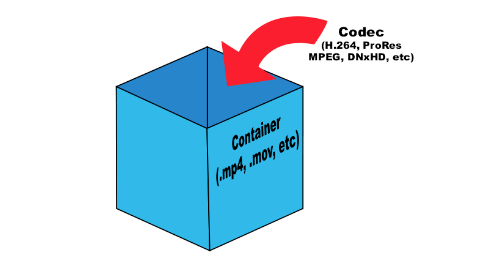
format vs codec

How is the video format different from the codec?
What is the video format?
What is the video codec?
What codecs are there
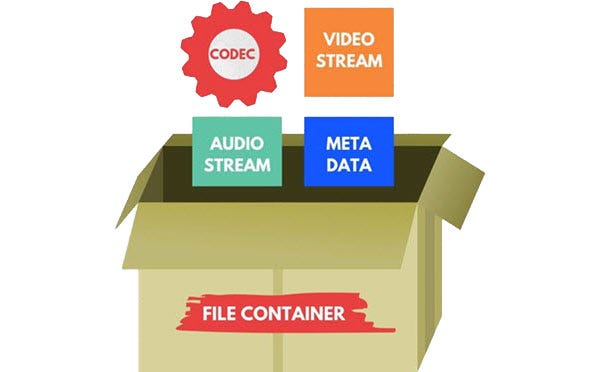
format vs codec

What is the video format?
Although there are many video formats, from analog recording methods (VHS, for example) to digital (Betamax, DV and others), in everyday life we ​​often talk about file formats that contain digital video. In fact, these files are containers that contain not only video, but also various audio tracks and / or subtitles. Each file format has its own characteristics: some allow streaming, some do not. Some may contain multiple audio and video tracks, while others may contain only one. The container only provides one header – “instruction”, which describes how and how to open the tracks stored in it. All information is contained in compressed form, and each object packed in a container is processed in a specific way, characteristic of the selected container type.
The most common container formats are:
1. AVI (Audio and Video Interleaved) developed by Microsoft for Windows. In theory, it can store various audio and video streams, in practice it is rarely used.
2. FLV (Flash Video) is optimized for streaming video over the Internet; Advantages: quality preservation even at low bitrate, the ability to view from anywhere, regardless of the operating system.
3. 3GP focuses on mobile devices that provide the ability to record / view audio and video.
Most of the listed formats are commercial, but there are projects based on completely open standards. The most popular among them is MKV (Matroska).
Although it is more correct to use the term “media container”, in colloquial speech the word “format” has become more popular. There is no crime in this, so in the communication process you can safely operate with the data, leaving the “containers” for professional discussions.
It is sufficient that the player program understands how to correctly identify the type of container to correctly reproduce the data stored in it. Consequently, the user must know which formats the player supports and install the necessary set of several on the computer (if one cannot play all of them).
Generally, a splitter program is involved in unpacking file and media containers (it can also be part of a player). Your task is to extract the content and only then transfer each audio / video stream for decoding using codecs.

What is a video codec?
To decrypt the contents of a media container and convert it into a video stream, you will need codecs, programs of formula similar in principle to filing cabinets. Having the required codec will allow you to correctly decompress the compressed image, so it is important to have as complete a set as possible of these algorithms so as not to find a message about an unsupported video format. From an academic point of view, it is more correct to speak of decoders, but, as in the previous case, it is easier to operate with the concept of “codec”, it is universal for both digitization and video playback.

What are the codecs?
The most popular video codecs used for home use are Xvid and DivX. Movies distributed on DVD are encoded with the MPEG-2 codec.
In general, DivX is the most common proprietary MPEG-4 codec. And the Xvid codec is based on one of the versions of DivX, but open source. There is also x264 (a codec for compression in the H.264 standard) and TrueMotion VP6 (used as one of the main encoding options in the Flash Video format). The rest of codecs, and there are many, you may not need them in practice, but it is better to have them all the same. As a general rule of thumb, the full set can be obtained by installing the K-Lite Mega Codec Pack, but some of them may have to be added manually later.

Conclusions
The video format is determined by the extension of the container file, but it is not always known which codec was used to compress the information it contains. And if to play the required format it is only important to know if the media player supports it, then to determine the codec you will have to use a third-party utility (for example, AVIcodec or GSpot), and only then add the missing codec to the system.


Free Download Mp4Gain
picture


Mp4Gain Main Window
picture


Mp4Gain Features
picture


Free Download Mp4Gain
picture

Formats, extensions and codecs: what do they mean?

Formats, extensions and codecs: what do they mean?

When it comes to audio files, we can talk about formats, extensions and codecs. In summary, we can say that the format refers to the type of file, identified by its extension (* .mp3, * .wav, * .ogg, * .wma etc), which often tells us how it has been encoded or which one is your codec.

Normally those endings are mixed. But what is important to know is that, as in videos, files with the same type of extension do not always have the same codec and vice versa.

This information is valid so that you do not feel lost in case you do not understand the reason why a software, which normally plays your * .m4a files, does not play another with the same extension, for example.

Such a situation could indicate that the codecs used are different. In that case, the solution would be to use other software to read the file or to convert it (new encoding). This can be done even in video editors.

The variations of formats and codecs depend on the options of the companies that develop the softwares that execute the files. In these cases, there are many things at stake, such as technical specifications and relations with patents.

On the other hand, files are usually divided into two types: uncompressed or compressed.

Uncompressed files

Audio recording equipment usually offers us options to record files without losing any information. These uncompressed files can be generated in various formats and extensions, such as WAV, AIFF, FLAC and ALAC. For those who are familiar with photography, they are equivalent to RAW or DNG.

As they are usually very heavy, using lossless formats in the final product is only recommended in some cases, such as:

when the final product can be processed by the consumer (files destined for sound banks, for example);
when there will be recording on physical media (CD, DVD and Blue-Ray);
or for the audiophile market (for a matter of perceived value and guarantee of high quality).
But, even if you don’t want to end the process with a WAV (one of the most common), lossless formats can be very useful at the editing stage. Because they contain a lot of information, they withstand more extreme alterations without harming the audio quality.

With plugins, conversions and processing, they can be manipulated more freely, guaranteeing excellent quality, even if a compressed file is subsequently generated.

Compressed files

Most of the equipment available on the market (cameras, cell phones and even audio recorders) usually deliver already compressed files. This type of file is more practical, easier to process, requires less storage space and is very small (in bytes).

Some examples of these formats are: 3GP, AAC, M4A, OGG, WMA and MP3, which is, without a doubt, the best known. Files are like JPEG or GIF in the images field.

Through a complex algorithm, these files are generated seeking to keep only relevant information for our ears. Depending on the compression mode, we can generate an MP3 from a WAV and have a file 10 times smaller, without perceptible alterations in audio quality.

Speaking of MP3, despite its great popularity, it is currently considered an obsolete format, since others, such as ACC (extension .acc or .m4a), make it possible to obtain smaller files and with higher quality.

Even so, MP3 is still widely used, since a large part of the softwares and equipment were developed for this format. So, to talk about compression rates, we will use it as an example.

Compression rate: what is its relationship to audio quality?
Now that you understand that a file can be compressed and maintain sufficient quality for our ears, you should know that the level of compression can vary greatly.

And it is by the value of the compression rate (or bitrate) that we manage to control the file size and, therefore, the audio quality.

For example, a 320 kbps (kilobits per second) MP3 may sound as good as uncompressed audio from a CD or DVD. As the bitrate value decreases, the file size decreases, but the sound losses become noticeable, depending on the audio.