Audio formats for sound quality.


Free Download Mp4Gain
picture

Audio formats for sound quality.

Audio Formats

The term “audio” today means everything that is somehow connected with sound. This is processing, playing, mixing and simply listening to audio recordings. Few people know that during their existence, all popular audio formats have undergone significant changes, sometimes for the better, and sometimes even for the worse.

audio formats

The problem is that when the creators tried to improve the recording quality by using the new format, the size of the result increased significantly. Reducing the size of the final file resulted in a significant loss of quality. But this was not always the case.
The first audio format used in computer games.

The first mention of computer sound is associated with the creation of several primitive video games. Then the sound was played back using the speaker of the system. As the software developers of that time did not try, it was impossible to achieve the level of quality that would be compatible with tape and reel recorders. This is what got many developers thinking about how to change the audio format to make the sound more natural and natural. It is this problem that has led to the current competition in the audio market. As a result, the formats used strongly affect the quality of the reproduced material and the configuration of the basic playback parameters.

WAV format

The first full quality of audio formats is associated with this particular format. The WAV extension designation was derived from the English word “wave”, which means wave in Russian. It was this format that became the first audio format to be processed with computer programs at a highly professional level. Files with a WAV extension had the following characteristics:

– depth of sound;
– sampling frequency;
– bit rate, etc.

This format was even compatible with the sound that could be obtained after processing an audio CD with an equalizer and other tools. However, the file size in this case was completely unwarranted. For example, the most common 3 minute long track could be up to 50 megabytes long.

CD

Audio CDs, or more exactly the .cda extension, appeared almost at the same time as the wav format. But unlike files with the wav extension, .cda cannot be edited. But it can be opened in any audio processing program, transcoded and formatted, and saved to your hard drive. Of course, you will not be able to save your changes to the CD.

MP3 codec

After the introduction of the LAME MP3 Encoder codec in the music industry, there was a real revolution in the audio world. Now the audio files are ten times smaller. At maximum compression, the size of a five minute composition rarely exceeds 7MB. This was a significant advance. Also, this extension finally implemented the ability to tweak some features and configure additional parameters, such as ID3 tags. They can contain information about the track title, artist, album, and release date.

Of course, this format immediately became widespread. Almost the entire Internet community uses this universal format. Therefore, we can say that the MP3 format has been a real revolution in the field of computer sound. Today it is one of the most demanded and popular audio formats. Although today it is already being replaced by other audio formats. But we will talk about this a bit later.

AIFF files

There are other types of audio files. This is the so-called aiff format. This format was originally created for use on Macintosh computers. A little later, a transformation occurred, as a result of which it was possible to achieve the compatibility of various audio formats and the possibility of their use on different platforms and operating systems.

OGG format

This audio format is also quite common. It was developed by the specialists of the Vorbis company. Please note that this format has several disadvantages. First of all, despite the small size of the files, using this format places a heavy load on the computer’s system resources.

Also, to work with this audio format, you must use your own decoders and codecs, which may not be installed automatically. For example, those who worked with the FL Studio Producer Edition program had to manually activate the installation file in .inf format to work with this format. Otherwise this app just won’t play OGG files. Despite all these shortcomings, OGG audio files are quite common nowadays and they sound good.


Free Download Mp4Gain
picture


Mp4Gain Main Window
picture


Mp4Gain Features
picture


Free Download Mp4Gain
picture

Bluetooth Audio Standards: How to Choose the Right Wireless Headphones

Bluetooth Audio Standards: How to Choose the Right Wireless Headphones

Bluetooth Headphones

In the age of modern technologies, you will no longer surprise anyone with wireless devices: We actively use Wi-Fi on phones and laptops, connect wireless mice and keyboards to computers, and listen to music through Bluetooth headphones. And here a drawback occurs: how to choose the best headphones specifically for your devices, because there are many BT audio transmission protocols, and not all of them are supported by the headphones and the device itself?

Bluetooth Headphones

History and characteristics of the Bluetooth standard

But we will start as usual in the history of BT. And they started creating it, which is remarkable, a few years before USB; In 1994, Ericsson, a well-known manufacturer of telecommunications equipment, began working on this standard. The standard itself was developed as a wireless alternative to a wired RS-232 connection (better known as a serial port). The specifications themselves were ready in 1998, when the Bluetooth SIG group was created, which, along with Ericsson, included IBM, Intel, Nokia, and Toshiba. In 2002, Bluetooth became part of the IEEE 802.15.1 standard (Wi-Fi, remember, is included in the IEEE 802.11 standard). The Bluetooth SIG currently includes more than 18,000 companies, making Bluetooth one of the few important standards for short-range data transmission.

How does Bluetooth work?

Like Wi-Fi and many other systems, it operates in the ISM band, 2.4 to 2.4835 GHz. Of course, using one range leads to signal interference (overlap) and this, in turn, negatively affects stability and performance. operating speed. Considering the fact that sound should always be transmitted with the same quality and without lag, the developers of the standard did a trick. Perhaps the most important problem for BT is precisely Wi-Fi: there are many such networks in the 2.4 GHz band in every home, and there may be 13 channels in this range with a width of 22 MHz.

Here the approach is simple: both the transmitter and the receiver use a fairly wide channel all the time. Yes, it can overlap with other channels, which will negatively affect speed, but not stability, and this suits everyone. Bluetooth uses a different approach: in the ISM band it already has 79 channels (in some countries there are 23, but Russia does not belong to them) with a width of only 1 MHz, and the receiver and transmitter with a frequency of 1600 times per second change the channel according to a given algorithm.

This is specifically done to greatly reduce the probability of signal aliasing in such a small frequency range. But this does not cancel out the interference: small BT channels can get into large Wi-Fi channels, and this will lead to a loss of speed, which is unacceptable for high-quality sound transmission. Therefore, BT uses AFH (Adaptive Frequency Hopping) technology. Its principle is that when changing Bluetooth channels, those channels that fall into the big Wi-Fi channel are ignored.

So if you use Bluetooth in one place, then in theory there are no problems with sound transmission: out of 79 channels, free ones will be selected, which will provide enough speed. Problems can arise if you move, but on the other hand, have you often seen Wi-Fi networks on the street? Therefore, the technology for transmitting sound through BT can be considered completely immune to noise, and it remains only to find out the standards for transmitting sound through it.

EVERYTHING YOU NEED TO KNOW ABOUT HIGH RESOLUTION

EVERYTHING YOU NEED TO KNOW ABOUT HIGH RESOLUTION

High-Res Audio

High Definition Audio is the choice of the most dedicated digital music fans. What is it, where to get it, and what does it take to hear it?

Hi-Res Audio

If you’re a bit interested in digital music (whether it’s listening to CDs or streaming from Spotify on your smartphone), you’ve probably come across the term “high definition audio” or “high resolution audio.”

In recent years, the popularity of Hi-Res Audio is slowly but surely gaining momentum, fueled by the emergence of new components, streaming services, and even smartphones that support this standard. Until recently, it was a niche segment for a narrow circle of insiders, but today everyone wants to join it.

If you want to get the best possible music listening experience, or at least better sound quality, you need to familiarize yourself with the concept of Hi-Res Audio.

This perspective is a bit overwhelming as it involves many factors. What is Hi-Res Audio? What do all these formats and numbers mean? Where can I get high-quality files and on what devices should I play them? Finally, where do you start?

Our guide to the world of Hi-Res Audio will help you understand the matter in depth. After reading this material to the end, you will be armed with all the necessary knowledge and take the first step on the way to the magical world of the best sound.

What is Hi-Res Audio?

Unlike HD video, there is still no universal standard for high definition audio. Digital Entertainment Group, Consumer Electronics Association and The Recording Academy, as well as record companies define it as follows: “An audio file in a lossless format that contains a soundtrack across the entire frequency range in which it was mastered with higher quality equipment than CD ”.

In simple terms, this term generally refers to recordings with a higher sample rate and / or bit depth than CDs (i.e. 16-bit / 44.1 kHz).

The sample rate indicates how many times per second the signal is sampled during its conversion from analog to digital. The higher the bit depth, the more accurate the signal measurement will be at the sampling point, so the transition from 16-bit to 24-bit can significantly improve quality.

High-resolution audio formats typically have a sample rate of 96 or 192 kHz at 24 bits. Also, there are files with 88.2 and 176.4 kHz.

However, Hi-Res Audio has one major drawback: the size of the files. They are typically tens of megabytes in size, and a few songs can easily take up all of your device’s memory. Fortunately, memory is much cheaper today than it was a few years ago, and devices with large disks are not hard to find. However, the large file size makes it difficult to transfer these files over Wi-Fi and mobile networks.

And that’s not all: each of the Hi-Res Audio file formats has certain compatibility limitations. Examples include FLAC (Free Lossless Audio Codec) and ALAC (Apple Lossless Audio Codec); both, in theory, provide lossless transmission of musical information. In addition, there are uncompressed formats: WAV and AIFF, DSD (the format used in Super Audio CD) and the recently developed MQA (Master Quality Authenticated).

The relative advantages of each format can be discussed, but the first thing to consider is their compatibility with audio components and software solutions.

Main audio file formats, their advantages and disadvantages:

-MP3 (not a high resolution audio format): popular compression and lossy format with small file size and low quality. It is suitable for storage on smartphones and iPods, but does not apply to high-resolution formats.

-AAC (not a high resolution audio format): alternative to MP3, also compressed and lossy, but sounds better. Used by iTunes and Apple Music (256 kbps), as well as YouTube streams.

-WAV (Hi-Res): standard digital format in which all CDs are recorded. Excellent quality but large file size due to lack of compression. Weak support for metadata (versions, song titles and artists).

-AIFF (Hi-Res): Apple’s alternative to WAV with more complete metadata. Not very popular format without compression and loss with large files.

MAXIMUM SOUND QUALITY. LOSSLESS FORMAT

MAXIMUM SOUND QUALITY. LOSSLESS FORMAT: WHAT IS IT? HIGH QUALITY MUSIC IN LOSSLESS FORMAT

Lossless Audio

Today there are about three dozen common digital audio formats. Why you need to create so many types of sound files to store one type of content and how to manage all this, you will learn from this material.

Lossless Audio

Surely many users prefer to use their home computer not only as a workhorse, but also as a multimedia center, where they can watch movies or family photos, as well as listen to their favorite music. Although compact digital players or mobile phones are certainly more suitable for listening to musical compositions, but unlike them, a computer can not only play music.

No matter how big the built-in memory of your music player is, it will most likely be difficult to store your entire music library on it. Additionally, using a PC, you can create, edit, organize, and search for music. Also, don’t forget that there are around three dozen common digital audio formats today, and most players are far from omnivorous and can only play a few of them.

So why do you need to create so many music formats to store one type of content? The point is that in the vast majority of cases the sound is stored in a “compressed” form, since one minute of uncompressed composition occupies about 10 MB on the hard disk. On the one hand, this seems not to be much, but on the other, if you are a music lover and your collection consists of several hundred or even thousands of songs, then it is clear that the sound must be compressed to reduce the space it takes up electronic media.

Various special algorithms are used to compress music files, which subsequently determine the structure and presentation of the audio data, or so-called digital audio file formats. All audio formats can be divided into three groups: uncompressed audio formats, lossless compression, and lossy compression.

NO COMPRESSION

One of the most widespread formats related to this type is the well-known WAV. The sound of files with this extension is stored without compression or changes. It is true that much more space is required to store uncompressed files and therefore WAV is more widely used only in professional audio and video applications, where the sound should not have a loss of quality before processing. Storing ordinary musical compositions in this form is an unwarranted waste.

To play WAV files, you do not need any special software, as all media players understand this format, including the standard Windows Media audio player built into the Windows system.

Another format used to store uncompressed audio that is worth mentioning is Apple’s development called AIFF (Audio Interchange File Format). As you may have guessed, it is most commonly used on Macintosh computers running Mac OS X.

LOSSLESS COMPRESSION (NO LOSS)

Lossless compression algorithms for audio files work on the principle of conventional file cabinets. They do not provide the highest level of compression (40 to 60%), while they have virtually no effect on sound quality. It is also worth noting that in this case, the encrypted data can be fully restored to its original form. Therefore, the use of lossless compression is most often used in cases where it is important to preserve the identity of the compressed data with respect to the original.

The most popular audio formats in this group are FLAC (Free Lossless Audio Codec), APE (Monkey’s Audio), WMA (Windows Media Lossless), and ALAC (Apple Lossless Audio Codec). Each has its own pros and cons. For example, the APE codec offers slightly better compression gains, while FLAC is more common. In general, all true music lovers store their music collections in lossless formats, since they do not remove any data from the audio stream, and files created with these codecs can be listened to even on high-quality stereos.

Digital audio information (Part 3)

Digital audio information (Part 3)

digital audio

Codec sample rate and bit depth

Digital Audio

Sampling is the acquisition of instantaneous values ​​(samples) of an analog signal with a certain time step in the digitization process. The frequency of this step is called the sample rate (it is also the sample or sample rate). The larger it is, the better the sound recorded and reproduced. In studio equipment, the frequency is 48 kHz, in home systems – 44.1 kHz.

Bit depth determines the quality of the recorded audio. Higher is better. The bit value, for example 32, denotes the number of bits that are allocated to record the amplitude of the signal at the time of its measurement.

Consequently, the more often (sample rate) and more accurately (bit depth) the audio signal is measured, the higher quality audio file is obtained.

Bitrate

The bit rate (literally, the information bit rate) determines the maximum amount of information that can be transmitted through the audio channel per unit of time. A high bit rate is needed to transmit a rich sound image and is not required when encoding speech. Audio recordings with a 128 Kbps bit rate are suitable for inexpensive speakers, but when accessing expensive equipment, it makes sense to get music at a 192-256 Kbps bit rate.

Convenient solution: variable bit rate encoding, change the bandwidth of the audio channel according to the quality and saturation of the musical fragment.

Audio formats

MP3 is the most popular digital audio format right now. It is widely used in file-sharing networks due to the small size of the final files (approximately 1/10 of the original audio CD file) and due to its special data compression algorithm, it provides playback quality very close to that of original. The MP3 format is compatible with absolutely all RoverMedia players, as well as all modern stereos and DVD players.

WMA is a file format developed by Microsoft to store and transmit audio information. The main advantage of WMA over MP3 is its greater compression capacity, which results in a smaller file size. The latest versions of the format, starting with Windows Media Audio 9.1, provide lossless encoding, multi-channel surround sound encoding, and speech encoding.

WAV is an audio container file format for storing a recording of a digitized audio stream. This format is mainly used to record sound from the voice recorder built into RoverMedia players and most modern devices.

FLAC (Free Lossless Audio Codec) is one of the most popular formats for lossless audio compression. Unlike MP3 and WMA formats, it does not remove any information from the audio stream when encoding the audio. Thanks to this, FLAC files are suitable not only for listening to high-quality music on RoverMedia portable media players, but even on high-quality audio equipment.

Number of audio channels

Infectious mononucleosis
Mono (from the Greek (Monos) – one) is a prefix that means the relationship with the singular.
Mono eng. Mono (monophony) is most often used as a term related to the recording and reproduction of sound.
Mono means monophonic, single channel.

Stereo
Stereo (from Greek solid, spatial)
Stereophony or stereo sound (from the ancient Greek words “stereoros” – solid, spatial and “background” – sound): recording, transmission or reproduction of sound, in which the auditory information about the location of its source is stored through sound design over two (or more) independent audio channels. …
In stereo recording, the recording is made from 2 microphones spaced a certain distance, each with a separate channel (right or left).
The result is what is called “panoramic sound”.

Digital audio information (Part 2)

Digital audio information (Part 2)

DIGITAL AUDIO

Sampling frequency. A microphone connected to the sound card is used to record analog sound and convert it to digital format. The quality of the digital sound obtained depends on the number of measurements of the sound volume level per unit of time, that is, the sampling frequency. The more measurements that are made in 1 second (the higher the sampling frequency), the more accurately the “ladder” of the digital audio signal repeats the curve of the dialogue signal.

Digital Audio

The audio sample rate is the number of sound volume measurements in one second.

The audio sample rate can vary between 8000 and 48000 sound volume measurements per second.

Audio encoding depth. Each “step” is assigned a specific value for the sound volume level. Loudness levels of sound can be viewed as a set of possible states N, for which a certain amount of information I is required, which is called audio coding depth.

Audio encoding depth is the amount of information required to encode the discrete volume levels of digital audio.

If the encoding depth is known, then the number of digital audio loudness levels can be calculated using the formula N = 2I. Let the sound encoding depth be 16 bit, then the number of sound volume levels is:

N = 2I = 216 = 65536.

During the encoding process, each sound volume level is assigned its own 16-bit binary code, the lowest sound level will correspond to the code 0000000000000000 and the highest – 1111111111111111.

The quality of digitized sound. The higher the sampling frequency and depth of the sound, the better the sound of the digitized sound. The lowest quality of digitized sound, corresponding to the quality of telephone communication, is obtained at a sampling rate of 8000 times per second, a sampling rate of 8 bits, and by recording an audio track (“mono” mode). The highest quality of digitized sound, corresponding to the quality of an audio CD, is achieved with a sampling rate of 48,000 times per second, a sampling rate of 16 bits and the recording of two audio tracks (stereo mode) .

It should be remembered that the higher the quality of the digital sound, the greater the volume of information in the audio file. It is possible to estimate the volume of information of a digital stereo sound file with a duration of 1 second with an average sound quality (16 bits, 24,000 measurements per second). To do this, the encoding depth must be multiplied by the number of measurements in 1 second and multiplied by 2 (stereo sound):

16 bit? 24,000? 2 = 768,000 bits = 96,000 bytes = 93.75 KB.

Sound editors. Sound editors allow you not only to record and play sound, but also to edit it. Digitized sound is presented in sound editors visually, so copying, moving, and deleting parts of the audio track can be easily performed with the mouse. Furthermore, you can layer audio tracks on top of each other (mix sounds) and apply various acoustic effects (echo, reverse playback, etc.).

Sound editors allow you to change the digital sound quality and volume of an audio file by changing the sample rate and encoding depth. Digitized audio can be saved uncompressed as universal WAV or compressed MP3 audio files.

By storing audio in compressed formats, low-intensity audio frequencies “excessive” for human perception are discarded, coinciding in time with high-intensity audio frequencies. Using this format allows you to compress audio files dozens of times, but it leads to irreversible loss of information (files cannot be restored in their original form).
test questions

1. How do sample rate and encoding depth affect digital audio quality?
Self-help assignments

1.22. Selective Response Mapping. The sound card performs binary encoding of the analog audio signal. How much information is needed to encode each of the 65,536 possible levels of signal intensity?
16 bits;
256 bits;
1 bit;
8 bits.

1.23. A task with a detailed answer. Estimate the volume of information in digital audio files with a duration of 10 seconds at an encoding depth and a sample rate of an audio signal that provides the minimum and maximum sound quality:

a) mono, 8 bits, 8000 measurements per second;

b) stereo, 16 bits, 48,000 measurements per second.

Digital audio information (Part 1)

Digital audio information (Part 1)

Digital Audio

The history of recording technology

Digital Audio

The creation of sound by computer is a modern stage in the history of the development of sound technology. Let’s take a brief look at this story.

Since the late 19th century, the technical means of storing and transmitting information have developed rapidly. So in the late 1800s, the famous American inventor Thomas Edison made a phonograph.

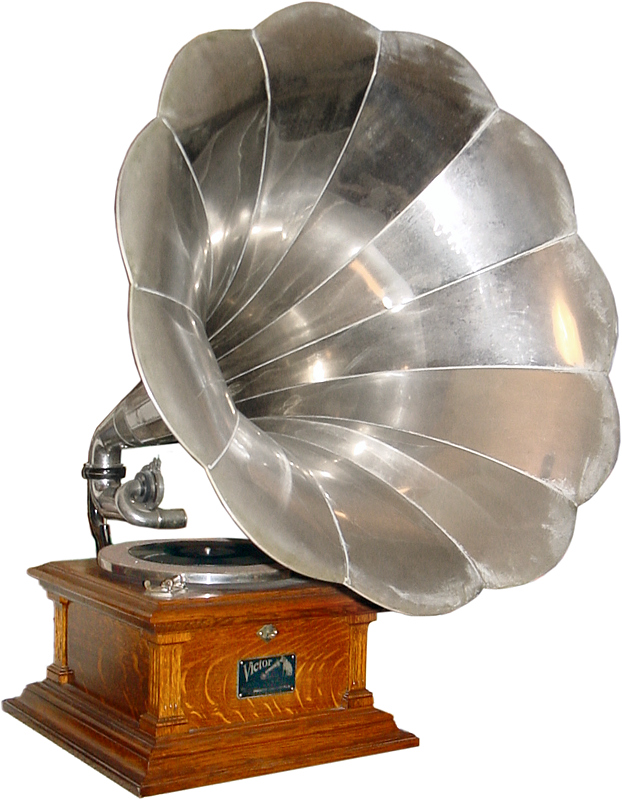
The principle of operation of the phonograph is as follows. Speech, music, or song create sound vibrations that are transmitted to the recording pen of the phonograph. The needle, acting on the surface of the rotating wax roller, leaves in it a groove with variable depth: a sound track. When a sound is reproduced, the opposite process occurs: the movement of the reading needle along the soundtrack is accompanied by its oscillations with the same frequency. These vibrations are converted by the phonograph into an audible sound. The Edison phonograph is the first sound recording device.

The same idea served as the basis for the production of celluloid gramophone records and mechanisms that reproduce the sound recorded on them: gramophone and gramophone.

In the middle of the 20th century, an electrophone appeared, an electrical analog of a gramophone.
Analog sound representation

The soundtrack of a phonograph record is an example of a continuous form of sound recording.

The electrical signal is transmitted to the speaker of the microphone and converted into sound.

In the 20th century, the tape recorder was invented, a device for recording sound on magnetic tape. It also uses an analog form of audio storage. Only now the soundtrack is not a mechanical “pit groove”, as shown in fig. 1.1, and a line with continuously changing magnetization. With the help of a magnetic reading head, an alternating electrical signal is generated, which is emitted by an acoustic system.

Until recently, all sound transmission technology was analog. This is both telephone communication and radio communication. During a telephone conversation, the sound vibrations from the microphone membrane are converted into an alternating electrical signal that is transmitted through electrical cables. On the receiving phone, they become sound.
Audio encoding and processing

Sound information. Sound is a wave that travels through air, water, or other medium with a continuously varying intensity and frequency.

A person perceives sound waves (air vibrations) with the help of hearing in the form of sound of different volume and pitch. The greater the intensity of the sound wave, the louder the sound, the higher the frequency of the wave, the higher the pitch of the sound.
Dependence of the volume and pitch of the sound on the intensity and frequency of the sound wave.

The human ear perceives sound at a frequency of 20 vibrations per second (low sound) to 20,000 vibrations per second (high sound).

A person can perceive sound in a wide range of intensities, in which the maximum intensity is 1014 times greater than the minimum (one hundred thousand billion times). To measure the volume of sound, a special unit “decibel” (dbl) is used (Table 5.1). A decrease or increase in sound volume by 10 dB corresponds to a decrease or increase in sound intensity by 10 times

Sound volume

Sound volume in decibels:
-Lower limit of human ear sensitivity 0
-Rustling leaves 10
-Talk 60
-90 car horn
-120 jet engine
-Pain threshold 140

Sound time sampling. (Part 1)

In order for a computer to process sound, a continuous audio signal must be converted to a discrete digital form using time sampling. A continuous sound wave is divided into separate small time sections, for each section a certain value of sound intensity is set.

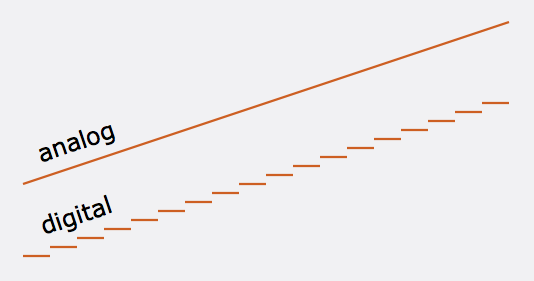
Therefore, the continuous dependence of the loudness of the sound at time A (t) is replaced by a discrete sequence of loudness levels. On the graph, this appears to replace a smooth curve with a sequence of “steps”).

Audio recording

Audio recording

Phonograph Thomas Alva Edison

The era of mechanical sound recording began in 1877, when Thomas Alva Edison invented the phonograph.

Gramophon

In fact, gramophones, gramophones, and even modern vinyl players are improved phonographs; after all, the principle of recording sound in a groove located in a spiral on a medium has remained unchanged.

In 1900, the Danish engineer W. Paulsen at the World’s Fair in Paris demonstrated a working model of a magnetic recording apparatus created as an alternative to Edison’s invention. For the first time in human history, a human voice sounded on a magnetic recording: the astonished Parisians heard the voice of the Austro-Hungarian Emperor Franz Joseph breaking the whistle. From this moment, perhaps, the true history of sound recording began, the theory of which was created in the 30s of the 20th century.

Sound is a complex analog signal. For the analysis of such signals a technique widely used in radioelectronics is used. Using the Fourier transform, a complex signal is converted into a harmonic series consisting of sinusoids with different frequencies and amplitudes. But in practice the signal we are dealing with is of course very different from the sinusoidal one.

Musicians call the first harmonic in this spectrum the fundamental tone, and harmonics with higher frequencies are called harmonics. The main tone determines the pitch and the harmonics give it a certain color, creating the timbre of a voice or musical instrument.

To study the spectra of audio signals, complex and expensive instruments are used – spectrum analyzers.

With the help of such devices, it can be established that some musical instruments, such as a violin, have a relatively uniform spectrum and some wind spectra with pronounced maxima and minima, called formants.

There are no terms that directly describe the coloration of the timbre of a human voice or musical instruments, so it is necessary to resort to various metaphors such as “deep timbre”, “hard timbre”, “metallic” sound or even “transistor”.

Attempts to use digital information processing methods in connection with sound recording were made many times, but the first serious results were achieved in the early 1980s of the 20th century, and coincided with the rapid development of computers and the successful microminiaturization of radio components. The use of digital sound processing techniques has opened up exciting new possibilities.

To process sound on a computer, it must first be converted to a digital, encoded format. An analog signal is encoded by devices called analog-to-digital converters (ADCs). The main method of encoding an analog signal is pulse code modulation, which consists of three operations: sampling, quantizing, and encoding.

We won’t go into coding theory now, especially since it’s quite complicated and requires higher math skills. It is important for us to understand that the quality of the digitized sound and the resulting file size depend on the sample rate and bit depth.

The sample rate is the frequency at which the characteristics of an audio signal are measured. It follows from Kotelnikov’s sampling theorem that to obtain an undistorted digital signal, the sampling frequency must be at least twice the highest frequency of the encoded signal. Therefore, when encoding an audio signal, the sample rate must be at least 40 kHz. In digital communication systems, the sampling frequency is 32 kHz, in laser CD players and consumer digital tape recorders – 44.1 kHz. In digital studio equipment, the sample rate is even higher: 48 kHz.

The bit depth of the recorded sound is the number of memory bits that are allocated to record each value of the amplitude of the sound signal at the time of its measurement. Modern sound cards use 8 or 16 bits of memory per dimension, and higher quality 32-bit cards are available. The higher the bit depth, the higher the quality of the digitized sound.

As already mentioned, the size of an audio file depends on the sample rate and bit depth of the sound. So with a sample rate of 44 kHz and a sound depth of 16 bits, one minute of sound requires a file size of 5.3 MB and with a sample rate of 11 kHz and 8 bits, 660 Kb.

It is clear that such a waste of disk space turned out to be unacceptable, and special algorithms and formats were created for cheaper storage of audio files.

Parameters that affect the quality of digital audio. (Part 3)

Parameters that affect the quality of digital audio. (Part 3)

digital audio

The quality of the digital sound obtained depends on the number of measurements of the sound volume level per unit of time, that is, the sampling frequency.

DIGITAL AUDIO

Audio sample rate is the number of audio volume measurements in one second.

The more measurements that are made in one second (the higher the sampling frequency), the more accurately the “ladder” of the digital audio signal repeats the curve of the analog signal.

Each “step” of the graph is assigned a certain value for the sound volume level. Loudness levels can be thought of as a set of possible N states (gradations), which require a certain amount of I information to encode, which is called audio encoding depth.

Audio encoding depth is the amount of information required to encode the discrete volume levels of digital audio.

If the known encoding depth, the number of digital audio volume levels can be calculated by the general formula N = 2 I.

For example, if the audio encoding depth is 16-bit, then the number of audio volume levels is:

N = 2 I = 2 16 = 65 536.

During the encoding process, each sound volume level is assigned its own 16-bit binary code, the lowest sound level will correspond to the code 0000000000000000 and the highest – 1111111111111111.

Digitized audio quality

Therefore, the higher the sample rate and depth of audio encoding, the better the digitized sound will sound and the better you can bring the digitized sound closer to the original sound.

The highest quality of digitized sound, corresponding to the quality of an audio CD, is achieved with a sampling rate of 48,000 times per second, a sampling rate of 16 bits and the recording of two audio tracks (stereo mode) .

It should be remembered that the higher the quality of the digital sound, the greater the volume of information in the audio file.

You can easily estimate the volume of information in a digital stereo sound file with a duration of 1 second with an average sound quality (16 bits, 24,000 measurements per second). To do this, the encoding depth must be multiplied by the number of measurements per second and multiplied by 2 channels (stereo sound):

16 bits × 24,000 × 2 = 768,000 bits = 96,000 bytes = 93.75 KB.

There are three main types of audio digits:

format – no compression;
format (lossy) – lossy compression;
format (lossless): lossless compression.
Lossy compression: technology in which there is a significant reduction of the encoded file compared to the original, due to the removal of information that is not perceived by the human ear.

The downside of this technology is the fact that the compressed file will never be identical to the original.

List of the most common lossy formats:

AAC (.m4a, .mp4, .m4p, .aac): advanced audio encoding (often in MPEG-4 container)
MP2 (MPEG Layer 2)
MP3 (MPEG Layer 3)
MPC (known as Musepack, previously called MPEGplus or MP +)
Ogg Vorbis
WMA (Windows Media Audio)

Lossless – Lossless compressed audio formats, including:

FLAC (Free Lossless Audio Codec)
APE (mono audio)
WV (WavPack)
These formats are capable of converting CD to digital format while maintaining quality. As an example, you can take a CD, convert it to WAV, then WAV to FLAC, then go back from FLAC to WAV, and then burn it to a blank CD and you have an absolutely identical copy of your source.

What format does the music sound with the best quality?
The most popular is the lossless FLAC format, and one of the most widely used CD to FLAC conversion programs is EAC (Exact Audio Copy).

Of all the parameters of digital audio, it is necessary to pay attention primarily to the following indicators:

sampling rate (precision of digitizing an analog signal in time),
bit rate (amount of information contained in a file in terms of one second).

The sample rate is the frequency at which digital audio is processed. The most common sample rate for quality audio formats is 44.1 kHz.

It is generally accepted that a high bit rate guarantees the best quality; this is true, but only if the source file is of good quality. A high quality MP3 should have a bit rate of 320 kbps, but a high quality FLAC format generally has a bit rate of 900 kbps and higher.

What is the best quality music format?
In addition to the audio formats themselves, for high-quality music sound, high-quality reproduction equipment is also needed: speakers, amplifiers, headphones.