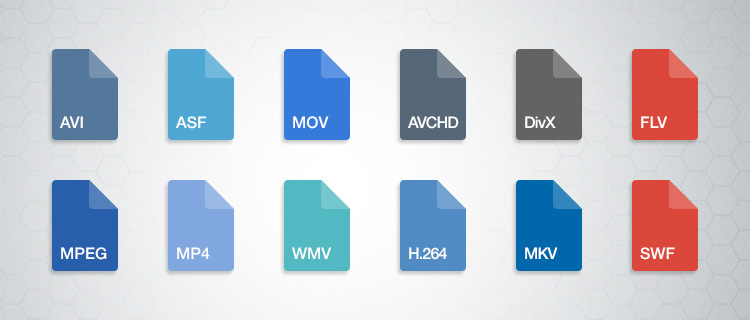
Video formats: what are they, advantages and disadvantages


Free Download Mp4Gain
picture

When image formats were displayed for the Internet, an unwritten rule was extended: The GIF format was for computer-generated images and the JPG format for images from “real life”, e.g. B. Photos. Unfortunately, no similar rules were imposed on videos: there are numerous formats and codecs, not to mention the fact that the requirements can vary depending on how the video is used.

video codecs

For example, file size doesn’t matter if you need to make a DVD, but it is crucial if you want to share the video on YouTube. A similar discussion could be held for overall quality and resolution, since preparing a video for display with a video projector is not the same as displaying it on a 3-inch screen. We have tried to deal with the most common video formats, treating the pros and cons of all. However, it should be noted that the number of formats available is very large and a complete book is required to cover all of them.

video

introduction to Video Formats

When image formats were displayed for the Internet, an unwritten rule was extended: The GIF format was for computer-generated images and the JPG format for images from “real life”, e.g. B. Photos. Unfortunately, no similar rules were imposed on videos: there are numerous formats and codecs, not to mention the fact that the requirements can vary depending on how the video is used. For example, file size doesn’t matter if you need to make a DVD, but it is crucial if you want to share the video on YouTube. A similar discussion could be held for overall quality and resolution, since preparing a video for display with a video projector is not the same as displaying it on a 3-inch screen.

We tried to deal with the most common video formats and deal with the advantages and disadvantages of each. However, it should be noted that the number of formats available is very large and a complete book is required to cover all of them.

Codec

A codec is a series of instructions for compressing and decompressing an audio or video file. There are many codecs for the most popular formats like AVI or QuickTime, which contain more than a dozen of them. Choosing the right one is the first step to getting a good result. One of the most pressing problems is definitely the selection of a codec that can also be used by the viewer on his computer. Otherwise you will not be able to watch the video. However, if the video is to be uploaded to MySpace or YouTube, this aspect is not relevant, since websites of this type have all or almost all codecs installed with which the video is converted into Flash FLV format.

The AVI format Audio Video Interleave was originally the Windows video format. For this reason, it can be played on all Microsoft operating systems from Windows 3.1 and on many Macs, provided the required codec is installed.

The “Microsoft MPEG-4 v2” codec offers the best combination of quality, small size and distribution in terms of the “installed base”, ie this codec is installed on many computers.

Thanks to the “Huffyyuv” codec, AVI files can also be saved losslessly or without compression. Both options are intended for static purposes, certainly not for transferring video over the Internet, since the resulting files are very large.

The “DivX 3” format was introduced as the “pirated version of the MPEG-4 v3 codec from Microsoft”. The installation of this codec generally overwrites the Microsoft MPEG 4 v1 and v2 codecs without notifying the user. The Divx4 version was released without special notice, but was legal, while the fifth version legitimized the format worldwide. The current version is DivX 6.8.

DivX is basically an AVI codec. Files created with this codec can use the DivX extension. They are high quality and small, but of course the viewer must have the codec installed.

This format is compatible with DivX certified hardware, including many lounge players.

Keyframe

The use of keyframes is similar to that of control points for 3D graphics.

The term “keyframe” is used when creating an animated video or combining animations and recorded videos. The term can have different meanings depending on the context. When creating an animation, Keyframe defines the frames in which the most important transitions are located.


Free Download Mp4Gain
picture


Mp4Gain Main Window
picture


Mp4Gain Features
picture


Free Download Mp4Gain
picture

Video formats – Wich format is better?

Who has not ever wondered what H264 means or what is an Mp4, Mkv or Avi file. These are some of the questions that we all ask ourselves when we are talking about digital video in some of the applications that we see online to find out which format or format has more quality or how I can convert a file to another file.

VIDEO FORMATS

What in my measure can contribute is to shed light on the distinctions that exist when we talk about video formats within the different types that are applied to digital video and that there are three important parts to distinguish between them on the Internet or on a DVD:

The video and its codec (As the video has so much weight, it must always be encoded and subsequently decoded). They are simply mathematical algorithms to compress and decompress the video file.
Audio and its different formats or containers.
The file that contains the audio and the video. The container
Let’s go to see which are the most popular and try to explain them:

Digital Video Formats

MPEG: Moving Pictures Expert Group (Mpeg1, Mpeg2, Mp4 or Mpeg4)
AVI: It is the standard format but the one with the most weight. (Xvid or Divx)
WINDOWS MEDIA: Format developed by Microsoft. (. Mp4 or .asf)
MOV: Format developed by Apple. Quicktime required to read it. Low weight.Ideal for Web (.m4v or .mov)
FLV: Adobe Flash format. Use Sorensen Spark codec. (.flv)
Digital Audio Formats

Mp3 or MPEG-1 Audio Layer 3: Tablet with imperceptible signal loss for humans. (1Mb / Min)
Aiff: Audio Interchange File Format. It has no compression and uses PCM modulation so they are very heavy (10 Mb / Min.)
AAC: Advanced Audio Coding. Mpeg-2 compression. Indicated for surround or surround sounds
Windows Media Audio: The worst quality of all the previous ones, is the Windows format.

Digital Video and Audio Container Formats

The truth is that it is a whole world and more when the big companies live thinking only about leading their own markets and not from the point of view of the user whom they have had abandoned for years. Obviously these are not all there are but I have wanted to include the best known.

But if we are talking about a file or files that any dvd may have or downloaded from the Internet in any format or container such as Mp4, mkv, avi with greater or lesser quality, it must be remembered that what is important is the amount of information that they contain, is say the Mbs this video is exported to.

It is as if we have a 16 ton truck and we put a box of oranges inside it when it can carry 1000 boxes of oranges. what we are going to see is oranges but with a very low quality.

I hope I have shed some light on this world of digital video and how the next time you face such a file you will be able to understand what each of the things attached to it means. I have to admit that it is not easy, but with that global vision and knowing what each one means, you feel better when facing it.

And you know some type of format that you are using and you think is missing here? This is a live article to be developed among all and in this way we can clarify all more.

Characteristics of the Mpeg or MPG format

Characteristics of the Mpeg or MPG format

MPEG stands for Moving Picture Experts Group and is pronounced m-peg. MPEG is a group of ISO and family of compression standards and digital video file formats developed by the group.

MPG or MPGE is basically a container format, since it can contain multiple audio and video tracks, or even optional subtitle tracks. Depending on the properties of the audio and video (resolution, bitrate, FPS, etc.), the MPG file will adapt to a certain standard.

MPEG generally produces better quality videos than other formats, such as video for Windows, Indeo, and QuickTime.

MPEG algorithms compress information into small packets that can be easily transmitted and then decompressed. MPEG achieves its high compression rate by storing only the changes from one frame to the next, instead of storing the entire frame. The video information is then encoded using a technique called Discrete Cosine Transform (DCT).

With the compression that MPEG uses, certain data is lost, but this loss is generally imperceptible to the human eye.

Regions

The MPG format is dependent on the geographical area in which it is used. Therefore, the PAL format is the one used in Europe, whereas the NTSC is the American format. However, there are multizone devices that are compatible with both PAL and NTSC. If the MPG video you will be using is in 25 FPS, you must convert it to PAL format, and if it is in 23.976 or 29.976FPS, you must use NTSC format.

The main MPEG compression formats are:

MPEG -1: is the initial audio and video compression standard. It provides video with a resolution of 352×240 at 30 frames per second (fps). This produces slightly lower video quality than conventional VCR videos. Includes Layer 3 (MP3) audio compression format.

MPEG -2: standard for audio and video for television quality broadcast. It offers 720×480 and 1280×720 resolutions at 60fps, with audio CD quality. This is sufficient for most TV standards, including NTSC, and even HDTV. MPEG-2 is used for you, satellite TV services and digital cable TV signals. MPEG-2 can compress a 2-hour video into a few gigabytes. Although decompressing an Mpeg-2 data stream does not require a lot of computer resources, encoding to the Mpeg-2 format requires considerably more power for the process.

MPEG -3: It was designed for HDTV but was abandoned in favor of MPG-2.

MPEG -4: standard graphics and video compression algorithm based on Mpeg-1 and Mpeg-2 technology and Apple QuickTime. Mpeg-4 files are smaller than JPEG or QuickTime files, so they are designed to transmit video and images over a narrow bandwidth and can mix video with text, graphics, and 2D and 3D animation layers.

MPEG -7: formally called Multimedia Content Description Interface, Mpeg-7 provides a toolkit for multimedia content. Mpeg-7 is designed to be generic and is not intended for a specific use.

MPEG -21: Includes a Rights Expression Language (REL) and a Rights Data Dictionary. Unlike other MPEG standards that describe compression and encoding methods, Mpeg-21 describes a standard that defines content description and also the processes for accessing, searching for, storing and protecting the copyright of content.

Video Formats, all about video formats

Knowing the video formats you can produce will help you be more successful with your business strategy.

Video content production is very successful today, so much so that YouTube, which is one of the largest platforms for sharing this type of content, already has 1.9 billion monthly users.

But do you know what types of video formats you can use in your strategy?

Both to publish on YouTube and other hosting platforms, knowing how to differentiate an FLV file from an MKV, for example, is essential for anyone who wants to make professional videos.

This is because some formats may compromise the quality of the result of your production.

Follow us and understand everything!

Meet the 7 main video formats

Each video format needs specific recording and execution applications.

When the platform you want to use cannot reproduce your material, the CODECs come into play: they are programs that encode and decode the file.

Does it sound complex? But calm, everything is a matter of compatibility. YouTube, for example, can already support various video formats.

But depending on the type of file you have, you need converters to transform the format into one that can be interpreted by the application or operating system you use.

Therefore, it is worth knowing the main ones and understanding their particularities of reproduction.

1. AVI (.avi)

AVI (Audio Video Interleave) is a format developed by Microsoft and one of the first video compressors that has been created. To play it, you need applications such as Windows Media Player.

As for quality, it is a simple format that stores audio tracks and image data in the same file. Therefore, it is common that there is some loss of data in compression and, as a result, the video does not have 100% of the recording quality at the time of viewing.

2. WMV / WMA (.wmv or .asf)

WMV / WMA (Windows Media Video / Audio) is a format developed by Microsoft as a replacement for AVI. These files are compatible with YouTube and can preserve quality even in smaller compression sizes.

A good detail is that this format is based on the continuous flow of data. This means that you can start playing it without downloading it completely, which is ideal for streaming on the Internet (as on YouTube).

3. MOV (.mov)

MOV is a direct competitor of the AVI, created by Apple. Its default player is the QuickTime Player, but applications such as Microsoft Windows Media Player can also play it.

The great advantage over its “rival” is that the loss of data is much less in compression. Then, even in very small files, MOV can offer good quality audio and video tracks.

4. FLV (.flv)

Adobe also has its own video format: the FLV. This is the most suitable type of file for playback on YouTube, since the platform is based on Flash Player technology. TV Lg is another streaming website that uses the Adobe system.

Flash videos are compatible with most operating systems and have extensions that allow embedding tracks of high definition images. For these reasons, the format is very well accepted when recording videos to share on the web.

5. RM (.rm)

The RM format has been developed by Real Networks, one of Microsoft’s competing companies. To play it, your computer must have the RealPlayer program or the Real Alternative, a Windows-compatible CODEC package.

The compression technique of this format is performed with a fixed bit rate, that is, a predetermined measure of the data transmitted over a certain period of time.

A bit complex, right? It is also for us! But the fact is that this technique causes the files to compress too much and, therefore, significantly lose the audio and image quality.

Therefore, and by way of example, sound effects are often lost in this process.

6. RMVB (.rmvb)

RMVB, in turn, is one of the video formats that has worked. Also from Real Networks, RMVB has long been an important competitor of Microsoft formats.

Unlike the RM / RA, here the data loss is much smaller. Therefore, the format allows small files – ideal for quick downloads – but with preserved track quality.

For this reason, it was widely used a few years ago, when streaming platforms were still taking their first steps, and the most common was to download video content.

7. MP4 (.mp4)

This is one of the most popular video formats. It is the most common in mobile devices and, therefore, is present in the daily life of many people.

How many types of video format do you know?

How many types of video format do you know?

If you are one of those who normally work with video files, you will have noticed that there are multiple formats of it. How many video formats do you know? Sure you are familiar names like MP4, H264, MOV, FLV, SWF … But let’s go by parts.

The first thing to note is that although they are different formats, they all have in common that they are made up of three elements or components:

The video and its corresponding codec. The latter is necessary for encoding and decoding the file, which allows tablets to compress the file. In this way, the weight of this is reduced.

The audio, that is sound. This will also have different formats: MP3, AIFF (barely without compression, which makes them very heavy), AAC (Advanced Audio Coding, usually used in Surround or surround sounds), Windows Media Audio (Windows format).

AVI is one of the first formats that was used. It was designed by Microsoft and still has a great presence.

ASF and WMV are another type of format that has the advantage of storing data on the acquisition of digital records.

MOV is a format developed by Apple for QuicTime. The MOV is usually seen in videos recorded by digital cameras or video cameras.

FLV (Flash Video) is the one developed by Flash and is more web-oriented.

MKV Surely on the Internet when you have gone to watch a series or movie you have found this format. It is a multimedia container that supports any type of content (movies, 3D animation, video games …). This is played on computers and televisions that have multimedia equipment.

MP4 or H.264 is the most widely used today, especially for its versatility. It can be seen both on mobile devices and on the computer. In addition, it allows you to encode the video in any type of resolution. And, especially if you are going to work with a video that has to work on different media, this is undoubtedly your H.264 format.

It is in this last format that we advise you to export your video projects. So you will not have any problem when viewing them.

What is the difference between bandwidth and speed?

Is there a difference between bandwidth and internet speed? Yes, there is. There is a difference that is influenced by various physical and software factors that we will know this day.

Many times we use the terms bandwidth interchangeably and speed up the internet connection. Few or on no occasion have we stopped to think if it is really the same.

What is the bandwidth of an internet connection?
The Internet bandwidth or network bandwidth is the maximum amount of data (measured in Kilobit, Megabit or even Gigabit) that can be transferred per second through a network link between two computers.

The real meaning of the term bandwidth is completely different from that promoted by computer networks. Bandwidth finds its use in the field of signal processing where it indicates the difference (measured in Hertz) between the lowest and highest frequency in a continuous set of frequencies.

How to increase Internet speed in a minute

Internet Bandwidth Vs Speed ​​- Is bandwidth the same as download speed?

Now, speaking of Internet speed or performance, it is only a way to show the speed of data transfer. When doing normal things like browsing the web or downloading a file, we could use speed and bandwidth interchangeably.

However, there may be situations when you have higher bandwidth, but your Internet connection still works like a snail. Let’s say your ISP has assigned you a bandwidth of 50Mbps – it means that 50 megabits of data can be downloaded in a second on your computer. You start downloading a file from a web server and the download manager reaches a maximum of 18 Mbps.

In this case, your real bandwidth is 50 megabits per second, but the speed you get is only 18 megabits per second. Internet speed could be more or less than 18Mpbs, and it could even match bandwidth if all things are right.

Internet speeds may be due to several factors. They can be physical, such as infrastructure capacity, distance, the number of users connected to the ISP, or it can depend on the type of protocol used for the connection. For example, you can have a bandwidth of 40 Mbps, but only reach 25 Mbps due to the inability of the router or copper line that the Internet guys have installed.

Another factor that also influences are the (useless) DNS servers used by the Internet service provider, over time slowing down the overall speed or performance of the final connection.

Connection latency can be one of the causes of low Internet speeds. Latency is measured in milliseconds, and it is the time it takes for data packets to arrive from source to destination, through different networks and routers.
You may have seen delays during live broadcasts and multiplayer gaming sessions, even if your network bandwidth is tens of megabits per second, it is because the latency is too high.

   In conclusion…

The difference between Internet speed and bandwidth can be summarized in a single line: Internet bandwidth is the amount of data that can be downloaded or loaded from your computer, while Internet speed is the speed of loading or unloading data on your computer. Many ISPs allow different bandwidth limits to download and upload.

The load bandwidth is less than the download bandwidth in most cases, since most of the activities performed by users require downloading data from the Internet.

The perfect video compression

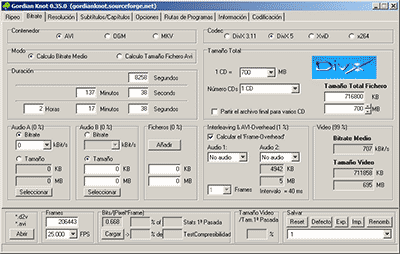
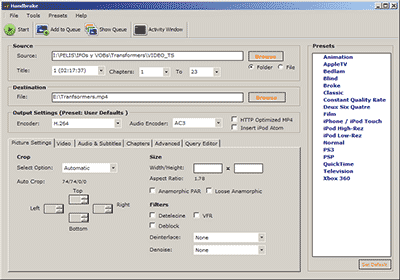
We all like to enjoy great image quality in the videos and movies we watch on the computer, especially if you make your own compressed copies of DVD movies. I have always relied on the popular DivX but, now that there are other types of compression such as Xvid and some as modern as the H.264, it would be worth comparing to discover which one offers the best quality in the smallest size.


For the test I have chosen the movie Transformers, released in November 2007 and directed by Michael Bay, with Shia Labeouf and Megan Fox as protagonists. It is an action movie with a variety of scenes: static in great detail, with movement, explosions, lots of color … ideal for testing. The DVD boasts a very high image quality, as evidenced by the editors of a well-known magazine.

codecs

Choice of codecs, bitrates and encoders

To carry out the test, you have to choose different “compression methods”, each of them to several different “qualities” and using one or several programs that allow to compress in this way.
Things have changed a lot since in 2000 I compressed my first movie in DivX 3.11 format. It took me a whole day looking for information on the Internet on how to do it and my computer at that time (an AMD K6 II of 400Mhz) took all night to compress it in only 650 MB. Since then I have been using all versions of DivX, from 3.11 to the current 6. But the Xvid codec sounds more and more and there are excellent comments from the newest H.264, so the question is on the table: what is The best way to compress to achieve sublime image quality? Well, for this you have to discover which is the best codec and use it at the optimal bitrate with the ideal encoder. But what about that “codec”, “bitrate” and “encoder”?

Codec, the type of compression

The “compression method” is what in the video world is called “codec”, which is the acronym for COmpresor-DECompresor, a program capable of compressing and decompressing the image in a certain way. It is something similar to what photography programs incorporate to allow them to read and write files in JPEG format, for example. The type of compression that incorporates the DVD is called MPEG-2 and is already considered somewhat old, being surpassed by the MPEG-4 standard, more modern and efficient.
The problem is that there are many types of MPEG-4 and it is not clear which one is the best.

On the one hand there is DivX (a variant of the MPEG-4 type called ASP; see official page), which is tremendously popular and more and more DVD lounge players admit it. The decompressor (necessary to watch the videos) is free, but the compressor (to generate them) is paid.

There is also Xvid, (which is the same type as DivX; official page) a competitor of DivX (its name is the same, but vice versa) although completely free.

codec

And finally, the very modern H.264, of the MPEG-4 AVC type, a prodigy of compression according to experts. Well, to find out which one is better, I have compared the generic MPEG-4 with these three contenders. There are several codecs to use this type of compression, but the most popular is the x264, mostly because it is free, which is what I used.

The versions that I have used for this comparison are the following: DivX Pro v6.8.2, Xvid v1.2 and x264 revision 808.

Bitrate, the amount of compression

Already with each of them, you can select the “quality” image, similar to how you choose the quality between 0 and 12 when saving a JPEG file from Photoshop. The difference is that in the world of video this is known as bitrate, which is nothing more than the bit stream per second of video, and is measured in bits per second and their multiples. Since video is a succession of frames formed of pixels (ultimately bits), this parameter measures the flow of information per second; at higher flow, higher quality and vice versa. In our case, I will use measures in “kbps” (“Kb / s” would also work), that is, kilobits per second (be careful, don’t confuse it with KB / s, which would be kiloBytes per second, an 8 times larger unit).
In order not to make the mistake of falling short, I have chosen 7 different bitrates, starting from an intermediate one. Taking the original DVD image, with a 720×304 pixel size frame

What does a codec indicate?

The six most important specifications to know about a codec are: codec type, resolution, compression, GOP, bits and color sampling.

Type of codec:

here come the little names of maras. H.264, MPEG-4, MPEG-2, H.265 … will give us an estimated indication of the efficiency of the codec, although as I indicated above, be careful because it can be misleading. Nothing like comparing the material directly. Within each one, the rest of the specifications are defined below, there being generally different variants in each.

Resolution:

number of vertical and horizontal lines. Mind you, it is another one of those deceptive factors, the real resolution that a camera gives has little to do with the resolution of the codec, nor does any of this have to do with the sharpness. We will expand this in another chapter.

Compression:

In Mbps or Mbit / s, it indicates the information contained per second

GOP:

Group of Pictures, specifies the order in which images are stored. It can be Intra, where each image is independent, or employ various methods where an independent reference image is used and others are stored next to it containing information regarding movement compensation. That is, it stores an image, and the differences in a certain group of the following, until you have a complete image again. Example: GOP12, if we record at 24fps, it will contain two complete images at half-second intervals, and 11 will start from it, only saving the differences from the whole image.

Bit Depth:

the more bits, the more information we will have available, allowing us a more aggressive grading and thus avoiding banding.

Color sampling:

Broadly speaking, it indicates the way in which the chrominance is compressed. We will make a chapter dedicated to this, since it is a complex and important factor.

Codec Standards

Each codec has a series of variants within it, and sometimes these variants are used without specific names or certain new variants. There are some codecs however whose specifications are already fully predefined. For example, there are the well-known Apple Prores, used in assembly regardless of the codec with which we record (some professional cameras and external recorders have it incorporated), or the most used in AVCHD and XAVC S consumer cameras.

However, we must bear in mind that even with a predefined specification there can be huge differences from camera to camera. And there are many other factors to consider, since the internal processing of the video will be crucial for the subsequent compression process.

The (little) importance of bitrate

Bitrate defines the data that will be saved per unit of time, usually expressed in Mbps (megabits per second, not to be confused with megabytes). It may seem a priori that a greater amount of data per second means higher quality, but here comes the codec efficiency factor, and the truth is that we must compare the material directly (and without extra compression from YouTube or Vimeo) to Really see the differences.

An example can be seen in the Panasonic GH4. This camera has many bitrates to which we can record and also several resolutions. Something curious, is that if we record at Full HD, we can use a bitrate of 200 Mbps, while if we record in 4k, the bitrate is 100 Mbps. This can lead us to think that if the material is going to be broadcast in Full HD, it will be better to use this resolution and the higher bitrate. However, the reality is that it is better to rescale the 4K and use its lower bitrate: we will get better quality. It can be easily observed even with the compression of Vimeo in the video by Andrew Reid.

Another example is the Canon C100, a camera with very striking specifications and really good results. It uses the AVCHD codec (MPEG-4 AVC 25Mbps 4: 2: 0), which has never had a good reputation. Its quality is such that the differences with its older sister the C300 (MPEG-4 50Mbps and 4: 2: 2 color sampling) are negligible. Even using an external recorder like the Ninja Atomos, the differences are almost nil, even if it uses Prores and the output is 4: 2: 2. What’s more, broadcasting in Full HD its sharpness is superior to a GH4 with 4K rescaling. It is the magic of video.

How to use video frames

Today we have a topic related to video, we talk about the image frequency, also called frame rate or frames per frame or per second.

A frame or frame is each of the images that form a video. They are expressed with the acronym fps and in hertz (Hz).

The expression is used in the fields of video, cinema or computer graphics. We can make a recording in different frames per second, depending on the type of video, what we are going to record or where it is going to play.

   Progressive Vs Interlaced

A moving image can be formed in different ways depending on whether we use the frames in a progressive or interlaced way. What is the difference?

‘In progressive each frame shows all the lines that make up the image. The progressive format is expressed with a p (1080p).

-In interlaced each frame only shows half of the lines of an image, therefore two frames are needed to show the complete image. In static images the quality is fine, but if the images contain a rapid movement they produce lines as if they were blinds. The interlaced format is expressed with an i (1080i).

Like it was before

At the beginning of the cinema there was no base projection speed because, when using cameras with a hand crank, it was impossible to maintain the same speed all the time. It was with the arrival of synchronized sound when 24 frames per second were set as standard speed.

The taumatropo, in wonderturner English, is one of the precursor toys to the cinema. It is a disc with two different images on both sides and a piece of string on each side of the disc, when we turn the discs quickly with the string it produces the illusion that both images are together. In the video you can see it in action.

How it is now

We go with the types of frame rate that exist now, and how and when to use them. To simplify, we will name only the best known that would be 24 fps in cinema, 25 fps in PAL system of European television and 30 fps for the NTSC system of American television.

  24 fps

When you want your video to have a cinematic appearance, such as a short film, record at 24fps. It is the most common frame rate, to which our brain is more accustomed, but that does not mean that you cannot use other speeds.

The only drawback of this format is that moving images lose sharpness. If any of the scenes is slow motion and the movement is very fast, keep in mind that the image will not be completely fluid.

There are currently directors who have begun to experiment and record their films above 24 fps, such as Peter Jackson in The Hobbit, which did so at 48 fps.

In fact, it is a matter of debate among the spectators. Those in favor think that it is a way to get even more realism and detail to the image. The detractors, on the other hand, think that recording at a higher frame rate causes the characteristic texture of the cinema to be lost and reminds them of the television look.

  25 fps and 30 fps

The 25 fps are used in European television with the PAL system, on LCD screens, computer monitors or projectors.

On the other hand, in American television, having an NTSC system uses 30fps.

  And more fps

There are some cameras that also allow recording at 50 fps and 60 fps. It is used in high definition televisions, but at the moment it has not been standardized.

From 60 fps, such as 100 fps or more, they are used to record slow cameras with a sharpness incomparable with slow cameras of 24 fps or 25 fps. The more frames that make up your image, the more fluid and crisp your image and slow motion will be. This can be very useful for recording sports or very fast movements.