Audio normalization for beginners


Free Download Mp4Gain
picture

What’s more annoying when listening to music is that you have to manipulate the volume control for every song that plays. If you have a computer, a tool allows you to uniformize the atmosphere from track to track while the songs are playing. This is called normalization. Three main means are used to achieve this result more or less effectively.

Audio normalization

Normalization through detection of maximum volume

The player or audio processing software analyzes the sound of the track and detects the highest amplitude. If it is less than the maximum gain value that is imposed, the signal is automatically boosted by the number of decibels required to reach and reach this value in all samples on the track. If the highest amplitude is equal to or greater than the maximum gain value, nothing is done.

Normalization

This method has only one advantage: the avoidance of saturation. However, the drawbacks are many.

This form of normalization cannot be applied in real time, as it is assumed that the maximum signal value is known in advance, which is hardly the case with live audio sources (playback or recording). Also, this type of normalization turns out to be totally ineffective when the overall sound of the song is low, but interrupted by small ridges that can be parasitic. When these peaks reach or exceed the maximum gain value, nothing happens and the overall sound is always reduced, especially if these peaks last only a few fractions of a second.

Normalization in detecting maximum volume is almost never used by reading software. Many audio processing software or even audio CD burning offers this option, such as Audacity and Nero.

Normalization by medium volume detection

Here, the player or audio processing software analyzes the sound of the track and does not detect the highest amplitude, but the average amplitude of the signal. Thus, the volume of the song will automatically increase or decrease by the number of decibels required to reach the imposed value, as appropriate.

Also known as RMS, this method has the advantage that the sound is fairly accurately balanced from one song to another, even if there are sharp peaks in the volume.

However, normal normalization of volume detection, like the previous method, cannot be applied in real time and is ipso facto unsuitable for live audio sources. In addition, saturation can occur if the imposed value to be achieved is not sufficient. It is recommended to use normalization values ​​small enough to avoid this problem as much as possible.

Many reading software programs use this normalization mode, but they all work better or worse than the others. .

Sound compression / modern normalization

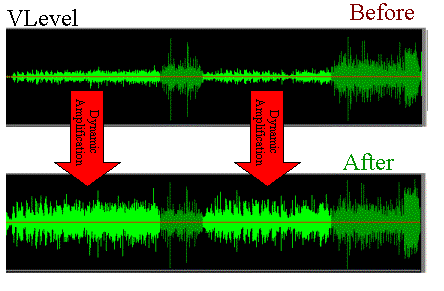
The mp4gain audio processing  software performs the audio signal analysis, analysis that will lead to increase or decrease the volume of certain areas of the signal according to a complete set of fairly complex parameters inherent in the signal itself. Ultimately, the loud sounds will be attenuated, the weak sounds will improve when multiple presets are reached.

This is the best normalization method if the sound processing values ​​are well established, in which case the sound volume becomes very constant and without saturation, regardless of the source and signal type, in real time or No

However, this type of normalization requires some processing power from the processor. Although the results achieved are much more professional and the only ones that really achieve what the 2020 ear is looking for. Mp4Gain has the most efficient response to normalize audio, either from audio files of the most popular formats or from video files, including the most commonly used formats.


Free Download Mp4Gain
picture


Mp4Gain Main Window
picture


Mp4Gain Features
picture


Free Download Mp4Gain
picture

Sound perception

Up to 20 years if you have not abused headphones and concerts, the ability to perceive frequencies is maximum. Or approximately 20Hz to 20,000Hz. 1 Hertz is written Hz, = one oscillation per second.

The louder the sound, the more directional it is in space like a laser beam. That is why it is advisable to have tweeters at ear level, but treble stops quickly due to obstacles.

The lower the sound, the more it radiates in all directions and crosses many obstacles such as walls and ceilings.

A church organ can drop to 16Hz. The bass of a 26.7Hz grand piano, the electric basses are between 40 and 50Hz. The lowest frequencies are vibrations that we can pick up. Higher frequencies, if not directly audible, can influence the audible frequencies through the harmonic set. These harmonics are multiples or submultiples of the fundamental frequencies. They characterize the timbre of a voice or an instrument or a microphone.

The most common audio formats.

.MP3 called MPEG 1 and 2 layer 3 (since 1992)
The evolution of the format recently stopped, it is a compressed format. There are 56 different 56Khz qualities, enough to listen to a dictated text. 128kilo bits per second is fine for electric music or 320KBPS, the highest quality in MP3. It exists in medium quality with a variable bit rate VBR = variable bit rate. The quality of the transmission varies in real time according to the variations of the audio file.

.WMA Windows Media Audio (since 1999)
Compressed format used by Microsoft Windows software with variable quality, in some cases lower or higher than MP3. In 8 or 16 bits, sampled from 8Hz to 48KHz, mono or stereo with a data stream of 5 to 192KHz. With a quality roughly equal to MP3 128KPPS, the 96KHz WMA file takes 25% less space than MP3.

.OGG Vorbis (since 1993)
Less common format. It is a compressed audio format that comes from the free Linux environment. Slightly higher than MP3 and WMA format suitable for 8 to 48KHz 16-24 bit surround sound and transmission, with an audio data stream of 16 to 512KBPS, often 128 to 320KBPS. It exists in medium quality with a variable bit rate VBR = variable bit rate. The quality of the transmission varies in real time according to the variations of the audio file.

AAC Advanced Audio Coding (since 1997)
The compressed format allows better quality than MP3. An upgraded version HE-AAC or eAAC + (MPEG 4) is used for DAB (Digital Audio Broadcasting) digital radio transmission.

.M4a (audio) and .MP4 (audio or video)
Compressed formats. They are used for APPLE products and are of very good quality.

.WAV
It is a very good quality uncompressed format. By default, high-quality recording in dictaphone. For an audio CD (700Mo), these are 16-bit packets extracted or read 44100 times per second = 44.1KHz with a flow of 1411KBPS = Kilo bits per second. Which is much higher than the MP3 which has a 320KBPS limit.

What exactly is normalizing?

Music is distinguished by what is often called “dynamic” and which refers to the changes (more or less abrupt) of the “effort” with which certain notes or passages are interpreted.
Whether it is an instrument or the voice.

singer

Any vocal performance that has been considered virtuous, in general terms, will have a dynamic that goes from very soft passages, almost whispered, to intense passages, with a high volume, singing at full voice.

At the time when vinyl existed as the option to listen to music, it was not felt (at least it went almost unnoticed) the fact of noticeable differences between the loudness or the volume of a song.

It was with the advent of digitization and the possibility of its variants (opting for different bitrates, sample rates, bitdepths, etc.) that this difference became very evident.

And with the appearance of mp3 and its distribution or exchange, at the same time that winamp and distribution lists arose, when it was inevitable and it was even started to look for solutions.

Napster

These first ones were based on the sound peaks and their results were very inefficient.

Returning to the mention of the mp3, situations such as masking (where information is removed) further marked the problem of differences in volume.

Then began to use the RMS that rather mediates the average power that the song had, more than the peaks.

Initially, it was enough to put a slower reaction level to the volume meter, to have a more general idea and less impacted by the volume peaks.

And so, the way of listening to music and considering what normalization was evolved.

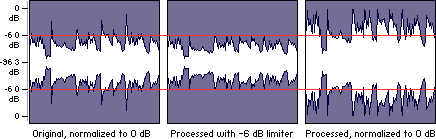
Finally it appears to be somewhat closer to a mixture of a volume limiter and a compressor.

What is a volume limiter? It is a hardware (although lately there are also limiters in software version) that ensures that no peak exceeds a maximum limit.

A compressor, on the other hand, is a device or software that is used to “compact” the volume, preventing the parts with the lowest volume from being too low and at the same time preventing the high parts from exceeding a range that has been assigned. We would say that the compressor dampens the increases and decreases in volume.

To this we can add an equalization that differentiates the bands and treats them differently both in the limitation and in the compression. Each frequency band has a different treatment in the Mp4gain and that produces a very efficient result. It is NOT the only improvement offered by Mp4Gain, but this is described here. In other articles we will deal with other differences.

Mp4Gain is the best normalizer of 2020 and this is clear when using it.

How to normalize mp3 files to play at the same volume

How to normalize mp3 files to play at the same volume

What could we understand by normalizing the audio volume level of an mp3 file or any other format?

Mp4Gain : Mp3Gain alternative : Audio converter Video Converter ...

A very technical definition would be to say that what is sought is to ensure that the upper volume level or the volume peaks of a song do not exceed certain levels.

That would be the answer that many people would give, but that would take us 20 years ago. When the normalizers were very simple and basic.

MP3 Normalizer

Today the technical explanation would be much more advanced and it would be something like this:

What a modern normalizer seeks is to ensure that the points with the highest volume level, also known as “peaks”, do not exceed a certain level, but at the same time they must not be below another level X.
In other words, the volume peaks of an audio file must not be outside a parameter, nor higher than one level X, but also not lower than another level X1. Which means that the peaks of a song will be very close to those of the other songs, with which we achieve that the sonority or loudness is very similar.

And if we are going to think about an even more efficient normalizing program, we could think that the lowest levels will not be outside of the x2 and x3 range either.

So we should never have to turn the volume knob to raise or lower the highest volume peaks of a song … nor should we turn the knob to raise parts of a song that sound very low.

In summary, the song (actually, all songs) will sound within a volume range, without falling below a certain level or rising from another level. What will make the activity of listening to music pleasant.

This is only achieved by Mp4Gain, which is also capable of doing all the important audio and video formats.

How to normalize mp3 files to play at the same volume? We hope that the brief explanation given above has been sufficient to achieve an adequate response.
And that helps to understand why some normalizers are definitely superior to others and more modern and efficient.

Because many people only think of volume peaks when thinking about a normalizer, but “sounding at the same volume” also implies that the lower volume parts are similar among all mp3s.

High and low volume parts will have similar levels.

Normalization of an audio file.

How to normalize an audio or video file.

Normalization is used to increase or decrease the level of the song as a whole, so that its maximum volume peaks assume the indicated level.

For example, if the maximum intensity points of the song are at -3 dB (therefore, well below 0, which should represent the maximum before distortion), normalizing to 0 dB means increasing the level of the entire song so that these peaks reach 0 dB.

audio level

This is the typical normalization of the peaks.

There is also RMS normalization (which takes into account not the peaks, but the actual average level of the song).

AUDIO CDs, which have good dynamic possibilities (various intensity tones, from pianissimo to fortissimo), are generally recorded so that the maximum volume points are at 0 dB.

Free image of audio levels

Normalizing your recordings in WAV can be useful to adapt them to the average level of a CD in case they are too low (because you had been careful in the level during the recording) but there is one important thing to keep in mind:

normalization of this type alters the original dynamics, that is, the reciprocal relationships between weak and strong sounds.

Although all levels are raised by the same amount, the relationship between 2 levels changes (small mathematical example:
2/5 = 0.4 ma (2 + 1) / (5 + 1) = 0.5 …

The result is that the weaker sounds, after sudden normalization, sound much louder and those that were already loud only sound a little louder … altering the dynamic relationships that had been envisioned by those who originally recorded the music and causing the sound output to lose depth.

Some types of music, generally already deficient dynamics (rock, metal, etc.) since the excursions between the minimum and maximum volume are almost never very consistent, are more “normalizable” without problems, while the genres in which there may be Large Dynamic excursions (classical music or music with passages from pianissimi to fortissimi) are more problematic.

Furthermore, it is necessary to keep in mind that if you normalize a large wav file that contains many songs (not yet divided) there can still be, even in genres with little dynamics, consistent differences, in this case between one song and another and not between different points of the same song.

So a light normalization can do and is actually used (to raise the level of the song), but it would be better to make sure you don’t need it (recording from the beginning with a good level) or at least not have too much need. and remember, however, that the dynamics are somewhat flattened.

Normalization of an mp4 or normalization of a video.

We are in the video age, it is said that 2,000 hours of video per minute are uploaded on YouTube.

HOWEVER, THERE IS NO OTHER SOFTWARE THAT IS ABLE TO NORMALIZE THE AUDIO OF THE VIDEOS !!

Mp4Gain is used by television channels throughout the world. Also by radio stations … even by some famous musicians, of whom we cannot give the name for reasons of confidence … but we are talking about musicians of global fame.

One of them is the guitarist of one of the groups that generates the most money on their world tours … or perhaps the one that generates the most money on their world tours. He uses Mp4Gain …

And so, many other celebrities are our clients. NBA players belonging to the legendary dream team, etc.

Normalization of an audio file.

Normalization of an audio file.

Normalization is used to increase or decrease the level of the song as a whole, so that its maximum volume peaks assume the indicated level.

Loudness Normalization

For example, if the maximum intensity points of the song are -3 dB (therefore well below 0, which should represent the maximum before distortion), normalizing to 0 dB means increasing the level of the entire song so that these peaks reach 0 dB.

This is the typical normalization of the peaks.

There is also RMS normalization (which takes into account not the peaks but the actual average level of the song).

Audio Normalization

AUDIO CDs, which have good dynamic possibilities (various intensity tones, from pianissimo to fortissimo), are generally recorded so that the maximum volume points are at 0 dB.

Normalizing your WAV recordings can be helpful in adjusting them to the average level of a CD in case they are too low (because you had been careful in level during recording) but one important thing to note:

Normalization of this type alters the original dynamics, that is, the reciprocal relationships between weak and strong sounds.

Although all levels are raised by the same amount, the relationship between 2 levels changes (small mathematical example:
2/5 = 0.4 ma (2 + 1) / (5 + 1) = 0.5 …

The result is that the weaker sounds, after abrupt normalization, sound much louder and those that were already playing only sound a little louder … altering the dynamic relationships that had been envisioned by those who originally recorded the music and making the sound output to lose depth.

Some types of music, generally already deficient dynamics (rock, metal, etc.) since the excursions between the minimum and maximum volume are almost never very consistent, are more “normalizable” without problems, while the genres in which there may be Large Dynamic excursions (classical music or music with passages from pianissimi to fortissimi) are more problematic.

In addition, it is necessary to take into account that if you normalize a large wav file that contains many songs (not yet divided) there can still be, even in genres with little dynamics, substantial differences, in this case between one song and another and not between different points of the same song.

So a light normalization can do and is actually used (to raise the level of the part), but it would be better to make sure you don’t need it (recording from the beginning with a good level) or at least not have too much. remember, however, that the dynamics are somewhat flattened.

Normalize with Mp4Gain

This software is capable (it is the only one that can do this) of normalizing the main audio and video formats and its standardization algorithm is by far the most efficient and the one that produces the best results.
For this reason it is used by musicians, radio broadcasters, universities, television stations, producers, etc.

Audio normalization explained

Audio normalization – Audio normalization

Audio normalization is the application of a constant amount of amplification of a sound recording to bring the amplitude of a target level (standard). Because the same amount of gain over the entire recording, the signal-to-noise ratio and relative dynamics are unchanged.

Two basic types of audio normalization exist. Peak normalization adjusts the recording based on the highest signal level present in the recording. Loudness normalization adjusts the recording based on perceived loudness.

Normalization differs from dynamics compression, which applies varying levels of gain across a recording to fit the level within a minimum and maximum range. Normalization adjusts the gain with a constant value over the entire recording.

Normalization is one of the functions usually provided by a digital audio workstation.

Peak normalization

One type of normalization is peak normalization, where the gain is changed to bring the highest PCM sample value or analog signal peak to a certain level – usually 0 dBFS the loudest level allowed in a digital system.

Peak normalization

Since it only goes to the highest level, only peak normalization does not take into account the apparent loudness of the content. As such, peak normalization is commonly used to change the volume so as to ensure optimal use of the available dynamic range during the mastering phase of a digital recording. In combination with compression / restriction, however, peak normalization becomes a feature that can provide a volume advantage over off-peak normalized material. This feature of digital recording systems, compression and limiting followed by peak normalization, sets contemporary trends in program loudness.

Loudness normalization

Another type of normalization is based on a measurement of loudness, where the gain is changed to bring the average amplitude to a target level. This average can be a simple measurement of average power, such as the RMS value, or it can be a measure of human perceived loudness, such as that offered by ReplayGain, Soundcheck and EBU R128.

Loudness Normalization

For example, YouTube reference level -14 LUFS, so if a program analyzed at -10 LUFS, YouTube will decrease the level 4 dB to the reference of -14 LUFS.

Loudness normalization was made in different volume combat when listening to different music in a series. Before loudness normalization, one song in a playlist would be quieter than the rest, so the end listener would have to put a volume knob to adjust the playback volume.

Depending on the dynamic range of the content and the target level, loudness normalization may result in peaks that exceed the storage medium. Software offering such normalization usually offers the option of using dynamic range compression to avoid clipping when this happens. In this situation, signal-to-noise ratio and relative dynamics changed.

Destructive compression vs non-destructive

Destructive compression is compression obtained by losing information. This means that if you extract the compressed signal with this technique, you will not find the start signal.

Destructive Vs Non-Destructive Audio compression

In destructive compression techniques, there are basically methods that take advantage of the properties of the human ear. The latter listens to frequencies between 20 Hz and 20 kHz. If a song contains frequencies outside this range, we can easily delete them without losing the audio quality because the ear does not hear them. In fact, frequencies between 2 kHz and 5 kHz are generally heard correctly. In fact, less than 5 dB is required to hear frequencies in this band, while more than 20 dB is required to hear frequencies below 100 Hz or above 10 kHz. These results can be used to reduce the size of the files. For example, we can conclude that all frequencies above 15 kHz are suppressed.

audio compression

MP3 also uses the principle of masked frequencies. If in a frequency group some have a much higher noise level than others, it is not necessary to keep the frequencies low – we will not hear them. Imagine yourself in your garden listening to the birds sing. The chord goes over your head (even very high). We no longer listen to birds because the sound they make is much quieter than that of the plane. It is as if the birds no longer exist or have stopped singing. Obviously, it is not necessary to code all the frequencies present in a song so that the human ear can always perceive it well. Finally like the two ways

What do we find among non-destructive techniques?

Mainly coding techniques.

Let’s explain. A sound is a frequency. A second of music is therefore a sequence of frequencies. Imagine that in the series of samples that make up a second of music (remember that there are 44,100), we have the same frequency several times in succession, for example 10 times. If instead of storing these 10 points, we only store 1 and the number of times it is repeated, we must encode 2 digits and not 10. If we also apply this method to frequencies which are no longer identical, but very dense together (so close that the average human ear cannot distinguish them), we can still save space. This time, the compression is destructive because we are replacing one frequency with another frequency (almost identical).

MP3 also uses the algorithm of Huffman (1952) as a method of encoding information. This method is used in all compression algorithms (compression of text files, compression of images, compression of sound). It is based on the use of a variable length code and the probability that an event (in this case a frequency) will occur. The more a frequency appears, the shorter the code (low number of bits to display it). The file is read for the first time and a table appears with the frequencies that appear and the number of times they appear. We derive the right code. This encryption was last used. It is the final phase of compression. This is non-destructive coding.

MP3 works on the properties of the ear, first to reduce the size of a part, then processes the stereo sound and possibly applies encodings which end with Huffman encoding.

The use of all the reduction options mentioned depends on the location you want to give within 1 minute of your tablet and therefore on the compression speed to apply.
To encode MP3 audio files, we are talking more in terms of bit rate than compression rate.
Bit rate is the number of bits allowed in 1 second.
Therefore, we have the following relationship: the more we want to compress a song (so that it takes up the least space possible), the lower the bit rate.

Choice of compression ratio (bit rate)

Obviously, the more you compress, the worse the sound quality.
You have to compromise the file size and audio quality.
This commitment can be dictated by your needs, but also by the use you want to make of your MP3 files. It may not even be demanding if your MP3s are intended for your portable music player and are too demanding to be listened to on a stereo system.

What is Normalize audio?

What is Normalize audio?

The battle of volume

For decades, but especially in recent years, music producers discovered that by being able to manipulate volume levels on the mixing console, they were able – artificially – to get people to listen to a recording as “better” with just push the recording volume up a bit, its decibels.

audio & video normalizer

Indeed, tests carried out by universities have shown that a little more volume makes the music sound “better” when listening.

Hence, in the last few decades, especially from the 80s, there has been a war to make each musical production sound louder to achieve that effect of better sound quality.

This has resulted in recordings showing extremely uneven volume levels, some sounding very loud and others sounding too low.

But today everyone wants the music to sound at high volume, to boost the volume level, to boost the volume of the song.

Even when it comes to loud music like dance music, rock, etc. trying to boost the bass, which produce an effect not only in the ear, but literally “feel” and to make people “feel” that music, the producer must be generous in the recording console and with the equalizer.

This usually results in people perceiving that their collection of musical files has uneven volume levels, that some recordings sound very loud and others sound very low in volume.

So it has become an urgent need to find an audio volume normalizer that manages to boost the music level, that manages to boost the bass and that manages to improve the sound of each music file, that makes it sound louder.

Mp4Gaines the answer. It is without a doubt the most efficient normalizer that manages to boost the volume and make it sound louder and at the same time sound at a more equal volume level.

If you are looking to improve the volume level of your audio and video files, of the main formats, not just mp3s, Mp4Gain is definitely the most powerful, modern and efficient solution.

Volume normalization, an explanation

Audio Normalization: Make Your Audio & Video Consistently Loud

Audio normalization is a process in which the amplitude (volume) of an audio recording is increased or decreased in a constant relationship over time, so that the maximum amplitude or the maximum effective value or the perceived volume (volume) reaches a predetermined level, the standard. If the signal has multiple tracks, they all undergo the same correction.

Normalize Audio

Example: normalization of peaks to -3 dB:
A collection of digital recordings is made with a peak modulation standard of -3dB FS.
A new stereo recording is measured. The highest maximum level is -5.5 dB FS on the left track, -5.7 dB FS on the right track.
Normalization consists of applying a constant gain of 5.5 – 3 = 2.5 dB.
Standardization requires two passes. The first determines the maximum level, the second applies the correction to the entire recording.

Audio Normalization

Maximum normalization changes the level, but not the dynamics of the sound.
Volume normalization or perception of loudness often includes compression that changes the dynamics of sound.

Peak normalization

Peak normalization applies a constant gain to a recording to bring the highest peak to a target level, 89% professional audio (-1 dBFS true peak (True Peak)).

The sound dynamics of the recording are more or less preserved, except that maintaining a low distortion level after multiplication of all samples may involve the application of a known quantization error decorrelation noise. under the name redithering (tingling of the least significant bit) 2, which slightly increases the background noise level.

Volume normalization

The purpose of volume normalization is to bring all sound elements in a collection to the same sound volume level, so you can hear them without having to adjust the volume. In fact, the normalization of the maximum level in no way guarantees a homogeneity of the perceived sound volume (Loudness).

A simple approach to volume normalization, which is provided by various software programs, is to normalize the RMS value of the integrated signal within a few tenths of a second. The most advanced machines use extensive algorithms for more accurate evaluation of the perceived noise level. The European Broadcasting Union published a recommendation 1 in 2011, which provides a relatively simple method for this evaluation.

If the standard is not low enough, volume normalization involves compression for recordings whose sound dynamics would be higher than implied when setting the standard from the maximum level. If not, the signal peaks would exceed the quantization limits.

In the simplest implementation, volume normalization collects volume data during the first pass, determines the gain or attenuation necessary for the maximum volume to reach the norm, and applies this correction to the second pass. If the elements of the collection have the same characteristics, from form factor to top factor and dynamics, as is the case with popular music collections or recorded speech, this approach produces satisfactory results.

Extensive implementations use a standard that includes not only the volume of the sound, but also the maximum maximum values ​​and dynamics of the sound. They collect loudness levels and maximum values