What is the standard bitrate for smartphone videos? Part 2


Free Download Mp4Gain
picture

What is the standard bitrate for smartphone videos? Part 2

smartphone bit rate

Video Terms to Remember 1: Resolution
Resolution is the number of vertical and horizontal pixels in a video.

Smartphone BITRATE

The higher the resolution, the better the image will look. For example, if you prepare the same image with the same resolution of “640 x 360” and “2560 x 1440”, the latter will be clearer in detail.

Also, both the resolution and the pixel refer to vertical and horizontal pixels, but in the case of the number of pixels, it is expressed by the total number, so if the resolution is “1980 x 1080”, the number of pixels will be “2,138,400”.

Video term 2: frame rate to remember
Frame rate is the number of still images per second of video.

The frame rate unit is “FPS (Frames Per Second)”. Since a video is made up of a collection of continuous still images, the higher the frame rate, the smoother the video. However, the amount of data will increase accordingly.

Therefore, it is important to set the frame rate to the appropriate size according to the purpose of the video.

Video Term 3: Codec to Remember
A codec is a codec that compresses and decompresses audio and video data.

The larger the size of the video, the greater the amount of data, and the higher the quality, the larger the file size. Therefore, it is necessary to compress the data with a codec.

For example, there are types such as “MPEG-4” and “MPEG-2” for video codecs and “MP3”, “AAC” and “FLAC” for audio codecs.

Estimated bit rate suitable for smartphone videos

For smartphone videos, the standard bit rate is “300 kbps” or “600 kbps”.

Taking as an example the frame size that is often used for inline distribution, if the frame size is 480 x 270 px, 360 x 270 px, the bit rate is “300 kbps” and if the frame size is 640 x 360 px, 480 x 360 px, the bit rate is “600 kbps” will be a guide.


Free Download Mp4Gain
picture


Mp4Gain Main Window
picture


Mp4Gain Features
picture


Free Download Mp4Gain
picture

What is the standard bitrate for smartphone videos?

What is the standard bitrate for smartphone videos?

Bitrate

In this article, we’ll give you an overview of bit rates, guidelines for suitable bit rates for smartphone videos, and points to keep in mind when considering bit rates for smartphone videos, so check them out.

smartphone bit rate

What is the important bitrate for smartphone videos?
Bit rate is a term that refers to the amount of data per second.

The amount of data that can be sent and received in one second, and the unit is “bps (bit per second)”. For example, at 1 bps, 1 bit of data can be sent and received per second, and the higher the bit rate, the more data can be transferred.

Therefore, when making smartphone videos, it is necessary to consider the bit rate that viewers can comfortably watch.

Relationship to screen size
The larger the screen size, the greater the amount of data required and, conversely, the smaller the screen size, the less the amount of data.

Therefore, there is a reference bit rate for each screen size. If the screen size is 480 x 360, the bit rate is 500 to 700 Kbps, if it is HD 1280 x 720, it is around 2000 Kbps, and if it is full HD 1920 x 1080, it is around 4000 Kbps It is a guideline for the bit rate.

Three video terms to remember in advance

When creating a video, be aware of the video terminology.

In recent years, there have been many cases of video distribution in companies. However, there are many technical terms in the video, so you need to know the meaning of the terms in order to understand the video properly.

Here are three video terms to remember beforehand, so why not take a look at what they are?

Difference between CBR (fixed), VBR (variable) and ABR (average) [bit rate]

Difference between CBR (fixed), VBR (variable) and ABR (average) [bit rate]

constant vs variable bit rate

CBR (constant bit rate)
VBR (variable bit rate)
ABR (average bit rate)
There are three types.

Constant bit rate (CBR)

I will present the differences between them.

See the following article for the “bit rate”.

Reference: What is a bit rate? Relationship between image quality and sound quality [Video / Audio]
Related: Difference Between VFR (Variable) and CFR (Fixed) [Frame Rate]

Every feature
I will briefly explain each feature.

CBR (constant bit rate)
CBR (constant bit rate) is

A video with a constant video bit rate.

for instance,

Scenes with intense movement
Scenes with complex audio
Even in “scenes that require a large number of bit rates”, for example, the bit rate to be assigned is constant and

Motionless scene
Scene without audio
Even in “scenes that do not require a lot of bit rate”, the bit rate to be assigned is constant.

In this way, a video that assigns a constant bitrate to “Assign a constant bitrate!” In any scene it is called CBR (constant bit rate) video.

The following are the characteristics of CBR.

(○) Search (fast forward / rewind) is fast
Since the transfer rate is the same, you can search instantly.
(○) File size can be predicted
If you decide beforehand to “encode at XX bit rate”, you can predict the file size from resolution, frame rate, video length, codec, and so on.
(○) Easy to use as a material
In the case of video, there is no need to worry so much, but in the case of the sound source, various problems can occur such as drift of sound with VBR or ABR (so if there is a possibility that it will be used later to video edit material, etc. Better to encode with CBR)
(○) Fast encoding speed
It doesn’t change much, but unlike VBR and ABR, you don’t need to “predict” it, so encoding is faster.
(X) Image quality and sound quality are not very good for the file size
Even a monotonous scene that does not require a lot of bit rate allocation may be assigned a certain number, or a scene that requires a large bit rate may not have enough bit rate, so the image quality and sound quality for the file size. Cospa is bad
VBR (variable bit rate)
VBR (variable bit rate) is

A video whose bit rate varies depending on the scene.

VBR_figure

for instance,

Scenes with intense movement
Scenes with complex audio
In “scenes that require many bit rates”, such as assigning many bit rates and

Motionless scene
Scene without audio
For “scenes that do not require a lot of bit rate”, assign a lower bit rate.

In this way, a video that assigns only the required bitrate according to the scene, “You need this bitrate, don’t you?” It’s called VBR (Variable Bit Rate) video.

The following are the characteristics of VBR.

(○) Image quality (sound quality) by file size is the best
Compared to CBR and ABR, the image quality (sound quality) by file size is the best.
(△) Unpredictable file size after encoding
The file size cannot be predicted because the bit rate fluctuates extremely depending on the content of the material to be encoded. (However with the x264 encoder etc it is possible to predict because it puts an upper limit on the file size and allocates the maximum bit rate within that range)
(X) Old MP3 players may not play well
If you have an old MP3 player, the playing time display may be strange, the bit rate display may be strange, or you may not be able to play from beginning to end.
(X) When used as video editing material, it may cause sound drift.
For more information, see the following article
Reference: Causes and countermeasures for sound deviation [Encoding]
If you want to encode video with high image quality and low capacity, VBR is your choice.

By the way, in VBR, it is common to determine video quality by “quality standard” (CRF value in x264 encoder) rather than by “bit rate standard”.

For example, instead of saying “Encode at 192bps!”, Specify something like “Encode at

What is a bit rate?

What is a bit rate?

Audio Bit rate

The bit rate in a video is “how much information is packed in one second”.
BIT RATE

What if the bit rate is high?
Basically, the higher the bit rate, the better the picture and sound quality.

* Although it is closely related to the “codec” described later, it will basically improve.

There are two types of bit rates
Bit rates are assigned separately for “video” and “audio”.

The higher the bit rate assigned to “video”, the better the “image quality”.
The higher the bit rate assigned to “voice”, the better the “sound quality”.
Also, the sum of the two bit rates is “is called the oval bit rate (total bit rate)”. (This oval bit rate is called “video bit rate”)

▲ If you open the video file properties and open the “Details” tab, you can see “What is the bit rate?”

(However, this Windows function is unreliable, so it is better to use video analysis software like MediaInfo)

soon,

Oval bit rate = video bit rate + audio bit rate
It becomes the calculation formula.

So even if it says “bit rate is high!”, It may mean “video bit rate is high” and “audio bit rate is not high”.

In other words, in such a case, the video will be “Image quality is good, but sound quality is not good …”.

Basically, the file size of “audio” is much smaller than that of “video”, so even if you increase the bitrate of “audio” significantly, the overall size of the file will not change as much.

Therefore, “speech” is often encoded uncompressed (linear PCM).

Relationship to image quality
The higher the “video” bit rate, the more accurate the color information that can be assigned to all pixels.

as a result

High bit rates improve image quality and
If the bit rate is low, the image quality will deteriorate.

▲ High bit rate (12 Mbps, 2.57 MB) ▲ Low bit rate (90 kbps, 20 KB)
* Actually, it is a gif video, so the bitrate is not accurate.

Bit rate difference

Also, in the case of a low bitrate, if you allocate bits evenly to all pixels, you will run out of bits, so in scenes where similar colors are continuous (such as a scene where the blue sky stretches without end), etc. Try to reduce the bits preferably.

As a result, “block noise” ↓ is likely to occur in such scenes.

Block noise
▲ Example of block noise (block noise)

Relationship to sound quality
The audio bit rate is

Sampling rate (Hz) x bit depth (bit) = bit rate (bps)
It can be expressed by the formula.

For example, when recording sound as digital data

How often do you record (= sample rate)
How much data is stored per interval (= bit depth)
Decide and register.

for instance,

Sampling frequency: 44000 Hz
Bit depth: 24 bit
If so, the sound is divided and recorded 44,000 times per second, and the sound is recorded using 24 bits for every 44,000 times.

In other words, if you want to improve the sound quality, you can increase the “sample rate” or “bit depth”.

Increase the sample rate → Soft sound
Increase the bit depth → Increase the expressiveness of the sound, such as finesse and volume
Reference: Meaning and Relationship of Sample Rate, Bit Depth, and Bit Rate

Relationship to codec
I mentioned earlier that “the higher the bit rate, the better the image quality and sound quality”, but the image quality and sound quality are “codecs”. they are closely related to the “.

A “codec” is something like a “compression algorithm” for compressing “video” and “audio”.

Reference: What is video format? Codec difference

for example, “the H.264 video codec” It is a very famous codec that is also used on Youtube and Nico Nico Douga,

(Addendum: Not used now …)

“H.265” which improved the “image quality by file size” from “H.264” There is a codec called “which.

“H.265” is “H.264 at about half the bit rate of”, “H.264 will get the equivalent of image quality and”. (The compression rate is double)

for instance,

Using “2Mbps” video bit rate with “H.264 codec”
Video using “2Mbps” bit rate with “H.265” codec
If there are two videos, the image quality of “H.265” is twice as beautiful even though the bit rate (file size) is the same.

MP3 bitrate types

MP3 bitrate types

Mp3 Bitrate

Bit rate

bitrate

CBR stands for constant bit rate, that is, a constant bit rate that is set by the user and does not change when the part is encoded. Therefore, every second of the part corresponds to the same number of bits of encoded data (even when encoding silence).

VBR stands for variable bit rate, that is, a variable bit rate or variable bit rate that the encoder program dynamically changes during encoding based on the saturation of the audio material being encoded and the encoding quality set by the user (for example, silence is encoded with the minimum bit rate). The downside to this encoding method is that VBR considers the quietest snippets to be “negligible” audio information, so it turns out that if you listen too loud, these snippets will be of poor quality, while CBR makes quiet and loud snippets with the same bit rate …

ABR stands for Average Bit Rate, that is, Average Bit Rate, which is a hybrid of VBR and CBR: the user sets the bit rate in kbit / s and the program varies it, constantly adjusting it to the specified bit. Velocity. Therefore, the codec will be careful to use the maximum and minimum possible bitrate values, as it runs the risk of not conforming to the bitrate specified by the user. This is a clear disadvantage of this method, as it affects the quality of the output file, which will be slightly better than using CBR, but worse than using VBR (with the same file size).

MP3 codecs

The type of programs required to convert file formats. The most common MP3 codecs are:

mp3PRO-codec (uses SBR frequency transform).
LAME codec
fraunhofer-codec

What is the video and audio bit rate?

What is the video and audio bit rate?

Bit Rate

Do you like video production or do you value high quality in movies? You’ve probably come across something like bitrate. It always accompanies the technical characteristics of video recordings and its value determines the quality of the image in the file. When working with converters, you will come across this feature more than once, so it is advisable to fully understand what it is responsible for and how it affects the final product: a video or an audio file.

bitrate

To find out what bit rate is, it is worth understanding how video information transmission works. Any video is a rotating sequence of images. In order not to have a “slideshow feel”, the image change speed must be at least 24 frames / sec. Each box has parameters: width and height. The higher they are, the more pixels are placed in an image, the higher the quality.

Each “point” that makes up a frame has a weight and is equal to 1 byte. Let’s take a Full HD picture and calculate its weight – about two megabytes will be released (1920 x 1080 = 2073 600). So one second of video, containing 24 frames, would weigh 48MB. This is where the concept of bitrate comes in: it is the power to compress a video.

Those. the required file, being encoded, loses weight. But due to strong compression, it may also lose quality. Of course, in reality, not everything is so simple; Much depends on the codec used for encoding. This is the name of the direct compression method. So videos in different formats, but with the same bitrate, can produce images of different quality. The concept of “audio bit rate”, denoting the strength of compression, is also applicable, but for an audio stream.

Bit rate types
Delving into the topic, it is worth noting that the bitrate is not always the same. And now we are not talking about a quantitative indicator, but about a division into types. To work competently with media conversion, read about three types of bitrate: constant, variable, and average, which is a hybrid of the first two.

Constant Bit Rate (CBR)
As the name implies, this type of bit rate does not change during file playback. This compression method allows you to fairly accurately determine the size of the output file and ensure consistent quality throughout your listening or viewing session. But in the entertainment industry, constant bitrate is rarely used due to the impossibility of adjusting it. for dynamic playback, because the files get bigger than they could be.

Variable Bit Rate (VBR)
This type of bit rate is flexible and resistant to change, as a result of which it can be adjusted to the playback object and produce an optimal size / quality indicator. For example, for pictures or musical pieces with a reduced information density, the bit rate will decrease, thus reducing the weight of the object.

Average bit rate
This view is a compromise between the previous ones. The problem with variable bitrate is that changes are automated, and sometimes overcompression can occur. Average bitrate allows the user to set the range in which compression variation will occur. True, the technique of its use is not so simple and is mainly used in professional studios when working on serious projects. An additional advantage of the average bitrate is that it allows you to more accurately calculate the file weight even when the compression force changes.

What is bit rate and what is it for?

What is bit rate and what is it for?

bitrate

If you become familiar with the term, you can understand that there is nothing supernatural about it.

Bit-Rate

This value can be found in multi-server settings when people are streaming video and audio.

For example, when making desktop and online converters. To understand how to change the video and audio bitrate, you need to go to a specialized site, where, in principle, more information on how to do it.

Also, it should be borne in mind that you can not do without a special program. It should be used 100 percent and only after that will it be possible to see the result on whether the bit rate has been changed in the video or audio file.

There really is a lot that you can achieve with modern software. What features of the term should I pay attention to? It should be noted that the bit rate is translated exactly as the width of the stream. Basically, it is the amount of information that is transmitted or processed per second of time.

This concept is more related to the multimedia sphere, for example, the video information that can be seen on the screen in one second – this is the bit rate. Among the characteristics are the following: To measure bit rate, one must understand what a kilobit per second is. This is the transmitted information that can be viewed. Thanks to the VideoMaster program, the kilobit can be tracked visually.

A video clip where the low bit rate is one that is low quality in digital format. Also, you can see how the video looks blurry, dull, and pixelated during streaming. At a high quality bit rate, you can see a wide color gamut, as well as hear a high enough quality sound, because the music gamut will be really distinguishable and clear. Varieties include: a constant type of bitrate, variable, averaged.

All of them can be viewed using the VideoMaster program, which directly adjusts the video to every second. Bitrate can be used in the program in any specific situation to remove one second or another from the video, or leave it.

What is the bit rate?

What is the bit rate?

What is bit rate

What is the bit rate? It is difficult to do without this term when we talk about audio and video files. It is not difficult to understand what you need to see behind this term. Even someone who is far from any modern technology.

What is bit rate

First, you need to understand that there is a general principle for compressing and encoding files. For example, MP3 encoding assumes that the original audio file must be cut into chunks, the length of which will be 50 milliseconds. Each of these fragments is analyzed separately to break down into harmonics.

A person perceives the sound with the ear so that it throws out those harmonics that it perceives worse. That is, quieter sounds, when the loudest are heard, you do not perceive them. Therefore, due to the inertia of hearing, a person makes masked sounds. This means that you will not be able to hear any short-term signals that will pass in a fraction of a second, for example for a clap.

Information about the harmonics remaining after filtering is recorded in an MP3 file. It is significantly smaller than the original WAV. A WAV file is a complete repository of information about the original sound, which is digitized and quantized at 44 kHz. The resulting information is stored on normal audio CDs.

When playback is in progress, reverse conversion is performed. That is, the remaining harmonics are transformed back into a sound wave. Some of the information about the original signal is lost because the sound does not match the original. Since insignificant sounds were removed, the human ear does not distinguish the signal from the original. The same as it was before packing in MP3.

This means that the bit rate should be called the amount of information per unit of time. The essence of the bit rate is how much information we can spend on each second of recording. The smaller it is, the smaller the size of the files of the same length in time. This means that it will be necessary to eliminate a greater number of “extra” harmonics.

The higher the bit rate, the larger the file size and the higher its quality. For bit rates, units of measure are provided: kilobits per second (Kbps) and megabits per second (Mbps). The MP3 audio compression algorithm is mainly used with 128 kbps compression.

There are also two types: constants and variables. For example, in video compression, when using a constant bit rate, a fixed amount of data is used to encode one second of a movie. With a variable bit rate, depending on the scene in the movie, the codec sets its own bit rate value.

Bit rate, what is it?

Bit rate, what is it?

Bit Rate

as a feature of digital audio and video

Bit rate

Bitrate: literally, the information bit rate. It is common to use the bit rate when measuring the effective information transmission rate through the channel, that is, the “payload” transmission rate (in addition to that, the channel can transmit service information, for example, start and stop symbols for asynchronous transmission or control symbols for redundant coding). The baud rate, which takes into account the total bandwidth of the channel, is measured in baud.

Bit rate is the number of units of information required to store (transmit) one second of a stream of data (generally audio and video files). It is generally measured in ‘kbps’, kilobits per second.

The term bit rate is used in two basic meanings
: channel or device characteristic: the maximum number of bits that can be transmitted per unit of time.
– The size of the data stream transmitted in real time (the minimum size of the channel that can pass this stream without delay).
– A special case is the compressed video or audio bit rate.
Bitrate is expressed in bits per second (bit / s, bps), as well as values ​​derived with the prefixes kilo, mega, etc.

The term bit rate (in conjunction with subjective quality criteria) is often used as a characteristic to evaluate the performance of lossy compression algorithms.

Bitrate characterizes both the density of the information package and its quality. For example, out of two MP3 files compressed with different bit rates, a file with a higher bit rate will have higher sound quality (close to the original). At the same time, a file of a different format, with the same bit rate, can offer both better and worse sound quality.

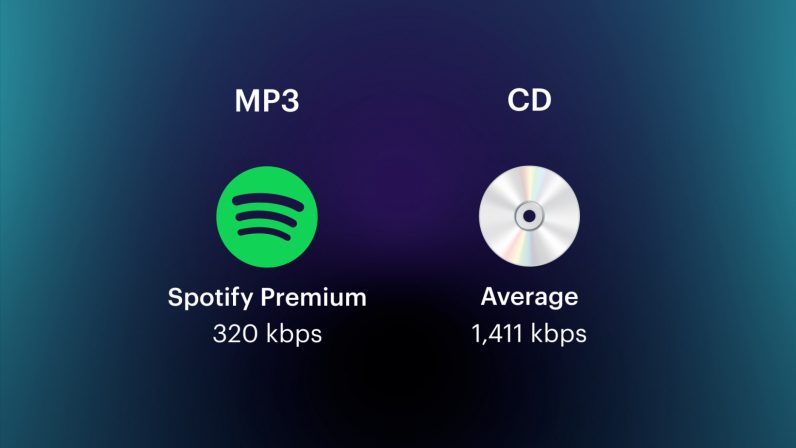
On an audio CD, information is losslessly encoded at a constant 1407 kbps bit rate.

The MP3 format allows you to encode audio information with constant or variable bit rates from 32 to 320 kbps, that is, they provide five times the compression compared to CD.

Bit rate as a characteristic of digital video and audio

In streaming video and audio formats (such as MPEG and MP3) that use lossy compression, the bit rate parameter expresses the degree of compression of the stream and therefore determines the size of the channel for which it is compressed data transmission. Most of the time, the audio and video bit rate is measured in kilobits per second (kilobits per second in English – kbps), less often – in megabits per second (for video only).

There are three compression modes for data transmission:

– with a constant bit rate (constant bit rate in English – CBR)
– with a variable bit rate (variable bit rate in English – VBR)
– with an average bitrate (English Average Bitrate – ABR)

Variable and average bit rate

The codec chooses the required bit rate based on the parameters (the level of the desired quality) and, during the encoded chunk, the bit rate may change. When compressing audio, the desired bit rate is determined based on the psychoacoustic model. ABR is a variation of VBR in which the codec is compressed to a specified average value.

What is bitrate: a clear explanation for beginners

Bit Rate

Once a student was teaching a class and asked me to give him the clearest possible explanation of what bitrate meant.

Today I am going to share with you that explanation that although it does not refer to sound but an image in the background, it is the same and is very easy to understand.

bit rate

Imagine that you put me in front of a beautiful landscape full of rivers and trees, mountains and Valleys with some Villas with Fields full of flowers and animals.

There is a lot of information there if I had to make a detailed description.

Imagine that you ask me to give you a description in 4 words.

It would have to make a very general description that, being very brief, Nova contains details. Maybe I’ll say something like “a beautiful autumn landscape.”

if after that you tell me that now I will have 14 words to describe what I am seeing.
I’ll be able to give more information Although it will really continue to be very summary, but you could already give some details.
“a beautiful autumn landscape with fields and mountains that have houses, flowers and animals”

If they ask me for the following explanation and they already allow me to use 50 words, I will be able to give many more details.
Although of course I will still have to omit a lot of details.

How many words might I need to give a detailed, spoken portrait of what I am looking at?

Well, this example that I just gave of the four words at the beginning then 15 words later have maybe 500 words later is exactly what the bit rate is.

We are talking about what is the amount of information that our audio or video file can transmit per second and obviously The higher the information There will be more details and therefore a higher quality and on the contrary the lower the information the lower the details and therefore lower quality.

That’s why a bit rate of 320 thousand bits per second will have a much higher audio quality than one of 90,000 bits per second.

Because in music, images and video, the quality always depends on the amount of information.

And in the specific case of audio and video, the amount of information is measured by seconds.

This means how much information it can transmit per second, that is, how many bits it can transmit per second, which means How much information and therefore How much detail, which is synonymous with quality.

With this we will understand very easily that as well as the sampling frequency is also very important and we will explain it in another article.
The rate of bits that are transmitted per second is crucial in determining the quality that an audio or video will have.

Of course, it must be understood that the higher the bit rate per second, the larger the size of the audio file will be because the greater the amount of information stored will be, but this will result in higher quality and greater definition.

Because here the definition concept is crucial.
The higher the bit rate the higher the definition and therefore the higher the quality.

The definition would be the detail of our initial explanation, if they let me use 2000 words to describe a landscape, I will be able to give many details and define them with great clarity. And that will mention a lot of quality.

This As-is applies to audio or video files.

Surely with this explanation it has been much clearer what is the rate of bits per second and why it is important.