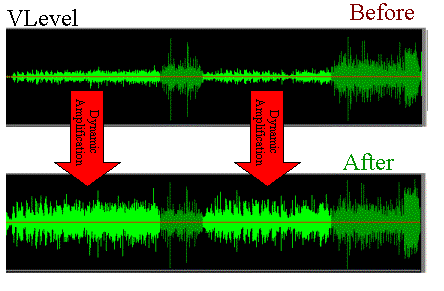
Normalization of an audio file.


Free Download Mp4Gain
picture

How to normalize an audio or video file.

Normalization is used to increase or decrease the level of the song as a whole, so that its maximum volume peaks assume the indicated level.

For example, if the maximum intensity points of the song are at -3 dB (therefore, well below 0, which should represent the maximum before distortion), normalizing to 0 dB means increasing the level of the entire song so that these peaks reach 0 dB.

audio level

This is the typical normalization of the peaks.

There is also RMS normalization (which takes into account not the peaks, but the actual average level of the song).

AUDIO CDs, which have good dynamic possibilities (various intensity tones, from pianissimo to fortissimo), are generally recorded so that the maximum volume points are at 0 dB.

Free image of audio levels

Normalizing your recordings in WAV can be useful to adapt them to the average level of a CD in case they are too low (because you had been careful in the level during the recording) but there is one important thing to keep in mind:

normalization of this type alters the original dynamics, that is, the reciprocal relationships between weak and strong sounds.

Although all levels are raised by the same amount, the relationship between 2 levels changes (small mathematical example:
2/5 = 0.4 ma (2 + 1) / (5 + 1) = 0.5 …

The result is that the weaker sounds, after sudden normalization, sound much louder and those that were already loud only sound a little louder … altering the dynamic relationships that had been envisioned by those who originally recorded the music and causing the sound output to lose depth.

Some types of music, generally already deficient dynamics (rock, metal, etc.) since the excursions between the minimum and maximum volume are almost never very consistent, are more “normalizable” without problems, while the genres in which there may be Large Dynamic excursions (classical music or music with passages from pianissimi to fortissimi) are more problematic.

Furthermore, it is necessary to keep in mind that if you normalize a large wav file that contains many songs (not yet divided) there can still be, even in genres with little dynamics, consistent differences, in this case between one song and another and not between different points of the same song.

So a light normalization can do and is actually used (to raise the level of the song), but it would be better to make sure you don’t need it (recording from the beginning with a good level) or at least not have too much need. and remember, however, that the dynamics are somewhat flattened.

Normalization of an mp4 or normalization of a video.

We are in the video age, it is said that 2,000 hours of video per minute are uploaded on YouTube.

HOWEVER, THERE IS NO OTHER SOFTWARE THAT IS ABLE TO NORMALIZE THE AUDIO OF THE VIDEOS !!

Mp4Gain is used by television channels throughout the world. Also by radio stations … even by some famous musicians, of whom we cannot give the name for reasons of confidence … but we are talking about musicians of global fame.

One of them is the guitarist of one of the groups that generates the most money on their world tours … or perhaps the one that generates the most money on their world tours. He uses Mp4Gain …

And so, many other celebrities are our clients. NBA players belonging to the legendary dream team, etc.



Free Download Mp4Gain
picture


Mp4Gain Main Window
picture


Mp4Gain Features
picture


Free Download Mp4Gain
picture

Audio normalization explained

Audio normalization – Audio normalization

Audio normalization is the application of a constant amount of amplification of a sound recording to bring the amplitude of a target level (standard). Because the same amount of gain over the entire recording, the signal-to-noise ratio and relative dynamics are unchanged.

Two basic types of audio normalization exist. Peak normalization adjusts the recording based on the highest signal level present in the recording. Loudness normalization adjusts the recording based on perceived loudness.

Normalization differs from dynamics compression, which applies varying levels of gain across a recording to fit the level within a minimum and maximum range. Normalization adjusts the gain with a constant value over the entire recording.

Normalization is one of the functions usually provided by a digital audio workstation.

Peak normalization

One type of normalization is peak normalization, where the gain is changed to bring the highest PCM sample value or analog signal peak to a certain level – usually 0 dBFS the loudest level allowed in a digital system.

Peak normalization

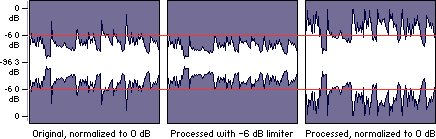
Since it only goes to the highest level, only peak normalization does not take into account the apparent loudness of the content. As such, peak normalization is commonly used to change the volume so as to ensure optimal use of the available dynamic range during the mastering phase of a digital recording. In combination with compression / restriction, however, peak normalization becomes a feature that can provide a volume advantage over off-peak normalized material. This feature of digital recording systems, compression and limiting followed by peak normalization, sets contemporary trends in program loudness.

Loudness normalization

Another type of normalization is based on a measurement of loudness, where the gain is changed to bring the average amplitude to a target level. This average can be a simple measurement of average power, such as the RMS value, or it can be a measure of human perceived loudness, such as that offered by ReplayGain, Soundcheck and EBU R128.

Loudness Normalization

For example, YouTube reference level -14 LUFS, so if a program analyzed at -10 LUFS, YouTube will decrease the level 4 dB to the reference of -14 LUFS.

Loudness normalization was made in different volume combat when listening to different music in a series. Before loudness normalization, one song in a playlist would be quieter than the rest, so the end listener would have to put a volume knob to adjust the playback volume.

Depending on the dynamic range of the content and the target level, loudness normalization may result in peaks that exceed the storage medium. Software offering such normalization usually offers the option of using dynamic range compression to avoid clipping when this happens. In this situation, signal-to-noise ratio and relative dynamics changed.

Volume normalization, an explanation

Audio Normalization: Make Your Audio & Video Consistently Loud

Audio normalization is a process in which the amplitude (volume) of an audio recording is increased or decreased in a constant relationship over time, so that the maximum amplitude or the maximum effective value or the perceived volume (volume) reaches a predetermined level, the standard. If the signal has multiple tracks, they all undergo the same correction.

Normalize Audio

Example: normalization of peaks to -3 dB:
A collection of digital recordings is made with a peak modulation standard of -3dB FS.
A new stereo recording is measured. The highest maximum level is -5.5 dB FS on the left track, -5.7 dB FS on the right track.
Normalization consists of applying a constant gain of 5.5 – 3 = 2.5 dB.
Standardization requires two passes. The first determines the maximum level, the second applies the correction to the entire recording.

Audio Normalization

Maximum normalization changes the level, but not the dynamics of the sound.
Volume normalization or perception of loudness often includes compression that changes the dynamics of sound.

Peak normalization

Peak normalization applies a constant gain to a recording to bring the highest peak to a target level, 89% professional audio (-1 dBFS true peak (True Peak)).

The sound dynamics of the recording are more or less preserved, except that maintaining a low distortion level after multiplication of all samples may involve the application of a known quantization error decorrelation noise. under the name redithering (tingling of the least significant bit) 2, which slightly increases the background noise level.

Volume normalization

The purpose of volume normalization is to bring all sound elements in a collection to the same sound volume level, so you can hear them without having to adjust the volume. In fact, the normalization of the maximum level in no way guarantees a homogeneity of the perceived sound volume (Loudness).

A simple approach to volume normalization, which is provided by various software programs, is to normalize the RMS value of the integrated signal within a few tenths of a second. The most advanced machines use extensive algorithms for more accurate evaluation of the perceived noise level. The European Broadcasting Union published a recommendation 1 in 2011, which provides a relatively simple method for this evaluation.

If the standard is not low enough, volume normalization involves compression for recordings whose sound dynamics would be higher than implied when setting the standard from the maximum level. If not, the signal peaks would exceed the quantization limits.

In the simplest implementation, volume normalization collects volume data during the first pass, determines the gain or attenuation necessary for the maximum volume to reach the norm, and applies this correction to the second pass. If the elements of the collection have the same characteristics, from form factor to top factor and dynamics, as is the case with popular music collections or recorded speech, this approach produces satisfactory results.

Extensive implementations use a standard that includes not only the volume of the sound, but also the maximum maximum values ​​and dynamics of the sound. They collect loudness levels and maximum values

VOLUME NORMALIZATION: WHAT IS THE VOLUME NORMALIZATION FUNCTION?

Audio Normalization

HOW IS THE VOLUME BETWEEN TITLES NORMALIZES?

WHAT ARE the benefits of activating the normalization feature?

The “NORMALIZE VOLUME” volume normalization feature allows you to achieve a volume of the same level, music title after music title, regardless of which one succeeds during playback.

How Audio Normalization Works

This provides undeniable listening comfort rather than having to, as before, sometimes turn the volume up or down depending on certain pieces of music.

Note that this difference between a high volume and a low volume sound is called dynamic. If this sound is short or long (1 second or 3 minutes …), be it music, voice or noise.

WHY IS THE SOUND MUSIC OR LETTERS STRONG, SOME TIME?

We must not forget that music, recorded or not, as well as everyday acoustic sounds (those that surround us) are something “alive” which, like during a human discussion, necessarily contains volume passages. weaker sound and others that are louder.

The human ear is by definition used to these differences in sound levels. If these sound differences between the low and high levels did not exist, it could end up giving us a headache because the sound heard would not be natural. The ear needs moments of rest, even if only for a moment, and stronger moments for words to remain audible (and to work the ear again!). The human ear needs this natural “breath”.

Today’s music is very “compressed” (constant sound level, few low levels) when recording (mixing), that is, there are few passages with a big difference between the lowest and highest passage of the song. The STANDARDIZE feature can even be activated and not work much if all the titles of an album are very “compressed”.

Finally, the sound world is like the aquatic world: there are high and low waves. Some tracks are not recorded (mixed) like others. They leave a big difference between low and high noise levels. The NORMALIZE VOLUME feature allows you to level up and try to get everything back to the same level.

WHEN SHOULD I USE THE STANDARDIZATION FUNCTION?

Eg. On the street or in the subway, standardization plays an additional role in making your music more audible. And of course, first and foremost to get a comfortable listening when listening to different music titles with as much sound as possible.

WHY disable the standardization feature?

When the need arises, you can turn this feature off at any time when you want to find this “breathing sound”, titles read (play), with multiple moments that contain smoother (weaker sounds) and higher variations (it’s loud).

Especially if all the titles in your album or playlist are compressed at source, disabling the NORMALIZER feature will help your ear rest, at the end of the day you will be less tired.

Deezer’s NORMALIZE feature does not compress sound and fatigue, it only reduces the major differences between high-level and low-level titles.

What is an audio normalizer.

Normally at the time when one listened to music on CDs or even vinyl, it is a problem the relationship of the levels of volume music tracks since they all came from the same Source. That is, all the music tracks recorded in the same studio and mastered by the same person for which the gain of its similar volume and when one finished listening to the vinyl or CD to listen and then did not notice the difference between One disk and another disk volume gain.
at the moment when the internet begins to exchange musicals, he does not listen to a complete album, but hears an album another album, the differences in very noticeable volume levels. This is why the need arises soon for the sound of the different wales music tracks Although these come from albums that have been mixed in different studios and by different recording engineers.

This is known as normalize level of musical audio gain. Over time, more sophisticated algorithms have gone away that achieve this function more efficiently. Initially understanding the peaks of each song the entire song reach its maximum point without generating any distortion. This was obviously insufficient and the result was not satisfactory, I am still investigating and creating increasingly sophisticated algorithms to achieve a similar loudness in volume peaks.

Nowadays, this application called mp4gain is available, which manages to match the loudness and optimize the best results quite similar to any large FM radio station. q is the algorithm the loudness of each of the frames used to achieve the best possible volume without ever reaching the distortion.
In addition, the program offers other functions such as modifying the pitch without altering the speed and vice versa or being able to equalize the song. Very high quality the most used music program is even used by universities, television channels, radio stations and different music producers. You can download it for free to try it on your computer or buy it directly from this site

Increase Mp4 Volume


Increase Mp4 Volume

Until recently it was very difficult or impossible to find software that normalize the volume of video in mp4 format.

Options existed almost exclusively to normalize audio files, basically MP3 format.

But think normalize the volume of video files, it was almost a dream, elusive.

Mp4Gain is the ideal answer to this need. If you necesiuta normalize the volume of a Mp4, he found the right program.

But it is not only there, there are many other video formats that can be normalized by the Mp4Gain and even many audio formats. In resuymen, almost all important and known audio and / or video formats, they can be normalized by the Mp4Gain, which is a very modern program (and very inexpensive, only $ 40 with upgrades for life!) And extremely efficient.

Mp3 Normalizer – Mp3 Increase Volume

With the quality of devices that we have today, is no longer sufficient normalization method offered by the audio normalizing a decade ago.

Once I considered sufficient to make a simple scan looking for the volume peaks, to amplify ALL that song by the same ratio. That is, if the peak volume was by 305 below the limit possible, then the entire song simply by 30 percent was amplified. True, it was ingenious, but very innocent and inefficient.

Seeking then calculate the loudness of the entire song and compare it with all the tracks that formed a CD. ID3 tag type is generated (which are not at all standard, that is, most players today olos ignore) and it was like automatically turn the volume knob.

Today we come to the time where you can perform complex and sophisticated frequency sweeps (practically isolating each instrument) in each frame, in order to modify differently the various sound within a song or video.
Not everything is amplified at the same ratio, every sound is treated separately, to achieve the proper normalization in 2016.


Increase Mp3 Volume – Mp3 Volume Booster

Increase Mp3 Volume – Mp3 Volume Booster


The need to increase or enhance the volume of a volume file (mp3, mp3, mp2, flac, ogg, m4a, AAC, wav or ac3) is increasingly necessary as quew usually tend to have a volume level too different, because, above all, they have very different sources.
Some have obtained downloading them from the Internet, others have inefficient encoded with encoders, etc.
The result is always the same volume levels very different audio, which must be normalized to avoid having to handle the volume knob every new song.
This happens in all formats, for example mp3, mp3, mp2, flac, ogg, m4a, AAC, wav or ac3.

Mp4Gain is software that normalize to perfection these audio volume levels, driving the volume normalizing volumes of each audio file.
Mp4Gain also do this with video files of major formats, which you would have resolved the issue of uneven volume levels of both audio files and video files.

Today, a whole range of devices, which are used for playing audio and video, Mp4Gain is the solution that makes all your audio or video sound at the same volume level.


With Mp4Gain, it will be very easy for you to standardize your files one by one or in batches and ensure that all audio or video files have a level of optimum volume.
Why Mp4Gain analyzes each loa million frames that the file contains and also sweeps the frequencies, which offers normalization algorithm truly sophisticated and modern, suitable for reproduction in the most modern audio devices and video .


Increasing the volume of the audio from the videos?

Increasing the volume of the audio from the videos?

Some people wonder if it is possible to increase the volume of the audio from the videos in the most popular formats. Increase the volume in mp4, flv, 3gp, avi, etc.

In so far that’s not possible ea. In fact, it was usually only possible to increase the volume in mp3 format files.
Mp4Gain offers, in addition to increasing the volume in video files, also do it in the most popular audio formats, such as FLAC, OGG, MP2, M4A, AAC, AC3, etc..

This allows the software Mp4Gain a tool to manage the normalization of the most popular formats of audio and video. What software makes it a must for anyone who collects audio or video, for there will always be very noticeable volume differences.

Mp4Gain is the solution to these huge differences in volume, making all your audio and video have the same volume.


Of course we get questions by email as:

“Someone has been raised to match the audio of the videos?
I thought the audio separate from the video to match with any program.
Any better ideas?

PD
I just did a test and normalizing separating audio with a program. The problem I have is that the audio is played only once, even if the video is repeated.
I’m looking at the audio options, but not if confgurar be able to play continuously. ”
With Mp4Gain not need to do all this, it is much easier and standardization is of much better quality.

Mp4 Gain is the best volume normalizer, audio and video, you can download the trial version and try it on your own computer.


Mp4 video normalizer

Mp4 Video Normalizer

Normalize volume of a Youtube video (MP4 or FLV) is very necesaerio today but almost impopsible of consiguir far Mp4Gain finally appears.

For a long time people felt they needed to boost the volume of your videos on formastos as mp3, flv, wmv, etc.. but had ne way to normalize audio from videos.

Now with Mp4Gain is as simple as uploading one or hundreds of files in the program (Mp4Gain accepts normalizacvion batch) and press a button.

Formats that can normalize Mp4Gain are:

Video Formats:
mp4, flv, avi
mpeg, mpg
3gp, wmv

Audio Formats:
mp3, mp2, flac
ogg, m4a, aac
wav, ac3

That is, besides standardizing videro popular formats (mp4, flv, avi, mpeg, mpg, 3gp, wmv) also normalizes all popular audio formats (mp3, mp2, flac, ogg, m4a, aac, wav , ac3).
You download the trial version of the program and test on your own computer with your own files, you’ll see that you will be pleasantly surprised with the results Mp4Gain offers and that no other software can offer.