Lossless digital audio formats


Free Download Mp4Gain
picture

Lossless digital audio formats
lossless audio

Uncompressed formats
The first digital audio formats encoded information, as they say, “as is”.

Lossless Audio

This format is, first of all, convenient for the computer itself: there is a simple correspondence between a sequence of digital signals and a sound waveform. Not surprisingly, despite the further development of compressed audio formats, uncompressed formats continue to be actively used in the field of professional (and amateur) sound work. What are these formats?

First, it is the audio CD format itself. For him everything is simple: this is the format in which most audio discs are recorded (unless, of course, several albums have been recorded on them at the same time – in this case, we are talking about a format obviously compressed). The Audio CD format uses Pulse Code Modulation (PCM) to convert “digital” to “analog.” This is the type of conversion that forms the basis of most other audio formats.

Everything is clear with CDs, but what about sound presentation formats on computers? Here, as you can imagine, the biggest computer and software manufacturers were the first to rush in, developing formats like AIFF (Apple) and WAV (Microsoft and IBM), known to computer and operating system users of these developers to this day. from today. Furthermore, Apple, being the undisputed leader in the field of computer multimedia at the time, introduced its format in 1988, ahead of the developers of the WAV format by three years. If you let the computer read the data on the audio CD and translate it into any of these formats, you will get an exact copy, which will take up the same amount of space on your computer’s hard drive as the original on the CD. The only difference will be in the format in which this data will be packed.

It is important to note that the capabilities of these formats exceed those of an audio disc. They allow much greater audio depth (up to 32 bits) and sample rates (AIFF up to 196 kHz, and in WAV, any). But even these parameters were not satisfied with the developers of ultra-high fidelity audio formats. These formats were first used on Super Audio CD (SACD) developed in 1999 by Sony and Philips, and were eventually installed on personal computers for lovers of high-quality sound.

The digital audio format used in SACD is called DSD (Direct Stream Digital). It uses a fundamentally different way of analog-to-digital and digital-to-analog conversion – the waveform is encoded with just one bit at a time. In other words, the “depth” of the sound is only one bit, but this information is updated much more frequently than in most other formats, that is, the sample rate is increased several times. This allows the algorithm to recreate the shape of the sound wave by estimating the density of these pulses in a given time interval.

This way of representing the signal made it possible to avoid non-linear quantization noise. It is true that the higher the frequency of the sound, the lower the number of pulses that encodes it, the precision of the encoding decreases, which means that the constant noise level in relation to the signal, that is, the hiss, increases . But at a high sampling frequency, the level of this hiss becomes critical already in the ultrasound region, which is imperceptible to the ear. At the same time, a much more important task has been accomplished: there is no quantization noise, a kind of “curse” of digital sound. They all “left” with the same inaudible noise. It is not surprising that this format fell in love with critics of “digital”, it seemed to bring it closer to “analog”, eliminating traces of discretion in its sound.

However, it turned out that DSD files are completely unsuitable for editing: they are edited only by converting to PCM (and vice versa when saved), and each such conversion multiplies the amount of noise that soon becomes critical for hearing. . It’s one thing when you record ready-to-use analog material in DSD, which has passed analog mastering. But what should you do when recording and editing new audio material? So, there were formats that went back to pulse code modulation with additional adjustments against quantization noise. Notable among these is DXD (Digital eXtreme Definition), which has found application not only for mastering source data for SACD, but also for listening to high-quality audio on a computer.


Free Download Mp4Gain
picture


Mp4Gain Main Window
picture


Mp4Gain Features
picture


Free Download Mp4Gain
picture

Introduction to digital sound

Introduction to digital sound

digital sound

The computer operates on digital data. Therefore, for translation to a computer, an analog audio signal must be converted to digital.

Digital Sound

For playback, on the contrary, the digital signal must be converted to analog. For this, special devices are used: an analog-to-digital converter (ADC) and a digital-to-analog converter (DAC). Both devices are built into your computer’s sound card.
Recording scheme: sound reproduction

Recording and digitization
Tape recording is an example of analog recording. The computer operates on digital data. Digital recordings have many advantages over analog ones:

Digital files can be copied as many times as desired without loss of quality.
The digital files can be burned to a CD and posted on the website.
Digital recordings are easier to edit.
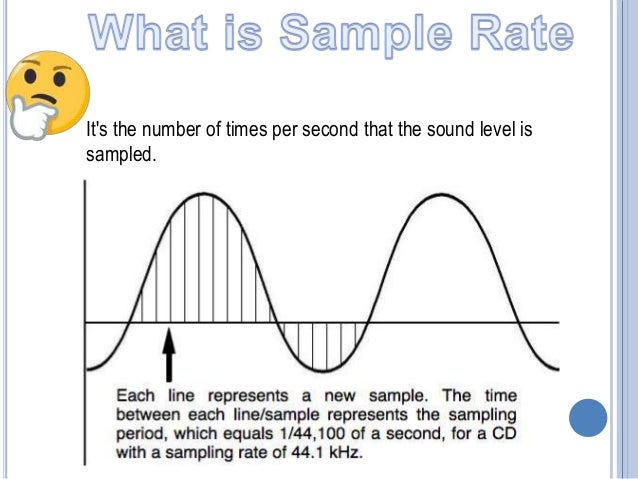
To convert an analog signal to digital, a special device is required: an analog-to-digital converter (ADC). The ADC converts an analog signal into a sequence of digital values ​​that are sent to a computer. The method used to convert the analog signal to a digital technique called pulse coding (PCM pulse code modulation). The essence of this method is that the amplitude of the analog signal is sampled at regular intervals:

Digitized sound

To convert a lossless signal, it is necessary to sample 2xPi times more often than the highest frequency in the signal spectrum:

It’s easy to guess that two parameters determine the quality of a digital recording:

Sampling frequency: the speed at which samples are taken. Measured in Hertz (Hz). 1 Hz = 1 / P.
Audio CDs, for example, use a sample rate of 44,100 Hz.

Resolution (sample format or sample size): the precision of the representation of each sample, that is, what number describes each sample. Audio CD is represented by 16 bits.

Bitrate

The human ear recognizes sounds in the 15 Hz to 20 KHZ frequency range. Therefore, the ideal sample rate is 128 kpc. This frequency is used in DVD format. Recently, the frequency of 192 kHz with sampling of 24 and 32 bits is becoming common. This resolution allows you to transmit completely realistic sound, but requires high-quality acoustics.

For the audio format, the selected frequency is 44,100Hz with 16-bit sampling (see “What is sound”); this corresponds to the ability to reproduce most speaker systems.

The digitization of the analog signal is done using the pulse modulation method (PCM stands for Pulse Code Modulation).

Reproduction
For playback, a digital signal must be converted to analog, amplified, and routed to a sound-reproducing device – speakers or headphones.

To convert a digital signal to analog, one device is used: a digital-to-analog converter (ADC).

Typically ADC and DAC are built into a computer sound card

Which is better: MP4 or 3GP?

Which is better: MP4 or 3GP?

MP4 VS 3GP

When evaluating the MP4 and 3GP formats, the question is not which one stores superior digital video, but which one is best for the task at hand. Although they both contain multiple media tracks and share similar encoding methods, the differences are most noticeable when used on portable devices.

3GP vs. MP4

Background
When digital videos are created, they are published through a process called compression. During this process, digital scripts, called codecs, encode the media tracks and make them readable. After that, the ordered video, audio, subtitle, and animation tracks are combined into one file via a media container. The MP4 and 3GP formats are closely related because their files are recorded using some version of MPEG-4 compression.

Characteristics
The 3GP format was developed by a third-generation partner project as an implementation of MPEG-4 compression. Although this encoding profile is commonly used for digital video, telecommunications professionals have developed it specifically for performance on 3G mobile phones. In contrast, MP4 is a common format for any digital video that has been published with MPEG-4 compression. The formats are very similar, some 3GP files can be opened if their extension is changed to MP4.

Show
Because MPEG-4 compression is so efficient, any digital video encoded to this standard can transmit high-quality multimedia with relatively low bandwidth. As a result, these files are relatively small and are less likely to take up storage space and processing speed. Due to this efficiency, MP4 is almost universally compatible with portable media players and smartphones. Despite this wide compatibility, MP4 files are not optimized for playback on 3G mobile phones like 3GP files.

Compatibility
Although 3GP files are designed for 3G mobile phones, they can also be opened on some media players. These applications include QuickTime, VLC, and RealPlayer. However, since MP4 files are very widespread and more widespread, support for the format is almost standard in multimedia software. Besides QuickTime, VLC, and RealPlayer, MP4 files can be transferred to iTunes and Windows Media Player. MP4 files can also be downloaded to Apple iPod, Apple iPhone, and Sony PSP.

Bottom line
When it comes to streaming video to a desktop computer or portable media player, MP4 is the best format because it can support higher resolution videos. However, 3GP should only be used on 3G phones as it is designed specifically for the device.

Everything you need to know about high resolution

Everything you need to know about high resolution

Hi-Res Audio

High Definition Audio is the choice of the most dedicated digital music fans. What is it, where to get it, and what does it take to hear it?

HI RES AUDIO

If you’re a bit interested in digital music (whether it’s listening to CDs or streaming Spotify on your smartphone), you’ve probably come across the term “Hi-Res Audio” or “Hi-Res Audio.”

In recent years, the popularity of Hi-Res Audio is slowly but surely gaining momentum, fueled by the emergence of new components, streaming services, and even smartphones that support this standard. Until recently, it was a niche segment for a narrow circle of insiders, but today everyone wants to join it.

If you want to get the best possible music listening experience, or at least better sound quality, you should familiarize yourself with the concept of Hi-Res Audio.

This perspective is a bit overwhelming as it involves many factors. What is Hi-Res Audio? What do all these formats and numbers mean? Where can I get high-quality files and on what devices can I play them? Finally, where do you start?

Our guide to the world of Hi-Res Audio will help you understand the matter in depth. After reading this material to the end, you will be armed with all the necessary knowledge and take the first step on the way to the magical world of the best sound.

WHAT IS HI-RES-AUDIO?

Unlike HD video, there is still no universal standard for high definition audio. Digital Entertainment Group, Consumer Electronics Association and The Recording Academy, as well as the largest recording companies define it as follows: “An audio file in a lossless format that carries a soundtrack across the entire frequency range in which it was mastered using higher quality equipment than CD ”.

In simple terms, this term generally refers to recordings with a higher sample rate and / or bit depth than CDs (i.e. 16-bit / 44.1 kHz).

The sample rate indicates how many times per second a signal is sampled during its conversion from analog to digital. The higher the bit depth, the more accurate the signal measurement will be at the sampling point, so the 16-bit to 24-bit transition can significantly improve quality.

High-resolution audio formats typically have a sample rate of 96 or 192 kHz at 24 bits. Also, there are files with 44.1, 88.2 and 176.4 kHz.

A little loss

However, Hi-Res Audio has one major drawback: the size of the files. They are typically tens of megabytes in size, and a few songs can easily take up all of your device’s memory. Because of this, they are difficult to transfer over mobile networks and Wi-Fi.

And that’s not all: each of the Hi-Res Audio file formats has certain compatibility limitations. Examples include FLAC (Free Lossless Audio Codec) and ALAC (Apple Lossless Audio Codec); both theoretically provide lossless transmission of musical information. In addition, there are uncompressed formats: WAV and AIFF, DSD (the format used in Super Audio CD) and the recently developed MQA (Master Quality Authenticated).

You can discuss the relative advantages of each format, but first of all, you will have to consider their compatibility with audio system components and software solutions.

WHAT ARE GOOD HIGH-RESOLUTION AUDIO FORMATS?

The main advantage of high definition formats over tablets is the higher sound quality. Downloadable sites like Amazon and iTunes and streaming services like Spotify offer relatively low-bitrate compression formats like 256kbps AAC from Apple Music and Spotify’s 320kbps Ogg Vorbis.

During the compression encoding process, some information is lost; in other words, the signal resolution is reduced for convenience and file size reduction. This affects the sound quality: in these formats, your favorite songs will not be able to be fully revealed.

What is MQA? And why do we need another digital format?

What is MQA? And why do we need another digital format?

MQA

More and more people ask us about MQA: what is it, good or bad, is it necessary or not? Although for most Russian music lovers, these three letters probably say nothing. How is that and what is hidden behind them? We will try to tell you.

MQA

MP3, AAC, ALAC, FLAC, WAV, DSD are just some of the most common digital audio formats today, why do we need another one: MQA?

At the moment, MQA is still quite a niche thing, still a far cry from the status of a generally accepted format, which was (and for many, we admit, is still morally out of date) MP3, but the people and companies behind MQA they have serious ambitions and prospects for the future. they think that MQA is changing the way most of us get digital music right now. For one thing, the technology works right now, it’s backward compatible with existing audio devices, and it can deliver quality that was previously unattainable. But not everything is so simple in the history of MQA. Today we will talk about the main points to understand this topic.

What is MQA?
MQA stands for Master Quality Authenticated – “Confirmed Master Quality”. This is the name of the technology and the codec behind which many patents, licensed technologies and its own philosophy lie. It is also the name of the company that develops and licenses these technologies. MQA was invented within the legendary American company Meridian Audio under the leadership of Bob Stewart, but it was later decided to separate the technology into a separate division, which has such ambitious plans.

Stewart and UK Meridian’s trajectory includes the first digital active loudspeaker, the first audiophile CD player and the first digital surround sound processor. Meridian also invented the MLP (Meridian Lossless Packing) algorithm, which is used for lossless audio compression for DVD-Audio / HD-DVD / Blu-ray.

Meridian announced MQA technology in 2014, with the first public demonstration in Las Vegas at CES 2015. Various digital music providers, hi-fi developers and record companies announced support, including: Pioneer Corporation, Onkyo, Meridian Audio, 7digital, Lindberg Lyd (2L) Mytek and others. Warner Music Group announced that it signed a “long-term license agreement” with MQA at the High End in Munich in May 2016.

In May 2016, the Recording Industry Association of America (RIAA), in partnership with the Recording Academy’s Producers and Engineers Branch, the American Independent Music Association (A2IM), and DEG: The Digital Entertainment Group, announced that the services of MQA music are eligible to use the official logo. “Hi-Res MUSIC” industry.

In January 2017, MQA’s recordings were made available to Tidal “HiFi” subscribers.

In March 2018, MQA launched “Live”, a virtual concert service designed to preserve the original sound quality of live performances.

Why do we need MQA?
Most of the digital music you listen to online or download was not produced by the artist. Of course, we are not referring to the songs and works themselves, but to MP3, AAC or FLAC files. Most of the time they are created by third parties, for example Apple Music or Yandex. Music from studio-quality master files provided by record labels.

It would be nice if all these digital versions were produced according to a certain set of standards, so that each of them is the most accurate representation of the original recording, but the reality is not that simple. It would be nice if artists could listen and approve these versions before they are released. But this doesn’t always happen either.

Sampling rate (sampling)

Sampling rate (sampling)

Sample Rates

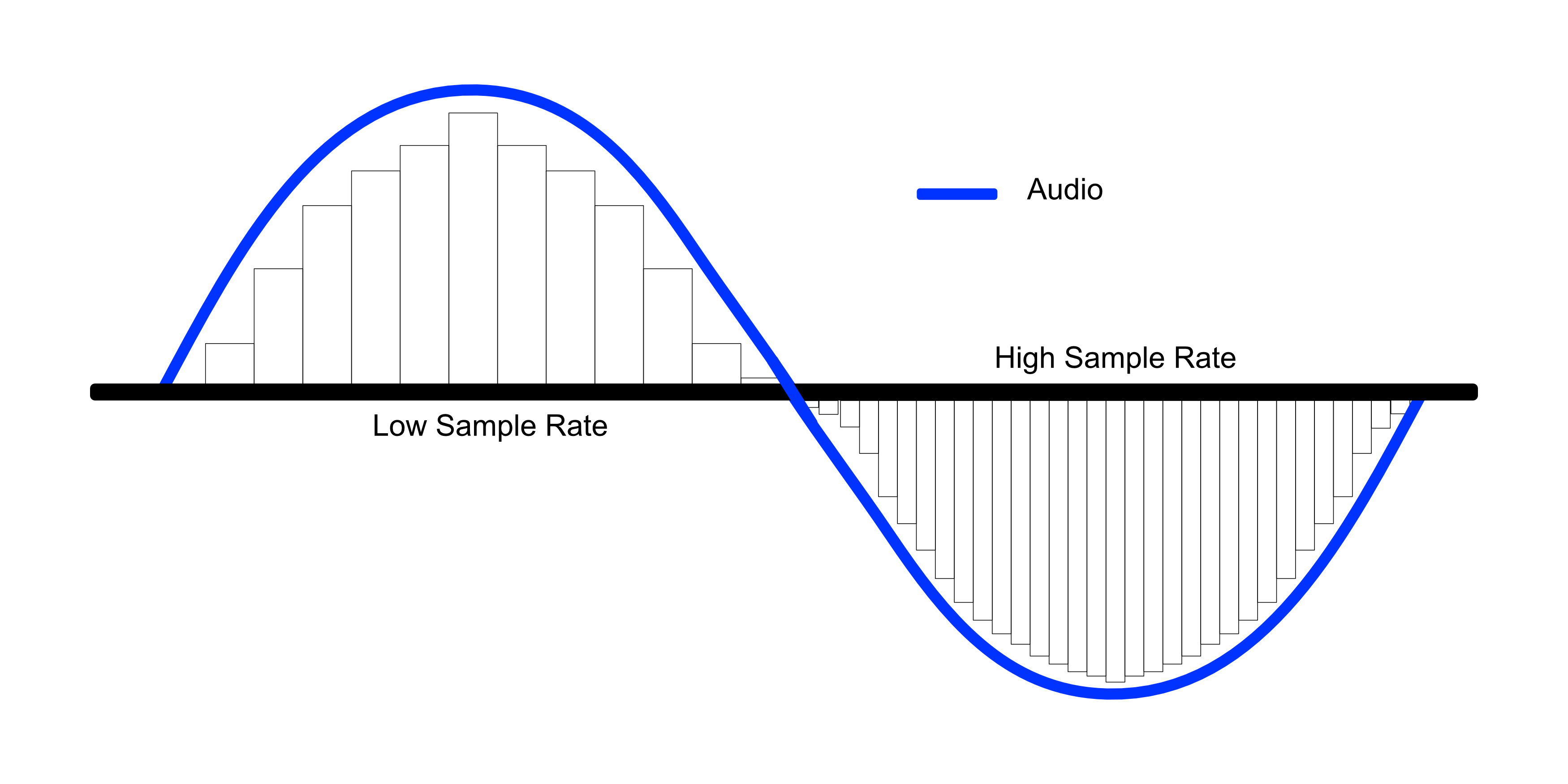
A higher sample rate describes sound more precisely, but at the same time describes those frequencies that the human ear can no longer hear, although changes in sound in the inaudible frequency range can still affect audible frequencies, so that studio recording is performed at a higher sample rate.

Sample rate

Since consumer equipment is primarily designed to reproduce sound with a sample rate of 44.1 kHz, when the recording is ready, it is re-encoded to a generally accepted standard. If the difference in sound quality between 32 and 44.1 kHz is obvious, then the higher the sampling frequency, the less perceptible or not at all perceptible to the ear the difference in quality between the two different frequencies will be. A higher sample rate describes sound more precisely, but at the same time describes those frequencies that the human ear can no longer hear, although changes in sound in the inaudible frequency range can still affect audible frequencies, so that studio recording is performed at a higher sample rate. Since consumer equipment is primarily designed to reproduce sound with a sample rate of 44.1 kHz, when the recording is ready, it is re-encoded to a generally accepted standard. If the difference in sound quality between 32 and 44.1 kHz is obvious, then the higher the sampling frequency, the less perceptible or not at all perceptible to the ear the difference in quality between the two different frequencies will be. A higher sample rate describes sound more precisely, but at the same time describes those frequencies that the human ear can no longer hear, although changes in sound in the inaudible frequency range can still affect audible frequencies, so that studio recording is performed at a higher sample rate. Since consumer equipment is primarily designed to reproduce sound with a sample rate of 44.1 kHz, when the recording is ready, it is recoded to a generally accepted standard. the difference in quality between two different frequencies is less noticeable or not at all noticeable to the ear. A higher sample rate describes sound more precisely, but at the same time describes those frequencies that the human ear can no longer hear, although changes in sound in the inaudible frequency range can still affect audible frequencies, so that studio recording is performed at a higher sample rate. Since consumer equipment is primarily designed to reproduce sound with a sample rate of 44.1 kHz, when the recording is ready, it is recoded to a generally accepted standard. the difference in quality between two different frequencies is less noticeable or not at all noticeable to the ear. A higher sample rate describes sound more precisely, but at the same time describes those frequencies that the human ear can no longer hear, although changes in sound in the inaudible frequency range can still affect audible frequencies, so that studio recording is performed at a higher sample rate. Since consumer equipment is primarily designed to reproduce sound with a sample rate of 44.1 kHz, when the recording is ready, it is recoded to a generally accepted standard. Although changes in sound in the inaudible frequency range can still affect audible frequencies, studio recordings are made at a higher sample rate. Since consumer equipment is primarily designed to reproduce sound with a sample rate of 44.1 kHz, when the recording is ready, it is recoded to a generally accepted standard. Although changes in sound in the inaudible frequency range can still affect audible frequencies, studio recordings are made at a higher sample rate. Since consumer equipment is primarily designed to reproduce sound with a sample rate of 44.1 kHz, when the recording is ready, it is recoded to a generally accepted standard.

Recording at a sampling rate of 8 kHz

If you watch the sound recording at a low sample rate of 8 kHz, you will notice that its waveform has sharp edges. After all, to smooth out the wave, you would need more precision in your description and a larger number of samples, as in the example below with a sample rate of 44.1 kHz.

Analog or digital audio?

Analog or digital audio?

Analog vs. Digital Audio

Mechanical, electromechanical, optical, and magnetic recording were originally analog recording methods: recording and reproducing sound vibrations in their natural form (waves).

ANALOG vs. DIGITAL AUDIO

Many people believe that there is no better sound recording than analog. The warm analog sound of the magnetic tape is the standard of the best audio recordings for all mankind. Everyone from Elvis Presley and the Beatles to the latest electronic musicians have used and are using analog tape recording or emulation to create their music.

But analog recording is not the most accurate way to record sound. Rather the most beautiful. Analog sound is pleasant to the human ear due to the presence of “warm” harmonics, which are, in fact, distortions of sound. The most accurate sound recording principle today is digital recording.

The father of digital sound was 25-year-old Volodya Kotelnikov, who created it in 1933. The famous “report theorem” (also known as “Kotelnikov’s theorem” or “Nyquist-Shannon theorem). This theorem was the beginning of the creation of the principle of digitizing sound: encoding an audio signal into bits, that is, converting an analog signal into digital. It only took 49 years to create the CDs we know about. the world, it was only adopted in 1982.

A complete list of the types of digital sound recording in use today is digital magnetic recording (format: DAT cassette), magneto-optical recording (miniDisc format), laser recording (CD, SACD formats), digital recording optical (dolby digital)

The development of computers and digital technology has opened up enormous possibilities for processing and recording sound. Huge analog studios with countless multi-kilogram recording equipment, consoles, and sound processors are being replaced by virtual studios that fit into the computer’s system unit.

To process sound on a computer, it must first be recorded in digital, encoded format. The analog signal is encoded by an analog-to-digital converter (ADC). To play back the recording, you must reverse the digital-to-analog audio conversion using a digital-to-analog converter (DAC). The DAC and ADC are part of the computer sound card and other digital audio equipment. The quality of sound recording and playback is highly dependent on the quality of the DAC and ADC.

DAC and ADC

The main parameters of digital sound are sample rate and bit depth. Both the quality of the digitized sound and the size of the recorded file depend directly on them.

Sampling rate (sampling)

Analog recording begins by pressing the “record” button and ends by pressing the “stop” button. Digital recording is discreet. It consists of many recording fragments (samples) that follow one after another. The number of samples logged per second is the sample rate. It is calculated in hertz. The 44 100 Hz sampling rate (standard for CD) means that the audio signal is measured 44 100 times per second. The lower the sampling frequency, the smaller the frequency spectrum that is recorded. The higher the sampling frequency of the source material, the higher the quality and the larger the file size. When you talk on the phone, you only hear a small mid-range range. This is because the sample rate for phone calls is only 8,000 Hz. To transmit a range of frequencies that the average person’s ear hears and transmits home stereos: 40,000 Hz is sufficient. If the difference in sound quality between 32 and 44.1 kHz is obvious, then the higher the sampling frequency, the less perceptible or not at all perceptible to the ear the difference in quality between the two different frequencies will be. A higher sample rate describes sound more precisely, but at the same time describes those frequencies that the human ear can no longer hear, although changes in sound in the inaudible frequency range can still affect audible frequencies, so that studio recording is performed at a higher sample rate. Since consumer equipment is primarily designed to reproduce sound with a sample rate of 44.1 kHz, when the recording is ready, it is re-encoded to a generally accepted standard. If the difference in sound quality between 32 and 44.1 kHz is obvious, then the higher the sampling frequency, the less perceptible or not at all perceptible to the ear the difference in quality between the two different frequencies will be.

What are the differences between so many sound formats?

What are the differences between so many sound formats?

sound formats

The fact is that, in the vast majority of cases, the sound is stored in “compressed” form, since one minute of uncompressed composition occupies about 10 MB on the hard disk. On the one hand, this seems not to be much, but on the other, if you are a music lover and your collection consists of several hundred or even thousands of songs, then it is clear that the sound must be compressed to reduce the space it occupies in electronic media.

sound formats

Various special algorithms are used to compress music files, which subsequently determine the structure and presentation of the audio data, or so-called digital audio file formats. All audio formats can be divided into three groups: uncompressed audio formats, lossless compression, and lossy compression.

No compression
One of the most widespread formats related to this type is the well-known WAV. The sound of files with this extension is stored without compression or changes. It is true that much more space is required to store uncompressed files and therefore WAV is more widely used only in professional audio and video applications, where the sound should not have a loss of quality before processing. Keeping ordinary musical compositions in this form is unwarranted waste.

To play WAV files, you do not need any special software, as all media players understand this format, including the standard Windows Media audio player built into the Windows system.

Another format used to store uncompressed audio that is worth mentioning is Apple’s development called AIFF (Audio Interchange File Format). As you may have guessed, it is most commonly used on Macintosh computers running Mac OS X.

Lossless compression (lossless)
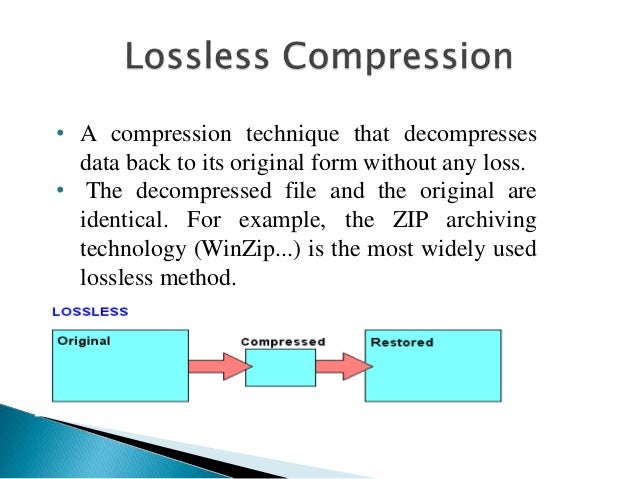
Lossless compression algorithms for audio files work on the principle of conventional file cabinets. They do not provide the highest level of compression (40 to 60%), while they have virtually no effect on sound quality. It is also worth noting that in this case, the encrypted data can be fully restored to its original form. Therefore, the use of lossless compression is most often used in cases where it is important to preserve the identity of the compressed data with respect to the original.

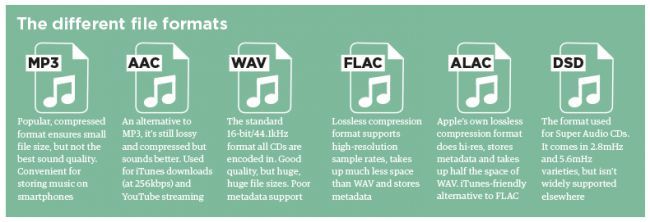
The most popular audio formats in this group are FLAC (Free Lossless Audio Codec), APE (Monkey’s Audio), WMA (Windows Media Lossless), and ALAC (Apple Lossless Audio Codec). Each has its own pros and cons. For example, the APE codec offers slightly better compression gains, while FLAC is more common. In general, all true music lovers store their music collections in lossless formats, since they do not remove any data from the audio stream and files created with these codecs can be listened to even on high-quality stereos.

To play lossless compressed formats, as a rule, third-party players (except WMA) are used, such as MPlayer, foobar, AIMP, Winamp, VLC and others, since all the necessary codecs are already built into them. Another option is to separately install an additional codec pack (for example, K-Lite), after which you can listen to files in lossless format from almost any audio player.

Lossy compression
This is the most popular group of algorithms that provides the maximum audio compression ratio (up to 10 times or more). However, unlike previous formats, the audio file loses quality here, and how much depends directly on the degree of compression.

To determine the quality of digitized sound, the most commonly used indicator is bit rate: the rate of the audio stream obtained after compression and measured in kilobits per second (kbps). As we already said, on average a minute of uncompressed audio takes around 10MB, which corresponds to an audio stream of around 1400 kbps. After lossy encoding, its bit rate can drop to 56 kbps. At the same time, it should be noted that to preserve natural sound, the throughput should be at least 192 or 256 kbps. If the bit rate of the transmission is 320 kbps or more, the difference in sound for most people between compressed and uncompressed audio practically disappears.

The most popular format here is definitely the famous and beloved MP3, developed by specialists from the famous MPEG (Moving Picture Experts Group).

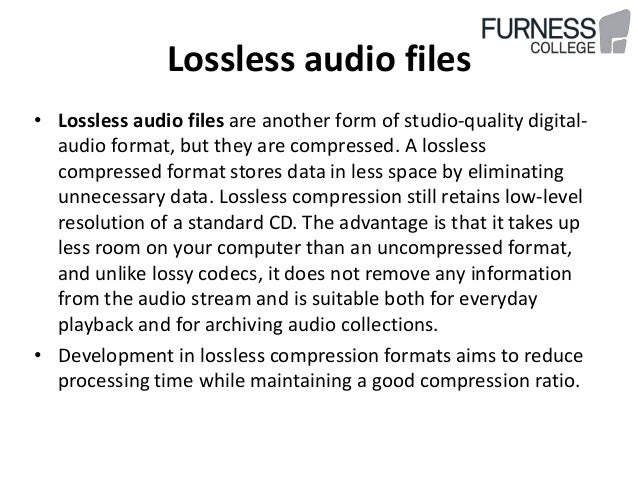
Lossless audio compression explained

Lossless audio compression explained

LossLess Audio compression

FLAC is perhaps the most popular lossless audio format and encoding codec.

lossless audio compression

Music lovers are gradually switching to this format. WavPack competes with it, but it is not that popular. It’s the same story with Apple Lossless, which reduces the size to 60%.

Here the story is exactly the opposite: the quality is better and the size is greater.

Skeptics say that it is almost impossible to distinguish MP3 (320 kbps) from Losless by ear. “And if there is no difference, why pay more?” In fact, on ordinary equipment, it is quite difficult to feel the difference in audio formats, even for music lovers. But there are those who immediately feel this difference (they personally attended the experiment). But when listening to a good device, the difference is huge. The problem is that not everyone can afford a good device.

Compressed using special lossless audio codecs, it can be restored with absolute precision if desired.

If you take a normal audio CD disc with analog sound, record it in WAV format for uncompressed sound, then compress WAV using lossless codec, then decompress the resulting sound file into WAV and burn the result to a blank CD , you can get two completely identical audio files COMPACT DISCS.

The advantage of lossless for storing an audio collection is that the quality of the recordings is much higher than that of lossy codecs and they take up less space than uncompressed audio. It is true that lossy files are smaller than lossless music files. Most modern playback programs understand the lossless format. Programs that cannot play it can easily learn it using the lossless plugin. What are lossless audio formats?

Lossless audio formats
A true music lover is unlikely to be satisfied with the sound of music recorded in Ogg Vorbis or MP3 compression formats. Of course, if you listen to audio recordings on home audio equipment, sound defects cannot be heard with your ear, but if you try to play a compressed file on high-quality Hi-Fi equipment, you will immediately find the sound defects. . Of course, creating a collection of quality music on CD or vinyl is not easy. There is a reasonable alternative to this path for lovers of high-quality sound: lossless music. It can be stored on your PC in a way that allows you to keep the original music settings unchanged, even if compression is applied. In this way it simultaneously solves the problems of high-quality music and its compact storage, since audio equipment for listening (headphones, speakers, amplifiers) is quite affordable.

Uncompressed lossless audio formats:

CDDA is an audio CD standard;
WAV: Microsoft Wave;
IFF-8SVX;
IFF-16SV;
AIFF;
Compressed formats:

FLAC;
APE – Monkey’s Audio;
M4A – Apple Lossless – Apple’s high-quality music format;
WV – WavPack;
WMA: Windows Media Audio 9;
TTA – True Audio.
LPAC;
OFR – OptimFROG;
RKA-RKAU;
SHN – Shorten.
FLAC format
The most common format is the. It differs from lossy audio codecs in that no data is removed from the audio stream when it is used. This makes it possible to use it successfully to play music on Hi-Fi and Hi-End equipment, as well as to create an archive from a collection of audio recordings.

The great advantage of the format is its free distribution. This is important for musicians who record music on their own. The format has grown in popularity lately, thanks to which its support is included in the vast majority of multimedia players.

APE format
Unlike FLAC, for the APE format there are only codecs and plugins for the Windows platform. For other platforms, there are expensive third-party software solutions. The algorithm is capable of achieving lossless compression of the audio information between 1.5 and 2 times. It includes three main stages of encoding, of which only one is based on the use of inherent properties of sound for compression. The rest are similar to conventional filing cabinets. Despite the fact that the compression algorithm is distributed free of charge, the licensing restrictions are such that it is practically inaccessible for amateur musicians.

Apple Lossless Format
You can listen to high-quality lossless music using the audio compression codec without sacrificing Apple quality. This format was developed by Apple for use on its own devices. The format is compatible with iPods with special dock connectors and the latest firmware.

What audio formats exist. Is there a difference between MP3, AAC, FLAC audio formats and which one should I use?

What audio formats exist. Is there a difference between MP3, AAC, FLAC audio formats and which one should I use?

Audio file formats

Almost any computer user periodically listens to music on it, which is stored electronically. There are many formats for storing music, each of them was developed for specific tasks:

Audio File Formats

Bit rate is the amount of information used during encoding for 1 second playback. The higher it is, the less the distortion and the sound matches the original as much as possible.
Lossless – Lossless audio encoding. By converting to lossless formats and vice versa, we get exactly the same sound.
Lossy: compression formats designed for the fact that a person simply cannot physically hear certain frequencies that are skipped during conversion. At the same time, it can significantly save the amount of disk space.
Audio CD
The format that ushered in the era of digital sound after the transition from vinyl records. It was adopted as a standard in 1979 by Philips and Sony. In the audio CD format, music can be physically stored only on optical media; when recording to a hard disk, the audio track must be converted.

Due to the highest sound quality and the ability to play on any player, the format is still very popular, even though it is quite old.

Flac
Perhaps the most common format for storing lossless music. Compared to other lossless audio compression codecs, flac developed by xiph.org is completely free and offers the smallest output file size.

MP3
The most popular music format accepted as an unofficial standard for any playback device. Its popularity is based on the fact that because it cuts frequencies inaudible to the ear with practically the same sound quality, an mp3 file is 30% of the original lossless file.

The first audio track in mp3 format appeared in 1994. One of the reasons for its popularity is the ability to store a variety of additional information on audio file tags and the convenience of organizing a music library.

Ogg
A new lossy format that was launched in 2002 as a free alternative to paid formats. Unlike its predecessors, mp3 in particular, it allows the possibility of multi-channel encoding and multi-channel audio storage. It is most used in video games.

It is often a measure of the quality of a track. There is a lot of debate about which is the best music format. So I recently witnessed a similar dispute. Not virtual, but real. In general, I decided to write an article on audio formats and try to explain in human language which is the best audio format. I’ll try to avoid abstruse terms and feature descriptions, so as not to hurt the brains of readers again.

I immediately admit that I am not going to sing praises in honor of any particular audio format, just as I am not going to “disappoint” anyone. Let everyone decide for themselves. I will not go into the “jungle” and review the most famous formats of high quality music.

I believe that these disputes are conducted by people, to put it mildly, not well versed in this matter. Because professionals (that is, people who know what they are doing and why they are doing it) will not do it. With today’s abundance of audio formats, anyone who needs it will find what they need. Agree, a dispute between a tractor driver and a driver about which is better – a tractor or a car will look silly. For some purposes a tractor, for others a machine. Here it is the same.

WAV is rightly considered the highest quality music format. This audio format is not compressed or lossy. Used for recording and processing sound, this is the highest quality sound, as the WAV recording is not compressed. Encoded to any other audio format. Well, as a result, it “weighs” a lot, so it is mainly used for sound recording.

Lossy audio compression
I’ll start with the well-known and widely used (though not always loved) MP3 format. This audio format is actively used everywhere and everywhere, where it is needed and where it is not needed. But this does not mean that it is not worthy of the place it occupies in its niche. Very worthy. Although he has been “sitting” in his niche for about two decades, no one has “kicked” him out of there yet. And there were many who wanted to say it. And the main favorite of them is WMA (Windows Media), which was conceived by Microsoft as an alternative to MP3.