Audio formats


Free Download Mp4Gain
picture

Audio formats

Audio Formats
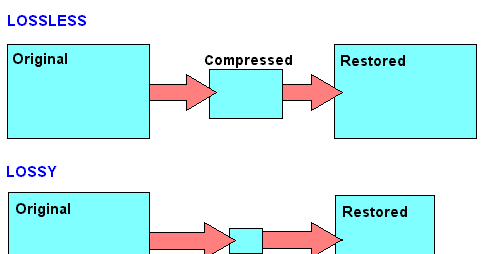
The audio format is a type of computer file that contains music. There are lossless uncompressed, lossless compressed and lossy music audio formats.

Audio Formats

Bit rates
Bit rate is a unit of measurement for data that indicates the number of bits transmitted in a given time. When it comes to music formats, the bit rate is expressed in kilobits per second (kbps) transmitted. If you compare the same song encoded at different bit rates, the file with the highest bit rate will be of higher quality. For example, a 320 kbps (CBR) MP3 file transmits 320 kilobits for every second of the audio stream.

Audio formats containing uncompressed lossless data (Uncompressed Lossless)
Lossless uncompressed data formats retain all original recorded information. Since silence is encoded at the same number of bits per second as sound, files containing uncompressed lossless data are often large. Formats containing lossless and uncompressed data are encoded using pulse code modulation (PCM). Examples:

WAV (PCM) (used in Windows)
AIFF (PCM) (used in Mac OS).
Audio formats containing lossless compressed data (Compressed Lossless)
Lossless compressed formats store all original recorded information in a smaller volume than uncompressed lossless data when compressing data. Silence is encoded at the lowest bit rate and audio is compressed, so files that contain lossless compressed data are usually half the size (file size) of the same song in a format that contains non-data. uncompressed loss.

Since formats that contain compressed data without loss of quality and formats that contain uncompressed data without loss of quality both retain all the information from the original recording, they can be transcoded to each other without loss of quality. Examples:

Free Lossless Audio Codec (FLAC)
Apple Lossless Audio Codec (ALAC)
Mono Audio (APE).
Lossy audio formats
Lossy formats always compress data. Lossy audio formats are smaller than those that contain lossless compressed data and formats that contain uncompressed lossless data by removing some of the original information. These are usually high frequencies that most people cannot hear, however in some cases the difference in lossy and lossless audio formats can be very large.

Since lossy formats lose data during compression (and therefore sound quality), they CANNOT be transcoded to lossless or other lossy audio formats without further loss of sound quality. Examples:

MPEG Layer 3 Audio (MP3)
Advanced Audio Coding (AAC)
Windows Media Audio (WMA)
Dolby Digital 3 (AC3) audio codec
DTS Coherent Acoustics Codec (DTS).
File sizes
Here we can see how the file size of the same song depends on the format in which it is presented: uncompressed data without loss of quality, compressed data without loss of quality or loss of quality. Take Avril Lavigne’s classic pop song Sk8er Boi for example. The song is 3 minutes and 24 seconds long.

Lossless uncompressed format – WAV (PCM): 34.3 MB
Lossless compressed format – FLAC: 25.75 MB (25% compression)
Lossy format – MP3 320 (CBR): 7.78 MB (78% compression)
Sound transparency
Sound transparency is a term used to describe the sound characteristic of a lossy file. The sound of a lossy file is considered transparent if the average person cannot hear the difference between it and a lossless file with the same song, having listened to both files and not knowing in what sequence they were heard. For most people, MP3 192kbps (CBR) is considered transparent.

Allowed audio formats
While there are many types of lossy and lossless audio formats, only a few are allowed on RED.

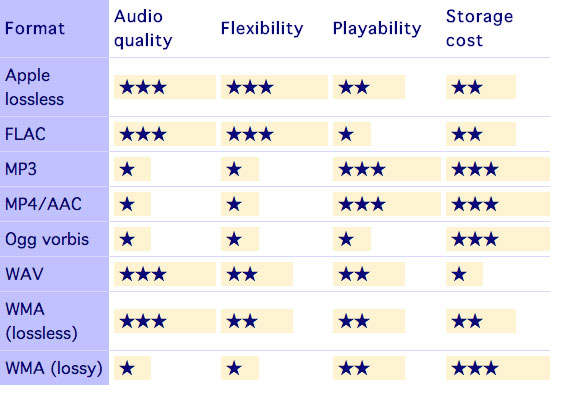
Since some lossless audio formats can be transcoded to other lossless audio formats without loss of audio quality, the only lossless audio format allowed on RED is FLAC. You can always download FLAC and transcode it to ALAC (for iTunes) or any other lossless or lossy audio format you want.

Allowed lossy audio formats:

MP3 (the minimum bit rate for MP3 is 192 kbps (CBR))
AAC (can be replaced by any MP3 torrent except downloads purchased from the iTunes store and containing exclusive tracks from iTunes)
AC3 (usually found on DVD)
DTS (usually found on DVD)
MP3 is the most popular audio format on RED. We allow you to upload albums to AAC purchased from iTunes because they often contain bonus tracks from iTunes, and since AAC is a lossy format, it cannot be transcoded to other audio formats without losing sound quality. Also, AC3 and DTS are often found on DVD and are lossy audio formats, so they cannot be transcoded to other audio formats without losing sound quality.


Free Download Mp4Gain
picture


Mp4Gain Main Window
picture


Mp4Gain Features
picture


Free Download Mp4Gain
picture

Lossless audio formats

Lossless audio formats

Lossless audio

Audio files can be converted in a more or less space saving way using lossless or lossy codecs. While the data reduction is absolutely true to the original with lossless codecs, a difference can be heard from the original material, especially with heavy compression with lossy codecs.

Lossless compressed audio files lose approximately 25% to 50% of their original file size. Typical representatives are Monkey’s Audio, FLAC, or WavPack. Modern lossy codecs like AAC, Ogg Vorbis, or MP3, on the other hand, reduce source material by 90% without sounding noticeably worse.

Lossless audio compression

Unlike documents or images, for example, audio files are very difficult to compress, since identical repetitions are very rare in music. But it is precisely on such occurrences that the Huffmann or Lempel-Ziv algorithms depend, which are used in ZIP or RAR, for example. Therefore, most non-clustered compressors employ predictive coding. The signal is divided into a music component and a noise component. Depending on how well this prediction has been made, the noise component should ideally be Gaussian white noise that can be easily compressed using conventional methods.
In the ideal case, the result is 50% compression, which is highly dependent on the piece of music.

Monkey’s Audio, FLAC and WavPack are popular formats for lossless compression of WAV (PCM) files, for example digitized original recordings from the recording studio (for archiving or later processing) or archiving copies of music CDs. The sound quality is always the same as the original and the checksums reveal corrupted files. Increasing hard drive capacity at affordable prices makes “Lossless Codecs” interesting for everyday use.

Uncompressed: WAV (PCM)

WAV is the largest common denominator of Windows audio formats. The Macintosh equivalent is called AIFF. WAV is actually the collective term for various subformats, of which PCM is the most common and is generally equated with WAV.

WAV (PCM) is an uncompressed recording of sound samples: the time signal of a noise is sampled, quantized, digitized, and saved at discrete points in time. The more often and finer you record these values, the better the sound. With CD quality music, this instantaneous value is recorded 44,100 times per second and recorded with 16-bit “precision”, that is, 2 ^ 16 = 65536 possible values.

With the help of special programs (eg CDex, EAC, Audiograbber), Audio CDs can be transferred to the hard disk as WAV (PCM) files. Viewed in this way, WAV (PCM) files are copies of the original, provided the CD-ROM drive is not read incorrectly or the CD is damaged. One minute at CD quality requires roughly 10MB of storage space, which is not as happy to give away even in the age of ever-larger hard drives.

On the PC, WAV (PCM) and CD-quality (44.1 kHz, 16-bit, stereo) audio files are often the starting material for creating space-saving audio files in formats such as MP3. However, for sound processing on the home PC, WAV (PCM) is the first choice.

Monkey’s Audio

Monkey’s Audio is a lossless audio codec for PCM wave files. Monkey’s Audio comes with a convenient program interface (in English), over which files can be compressed, decompressed, verified or tagged. PCM wave files (any sample rate, 8/16/24 bit, mono or stereo) or corresponding Shorten or WavPack files are accepted as source files. Monkey’s Audio does not support multiple channels.

The APE tags that are used to store the title information can be supplemented with their own fields and are therefore very flexible. They are now used in conjunction with other audio formats as well.

The included command line encoder allows integration into other programs. Various audio players support the format through plugins. A plug-in for Winamp can be installed at the same time as installation. Monkey’s Audio is a Windows program by default. However, there is a platform independent version of Java.

FLAC

FLAC stands for “Free Lossless Audio Codec”. There are several lossless audio codecs available. FLAC is suitable here for several reasons: FLAC follows the open source philosophy (free open source code, available for many operating systems), works very fast, has a good and secure framework structure.

Lossless audio formats 

WAV (.wav) The WAV format is nothing more than a digital recording of real sounds, sounds that come from a source outside the PC. With WAV music, drums, piano, guitar, bass or vocals are heard the same, no matter what computer the file is played on (with the same acoustic quality of hardware components, of course).

wav

DSD (DFF, .Dsf) are used in digital media such as Super Audio CDs. Sampling quality is very high (variable sampling rate is approximately 64 times higher than for audio CDs), although according to several operators in this sector, it must be absolutely determined whether the final quality is higher than the sampling quality. PCM (used in high quality Blu-Ray and DVD Audio). I can reproduce free readers like Foobar 2000 or AIMP on our computer.

AIFF (.aif). It’s the Apple audio format used by Apple for Mac. It’s basically the WAV equivalent used by Windows.

APE (Mono Audio; .ape): Ordinary with a loss that allows us to reduce by about 50% the space occupied by our music (in some cases even more), without losing quality. In this way, an album that takes up about 600 MB in wav format averages 300 MB (much more than about 100 MB of high-speed mpc and 60 mp3 mp3, but the quality is the same as the original); On average, I speak because there are certain types of music where the level of compression is even higher. You can use WinAmp plug-ins to listen to songs in this format, or better yet, a player that uses it natively as Foobar 2000. Right now, it’s probably the best lossless codec, considering the balance between speed and compression (Click here for a lossless comparison table) format.)

Apple Lossless Audio Codec – ALAC (.m4a) This is a lossless audio codec created by Apple a few years ago and available as an open source from Apple since October 2011. Some programs support it in Windows (encoded). , including DbPowerAmp.

FLAC (.flac): a very popular open source format. It used to be very popular (among music purists), but some space has been lost with the MonkeyAudio bee format, which allows for better compression in the same quality. Compared to others, it always came in .ape format (but also after WavPack).


LA (Lossless Audio: .la): The lossless format that compresses the most. Conversion to this format is very slow, but achieves the best compression in history (for example, MonkeyAudio, this album would take up about 290 MB compared to 300 MB in APE). This is not widespread, as some MB obtained on a bee is not worth the long wait (and less support from third-party programs), but it is the winner of my lossless format comparison.flac

OPTIM FROG (.ofr) – Excellent lossless codec, best after LA as compressibility. Compression, when set to slightly high levels, is about 3 times slower than Monkey Audio and the gain in MB is about 2%. Like all other formats on this site, you can listen without the addition of Foobar 2000.

WAVPACK (.wv, wvc) – is a valid open source compression format that allows lossless, lossy and hybrid results. The compression rate is high and the compression is good. Another interesting hybrid format is that the lossy file is merged with another file, which allows you to completely restore the original file without loss in case we want to restore it.

What are the most popular audio formats?

What are the most popular audio formats?

There are dozens of audio files that we can use to convert a song, but the really useful ones can be counted on the fingers of one hand.

losseless

When we think of an audio file, most of us immediately think of MP3. Without a doubt, it’s one of the most popular audio formats, but it’s not the only one. Let’s see what are the most popular audio formats and what are the differences in use. And we have to choose that according to our needs.

There are different categories of audio files. First we defined the formats as uncompressed. The word itself defines this section of the file. In this case, the recorded sound waves are actually converted into a digital format without further processing. What does it all mean? In files that are very difficult to save and take up a lot of space. In order to simplify the storage of audio files and to reduce the load, formats with lossy data compression were created. These sacrifice some quality in favor of the small storage space required.

losseless

To fix this error, which represents the loss of quality in favor of file size, compressed audio formats were created without loss of data. Obviously, they’re not small files like lossy compression, but they’re still smaller than uncompressed. However, it must be said that these types of formats are only widespread in certain cases.

PCM

PCM is the most common and widely used audio format on CDs and DVDs that we have at home. It is the faithful conversion of analog audio into a digital file. It is no coincidence that it is an uncompressed audio format. Remember that analog sounds exist as waveforms. In order to convert a sound wave into digital bits, the sound must be sampled and recorded at certain intervals.

WAV

WAV stands for Waveform Audio File Format (previously it was also called Audio for Windows, now it is no longer). It is a standard developed by Microsoft and IBM in 1991. WAV files can contain compressed and uncompressed audio formats. In most cases, however, they are used for uncompressed people. Although it was developed for Windows, it can also be safely opened on a Mac.

MP3

This is without a doubt the most popular audio format. It was released in 1993 and over the years its success has increased thanks to the combination with the pieces of music. Why are they used so often? Quite simply, these are lossy compressed files, and the generated files are so small that users can create a music library without taking up too much space. And the quality? It is much lower than other formats, but the human ear doesn’t always manage to notice the difference significantly. MP3 is also a universal file. It can be found on smartphones, computers, smart TVs, tablets and many other electronic devices.

WMA

WMA stands for Windows Media Audio. It was first published in 1999 and has gone through several developments since then, always keeping the same name. As you can easily guess, it is an audio format created by Microsoft. It was developed to replace MP3s. Unfortunately, there are very few platforms that support this, so the MP3 mastery has never been compromised.

OGG

OGG is not a real compression audio format. We can define it as a multi-purpose multimedia container. It can contain all types of audio formats, but is often used to contain Vorbis files. It is one of the best performing files to reduce size without losing quality.

FLAC

FLAC stands for Free Codec Lossless Audio. It is a lossless, compressed format that was created in 2001. A FLAC file can be compressed to 60% of its original size without minimal loss of sound quality. It is also an open source format. Because of this, it is compatible with most programs and devices. It is the best quality alternative to MP3.

Most important audio formats

Most important audio formats

MP3

MPEG Audio Layer III
-Compressed digital format with loss.
-Its compression size: 11 to 1
-Compresses the audio using a lossy algorithm to obtain a smaller size, decoding the signal, allowing less bits to be consumed, which translates into less weight and less quality.
-Extension: .MP3
-Good compatibility. Can be played on almost all audio players
-Easily distributable online
-Better quality-space ratio
-Loss of the original sound, implies a decrease in quality throughout the format
-Supports two channels
-Distortion in frequency bands where the brightness and sparkle (5000hz-20000hz) are located.
-Increase in the bass and subwoofer frequencies (250hz – 40hz) due to the dynamic compression of the sound that causes a different equalization from the original recording.
-present patterns between tracks

AAC

Advanced Audio Coding
– Lossy compressed digital format
-It is an audio compression system developed by the Fraunhoffer Institute, AT&T, Sony and Dolby Laboratories.
– It is an audio broadband coding algorithm with higher performance than MP3.
-Extension: .m4a, .m4b, .m4p, .m4v, .m4r, .3gp, .mp4, .aac
-Play files from the hard disk of a computer with a quality that can be similar to the CD using significantly less space than an mp3.
-This system increases the quality of the mp3.
-Loss of original sound
-Subject to patent

WAV

Waveform audio format
-Uncompressed digital format.
– Windows own format
– Used to store sounds on PC, supports mono and stereo files at various resolutions and sampling rates
– Extension is .wav
-High sound quality
-Provides faithful listening to the audio
-It works in Windows applications and in common equipment with a CD player.

– Includes support for almost all current audio codecs
– Compatible to convert into various formats by means of the appropriate software.Example switching from Wav to Mp3
-It takes up a lot of disk space
-Poor quality-space ratio
-Difficult to distribute online due to the weight of the file
-Allows to capture in the same file up to 6 hours

FLAC

Free Lossless Audio Codec
– Lossless compressed format

-Extension: .flac
-Higher quality in high fidelity equipment
-Information is continuous between separate tracks
-It does not delete information from the original content
-It is an open source format.
-Code and decode quickly
-It takes up a lot of disk space
-It is not supported by all portable players

AIFF

Audio Interchange File Format
-Uncompressed format without loss.
– Format typical of native applications of Mac OS X for example iTunes
-Extension: .aiff or .aif.
-High sound quality
-Requires large storage space

OGG VORBIS

-Compressed format loss
– Stream-oriented container, which means that
can be written and read in one step, making it suitable
for streaming on the internet.
– Free software version to MP3 and AAC.
– Intended to allow maximum encoder flexibility
Extension: .ogg
-It is free, open and not patented
-Similar to MP3
-Good value for space
-Improved same-size MP3 quality.
-It is not supported by all players
-Loss of original sound

WMA

Windows Media Audio
– Lossy audio compression format, although there is a more recent lossless development
-Windows version to compress audio
-Extension: .wma
-Ideal for real-time streaming
-Reduce size of large files
– Inclusion of support in Windows Media Player
-Lower quality
-It takes space
Real Audio
-Media player with various functions and Internet connection tools
Example: listening to music and watching videos hosted on the Internet (streaming), and creating and playing extensive playlists.

– Ideal for live streaming over the network due to its streming ability
– the coding allows adapting it to the user’s reception capacity depending on their internet connection speed.
-Can be used in different operating systems (Windows, Linux, Mac OS)
– Ability to transfer files to other multimedia devices
-Reduction in file sizes

-Incompatibility with some browsers
-High RAM consumption

APE

– Lossless compressed format
-Extension: .ape
-Save space
-High quality
-Better file compression rate
-It is not compatible with most players.
-Slow to compress and decompress files

What audio formats are there? All you need to know


FLAC, WAV, AIFF, DSD … these are just some of the initials that you can find when you are looking for a digital format. They are also accompanied by technical data such as sample rates and bit depth. So many terms can leave you more misplaced than a chicken at a dance. And it is that unless you are an expert in digital sound, the process to choose the audio format that best suits your needs can be a mess. But if they explain it to you, the topic is relatively simple. That is why at Culturasonora we have prepared a complete guide for you on the different audio formats most used. This will prevent any acronym from taking you on the dark side.

What are Bit Depth and Sample Rate?

These two concepts are basic. To understand how audio formats work you need to know what Bit Depth and Sample Rate are. These are two measures that indicate the quality of a digital audio file. We are going to try to summarize it so that you keep the general idea

samplerate

When you read the specifications of the audio formats you come across a couple of figures. For example: 32-bit / 192kHz or 24-bit / 96kHz. These numbers indicate the bit depth and the sample rate. These references tell us how much information the different formats transmit and the quality of the sound. For example, the audio we hear on a regular CD, or on a Spotify stream, is 16bit / 44.1kHz. Samples are always measured in Hertz (or hertz) and bit depth in Bits.

Softwares or hardwares usually do not work with a continuous flow of information, but usually use pieces, samples or samples to effectively manage the data that is transmitted. The sample rate is the number of samples per second that are obtained from a recording. The higher the number of times a device plays samples, the higher the sound quality. Each of these extracts or samples has a certain amount of information, which is the bit depth, or bit depth.

So that you understand it better we are going to make a somewhat beastly analogy, which is not entirely true, but that will help you get the sense of all this. Which is what interests us. If you control a bit of photography and image you will get it right away: the sample rate would be something similar to the frames or frames per second of a video, and the bit rate would be similar to the pixels of a photograph. The higher the bit depth number, the more information each sample will have. The more pixels an image has, the higher resolution each frame of a video will have. The more frames per second a movie has, the better definition. In short: the higher the number of the Bit Depth and the Sample Rate, the higher the quality of the audio file. Heard cooking?

Audio formats: MP3 vs WAV vs AIFF

What is the MP3 format?

If you’re interested in getting some audio fidelity and decent sound from your files, you’ll want to avoid this format. Why? Because basically an MP3 is a file that sacrifices audio quality to minimize size. They weigh very little for any device to read. The negative? Compressing these files provides poor, almost lifeless sound. Today, hardly anyone uses this format seriously. Even its creators recently ended the license by declaring it dead. But surely from time to time you come across a zombie file with this format.

What is WAV format?

WAVs (Waveform Audio File Format) are just as common but better for anyone who wants a decent audio format. They are higher resolution files than MP3s. A WAV is an audio piece that is encoded with something known as Pulse Code Modulation (PCM), a medium that encodes analog audio pieces and converts them to digital so they can have the Sample rate and Bit Depth of the that we have already talked about previously.

What is the AIFF format?

The AIFF (Audio Interchange File Format) audio format is very similar to WAV in that it also uses PCM to encode analog audio pieces and present them in digital format. This format was born as a response from Apple to Microsoft’s WAV, and at the beginning it could only work on MAC computers. Currently AIFF and WAV are more or less interchangeable.
In summary…
To close this topic, we will tell you that if you have a file in WAV or AIFF audio formats, you will hear a piece of sound of good quality. Normally these formats are used in files that we reproduce through our services, such as the iTunes music library. We will not see them in online streaming services, which tend to use special types of files.