Digital Music vs Analog Music – A Comparison


Free Download Mp4Gain
picture

Digital Music vs Analog Music – A Comparison

Analog Vs. Digital Audio

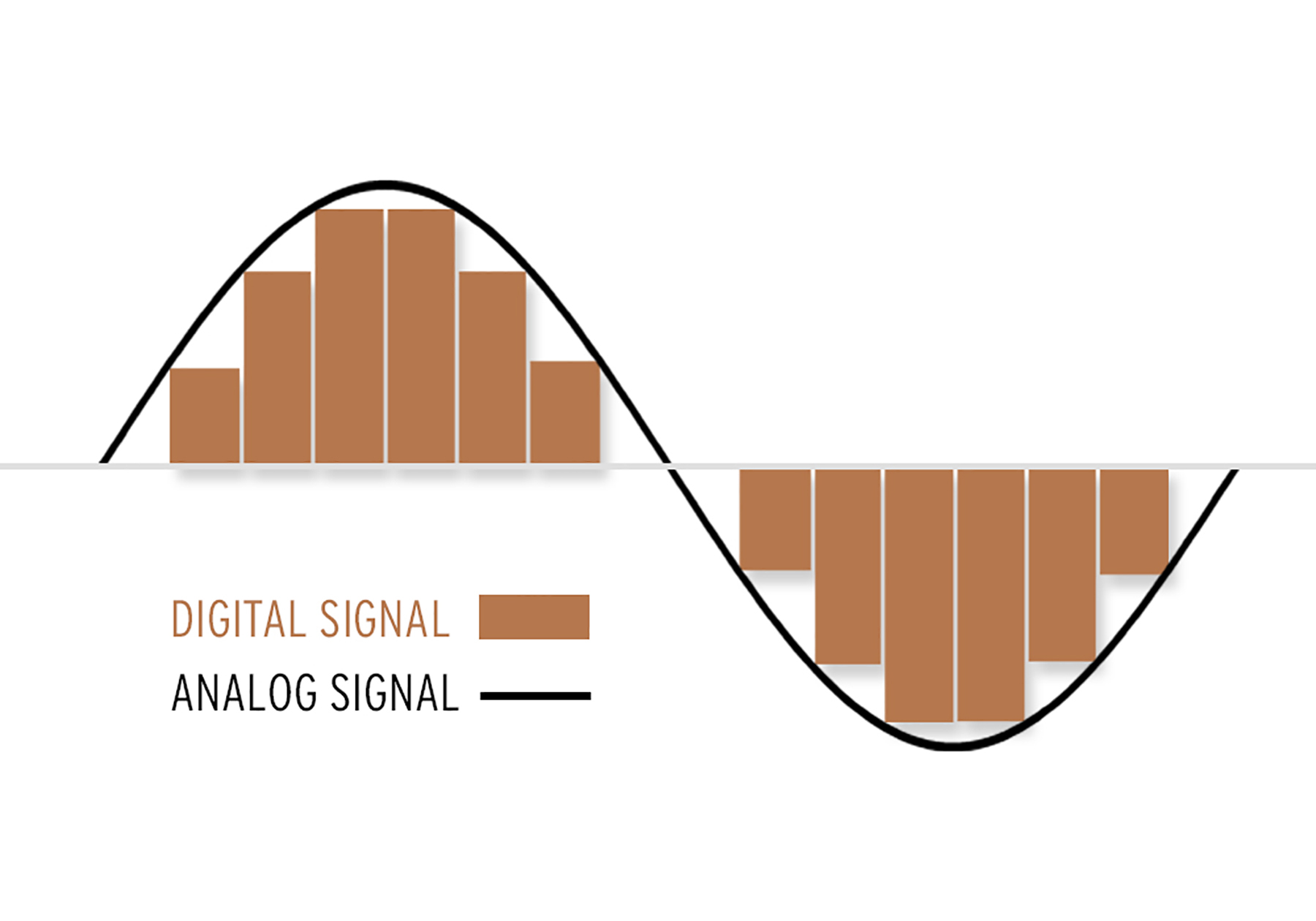
Digital music and analogue music have many differences. From the way audio information is stored to the quality of playback, there are many things to consider when choosing between these two audio formats. Below, we’ll discuss some of these differences to help you decide which one is best for your needs.
Digital vs Analog Audio

Storing music

The most common way to store digital music is in a compressed file format. This means that the music is compressed so that it takes up less space on your hard drive. This also means that a computer will be needed to play the music. Digital music can be stored in a variety of formats, such as MP3, WAV, and FLAC.

Analog music, on the other hand, is stored in an uncompressed format. This means that more storage space will be needed to store the same amount of music. It also means that you will need a record player or audio equipment to play the music. Analog music is stored in formats such as vinyl or cassette.

Music quality

In terms of audio quality, digital music and analogue music can be very similar. The audio quality of digital music depends primarily on the file format in which it is stored and the audio equipment with which it is played. Although compressed file formats such as MP3 may produce lower audio quality than uncompressed formats such as WAV, the difference may be imperceptible to many listeners.

When it comes to analog music, the audio quality depends on the quality of the audio equipment and the state of the music itself. For example, vinyl in poor condition can produce a very loud sound. On the other hand, well-maintained vinyl can produce incredibly good sound. The audio quality of analog music also depends on the audio equipment with which it is played. Good audio equipment can significantly improve the audio quality of analog music.

Ease of use

In terms of ease of use, digital music is much easier to use than analogue music. With digital music, you only need a computer to play the music, which means you don’t have to worry about maintaining audio equipment. Also, digital music is much easier to share than analog music.

Analog music can be a bit more difficult to use than digital music. To get started, you’ll need audio equipment to play the music. This means that you will need to perform regular maintenance to ensure that the equipment is working properly. Also, analog music is much more difficult to share than digital music, since it cannot be sent via email or shared online.

Recording music

Another important difference between digital music and analogue music is the way the music is recorded. To record digital music, you’ll need a computer and audio recording software. This will allow you to record the music and save it in a compressed file format, such as MP3. This means that digital music can be easily recorded, edited and shared.

To record analog music, you’ll need audio recording equipment. This will allow you to record the music onto a vinyl record or tape. This means that analog music is much more difficult to record, edit and share than digital music.

Cost

Due to the difference in equipment needed to play and record music, there is a big difference in costs between digital music and analogue music. Digital music is much cheaper as you only need a computer to play and record the music. Analog music, on the other hand, can be much more expensive, since you’ll need audio equipment to play the music and recording equipment to record it.

Conclusion

As you can see, there are many differences between digital music and analogue music. Depending on your needs, one may be better than the other. If you need an easy way to share and record music, digital music is the way to go. If you are looking for superior audio quality, analog music may be the best option.


Free Download Mp4Gain
picture


Mp4Gain Main Window
picture


Mp4Gain Features
picture


Free Download Mp4Gain
picture

What is the best digital audio format?

What is the best digital audio format?

What is the best digital audio format?


When choosing the best digital audio format, several factors must be taken into account. The most popular digital audio formats are MP3, AAC and WAV.

What is the best digital audio format?

MP3

MP3 is the most commonly used digital audio format. It is a compression format that allows audio information to be compressed without a great loss of quality. It is compatible with most audio players and is very easy to play on most devices.

AAC

AAC is a digital audio format developed by Apple. It offers better sound quality than older digital audio formats like MP3, but with a much smaller file size. This means more songs can be stored on a device without affecting performance.

WAV

WAV is the lossless digital audio format. This means that the original audio file is saved exactly as it was recorded. This means that WAV files are much larger than MP3 or AAC files, which means that more storage space is needed to store the files.

In conclusion, the best digital audio format depends on your needs and preferences. If you need a small file size, MP3 or AAC are good options. If you need the best sound possible, then WAV is the best choice.

What is the digital audio format with the best sound quality?

Currently there are several digital audio formats, each with its own qualities. The most popular formats are FLAC, MP3, AAC, OGG and WMA. But which of these offers the best sound quality?

FLAC (Free Lossless Audio Codec)

FLAC is a lossless audio format that preserves all the characteristics of the original audio without any compression. This means that the audio is reproduced with the highest sound quality, without any loss of quality. Also, FLAC is an open format, so it is compatible with most audio players.

MP3 (Moving Picture Experts Group Layer 3)

MP3 is a compressed audio format used to reduce file sizes. This allows more audio files to be stored and streamed, but also causes a loss of quality. However, if a high bit rate is used, the sound quality of MP3 files can still be very good.

AAC (Advanced Audio Coding)

AAC is a compressed audio format developed by Apple as an alternative to MP3. It has a better compression ratio than MP3, which means smaller audio files with equal or better sound quality. However, as with MP3, the sound quality depends on the bit rate.

OGG (Ogg Vorbis)

OGG is a lossless audio format developed by Xiph.Org. Like FLAC, it does not compress audio, so audio files are played at highest sound quality. Unlike FLAC, however, OGG is a closed format, so it is not supported by all audio players.

WMA (Windows Media Audio)

WMA is a compressed audio format developed by Microsoft. It is compatible with most audio players, but offers lower sound quality than other formats. Also, like MP3 and AAC, the sound quality depends on the bit rate.

Conclusion

Of the five popular digital audio formats, FLAC and OGG offer the best sound quality because they don’t compress the audio. However, MP3, AAC and WMA offer good sound quality if a high bit rate is used. Finally, FLAC is the most widely supported digital audio format, while OGG is the least widely supported.

Masking in an mp3

Masking in an mp3

 Masking in an mp3
Masking in an mp3

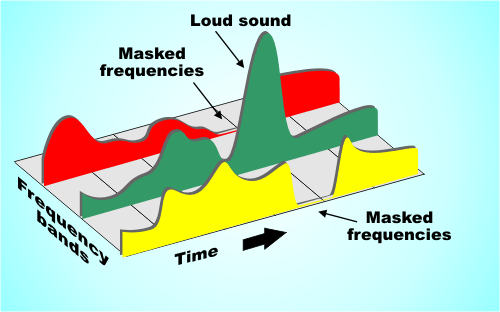
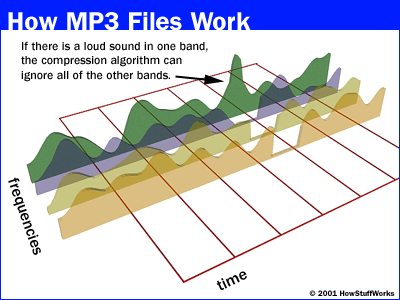
Masking is one of the main problems affecting the quality of compressed audio files.

Masking in an mp3
Masking in an mp3

This technique is used to reduce the file size by encoding the information, which causes significant loss of quality and distortion. This distortion can be so pronounced as to be audible in the resulting file. The masking effect is particularly evident in MP3 files compressed at low bitrates, since excessive compression removes much of the original information from the file.

The good news is that there are ways to deal with the effect of masking in MP3s. One way is to simply use a higher bitrate when encoding your files, as this will prevent users from experiencing distortion due to poor audio quality. Another way is to use an improved codec like AAC or FLAC to encode your files, which offers better performance and quality without sacrificing much file size. Finally, there are specialized programs designed to correct the masking effect, allowing users to recover some of the quality lost during the compression process.

In short, the masking effect can be extremely detrimental to the sound quality of MP3 files compressed at low bitrates. Fortunately, there are ways to deal with this effect if proper measures are taken when encoding the original files or if dedicated programs are used to correct the effect after encoding.

In recent years, the MP3 audio encoder has been the standard audio format for producing files of superior sound quality. Due to its nature, compression in MP3 files can cause perceptible destruction of high-quality sound if some precautionary measure is not taken. The addition of masked framing to the process removes many distortions between noise and finer details.

In simple terms, the “masking” process helps to minimize those sound frequencies that can interfere with each other. It is used to match the dynamic range of the encoded file without having a large effect on the final result. This allows the detections and artistic characteristics to remain intact to some extent during encoding to the MP3 format.

How to improve the sound quality in an mp3

How to improve the sound quality in an mp3

How to improve the sound quality in an mp3

Mp4Gain is the best option. In this case we will talk about the masking effect.

How to improve the sound quality in an mp3

MP3 masking is an audio processing tool that has gained popularity in recent years. This technique is used to improve audio quality by removing unwanted sound elements. Masking is a form of audio filtering used to improve sound quality by removing unnecessary sounds, such as background noise. This technique has been widely used to improve the quality of MP3 files by allowing file sizes to be reduced without sacrificing sound quality.

Masking can be an invaluable help for those who want to store audio files in a compact format without compromising sound quality. This technique can be used to reduce the size of audio files without compromising sound quality. This is accomplished by filtering out unnecessary sounds from the audio, allowing the file to be compressed without sacrificing sound quality. In addition, masking also reduces background noise in the audio, which improves sound quality.

Masking can also be a useful tool for those who want to improve the quality of their audio files. This technique can be used to improve sound clarity and sharpness, as well as to reduce background noise. This helps users to get cleaner and more detailed sound in their audio files.

In short, MP3 masking is a useful tool for those who want to improve the quality of their audio files. This technique can be used to reduce file sizes without sacrificing sound quality, as well as to improve sound clarity and sharpness. This helps users to get cleaner and more detailed sound in their audio files.

Mp3 normalize volume

Mp3 normalize volume

Mp3 normalize volume

MP3 Normalization: What it is and How to Do it

mp3 normalize volume

MP3 normalization is the process of adjusting the volume level of an MP3 audio file so that it plays at a consistent volume across different devices and playback systems. This is important because MP3 files can have varying levels of volume due to the way they were recorded or encoded.

There are several ways to normalize the volume of an MP3 file. One popular method is to use a software program such as MP3Gain or AIMP. These programs analyze the audio data in an MP3 file and adjust the volume level accordingly. They also provide a “normalize” or “gain” function that can be used to bring the volume level up to a desired level.

Another method for normalizing MP3 volume is to use an online service such as mp3Doctor or AudioNormalizer. These services allow you to upload your MP3 file and then adjust the volume level using a web-based interface. The advantage of using an online service is that you don’t need to download or install any software on your computer.

When normalizing the volume of an MP3 file, it’s important to be careful not to overdo it. If the volume level is too high, it can cause distortion and damage your hearing. It’s also important to keep in mind that some devices and playback systems have a limited dynamic range, so it may not be possible to bring the volume level up to the maximum level without causing distortion.

In conclusion, normalizing the volume of MP3 files is a simple process that can help ensure that your music is heard at the same volume level across different devices and playback systems. Whether you use a software program or an online service, it’s important to be mindful of the volume level and not to overdo it. With the right tools, you can make sure that your music sounds great no matter where or how you listen to it.

What is digital audio masking?

What is digital audio masking?

What is digital audio masking?

Digital music is a vital part of today’s culture.

What is digital audio masking?

Whether it’s a simple MP3 file or live streaming, digital music is used to relax, have fun and even inspire. One of the main concepts involved in the production and distribution of digital music is masking, which significantly affects the audio quality. The details of MP3 masking and how it hurts our digital audio experience will be explained below.

Masking is a concept used to describe how sounds are distributed between different frequencies when they are encoded for digital reproduction. This is the result of compressing files like MP3 or AAC with algorithms that remove unnecessary frequencies to reduce file size. When this frequency compression is done, the remaining frequencies are superimposed on each other, thus creating a unique sound pattern known as masking.

The effects of masking, however, can be quite detrimental, limiting the sharpness and precision with which individual musical instruments are displayed throughout the encoded audio. This difference is even more noticeable when playing wired music directly from the original compressed file; then each individual volume element loses sharpness due to the masking of existing MP3 within the group.

In fact, several consumers have reported significant differences between the sound generated by various platforms and digital servers when performing hearing tests directly from the source. The main reason lies in the type and level of masking present within the chosen container formats (MP3, AAC or OGG) to improve the overall quality of the sound delivered to the end listeners.

In general, considering only the parameters related to the compressed sound within the MP3 container by general commercial recommendations, there is an optimum level that leads to the best balance between aural definition versus set bitrate (which determines the file size). Once chosen the right speed-quality/optimal-file-size ratio to optimize your overall sound (many platforms offer customizable parameters), everyone can benefit from enjoying CD-like audio further from their own mp3 mini-converter enjoying the complete works compacted to their greatest possible thumbnail without hassle !.

Enjoy the best sound quality with MP3

Enjoy the best sound quality with MP3

Enjoy the best sound quality with MP3

Are you tired of listening to poor quality audio?


Enhance your audio experience with high quality MP3! With quality MP3 technology, you can enjoy music and audio the way you want, with superior sound quality. Discover the best quality MP3 sounds for the best audio experience.

Many people enjoy listening to music or audio, but often encounter poor audio quality. This can take away from the audio experience, as voices can be muddled and sounds can be distorted. Fortunately, quality MP3 technology can greatly improve audio quality. The MP3 format has become the standard format for playing audio and music, offering much better audio quality than other formats.

Quality MP3 files offer superior sound quality. This means that the voice and sounds are heard clearer, without distortion. In addition, high-quality MP3 files can also contain more information, which means that the audio can sound more defined and full. This makes the audio experience much more pleasant.

But how can you get quality MP3? Fortunately, there are several ways to get high-quality MP3s. The first option is to convert existing sound files to MP3. This can easily be done using Mp4Gain. This program can convert audio files from other formats to quality MP3 without losing quality and normalize the volume of your mp3.

The second option is to download MP3 files from the web. Many websites offer quality MP3 files, some of which are free. These files can be downloaded directly to your computer and then played on your MP3 player.

The third option is to buy quality MP3 files. These files can be purchased online at specialty music and audio stores. These files generally offer superior audio quality and can be downloaded directly to your computer.

With quality MP3 technology, you can enjoy music and audio the way you want, with superior sound quality. This will allow you to experience the best audio quality with MP3. Discover the best quality MP3 sounds for the best audio experience.

Quality MP3 technology is a simple and effective way to improve audio quality. With quality MP3 files, you can enjoy music and audio the way you want, with superior sound quality. There are several ways to get quality MP3, from converting existing files to MP3 to downloading from the web or buying them. Discover the best quality MP3 sounds for the best audio experience.

Structure of an mp3

Structure of an mp3


Structure of an mp3
Structure of an mp3

audio compression

Structure of an mp3
Structure of an mp3


The MP3 format began in the mid-1980s and the Fraunhofer Institute in Erlangen, Germany, was committed to high-quality, low-data-rate audio coding.

MP3 audio compression includes encoding and decoding in two parts. Encoding is converting the data in the WAV file into a highly compressed bitstream format, and decoding is accepting the bitstream and reconstructing it into the WAV file.

MP3 uses the distortion algorithm of Perceptual Audio Coding (PerceptualAudioCoding). The frequency range of sound perceived by the human ear is from 20 Hz to 220 kHz. MP3 cuts out a lot of redundant signals and irrelevant signals. The encoder transforms the original sound into the frequency domain through a hybrid filter bank. Using the psychoacoustic model, it is estimated that it may simply be The perceived noise level is quantized and converted to Huffman coding to form an MP3 bitstream. The decoder is much simpler and its task is to extract the sound signal from the encoded spectral line components through inverse quantization and inverse transformation.

When compressing audio data, the original sound data is first divided into fixed blocks, and then direct MDCT is performed. MDCT itself does not perform data compression, but only converts a set of time-domain data to frequency-domain data to obtain time-domain data. In case of change, the direct MDCT converts the value of each block into 512 MDCT coefficients. Quantization compresses data, and when bits are allocated to transformed samples after quantization, it is necessary to consider making the entire quantized block the smallest, which becomes lossy compression. When decompressing, the 512 coefficients are restored to the original sound data by reverse MDCT, and the original sound data before and after are inconsistent, because redundant and irrelevant data are removed during the compression process.


MP3 file structure
MP3 files are roughly divided into three parts: TAG_V2(ID3V2), Frame, TAG_V1(ID3V1)

ID3V2 Contains information such as author, composer, album, etc., the duration is not fixed, expanding the amount of information of ID3V1
framework


A series of frames, the number is determined by the file size and frame length

The length of each frame can be variable or fixed, determined by the bit rate.

Each FRAME is divided into two parts: frame header and data entity

The frame header records the bitrate, sample rate, version, and other mp3 information, and each frame is independent of each other.

ID3V1    Contains author, composer, album and other information, length is 128BYTE

Structure of an mp3

Structure of an mp3


Structure of an mp3
Structure of an mp3

The full name of MP3 is MPEG Audio Layer3, which is an efficient computer audio coding scheme.

Structure of an mp3
Structure of an mp3

It converts audio files into smaller files with .MP3 extension with a higher compression ratio and basically keeps the sound quality of the original file. MP3 is part of the ISO/MPEG standard. The ISO/MPEG standard describes audio compression using a high-performance perceptual coding scheme. This standard has been continuously updated to meet the pursuit of “high quality, low volume”. MPEGLayer1, Layer2 , and Layer 3 have now formed three audio codec schemes. The compression rate of MPEGLayer3 can reach from 1:10 to 1:12. A 1M MP3 file can play for 1 minute, while a 1 minute CD-quality WAV file (44100 Hz, 16-bit, two channels, 60 seconds) will take up 10M of space. , A 650M MP3 disc should play for more than 10 hours, while a CD with the same capacity should play for about 70 minutes. The advantages of MP3 are unmatched by CD.

MPEG audio standard
MPEG (Motion Picture Experts Group) is a moving picture expert group under ISO, and the MPEG standard it creates is widely used in various multimedia. MPEG standards include video and audio standards, among which MPEG-1, MPEG-2, MPEG-2AAC, and MPEG-4 audio standards have been developed.

The MPEG-1 and MPEG-2 standards use the same family of audio codecs: Layer 1, 2, and 3. A new feature of MPEG-2 is the use of low sample rate expansion to reduce data traffic, and another feature is multi-channel expansion, which increases the number of main channels to five. The MPEG-2AAC (MPEG-2 Advanced Audio Coding) standard was released by FraunhoferIIS and AT&T in 1997, with the goal of significantly reducing data traffic. MPEG22AAC adopts the Modified Discrete Cosine Transform (MDCT) algorithm and the sampling rate can be between 8 KHz and 96 KHz. The number of channels can be between 1 and 48.

MPEG Audio Layer1, 2, and 3 use the same filter bank, bitstream structure, and header information, and the sample rate is either 32 KHz, 4411 KHz, or 48 KHz. Layer1 is designed for DCC (DigitalCompactCassette) digital compression tape, the data rate is 384kbps, Layer2 has made a compromise between complexity and performance, and the data rate has been reduced to 256kbps-192kbps. Layer 3 was designed for low data traffic from the start, and data traffic ranges from 128 kbps to 112 kbps. Layer 3 adds MDCT transform, making its frequency resolution 18 times higher than Layer 2. Layer 3 also uses EntropyCoding similar to MPEGVid2eo, reducing redundant information. The vast majority of MP3s use the MPEG21 standard.