Digital Audio Quality


Free Download Mp4Gain
picture

Digital Audio Quality

Digital Audio Quality

Data rate refers to the data flow used by a video file in a unit of time, also called bit rate or bit stream rate.

Digital Audio Quality

The popular interpretation is the sampling rate, which is the most important part of image quality control in video encoding. Generally, the units we use are kb/s or Mb/s. Generally speaking, at the same resolution, the higher the code stream of the video file, the lower the compression ratio and the higher the image quality. The higher the code stream, the higher the sampling rate per unit time, the higher the data stream, the higher the accuracy, the closer the processed file is to the original file, the better the image quality, the clearer the image quality and the higher the decoding capability of the playback device is required.

Of course, the larger the code stream, the larger the file size. The calculation formula is file size = time X code rate/8. For example, a 720P RMVB file with a 1 Mbps stream of 90 minutes is common on the Internet and its volume is = 5400 seconds × 1 Mb/8 = 675 MB.

Generally speaking, a video file includes images and sounds, just like an RMVB video file, which contains video information and audio information. Audio and video have their own sampling methods and different bit rates, that is, the same video Audio and video file bit rate is not the same. And what we’re talking about is the bitrate of a video file, which generally refers to the sum of the bitrate of the audio and video information in the video file.

Taking the most popular and familiar RMVB video file in China as an example, VB in RMVB refers to VBR, which is short for Variable Bit Rate. The Chinese meaning is variable bit rate, which means that RMVB adopts dynamic encoding. In this way, a higher sample rate is used for complex dynamic images (singing and dancing, flying cars, wars, actions, etc.), while a lower sample rate is used for static images, and the resources are use rationally to achieve image quality and volume .Effect.

The most fundamental difference between code rate and sample rate is that the code rate is for the source file.


2. Sampling rate

Sample rate (also called sample rate or sample rate) defines the number of samples per second taken from a continuous signal to form a discrete signal, and is expressed in hertz (Hz). Sampling rate refers to the sampling frequency when converting an analog signal to a digital signal, i.e. how many points are sampled per unit of time. How many bits are in the data for a sample point? Bit rate refers to the number of bits (bits) transmitted per second. The unit is bps (bit per second). The higher the bitrate, the more data transmitted and the better the sound quality. Bit rate = sample rate x number of bits used x number of channels.

The sample rate is similar to the number of frames of moving images. For example, the sampling rate of movies is 24 Hz, the sampling rate of PAL format is 25 Hz, and the sampling rate of NTSC format is 30 Hz. When we play back the still images sampled at the same rate as the sampling frequency, we see a continuous image. In the same way, when a CD recorded at a sampling rate of 44.1 kHz is played back at the same rate, a continuous sound can be heard. Obviously, the higher the sample rate, the more coherent the sound will be heard and the picture will be seen. Of course, the sampling rate that human auditory and visual organs can distinguish is limited, which is basically higher than sound sampled at 44.1 kHz, and most people haven’t noticed the difference.

The number of digits in the sound is equivalent to the number of colors on the screen, indicating the amount of data per sample. Of course, the larger the amount of data, the more accurate the playback sound, so as not to confuse the sound. of the teapot with the train whistle. In the same way, it is more clear and precise for the image, so as not to confuse blood and ketchup. However, limited by the function of human organs, 16-bit sound and 24-bit image are basically the limits of ordinary humans, and the highest digits can only be distinguished by instruments.


Free Download Mp4Gain
picture


Mp4Gain Main Window
picture


Mp4Gain Features
picture


Free Download Mp4Gain
picture

Audio Bitrate Calculation

Audio Bitrate Calculation

MP3 bit rate
MP3 bit rate

Generally, the files we read will know the following parameters:

MP3 bit rate
MP3 bit rate

Sampling frequency: the number of sampling points that pass one second; by
For example, the most common sample rate of 44.1k means that there are 44,100 sampled data points in one second;

Bit depth: Bit depth is also called sampling bit depth, and the bit depth of the audio determines the dynamic range.
Our common 16-bit (16-bit) can record a dynamic range of about 96 decibels. Well, roughly you can know that each bit can record about 6 decibels of sound. Similarly, the 20-bit recordable dynamic range is about 120 dB; 24 bits is about 144 dB.

If we define 0dB as the maximum value, then the amplitude of the sound is calculated by extending down, then the dynamic range of CD audio is “-96dB ~ 0dB”. And so on, the dynamic range of 24-bit HD-Audio is “-144dB~0dB”. It can be seen that at higher bit depths, a greater dynamic range is available and lower levels of detail can be recorded.

Number of channels: usually single channel or two channels

Through the above parameters, the bit rate of the audio can be calculated

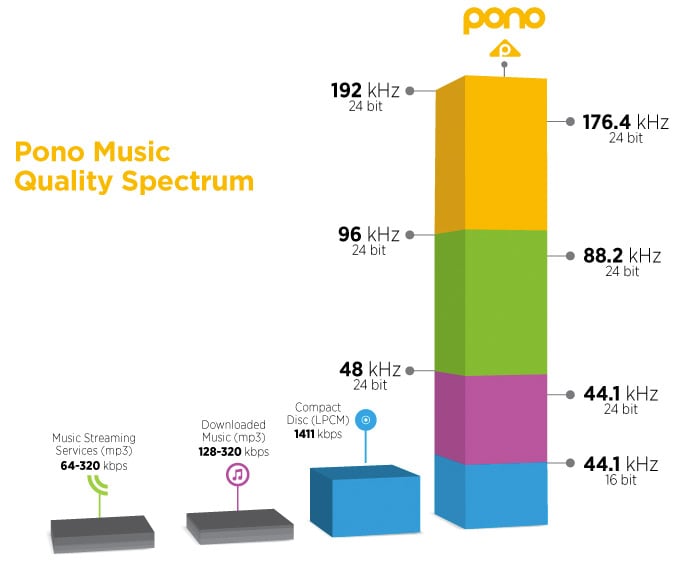
\color{blue}{code rate = sample rate (44.1k) * bit depth (16) * number of channels (2) = 1411.2kbps}

Audio bitrate, also known as bitrate: Refers to the amount of data that can pass through an audio stream per second. For example, 128 kbps, where ps (per second) is per second and kb is thousand bits, then 128 kbps means that the amount of data that can be transmitted in one second is 128 thousand bits. For files of the same format, the higher the bitrate, the better the sound quality. But for audio files of different formats, the same bitrate does not mean the same sound quality.

CD quality sound, usually two channels, compressed at 128kbps MP3, one second of data is converted to 128kbits. Some details are lost, which saves a lot of disk space or bandwidth.

After knowing the audio code rate, you can get the size of the whole audio file = duration (300s) * code rate (1411.2)/1024/8=51.67M

3 Ways to Change Bitrate of MP3 Files Part 2

3 Ways to Change Bitrate of MP3 Files Part 2

mp3 bit rate
mp3 bit rate

The second thing you want to read is that you should never convert to a lower bitrate. bitrate to a higher bitrate stream and I hope it sounds better. You cannot gain quality by increasing the bit rate. This is absolutely correct. If you try to convert the bitrate, you will actually lower the quality of the MP3 file.

mp3 bit rate
mp3 bit rate

If you want an MP3 with a higher bitrate than it currently has, you’ll need to go back to the source (CD, etc.) and extract the audio at full quality. You can then convert that file to a higher bitrate MP3 file.

The last thing you need to know is that converting between lossy formats is not recommended as you will still lose quality. However, it is possible to convert between formats losslessly while preserving quality.

On the other hand, many tests done even with recording engineers or professional musicians have shown that less than 1% of the population can distinguish between an mp3 with good bitrate (196 for example) and a samplerate of 44100 or more.

There is a sector of puritanism that defends tooth and nail the use of losless formats, because in theory they seem to be better, but the limitations and peculiarities of human hatred mean that a loosy file with a high bitrate and a high samplerate is enough for the human ear.

Mp4Gain is the most professional and polished program to help you in all these matters and you can achieve the highest sound quality with any format.

3 Ways to Change the Bitrate of MP3 Files

3 Ways to Change the Bitrate of MP3 Files

Mp3 bitrate
Mp3 bitrate

Do you want to change the bitrate of an MP3 file?

Mp3 bitrate
Mp3 bitrate


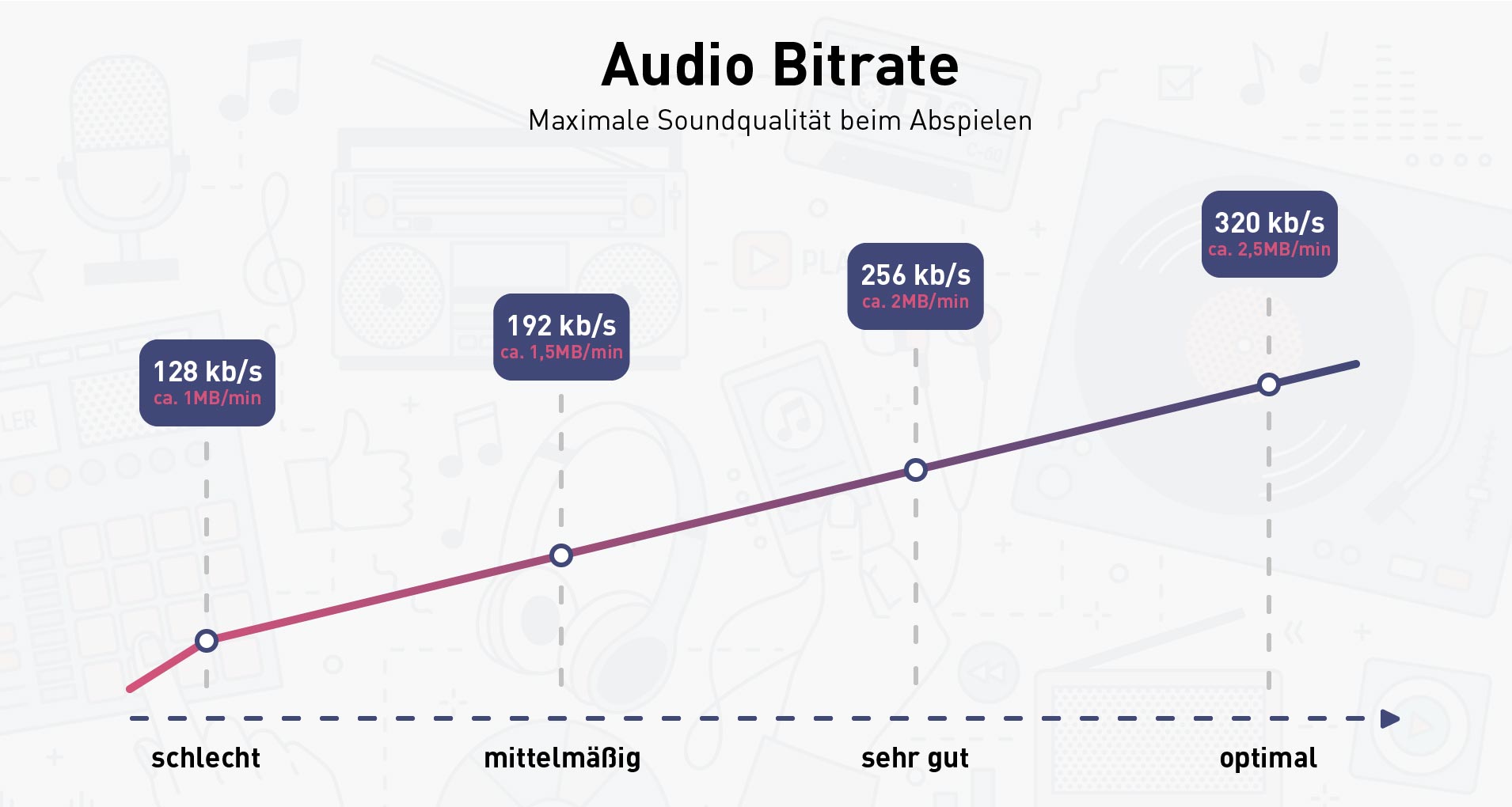
This can be useful if, for example, you need to reduce the size of an MP3 file. A 320kbps MP3 file, the highest bit rate allowed for MP3 files, can be reduced to 192kbps to significantly reduce the size of the MP3 file.

There is a drop in quality, but the difference is negligible for most listeners using standard speakers or headphones. If you’re an audiophile, you’ll probably never use the MP3 format, except for expensive audio equipment.

You are most likely using a lossless format such as PCM, WAV, AIFF, FLAC, ALAC, or APE audio, compressed or uncompressed. Uncompressed PCM audio files are about 10 times larger than CD-quality MP3 files.

The MP3 format is a lossy format, which means sacrificing audio quality to keep the file size relatively small. Almost every site will tell you not to convert lossless audio files to MP3 unless you might lose some audio quality.

<Almost all the time. The only time it might make sense is if you have a high bitrate audio file in a low quality format like WAV. For example, it might make sense to convert a 96kbps WAV file to MP3, but only if you choose a bitrate of 192kbps or higher. A higher bitrate in an MP3 file will allow it to maintain the same quality as a WAV file, even if it has a lower bitrate.

Audio Bitrate: What is the Bitrate of Music Part 3

Audio Bitrate: What is the Bitrate of Music Part 3

Audio Bitrate
Audio Bitrate

How should bitrate be interpreted in an audio file?

Audio Bitrate
Audio Bitrate

That is, the higher the bitrate, the better the audio and video quality, but the larger the encoded file, the lower the bitrate, the situation is reversed. For example: encode audio and video at 500 Kbps. Where bps is bit 1K=1010=1024 b is bit (bit) s is second (second) p is per (per) So encoding with 500kbps means that audio data and video encoded need to use 500K bits per second to Indicates that the bit rate is used to represent the code rate of information transmitted in the baseband transmission system. The bit rate Rb refers to the number of binary bits transmitted per unit of time, and the unit is b/s. For example, the transmission code rate of a computer serial port is up to 115200b/s. The symbol rate or baud rate Rs refers to the number of modulation symbols transmitted per unit of time, that is, the information transmission rate of ternary and more than ternary digital code streams, and the unit is baud/s In M-ary modulation, bit The relationship between the rate Rb and the baud rate Rs is: Rb=Rslog2M In a word, the bit rate indicates the amount of data transmitted per second.

What is the proper bit rate for mp3 music files?
Bitrate is simply the number of bits per second transmitted by the media file and the unit is Kbp/s. The default bit rate of compressed MP3 files is 128 Kbp/s and the sound quality is similar to that of a CD. However, the bit rate of MP3 downloaded from the Internet is usually 192Kbp/s, the sound quality of 192Kbp/s is better than that of 128Kbp/s, and the space occupied by the file is not too large, so which is widely used. . However, if you want to get better sound quality, the bit rate should be higher than 320Kbp/s, and the sound quality can be really comparable to CD quality. However, the price you pay for doing this is that one song will take up about 10M of hard drive space. Generally speaking, the higher the bitrate, the better the sound quality, but it will take up more disk space.

What does “bitrate” mean in audio?
For example, 128kbps MP3 means that the amount of information per second is 128kb converted into bytes is 16KB 320kbps MP3, so the quality does not improve, on the contrary, it may decrease. There are also lossy compression formats such as MP3, wma, ogg .. These are lossy compression formats, which means that there will be loss in the compression process, but each compression algorithm is different, and the quality of the compressed sound is different. For example, when comparing the same bit rate, the sound quality of different formats is different. Hope it can help you.

Audio Bitrate: What is the Bitrate of Music Part 2

Audio Bitrate: What is the Bitrate of Music Part 2

Audio Bitrate
Audio Bitrate

What do sample rate and bit rate mean in a song?

Audio Bitrate
Audio Bitrate


Bit rate Bit rate refers to the sampling rate at which digital sound is converted from analog to digital format. The higher the sampling rate, the better the quality of the restored sound. The bit rate value is compared with the actual audio: 16 KBPS = phone sound quality 24 KBPS = increase phone sound quality, shortwave transmission, longwave transmission, European standard medium wave transmission 40 KBPS = American standard medium wave transmission 56 KBPS = voice 64 KBPS = voice boost (best bit rate for mobile phone ringtones) Setting value, the best mobile phone mono MP3 player setting value) 112 KBPS = FM radio stereo FM 128 KBPS = tape (best setting value of mobile phone stereo MP3 player, best setting value of low-end MP3 player) 160KBPS= HIFI HIFI (best setting for MP3 players mid- to high-end) 192KBPS=CD (best setting for high-end MP3 players) 256KBPS=Studio Music Studio (for music enthusiasts) The sample rate is when the analog signal is ca is converted to a digital signal The sampling rate is related to the quality of the sound. The higher the sample rate, the better the high-frequency restoration of the sound file. The following is the different quality corresponding to different sampling rates 1.11,025Hz The sound of this sampling rate is similar to the sound quality of AM radio 2.22,050Hz The sound of this sampling rate is similar to the sound quality of FM radio, but less than 3.32 000 Hz This sample The sound of this frequency is higher than the sound quality of FM broadcast 4.44 100 Hz The sound of this sampling frequency reaches the sound quality of the CD audio 5.48000 Hz Sound at this sampling rate reaches DAT audio sound quality 6.96000 Hz Sound at this sampling rate reaches DAT audio sound quality The higher the sampling rate sound quality of the DVD audio, the more disk space the final sound file will take up. Usually we can choose 44.1KHZ sampling rate.

Audio Bitrate: What is the bitrate of music

Audio Bitrate: What is the bitrate of music

Audio Bitrate
Audio Bitrate

Bit rate refers to the amount of binary data per unit of time after converting an analog sound signal to a digital sound signal.

Audio Bitrate
Audio Bitrate

The higher the bitrate, the better the sound quality (under the same encoding format, different formats cannot be compared). audio bitrate. Bit rate is a benchmark of digital music compression efficiency. Bit rate indicates the rate of the number of bits bps (bit per second, bits per second) transmitted in a unit of time (1 second). Kbps (in layman’s terms is 1000 bits per second) is usually used as the unit. The bit rate of digital music on the CD is 1411.2 kbps (i.e. to burn 1 second of CD music, 1411.2 × 1000 data bits are required), the high bit rate of the music file means that the data must be processed in a unit of time (1 second) The amount (BIT) is large, that is, the sound quality of the music file is good. However, when the BITRATE is high, the file size increases, which will occupy a large amount of memory capacity. ranges in this sense, most of them are 32-256 Kbps. Of course, the wider the index, the better, but 320 Kbps is the highest level for the moment.

What is bit rate? Knowledge of the MP3 audio format. Part 3

What is bit rate? Knowledge of the MP3 audio format. Part 3

bit rate
bit rate

ABR (average bit rate, average bit rate)

bit rate
bit rate

ABR is an interpolation parameter of VBR. It is an encoding method developed on the basis of VBR. This encoding mode is created for the large file size of CBR and the variable size of files generated by VBR. ABR is within the specified file size, with every 50 frames (about 1 second for 30 frames) as a segment, low-frequency and insensitive frequencies use relatively low traffic, high-frequency and large dynamic performance use high traffic , which can be used as VBR and CBR A compromise.

3, WMA (Windows Media Audio, Windows Media Audio)

WMA is Microsoft’s media compression method. It is a technology that only compresses audio data in Microsoft Windows media technology, and the sound quality is similar to MP3. From the perspective of compression rate, under the condition of encoding rate less than 192kbps, WMA can get lower volume than MP3 file in the same sound quality condition, even half (but when the encoding rate encoding is higher than 192 kbps, the general thinking is that MP3 has better sound quality than WMA). According to Microsoft’s official announcement, the WMA format is extremely protectable and can even limit the playback machine, playback time and number of playback, and has considerable copyright protection capabilities.

4. WAV (sound resource file)

WAV is a kind of waveform file, which directly records sound waveform without compression. The audio track captured from CD is wav file, which is large in size.

5. AMICD

ADPCM is short for Adaptive Differential Pulse Code Modulation, the full name is Adaptive Differential Pulse Code, and it is also a lossy compressed digital audio format. This format is commonly used in MP3 Walkman recordings. It can provide a very high compression ratio. Generally, a 128MB MP3 Walkman can record up to 16 hours of recording, but the pursuit of long recording time comes at the expense of sound quality.

6. AAC (Advanced Audio Coding, Advanced Audio Coding)

AAC is a lossy compressed audio format jointly developed by the Fraunhofer Institute (creator of the MP3 format), Dolby Laboratory (DOLBY), and AT&T (American Telephone and Telegraph Company), and is part of the MPEG-2 specification. Compared with MP3, AAC adds features that MP3 audio formats do not have, such as perfect stereo sound playback, streaming effect sound scanning, multimedia control, and noise reduction optimization, and also supports more sampling rates and bit rates, and multiple languages. compatibility and higher decoding efficiency. In conclusion, AAC can provide better sound quality with 30% smaller file size than MP3 files.

However, in the current MP3 Walkman, only a few have applied this format.

What is bit rate? Knowledge of the MP3 audio format. Part 2

What is bit rate? Knowledge of the MP3 audio format. Part 2

bit rate
bit rate

Bitrate is a benchmark indicator of the efficiency of digital music compression.

bit rate.
bit rate

The bit rate represents the number of bits bps (bit per second, bits per second) transmitted per unit of time (1 second). We usually use kbps (in simple terms, it is per second) clock 1000 bits) as the unit. The bit rate of digital music on CD is 1411.2 kbps (ie recording 1 second of CD music requires 1411.2 × 1024 bits of data). The higher the bit rate of the music file, the more data (Bit) must be processed in a unit of time (1 second), and the better the sound quality of the music file. However, when the bit rate is high, the file size increases, which will occupy a large amount of storage capacity. 8 to 320 kbps.

1. WMA (Windows Media Audio, Windows Media Audio)

As a Microsoft media compression method, it is a part of the technology that only compresses audio data in Windows Media Technologies. The sound quality is similar to MP3 and can be compressed with half the technology of MP3. It has the copyrighted Windows Media Rights Manager and can be played by installing it in WMP (Windows Media Player, Windows Media Player). Due to the strong influence of Microsoft and Windows, as well as major copyright reasons, the major American record companies, EMI and BMG, officially confirmed that they use the WMA method developed and produced by Microsoft. It is believed that this advanced method will become even more popular in the future.

2. MP3 (CBR, VBR, ABR)

MP3 is currently the most widely used and widely used lossy compressed digital audio format. It has been explained above and will not be repeated here.

CBR (constant bit rate)

CBR is the oldest and simplest MP3 encoding (compression) method. When this method is used for encoding, the bit rate of the entire file is the same, in other words, the bit rate used by the MP3 file per second is the same. Although the music file has sections of varying complexity, the encoder always keeps the bitrate constant, unless you use the highest sound quality; otherwise the sound quality of the different sections of the MP3 file will vary. The more complex the passage, the worse the sound quality. Its biggest advantage is that the file size is fixed, which is convenient for calculating storage space.

VBR (Variable Bit Rate, Variable Bit Rate)

VBR is a variable encoding rate MP3 compression method. Its principle is to encode the complex part of a song with a high bit rate and the simple part with a low bit rate. Through this dynamic adjustment of the encoding rate, the sound quality can be improved. additionally obtained and the size of the file. Its main advantage is that the entire song can approximately meet our sound quality requirements, but the disadvantage is that the size of the compressed file cannot be estimated during encoding.

Most MP3 players released now support VBR, but although some machines can play songs in VBR format, they can’t display the playing time correctly. Nowadays, a lot of high-quality MP3 music is encoded in VBR.

What is bit rate? Knowledge of the MP3 audio format.

What is bit rate? Knowledge of the MP3 audio format.


bit rate
bit rate

Digital audio formats are audio signals that are recorded, processed, and reproduced in digital form.

bit rate
bit rate

The emergence of digital audio formats is to meet the needs of high-fidelity playback, storage and transmission. Simply put, early analog audio formats had issues with playback distortion and glitches due to media wear. Since the advent of the CD, digital format audio files have become popular, but another problem has arisen: the limitation of the storage volume, and the CD still has the phenomenon of wear. Saving to hard drive (relatively longer storage time) is not a good solution when storage media (mainly hard drives) are still expensive at the time. The rise of the Internet has created a requirement for long-distance file transmission. Under the restriction of bandwidth, the demand to reduce file size has become more intense. All this has led to the generation of lossy compressed digital audio formats from external factors!

In terms of internal factors, with the improvement of computing and coding capabilities, the progress of various acoustic psychological models has promoted the emergence of various lossy compressed digital audio formats. Some of the most commonly used audio formats in MP3 players are briefly introduced below: MP3 (CBR, VBR, ABR), WMA, WAV, ADPCM, and the emerging audio formats AAC, ASF, and OGG.

Before introducing various digital audio formats, let’s clarify one concept: bitrate.

In the field of computing, all information is digitized. Bit is the smallest unit of data in a computer, it refers to a number of 0 or 1, which is a mathematical binary number, a “0” or “1” , is a bit. For example, when we say a 2-digit number, it means that it is a two-digit binary number, and there are 4 combinations of “00”, “01”, “10” and “11”, which represent 0, 1, 2 and 3 is four numbers.