MPEG: questions and answers

MPEG: questions and answers

MPEG Video

What is MPEG?

MPEG Video

MPEG is a group of people within the ISO (International Standards Organization) who come together to develop standards for digital video and audio compression. Specifically, they identified a compressed flow and a decompressor for it. The compression algorithms are determined individually by each manufacturer, which is the advantage of the published International Standard. The MPEG group meets approximately four times a year for approximately one week. Most of the work is done between meetings, organizing and scheduling for them.

Does it have something to do with JPEG?
Yes, the names are consonants and the groups belong to the same ISO subcommittee, along with JBIG and MHEG, and they meet at the same place and time. However, they are different people with different goals and needs. JPEG is for compressing still images, while MPEG is for live video and accompanying audio.

What are JBIG and MHEG?
JBIG is for the compression of binary images (faxes, …), and MHEG is for multimedia data, integrating still images, video, audio, text, etc.

How does MPEG video work?
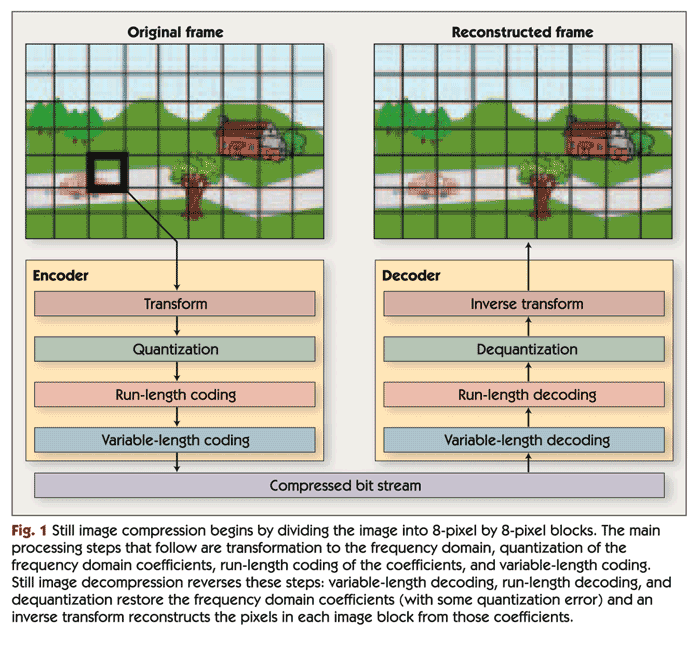
A digital color image of the compressed sequence is converted to the YUV (YCbCr) color space. The Y component represents intensity and the U and V components represent chromaticity. Since the human eye is less sensitive to chroma than to intensity, the resolution of the color components can be reduced 2 times vertically, or both vertically and horizontally. For animation and high-quality studio video, downsampling is not applied to preserve quality, and for home applications where streams are lower and equipment is cheaper, this action does not lead to noticeable loss. on visual perception, while saving valuable bits of data.

The basic idea of ​​the whole scheme is to predict the movement from one frame to another, and then apply a discrete cosine transform (DCT) to redistribute the redundancy in space. DCT is performed in 8×8 point blocks, motion prediction is performed in intensity channel (Y) in 16×16 point blocks or, depending on the characteristics of the original image sequence (interlaced scan, content), in blocks 16×8 dots. In other words, a given 16×16 pixel block is searched in the current frame in the corresponding larger area in the previous or subsequent frames. The DCT coefficients (the original data or the difference between this block and its corresponding one) are quantized, that is, they are divided by a certain number to discard insignificant bits. Many coefficients after such an operation turn out to be zero.

How are the frames related to each other?
There are three types of encoded frames. I-frames are frames encoded as still images, without reference to the next or the next. They are used as starting points. P-frames are predicted frames from previous I or P-frames. Each macroblock in the P frame can come with a vector and the DCT coefficient difference of the corresponding block from the last decoded I or P, or can be encoded as in I, if the corresponding block was not found.

And finally, there are the B-frames, which are predicted from the two closest I or P-frames, one before and one after. The corresponding blocks are searched in these frames and the best of them is selected. The direct vector is searched, then the inverse, and the average between the corresponding macroblocks in the past and the future is calculated. If this doesn’t work, then the block can be encoded as an I-frame.

The sequence of decoded frames generally looks like

IBBPBBPBBPBBIBBPBBPB …

There are 12 frames from I to I frame. This is based on the random access requirement that the start point must repeat every 0.4 seconds. The relationship from P to B is based on experience.

For the decoder to work, the first P frame in the sequence must be before the first B, so the compressed sequence looks like this:

0 xx 3 1 2 6 4 5 …

where the numbers are numbers of frames. xx may be nothing if it is the beginning of a sequence, or frames B -2 and -1 if it is in the middle of a sequence.

You need to decode I frame first, then P, then, having both in memory, decode B. During decoding, P is displayed I frame, B is displayed immediately, and the decoded P is displayed during decoding of the next.

Digital video, its advantages

Digital video, its advantages

DIGITAL VIDEO

Digital technologies provide undeniable advantages over analog technologies.

Digital Video

The digitized signal can store all the information stored in analog form. Modern digital data transmission, recording and storage technologies practically do not distort the signal.

One of the indisputable advantages of digital technologies is the ability to apply a powerful mathematical apparatus to compress video and audio information into a digitized signal. Unlike “analog”, “digital” can be reproduced at any time with 100% repeatability. Consequently, the digitized signal opens up convenient post-processing, analysis, and simulation options.

The main video compression methods come down to compressing data within a single frame and optimizing the transfer of changes between frames. Even when looking at a still image, you can see that it contains a lot of information of the same type and duplicate information. For example, the background intensity is usually a constant value; many separate areas of the image, occupying significant frame sizes, also have the same digital signal level. Naturally, it makes no sense to transmit all this information without compression. With the use of specialized video compression techniques, smoothly changing frame by frame, it is possible to further reduce the resulting density of information transmission over the network.

Unlike universal archivers (such as WinRar or WinZip), video compression can occur with some loss, the amount of which depends on the selected codec. Modern compression algorithms use extensive logical analysis of the video to extract duplicate fragments between frames and reduce the size of the final file. During playback, the compressed information is “stretched” and then displayed to the user. On a low-powered computer, it can take a long time to decompress images compressed with some codecs.

Digital video compression technologies
There are many digital video compression technologies. Some of the compressors considered use more than one compression technology, but a combination of them. For example, both Indeo 3.2 and Cinepak use vector quantization. The international standards MPEG-1, MPEG-2, MPEG-4, H.261 and H.263 use a combined BDKP technology and motion compensation. Some modern algorithms use Discrete Wavelet Transform (DWT) technology. Other technologies include fractal image compression.

Lossless compression

Image compression can be performed without quality loss only if there was no data loss during the compression process. As a result, the image obtained after decompression will match exactly (bit by bit) the original. Examples of such compression are GIF for static graphics and GIF89a for video.

Lossy compression

Compression can be lossy if information is lost during the compression process. However, from the point of view of human perception, lossy compression should be considered only that compression in which it is possible to distinguish with the naked eye the result of compression from the original. Thus, despite the fact that two images, the original and the result of compression with one or the other compressor, may not coincide little by little, however, the difference between them may be completely imperceptible. Examples include the JPEG algorithm for compressing static graphics and the M-JPEG algorithm for compressing video.

Lossless compression from a perceptual perspective

Being formally lossy compression, a compression scheme can at the same time appear to be lossless in terms of human perception. Most lossy compression technologies have the so-called Compression Quality Factor (QF), which characterizes the perceived quality side and ranges from 0 to 100.

About video compression

About video compression

Video Compression

As the days go by, the demands for video quality are constantly increasing.

Video Compression

At the same time, channel width and media capacity could not keep up with this growth if video compression algorithms were not improved.
Next, we will talk about some of the basics of video compression. Some of them are somewhat outdated or described too simply, but at the same time they give a minimal idea of ​​how everything works.

Video Streaming Features

Most everyone knows that any video is a collection of still images that will replace each other over time. In what follows, we will call this ordered set video stream. They are different, so it is extremely useful to do a little classification here:
Pixel format. The pixel does not give us more information than its color. However, color perception is highly subjective and great efforts have been made to create color rendering and rendering systems that are acceptable to most people. So the color that we see in the real world is quite complex in terms of the frequency spectrum of light, which makes it extremely difficult to transmit it in digital form and display it even more. However, it was observed that the three points of the spectrum can quite accurately bring the displayed color closer to the present in the metric of color perception by an ordinary person. These three points are red, green, and blue. That is, due to its linear combination, we can cover most of the spectrum of visible colors. Therefore, the simplest way to represent a pixel is: RGB24, where exactly 8 bits of information are allocated for the Red, Green and Blue components. And so we can transfer 256 gradations of each color and a total of 16,777,216 of all kinds of shades. But in practice, during storage, this color representation is practically not used, not only because we spend up to 3 bytes per pixel, but also for other reasons, but more on that later (on YV12).
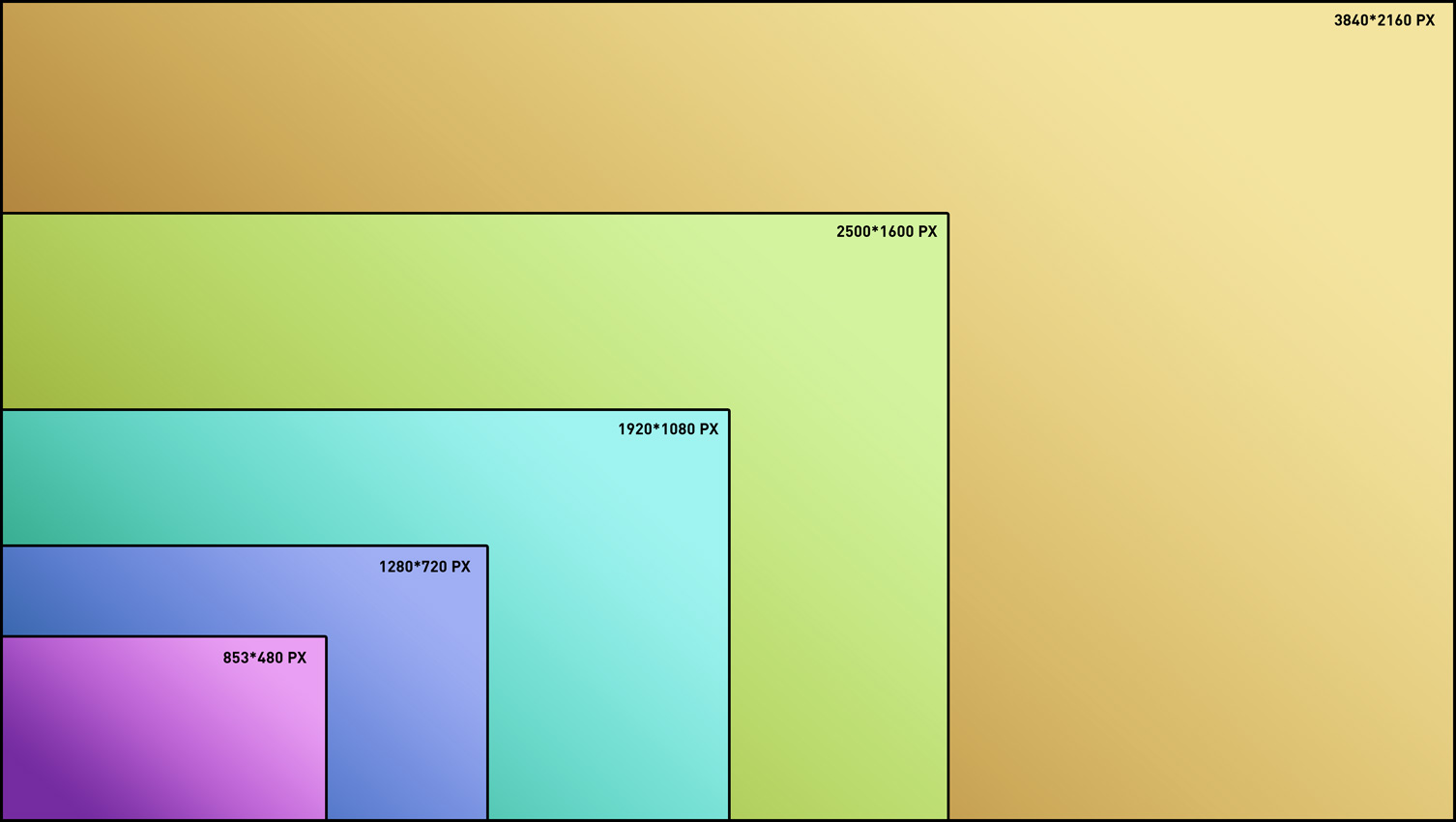
Frame size. We already grab and encode all the pixels in the video stream and receive a lot of data, but it is inconvenient to work with. In the beginning, everything is very simple, the frame is characterized by: width, height, size of the visible part and format (more on that later). Here the numbers will probably be familiar to many: 640×480, 720×480, 720×576, 1280×720, 1920×1080. Why? Yes, because they appear in different standards, for example most European DVDs have a resolution of 720×576. No, of course you can make a 417×503 video, but I don’t think there is anything good in that.

Frame format. Even knowing the size of the frame, we cannot represent the pixel array in a more convenient way without knowing how to “pack” the frame. In the simplest case, there is nothing complicated: we take a row of pixels and write the bits of each encoded pixel in a row, and so on line by line. That is, we write as many lines as we are tall by as many pixels as we are wide and all in a row, in order. This is called progressive. But maybe you tried to watch TV shows on a computer without the proper settings and saw the “comb effect”, this is when the same object is in different positions relative to the odd and even lines. You can argue for a long time about the desirability of interlaced (interlaced) scanning, but the truth is that it has remained a relic of the past of traditional television (those who are interested in reading about the kinescope device). I will not talk now about methods to remove (deinterlace) this unpleasant effect. This is where the magic designations come from: 576i, 720p, 1080i, 1080p, where the number of lines (frame height) and the type of scan are indicated.
Frame rate. Some of the standard values: 23.976, 24, 25 and 29.97 frames per second. For example, 25 fps is used on European television, 29.97 on American television, and 24 fps is used in movies. But where did the “strangers” 23.976 and 29.97 come from? Let me tell you a secret: 23.976 = 24 / 1.001, and 29.97 = 30 / 1.001, that is, the 1.001 divisor is included in the American NTSC broadcast standard. Consequently, when the movie is shown, there will be a very slight slowdown, which will not be noticeable to the viewer, but if it is a musical concert, then the speed of the show is so critical that it is better to occasionally skip frames and again the viewer will not notice anything.

Digital video encoding and compression

Digital video encoding and compression

H.264

Encoding (compressing) digital video information can seem like a difficult question to understand if you don’t know why it matters, what to look for, and generally how it works.

H.264

Why is video compression important?

The use of digital video filming was introduced in the 1980s. It was clean, uncompressed video information that required large amounts of memory and playback system resources to play and store files. But even today, compression and encoding are a prerequisite for recording any video information, despite the colossal leap in the development of digital electronic technology. Otherwise, uploading, processing, editing, playing and storing video files will become a test of the endurance of your nervous system and the capabilities of your equipment.

How does video encoding work?
In the process of encoding a video signal, the video data stream is continuously analyzed by special software, and unnecessary / unimportant data fragments are simply cut off, this helps to significantly reduce the size of the video file.

There are two types of video compression: frame-by-frame (intra-frame) and inter-frame encoding.

Frame-by-frame compression treats each frame of the video as a separate still image, similar to a photo in jpeg format. This technology is distinguished by good video quality, however, the reduction in video file size is negligible due to the fact that all frames are saved, even if there are no changes to the image for a dozen or even hundreds. of frames. In other words, out of a hundred identical photos, 100 are saved, not one.

Compression between frames works on the opposite polar principle: when a signal is processed, the whole frame is analyzed, but only key changes are saved from frame to frame, as in animation, when you need to show the movement of an object , but the background of the background and the environment around the object are the same. This enables you to significantly reduce the size of the video file compared to the intra-frame compression principle.

Image quality of
video after compression Even the most advanced video compression algorithms result in a loss of quality of the original signal. But the development of software products and codecs has reached a level where the loss of quality is almost imperceptible and indistinguishable from the original to the average human eye, especially to non-professionals in the field of digital video processing.

To preserve the highest possible video quality, while saving the volume of the video file, you need to determine the main key points: video resolution, file size, method of transferring and downloading the video file, predominance of static or dynamic scenes , color, contrast and the like. An important factor that affects the quality and size of the resulting video file is the choice of codec and compression format.

Codecs A
Video file must be compressed and encoded, and then decompressed and decoded with the same set of software tools: a codec, which includes tools to process and play the file. In other words, to view a video file, you have to decode it with the same codec that it was encoded in, for example, a video encoded in the MPEG-4 codec must be decoded with the same MPEG-4 codec; otherwise, you are guaranteed to have problems with playback. of this file.

Compression standard M-JPEG (Motion JPEG) Un
An unlicensed encoding standard created and widely used in the 1990s using intra-frame compression technology. The digital video sequence obtained with this codec is a full weight JPEG image matrix. Although this codec allows the use of a number of tools that reduce file size, it is used very rarely today due to the poor quality of the resulting image, as well as the minimal compression ratio.

MPEG-4 compression standard
Licensed coding standard that uses object-oriented compression (between frames), that is, the movement of each object in the frame is tracked separately, and based on these movements, the video signal is captured. The main advantage of this codec is the wide compression ratio setting, which can be selected for any data transfer rate, low or high. This format is universal, it is designed to watch sweat videos in real time.

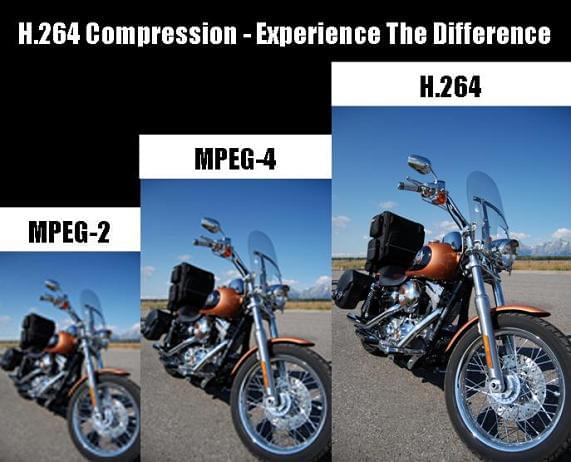
Compression standard H.264 Un
licensed copying standard that greatly reduces the amount of digital video information, while making minimal changes to its quality, especially in

New standard for digital video compression twice as efficient as HEVC

New standard for digital video compression twice as efficient as HEVC

H.266/VVC Video Compression

German engineers who once developed the popular MPEG-3 audio coding format, as well as AVC and HEVC, which allowed video to be compressed to fit on a smartphone, announced a new standard for VVC compression, which could become a critical element in the era of ultra high definition video.

H.266

Compressed video today represents 80% of global Internet traffic. New standard presented by the Institute of Telecommunications. Fraunhofer, provides improved compression that will reduce file size by 50% compared to the older H.265 / High Efficiency Video Coding (HEVC) format. In other words, the H.266 / VVC standard will provide faster file transfers with the same quality. It supports all video resolutions from SD and HD to 4K and 8K, high dynamic range video, and 360-degree video.

“Today it is increasingly difficult to distinguish a voice robot from a human”
By reducing data requirements, VVC is making video streaming over mobile networks more efficient, according to the Institute’s website.

For example, if HEVC required approximately 10GB of data for 90 minutes of UHD recording, then with VVC you only need 5GB while maintaining the same quality. The new format is especially suitable for 4K and 8K broadcasts on flat screen televisions.
As with each of the previous protocols, VVC will require new encoding chips that are already in development. Apparently this is being done by the Institute’s partners: Apple, Ericsson, Intel, Huawei, Microsoft, Qualcomm and Sony.

To avoid previous licensing problems, the developers will authorize the use of the new standard on FRAND principles (fair, reasonable and non-discriminatory use), which will be enforced by the Media Coding Industry Forum (MC-IF). The first VVC-compliant encoding program will be released this fall.

Digital video, video [DV – Digit Video, video]

Digital video, video [DV – Digit Video, video]

Video compress!

1. The term used in relation to the systems and tools to create, store, transform, transmit and / or receive (including reproduction) of moving images using computer technology. Digital video is characterized by the following basic parameters: frame rate [frame rate] (measured by the number of interchangeable image frames on the screen per second), screen resolution [spatial resolution] (measured by the number of pixels in an image frame), color depth or color resolution [color resolution] (measured by the number of transmitted color tones), and image quality [image quality] – a complex indicator, including the above. One type of digital video is computer animation.

Video Compression

2. Video presentation format used for recording and data exchange between digital video cameras, VCR and PC. Also called DV editing [DV-the format]. For DV transmission, the IEEE-1394 standard (FireWire or i.LINK) is used. Provides 5: 1 video signal compression ratio, 3.6MB / s signal transmission rate, video frame resolution for PAL – 720×576 and NTSC – 720×480, support for recording and reproduce sound in 4 channels with a sampling frequency of 32 kHz and a bit depth of 12 (or in 2 channels with a sampling frequency of 48 kHz and a bit depth of 16 bits). See [556] for more details.

DV Type-1 (Digital Video Type-1): A variant of the DV format presentation (see above), incompatible with Video for Windows and compatible only with later versions of DirectShow. A file in this format has video and audio components of the recording, which are interleaved (stereo, 48 kHz, 16-bit). This format is the recommended format for processing DV video on a PC [556].
DV Type-2 (Digital Video Type-2) – The original (legacy) version of the DV format on a PC, backward compatible with Video for Windows – Programs running on Video for Windows can only read one file Type -2. In this case, to save data in it, you need to use a special codec. Compared to Type -1, it is more expensive to decode and mix [556].
S-Video is an image format in which chroma and luminance are separated into two separate signals, resulting in higher image quality (see also “stereo video” above).
Component Video [Component Video]: Color video transmitted using three separate channels using one of the color separation models: RGB, YiQ, or YUV.

Intel DVI (Intel Digital Video Interface), Intel Real-time Video – DVI is a hardware / software suite that includes a DVI chipset, an executable software interface, data compression and decompression schemes, and data file formats. DVI format was created in 1984 in Princeton, New Jersey by employees of the USA company the RCA Corporation. Then it changed ownership and from 1988 became the property of Intel Corp., which supports its development. Currently, DVI is a multimedia format for storing audio and video data. Its main features: Supports 16 million colors; it has a maximum resolution of 256×240 pixels; uses its own compression machine and JPEG (5: 4 motion picture compression ratio); it also provides still image storage and compression (lossy and lossless); has a specification on CD-ROM. Audio compression is done using ADPCM and PCM 8. For more information, see [584].

RIFF (Resource, Interchange, File, Format) – “File Format Resource Sharing” from Microsoft is a complex multimedia format used for Windows * *, Windows NT, and OS / 2 operating systems. Its purpose: to adapt various types of data for multimedia programs. The type of data contained in the RIFF file is indicated by the extension: embedded audiovisual data – * .avi; audio data (“wave”) – * .wav; raster data – * .rdi; MIDI data – * .rmi; lots of other RIFF- * .bnd files … Since there are many different multimedia files under the general name RIFF, each of them is processed taking into account the type of data it contains. For example, a RIFF file that contains audiovisual data is often referred to and treated as an AVI file in general and not as a RIFF file. RIFF files are often mistakenly believed to be similar to TIFF (Tag Image File Format) files. Although these formats use the same storage concept, they are incompatible. For more details, see [584].

QT (QuickTime), QTM (QuickTime Movie Resourse Format)

Video compression, how it works

Video compression, how it works

Video Compression

Video – This is essentially a three dimensional pixel color matrix. Two measurements indicate the vertical and horizontal resolution of the frame, and the third dimension, this time. Frame – is an array of pixels, visible camera at this moment of time, or just an image. Video is also possible so-called half images (see: Interlace Scan System).

Video Compression

Compression might be impossible, if I would each frame was unique and the pixel placement was completely random, but it’s not so. Therefore, you can compress, in – first, the image itself – for example, the sky blue photo without sun will actually be reduced to the outline dotted description and a gradient fill. In – Second, you can compress a similar neighboring frames. Ultimately, the algorithms for image and video compression are similar, if you consider video as a three-dimensional image with time as the third coordinate.

Lossless compression
In addition to lossy video compression, it can also be compressed and lossless. This means that when the decompression result will be a precision (bit bits) that matches the original’s. However, when lossless compression is impossible to achieve high compression ratios in real (not artificial) video. For this reason, almost all commonly used videos are lossy compressed (by that number on consumer digital video discs, video sharing, on satellite broadcast). On the web – sites for small clips without sound sometimes use simple GIF and APNG formats.

Compress technology and video compensation motion
One of the most powerful technologies, which allows to increase the degree of compression, this compensation movement. When any modern video compression system later frames in the sequence uses the similarity of regions in the previous frames to increase the degree of compression. However, since – for any traffic – any objects in the frame (or the camera itself), the use of adjacent frame similarity was incomplete. Motion compensation technology allows you to find similar sites, even if they move from the previous frame.

The current state of affairs

РЕКЛАМА
Cm. See also: HTML5 video
At the end of 2011 the year almost all algorithms compress the video (for example, the standards, adopted by the ITU – T and ISO) using a discrete cosine transform (DCT) or its modification to eliminate spatial redundancy. Other methods, such as a fractal compression and discrete wavelet- transform, have also been the subject of investigation, but are now generally used only for compression of still images.

The use of most compression methods (such as the discrete cosine transform and wavelet – conversion) also involves the use of the quantization process. Quantization can be like scalar, so and vector, so there are less, most compression schemes in practice use scalar quantization for its simplicity.

Television
Modern digital television broadcasting is available precisely thanks to video compression. The television station can transmit not only high definition video (HDTV), but also it and several channels on one physical channel (6 MHz).

Although most of today’s video content is broadcast with the use of the MPEG – 2 video compression standard, the no less new and more efficient standards for video compression already used in broadcasting – for example, H . 264 and VC – 1.

Types of videos

Types of videos

Video Formats

MPEG-1

Video formats

The MPEG-1 video compression format was developed by the Motion Picture Expert Group, an international organization that creates video compression standards. It supports a maximum frame resolution of 4095 x 4095 pixels at a frame rate of up to 60 times per second. However, a resolution of 352 x 288 is generally used, which corresponds to the quality of recording on a normal VHS cassette.

How is the information compressed in this format? Suppose we have the following scene: the car moves from point “A” to point “B”. The movement of the machine can be described by two parameters: the vector of movement from point “A” to point “B” and the angle of rotation around its axis. At the same time, the background remains unchanged or almost unchanged: the viewer is unlikely to pay attention to the vibrations of small branches near distant trees. So you can divide the frame into two components: the background, which is saved once and then replaced during all-frame playback, and the area where the car moves, will have to be recorded separately for each frame.

Digital video: an overview of formats

In MPEG-1 format, all frames in a movie are classified into three types: I, P, and B frames. The first type (I-frames, Intra Frames) includes anchor frames. Your images are saved in their entirety in JPEG format. For the predicted frames, only the differences from the previous i-frame are recorded, which requires much less disk space. For B-frames (bidirectionally interpolated frames), the differences with the previous and next I or P-frames are preserved (Fig. 2).

Digital video: an overview of formats

As a result, the compressed file size is approximately 1/35 of the original. This means that an hour and a half movie with the quality equivalent to an analog VHS cassette in MPEG-1 format will fit on two CDs. For transmission over the Internet or in satellite transmission networks, this standard, of course, is not suitable. But there have been many consumer video CD players that work in this format (and they are still being produced now, by the way).

MPEG-2

MPEG-2 is an additional extension of MPEG-1. The recommended frame size has been increased; it is now 1920 x x 1080 pixels, added support for six channel audio. However, playing video in this format requires more processing power from your computer.

It should be noted that work was underway to create the MPEG-3 standard (not to be confused with the now popular audio compression format: MPEG-1 Audio Layer 3). It was supposed to become the basis for HDTV digital television systems. But the work was interrupted, because the necessary requirements for HDTV were implemented in the form of small extensions of MPEG-2.

This format is now quite widespread in the West: it is used to transmit video through satellite channels and digital cable networks, in addition, all DVD video discs are recorded in this format.

MJPEG

In fact, MJPEG (Motion JPEG) is a transition format from compressing normal photos to compressing videos. Each frame is recorded in JPEG format and then placed in the footage. MJPEG is mainly used in video editing cards like Fast AV Master, MiroVideo DC50, etc. You can reduce the video stream from 30MBps to 6MBps. For use in home video players, this standard is not very suitable due to the low compression ratio (5: 1) and the lack of means to synchronize video and sound.

MPEG-4

The MPEG-1 and MPEG-2 formats did not provide a real possibility to transmit video over the Internet and create interactive television based on them: the file size was too large. To drastically reduce it, as well as implement other functions necessary for video transmission, work has begun on the specifications of a new format: MPEG-4. In fact, it does not focus so much on video compression as on the creation of so-called “multimedia content”: the fusion of interactive television, 3D graphics, text, and so on.

As for the video itself, the most important innovation was the further improvement of technologies for decomposing a scene into objects and algorithms for their effective compression. Thus, for example, when compressing a video recording of a tennis match, most of the frames can be conditionally decomposed into images of the stands (background) and the players.