Digital video encoding and compression
Encoding (compressing) digital video information can seem like a difficult question to understand if you don’t know why it matters, what to look for, and generally how it works.
Why is video compression important?
The use of digital video filming was introduced in the 1980s. It was clean, uncompressed video information that required large amounts of memory and playback system resources to play and store files. But even today, compression and encoding are a prerequisite for recording any video information, despite the colossal leap in the development of digital electronic technology. Otherwise, uploading, processing, editing, playing and storing video files will become a test of the endurance of your nervous system and the capabilities of your equipment.
How does video encoding work?
In the process of encoding a video signal, the video data stream is continuously analyzed by special software, and unnecessary / unimportant data fragments are simply cut off, this helps to significantly reduce the size of the video file.
There are two types of video compression: frame-by-frame (intra-frame) and inter-frame encoding.
Frame-by-frame compression treats each frame of the video as a separate still image, similar to a photo in jpeg format. This technology is distinguished by good video quality, however, the reduction in video file size is negligible due to the fact that all frames are saved, even if there are no changes to the image for a dozen or even hundreds. of frames. In other words, out of a hundred identical photos, 100 are saved, not one.
Compression between frames works on the opposite polar principle: when a signal is processed, the whole frame is analyzed, but only key changes are saved from frame to frame, as in animation, when you need to show the movement of an object , but the background of the background and the environment around the object are the same. This enables you to significantly reduce the size of the video file compared to the intra-frame compression principle.
Image quality of
video after compression Even the most advanced video compression algorithms result in a loss of quality of the original signal. But the development of software products and codecs has reached a level where the loss of quality is almost imperceptible and indistinguishable from the original to the average human eye, especially to non-professionals in the field of digital video processing.
To preserve the highest possible video quality, while saving the volume of the video file, you need to determine the main key points: video resolution, file size, method of transferring and downloading the video file, predominance of static or dynamic scenes , color, contrast and the like. An important factor that affects the quality and size of the resulting video file is the choice of codec and compression format.
Codecs A
Video file must be compressed and encoded, and then decompressed and decoded with the same set of software tools: a codec, which includes tools to process and play the file. In other words, to view a video file, you have to decode it with the same codec that it was encoded in, for example, a video encoded in the MPEG-4 codec must be decoded with the same MPEG-4 codec; otherwise, you are guaranteed to have problems with playback. of this file.
Compression standard M-JPEG (Motion JPEG) Un
An unlicensed encoding standard created and widely used in the 1990s using intra-frame compression technology. The digital video sequence obtained with this codec is a full weight JPEG image matrix. Although this codec allows the use of a number of tools that reduce file size, it is used very rarely today due to the poor quality of the resulting image, as well as the minimal compression ratio.
MPEG-4 compression standard
Licensed coding standard that uses object-oriented compression (between frames), that is, the movement of each object in the frame is tracked separately, and based on these movements, the video signal is captured. The main advantage of this codec is the wide compression ratio setting, which can be selected for any data transfer rate, low or high. This format is universal, it is designed to watch sweat videos in real time.
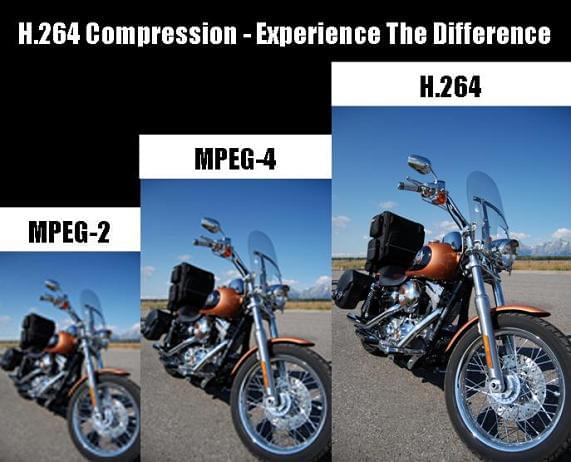
Compression standard H.264 Un
licensed copying standard that greatly reduces the amount of digital video information, while making minimal changes to its quality, especially in