What are video codecs and audio codecs?


Free Download Mp4Gain
picture

What are video codecs and audio codecs?

Video Codecs

Almost any computer user periodically listens to music on it, which is stored electronically. There are many formats for storing music, each of them was developed for specific tasks:

Video Codec

Bit rate is the amount of information used during encoding for 1 second playback. The higher it is, the less the distortion and the sound matches the original as much as possible.
Lossless – Lossless audio encoding. By converting to lossless formats and vice versa, we get exactly the same sound.
Lossy: compression formats designed for the fact that a person simply cannot physically hear certain frequencies that are skipped during conversion. At the same time, it can significantly save the amount of disk space.

Audio CD
The format that ushered in the era of digital sound after the transition from vinyl records. It was adopted as a standard in 1979 by Philips and Sony. In the audio CD format, music can be physically stored only on optical media; when recording to a hard disk, the audio track must be converted.

Due to the highest sound quality and the ability to play on any player, the format is still very popular, even though it is quite old.

Flac
Perhaps the most common format for storing lossless music. Compared to other lossless audio compression codecs, flac developed by xiph.org is completely free and offers the smallest output file size.

MP3
The most popular music format accepted as an unofficial standard for any playback device. Its popularity is based on the fact that because it cuts frequencies inaudible to the ear with practically the same sound quality, an mp3 file is 30% of the original lossless file.

The first audio track in mp3 format appeared in 1994. One of the reasons for its popularity is the ability to store a variety of additional information on audio file tags and the convenience of organizing a music library.

Ogg
A new lossy format that was launched in 2002 as a free alternative to paid formats. Unlike its predecessors, mp3 in particular, it allows the possibility of multi-channel encoding and multi-channel audio storage. It is most used in video games.

The term “audio” today means everything that is somehow connected with sound. This is processing, playing, mixing and simply listening to audio recordings. Few people know that during their existence all popular audio formats have undergone significant changes, sometimes for the better and sometimes even for the worse.

The problem is that when the creators tried to improve the recording quality by using the new format, the size of the result increased significantly. Reducing the size of the final file resulted in a significant loss of quality. But this was not always the case.

The first mention of computer sound is associated with the creation of several primitive video games. Then the sound was played back using the speaker of the system. As the software developers of that time did not try, they failed to achieve the level of quality that would be compatible with tape and reel recorders. This is what got many developers thinking about how to change the audio format to make the sound more natural and natural. It is this problem that has led to the current competition in the audio market. As a result, the formats used strongly affect the quality of the reproduced material and the configuration of the basic playback parameters.

WAV format

The first full quality of audio formats is associated with this particular format. The WAV extension designation was derived from the English word “wave”, which means wave in Russian. It was this format that became the first audio format to be processed with computer programs at a highly professional level. Files with a WAV extension had the following characteristics:

– depth of sound;
– sampling frequency;
– bit rate, etc.

This format was even compatible with the sound that could be obtained after processing an audio CD with an equalizer and other tools. However, the file size in this case was completely unwarranted. For example, the most common 3 minute long track could be up to 50 megabytes long.


Free Download Mp4Gain
picture


Mp4Gain Main Window
picture


Mp4Gain Features
picture


Free Download Mp4Gain
picture

Video compression and decoding | Codecs and Decoders

Video compression and decoding | Codecs and Decoders

Video Container and Video Codecs

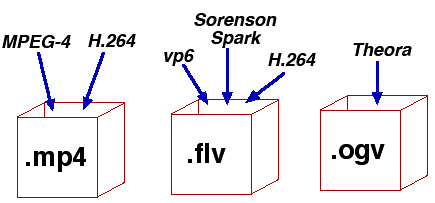
Before doing serious testing, there are a few simple things to clear up. It is important to distinguish between codecs and file containers. For example, Blu-ray files often appear with the extension .m2ts. But the BDAV (blu-ray Disc Audio / Video) container format generally acts as a storage container. In this case, you can use three codecs: MPEG-2, H.264, and VC-1.

Video Codec and container

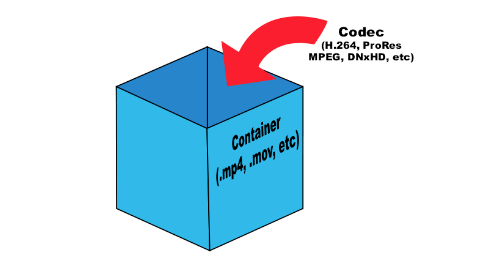
What is the difference between a codec and a container? Think about your last vacation. Your suitcase, in this case, is a “container”. Baggage is content (video, audio, subtitles, and other information), and a codec is the way you store everything (data) in your suitcase to fit. You can put things in a suitcase by folding carefully (one codec) or press them into rolls and wrap them with tape to fit more (another codec). This is true for any multimedia content. For example, the Microsoft AVI (Audio Video Interleave) format is a file container, but the video it contains can be encoded with different codecs, from DivX to MPEG-2.

When you play something back on a video player, generally the encoded video is passed through a decoder, converted to YUV (color space) data, and sent to the screen. The decoder recognizes the format and decompresses the compressed data into useful information that can be processed and displayed.

There are two types of decoders: software and hardware. Before UVD, PureVideo, and Intel GMA 4500MHD, video was decoded using software decoders that relied on the power of the processors. Therefore, many companies tried to do something to play videos. But only two of them managed to do this really well: CyberLink and InterVideo (now Corel), so ATI later licensed the PowerDVD decoder for their ATI DVD decoder. Naturally, software decoders consume a large amount of processor time, which, while not affecting the performance of modern processors, significantly reduces the battery life of mobile devices.

Over time, graphics card manufacturers addressed this problem and began developing fixed-function decoders, which were logic circuits in the GPU for video processing. Today they are called hardware accelerators. Its advantage was that when the GPU was working, the time of the main processor was not wasted.

There are some interesting points. Since the decoder processes video, it is quite difficult to set parameters for its performance or efficiency. Regardless of whether the video goes through the hardware or software conversion pipeline, the data changes long before it appears on your monitor. When using software, it is not necessary to compare the systems used in decoding. However, when using the same system, different decoders can produce different images or change the image quality. Most Blu-ray discs played on nVidia or AMD graphics cards will look the same if you disable acceleration in PowerDVD. In both cases, the video is processed using software on the processor, giving the same result.

When hardware decoding is added to the process, things look different. Why? Modern GPUs have a special unit for decoding and processing video data. This is exactly the logic with a fixed function, which was discussed earlier. Hardware accelerated decoding on Sandy Bridge processors is designed and programmed differently than on AMD and nVidia graphics cards.

We must understand clearly: there are no general purpose GPU decoders. There are no decoders that can fully work on DirectCompute, APP, or CUDA. Striving to implement such support is doomed beforehand. GPGPU is designed to handle raw data with a high degree of parallelism. But we are talking about video, not raw data. To process images, you have to do a lot and in a sequential execution. Fixed function decoders decode and process video; they do nothing else. Porting this functionality to more general computing resources would be a step back from moving it to the processor, since in both cases you have to work with software decoding.

Elemental Technologies (known for its Badaboom) is unique in developing a CUDA-based MPEG-2 decoder. And it is not a pure GPGPU decoder. Parts of your pipeline, such as entropy encoding, syntax encoding, syntax decoding, and entropy decoding, must be executed sequentially. Other parts of the process can be designed to run in parallel, such as motion estimation, motion compensation, etc.

Video codecs, video formats – what does this all mean?

Video codecs, video formats – what does this all mean?

video codec

What is video codec and video format?
If you are puzzled by the endless list of export options in your video editing software, this article is for you. Let’s first look at the definition of a codec. Then we will look at the concept of video format and then we will look at some of the most common codecs and their uses.

Video Codec

If you are recording or editing a video, you will almost immediately come across the term “codec”. Since there are so many and it’s hard to tell them apart, I’ve made a quick overview to help you get started. Once you understand certain terms, you can better decide which one suits your needs. Let’s start with a simple definition.

The video codec.

A codec is actually a combination of two words: an encoder and a decoder (co / dec). What are they doing? Bottom line, because video files are so large, you need a way to make them smaller. The codec encodes, compresses the data to store or send it, and then decompresses it for playback or editing.

A codec is a computer code that performs its function each time the software calls a file. Codecs can also be used on physical equipment, such as a camera, to digitize incoming video and audio.

This happens in real time, either at the point of capture or at the point of playback. However, if you are not a broadcast engineer, you must rely on your computer or device to select the codec. Hardware compresses your video and audio data for viewing, streaming, or storage.

The video format is.
The file format is similar to a container. The container contains data that has been compressed using a specific codec. And sometimes they have the same name.

For example, a file format such as Windows Media Audio contains data that is compressed using the Windows Media Audio codec. However, a file format such as Audio Video Interleaved (AVI) can contain data compressed with any of several different codecs, including MPEG-2, DivX, or XviD codecs.

AVI files can also contain data that is not compressed by any codec. Therefore, depending on the codecs installed on your system, some AVI files will play fine, while other AVI files, despite the same file extension, will not play.

It also affects the audio. Often there is a situation where when playing a video, the sound plays, but the video does not. This means that the appropriate video codec is installed on your device.

Terms display – video format

How do I determine the video format and video codec used?
Unfortunately, the tools built into Windows do not allow you to find detailed information about a video file.

What is the smallest video format?
Currently, the HEVC or H.265 codec is one of the most efficient available on the market and is commonly used to compress 8K UHD video. However, the use of the codec requires the payment of a license fee, so it is not widely supported or widely supported by different devices or browsers. For the Internet, the .WEBM format and the corresponding VP8 / VP9 codec are used. This package is widely supported and popular for reducing the size of video files.

However, it is important to consider factors other than size: where the files will be played and the required video quality.

Everything you need to know about video codecs, containers, and compression.

Explaining the difference between codecs and containers is relatively simple, but the difficult part is trying to understand each format. The lines begin to blur when you realize that the most common codecs are not exclusive and can use various compression technologies to get the job done. The blurred line is almost invisible when you start talking about formats like MPEG-4, which can be classified as container and codec, but it is a complicated classification that is better to leave for another time.

codecs

So how is the difference between dozens of codec and container options taught? Don’t do it.There are only a handful of technologies used for online video, and most of your effort will be devoted to understanding how they work, as well as understanding the trade-offs you face in deciding what to use. .

Lossless vs Lossy

You can spend weeks studying technologies that are only used for a relatively small number of applications. Therefore, we will focus our attention on the technologies that you will use for most video encoding and playback needs.

What is a codec?

A codec, or encoder / decoder, is an encoding tool that processes video and stores it in a sequence of bytes. Codecs use algorithms to effectively reduce the size of the audio or video file and then unzip it when necessary. There are dozens of different types of codecs, and each uses different technology to encode and reduce your video file for the intended application.

Depending on the codec, this encoding occurs in two ways: Lossy or lossless compression How does file compression work? How does file compression work? One can argue that file compression is at the heart of how the modern Web works, as it allows us to share files that would otherwise take a long time to transfer. but how does it work? See more information.

Lossy compression

When looking for manageable file sizes, lossy compression is the most viable method available. Although it certainly loses quality in audio, video or both, compression is a necessary evil (currently) in a world dominated by the need to share and store what would otherwise be equivalent to impractical file sizes. Your average Blu-ray, for example, can top 40 gigabytes, and that kind of storage space would not only be expensive, but would make digital downloads and purchases inconvenient, if not a waste of time. The key when using lossy compression is to set the highest quality compression format for its intended use, so that it follows the fine line between quality loss and file size.

Lossless compression

Lossless compression works much the same as a ZIP or RAR archive, because after compressing and decompressing, the archive is essentially the same. By using smart algorithms, the file does not lose a lot of quality, but it is not an efficient way to store large files because there is not much compression that actually occurs. Also, streaming large video files online uses a lot of bandwidth (although H.265 encoding can change that) to make it a viable compression option.

Unless you work in the film or video editing industry, you are unlikely to share video files in a lossless format (if you do). To put this in perspective, even a 4K TV does not contain the resolution necessary to display a movie shot on a modern camera and is delivered without compression. In fact, it’s not even close (yet). While 4k video is beautiful, 8 Ultra HD videos to watch on your new 4K TV [things to see] 8 Ultra HD videos to watch on your new 4K TV [things to see] We have tracked high and low and found some 4K videos that take full advantage of the ridiculous amount of pixels at your disposal, for free. Read more, it is not the size of an uncompressed video format.

Although a Blu-ray movie is less than 50 gigabytes (if required on disc), the first downloadable 4K movie (available to consumers – trailer below) is 160 gigabytes! The uncompressed 1080p video is mind-blowing 410 gigabytes per hour, and that doesn’t include the audio file, which can add an additional 7 gigabytes per hour, depending on how it was recorded.

Video codecs

In photography, the choice of the recording codec is quite limited: we usually fluctuate between the JPG format and the Raw format. In video, the choice is slightly wider: MPEG-1, MPEG-2, MPG-4, H264, H265, RAW, ProRes, ProRes Raw, Motion jpeg, etc.

So what are these codecs for, what uses are they designed for, and which ones should you choose?

Códecs

CONTAINERS AND CODECS are NOT the same!

Digital videos are contained in files. These files are called “containers”. The extension of these files often makes it possible to determine their type. The most common containers are MP4, MOV, AVI and MXF. The MXF container is generally used in professional camera series from manufacturers such as Sony or Panasonic.

These containers are “boxes” or “folders” that consist of several elements: video track, sound tracks, time code or subtitles. The purpose of the container is to synchronize all the elements it contains.

Therefore, you cannot know the codec of a video from the file extension: for example, an .avi file and a .mov file could use the same codec to encode the video track.

WHAT IS A CODEC?

A codec is a mathematical procedure consisting of algorithms used to encode and decode the image (codec). It helps define how sensor information is stored and the strategy for compressing and decompressing images.

codec

The size of a one minute 4K video file is about 50 GB. Therefore, it is easy to understand the main advantage of using a codec: compression. For the same minute of 4K recording, for example, using the H264 codec reduces the file size by a factor of about 27, or a final size of about 1.8 GB.

The more “codec” a codec is, the more complex the decoding will be and it will require a powerful machine to accomplish this task. At the same time, the higher the compression, the greater the loss of information that can make post-production difficult.

To achieve this optimization, most codecs use spatial compression: each image is compressed independently of the other images; This is known as an “intra” codec. For more compression, more complex codecs add temporary compression: we’re talking LONG GOP (GOP for “Group of Pictures” or “Long Group of Pictures”); Codecs of this type record only one full image per x images (often 12) and retain only what has changed between these images.

What are the most used video formats?

Choosing audio and video codecs and containers affects video quality and file size. Here we show you how to find the format that best suits your needs.

formats

Decades and decades of developments in the audiovisual field have led to a result that, in some way, can be considered curious. While in other sectors, continuous development has led to a very marked standardization (think of the .doc or .pdf format), in multimedia the situation is at least compound.

An example is the world of audio formats, animated by strong “competition” and a multitude of available options. It is no less than that of video formats, in fact. In this case, in fact, we have to deal with a division between codecs and containers (we will see in a moment what they are and what function they perform) that ends up complicating things even more. Therefore, in case you want to convert a movie, you have to be careful to choose the correct codec and the correct video format, to avoid creating files that are too large or simply unreadable. In short, the error is just around the corner.

audio formats

Differences between containers and codecs

Before analyzing the situation and seeing what are the most used video formats, it is necessary to clarify some fundamental concepts: first, what is the difference between the codec and the container. If in the audio world, the codec used to digitize the audio track matches the “final” file format, in the video, on the other hand, the codecs used are different from the file format that the video file will assume at the end of the digitization process. The reason is soon explained and lies in the multimedia nature of a video.

A movie, in fact, contains video and audio data: the conversion or playback software must be able to analyze both multimedia streams, and therefore will need different algorithms that work in one or another type of data stream. Codecs do exactly this: as the name, code, and decoding of data (audio and video) are made from movies, so you can convert them to another video format or play them back with a media player. Even with regard to containers, it is enough to resort to the literal meaning of the word: these are files that contain both the video and audio sequences within them and “make them available” to codecs for reading and playback.

What are the most used codecs?

A codec, as mentioned, is in charge of compressing and decompressing the video files and determines how they are played on the screen of the PC or smart TV. Each operating system provides the user with dozens and dozens of different codecs, each useful for encoding and decoding a specific type of file, even if a new one can be installed by downloading special software or packages from the web. Among the most used codecs we find the FFmpeg, Divx, Xvid, H.264 and its evolution H.265, VP9 and VP 10 (also known as the name of the Google codec).

-Divx and Xvid. As the name also suggests, these are two “mirror” codecs, created in the late 20th and early 21st centuries to meet the initial demand for online multimedia content. Since bandwidth and browsing speed were very limited, these are codecs that can guarantee good video quality even at high levels of image compression. In this way, it was possible to obtain files of contained dimensions even with very long movies (such as full movies)

-264 and H.265. Created by the Motion Picture Expert Group, they can be considered as industry standards. Among the most popular and used in all areas (you can find H.264 encoded movies on Blu-ray discs, for example, but also movies downloaded from the network) thanks to its versatility and ability to guarantee an excellent quality ratio / File size. The H.265 codec, in particular, can guarantee, with the same quality, a compression factor twice as high as that of its predecessor: files “treated” with this codec will therefore weigh half compared to their counterparts processed with H.264 codec

-VP9 and VP10. Also known as “Google Codec”, they are the codecs used by the giant Moutnain View to compress and decompress the movies uploaded to YouTube. These are algorithms optimized for online video playback, capable of offering excellent resolution and high quality even with small files. The VP10 in particular is the all’H.265 answer and is designed for resolutions up to 4K
Mpeg-H.

Video codecs and possible failures

Video codecs and possible failures

Numerous queries that you make to us as readers are caused by one of those incompatibilities in something that should be as simple as being able to put a file in a pendrive and that later (for whatever astral reason) it cannot be reproduced due to a failure or due to other. And this, dear reader, is almost always given by the codecs.

So with the intention of explaining and the desire to give you simple solutions, we elaborate this article where you can know what they are, how to detect them, how to convert them easily and by which way it is better to insert it to our precious Smart TV. But, let us start at the beginning.

But what is that about codecs?

The first thing to distinguish is what a codec and what a container. Sometimes they are confused and it is essential to define them to identify them and get to the point when we are presented with any incompatibility in any file that we want to reproduce.

Surely you sound files with formats as famous as .mpg, .avi, .mov, .divx, .mkv … Well, all these are containers of content both in the form of audio and video tracks so that later when playing them play all at once, in tune and with sufficient quality. That’s where the codec comes in.

A codec is simply a program that creates a particular file with encryption. Hence its name … to encode and decode these files in a language or code that improves image and sound quality or reduces the file size for a better transfer over the network of networks.

So to sum up, one issue is the type of file format or extension that we have in front of us and a very different one, how it has been encoded, in what language, that our TV will then be able to interpret and reproduce correctly.

And it is that before a problem of reproduction of file the first thing that we have to know is with what type of codec it has been codified. To do this in a very simple way we can find out with a simple video player on our PC.

How to know the compatibility of Smart TV

Knowing what codec or container our “smart” television can play is critical to know what type of video file to download and that it doesn’t trouble us later when playing it with the smart TV model we have at home. But this information is not always at hand as we expect. There are brands that do not include this information in detail on their website or in the manual.

Codecs: How an audio or video codec works

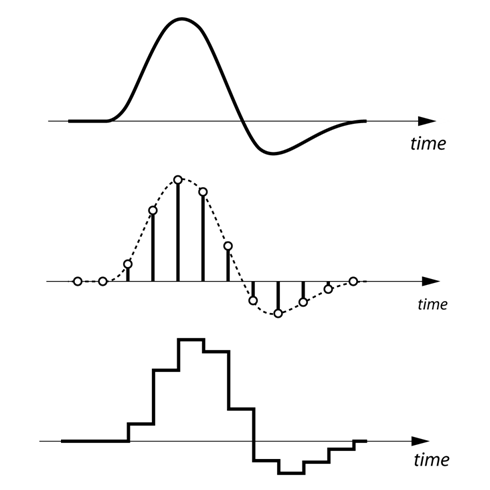
To understand in a simple way what a codec is and how it works, the first thing we have to keep in mind is that the human voice is a continuous (analog) waveform, while the information that circulates through a data network is discrete ( digital). This means that if we want to send packets with data that contain the information needed to reproduce a voice fragment, we will have to digitize the voice beforehand.

codecs

The process of converting an analog signal to a digital signal is done through an element called an encoder. If the encoder is also capable of performing the opposite process, that is, moving from a digital signal to an analog signal even if only approximately, then we will have an encoder-decoder. An encoder-decoder is also called a ‘codec’.

Although it may seem that we would only be interested in selecting one or two codecs taking into account the voice quality (MOS, Mean Opinion Score) and bit-rate parameters that each codec needs, the truth is that we also have to face our network Look closely at the size of the packets that we are going to send since each voice packet is also made up of bits that are used for routing and error correction issues. As they add load, they saturate the network and make the entire system go slower. Do we reduce the number of packages we have to send making them larger? It is not always a good idea because the loss of a large package will have a greater impact on the output, even a cut in communication! What is recommended in these cases is to have a certain compromise between the number of packets that are sent to the network and the protection we want to have. The reference size should be about 20ms of voice per package.

codecs

How codecs work

The codecs reduce the information of the clips to facilitate and enable their publication and viewing through the Internet. There are two methods of compression, the so-called spatial and temporal compression.

In the first one, reduce the information by compressing the existing one inside each frame. Instead of describing the pixel-to-pixel image, pointing out for example the position and color of the pixels, the compression codec generalizes describing similar areas and their light and color characteristics. For example, instead of reproducing a blue sky pixel by pixel, it would be described as an area with similar light and color characteristics. In this sense, the less varied details an image presents, the codec can generalize and compress more easily. Creating videos with simple backgrounds facilitates compression and reduction, just as working with a tripod instead of a camera in hand means stabilizing the backgrounds and therefore facilitating subsequent compression.

The other compression method is temporary, where the information between consecutive frames is compared and only the details that vary are stored. The reference frames from which the differences are analyzed and the subsequent ones are supported are called keyframes and contain the complete image. On the contrary, the frames that reflect the differences are called “delta frames” and only contain the information of the areas that vary with respect to the previous images.

In general, videos that show few changes between frames are compressed better and this necessarily affects the realization. At present, both the television and the cinematographic realization tend to use the camera in motion. However, the compression of dynamic videos is more problematic than the cases of more static images.