There are several types such as WAV, MP3 and FLAC, but what is the difference?


Free Download Mp4Gain
picture

There are several types such as WAV, MP3 and FLAC, but what is the difference?

Music File Formats

Comprehensive research on file formats
Do they like music to all?

audio file formats

I think many people enjoy music by downloading or playing streaming instead of CD these days, but what kind of format music is stored as data?

I researched the differences, advantages and disadvantages of each format.

Types of audio compression

There are three types of music file formats: “Not compressed”, “compressed with loss” and “compressed without loss”.

File-based compression can reduce the size of the file and reduce the download time and storage capacity.

“Uncompressed format”
As its name indicates it, it is an uncompressed file. The point are the original data.

The advantage is the accuracy of the data. However, it also has the disadvantage of a large file, which uses about 10 MB for a 1-minute audio file.

The most used are “WAV” and “AIFF”. It is common to use “WAV” for Windows and “AIFF” for Macintosh.

“Compression format with loss”
This compression format is probably the one that most uses.

Although there are individual differences, it is said that the human audible range is 20 Hz to 20000 Hz. This file format has the advantage that the file size can be deleted while maintaining a certain level of sound quality when it is removed and compressed Other parts difficult to identify.

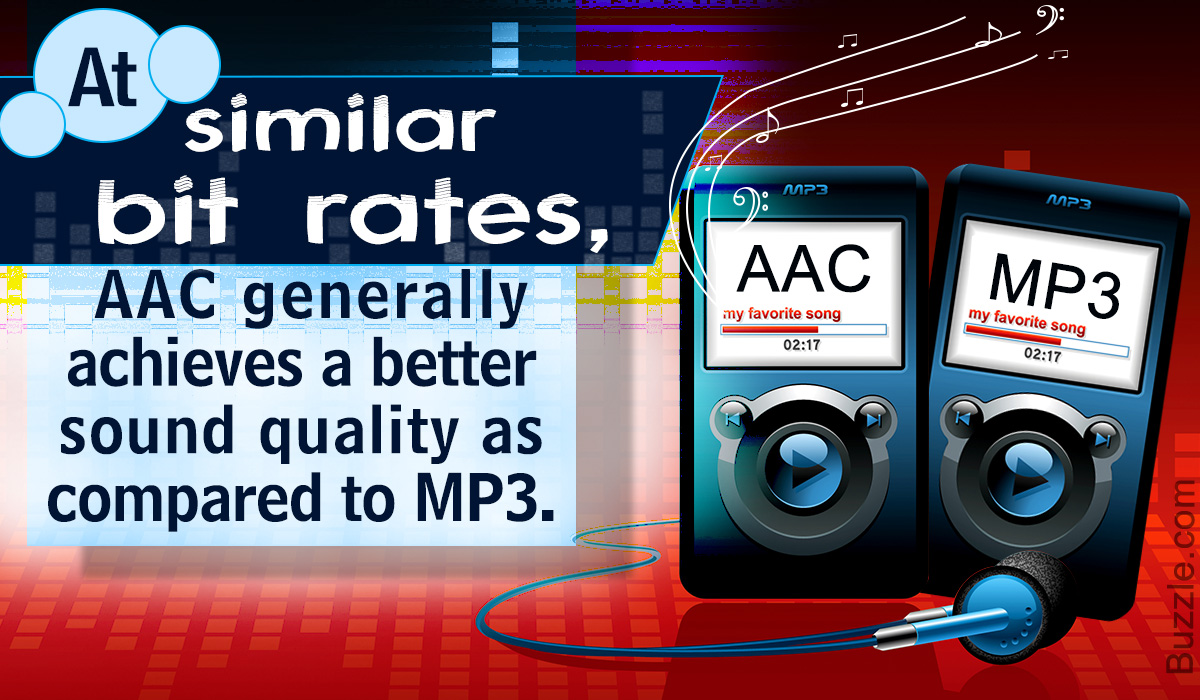
Even so, the disadvantage is that the sound quality is lower than the original data. It is not exaggerated to say that “MP3” is the best-known file format. As successors, “AAC” is often used, which was created to achieve higher sound quality. In addition, “WMA”, “Vorbis”, etc. They are also in this format.

“Format of compression without loss”
This format compresses the original data while preserves them.

During playback, you can decompress and return to the original uncompressed format, so the sound quality is the same as that of the original data. Although the file size can be reduced compared to the uncompressed format, it is still about half, so the size of the file is greater than that of the compressed format with loss and takes more time coding and decoding.

In addition, it is currently not handled by the main music distribution sites, and the number of devices that can be reproduced is less than that of uncompressed formats. The most common of these formats is “FLAC”, and Apple uses a single format called “ALAC”.


Free Download Mp4Gain
picture


Mp4Gain Main Window
picture


Mp4Gain Features
picture


Free Download Mp4Gain
picture

What is the difference between MP3 and AAC? Part 3

What is the difference between MP3 and AAC? Part 3

aac vs mp3

Finally, let’s review the important MP3 and AAC compatible devices.


MP3 o AAC

MP3s are compatible with almost all music-playing devices, such as personal computers, smartphones, and audio devices. Therefore, it is generally better to save the file in MP3 format.

As for AAC, it is a recommended storage format for iPad / iPhone users and those who use iTunes, Apple’s official music player, because it is compatible with Apple devices. Even if you import the sound source from a CD with iTunes or purchase paid music content from iTunes, it will be saved in AAC format.

Which is better, MP3 or AAC?

Unsplash logo Photo by marksolarski
In this article, I explained about MP3 and AAC music file storage formats. Finally, if you do not know what is the storage format that I should use, to leave and save the music files in MP3 format, it can be said that it is the best. MP3s have many playable devices and the sound quality is not that different from AAC.

Also, files saved in MP3 format can be easily converted to AAC files using iTunesw. When saving as MP3, it can also support post file conversion, so if you have problems with the save format, it is better to select the MP3 format. Also, if you’re targeting Apple devices, try saving music by choosing an AAC format that doesn’t need to be converted.

What is the difference between MP3 and AAC? Part 2

What is the difference between MP3 and AAC? Part 2

AAC Vs. MP3

The disadvantage of the “lossy compression format” used by MP3 / AAC is that the compressed data file cannot be restored to its original size (the original sound quality of music content).

aac vs mp3

There is a music content compression format called “lossless compression format”, which has a relatively large data size and can restore the original sound quality when playing music files.

There is not much difference between the two compression formats, but if you want better sound quality, you should use the “lossless compression format”. In the next chapter, we will further compare the differences between MP3 and AAC formats.

Comparison of MP3 and AAC

Unsplash Logo Photo by duck58cth
We will compare MP3 and AAC in terms of sound quality and compression rate (bit rate).

Sound quality

As mentioned above, MP3 and AAC are compression methods that use the “lossy compression format”, so there is not a big difference in sound quality between the two formats. The sound quality of MP3 and AAC differs depending on the compression rate (bit rate) of the music content file. So what exactly is the compression rate (bitrate)? The next section describes (compression bit rate).

Compression rate (bit rate)

format Compression rate (bit rate)
64kbbp 96kbbp 128 kbbp 160 kbp 192 kbbp 256 kbbp 320kbbp

MP3 Upper Limit Frequency 8.3 kHz 11.7 kHz 15.2 kHz 18.6 kHz 21.3 kHz 22.0 kHz 22.0 kHz

MP3 size 123kB 184kB 245kB 308kB 372kB 494kB 616kB

AAC upper limit frequency 13.5 kHz 15.2 kHz 18.7 kHz 19.1 kHz 19.6 kHz 20.0 kHz 20.0 kHz

AAC size 127kB 188kB 249 KB 310kB 368kB 490kB 613kB

The comparison table above shows the compression rate (bit rate) of MP3 and AAC, and the upper limit of frequency and data size (capacity). The higher the value of the compression rate (bit rate), the higher the upper limit for frequency and data size (capacity), and the better the sound quality.

Although the compression rate (bit rate) of MP3 and AAC is the same, the data size (capacity) and the upper limit frequency are different, so please compare the sound quality using the table above as a guide.

Proper use of MP3 and AAC

In this chapter at the end of this article, we will introduce how to use MP3 and AAC correctly. Even if you read the comparative explanation of MP3 and AAC presented so far, many people may not get it right. How to use MP3 and AAC correctly should be judged by the compression rate (bit rate).

Bit rate

As discussed in the previous chapter, the higher the value expressed in “kbbs” called the compression rate (bit rate), the better the sound quality. However, MP3 and AAC have the same compression rate (bit rate) but different upper limit frequencies.

128 kbps to 160 kbps is adopted for general MP3 / AAC music files. This is because you can watch various music genres like J-POP and Jazz with high sound quality. You can fully enjoy music with your PC speakers and audio equipment.

Then I will explain the characteristics of the compression rate (bit rate) of 128 kbps or less and the compression rate (bit rate) of 160 kbps or more, and which file format should be used, MP3 or AAC.

Less than 128 kbps

A compression rate (bit rate) of less than 128 kbps does not improve the sound quality of music, etc., and is not suitable for the music content storage file format. Suitable as a conversation-focused radio sound source. Also, if it is less than 128 kbps, the AAC format has a higher frequency upper limit, so the sound quality is said to be better than MP3.

192 kbps or higher

The compression rate (bit rate) of 192 kbps or higher reproduces even delicate sounds like classical music. If you have a good ear, you can clearly tell the difference in sound quality.

When the compression rate (bit rate) is 192 kbps or higher, the MP3 format has a higher upper limit frequency and is said to have a higher sound quality. The data size (capacity) is almost the same as that of AAC, so it is recommended to save it in MP3 format.

Digital audio formats or how sound is stored on a computer

Digital audio formats or how sound is stored on a computer

Digital Audio Formats

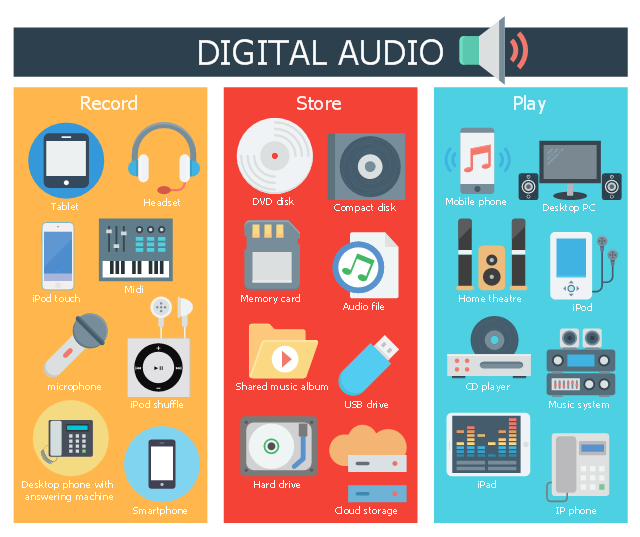
Today there are about three dozen common digital audio formats. Why you need to create so many types of sound files to store one type of content and how to manage all this, you will learn from this material.

Audio format developments | Digital audio | How to Create Digital Media  Infographics Using ConceptDraw PRO | Audio Infographic

Surely many users prefer to use their home computer not only as a workhorse, but also as a multimedia center, where they can watch movies or family photos, as well as listen to their favorite music. Although compact digital players or mobile phones are certainly more suitable for listening to musical compositions, but unlike them, a computer can not only play music.

No matter how big the built-in memory of your music player is, it will most likely be difficult to store your entire music library on it. Plus, you can create, edit, organize, and search for music with your PC. Also, don’t forget that there are around three dozen common digital audio formats today, and most players are far from omnivorous and can only play a few of them.

So why do you need to create so many music formats to store one type of content? The fact is that, in the vast majority of cases, the sound is stored in “compressed” form, since one minute of uncompressed composition occupies about 10 MB on the hard disk. On the one hand, this seems not to be much, but on the other, if you are a music lover and your collection consists of several hundred or even thousands of songs, then it is clear that the sound must be compressed to reduce the space it occupies in electronic media.

Various special algorithms are used to compress music files, which subsequently determine the structure and presentation of the audio data, or so-called digital audio file formats. All audio formats can be divided into three groups: uncompressed audio formats, lossless compression, and lossy compression.

No compression
One of the most widespread formats related to this type is the well-known WAV. The sound of files with this extension is stored without compression or changes. It is true that much more space is required to store uncompressed files and therefore WAV is more widely used only in professional audio and video applications, where the sound should not have a loss of quality before processing. Keeping ordinary musical compositions in this form is unwarranted waste.

To play WAV files, you do not need any special software, as all media players understand this format, including the standard Windows Media audio player built into the Windows system.

Another format used to store uncompressed audio that is worth mentioning is Apple’s development called AIFF (Audio Interchange File Format). As you may have guessed, it is most commonly used on Macintosh computers running Mac OS X.

Lossless compression (lossless)
Lossless compression algorithms for audio files work on the principle of conventional file cabinets. They do not provide the highest level of compression (40 to 60%), while they have virtually no effect on sound quality. It is also worth noting that in this case, the encrypted data can be fully restored to its original form. Therefore, the use of lossless compression is most often used when it is important to keep the compressed data identical to the original.

The most popular audio formats in this group are FLAC (Free Lossless Audio Codec), APE (Monkey’s Audio), WMA (Windows Media Lossless), and ALAC (Apple Lossless Audio Codec). Each has its own pros and cons. For example, the APE codec offers slightly better compression gains, while FLAC is more common. In general, all true music lovers store their music collections in lossless formats, as they do not remove any data from the audio stream and the files created with these codecs can be listened to even on high-quality stereos.

To play lossless compressed formats, as a rule, third-party players (except WMA) are used, such as MPlayer, foobar, AIMP, Winamp, VLC and others, since all the necessary codecs are already built into them. Another option is to separately install an additional codec pack (for example, K-Lite), after which you can listen to files in lossless format from almost any audio player.

Lossy compression
This is the most popular group of algorithms that provides the maximum audio compression ratio (up to 10 times or more). However, unlike previous formats, the audio file loses quality here, and how much depends

Varieties of digital audio formats.

Varieties of digital audio formats.

Audio Formats

There are several concepts of audio format.

Audio Format

The audio data presentation format in digital form depends on the quantization method of a digital-to-analog converter (DAC). The sound equipment at the present time the most common two types of quantization:

Pulse – code modulation
sigma – delta – modulation
Often bit quantization and frequency sampling point for various audio devices that record and play back as digital audio presentation format (24-bit / 192 kHz, 16-bit / 48 kHz).

The file format determines the structure and presentation of the audio characteristics of the data when stored on a PC storage device. To eliminate redundancy of audio data using audio codecs, with the help of which compression of audio data is carried out. There are three groups of audio file formats:

uncompressed audio formats, such as WAV, AIFF
lossless compressed audio formats (APE, FLAC)
audio formats, with the use of lossy compression (mp3, ogg)
There are only modular music format files. By synthetically or sampled pre-recorded live instruments, they are, in the main, used for the creation of modern electronic music (MOD). Also here the format of MIDI can be attributed, which is not a sound recording, but in this with the help of a sequencer it allows to record and play music, using a specific set of commands in the form of text.

Sound digital media formats are used as that of mass-propagated sound recordings (the CD, the SACD), so and in a professional recording (the DAT, MiniDisc).

For surround sound systems and you can select sound formats, in a multi-channel accompaniment largely without sound for movies. Such systems have a set family of two large formats that compete the companies of the Digital Theater then Systems Inc. – DTS and Dolby Laboratories Inc. – Dolby Digital.

Also called format the number of channels in multi-channel sound systems (5. 1; 7. 1). Initially, this system was designed for the cinema, but later it was extended to home theater systems.

What formats are used to represent digital audio?

What formats are used to represent digital audio?

Audio Formats

The format is used in two different ways.

Digital Audio Formats

When using a specialized medium or recording method and special read / write devices, the concept of format includes both physical characteristics of a sound carrier: the dimensions of a cassette with a magnetic tape or disk, the tape itself, or a disc, recording method, signal parameters, encoding and error protection principles, etc. .P. When using a universal information medium of wide application, for example, a flexible computer or a hard disk, the format is understood only as a method of encoding a digital signal, the peculiarities of the arrangement of bits and words and the structure of service information; all the “low-level” part directly related to working with the media, in this case, remains under the control of the computer and its operating system.

Of the specialized digital audio formats and media, the following are the best known today:

CD (Compact Disc) is a 120mm or 90mm single sided optical laser read / write disc, containing a maximum of 74 minutes of stereo sound at 44.1 kHz sampling rate and 16 linear quantization bits. The system is offered by Sony and Philips and is called CD-DA (Compact Disc – Digital Audio). For error protection, Cross Interleaved Reed-Solomon code (CIRC) and Hamming code 8-14 modulation (Eight to Fourteen Modulation, EFM) are used. A distinction is made between stamped compact discs (CD) write-only (CD-R) and rewritable (CD-RW).
PCM decoder (PCM deck): a system for converting the digital audio signal into a pseudo-video signal compatible with popular video formats (NTSC, PAL / SECAM) and vice versa. PCM decoders are used in combination with home (VHS) or studio (S-VHS, Beta, U-Matic) VCRs, using them as read / write devices. The devices operate with 16-bit linear quantization at sample rates of 44.056 kHz (NTSC) and 44.1 kHz (PAL / SECAM) and can record a two- or four-channel digital signal. In fact, such a decoder is a modem (modulator-demodulator) for a video signal.
S-DAT (Fixed Head Digital Audio Tape – Fixed Head Digital Audio Tape) is a system similar to a conventional cassette recorder, in which recording and reading is performed by a block of thin film fixed heads in a 3.81 mm wide tape in a double-sided cassette with dimensions of 86 x 55.5 x 9.5 mm. It implements two- or four-channel 16-bit recording at 32, 44.1, and 48 kHz.
R-DAT (Rotating Head Digital Audio Tape) is a VCR-like system with cross-tilted rotating head recording. The most popular tape-based digital recording format, R-DAT systems are often referred to simply as DAT. The R-DAT uses a 73 x 54 x 10.5mm cassette, with a 3.81mm wide tape, and the cassette and tape system itself is very similar to a typical VCR. The basic belt speed is 8.15mm / s, the rotation speed of the main unit is 2000rpm. R-DAT operates with a two-channel signal (on some models, four channels) at sample rates of 44.1 and 48 kHz with 16-bit linear quantization and 32 kHz with 12-bit non-linear quantization. To guard against errors, a double Reed-Solomon code and modulation with an 8-10 code are used. Cassette capacity – 80. .240 minutes depending on speed and belt length. Domestic DAT recorders are usually equipped with a phonogram illegal copy protection system, which does not allow recording from the analog input at a frequency of 44.1 kHz, as well as direct digital copying in the presence of SCMS prohibition codes (Serial Code Managenent System). Studio tape recorders have no such restrictions.
DASH (Digital Audio Stationary Head) is a 6.3 and 12.7 mm wide magnetic tape recording system with fixed heads. Belt speed is 19.05, 38.1, 76.2 cm / sec. Implements 16-bit recording with sample rates of 44.056, 44.1 and 48 kHz from 2 to 48 channels.
ADAT (Alesis DAT) is a proprietary system for recording eight-channel audio on S-VHS videotape, developed by Alesis. It uses linear quantization of 16 bits at 48 kHz, the capacity of the cassette is up to 60 minutes per channel. ADAT tape recorders can be cascaded so that a 128-channel synchronous recording system can be assembled.

Digital audio file formats wav, mp3, aiff, ogg, flac, m4a

Digital audio file formats wav, mp3, aiff, ogg, flac, m4a

digital audio formats

The last five years gave a great boost to the development of portable and stationary audio systems, and with this support for a variety of digital audio formats.

DIGITAL AUDIO FORMATS

Small pocket devices have a large internal memory and fixed audio equipment has become even smarter and more demanding. That is why, now, we can not save space on the player and download songs that weigh between 15 and 30 MB each, but at home, listen to digital music in a quality equal to the sound of an analog vinyl.

Description of popular digital audio formats
However, the most widespread audio formats still have their pros and cons, and even in an urgent matter like digital audio, a “panacea” has not yet been found. Classic digital audio formats are divided into “compressed” and “uncompressed” streams, as well as “lossless” formats, which exclude loss of sound.

Description of digital audio formats Description of digital audio formats

Wav audio format
The waveform audio file format (WAVE, WAV – “in waveform”) is a file format for storing a recording of an uncompressed digitized audio sequence. In general, this is the most common format for working in the studio and in broadcasting. allows you to get the most honest sound quality. For example, the standard audio CD format is an LPCM audio stream, with parameters: 2ch (stereo), 44-100Hz, 16bit.

Mp3 audio format
MPEG-1/2 Audio Layer 3: (MP3) is the most popular digital format for storing compressed audio. The MP3 format uses a special algorithm designed to greatly reduce the size of the original file. This format allows you to keep the audio close to the original sound, but thanks to a variety of settings, extremely small size.
Compared to the standard audio CD format, a file in MP3 format and a bit rate of 128 kbps will be approximately 1/11 the size of the original file.

FLAC audio format
FLAC (Free Lossless Audio Codec) is a popular free codec designed for lossless compression of audio data. What does that mean? Unlike lossy audio codecs such as MP3 or OGG, the FLAC audio codec does not remove any information from the audio stream. This format is ideal for audiophiles who create their own music collections and listen to music on high-quality equipment.

Ogg audio format
OGG is a format that has not gained great popularity, but is nonetheless used by a fairly large audience. The OGG format, similar to MP3, compresses audio with loss of quality, but is fundamentally different in practical conversions. This made it possible to get better quality with a smaller file size and to display this codec as absolutely independent. In addition to similar formats that convert lossy audio, OGG has the ability to adjust container properties.

Aiff audio format
The Audio Interchange File Format (AIFF) is a fairly universal audio file format developed by Apple, which is used to store audio data. Like its counterpart, the WAV format, it is uncompressed audio and is widely used in professional recordings and music production.
The .aiff and .aif files created by Apple Loops are used by GarageBand and Logic Audio music editors.

M4a audio format
Apple Losseles (also known as Apple Lossless Encoder, ALE or Apple Lossless Audio Codec, ALAC) (m4a) is another Apple development. This audio format refers to uncompressed audio, which provides lossless playback. It is a fairly specific format, which is mainly supported by products of the creator company, and in some cases, as in the iPhone system sounds, where it is possible to use exclusively the m4a format.

ABOUT DIGITAL AUDIO FORMATS

ABOUT DIGITAL AUDIO FORMATS

Digital Audio Formats

Today, there are several digital audio formats that are superior in quality to compact discs and are available on both physical media and the Internet. What are advanced sound lovers listening to now? Let’s find out.

Digital Audio Formats

The capabilities and quality of the CD-DA format were initially limited by the capabilities of CD as a medium. Legend has it that the standard 74-minute compact disc capacity was chosen in order to be able to record long classical pieces without splitting into two discs. And to be absolutely precise, this figure appeared thanks to Beethoven’s Ninth Symphony: it lasts exactly 74 minutes. Another default parameter was the 44.1 kHz sample rate. This figure defines the upper limit of the reproduced frequency range. For a CD that had to reproduce frequencies up to 20 kHz, this was the lowest possible carrier frequency. As a result, the only field of maneuver was the bit depth, the level of which was 16 bits. With regard to sound recording, bit depth determines its dynamic range and resolution.

The CD cannot be copied into the memory of the computer in the usual way, since we usually copy files. To save a CD-DA, you need a special program, a program that allows you to convert data recorded on an audio disc to PCM format (WAV file). A properly organized CD-DA ripping process allows you to get a completely identical digital copy on your hard drive. Audio CDs are generally saved on a computer as a large FLAC audio file (also WAV, WV, or APE) with a CUE index card or as separate tracks.

As the best digital audio format, the CD did not last that long, just over ten years. In the mid-nineties, the first format appeared that allows for better sound quality. HDCD was an improved version of CD-DA. Their difference consisted in a special recording algorithm that made it possible to save additional data on the sampling depth in a standard CD format. With an HDCD decoder, the output signal received not 16, but 20 bits, which did not give the standard of 96, but up to 120 dB of dynamic range and a very noticeable increase in recording resolution. At the same time, devices without an HDCD decoder played discs like normal CD-DAs. Interestingly, when saving such a disk on a PC in the same way,

The next leap in terms of sound quality came at the beginning of the new millennium. Two HD audio formats were introduced to the audiophile audience at once, appearing almost simultaneously. DVD-Audio, a further development of the traditional recording method and promoted by Panasonic and Toshiba. It is capable of recording 24-bit / 192 kHz in stereo mode and 24-bit / 96 kHz in multi-channel mode.

The SACD format competed with it, which, by the way, looked much less like a normal CD, although it was called “super CD”. Super Audio CD, developed by Sony, was based on the revolutionary DSD encoding algorithm. This digitizing method assumed one-bit sampling at an ultra-high frequency of 2.8224 MHz. The encoding and decoding principles of a DSD stream are much simpler than in high-bit formats and are essentially closer to the principles of analog technology. At the same time, the SACD format retains all the advantages of the advanced digital format and has output characteristics comparable to DVD-Audio in both sound quality and number of channels.

Both DVD-Audio and SACD were designed with a high level of copy protection, but inquisitive minds have already won over both formats, so if desired, the content of both disc types can be saved to a PC as images. ISO (without changing the structure and original codec) or FLAC tracks in 24-bit / 96 kHz or 24-bit / 192 kHz. Almost simultaneously with the DVD-Audio and SACD formats, another original format for publishing high-quality music was born: DAD 24/96. DAD stands for Digital Audio Disk, but it is essentially a DVD-Video with a high-quality still image and sound that can be played on any standard DVD player or PC.

Obviously, with this approach, Blu-ray media, with its HD sound formats, recorded in high quality without compression, is quite applicable for recording music in high quality. However, at the moment there are few such publications, and a special version of the BD-Audio format has every chance of not seeing the light of day, as the sale of high-quality audio material is already very active on the Internet. Anyone who does not want to convert DVD-Audio, DAD and SACD discs to the FLAC format on their own can officially buy albums already converted in 24-bit / 96 kHz or 24-bit / 192 kHz quality.

Advantages and disadvantages of popular audio formats

Advantages and disadvantages of popular audio formats

 Audio File Formats

In today’s music world, there are a large number of audio file formats that are often confusing to the unprepared user. To understand all this, to find out what they are and what they are used for, the presented review will help.

Audio formats

Types of audio formats

Today is the time when all music lovers, not to mention professional musicians and audio editors, need to understand concepts like audio file formats, bit rates, extensions, bit depth, sample rate and many others. to achieve high quality sound. Sound has gone digital, which means that it can be used for various purposes, eg for listening to evidence, for presentations, video dubbing. In fact, digital sound, like an image, is a collection of individual pixels, and the more there are, the better the sound image. This “pixelated” sound can be edited and processed.

An important role in evaluating the quality of audio formats and consequently sound quality is a parameter such as bit rate, which shows how many bits or kilobits it takes to record one second of sound. Low bit rates mean low quality sound, high bit rates mean high quality sound.

But for the storage and further use of audio in one form or another, audio formats are used – digital recordings of audio data. We can say that the format is a kind of container where the sound is stored. Virtually all audio formats can be divided into two broad categories: lossless compressed and lossy compressed.

No loss, no loss

To avoid as much as possible a decrease in sound quality during the compression of an audio file, special methods have been developed to store audio information, avoiding losses, which in fact can be compared with the file when the information is simply packed in a zip file, the size of which is noticeably smaller than the original data. Later, this data can be clearly restored on each bit. And the bitrate itself is not important for these files. These audio files are collectively called Lossless, Music As Is. These algorithms allow you to compress files two to three times. As a result, the size becomes quite large, but at the same time the original sound is preserved.

Digital audio formats

Digital Audio Formats

Now there are several formats, but a basic distinction is made between lossless and lossy formats and compressed or uncompressed formats. Lossy formats are always compressed, which means a reduction in required storage space, but at the expense of playback quality. Lossless compressed formats offer faithful playback with low memory requirements.

However, the savings are less than with lossy formats. Lossless and uncompressed formats offer true-to-original music reproduction, but require a comparatively large amount of storage space. In return, they sometimes support even higher resolutions than compressed formats.

digital audio formats

What are sample rates and bit depth?

When talking about the resolution of digital music, two numbers are often mentioned. For CD quality around 44.1 kHz and 16 bit. The first number is the sample rate of the file. Describes how often the computer or network player extracts a signal from the file and processes it. 44.1 kHz means that a certain amount of data is transmitted 44,100 times per second. This amount of data is described by the bit depth (also word depth), the second number.

At the quality described, 16 bits of data are transmitted 44,100 times per second. If you want to determine the actual amount of data per second, you need to multiply these two numbers and get 705,600 accordingly. Since this is a stereo file with 2 channels, this number should be taken twice.

With CD quality music, 1,411,200 bits per second or, for the sake of simplicity, 1,411.2 kilobits are transmitted. A good MP3 file only transmits 320 kbps, so it only contains about a third of the information on a CD. Compared to 192 kHz 24-bit files, even less.What is the difference between compressed and uncompressed formats?
Uncompressed formats like

WAV do not affect music in any way. Frequencies and information are stored exactly as they are read during encoding. Therefore, uncompressed formats require more storage space in the first place than compressed formats. However, compressed does not automatically mean lossy. Formats like Apple’s FLAC or ALAC save music losslessly as a WAV file. However, they pack existing data more neatly without removing any information, thus requiring less storage space. Normally, there should be no effects on music information.

Why aren’t MP3 files high fidelity?

The MP3 format was introduced in 1992. It was revolutionary for the time, because by encoding music in MPEG-Audio Layer III, the full name of the format, you could achieve file compression of at least 4: 1, usually even 10: 1, compared to the classic CD. . This is possible because encoding in MP3 format removes the parts of the original file that are considered the least useful.

You can never make an exact copy of a music file in MP3 format and you cannot add information that has been deleted. So there is no point in converting an MP3 back to a lossless format. The AAC format used by Apple also cuts information from the original file to save space during compression.

We speak here of lossy or in English also of “lossy”, in contrast to the formats without loss or “without loss”. Meanwhile, it doesn’t really make sense to use such formats anymore, as more storage space shouldn’t be a problem today, unlike in 1992. The sound quality of MP3s is also significantly lower than that of other formats, as only 320 kbps is transmitted here at best, usually only 192 kbps or 256 kbps.

What is metadata?

Metadata are files attached to a file that contain additional information. In the case of digital music, these typically include things like sample rate, bit depth, and file format. In the best case, information about the song title, artist, album, composer, track number, etc. is also attached to the file. Modern streaming clients display this information when they play games on their screen or in an app. Also, these hidden attachments are often responsible for how the music in memory is organized.