Audio compression, how it works Part 2


Free Download Mp4Gain
picture

Audio compression, how it works Part 2

Audio compression
Audio compression

Redundant information for transmission signals
Audio compression
Audio compression

Digital audio compression coding compresses the audio data signal as much as possible on the premise of ensuring that the signal is not audibly distorted. Digital audio compression coding is implemented by removing redundant components in sound signals. So-called redundant components refer to signals in the audio that cannot be perceived by the human ear and do not help determine the timbre, pitch, and other information of the sound. Redundant signals include audio signals outside the range of human hearing and masked audio signals. For example, the frequency range of the sound signal that can be perceived by the human ear is 20 Hz to 20 KHz, and frequencies other than this frequency that cannot be detected by the human ear can be considered as redundant signals. In addition, according to the physiological and psychoacoustic phenomena of the human ear, when a strong signal and a weak signal exist at the same time, the weak signal will be masked by the strong signal and cannot be heard, so the weak signal can be regarded as a redundant signal. Do not send. This is the masking effect of human hearing, which is mainly manifested in the spectral masking effect and the time-domain masking effect, which are presented below:
Spectral masking effects.
After the sound energy of a frequency is below a certain threshold, it will not be heard by the human ear, and this threshold is called the minimum audible threshold. When another sound with higher energy appears, the threshold value close to the frequency of the sound will increase considerably, which is known as the masking effect.

Masking effects in the time domain.
When strong and weak signals appear at the same time, there is also a masking effect in the time domain. That is, when the two occur very close in time, the masking effect will also occur. Time-domain masking is divided into three parts: pre-masking, simultaneous masking, and post-masking. Pre-masking refers to the short time before the human ear hears a strong signal, the already existing weak signal will be masked and cannot be heard. Simultaneous masking means that when a strong signal and a weak signal exist at the same time, the weak signal is masked by the strong signal and cannot be heard. Post-masking means that when the strong signal disappears, it takes a long period of time to hear the weak signal again, which is called post-masking. These weak masked signals can be considered redundant signals.


Free Download Mp4Gain
picture


Mp4Gain Main Window
picture


Mp4Gain Features
picture


Free Download Mp4Gain
picture

Audio compression, how it works

Audio compression, how it works

Audio compression
Audio compression

audio compression


audio compression
audio compression


Audio compression technology refers to the application of suitable digital signal processing technology to the original digital audio signal stream (PCM encoding), without losing the amount of useful information, or under the condition that the loss introduced be insignificant, reduce (compress) its code rate, and also called compression encoding.

It must have a corresponding inverse transform, called decompression or decoding. The audio signal can introduce a lot of noise and some distortion after passing through a codec system

Audio compression technology refers to the application of suitable digital signal processing technology to the original digital audio signal stream (PCM encoding), without losing the amount of useful information, or under the condition that the loss introduced insignificant, reducing (compressing) its code rate, and also called compression encoding. It must have a corresponding inverse transform, called decompression or decoding. Audio signals can introduce a great deal of noise and some distortion after passing through a codec system. The advantages of digital signal are obvious, but it also has its own corresponding disadvantages, ie increased storage capacity requirements and increased channel capacity requirements during transmission. Taking a CD as an example, the sampling frequency is 44.1KHz and the quantization precision is 16 bits, so a stereo audio signal for 1 minute needs to occupy about 10M bytes of storage capacity, that is, the capacity of a CD turntable is only about 1 hour. Of course, the problem is even more pronounced in the world of much higher bandwidth digital video. Are all these bits necessary? The study found that there is a large redundancy in the direct use of the PCM code stream for storage and transmission. In fact, sound can be compressed at least 4:1 under lossless conditions, that is, only 25% of the digital amount is used to retain all the information, and the compression ratio in the video field can even reach to several hundred times. Therefore, in order to use limited resources, compression technology has received much attention since its inception. The research and application of audio compression technology has a long history, like A-law coding, u-law is a simple almost instant compression technology, and has been applied in ISDN voice transmission. Research on speech signals has been developed before and has matured, and has been widely used, such as adaptive differential PCM (ADPCM), linear predictive coding (LPC), and other technologies.

In what format and with what quality is music heard on the radio?

In what format and with what quality is music heard on the radio?

Radio most used audio file formats

In fact, we can say that there are currently two main audio formats: lossy (compressed) and lossless (uncompressed). They are classified into many types.

Radio audio file formats

Lossy takes up less disk space, but degrades the quality of the audio track. When compressed using the MPEG protocol (hence the name mp3 – mp4 for files containing video sequences), the hues and transition tones, which are barely noticeable to the ear, are cut off. This makes the file clearer, but it also degrades it. The last place is occupied by the bit rate of that file: the degree of compression of each second of the audio track. The lower the bitrate, the less space the file will occupy and the worse the quality. Thus, a composition of three minutes in mp3 with a bit rate of 320 kilobits per second will occupy up to 3 megabytes on disk; a similar composition with a 96 kilobit bit rate will occupy about 400 kilobytes.

Lossless is as close to the original analog sound as possible *, making it much loved by sound engineers. Lossless formats take up much more disk space even compared to mp3-320. Among these formats, the most common are WAV (standard), FLAC (economic), AIFF (Apple). The former is used most often.

Professional sound recording is done only in uncompressed format. Only with him do sound engineers work.

On the radio, the situation is somewhat more complicated. This is due to the peculiarities of the work of the media, namely, efficiency and commercial profitability. The use of high-capacity servers is expensive and therefore most radio stations encode audio tracks in mp3 format at a bit rate of 256 kilobits per second. However, this is typical mainly of national stations. Equipment purchased from abroad has standard configurations that assume WAV encoding.

Why are software developers focusing on WAV? Because the radio signal cannot propagate without interference. Therefore, the listener still receives a small and sometimes significantly distorted signal. Therefore, broadcasters are faced with a reasonable question: what quality of sound will the listener perceive best: distorted ideal or distorted distortion? For this reason, in Europe and the United States, the WAV standard (AIFF, if the station operates with Apple equipment) is adopted, in Russia – mp3 with a bit rate of 256 kilobits per second.

Analog data transmission is based on the physical properties of sound. The record-playback mechanism is based on the principles of human auditory perception. That is, the sound wave vibrates the membrane (by analogy with the tympanic membrane of the ear) and is fixed with a needle in the carrier in the form in which it was obtained. Reproduced, therefore, also without deviations and changes associated with digital conversion.

The Audio Files category includes compressed and uncompressed audio formats that contain a data signal and can be played by audio programs. This category also includes MIDI files, music scores, and audio project files, which generally do not contain audio data.

The most common extensions are .WAV, .AIF, .MP3, and .MID.

Lossy audio compression

Lossy audio compression

MP3: Lossy compression

I’ll start with the well-known and widely used (though not always loved) MP3 format.

Lossy audio format

This audio format is actively used everywhere and everywhere, where it is needed and where it is not needed. But this does not mean that it is not worthy of the place it occupies in its niche. Very worthy. Although he has been “sitting” in his niche for about two decades, no one has “kicked” him out of there yet. And there were many who wanted to say it. And the main favorite of them is WMA (Windows Media Audio), which was conceived by Microsoft as an alternative to MP3. As a result, it is an alternative and it is, despite the best efforts of the developers. The next character is OGG. Despite the broader possibilities than MP3, for example, it never received widespread acceptance. Although it is compatible with many operating systems. Perhaps, it is worth mentioning the AAC audio format, which was supposed to replace MP3 in the relay. Encoding quality has been improved and compression loss reduced. But Ay.

The main advantage of these formats is their small size. The downside is the loss of quality.

Different formats
In today’s world, you can find a large number of different sound extensions. Let’s remember at a glance:

MP3 (Well where without it?)
WMA
OGG
CAA
And many others
Of course, each of these formats is good, especially MP3, which is probably the most popular format. But today we are not talking about popularity. MP3 and other similar formats, no matter how good they sound, are compressed originals. And even if you set the maximum quality to 320 btrate, it still won’t be of the highest quality. It was compressed, reduced, so there will be certain losses.

How does file compression work?

It is incredible that many of us not only use but also regularly practice the task of compressing files without understanding very well how this practice really works. The reality is that in a compression everything is transformed.

How does file compression work?

Basically compressing is removing redundant values ​​from a file, or what is the same, removing what is repeated. Suppose a file is composed of “MMMMMM”, compressing it would be “6M”. Being more specific and looking for all these chains, compression programs can compress several megabytes in just KB of files that have not previously been compressed.
The difference between basic and redundant information is called entropy.

Methods used to compress:

1) Without loss:
– EXAMPLE FILES: ZIP, PNG, RAR, H264 and others
This method consists of summarizing the information by removing what is redundant, as we mentioned earlier. It is like saying the same thing but in another way, in a summarized or compressed way. The good thing about this compression is that it is reversible and the files do not lose any quality. When you unzip a file with this technique, it will have exactly the same composition as before compressing it or what is the same as having the original file.

2) With loss:


– EXAMPLE FILES: Mp3, Jpg, MPG
These files lose quality because the compression parameters are removed, although they are not strictly necessary, they remove integrity and quality from the file.

In an image file, brightness, thresholds, and quality are removed, while for example in audio files, spaces, volume, and frequencies not audible by the human ear are removed.

Creating compressed files today is an easy task, any image editor allows you to convert to Jpg for example. In lossless compression, it requires programs such as Winrar or Winzip, programs that have become common in the use of the Internet as they not only compress but also allow a large file to be divided into small parts to facilitate downloading.

What is an audio compressor.

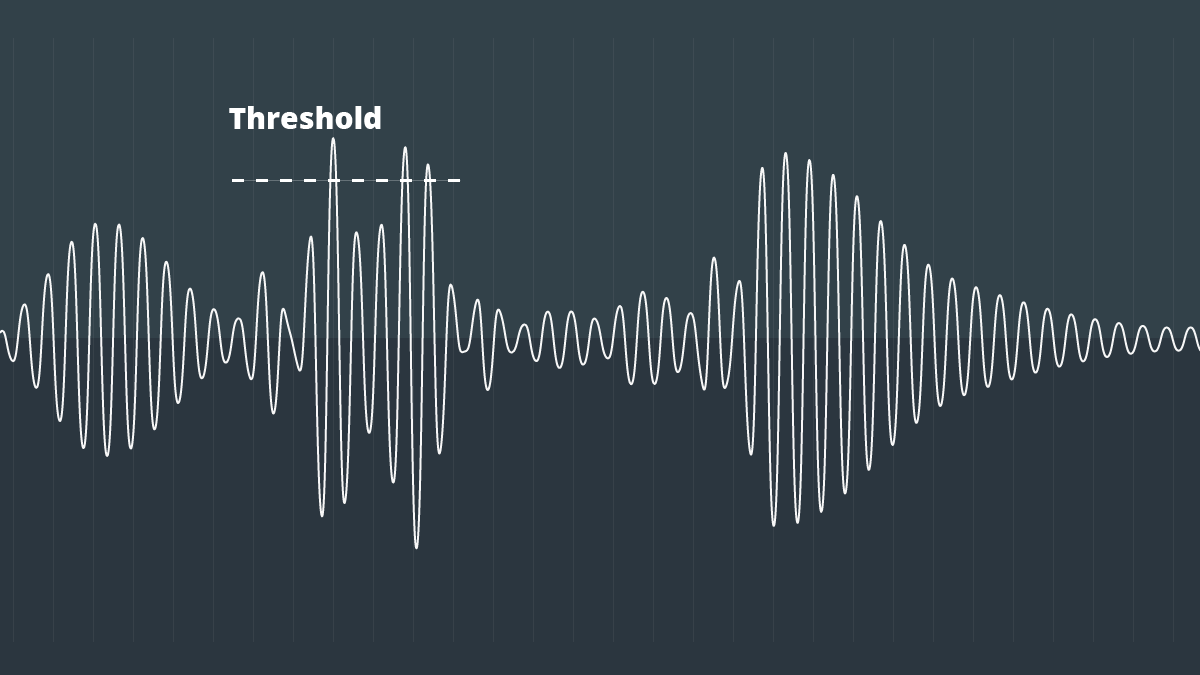
In the field of professional sound, a compressor is an electronic sound processor designed to reduce the dynamic range of the signal without noticing its presence too much. This task is done by reducing the system gain, when the signal exceeds a certain threshold.

Traditionally, compressors have been electronic equipment with one or two rack units, but software versions of them have appeared for some years.

A compressor acts in such a way that it attenuates the electrical signal by a certain amount (normally measured in decibels) and from a certain input level. The objective is to ensure that the resulting dynamic excursion is lower than the original, to protect certain equipment against possible signal peaks or, if it is a saturated sound, to try to hide the error.

Reasons to compress a signal

-Control the energy of the signal: The human ear is very sensitive, so the compression must be smooth and subtle so as not to capture it. This type of compression is used when there is a signal in which the intensity varies, so it is compressed to achieve a more constant signal within the values ​​assigned to it.

-Control the peak level of the signal: Often the equipment is limited, so the amplifiers can saturate and therefore be damaged. In this case the compression is used to control the signal and thus protect the equipment.

-Reduce the dynamic range of the signal: By attenuating the peaks of a signal, we reduce its dynamic range. Many devices are limited by the peaks, and this allows the RMS level of the signal to be raised.

Compressor Uses

In the field of music, its use ranges from applications for musical recordings to live sound. For example, it is often used to add more glued to the sound, an effect that is achieved by compressing the signal to subsequently apply a gain to the output of the device, which usually conceals possible interpretation failures by the artist, at least as Dynamic control refers. A compressor is highly recommended (and with certain musical styles, indispensable) for when using an electric bass. The slapping effect (hitting the strings with the finger) produces extremely high output peaks (20 dB or 10 times more than normal), which at low output levels generate distortion, and at high volumes (as in recitals) they can cause serious damage to the amplifier, and even the speaker (an excess of “excursion” can cause the speaker to tear from its suspension). Even in the (theoretical) case of a musical system with an infinite dynamic range, the difference, auditory speaking, using or not the compressor is imperceptible. Its use is also very frequent in voices, since not all singers use the appropriate technique so the signal level varies constantly.

-It is widely used in broadcasting, to improve the speaker’s diction.
-Compress during mastering improves the sound definition of the final mix.
-To protect the equipment (speakers).

Sound formats and audio normalization


WAV: It is the “pure” sound format, without any compression. Its weight is huge, as is its quality. Only recommended for professional works or to edit the audio before transferring it to a format with compression.
MP3: We’ve talked about him in the previous pages. Without a doubt, it is the most popular and widespread format. His appearance changed the way we listen to music.
OGG: It is the audio format of GNU / Linux, the free software MP3 version. It has all the virtues of MP3 (and more), but not all portable players can use it, but it is getting more and more.
WMA: Microsoft format, your own version of the MP3. It compresses quite well, but it is not as widespread as the MP3. Nor can all portable players use it.
MID: It is the audio format also known as MIDI (Musical Instrument Digital Interface). It is the only format that can not play more than music simply because what it contains inside are not sounds. Simplifying, it contains a series of instructions for special software included in all systems, a kind of digital synthesizer that can generate sounds like those of many musical instruments. The MID has inside what notes they have to sound and with what instruments: a score.

It is important to clarify the distinction between audio format and audio codec. The codec encodes and decodes the audio data while this data is archived in a file that has a specific audio format.

Most of the formats listed below are container formats, formats that group different types of data. Most of these container formats have only one codec associated, next to which metadata is stored. However, there are formats that group audio and video data produced by different codecs. Some of these container formats that group different types of data are: MP4, Ogg, WAV, QuickTime Format, AVI.

In this article we talk about audio formats, but we are really discussing the properties of the codec associated with the format.

When classifying audio formats we can distinguish three large groups.

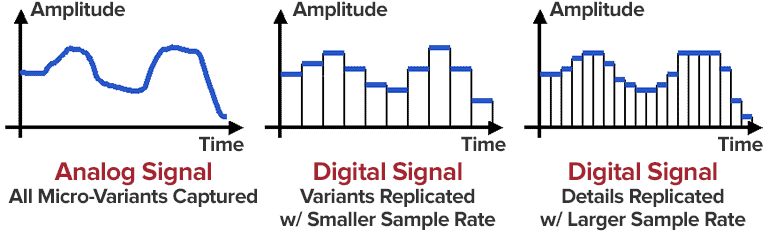
No data compression: These are real sound waves that have been captured and converted to digital format without further processing. As a result, uncompressed audio files tend to be the most accurate.
With compression, without loss of data: Compression algorithms are used to reduce file sizes; It basically works by eliminating redundancy.
With compression and data loss: It is a form of compression that loses data during the compression process. In the context of audio, that means sacrificing quality and fidelity to decrease file size. The good news is that, in most cases, we will not notice the difference when listening.

volume booster

Compression

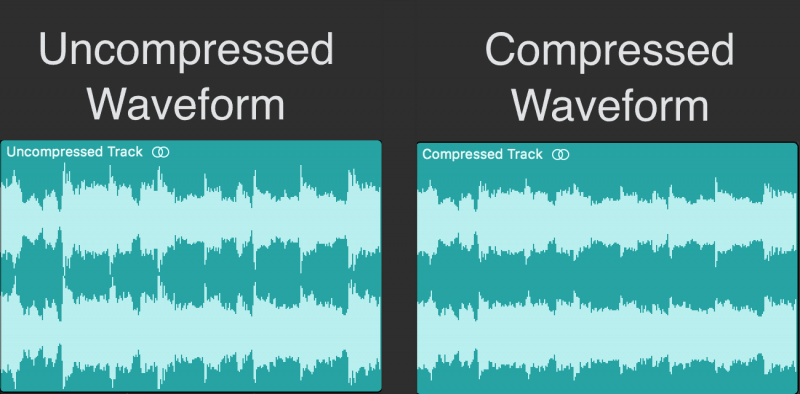
Compression is a process that involves reducing the dynamic range of an audio signal.

An apparatus, called a compressor, analyzes the gain of the input signal and, according to certain parameters set, those parts that exceed a level or threshold determined according to the desired configuration are attenuated.

In principle, compression is perceived a decrease in overall volume; In fact, this is because the compressor reduces the gain of the “peaks”, that is, of the parts that accumulate greater sound energy.

However, several very interesting objectives are achieved:

The resulting sound sounds more balanced and compensated, there is not much difference between the soft and strong parts of the signal
We gain headroom space (the difference between the nominal level and the saturation point) and we can increase the overall volume of the signal a little more without “touching the ceiling” (the peaks were attenuated). As a consequence, the parts that previously sounded with little force will now be heard better.
It will allow to integrate the signal with greater ease and clarity in the general mix.

Standardization

Normalization is an atypical dynamic process, very different from compression, limitation, expansion or noise reduction:

It does not reduce the relative dynamic range of the audio signal.
It is not applied in “real time”, or at the moment, but it is a process that is carried out “a posteriori”, on the previously recorded material.
The process to normalize audio is summarized as follows:

Normalization analyzes the material and detects its highest volume peak. It then increases its gain to the maximum possible without exceeding the reference level (from which distortion would occur).
Taking as reference the same proportion of increase applied in the previous step increases the level of the rest.
The signal, in general, will sound with a greater volume. The maximum volume level that we can reach depends on the limit marked by the highest peak.