What is Audio Compression Threshold and How it Affects Sound Quality


Free Download Mp4Gain
picture

What is Audio Compression Threshold and How it Affects Sound Quality
Audio Compression
Audio Compression
Audio Compression
Audio Compression

Introduction

Audio compression is a technique used to reduce the dynamic range of an audio signal. It is commonly used in music production to make a recording sound louder and more impactful. However, compressing audio too much can lead to a loss of detail and a reduction in sound quality. In this article, we will explore the concept of audio compression threshold and how it affects sound quality.

Understanding Audio Compression

Audio compression is the process of reducing the dynamic range of an audio signal by attenuating the louder parts of the signal while leaving the quieter parts untouched. The main purpose of audio compression is to make the overall level of the audio signal more consistent, which can make it easier to listen to and mix with other tracks.

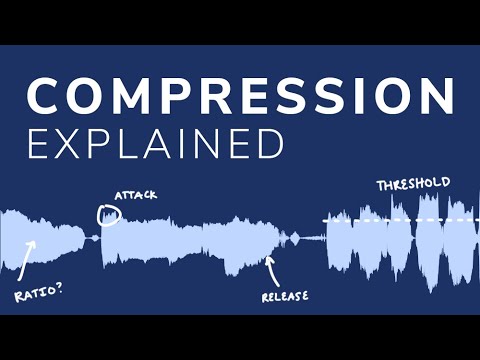
However, compression can also introduce artifacts such as pumping, breathing, and distortion, which can affect the quality of the sound. Therefore, it’s important to understand the parameters of audio compression, such as threshold, ratio, attack, and release, to achieve the desired sound.

“Compression is like a lens in photography. Just as a lens can bring certain parts of an image into focus while blurring others, compression can bring certain parts of an audio signal into focus while reducing the dynamic range.” – Bobby Owsinski, The Mixing Engineer’s Handbook

What is Audio Compression Threshold?

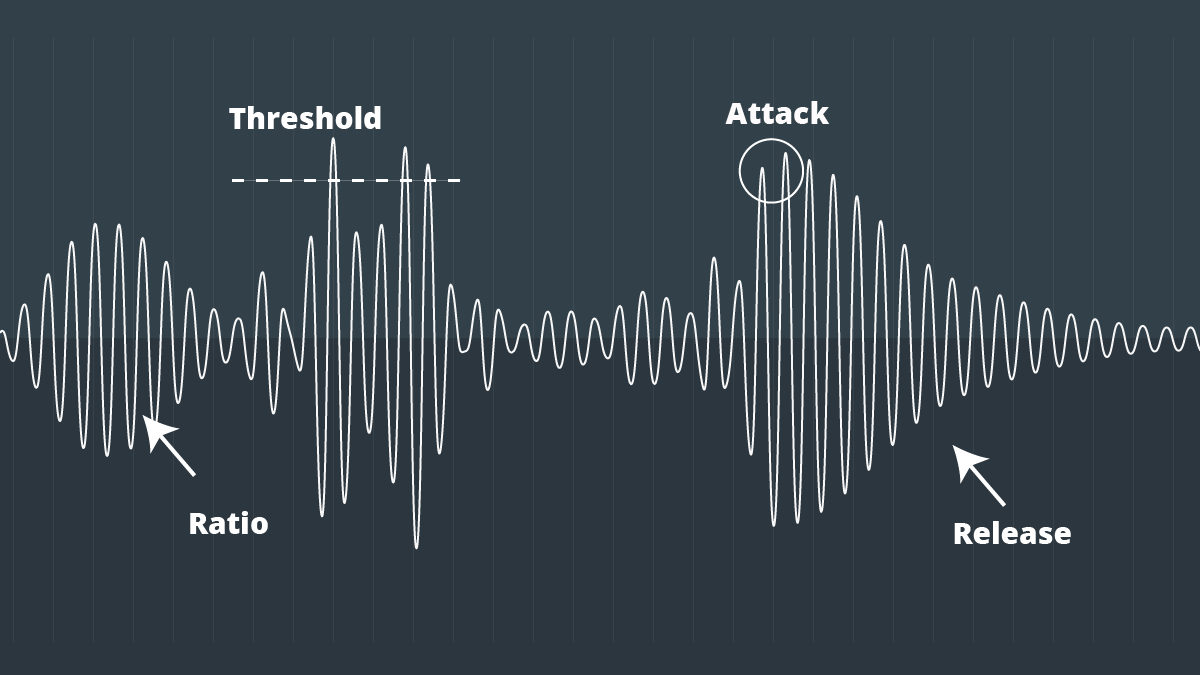
The compression threshold is the level at which the compressor starts to attenuate the audio signal. In other words, it’s the point at which the compressor kicks in and starts reducing the level of the audio signal. The threshold is usually set in decibels (dB), and it can range from -60 dB to 0 dB or higher.

Setting the compression threshold too low can result in over-compression, where the compressor is constantly active and the audio signal loses its natural dynamic range. On the other hand, setting the threshold too high can result in under-compression, where the compressor doesn’t kick in enough and the audio signal remains too dynamic. Therefore, finding the right compression threshold is crucial for achieving the desired sound.

“The compression threshold is the gatekeeper of the compressor. If you set it too low, the compressor will work too hard and the sound will lose its natural dynamics. If you set it too high, the compressor won’t work enough and the sound will be too dynamic.” – Bob Katz, Mastering Audio: The Art and the Science

How Compression Threshold Affects Sound Quality

The compression threshold can have a significant impact on the sound quality of an audio signal. Setting the threshold too low can result in a squashed and lifeless sound, while setting it too high can result in a dynamic and uncontrolled sound. Therefore, it’s important to find the right balance between dynamic range and consistency.

Additionally, different instruments and sounds require different compression thresholds. For example, a snare drum may require a higher threshold than a vocal track, as the snare drum has a shorter decay time and more transient peaks. Therefore, it’s important to adjust the compression threshold for each individual track to achieve the desired sound.

“The compression threshold is like a knife. Use it wisely,
Copy to Clipboard

clipboard emoji

User
continua donde te uedaste que fue en:

“The compression threshold is like a knife. Use it wisely,
ChatGPT

How to determine the right compression threshold

Determining the right compression threshold can be tricky, and it can take some trial and error to find the sweet spot. Here are a few tips to help you get started:

  • Start with a low threshold: A good starting point is a threshold of around -30dB. This will ensure that you are compressing the quieter parts of your audio, without squashing the louder parts.
  • Listen carefully: When you apply compression, listen carefully to the changes in the audio. You want to make sure that the compressor is not introducing any unwanted artifacts or distortion.
  • Experiment with different settings: Try adjusting the threshold up and down to see how it affects the audio. You may also want to experiment with the attack and release times, as well as the ratio setting.

Remember, there is no one-size-fits-all solution when it comes to compression. You will need to experiment to find the settings that work best for your particular audio.

“Compression is a great tool, but it’s easy to overdo it. Always err on the side of subtlety, and remember that sometimes a little goes a long way.”

– Brian Eno

The importance of a balanced mix

One of the most important aspects of audio compression is ensuring that your mix is balanced. If one element of the mix is too loud, you may be tempted to apply heavy compression to bring it down to the same level as the other elements. However, this can result in a dull and lifeless mix.

The key is to start with a well-balanced mix. This means that each element of the mix should be at a similar volume level, without any one element dominating the others. Once you have a balanced mix, you can then use compression to add subtle enhancements and make the mix sound even better.

“A good mix is all about balance. Each element of the mix should have its own space, and nothing should be too dominant.”

– Rick Rubin

The dangers of overcompression

While compression can be a powerful tool for enhancing the sound of your audio, it can also be easy to overdo it. Overcompression can result in a number of unwanted artifacts, including distortion, pumping, and breathing.

One of the main dangers of overcompression is the loss of dynamic range. Dynamic range refers to the difference between the loudest and quietest parts of your audio. When you apply too much compression, you reduce the dynamic range, resulting in a flat and lifeless sound.

Another danger of overcompression is the loss of transients. Transients are the short, sharp peaks in the audio that give it its punch and energy. When you apply too much compression, you can squash these transients, resulting in a dull and uninspired sound.

“Compression is a great tool, but it’s important to remember that it’s just one tool in the toolbox. Don’t rely on it too heavily, and always remember to use it in moderation.”

– Tony Maserati

Free Download Mp4Gain
picture


Mp4Gain Main Window
picture


Mp4Gain Features
picture


Free Download Mp4Gain
picture

Audio and Video Compression Basics

Audio and Video Compression Basics

Audio and Video Compression Basics


As we rely more and more on digital media, understanding the basics of audio and video compression becomes increasingly important. Compression is the process of reducing the size of digital files without sacrificing too much quality. Without compression, media files would take up a lot more space on our hard drives, making it difficult to store and share them. In this article, we’ll explore the fundamentals of audio and video compression and how it works.

Understanding Audio Compression

Audio compression is the process of reducing the dynamic range of an audio signal. Dynamic range is the difference between the quietest and loudest parts of a sound recording. Compression reduces this difference, making the quieter parts louder and the louder parts quieter. This is useful for improving the overall balance of a mix, and also for preventing distortion when the loudest parts of a recording exceed the maximum level of the recording medium.

Compression can be applied during recording or in post-production, using software tools like mp4gain. When done properly, compression can improve the clarity and punch of a recording, making it sound more polished and professional. However, overuse of compression can lead to a loss of detail and a “squashed” sound that lacks dynamics.

As musician David Byrne said in his book “How Music Works”:

“A good mix is one where the listener can hear and feel everything that the musicians and the engineer intended to be there.”

Understanding Video Compression

Video compression is the process of reducing the size of a video file by removing redundant or unnecessary data. This is done by encoding the video using a codec, which stands for “coder-decoder”. Codecs use complex algorithms to analyze each frame of a video and compress it in a way that minimizes the loss of quality.

There are two types of video compression: lossless and lossy. Lossless compression reduces the size of a video file without any loss of quality, but it’s not as effective as lossy compression in terms of file size reduction. Lossy compression, on the other hand, sacrifices some quality to achieve a smaller file size. The level of quality loss depends on the amount of compression applied.

When it comes to video compression, there are many factors to consider, including the resolution, bit rate, and frame rate. By adjusting these parameters, you can find the right balance between file size and quality for your particular needs.

As filmmaker and author Robert Rodriguez once said:

“Filmmaking is a chance to live many lifetimes.”

Compression Techniques for Audio and Video

There are many compression techniques used in audio and video, each with its own strengths and weaknesses. In audio, the most common type of compression is called “peak compression”, which reduces the volume of loud sounds that exceed a certain threshold. Another type of compression, called “multi-band compression”, divides the audio signal into multiple frequency bands and applies compression to each band separately.

For video compression, the most popular codecs are H.264 and HEVC (High-Efficiency Video Coding). H.264 is widely used for streaming video on the internet, while HEVC is more efficient but requires more processing

Audio Compression Techniques: Understanding the Basics

Audio Compression Techniques: Understanding the Basics

Audio Compression
Audio Compression
Audio Compression
Audio Compression

What is Audio Compression?

Audio compression is the process of reducing the size of digital audio files by removing redundant or unnecessary information, while maintaining the perceived quality of the original sound. This is done by using various algorithms that analyze and modify the audio data in a way that reduces its file size.

Types of Audio Compression Techniques

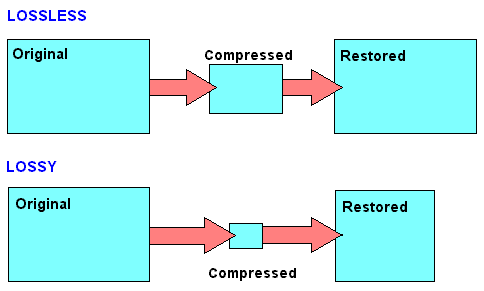
There are two main types of audio compression techniques: lossy and lossless.

Lossy Compression

Lossy compression algorithms are used to achieve high compression rates, but at the cost of some loss in quality. In lossy compression, some of the original audio data is discarded or modified in a way that reduces its size. The amount of data that is removed or modified depends on the compression algorithm used.

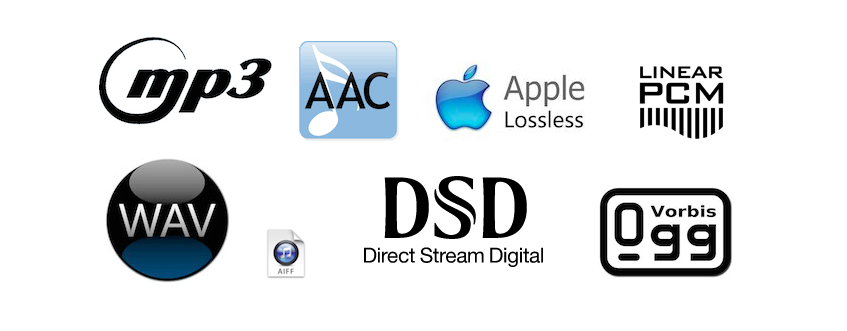
Some popular lossy compression algorithms include MP3, AAC, and WMA. These algorithms are commonly used for music streaming, online radio, and other applications where high compression rates are necessary.

Lossless Compression

Lossless compression algorithms are used to compress digital audio files without losing any information. These algorithms are designed to reduce the size of the file by removing redundancies in the data, but without modifying any of the original information.

Some popular lossless compression algorithms include FLAC, ALAC, and WAV. These algorithms are commonly used for high-quality music streaming and for archiving music collections.

How Audio Compression Works

Audio compression works by analyzing the original audio data and then modifying it in a way that reduces its size while maintaining its quality. This is done using various mathematical algorithms that compress the data.

The most common way to compress audio data is to use perceptual coding. This method takes advantage of the human ear’s limitations in hearing certain frequencies and sounds. By removing these sounds, the audio data can be compressed without the listener noticing any loss in quality.

Another method of audio compression is predictive coding. This method uses mathematical algorithms to predict the next sample in a waveform based on previous samples. The difference between the predicted sample and the actual sample is then compressed and stored.

Why Audio Compression is Important

Audio compression is important because it allows us to store and transmit audio data more efficiently. This means that we can store more audio files on our devices and transmit audio data faster over the internet. Without audio compression, it would be impossible to stream music or podcasts over the internet.

12 Common Questions About Audio Compression Techniques

1. What is the difference between lossy and lossless audio compression?

Lossy compression algorithms are designed to achieve high compression rates at the cost of some loss in quality, while lossless compression algorithms are designed to compress audio files without losing any information.

2. Which audio compression algorithm should I use?

The choice of audio compression algorithm depends on the intended use of the audio file. Lossy compression algorithms like MP3 and AAC are commonly used for music streaming and online radio, while lossless compression algorithms like FLAC and ALAC are commonly used for high-quality music streaming and archiving.

3. How much does audio compression affect the quality of the original sound?

The amount of quality loss in audio compression depends on the compression algorithm used and the degree of compression applied. Lossy compression algorithms generally result in some loss in quality, while lossless compression algorithms do not.

4. How can I tell if an audio file has been compressed?

You can usually tell if an audio file has been compressed by looking at its file extension. Lossy compressed files usually have extensions like MP3, AAC

Audio compression for music lovers

Audio compression for music lovers

Lossy compression


the truth about high bitrate lossy compression

lossy compression

In the opinion of most people, the word music lover is most often associated with a person who not only loves and collects music, but also appreciates high-quality music, and not only in artistic and aesthetic terms, but also the quality of the recording of the phonogram itself. Just think, a few years ago, an audio CD was considered the standard for music quality, whereas a computer, even in dreams, could not compete with the quality of a CD. However, time is a great joker, and he often likes to turn things upside down. It would seem that quite a while, a year or two passed and … that’s it, the CD on the PC went into the background. Don’t ask “why?”, You know the answer to this question yourself. Everything is to blame for the revolution in the world of computer sound: audio compression (hereinafter referred to as audiolo compression which means lossy compression to reduce the size of the audio file), which made it possible to store music on disk hard, lots of music! In addition, it was possible to exchange it over the Internet. New sound cards have been released, capable of almost “squeezing” studio quality out of a piece of hardware that seems useless in terms of music. Today, even having a computer that is not very smart in performance, having bought a Creative SoundBlaster Live! and remembering that since Soviet times there is a good amplifier and good acoustics, you will get nothing but a high-quality music center, the sound of which is inferior only to very expensive audio equipment (average or even the highest Hi-Fi category ). Add to this the general availability of music files and you understand that you have the power in your hands. And then there is a revolution, and you understand that a compact disc is no longer so convenient, you are fascinated by something completely different: the magic “MP3” signs. You cannot eat or sleep; you are faced with the seemingly insoluble “chicken and egg” question: how to “squeeze” and, most importantly, how to “squeeze” …

This is where I will help you. This article is the beginning of my new series of informational materials on music on the computer. For over a year developing OrlSoft MPeg eXtension and maintaining an extensive database of MP3 files, I have accumulated a great deal of research on audio compression. It is these studies that I will try to share with you. Many articles have been written on audio compression by different respected authors, so I will try not to write what I can easily find in other sources of information. I would like to put my position on the subject we are considering simply and clearly. We will not consider audio compression to be as compact a tool as possible put audio information on your hard drive (so that you can record so many hours of music there). Yes, compression allows you to record music more compactly, but my goal is to minimize quality loss by converting “pure” audio to compressed audio. This is why only high bit rates and qualitatively compressing encoders are considered in these modes. So it is much more convenient to work with compressed audio – instant access to any track from any album, convenient software for playback. And, of course, the financial issue has not been forgotten either.

Of the audio compression formats that exist today, in my opinion, three deserve attention: MP3 (or MPEG-1 Audio Layer III), LQT (as representative of the MPEG-2 AAC / MPEG-4 family) and a Completely new OGG format (Ogg Vorbis) developed by a group of enthusiasts:

MP3 is by far the most used of these (mainly because it is free). Let me remind you that it was thanks to the MP3 format that the victorious procession of compressed audio took place. However, as often happens with pioneers, little by little it is losing ground and giving way to new and better formats.
The second format, LQT, is a representative of a new direction of audio coding algorithms, a representative of the AAC family. This is a fairly high quality, but commercial and highly classified format.
OGG became widely known to the public this summer and is currently developing rapidly, soon (with the launch of the Encoder and Decoder) it should beat MP3 with better sound quality with smaller file size.

Does MP3 affect the sound quality?

The compression of songs affects the quality, but the losses are not necessarily audible.

mp3 audio quality

Is compression of MP3 songs harmful to the sound quality? Whether it is HD music or “normal” definition, the question of compression remains. The advantage is that the weight of the songs is reduced, so they take up less space in the memory of a phone or a portable music player. With standard MP3 compression, a music album ranges from 500 MB to 45 MB.

But by the way, the music is damaged. The sound seems a little less natural, less precise, less dynamic. Some of the audio information is literally destroyed. It doesn’t always sound good, but for some songs the difference is clear until everyone will notice.

mp3 quality

Fortunately, you can improve the quality of an MP3 song by compressing it with less force. The loss of sound quality becomes less clear, but in return the song weighs more. MP3 isn’t the only compressed music format that corrupts music. The most famous competitors are AAC, Ogg Vorbis and WMA. MP3 is not the most efficient compression format, this title applies to the Ogg Vorbis, but it is still a good option. All music players can play MP3 and online record stores prefer this format.

Lossless compression

However, some music lovers are reluctant to MP3. They swear by “nondestructive” compression, which does not remove sound information. The music has been completely preserved: we hear absolutely no difference. The best known non-destructive formats are Flac, APE and Alac. Unfortunately, not all electronic devices can play music recorded in these formats. Few artists offer their music in “non-destructive” compression. And the weight of the parts thus compressed is still very heavy. An album quickly reaches several hundred megabytes. However, the Flac stands out as the reference format for the most demanding music lovers.

Is it reasonable to keep using MP3? This remains a smart choice for most music lovers, as long as they choose an appropriate compression ratio. Which one to choose: 192 kbit / s, 256 kbit / s or 320 kbit / s? The stronger the compression, the lighter the number, but the lower the quality. With 128 kbit / s, the sound has clearly deteriorated, most of us can hear it. At 192 kbit / s, degradation becomes difficult for most of us to observe except for some rare numbers.

With 256 kbit / s, you have to have a musical ear and good sound equipment to make the difference. With 320 kbit / s, you need a well-trained ear and highly accurate audio equipment to make a difference. We only see a difference in quality in certain titles and only in certain passages. Therefore, most of us can settle for 192 kbit / s recording. Music lovers should expect a minimum of 256 kbit / s. And professionals will choose formats of 320 kbit / s or ‘lossless’.

Data compression techniques

It is evident that coding techniques for multimedia information contain large amounts of data that require memory space for recording and high transmission speed for transfer to other digital systems.

These needs can be met by reducing the space occupied by the data with special compression techniques. Compressed data cannot be used directly for processing, viewing, or playback. Compression techniques are used by special programs immediately before data storage or transmission. During the read or receive phase, similar programs perform decompression. Compression can be done on the basis that information encoding techniques dedicate an always equal amount of memory to each information element (be it a character, a pixel or a sound sample), regardless of their statistical frequency and its significance.

The compression techniques developed so far are more than a hundred but grouped into two categories:

Compression without loss of information.

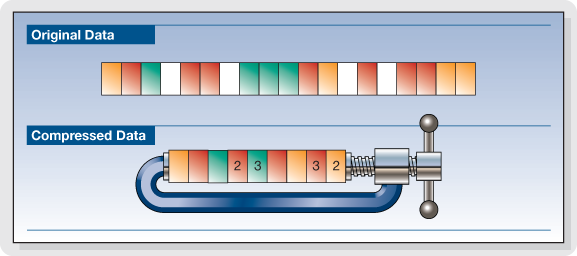
Lossless compression techniques are based on compact coding of the same data streams or coding with a small number of bits of the most statistically frequent data.

Picture
This compression is completely reversible and the decompression program returns the exact bit sequence as it originally was. For this reason, loss-free technique is applicable to any type of data, including executable texts and programs, although the achievable compression factor is not very high: values ​​usually range from 2: 1 to 4: 1. Of course, these results vary depending on the type of input data.

RLE encoding

Data Compression

The RLE (Run Length Encoding) compression technique is oriented to equal byte sequences. In the original version, it provides the introduction of a special character that indicates the beginning of a sequence, and instead of encoding the same characters in the sequence one by one, it encodes only the first one, followed by a number indicating where many times drawn and repeated. Specifies with the Sc character at the beginning of the sequence, the statement

these ******** are eight stars… these Sc * 8 are eight stars

where 8 is not encoded as an ASCII character but as a binary number.

The decompression program interprets the next byte as a counter and rebuilds the original sequence.

For image compression, RLE encoding only works well with images that contain large areas of uniform color, but are not very effective with complex images.

Compression with loss of information.

Loss-free compression techniques are not sufficient to solve the problem of the huge amount of data generated by encoding multimedia information, e.g. Video images while allowing better use of memory space on disks or data transmission lines. High resolution. , audio or video.

However, to try to solve this problem, it is necessary to remember that multimedia information, although subject to transformation, can remain understandable; This allows for compression factors that are higher in some orders of magnitude than those observed.

These interventions can be studied based on the behavior (vision and hearing) of our sensory systems to reduce the required memory without obvious changes in information content. Compression techniques that do this are called “lossy” since the least significant piece of information is irreversibly suppressed. Therefore, it appears that the bitstream after decompression is different from the original, and therefore these techniques cannot be used for other types of information, e.g. Text. Furthermore, the information thus compressed is not suitable for further processing as the loss introduced with each subsequent step becomes more and more apparent.

What is video encoding and how does it work?

The technique of compressing videos

What do we mean when we talk about video coding or, as industry experts generally call it, video coding?

YOUTUBE VIDEO FORMAT

Simply put, video encoding is the process of compressing and converting video content. The ultimate goal is to use less storage space, use less bandwidth, and make the user experience smoother. It goes without saying that the compression process causes a significant loss of information. The more data that is applied, the more data is deleted in the video. The result is a different version of the original due to missing data.

mp4 videos

Why is video coding so important?

Video encoding is essential for transmission because it simplifies the transmission of video on the Internet through a compression process. Compression reduces the bandwidth required while providing a high quality experience. Without this, raw video content would not allow many users to view content on the Internet due to insufficient connection speeds. The protagonist of this process is the bit rate or the speed of digital data transmission that can be transmitted in a certain time interval in a communication channel. When streaming, the bit rate determines whether users can easily view the content or are exposed to video buffering.

Another fundamental aspect of video coding is compatibility. Indeed, sometimes the content is already compressed to an appropriate size, but it still needs to be encoded to be compatible with different devices and applications, although this is often referred to as transcoding.

The video encoding process is governed by video codecs, which are compression standards that are created through software or hardware applications. Each codec consists of an encoder for compressing the video and a decoder for restoring an approximation of the video for playback. The name codec is actually derived from the merging of the words “encoder” and “decoder”.

But what is the best codec?

It depends on the type of video. On this occasion we will describe the most commonly used.

To stream high quality video over the Internet, H.264 is arguably the most widely used codec for most multimedia traffic. This codec is considered to be of excellent quality, coding speed and compression efficiency, although it is not as efficient as the later HEVC (High Efficiency Video Coding) compression standard, also known as H.265. H.264 also supports 4K video streaming, a real advance for a codec created in 2003.

Now that we have an overview of codecs, let’s look at some compression techniques.

Compression techniques

The most common compression technique is scaling the resolution. The higher the resolution of a video, the more information is contained in each picture. One way to reduce the amount of data is to reduce the size of the image and then scan it again. As a result, fewer pixels are generated, which reduces the level of detail of the image, which has a positive effect on the amount of information required. This process allows you to set multiple quality levels for a video that correspond to different resolutions created. A practical example is if you are watching a movie in streaming before playing it, you can actually choose the resolution at which you want to watch it, provided your device
Support him

One video compression technique that may not be widely used is the interframe. This process reduces “redundant” information from one frame to another.

Another technique is the P-frame, short for predictive frame, which means that it can look back at an i-frame or another P-frame and understand whether the same images are present. In this case, this part is excluded for reasons of space.

B-Frame, on the other hand, is the bidirectional predictive frame that offers good compression without affecting the viewing experience. However, this technique requires a higher coding profile.

Another technique is that which makes it possible to intervene in the color. This process, called “chroma subsampling”, tries to maintain the brightness of the image, which affects the quality of the color. Finally, another method of compressing videos is to reduce the number of frames per second.

Mp3: Audio Compression.

Audio Digitization.

Sound is a continuous wave that propagates through air or other media, formed by
pressure differences, so that it can be detected by measuring the pressure level in a
point. Sound waves have the proper and measurable characteristics of waves in general,
such as reflection, refraction and diffraction. As it is a continuous wave, a
digitization process to represent it as a series of numbers. Currently, most of
the operations carried out on sound signals are digital, since both storage and
processing and transmission of the signal in digital form offers very significant advantages over
analog methods. Digital technology is more advanced and offers greater possibilities, less
sensitivity to transmission noise and ability to include error protection codes,
as well as encryption. With the appropriate decoding mechanisms, moreover, they can be treated
simultaneously signals of different types transmitted on the same channel. The disadvantage
main aspect of the digital signal is that it requires a much greater bandwidth than that of the signal
analog, hence an exhaustive study is carried out regarding data compression,
some of whose techniques will be the center of our study.
The digitization process consists of two phases: sampling and quantization. In the sampling,
Divide the time axis into discrete segments: the sampling frequency will be the inverse of time
that mediates between one measurement and the next. At this time the quantization is performed, which, in its
In the simplest way, it is simply to measure the signal value in amplitude and save it.

Nyquist’s theorem guarantees that the frequency necessary to sample a signal that has its
Higher components at a given frequency f is at least 2f. Therefore, the range being
higher than human hearing around 20 Khz., the frequency that guarantees a sampling
suitable for any audible sound will be about 40 Khz. Specifically, to get sound
High-quality frequencies of 44.1 Khz are used, in the case of CD, for example, and up to 48 Khz.
in the case of the DAT. Other typical values ​​are submultiples of the first, 22 and 11 Khz. According to
nature of the application of course the appropriate frequencies can be much lower
such that the voice process is usually carried out at a frequency of between 6 and 20 Khz. or
even less. Regarding quantization, it is evident that the more bits used for the
axis division of amplitude, the “finer” the partition will be and therefore the less error in attributing
a concrete amplitude to the sound at every moment. For example, 8 bits offer 256 levels of
quantization and 16, 65536. The dynamic range of human hearing is about 100 dB. The
axis division can be performed at equal intervals or according to a certain density function,
looking for more resolution in certain sections if the signal in question has more components in a certain
intensity zone, as we will see in the coding techniques.
The complete process is usually called PCM (Pulse Code Modulation) and so we
We will refer to it hereinafter. It has been described in a very simplistic way, mainly
because it is widely discussed and is well known, being the field of study of
this work. However, we will go into detail at any time that is necessary for the
development of the exhibition.
1.2 Coding and Compression.
Before describing compression and encoding systems, we must pause briefly.
analysis of human auditory perception, to understand why a quantity
Significant information that the PCM provides can be discarded. The heart of the matter,
as far as we are concerned, it is based on a phenomenon known as masking.
The human ear perceives a frequency range between 20 Hz. And 20 Khz. First of all, the
sensitivity is higher in the area around 2-4 Khz., so that the sound is more
hardly audible the closer to the ends of the scale. Second is the
masking, whose properties exhaustively use the most interesting algorithms:
when the component at a certain frequency of a signal has high energy, the ear cannot
perceive lower energy components at close frequencies, both lower and higher. TO
a certain distance from the masking frequency, the effect is reduced so much that
negligible; the range of frequencies in which the phenomenon occurs is called the critical band
(critical band). Components belonging to the same critical band influence each other and
they do not affect nor are affected by those that appear outside it

Audio Data compression

Data compression or the technique that changed everything

Without pretending to extend ourselves in the description of this critical concept, it is important to know that compression is understood as a scheme that allows, by means of a “decision” algorithm based on a series of “rules” (which in the case of audio are masking and audibility threshold) reduce the amount of data to transmit a certain message. In other words: if the song “x” occupies, in the format used to encode the sound of a CD, 1 million bits, the data compression allows that song to be reproduced with maximum intelligibility using only 50,000 of those bits.

In this way, the download of a complete CD from a certain website could be carried out in a reasonable period of time. But, of course, the price to pay was high in terms of quality because such “castration” of the original message (which in turn was not “continuous”, analog, but also digital, although “linear”, without compression) meant removing many nuances of music, a disaster that in reality did not care for many consumers but it did worry, and a lot, those who bet on that High Fidelity in the reproduction of the sound that we are so passionate about and who received a wound that was almost fatal . In this sense, it is worth knowing that the “philosophical” keys to data compression are summarized in two terms: redundancy and irrelevance. In the first case, it is about reordering the available data to eliminate the ones that are repeated (for whatever reason: security, etc.), a bit like a “zip” computer file. It is a formal remodeling that does not affect the sound message at all (but it does save space to transmit / save data, making it very practical), so in this case, we are talking about lossless compression or “lossless” ” It is the second term that has the greatest scope in terms of sound quality because the idea of ​​irrelevance implies deleting irrelevant data from a certain message. And, of course, who decides what is relevant or not? Well, an algorithm, a program that, obviously, can be more or less sophisticated but still makes decisions with which everyone will agree. It is easy to understand: what may be irrelevant to such a person and / or the team may not be so to someone else. The fact is that here musical information is deleted, which, fundamentally, can no longer be recovered. Well, the algorithms in which there are losses of musical information are known as “lossy” or lossless coding algorithms. From what has been said, it is easily deduced that the difference between the concepts “lossless” and “lossy” is the one that marks the border between high and low quality digital audio, between high resolution (with recording studio quality formats or “Studio Master” on the cusp) and that “practical” sound (in principle for portable players and cars) and very often unnatural formats like the once ubiquitous MP3, which, we insist, almost ruined with the improvements provided by the CD.
ADSL, the key to accessing High End audio via the Internet
Basically it was a purely technical progress that, logically, had to come. A progress that allowed breaking the limitations that prevented downloading a song recorded in PCM at 16 bits / 44’1 kHz and, over time, the files with much higher resolution than for a good decade and a half are the usual ones in studios of recording. So, thanks to ADSL, the High End in audio via the Internet, and therefore “without physical support” is available to everyone. At this point, it will be good to briefly review the small “soup” of acronyms with which we can find ourselves, otherwise the result of the availability of open and “closed” environments (Windows, Mac), in what CODEC’s (algorithms that compress and decompress data (in this case of music) refers to the fact that compression is the norm.


AAC (Advanced Audio Coding): It was designed to be the successor to MP3 and, although it is a lossy CODEC, the results in terms of sound quality are superior to those of MP3 for the same bit rate. The AAC has adopted a wide range of portable audio devices such as the iPod and its derivatives for use.
AIFF (Audio Interchange File Format): It is the version of WAV created by Apple. Works with uncompressed (ie “lossless”) files that maintain full resolution and size.
 

ALE (Apple Lossless Encoder), also known as ALAC (Apple Lossless Audio Codec): Uses lossless compression to save storage space. Once unzipped for listening, the file will be bit by bit identical to a full size WAV or AIFF encoded file. As in AIFF or FLAC, in ALE / A files

What is audio compression?

What is audio compression?

I have finally returned to the tutorials, we are going to talk about the compression of audio from the most basic to the most advanced, it is a subject that many as producers have had a hard time learning and understanding.

So what is audio compression and what can you do to help?

Basically, compression reduces the dynamic range of your recording by reducing the level of the loudest parts, which means that the noisy and silent parts are now closer together in volume and the natural volume variations are less obvious. The audio compressor unit can increase the overall level of this compressed signal.

So, the end result is that the quieter parts sound as if they had increased their volume to be closer to the louder parts. Dynamic changes in the volume of a recording are now under more control, and a side effect is that the overall level of the compressed recording can be increased within its mix. The recording will also be located within the entire mix much more easily.

What are the compression controls?

The compression device itself has many different controls that can affect the sound it is processing. We will review the main controls that are commonly found.

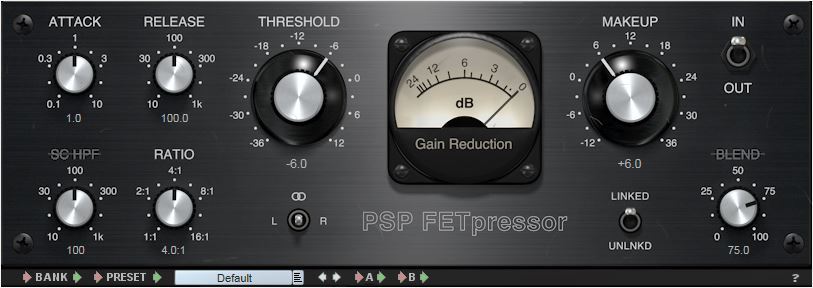
Input Gain
This controls the level of the signal entering the audio compressor.
Threshold
Compression reduces the overall level of the loudest parts of your recording. But how does the compressor know what part of the signal is “high” and what part of the signal is compressed? When setting the threshold.
The threshold sets the level at which the compressor starts and begins to change the recording dynamics. So, for example, if you set your threshold to -20 dB, everything below this level will not be affected by the compressor. But everything higher than this level (-20 dB) will be compressed.
Ratio
How much will the signal be compressed once it has exceeded this threshold? This is controlled with the relationship. The higher the ratio, the greater the compression.
The easiest way to show you how reason works is by showing you some numbers, if the ratio is 1: 1, there is no compression at all. On the other hand, if the ratio is set to 2: 1, for every 2 dB of sound that exceeds the threshold, you will get 1 dB of output above the threshold. So, if the signal exceeds the threshold by 10 dB, the compressor reduces this signal, so it is now 5 dB above the threshold.
If the ratio goes up to 8: 1, for every 8 dB of sound above the threshold you would get 1 dB of output above the threshold. Then, if the signal exceeds the threshold by 16 dB, the compressor reduces it, so only 2 dB exceeds the threshold.
Attack
This is the time it takes for the compressor to act on the input, once the sound level has exceeded the threshold. It is usually measured in milliseconds (ms).
Release
This is the time it takes for the compressor to let the signal return to normal once it has fallen below the threshold. Again, usually measured in ms.
Makeup
If the audio signal has been compressed, the overall level of the signal will be reduced. Increasing the output gain increases the level that comes out of the compressor, so the volume can more easily adapt to the levels of the rest of its tracks in its mix.
Knee
The soft compression of the knee is softer in the sound as it passes through the audio compressor: the change of uncompressed sound to compressed is softer. Hard knee compression is a more immediate and obvious effect.
Compressors are a very effective tool for us engineers, in the next post I will talk about the different types of compressors.