What are Lossless, Lossyless music formats?


Free Download Mp4Gain
picture

What are Lossless, Lossyless, cue and WAV music formats?

Lossless Audio

To make it easier to handle bitrates, I’ll give a somewhat simplified understanding of Lossy and Lossless bitrates.

lossless audio

If we imagine the sound in the form of a broken diagram, then in MP3 and OGG formats (these are currently the main Lossy formats, we will not consider the rest here as they are quite rare) from 128 to 256 kbps the ends of the sound are cut off (from this diagram). As for the 320kbps bit rate, the sound is not cut off.

What are bit rates?
Bit rate is an indicator of how much information a second of sound encodes. The higher it is, the less distortion and the closer the encoded composition is to the original.

Lossless – Lossless, which means that lossless (lossless) audio formats such as FLAC, APE, and WAV, as well as lesser-known ones, convert CDs to digital without loss of quality, that is, you can take a disc from your collection, save it to WAV, re-encode WAV, say to FLAC (or APE), then from FLAC (or APE) to WAV and burn it to disc and you get a disc absolutely identical to your CD. This begs the question: why not just use the WAV format? It’s very simple: lossless formats have the same quality as WAV, but take up less space, this is their advantage. There is a myth that an analog of a CD is an MP3 with a 320 kbps bit rate, but this is not the case, only a lossless image of this CD is an analog of a CD, by the way, and vinyl does not it has analogs at all. The bitrate of the vinyl analog must be equal to infinity, since vinyl records are made from so-called master tapes. A master tape is an analog copy of a piece mixed in a studio.

What are WAV and APE?
It is a lossless compression algorithm for WAV audio files, commonly used to store music extracted from compact discs (CD-DA). First, the original WAV file is removed from the CD-Audio (if a standard disc is fully recorded with music for 80 minutes, then the file will be 700Mb), and then it is archived in APE (standard extension for files compressed by Monkey’s Audio) . Yes, this is comparable to archiving, since APE can later be decompressed and the original WAV obtained, as if it were archived with ZIP or RAR. Compress the APE of the original WAV normally 1.5-2 times.

APE is a format for music connoisseurs, who are often interested in entire albums, not individual compositions. Music databases like freedb also work with albums. Also, a compressed album with one file takes up slightly less space than if each song were separated. But in fact, nobody forbids storing music in APE per track.

Many people don’t like APE because they need to spend more time on it to load it to the site (or from the site) or to the disk grabber. They argue that the size is large and it only causes a lot of problems with APE. The size of APE can be 2 or 4 times larger (depending on the type of music) than MP3. But, for the sound quality you have to pay (and not very, in my opinion, a great price). The extra half hour of horse racing or graberra is well worth it.

The APE bit rate ranges from 700 kb / ps to 1000 and more.

What is FLAC?
FLAC stands for Free Lossless Audio Codec (free lossless audio codec). FLAC is free, open source, and cross-platform. The compression ratios of FLAC are slightly lower than those of Monkey’s Audio, while the encoding (compression) time in FLAC format is approximately the same as that of Monkey’s Audio, however, the decoding (decompression) is much faster. FLAC is very popular on the Oslo network due to its cross-platform nature: it can be used on Windows, Linux, Unix and Mac OS X. There are also portable media players that support playing FLAC files. The Windows version of the codec contains plugins for Winamp (version 2.x / 5.x),

MP3
MP3 is a lossy compression format, that is, lossy. It is based on the assumption that the human ear simply does not perceive some frequencies and consequently they are removed during the compression process, which can significantly reduce the volume occupied by the composition.

The only advantage of MP3 is the size and nothing else. The fact is that when digitizing (encoding, compressing) a musical composition in MP3, frequencies that, according to some experts, cannot be heard by the human ear are discarded, so we obtain a small size (around 70% less than the source, depending on the quality of the bitrate and the codec).


Free Download Mp4Gain
picture


Mp4Gain Main Window
picture


Mp4Gain Features
picture


Free Download Mp4Gain
picture

All Digital Audio Formats

All Digital Audio Formats

Digital Audio Formats

ACC
Advanced audio coding
The format is a further development of the MP3 format.
ALAC
Apple Lossless Audio Codec
Apple Lossless (also known as Apple Lossless Encoder, ALE or Apple Lossless Audio Codec, ALAC) is an audio codec developed by Apple Inc for lossless compression of digital music.
ALS
MPEG-4 audio lossless encoding
MPEG-4 ALS is an efficient and fast codec for a variety of applications.
AMR
Adaptive multiple rate
The AMR compression format was developed specifically for use in cellular systems. Its field of application is voice audio content compression.
MONKEY
Monkey Audio
Monkey’s Audio (Windows only) is considered one of the best lossless audio codecs for storing music due to its effective ratio of output file size to speed.
ATTRAC
Adaptive Transformation Acoustic Coding
ATRAC is a lossy compression system based on psychoacoustic principles. Compresses an audio CD to approximately 1/5 of the original with a slight loss in sound quality.
Asao
Nellymoser audio codec
Nellymoser Asao is a proprietary codec that was designed for low bit rates.
CELTIC
Overlapping energy restricted transformation
The CELT codec is an algorithm for compressing audio data. Like MP3, Vorbis and AAC, it is suitable for high quality music streaming. Unlike these formats, CELT also has a very low latency, lower even than Speex, GSM or G.729.
Dolby
Dolby has developed many audio sound formats. Among them are compression formats.
FLAC
Free Lossless Audio Codec
FLAC is possibly the most popular lossless audio compression format.
LossyWAV
LossyWAV is a free lossy compression format. But, in essence, it is a preprocessor for PCM audio stored in WAV containers.
MP1
MPEG-1/2 Audio Layer I
MPEG-1 Audio Layer I (abbreviated as MP1) is one of the three formats included in the MPEG-1 standard. Even though it is compatible with many media players, the codec is already very outdated and has been superseded by the MP2 and MP3 codecs.
MP2
MPEG-1/2 Audio Layer II
MP2 is still used in the broadcasting industry for satellite transmission of digital video transmission and digital audio transmission.
MP3
Audio Layer III MPEG-1/2
The format is sometimes confused with MPEG-3, but MP3 is designed to compress only audio information and the full name sounds like MPEG Audio Layer-3.
Surround sound MP3
In 2004, Fraunhofer IIS released a backward compatible extension for MP3. MP3 Surround files provide high quality 5.1 sound with new decoders.
MP4
MPEG-4 Part 14
These are file extensions for the MPEG-4 container format, which can include all types of media (video, natural and synthetic audio, 2D and 3D graphics, animated avatars, etc.).
MPC
Musepack
Musepack is a lossy compression scheme invented by German programmer Andree Buschmann.
MT9
A new multi-track waveform data storage format that claims to be MP3.
Ogg Vorbis Audio
The Ogg vorbis format was developed by Xiphophorus. On the same site you can find the source codes of the project. It is part of the Ogg project to create a completely open multimedia system.
OptimFROG
OptimFROG is a lossless compression algorithm whose main goal is to reduce the size of audio files as much as possible. This is somewhat similar to ZIP compression, but is highly specialized for audio data.
Opus
Opus is a highly versatile, royalty-free, open source audio codec.
RealMedia
RealMedia is a proprietary streaming and multimedia file format owned by RealNetworks products and services.
SND
Sound
SND (SouND) is a digital audio file format created by Apple.
Speex
Speex is a patent-free audio compression format developed for voice transmission, as well as for use in open source software (for example, VoIP).
TAK
Tom’s lossless Audio Kompressor
TAK is lossless audio compression that provides APE efficiency and FLAC decoding speed.
VQF
TwinVQ
A proprietary format that was created to replace MP3, but was never fully developed due to its proprietary nature.
Wav
Wave audio file format
The WAV format is perhaps the most common audio storage format. It is the easiest to use to process and is compatible with almost all audio players.
WMA
Windows Media Audio
WMA is a compression format developed by Microsoft.
WavPack
WavPack is a completely open, lossless, high quality, lossy audio compression format with a unique hybrid mode.

Digital audio from A to Z

Digital audio from A to Z

Digital Audio

Confused about the terms used to describe audio devices? We have created a quick guide to help you discover them.

DIGITAL AUDIO

Do you want to immerse yourself in the wonderful (and sometimes overwhelming) world of high definition audio? You have a lot to learn about this world, but the endless abbreviations and terms can be confusing, making the text look like a collection of words.

There is nothing to worry about. At Sony, we make sure you get all the Hi-Res Audio knowledge you need, become a true expert, understand the complexities of terminology, and enjoy the best sound with the best music.

Below is a list of the main terms used by hardcore audiophiles when discussing Hi-Res Audio technology, as well as their definitions.

Hi-Res Audio / Hi-Res Audio

Hi-Res Audio generally means digital recordings with a higher sample rate than audio CDs and the MP3 format. This technology offers much higher sound quality while retaining more data than converting the original studio recording to MP3 files. Some of the high resolution audio formats are WAV, DSD, ALAC, FLAC, and AIFF.

DSD and PCM

What is the difference? There are two main ways to process / encode audio in digital formats: PCM and DSD. In short, editing is easier with PCM. However, the DSD file format is used in recording studios and this digital format is believed to be as close as possible to the original analog source. Below is a more detailed description of each format:

DSD

Direct Stream Digital is a digital recording method in which the audio signal is encoded using pulse density modulation like digital media. The sample rate of this audio format is 2.8224 MHz or 5.6448 MHz, which is 64-128 higher than the sample rate of audio CDs.

PCM

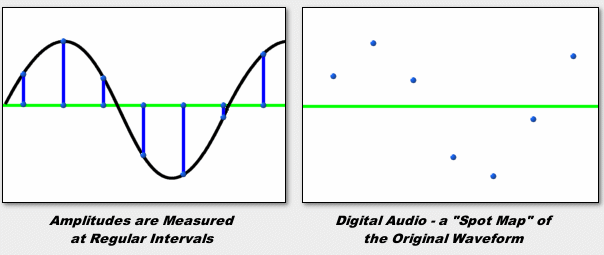
Pulse Code Modulation (PCM) is the basis for digital audio recording whereby the standard analog audio signal is converted to digital. This is the standard form of digital sound on computers and CDs. The analog signal is sampled at regular intervals and its amplitude is recorded as a point on a digital scale.

With data loss

The lossy format removes some of the information from the original digital recording in an attempt to preserve the quality of the original sound as much as possible when played back. This is the case for MP3 and AAC audio formats. The compressed file takes up much less space than the original file, but the quality suffers.

No data loss

The lossless encoding format allows you to store digital audio without losing the original data or allows you to reconstruct it when played back. Lossless audio files are generally larger than lossless files. However, it achieves significantly better sound quality. Examples of audio recordings of this type are files with the extensions FLAC and Apple Lossless.

No compression

The definition of the concept is derived from the name: uncompressed raw data. In general, uncompressed audio files like WAV and AIFF are of the best quality. The downsides of uncompressed audio are that they take up a lot of space and require a lot of bandwidth to open and play.

kHz / bit

This is a standard notation for the relationship between sample rate and bit depth.

Number of kilohertz (kHz)

It is a unit of sampling frequency which is the number of times the audio signal is quantized per second. Therefore, the higher the kHz number, the better the sound quality.

Bit depth

The bit depth of a digital recording determines how many bits (that is, data) are used to store each sample of the analog signal. Bit depth is directly related to the resolution of each sample. The higher the bit depth, the better the sound quality.

Now that you understand the complexities of Hi-Res Audio terminology, try to find examples for each concept.

What to expect from digital audio

What to expect from digital audio

digital audio

A few years ago, the word “multimedia” entered the computer lexicon, and more recently, the PC is increasingly used as a home entertainment center. In both cases, the computer must reproduce the sound, which, as you might guess, exists on it only in digital form. And if with the advent of the first transistor technology, the phenomenon of “transistor sound” was vigorously discussed and covered with myths and legends; However, it is often believed that computer signal processing, on the other hand, is obviously better. So what is digital audio and how is it inferior to or superior to analog?

Digital Audio

From a human point of view, sound is air vibrations with a frequency of approximately 16 Hz to 20 kHz. A person perceives the lower frequencies (with sufficient amplitude) not as sound, but as vibration. Superiors are not captured at all. The upper limit of the frequency range depends on age: in young children it reaches 22-24 kHz, and gradually decreases to 8-12 kHz over time. Therefore, the human ear can hear signals of a very wide bandwidth. For comparison: the eye can perceive color only in the range that covers the change in frequency of electromagnetic oscillations by less than 2 times. Of course, not all frequencies are equally important. For example, a range of 500 to 3500 Hz is sufficient for speech intelligibility. But to listen to music or the soundtrack of a movie, this is not enough. Ideally, the sound field in the listening area should be indistinguishable from the sound field in the recording area. That is, the entire audio path, from a studio microphone to a home speaker, must not introduce distortions that are within the resolution of the human auditory analyzer.

The sound that our ears perceive when playing a digital recording has previously undergone a series of transformations:

1) electromechanical conversion of air vibrations into an electrical signal;

2) amplification and processing of an analog electrical signal (frequency equalization, addition of reverb, etc.), mixing;

3) analog to digital conversion;

4) digital signal processing: frequency correction, mixing, mastering, etc .;

5) storage or transmission of digitized sound;

6) digital signal processing: frequency correction, volume control, oversampling;

7) digital to analog conversion;

8) Analog signal processing (frequency equalization, mixing, adding reverb, etc.);

9) amplification of the analog signal;

10) electromechanical transformation of electrical current oscillations into sound oscillations.

When processing an analog signal in a studio, devices with an analog interface and digital “fill” are often used, so the chain of analog-to-digital and digital-to-analog conversions can be much longer.

The first four stages are most often carried out on studio equipment, which has incomparably higher performance than home equipment. Therefore, although the distortions are unavoidable, we will assume that they are insignificant compared to the distortions of a similar nature introduced by the household equipment in the last five stages. In amateur audio recording, additional distortion should be considered in the early stages, which will be described below.

Electromechanical conversion is usually done with a studio microphone. This device generates a very weak signal that needs amplification and is also extremely susceptible to mechanical stress. Even under ideal conditions, for example in a concert hall, acoustic noise can cause the dynamic range of the music being played to be less than the maximum dynamic range of a 16-bit sound presentation.

A signal recorded from several microphones is inevitably processed: the required volume levels of the different channels are selected, the noise is cut with filters, etc. Also, the dynamic range of the signal is generally compressed. The last operation leads to a significant increase in the noise level, but without it, the recording would sound unsatisfactory on middle-class consumer equipment, first of all, too quiet.

The distortions introduced by the sound path have a varied physical nature and very different manifestations, but nevertheless they can be divided into three large groups.

Digital sound. Digital audio encoding

Digital sound. Digital audio encoding

Digital audio

What determines the quality of an audio signal?

Digital Audio

The purity and timbre of the sound are mainly determined by the audio codec, or rather, by its bit depth and sample rate (the higher they are, the better the sound). This processing can be done in hardware with a special chip, an audio processor, or in software that uses controllers, which consumes CPU resources.

What is AC’97, HDA?
AC’97 and HDA (High Definition Audio) are Intel’s proposed standards for audio codecs. AC’97 was introduced in 1997 and then improved several times, but eventually became obsolete and is now replaced by HDA. HDA is fully AC’97 compliant with improved performance and enhanced capabilities.
What is the difference between AC’97 and HDA?
AC’97 defines the maximum bit depth of a 16-bit audio codec at a sampling rate of 48 kHz, HDA – 32-bit / 192 kHz. Additionally, HDA devices support 8-channel (7.1) audio, DVD-Audio, Dolby surround sound technologies, and other advanced features.
What is the sample rate and bit depth of the codec?
Sampling is the acquisition of instantaneous values ​​(samples) of an analog signal with a certain time step in the digitization process. The frequency of this step is called the sample rate (it is also the sample or sample rate). The larger it is, the better the sound recorded and reproduced. In studio equipment, the frequency is 48 kHz, in home systems – 44.1 kHz.
Bit depth determines the quality of the recorded audio. Higher is better. The bit value, for example 32, denotes the number of bits that are allocated to record the amplitude of the signal at the time of its measurement.
Consequently, the more often (sample rate) and more accurately (bit depth) the audio signal is measured, the higher quality audio file is obtained.
What is the signal-to-noise ratio?
The ratio of the pure audio signal to the noise generated by the device itself. The higher the value (in dB), the better. The Sound Blaster X-Fi sound card has a signal-to-noise ratio of 118 dB. Most audio codecs are 80-95 dB.
What is DAC and ADC?

The DAC (digital to analog converter) and ADC (analog to digital converter) are part of the codec and directly perform sampling: during playback, the DAC converts the digital code to an analog signal, while recording, the ADC performs the reverse conversion. The better the ADC, the clearer and more detailed the sound that will flow from the speakers. The better the DAC, the more accurately the analog signal will be converted to digital.
Codecs for multi-channel audio support include various DACs and ADCs.

What is the bit rate?
The bit rate (literally, the information bit rate) determines the maximum amount of information that can be transmitted through the audio channel per unit of time. A high bit rate is needed to transmit a rich sound image and is not required when encoding speech. Audio recordings with a 128 Kbps bit rate are suitable for inexpensive speakers, but when accessing expensive equipment, it makes sense to get music at a 192-256 Kbps bit rate.
Convenient solution: variable bit rate encoding, change the bandwidth of the audio channel according to the quality and saturation of the musical fragment.

MP3 and audio digitization.

MP3 and audio digitization.

audio digitalization

All of humanity has become accustomed to such everyday things as recording and reproducing sound, be it a voice recorder, an answering machine, or musical recordings of their favorite artists. And people who spend most of their time near the computer probably can’t imagine life without sound. This article will focus on such a common encoding format as MP3.
audio digitalization

Well, Thomas Alva Edison started recording when he yelled the words “Mary had a lamb” on his “Talking Machine”. The “talking machine” was the world’s first device to record and reproduce sound: a phonograph that mechanically recorded a soundtrack on a wax roller. At the time, this was certainly a huge step forward, as at that time, and this was in 1877, no one came up with the idea of ​​creating something similar.

However, the biggest disadvantage of this sound carrier was the fragility of the recording. With the development of science and technology, people learned to record sound not only mechanically, as Edison did, but also electromechanically and photoelectrically, and with the advent of computers, it became possible to record sound in digital form. The main advantage of this recording method is the preservation of sound quality, regardless of how many times it has been played or rewritten, and since digital information can be processed on a computer, this opened wide doors of possibilities for working with sound. . But since in the early stage of digital sound development, recording a composition cost a lot of disk space and magnetic media had a small capacity, software developers began to baffle the fact. how to put a lot of music on a small hard drive. This led to the appearance of various programs – compressors, which reduced the size of the audio file. Compression algorithms provided the removal of certain frequencies, which led to a loss in sound quality, and then the user was faced with the choice of spending money buying additional megabytes and storing uncompressed music files, or saving money. and use compressors.

First, let’s find out what “sound” is in real life. The transmission of information at a distance using acoustic vibrations is only possible due to the properties of the acoustic environment in which these same sound vibrations occur. They are possible due to the presence of elastic bonds between particles in the conductive medium. The sound source creates an area of ​​pressure by compressing air molecules. These molecules transfer their energy to others that are nearby, and these, in turn, to others, etc., which leads to the appearance of areas of increased and decreased pressure in relation to the ambient pressure. This creates a sound wave that is continuous in nature. One of the parameters of the wave is amplitude. Let’s take a simple example: a guitar string. Everyone knows that to increase the volume of the sound it is necessary to pull the string with more force, thus increasing the amplitude of its vibration, which will lead to an increase in the pressure deviation. But a wave is not enough to transmit a sound that can be perceived by the human ear. Another important point is the vibration frequency, that is, the frequency with which the sound source creates a pressure change, and it is this frequency that determines the pitch of the transmitted sound. On a guitar, to change the pitch, you need to hold down the string at a certain fret, that is, change the length of the string and, as a consequence, the frequency of its vibrations. Another important point is the vibration frequency, that is, the frequency with which the sound source creates a pressure change, and it is this frequency that determines the pitch of the transmitted sound. On a guitar, to change the pitch, you need to hold down the string at a certain fret, that is, change the length of the string and, as a consequence, the frequency of its vibrations. Another important point is the vibration frequency, that is, the frequency with which the sound source creates a pressure change, and it is this frequency that determines the pitch of the transmitted sound. On a guitar, to change the pitch, you need to hold down the string at a certain fret, that is, change the length of the string and, as a consequence, the frequency of its vibrations.

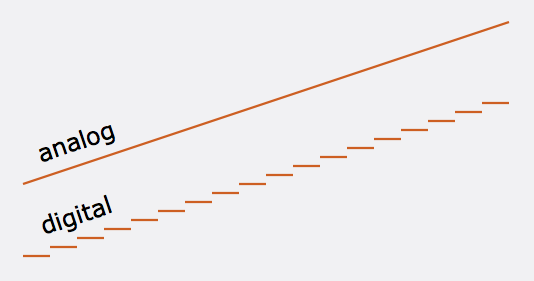
Now that we understand the nature of sound a bit, let’s move from analog to digital. To digitize “natural” sound, you must first convert it to an analog electrical signal. In this case, the analog of the amplitude of the sound wave is the amplitude of the voltage change. As mentioned above, the wave and the analog electrical signal are continuous functions, but for digitization they must be represented in discrete form. For this, an ADC (analog-digital converter) is used, which breaks the continuous wave into sections (Sample) and represents the amplitude of the wave in these sections as a number, that is, it quantifies. It is clear that for greater precision and purity of sound, the number of samples must tend to infinity and their size must go to zero. The number of samples per second is called the sample rate or sample rate and is measured in Hz. The question arises, what sample rate to use when digitizing so that the result is the most natural? It is theoretically known that for the most accurate reconstruction of a continuous analog signal from discrete values, it is necessary to use a sampling frequency at least 2 times higher than the frequency of sound (Nyquist’s theorem). It is known that the human ear can perceive sounds with a frequency of 18 to 20,000 Hz. Therefore, the optimal sampling frequency is 40 kHz or more. The most common sampling frequencies are 44.1 kHz, 48 kHz. However, due to the fact that harmonics above 20 kHz also affect the overall sound, encoders with sample rates of 96 and 192 kHz are also used. Also, the sound quality depends on the number of digits used to record the measured amplitude. The quantization error is inversely proportional to the bit width. Therefore, with 8-bit quantization, the sound level is recorded using numbers in the range [-128; 128], with 16 bits from [-32768; 32768]. For example, when recording audio CDs, exactly 16-bit quantization is used, so they have high sound quality.

Let’s make a middle conclusion: the ADC converts the analog signal into numbers and writes them as a sequence. Then comes Wave, a sound format. Note that audio CDs record sound in the same format. However, this storage method is not economical. Many people probably prefer an MP3 disc, which can contain more than 200 songs, than a regular CD. It does this by compressing the Wave file at the expense of quality. But don’t be alarmed, as the human ear is virtually incapable of recognizing the loss of sound quality after compression. Let me explain now. It all started when, in the late 1980s, the International Organization for Standardization (ISO) created the Moving Pictrures Experts Group, whose task was to develop an international standard for the presentation of digital video and audio data. The result of the group’s work is the MPEG-1 Layer 3 format, or MP3 for short, which compresses audio data by 1/12 with virtually no loss of quality. The audio compression algorithm in this format is based on the psychoacoustic characteristics of the human hearing organ, and therefore the removal of elements that are not perceived by the ear does not affect the noticeable deterioration in quality. Suppose there are many people in the room and they are all talking to each other at the top of their voices, and if you try to call a person who is only a few feet from you without raising your voice, don’t expect them to answer your call. , since due to the noise generated, it will not hear you. This is because sounds of the same frequency with higher amplitude mask other frequencies with lower amplitude. However, this unfortunate effect is happily used to compress digitized audio. The wave stream will contain all sound information, even masked, that is not audible to the ear, but after compression this information will be removed, reducing the file size. Another important characteristic of the human hearing organ used for compression is inertia. The ear, to put it vulgarly, is an inertial device, therefore, at the limit of the difference in sound level from highest to lowest for a certain time (~ 100 ms), a person cannot hear a sound of lower amplitude Therefore, the sound in this period may not be saved. It is also possible not to save the sound that is beyond the sensitivity threshold, that is, the sound level of which is below a certain value and is therefore inaudible to a person. Another interesting property used for encoding (but not by ”

Together, therefore, all of this leads to significant savings in the disk space occupied by the audio file. An average music file that occupies 30-40 MB in “full” form, after encoding it in MP3, already occupies 3-4 MB, allowing you to record more than 11 hours of music on a disc. However, this is not the limit. In 2001, the MP3 format had a successor: the MP3Pro format. Its creators are Thomson Multimedia and the Fraunhofer Institute in Germany. A distinctive feature of the new improved format is that, with the same quality, the files in the new format take up 2 times less space compared to normal MP3s. For example, an MP3Pro file with 128 kbps sound quality will be the same size as a 64 kbps MP3 file. Another advantage is

Let’s see how this is achieved. The working principle of the MP3Pro format is quite simple. When encoding, the audio stream is divided into two parts, two streams. The first is the low-frequency one, which is encoded in the usual MP3 format, which, by the way, makes the formats backward compatible, because normal players only play this part of the file. The second stream is high frequency, which is encoded in the part of the MP3 stream that older players ignore. The new decoder combines these two streams, leading to full sound across the entire frequency band.
Regarding the promotion of the new format in the market, compared to its older brother, MP3Pro has not received such a wide distribution. Thomson Multimedia offers a free version of the MP3Pro Player / Encoder for download from their website. The limitations of this version are that only 64 kbps quality is available for encoding. WinAmp lovers have a plugin to play MP3Pro files

Of course, the light did not converge on MP3, there are other digital encoding formats, but despite this, it is still the most popular.

How sound is stored on a computer

How sound is stored on a computer

Digital Audio

Today there are about three dozen common digital audio formats. Why you need to create so many types of sound files to store one type of content and how to manage all this, you will learn from this material.

digital audio

Introduction
Surely many users prefer to use their home computer not only as a workhorse, but also as a multimedia center, where they can watch movies or family photos, as well as listen to their favorite music. Although compact digital players or mobile phones are certainly more suitable for listening to musical compositions, but unlike them, a computer can not only play music.

No matter how big the built-in memory of your music player is, it will most likely be difficult to store your entire music library on it. Additionally, using a PC, you can create, edit, organize, and search for music. Also, don’t forget that there are around three dozen common digital audio formats today, and most players are far from omnivorous and can only play a few of them.

So why do you need to create so many music formats to store one type of content? The point is that in the vast majority of cases the sound is stored in a “compressed” form, since one minute of uncompressed composition occupies about 10 MB on the hard disk. On the one hand, this seems not to be much, but on the other, if you are a music lover and your collection consists of several hundred or even thousands of songs, then it is clear that the sound must be compressed to reduce the space it occupies in electronic media.

Various special algorithms are used to compress music files, which subsequently determine the structure and presentation of the audio data, or so-called digital audio file formats. All audio formats can be divided into three groups: uncompressed audio formats, lossless compression, and lossy compression.

No compression
One of the most widespread formats related to this type is the well-known WAV. The sound of files with this extension is stored without compression or changes. It is true that much more space is required to store uncompressed files and therefore WAV is more widely used only in professional audio and video applications, where the sound should not have a loss of quality before processing. Storing ordinary musical compositions in this form is an unwarranted waste.

To play WAV files, you do not need any special software, as all media players understand this format, including the standard Windows Media audio player built into the Windows system.

Another format used to store uncompressed audio that is worth mentioning is Apple’s development called AIFF (Audio Interchange File Format). As you may have guessed, it is most commonly used on Macintosh computers running Mac OS X.

Lossless compression (lossless)
Lossless compression algorithms for audio files work on the principle of conventional file cabinets. They do not provide the highest level of compression (40 to 60%), while they have virtually no effect on sound quality. It is also worth noting that in this case, the encrypted data can be fully restored to its original form. Therefore, the use of lossless compression is most often used in cases where it is important to preserve the identity of the compressed data with respect to the original.

The most popular audio formats in this group are FLAC (Free Lossless Audio Codec), APE (Monkey’s Audio), WMA (Windows Media Lossless), and ALAC (Apple Lossless Audio Codec). Each has its own pros and cons. For example, the APE codec offers slightly better compression gains, while FLAC is more common. In general, all true music lovers store their music collections in lossless formats, since they do not remove any data from the audio stream and files created with these codecs can be listened to even on high-quality stereos.

To play lossless compressed formats, as a rule, third-party players (except WMA) are used, such as MPlayer, foobar, AIMP, Winamp, VLC and others, since all the necessary codecs are already built into them. Another option is to separately install an additional codec pack (for example, K-Lite), after which you can listen to files in lossless format from almost any audio player.

Lossy compression
This is the most popular group of algorithms that provides the maximum audio compression ratio (up to 10 times or more). However, the audio file loses quality.

ABOUT DIGITAL AUDIO FORMATS

ABOUT DIGITAL AUDIO FORMATS

Digital Audio Formats

Today, there are several digital audio formats that are superior in quality to compact discs and are available on both physical media and the Internet. What are advanced sound lovers listening to now? Let’s find out.

Digital Audio Formats

The capabilities and quality of the CD-DA format were initially limited by the capabilities of CD as a medium. Legend has it that the standard 74-minute compact disc capacity was chosen in order to be able to record long classical pieces without splitting into two discs. And to be absolutely precise, this figure appeared thanks to Beethoven’s Ninth Symphony: it lasts exactly 74 minutes. Another default parameter was the 44.1 kHz sample rate. This figure defines the upper limit of the reproduced frequency range. For a CD that had to reproduce frequencies up to 20 kHz, this was the lowest possible carrier frequency. As a result, the only field of maneuver was the bit depth, the level of which was 16 bits. With regard to sound recording, bit depth determines its dynamic range and resolution.

The CD cannot be copied into the memory of the computer in the usual way, since we usually copy files. To save a CD-DA, you need a special program, a program that allows you to convert data recorded on an audio disc to PCM format (WAV file). A properly organized CD-DA ripping process allows you to get a completely identical digital copy on your hard drive. Audio CDs are generally saved on a computer as a large FLAC audio file (also WAV, WV, or APE) with a CUE index card or as separate tracks.

As the best digital audio format, the CD did not last that long, just over ten years. In the mid-nineties, the first format appeared that allows for better sound quality. HDCD was an improved version of CD-DA. Their difference consisted in a special recording algorithm that made it possible to save additional data on the sampling depth in a standard CD format. With an HDCD decoder, the output signal received not 16, but 20 bits, which did not give the standard of 96, but up to 120 dB of dynamic range and a very noticeable increase in recording resolution. At the same time, devices without an HDCD decoder played discs like normal CD-DAs. Interestingly, when saving such a disk on a PC in the same way,

The next leap in terms of sound quality came at the beginning of the new millennium. Two HD audio formats were introduced to the audiophile audience at once, appearing almost simultaneously. DVD-Audio, a further development of the traditional recording method and promoted by Panasonic and Toshiba. It is capable of recording 24-bit / 192 kHz in stereo mode and 24-bit / 96 kHz in multi-channel mode.

The SACD format competed with it, which, by the way, looked much less like a normal CD, although it was called “super CD”. Super Audio CD, developed by Sony, was based on the revolutionary DSD encoding algorithm. This digitizing method assumed one-bit sampling at an ultra-high frequency of 2.8224 MHz. The encoding and decoding principles of a DSD stream are much simpler than in high-bit formats and are essentially closer to the principles of analog technology. At the same time, the SACD format retains all the advantages of the advanced digital format and has output characteristics comparable to DVD-Audio in both sound quality and number of channels.

Both DVD-Audio and SACD were designed with a high level of copy protection, but inquisitive minds have already won over both formats, so if desired, the content of both disc types can be saved to a PC as images. ISO (without changing the structure and original codec) or FLAC tracks in 24-bit / 96 kHz or 24-bit / 192 kHz. Almost simultaneously with the DVD-Audio and SACD formats, another original format for publishing high-quality music was born: DAD 24/96. DAD stands for Digital Audio Disk, but it is essentially a DVD-Video with a high-quality still image and sound that can be played on any standard DVD player or PC.

Obviously, with this approach, Blu-ray media, with its HD sound formats, recorded in high quality without compression, is quite applicable for recording music in high quality. However, at the moment there are few such publications, and a special version of the BD-Audio format has every chance of not seeing the light of day, as the sale of high-quality audio material is already very active on the Internet. Anyone who does not want to convert DVD-Audio, DAD and SACD discs to the FLAC format on their own can officially buy albums already converted in 24-bit / 96 kHz or 24-bit / 192 kHz quality.

What are the pros and cons of digital audio?

What are the pros and cons of digital audio?

Pros and Cons of  Digital Audio

The digital representation of sound is valuable, first of all, for the possibility of endless storage and reproduction without loss of quality, but the conversion from analog to digital form and vice versa inevitably leads to its partial loss.

Gaming Headsets: Everything you need to know - Gaming Lifestyle Secrets

The most unpleasant distortions introduced in the digitizing stage are the granular noise that occurs when the signal is quantized by level due to rounding of the amplitude to the nearest discrete value. Unlike simple broadband noise introduced by quantization errors, granular noise is the harmonic distortion of the signal, most noticeable in the upper part of the spectrum.

The power of the granular noise is inversely proportional to the number of quantization steps; However, due to the logarithmic characteristic of hearing with linear quantization (constant step value), quiet sounds have fewer quantization steps than loud sounds, and as a result, the main density of non-linear distortions falls in the region of sounds. silent. This leads to a limitation of the dynamic range, which ideally (without taking into account harmonic distortion) would be equal to the signal-to-noise ratio, but the need to limit this distortion reduces the dynamic range for 16-bit encoding to 50-60 dB. The situation could have been saved by logarithmic quantification, but its implementation in real time is very difficult and expensive.

The distortion introduced by granular noise can be reduced by adding normal white noise (random or pseudo-random signal) to the signal, with an amplitude of half the least significant bit; such an operation is called dithering. This leads to a slight increase in the noise level, but weakens the correlation of quantization errors with the components of the high-frequency signal and improves subjective perception. Anti-aliasing is also applied before rounding the samples by decreasing their bit depth. Essentially, dithering and noise shaping are special cases of the same technology, with the difference that, in the first case, white noise with a flat spectrum is used and, in the second, noise with a spectrum with a “shape “special.

When restoring audio from digital to analog, there is the problem of smoothing the stepped waveform and suppressing the harmonics introduced by the sample rate. Due to the imperfection of the frequency response of the filters, insufficient suppression of this interference or excessive attenuation of useful high-frequency components may occur. Poorly suppressed sample rate harmonics distort the shape of the analog signal (especially in the high frequency region), resulting in a “rough” and “dirty” sound.

What methods are used to effectively compress digital audio?

Currently, the most famous are Audio MPEG, PASC and ATRAC. They all use the so-called “perception coding” (perceptual coding), in which information barely perceptible to the ear is removed from the sound signal. As a result, despite the change in the shape and spectrum of the signal, your hearing perception is practically unchanged and the compression ratio justifies a slight decrease in quality. Such encoding refers to lossy compression methods, when it is no longer possible to accurately restore the original waveform from the compressed signal.

Techniques to remove some of the information are based on a characteristic of human hearing, called masking: if there are pronounced peaks (dominant harmonics) in the sound spectrum, the weakest frequency components in the immediate vicinity of them are practically not perceived (masked) by ear. During encoding, the entire audio stream is divided into small frames, each of which is converted into a spectral representation and divided into several frequency bands. Within bands, masked sounds are detected and removed, after which each frame undergoes adaptive coding directly in spectral form. All these operations make it possible to significantly reduce (several times) the amount of data while maintaining the quality acceptable to most listeners.

Each of the described encoding methods is characterized by the bit rate at which the compressed information must enter the decoder when the audio signal is recovered. The decoder converts a series of compressed instantaneous signal spectra into a conventional digital waveform.

Audio MPEG is a group of audio compression techniques standardized by MPEG (Moving Pictures Experts Group).

Advantages and disadvantages of popular audio formats

Advantages and disadvantages of popular audio formats

 Audio File Formats

In today’s music world, there are a large number of audio file formats that are often confusing to the unprepared user. To understand all this, to find out what they are and what they are used for, the presented review will help.

Audio formats

Types of audio formats

Today is the time when all music lovers, not to mention professional musicians and audio editors, need to understand concepts like audio file formats, bit rates, extensions, bit depth, sample rate and many others. to achieve high quality sound. Sound has gone digital, which means that it can be used for various purposes, eg for listening to evidence, for presentations, video dubbing. In fact, digital sound, like an image, is a collection of individual pixels, and the more there are, the better the sound image. This “pixelated” sound can be edited and processed.

An important role in evaluating the quality of audio formats and consequently sound quality is a parameter such as bit rate, which shows how many bits or kilobits it takes to record one second of sound. Low bit rates mean low quality sound, high bit rates mean high quality sound.

But for the storage and further use of audio in one form or another, audio formats are used – digital recordings of audio data. We can say that the format is a kind of container where the sound is stored. Virtually all audio formats can be divided into two broad categories: lossless compressed and lossy compressed.

No loss, no loss

To avoid as much as possible a decrease in sound quality during the compression of an audio file, special methods have been developed to store audio information, avoiding losses, which in fact can be compared with the file when the information is simply packed in a zip file, the size of which is noticeably smaller than the original data. Later, this data can be clearly restored on each bit. And the bitrate itself is not important for these files. These audio files are collectively called Lossless, Music As Is. These algorithms allow you to compress files two to three times. As a result, the size becomes quite large, but at the same time the original sound is preserved.