Audio formats. Understanding the differences


Free Download Mp4Gain
picture

Audio formats. Understanding the differences

Audio File Format

There are many different audio formats.

audio file formats

You can’t even imagine how many audio formats there are. Now we will consider only the most popular ones, and if you need complete information, you can find it on Wikipedia.

Audio formats
Sound is itself an analog phenomenon. In order for it to register on a computer, it must be digitized. Digitized audio takes up a lot of space. Therefore, they use special algorithms to encode and compress data: codecs. Codecs provide encoding / decoding of audio / video data, as well as compression / decompression of such data. Download a set of codecs for Windows:

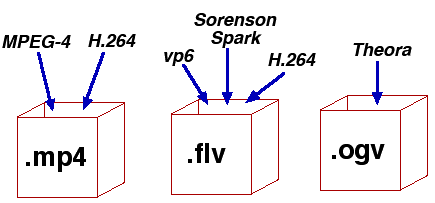
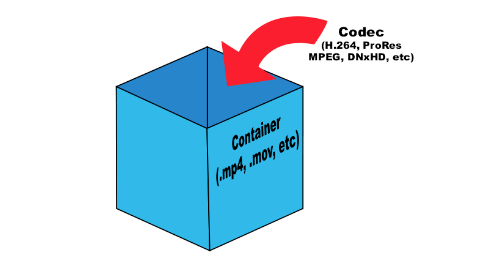
The type of media file format (audio or video, no difference) is determined by its extension. For example, MP3 files have the extension .mp3. The codec for this format is always the same: MPEG Layer-Ç. But for the MP4 format, the codecs may be different.

Some formats, such as MP4 and FLV, can contain streaming audio and video. So, if you see a file with the extension .mp4, you can’t definitely tell that it contains only music or only video, or a movie – audio and video. After all, initially in such formats, the possibility of transmitting both audio and video was raised.

We all know that once information is compressed, it can be lost. Therefore, all codecs can be divided into two groups: with loss of quality and without loss of quality. Don’t be intimidated by the word “lossy”: As a general rule, codecs cut off “unnecessary” information that is invisible to our eyes and ears (almost invisible).

Lossless compression codecs include:

FLAC (Free Lossless Audio Codec);
APE (Monkey’s Audio);
ALAC (Apple Lossless Audio Codec).
And here are the lossy codecs:

If you are a fan of sound then it makes sense to look for music in FLAG format. For normal home listening, the most popular MP3 format is sufficient. Also, to experience the total difference between MP3 and FLAC formats, you need professional sound reproduction equipment; unfortunately, the tablet does not belong to said team. So I don’t see any reason to download FLAC music to a tablet.

Now let’s take a quick look at the audio formats themselves:

WAV is the first (or one of the first) audio formats. It is used to store uncompressed audio recordings. One minute of recording in WAV format requires 10MB. An audio CD is usually copied in this format and then the resulting WAV files are compressed with an MP3 codec to save space.
MP3 (MPEG Layer-3) is the most widely used audio format. It reduces the sound with a loss of quality, but only the sound that is not heard by the human ear is cut off. As a result, a person does not hear the difference and the sound takes up less space. The main characteristic of this format is the bit rate. The higher the bit rate, the better the sound quality. Uncompressed audio CD has a bit rate of 1411.2 Kbps. The highest sound quality in the case of MP3 format is achieved at a bit rate of 320 Kbps. Anything below 320 Kbps is of worse quality . The difference between 128 Kbps and 320 Kbps is already felt by ear, so if you can download recordings with a higher bit rate, go for it.
WMA (Windows Media Audio) is a format developed by Microsoft for the Windows operating system. Microsoft tried to create a replacement for MP3, but, as time has shown, it failed.
OGG is an open format that supports encoding of audio with various codecs. The most widely used OGG codec is Vorbis. In terms of compression quality, the format is comparable to MP3, but less common in terms of media player and audio player support. If you can download music in MP3 and OGG format, you should choose MP3 because your audio player may not support OGG format.
AAC is a proprietary audio format that provides better sound quality than MP3. It is currently the best lossy audio coding algorithm. A file of this format can have the extensions aac, mp4, m4a, m4b, t4p, t4g.
FLAC is a lossless compression format. It does not make any changes to the audio stream, so the sound encoded with it is identical to the original. Used for listening to sound in high-level sound systems.
Video formats
There are no fewer video content formats and standards than audio formats. Let’s start with the international standards that define the data storage and encoding format of multimedia files:


Free Download Mp4Gain
picture


Mp4Gain Main Window
picture


Mp4Gain Features
picture


Free Download Mp4Gain
picture

Everything you need to know about video codecs and containers

Everything you need to know about video codecs and containers

Video Container Formats and Video Codecs

Today, everyone seems to be aiming to become filmmakers. People use a wide variety of gadgets and devices for filming, including mobile phones and digital cameras, as well as portable and professional video cameras. The latest generation of digital SLR cameras can record high definition video, which is being replaced by Ultra HD (4K) video.

Codecs and containers

It takes effort to learn how to make good videos, but it becomes even more difficult when you want to show your video masterpiece in all its glory to friends, family, or put it online for everyone to see. You may need to upload it to YouTube, you may want to burn your own Blu-ray Disc or DVD, or you may just want to upload a video to your mobile phone or tablet.

Everything you need to know about video codecs and containers

Let’s first understand the types of codecs. General concept of codecs

If you chat with people who are into video processing or visit the relevant web forums, one way or another, you will find yourself involved in the sometimes heated debate about which codec is better. In fact, the effectiveness of any codec is highly dependent on the compression mode used and the type of video material being processed. So it is worth considering different codecs, taking into account their specific use and the characteristics of the compressed material. Video codecs are mainly covered below, but the section on format containers also mentions the use of audio codecs. Video recording and archiving

Most modern consumer electronic devices receive content in some kind of already compressed format. As a general rule, only professional video operators work with uncompressed HD video. Of course, ideally, if possible, in the presence of a large-capacity storage system, the video files should be stored in the original recording format, because this ensures the highest quality. Transcoding a video from one type of compression to another can introduce subtle artifacts that can degrade image quality. (These errors are minimized with good software transcoding.)

Today, many codecs with specific specializations are offered. The average user may never find most of them. The next section is dedicated to codecs, such as compression / decompression systems, used as part of special software that is designed to encode or transcode video files.

x.264 / MPEG-4 AVC (Advanced Video Coding). This most common codec is used in modern digital video and still cameras, in which shooting results are saved as files on built-in hard drives, memory cards, etc.

H.265 (HEVC – High Efficiency Video Coding) the latest most efficient video compression standard developed in response to the need to migrate to ultra high definition video, known as Ultra HD or 4K.
H.265 was originally developed as HEVC (High Efficiency Video Coding). It was approved as the official successor to H.264 in April 2013.

MJPEG (Motion JPEG). This is an older format used by some older generation digital cameras and video equipment. It was developed by experts who participated in the development of the JPEG (Joint Picture Experts Group) codec to compress ordinary still images, hence the name of this codec.

DV and HDV The DV standard was developed by a consortium of video technology companies for tape storage systems and was often used in camcorders with a mini tape cassette slot. Some DV versions have been used successfully in professional camcorders, and the HDV version has been developed to support high definition tape cassettes.

Everything you need to know about video codecs and containers

Everything you need to know about video codecs and containers

Video Formats, Codecs and Containers

Sometimes it is quite difficult to figure out which codec and container are the best to create your video masterpiece.

Video Container,  Video Codec

Today, everyone seems to be striving to become filmmakers. People use a wide variety of devices and devices for filming, including mobile phones, digital cameras, portable and professional video cameras. And the latest generation of digital SLR cameras can record high definition video.

Making a good video takes a bit of effort, but it becomes even more difficult when you want to show your masterpiece to other people in all its glory. Maybe you need to upload it to YouTube, maybe you are going to burn your own Blu-ray or DVD, maybe you want to download the video to your mobile phone or tablet.

Sometimes it is difficult to figure out which codec and container is best for creating your video masterpiece. The material below can help you solve this problem.

What is the difference between a codec and a container?

Novice users are often confused when trying to figure out the difference between codecs and containers. Now the word Codec has become commonplace, and initially the term was an abbreviation for the concept of KOMPRESSOR-DEKOMPRESSOR. What do codecs do?

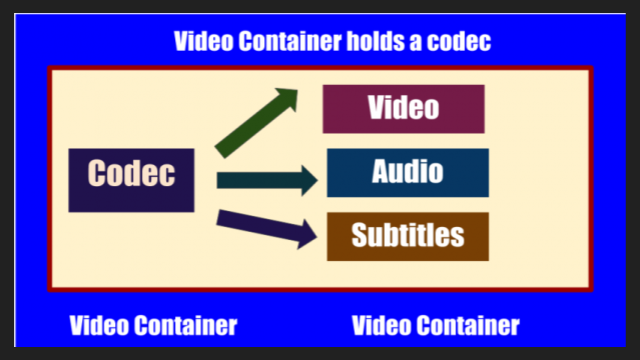
They take data from digital media and compress it (for transmission and storage) or decompress it for viewing and transcoding. Each codec uses a specific method to encode and decode digital data.

Uncompressed video and audio (raw means unprocessed, or often “raw”) require a lot of storage space. Uncompressed 1080i HD video recorded at 50 frames per second consumes up to 410 gigabytes per hour. Audio on CDs, quite out of date by modern standards, plays for around 74 minutes with a 680 megabyte disk capacity. However, eight-channel audio encoded with a 24-bit resolution will require 16 megabits per second, or several gigabytes per hour. Even broadband internet connectivity is sometimes not enough to listen to music in full audio resolution. This is the reason why digital video and audio recordings must be compressed for transmission and storage.

Once the media is compressed within reasonable limits, it must be packaged for shipping and later viewing. For this, container formats are used that act as a “black box” filled with various multimedia formats. Good container formats can accommodate files compressed with different codecs.

Let’s take a look at the types of codecs.

General concept of codecs

If you chat with people who are into video processing or visit the relevant web forums, one way or another, you will find yourself involved in the sometimes heated debate about which codec is better. In fact, the effectiveness of any codec is highly dependent on the compression mode used and the type of video material being processed. Therefore, it is worth considering various codecs and taking into account their specific use and the characteristics of the compressed material. Video codecs are mainly covered below, but the section on format containers also mentions the use of audio codecs.

Capture and archive videos

Most modern consumer electronic devices receive content in some kind of already compressed format. Usually only professional videographers work with uncompressed HD video. Of course, ideally, if possible, in the presence of a large-capacity storage system, the video files should be stored in the original recording format, because this ensures the highest quality. Transcoding a video from one type of compression to another can introduce subtle artifacts that can degrade image quality. (These errors are minimized with good software transcoding.) Many codecs with specific specializations are currently offered. The average user may never find most of them. The next section is dedicated to codecs as compression / decompression systems,

x.264 / MPEG-4 AVC (Advanced Video Coding). This most common codec is used in modern digital video and digital cameras, where shooting results are saved as files on built-in hard drives, memory cards, etc.

MJPEG (Motion JPEG). This is an older format used by some older generation digital cameras and video equipment. It was developed by the same specialists (Joint Picture Experts Group), who participated in the earlier development of the JPEG codec for compressing ordinary still images, hence the name of this codec.

DV and HDV. The DV standard was developed by a consortium of companies from

Digital audio formats

Digital audio formats

DIGITAL AUDIO FORMATS

Digital sound “format” means not only the format of the audio file (which can be determined by its extension), but also, for example, the data presentation format, which depends on the digitization method and parameters. In addition to the computer file formats of various operating systems, there are audio media formats, streaming audio formats, and multi-channel audio formats.

digital audio formats

Furthermore, the “sound” file can be not only an audio recording, but also a project file from an audio editor, DAW, or any other program for working with sound. The project file can contain embedded audio and only links to multimedia data.

A standard MIDI file does not contain any audio data, it is a set of commands that control synthesizers and other devices.

There are also several patch and sample formats that are used on synthesizers.

Presentation format
The format for representing audio data in digital form depends on how the analog-to-digital converter (ADC) quantizes. There are two types of quantization that are commonly used:

pulse code modulation
sigma delta modulation
Bit depth and sampling frequency (quantization) are also indicated for various audio recording and playback devices as the format for representing digital audio (24-bit / 192 kHz; 16-bit / 48 kHz).

Digital audio file formats
There are three groups of file formats:

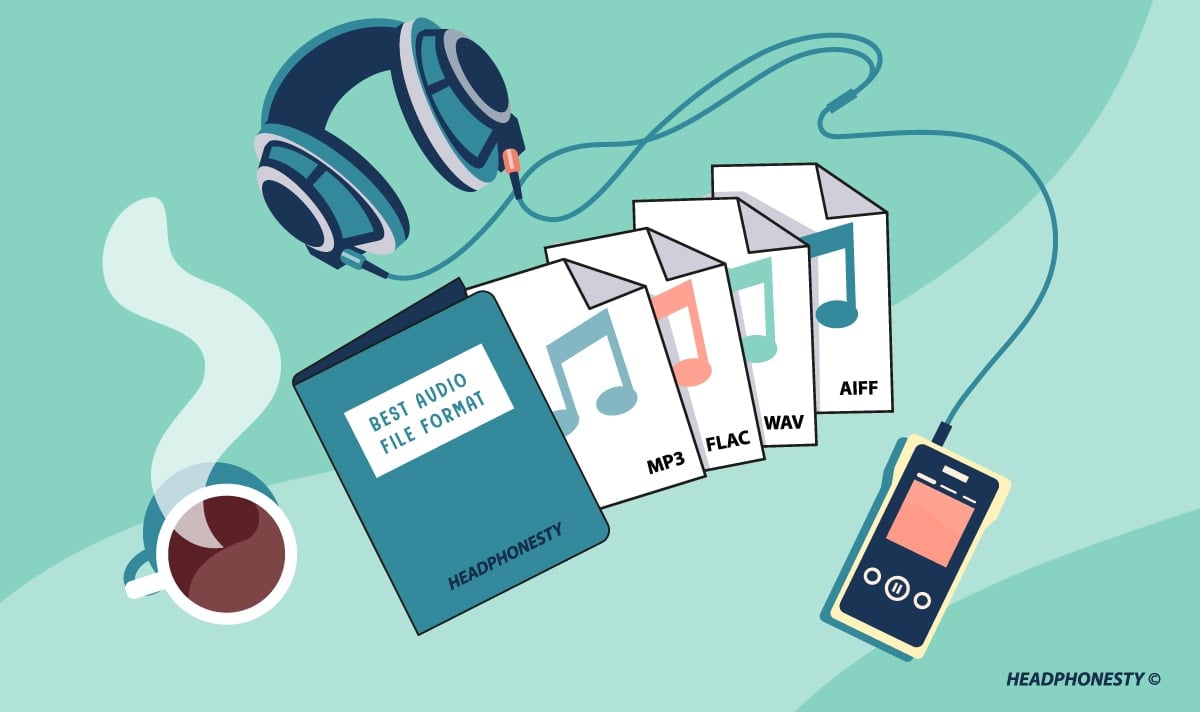
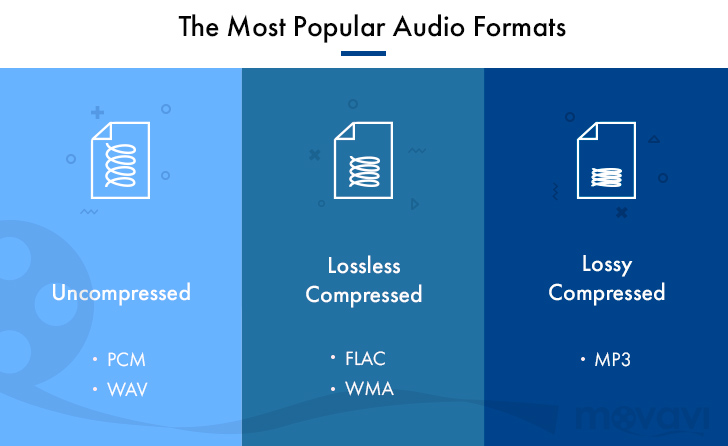
uncompressed audio formats like WAV, AIFF, RAW (raw (unprocessed) measurements without any header or sync)
lossless compressed audio formats (APE, FLAC)
lossy compressed audio formats (MP3, AAC, Ogg, WMA (lossless version available))
Comparison of digital audio formats

Lossless data compression is a data compression method by which encoded data can be recovered unambiguously with bit precision. This type of compression is fundamentally different from lossy data compression.

When lossy compression is used, the decompressed data differs from the original, but the degree of difference is not significant from the point of view of its perception or later use. The advantage of lossy compression is that it allows a higher compression ratio with acceptable distortion. When using lossy compression, be aware that recompression tends to degrade quality. However, if the recompression is done using the same algorithm and without changes to the compressed data, the quality does not change. But in general, when editing the decoded data, it is advisable to save the original uncompressed (or compress without data loss).

Audio formats for sound quality.

Audio formats for sound quality.

Audio Formats

The term “audio” today means everything that is somehow connected with sound. This is processing, playing, mixing and simply listening to audio recordings. Few people know that during their existence, all popular audio formats have undergone significant changes, sometimes for the better, and sometimes even for the worse.

audio formats

The problem is that when the creators tried to improve the recording quality by using the new format, the size of the result increased significantly. Reducing the size of the final file resulted in a significant loss of quality. But this was not always the case.
The first audio format used in computer games.

The first mention of computer sound is associated with the creation of several primitive video games. Then the sound was played back using the speaker of the system. As the software developers of that time did not try, it was impossible to achieve the level of quality that would be compatible with tape and reel recorders. This is what got many developers thinking about how to change the audio format to make the sound more natural and natural. It is this problem that has led to the current competition in the audio market. As a result, the formats used strongly affect the quality of the reproduced material and the configuration of the basic playback parameters.

WAV format

The first full quality of audio formats is associated with this particular format. The WAV extension designation was derived from the English word “wave”, which means wave in Russian. It was this format that became the first audio format to be processed with computer programs at a highly professional level. Files with a WAV extension had the following characteristics:

– depth of sound;
– sampling frequency;
– bit rate, etc.

This format was even compatible with the sound that could be obtained after processing an audio CD with an equalizer and other tools. However, the file size in this case was completely unwarranted. For example, the most common 3 minute long track could be up to 50 megabytes long.

CD

Audio CDs, or more exactly the .cda extension, appeared almost at the same time as the wav format. But unlike files with the wav extension, .cda cannot be edited. But it can be opened in any audio processing program, transcoded and formatted, and saved to your hard drive. Of course, you will not be able to save your changes to the CD.

MP3 codec

After the introduction of the LAME MP3 Encoder codec in the music industry, there was a real revolution in the audio world. Now the audio files are ten times smaller. At maximum compression, the size of a five minute composition rarely exceeds 7MB. This was a significant advance. Also, this extension finally implemented the ability to tweak some features and configure additional parameters, such as ID3 tags. They can contain information about the track title, artist, album, and release date.

Of course, this format immediately became widespread. Almost the entire Internet community uses this universal format. Therefore, we can say that the MP3 format has been a real revolution in the field of computer sound. Today it is one of the most demanded and popular audio formats. Although today it is already being replaced by other audio formats. But we will talk about this a bit later.

AIFF files

There are other types of audio files. This is the so-called aiff format. This format was originally created for use on Macintosh computers. A little later, a transformation occurred, as a result of which it was possible to achieve the compatibility of various audio formats and the possibility of their use on different platforms and operating systems.

OGG format

This audio format is also quite common. It was developed by the specialists of the Vorbis company. Please note that this format has several disadvantages. First of all, despite the small size of the files, using this format places a heavy load on the computer’s system resources.

Also, to work with this audio format, you must use your own decoders and codecs, which may not be installed automatically. For example, those who worked with the FL Studio Producer Edition program had to manually activate the installation file in .inf format to work with this format. Otherwise this app just won’t play OGG files. Despite all these shortcomings, OGG audio files are quite common nowadays and they sound good.

Variety of digital formats.

Variety of digital formats.

audio formats

Surely many users prefer to use their home computer not only as a workhorse, but also as a multimedia center, where they can watch movies or family photos, as well as listen to their favorite music. Although compact digital players or mobile phones are certainly more suitable for listening to musical compositions, but unlike them, a computer can not only play music.

Audio Formats

No matter how big the built-in memory of your music player is, it will most likely be difficult to store your entire music library on it. Plus, you can create, edit, organize, and search for music with your PC. Also, don’t forget that there are around three dozen common digital audio formats today, and most players are far from omnivorous and can only play a few of them.

So why do you need to create so many music formats to store one type of content? The fact is that, in the vast majority of cases, the sound is stored in “compressed” form, since one minute of uncompressed composition occupies about 10 MB on the hard disk. On the one hand, this seems not to be much, but on the other, if you are a music lover and your collection consists of several hundred or even thousands of songs, then it is clear that the sound must be compressed to reduce the space it occupies in electronic media.

Various special algorithms are used to compress music files, which subsequently determine the structure and presentation of the audio data, or so-called digital audio file formats. All audio formats can be divided into three groups: uncompressed audio formats, lossless compression, and lossy compression.

No compression
One of the most widespread formats related to this type is the well-known WAV. The sound of files with this extension is stored without compression or changes. It is true that much more space is required to store uncompressed files and therefore WAV is more widely used only in professional audio and video applications, where the sound should not have a loss of quality before processing. Keeping ordinary musical compositions in this form is unwarranted waste.

To play WAV files, you do not need any special software, as all media players understand this format, including the standard Windows Media audio player built into the Windows system.

Another format used to store uncompressed audio that is worth mentioning is Apple’s development called AIFF (Audio Interchange File Format). As you may have guessed, it is most commonly used on Macintosh computers running Mac OS X.

Lossless compression (lossless)
Lossless compression algorithms for audio files work on the principle of conventional file cabinets. They do not provide the highest level of compression (40 to 60%), while they have virtually no effect on sound quality. It is also worth noting that in this case, the encrypted data can be fully restored to its original form. Therefore, the use of lossless compression is most often used in cases where it is important to preserve the identity of the compressed data with respect to the original.

The most popular audio formats in this group are FLAC (Free Lossless Audio Codec), APE (Monkey’s Audio), WMA (Windows Media Lossless), and ALAC (Apple Lossless Audio Codec). Each has its own pros and cons. For example, the APE codec offers slightly better compression gains, while FLAC is more common. In general, all true music lovers store their music collections in lossless formats, since they do not remove any data from the audio stream and files created with these codecs can be listened to even on high-quality stereos.

To play lossless compressed formats, as a rule, third-party players (except WMA) are used, such as MPlayer, foobar, AIMP, Winamp, VLC and others, since all the necessary codecs are already built into them. Another option is to separately install an additional codec pack (for example, K-Lite), after which you can listen to files in lossless format from almost any audio player.

Lossy compression
This is the most popular group of algorithms that provides the maximum audio compression ratio (up to 10 times or more). However, unlike previous formats, the audio file loses quality here, and how much depends directly on the degree of compression.

To determine the quality of digitized sound, the most commonly used indicator is the bit rate, the speed of the audio stream obtained after compression and measured in kilobits per second (kbps).

MP3, AAC, WAV, FLAC: we talk about all audio file formats

MP3, AAC, WAV, FLAC: we talk about all audio file formats

Audio Formats

As you organize your digital music collection, you can dive into a variety of audio file formats. Almost everyone has heard of MP3, but what is OGG, AIFF, or MQA?

audio file formats

If, after reading the list, you have the suspicion that all these formats for obtaining such chic abbreviations were studied in different universities, we will help to dispel it. This material will clarify the essence of some popular music formats, the difference between them and why it is important to know them.

Regardless of what you’re listening to, low-bitrate MP3, slightly better tracks in AAC, or high-resolution audio in FLAC or WAV, it’s time to find out exactly what you get in each case and how to choose the optimal format.

Let’s evaluate the pros and cons of each.

A quick overview of file formats and codecs

In order not to beat around the bush, we’ll provide a quick guide to all file formats and the differences between them at first. If you want to know more, here is a more detailed description of the differences in size, sound quality and compatibility.

–AAC (not high resolution audio format). Apple’s popular alternative to MP3. Compressed and lossy, but with higher sound quality. Used to download from iTunes and stream from Apple Music.

–AIFF (high resolution). Apple’s alternative to WAV with more complete metadata. It is not an uncompressed and lossy format very popular with large files.

–DSD (high resolution). One-bit format used in Super Audio CD. Available in 2.8 MHz, 5.6 MHz and 11.2 MHz sample rates. Due to the use of a high quality codec, it is not currently used for transmission. Uncompressed format.

–FLAC (high resolution). Lossless compression format supporting high-resolution supporting sample rates and metadata storage; the file size is half that of WAV. Due to the absence of royalties, it is considered the best format for downloading and storing albums in high resolution audio. Its main drawback is the lack of support for Apple devices (and therefore the incompatibility with iTunes).

–MP3 (not high resolution audio format). Popular compression and lossy format with small file size and far from the highest sound quality. Convenient for storing music on smartphones and iPods.

–MQA (high resolution). Compressed format for storing high resolution files in an easier way to transmit. Used by the Tidal Masters service for high resolution audio streaming.

–OGG (not high resolution audio format). He is sometimes known as his full name: Ogg Vorbis. An open source alternative to MP3 and AAC that is not covered by patents. This 320 kbps format is used in Spotify broadcasts.

–WAV (high resolution). The standard format in which all CDs are recorded. Great sound quality, but large files due to lack of compression. Weak support for metadata (versions, song titles and artists).

–WMA Lossless (high resolution). An uncompressed version of Windows Media Audio, the compatibility of which is not often found on smartphones and tablets.

Compressed and uncompressed audio files

Let’s start by looking at three categories into which all audio file formats can be grouped. They are determined by the degree of data compression and the associated loss of sound quality.

If a special algorithm (or codec) was not used to compress the audio in your file, this will lead to a double result: first, there will be no loss of sound quality, and second, your space will soon be exhausted. HDD.

In essence, the uncompressed recording corresponds completely to the original audio file, in which real sound signals are recorded in digital representation.

WAV, AIFF or FLAC: uncompressed formats

WAV and AIFF are the most popular uncompressed audio file formats. Both are based on PCM (Pulse Code Modulation), a known mechanism for directly converting audio to digital format. WAV and AIFF use similar technologies, but the storage methods are slightly different. In these formats, you can record CD-quality files with higher resolution.

The WAV format was developed by Microsoft and IBM, and is therefore used on Windows-based platforms; it is the standard CD recording format.

The AIFF format was created by Apple as an alternative to WAV; And while AIFF files are less common, they provide more comprehensive metadata support, allowing you to store album art, song titles, and the like.

These fortmats take up a lot of space.

What audio formats are there and how are they different?

What audio formats are there and how are they different?

Audio formats

When recording sound, the question arises which audio format to choose for disk storage. Almost all of today’s recording programs offer a multitude of options here, from highly compressed MP3 to uncompressed WAV files.

However, it’s easy to lose track in the jungle of different formats. We clarify what audio formats are available and what are the differences between the formats. FROM MP3 TO WAV, EVERYTHING YOU NEED TO KNOW ABOUT AUDIO FORMATS When you save your audio recordings digitally, they are in a specific format.

Audio Formats

Describes the structure of the file and contains all the audio signals. A distinction is generally made between two variants: uncompressed audio formats, which contain all the data, and compressed. With these, certain information is cut from the file. Compressed music formats can also be divided into lossless and lossy.

Uncompressed formats include the following: PCM (Raw Data) AIFF (Audio Interchange File Format) WAV CDDA (Compact Disc Digital Audio) The main compressed formats are: MP3 WMA (Windows Media Audio) / Lossless WMA AAC (Advanced Audio Coding) FLAC (Free Lossless Audio Codec)

This is what defines lossless formats. Uncompressed audio formats store all data in an audio file, including what the human ear cannot or can barely hear. This takes up a lot of storage space on the data carrier, but the sound quality is excellent. Lossless files are compressed to a certain extent to reduce file size.

However, this is done in such a way that no noticeable loss of quality can be detected. All original data is preserved, only the layout of the data is changed. These are lossy formats. One of the most popular lossy formats is the MP3 music format. Parts of the original file are removed to reduce storage space. Ideally, only information from the file that is not perceptible to humans is removed.

The higher the compression level, the smaller the file, but the quality also suffers with each further reduction. PROCESS YOUR AUDIO FILES EVEN MORE – SAVE STORAGE SPACE AND COMPRESS The most common uncompressed music formats are WAV and AIFF. If you record audio files on a digital audio workstation, you typically export them in one of these two formats and then process them.

If you want to save the data without any loss, but the original data must be preserved, first compress the files with an appropriate audio program in a lossless format, for example as a FLAC file. This takes up less space on the data carrier, so you can save a lot on external media and transmit the data.

Since all the information is still contained in the file and is simply unzipped when you open it, you can process these music files optimally: cutting, adding additional effects or soundtracks, or splitting the file, and all without the quality of the sound is affected. If you want to share your music and audio files, upload them to the network, send them by e-mail or if you want to save many files on a data medium, compression is essential.

You can also do this by using a corresponding audio program, some of which you can download for free from the Internet. Compression reduces the file size to a greater or lesser extent depending on the degree. At the same time, the audio file information that cannot be restored is lost. Be careful when compressing. Bit rates – this is what determines the quality of an audio file

Bit rate describes the amount of data that is processed in the music file per second. The higher the value, the higher the quality of the file. Uncompressed files typically have a bit rate of 1411 kilobytes. For example, if you convert a WAV file to MP3 format, you can set the bit rate, for example, to 192 or 320 Kb per second. THE DIFFERENT AUDIO FORMATS AT A GLANCE

What music format is suitable for what purpose and what are the sound differences?

Here you can find out when you should ideally use which format. Uncompressed formats: PCM, WAV PCM describes the raw data of an audio file. The format allows very high bit rates and therefore very high quality. The data is in the original and the sound corresponds to that of an audio CD. However, the PCM format consumes a lot of memory and cannot be played with all common audio programs that are designed for the MP3 format, for example. Therefore, you need a special program to process the flat file.

MP3? No thanks! Everything you need to know about audio files

WAV Format

In order to get your music with recordJet to all major stores, your audio files must meet some general requirements to be accepted by stores. Here we explain everything about MP3 and other file formats, as well as the requirements that stores have on audio files.

You have probably already noticed that you cannot load tracks as MP3 files into recordJet, but only in a certain WAV format. What seems annoying to some at first, however, has two important reasons: the sound quality and the avoidance of problems.

Audio Formats

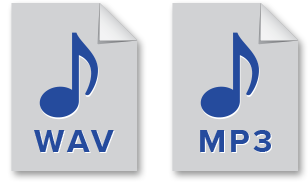
WAV is actually just a container format in which audio data can be stored. The most popular are uncompressed WAV (E) files, which contain so-called PCM raw data and were created with a 16-bit sample size and a 44.1 kHz sample rate. When talking about WAV files (as is also here in this article), we usually mean exactly this variant, the so-called CD quality.

Uncompressed music files have the advantage that all the information in digital files is still available. This means that the music will sound almost as good when played back as the original recording. But at least as good as on a CD.

With a codec like FLAC (Free Lossless Audio Codec), audio files can be losslessly compressed and reduced to about half their original file size without loss of quality. This works in a similar way to packing files in zip format, only the process is specially designed for music.

MP3 (actually MPEG-1 Audio Layer III), on the other hand, is a method for lossy compression of music files. You don’t need to be a professional to hear the quality differences between WAV and highly compressed MP3 without problems. In the case of lossy compression, the file information that is as “insignificant” as possible is removed, so the file size is naturally reduced as well. For example, an audio file can be reduced from 35-60 MB to 3-8 MB by such compression.

Unfortunately, the more a sound file is compressed, the worse the sound quality, as more information is removed from the file. The amount of information from the original file that is still available can normally be read at the so-called bit rate: a song with 320 kbit / s (= kilobits per second) is less compressed and has better sound quality than a song with 192 kbit / s. With MP3 with 320 kbit / s bit rate, even a professional can hardly hear any difference in CD quality.

So why doesn’t recordJet accept MP3 files at high bit rate?
It’s simple: all stores want to receive music in a different file format. The most widespread are the WAV or FLAC formats. But MP3 at various levels of compression are also required. One of the reasons for our decision to trust WAV is that we always want to offer the highest quality possible. If we were to convert your MP3s again, more information from the file would be lost. Even if you hardly hear a difference in quality in the original MP3 compared to the uncompressed version, this may become audible after a new conversion. Also, there is not just one MP3 codec with one parameter. Different codecs produce different results. Therefore, the sound quality may vary despite the same bit rate.

And why then exactly PCM with a bit rate of 1411 kbit / s, a sample size of 16 bits and a sample rate of 44100 Hz?
As already mentioned, this specification is the standard for CD quality. No store has yet demanded higher quality levels, which are entirely possible. In addition, everyone who participates in music production knows this format. For these reasons, and to avoid misunderstandings and problems, we have defined this format as our standard. Also, due to good internet connections, files of this size are rarely a problem for uploading these days. This can certainly take a bit longer, but it should still be within an acceptable range.

Why is it not necessary, or worse yet, to add metadata or tags to the uploaded files?
Unfortunately, the metadata and tags are not 100% clearly defined in WAV files or are used differently by different audio programs. We always provide stores with high quality metadata and possibly tag the audio files, according to their standards.

Better audio formats

You have decided to digitize the music tracks in your audio CD collection by transferring everything to your computer. You started to examine the possibility of converting it into a format that is more convenient for you.

audio formats

With a little experience in this area, however, you would like to get some advice on the subject so you can make the best decision. How do you say? Things are exactly the same and you want to know if I can help you by giving you the best audio formats? Of course yes, that’s exactly what he wanted to do.

audio formats

If you allow me a few minutes of your free time, I can actually use threads and characters to tell you which audio formats are most popular, what strengths and weaknesses they have and what purposes they may be more or less convenient for. Contact. Condition to choose those who you think are actually right for you. To complete the information and give you an even more comprehensive overview of the topic, I will also indicate at the end of the article which tools you can use to carry out various conversion processes. You will find that once you have read this manual, there is no longer any doubt about what to do.

In order to? How about putting the conversation aside and finally getting to the point? Yes? Excellent! So I suggest that you don’t waste any more time and immediately focus on the topic. Make yourself comfortable in front of your trusted computer and read everything below. I am sure you can say that you are happy and satisfied with what you have learned. As always, I hope you enjoy reading.