What is the difference between 128k and 320k music?


Free Download Mp4Gain
picture

What is the difference between 128k and 320k music?

Bit rate comparision

192k is a turning point. Below 192K, the sound quality is relatively damaged, especially the high-frequency part above 16Khz will be cut off.

bitrate

In a nutshell, mp3s above 192k can no longer be listened to with CD sound quality on ordinary home devices, except for Golden Ears and Hifi devices. Of course, these data are not 100% reliable. There are always people on the internet sharing fake mp3 above 192K. In fact, they are converting low bitrate music to high bitrate through software, but the sound quality will not improve. be improved. Windows Media Player compresses it. The resulting mp3 is absolutely wonderful, no matter how high the compressed bitrate is, it will cut perfectly around 16K.

Some time ago, a colleague came across a very troubled client. The mess was said to have been caused by the client asking him to provide song files larger than 100MB-200MB in size. And my colleagues don’t know much about audio formats, so they started endlessly fumbling about FLAC, WAV and audio size. In the end, the colleague did not explain to the client what was going on.

After that, other things happened that made me feel that in the music industry there are too many practitioners around me who have an extremely poor understanding of music and even lack some basic knowledge related to music. I don’t even have the idea to understand, which makes me very sad. It seems that music has only one merchandise attribute, and our practitioners only need to organize the shelves, encode various merchandise, and use the big data of users’ purchase records to recommend merchandise to users, no matter why to users. they like this. features that these products have, and use cold data to provide users with various services.

Therefore, I think it is necessary to write something. I don’t expect practitioners to become people who really love music. I just hope that even if you still think of “her” as a commodity, you can first figure out what you’re selling. and what is..

PS: The content of the first lesson is about media files. Since the relevant content involves a lot of technical stuff, it seems a bit boring, but if you read it carefully, you will find that it is actually very easy to understand, but this basic knowledge can be very helpful.

Bit Rate, Sample Rate, Lossless, MP3, FLAC, APE, 320kb, 192kb, 128kb, 44.1khz, CBR, VBR. Does this bunch of various names make you both familiar and unknown?

The higher the bitrate, the better the sound quality. Lossless music is the highest sound quality, right? So, let’s start with the sound collection.

【Audio composition】

Nowadays, when we talk about audio, everything is digital audio. Digital audio consists of three parts: sample rate, sample precision, and number of sound channels.

Sample Rate: Both the sample rate, which refers to the number of samples per second when recording the sound, expressed in Hertz (Hz).

Sampling Precision: Refers to the dynamic range of the recorded sound, measured in bits (Bit).


Free Download Mp4Gain
picture


Mp4Gain Main Window
picture


Mp4Gain Features
picture


Free Download Mp4Gain
picture

What is a bit rate? Basic bit rate knowledge required for video distribution.

What is a bit rate? Basic bit rate knowledge required for video distribution.

Video Bitrate

Bit rate / bit rate

BitRate


Bit rate is the amount of data per second. Video quality is determined by factors such as “resolution”, “frame rate”, “bit rate” and “codec”. Bit rate is an important factor related to video quality. Therefore, this time, I will explain the basic knowledge of bit rates required for Internet video distribution.

” Table of Contents ”

1. What is a bit rate?
2. Relationship between video bit rate and video image quality
3. Estimated video bit rate
4. Advantages and disadvantages of a high video bit rate
1. What is a bit rate?
The amount of data per second is called the bit rate. Use bps as the unit. This is an abbreviation for Bit Per Second. For example, if it is written as 500 kbps, k is 1,000, which means “the amount of data of 500,000 bits per second.”

There are two types of video bit rates: “video bit rate” and “audio bit rate”. The total value of “video bit rate” and “audio bit rate” is the total bit rate (oval bit rate) of the video file.

Video Bit Rate / Audio Bit Rate

■ Voice bit rate
The audio bit rate is the bit rate associated with the audio in the video file. Generally, the audio bit rate is lower than the video bit rate.
The guideline for the audio bit rate is as follows.

Lossy codecs like MP3, AAC, WMA … 96kbps-128kbps
Sound quality oriented video … 192 to 320 kbps
A codec is a program that encodes (encodes) / decodes (decodes) video and audio data. A lossy codec is a codec that dilutes the data and reduces its weight without affecting it. For more information on codecs, see the following.

[Reference article] What is a codec? Basic knowledge of the codecs required for video distribution.
■ Video bit rate
The video bit rate is the bit rate of the video in the video file. Generally, the video bit rate value is higher than the audio bit rate. The appropriate video bit rate will differ depending on the size of the resolution and the content of the video, such as amount of movement / small amount of movement.

The guideline for video bit rate is explained in “3. Guideline for bit rate”, but the value varies depending on the image quality you want to deliver, such as 500 kps to 70 Mbps. Since the standard for audio is “approximately 96 kbps to 128 kbps”, the video bit rate occupies most of the bit rate of the entire video file.

It can be said that the higher the value of the video bitrate, the better the image quality, but that does not mean that “the higher the value, the better”. When displayed at a small resolution, the roughness is not as noticeable even if the bit rate is reduced. On the contrary, even if you encode at a high bit rate, you will not notice the difference in image quality, and in many cases the file size will only increase.

From now on, we will focus on the bitrate of the video.

What is the encryption mechanism? Part 2

What is the encryption mechanism? Part 2

Video Bitrate

However, in the case of moving images, the quality of the image at the time of encoding will vary depending on whether the video material has a lot of movement or the video material has little movement, even if the bit rate is the same. Therefore, it is necessary to thoroughly judge and encode not only the bit rate, but also the frame rate and keyframe settings, which will be explained later, according to the video material. I hope you understand that “there is a relationship between resolution and proper bit rate” as a determining factor for high definition.

videro bit rate

Point 2: Increase the frame rate if movement is important and lower the frame rate if image quality is important.
While the frame rate (number of frames) is set at 29.97 fps for televisions and 24 fps for movies, the frame rate is freely configurable for Internet video encoding. A video is a collection of continuous images (frames) like a flip book. The more frames per second, the smoother the movement.

In video encoding, the bit rate per second is fixed, so if you increase the frame rate, the number of images in the flip book will increase and the movement will be smoother, but the amount of data allocated per frame will decrease, so the image quality will be better to fall.
On the other hand, if you reduce the number of frames, the number of images in the flip book will decrease and the smoothness of the movement will be a little slower, but the image quality will improve because a large amount of data will be allocated to each frame. .

If you want to emphasize the smoothness of motion in a video with a lot of motion, increase the frame rate (video demo 1). On the other hand, if the video has little movement, it is not necessary to increase the number of frames as much (depending on the degree), so it is effective to lower the frame rate and give priority to improving the image quality

Point 3: insert “keyframes” at short intervals for moving images
A keyframe is a frame that exists as a single still image (an image that is not compressed between frames) and is the starting point for difference information. Depending on the encoder settings, the keyframes are inserted when there is a scene change and the difference information is inserted at regular intervals, such as XX frames and once every XX seconds.

■ Keyframes for moving images
In a moving image, things move or change significantly in a short time. Therefore, inserting keyframes at short intervals improves the reproducibility of small movements.
There is also the advantage that the search is smoother for images with many keyframes. The reason is that the search is based on keyframes, so the more keyframes you have, the easier it is to stop at the target scene. If the position where the search stops is not a keyframe but a difference information frame, the information is fetched to a nearby keyframe, but that time is short.
However, if you increase the number of keyframes too much, the keyframe bit rate will be taken over and the overall video quality will deteriorate, so be careful.
For moving images, the keyframe is approximately once every 3 seconds.

■ Keyframes for images with little movement
Since there is little difference information in a video with little motion, you won’t notice much difference in change even if there are few keyframes. However, if you insert keyframes for too long, search may not work properly and playback may take a long time to start. This is the opposite of the case where there are many keyframes, and if the rewind position is far from the keyframes, it will take time to read.
For those with little movement, the guideline for keyframes is approximately once every 6 to 8 seconds.

So far, “What is the encoding mechanism? Five points to consider for encoding HD video [Part 1]”, “Understanding the appropriate bit rate for the resolution you want to distribute”, motion oriented or image quality I explained three points how to change the “frame rate” and “how to insert keyframes” depending on whether it is important. In [Part 2], we will explain “the advantages and disadvantages of bit rate settings

What is the encryption mechanism?

What is the encryption mechanism?

Video Bitrate

5 points to consider for HD video encoding

Video Bit Rate

Encode

The image quality of Internet videos is almost proportional to the bit rate. However, if the bit rate increases unnecessarily, the file size will increase. “Keep bit rate low”, “Reduce file size” and “Reduce load time” are linked, and there is nothing to say if you can encode in high definition while keeping the bit rate low.
Also, at the beginning, I wrote that “image quality is almost proportional to bit rate”, but I think some of you may have experienced that “I increased the bit rate and encoded, but I am not satisfied with the quality of the image. “So, this time, I will explain five points that are often used to do high definition video encoding.

Encoding Mechanism
First, I will briefly explain the encoding mechanism.
An image is a collection of continuous images (frames), and by changing this in a short time like a flip book, it appears that you are visually moving. Japanese television images are 29.97 frames per second (short for 29.97 fps / frame per second) and most movies and animations are standard 24 fps. Since a large number of frames are required for video, the amount of data is also huge. Therefore, data compression is indispensable for distributing videos on the Internet.

When coding

“Prediction in frame” that compresses data within a frame
“Prediction between frames” that compresses data into consecutive frames
The information is reduced to the extent that it does not affect the visual sense and the data is compressed.

■ What is in-frame prediction?
There are various methodologies for data compression, so I will skip the details here, but the basic idea of ​​within-frame prediction is to divide a frame into small blocks called cells and the colors adjacent to each other in the block. they are the same or similar, they are compressed together.
For example, if there is information “blue blue blue blue blue blue blue blue blue blue red red yellow yellow yellow” information in the divided block, the amount of data can be reduced by combining this with “blue 11, red 2, yellow 3”. It’s an image.

An example of data compression in in-frame prediction (image)

■ What is cross-frame prediction?
However, in the case of video with a time axis, the number of frames is large, so there is a limit to the overall weight reduction based solely on the prediction within the frame. On the other hand, in the prediction between frames, based on the idea that “the contents are similar before and after the consecutive frames”, the cells that do not change from the previous frame reduce the amount of data by reusing information, and the cells that change is converted to data as difference information.

Point 1: learn a suitable bit rate guideline for resolution

The above three are excerpts of the same 640x360px image, but the file sizes are different at 1MB, 250KB, and 50KB. The image quality of 250 kB is lower than that of 1 MB and is much coarser at 50 kB. This is because the amount of data allocated per pixel is reduced, resulting in poor image quality.

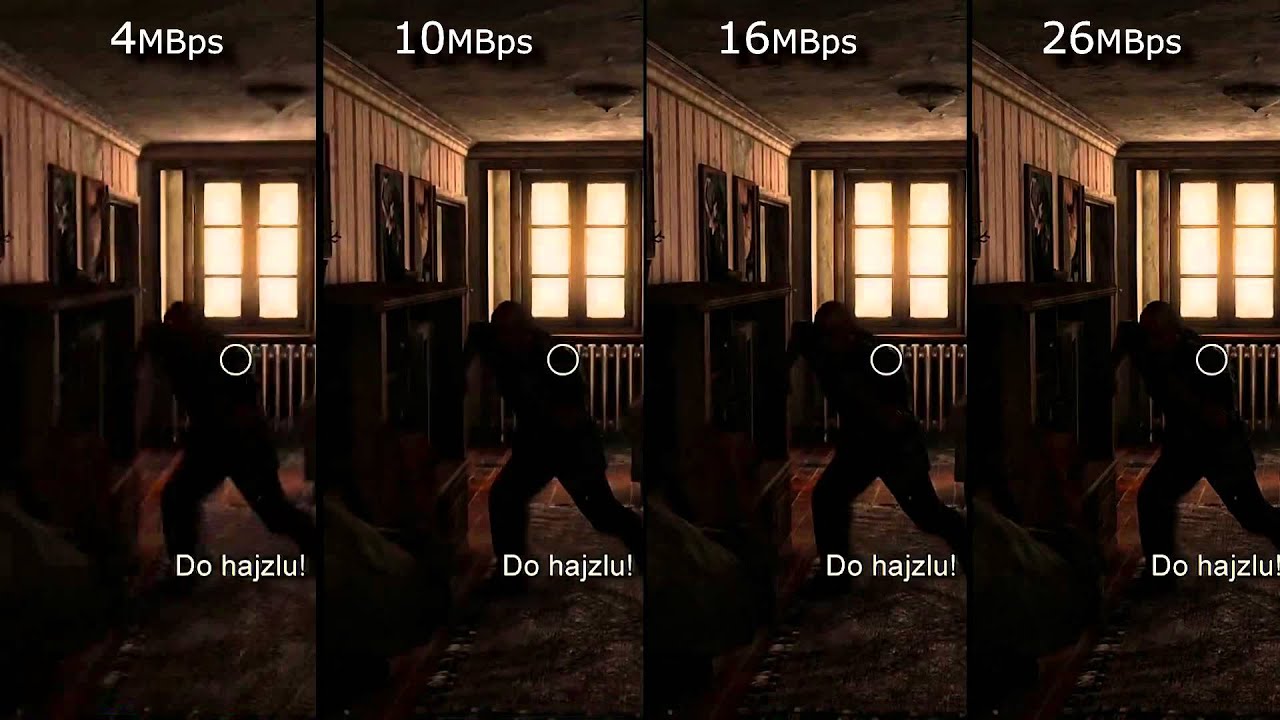
The same phenomenon can be said of the videos. Bit rate is the amount of data allocated per second and affects the image quality of the video. If you want to view a video on a large screen, such as viewing it full screen on a computer or TV monitor, you need a sufficient bit rate according to the resolution. On the other hand, when displayed at a small resolution, the roughness is not as noticeable even if the bit rate is reduced. On the contrary, even if you encode at a high bit rate, you will not notice the difference in image quality, and in many cases the file size will only increase.

What is video bitrate, frame rate, and aspect ratio?

What is video bitrate, frame rate, and aspect ratio?

What is a video file?
Video, like cinema itself, is a rapid alternation of images. How fast is it? For a human, there should be 24 images in one second. In this case, images that change rapidly become moving. Film is based on this and now video. Also, each image has several properties. Which? They are wide and tall. Also, for video, these values ​​are measured in points. So many points of width and so many points of height.

video

What does the video consist of

If we zoom in on any frame in our video, then we can see the individual squares that make up our image. Each of these squares was called “Pixel”, which comes from the English “Picture element”, that is, a picture element.

pixels

Pixels on screen

So when we look at the file properties, or the project properties, we see the video formats, which indicate how much the frame is and how wide it is.

video aspect ratio

In the image we can see that the width of the frame is 1920 pixels, and its height is 1080. It is clear that the more pixels in our frames, the more details can be accommodated. And consequently, the better the image will be. At the same time, do not forget that the frame rate must be at least 24 frames per second.

Older video formats, such as the PAL standard, were 720×576 pixels. Modern HD or Full HD, already 1920×1080. Well the latest 4K format is already 4096×2304 pixels. That is, the further, the better quality is achieved.

See Also: Video Codecs, Video Formats – What Does All This Mean?
Video aspect ratio.
This is also a parameter that for many is almost a thing of the past. The fact is, there used to be a TV format that had a 4/3 aspect ratio, and a widescreen format, mainly for watching movies, that had a 16/9 aspect ratio.

Monitor with 4×3 aspect ratio

Now the television format is a thing of the past (almost) and only the wide format remains

Monitor with a 16 x 9 aspect ratio
What is the video bit rate?
Like I said, each frame is made up of a large number of pixels. If we try to put this amount on our hard drive, it will take up too much space. Strictly speaking, the arithmetic here is simple. Let’s count.

One frame – 1920×1080 = 2,073,600, that is, two megabytes (actually, this is not entirely true, but I’ll simplify it a bit)

That is, we now know that a painting we have weighs 2 mb. It seems a bit, but let’s keep counting.

One second. A second must have at least 24 frames. What do we get? 24×2 = 48 mb.

One minute. 48×60 = 2880 mb. I mean, think about it. In one minute, almost 3 gig! Well, how long will an hour take then?

One hour 2880×60 = 172800 mb. In other words, one hour of movie will take up 172 gigabytes of memory.

Well, since such a thing will not work, smart people decided: we must squeeze. We need to compress the video so that we can put everything on a computer, on a phone. What can be seen on the Internet, etc. And that is why there are various video formats. Since each format has its own rules for video compression.

See also: Do ​​you know what a chroma key is? Learn the secrets of working with chroma key in 5 minutes
But here we come to the concept of bitrate.

Bitrate: read / write speed. You are recording a video. The video camera matrix takes measurements of light, that is, it measures pixels. Transfer them to a USB flash drive or SSD. The speed of this transmission is the bit rate.

Next, we watch the video. At this time, the data is read from memory and transferred to the monitor / screen. Again, we are faced with a certain data rate.

But in video, the role of the bitrate value is somewhat different. Video Bit Rate: The video compression rate. When recording video from the matrix, the signal is immediately encoded and compressed. The more the signal is compressed, the less space it occupies, but at the same time, and the lower the quality.

What is a video codec?
Now, let’s move on to the next concept: video codec. When I said that if you lower the bitrate, the video quality will be lower.

What is the bit rate?

What is the bit rate?

Find a Video's Bitrate in Windows

The bit rate, or as they also say the width of the stream, is the amount of data transmitted or processed in 1 second. The concept mainly applies to multimedia content, for example, video bit rate is nothing more than the amount of video information that is displayed on the screen in one second. To measure the bit rate, the designation “Kbit / s (kbps)” is used, that is, kilobits per second, less frequently Mbit / s, and so on. The more information that is transmitted during a specific period of time, the higher the quality of the image.

Video Bitrate

When people say “low bit rate video” they are generally referring to low quality video. Blur, opacity, and pixelation are characteristic features of such video, while high-bit-rate video has a detailed image with a rich color gamut. Like video, audio also comes with low and high bit rates. Music with a low bit rate loses in the frequency range, words and chords become less distinguishable, and itself takes on an unnatural sound, as if it were an electronic sound.

Bit rate types

It is not enough to understand what the video or audio bit rate is. To successfully work on programs for editing and converting multimedia content, you need to know what types of bit rates exist. These are constant, variable, and average, and each of them can be used in a specific situation.

Constant bit rate

Constant refers to a bit rate that does not change throughout the file, providing an accurate estimate of the size of the output material. On the other hand, it is not very suitable for multimedia with dynamically variable audio and video streams, as it does not provide an optimal balance of size and quality. Constant bit rate is mainly used at home level, as well as when processing files with relatively constant picture and sound characteristics.

Variable bit rate

In files with variable bitrate, the latter is changed by the codec for each frame according to its characteristics. For example, in frames that are not very informative and easy to encode, the video bit rate is lowered, which saves space, and this saving can differ significantly. Variable bit rate technology is often used to achieve the best quality / size ratio. The downside of this method is the unpredictability of the final size of the media file.

Average bit rate

A more flexible option is the averaged bitrate, which is a hybrid of the first and second types. Unlike Variable Bitrate, by choosing Average Bitrate the codec can only work within the user defined range. Professionals use this method when creating large projects, allowing you to achieve high-quality encoding with a relatively small file size. The precision of calculating the size is much higher.

How to find out the bitrate of the file

Novice users are often interested in how to find out the video bit rate and if special programs are needed for this. With few exceptions, it is not necessary to use third-party tools for these purposes, since the bit rate of the file can be obtained by the operating system itself. Right-click on the video file and select “Properties” from the menu. Then switch to the “Details” tab in the window that opens and look for the item “Data transfer rate”. This will be the bitrate of the video. In the case of audio files, the item will be named “Bitrate”. If the required information is missing from the properties, for example in the case of MKV files, use the MediaInfo utility.

What bit rate value to set

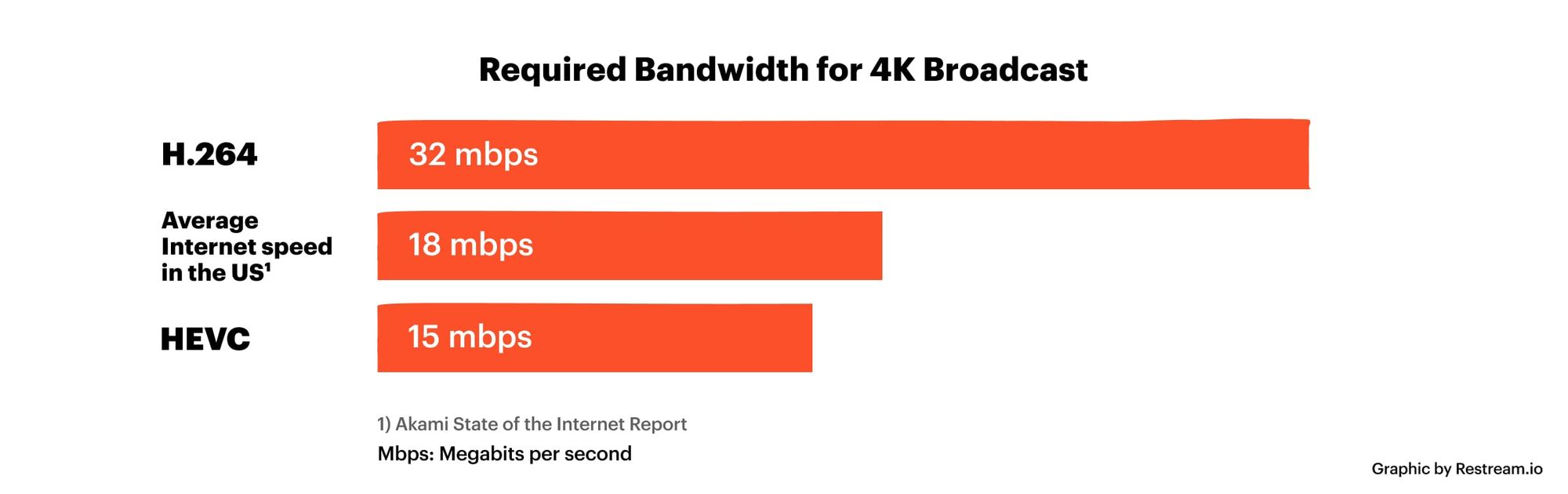
But much more relevant is the question of what bit rate should be set for a video when creating or converting it. It will not be possible to answer it unequivocally, it all depends on the situation and the purpose of the content. If you focus on average values, you should configure 2.5-5 Mbit / s for video and approximately 192 kbit / s for audio. When choosing, you should also consider the video format. Therefore, for 1920 x 1080 SDR video, the bit rate is better to set 8 and 12 mbps (60 frames / s), and for HDR video with the same resolution – 10 and 15 mbps, respectively.

What is the bit rate?

Video Bitrate

Bit rate measures the speed at which information can be transmitted between two locations. The standard unit for this speed is “bits per second”, but a kilo or mega value is often prepended to indicate the high speeds of modern digital technology. Communication technology measures speed as a function of bit rate, especially on the Internet. The transfer rate indicates how fast the data can be downloaded. This measure is also widely used to describe audio and video. higher rates mean higher quality.

Video bitrates

In its simplest form, bit rate describes how many bits per second are transmitted between two different locations. The higher the rate, the faster information can be exchanged between them. For this reason, the bit rate can be particularly important for communication technologies such as broadband, as it defines how quickly a user can download or upload information.

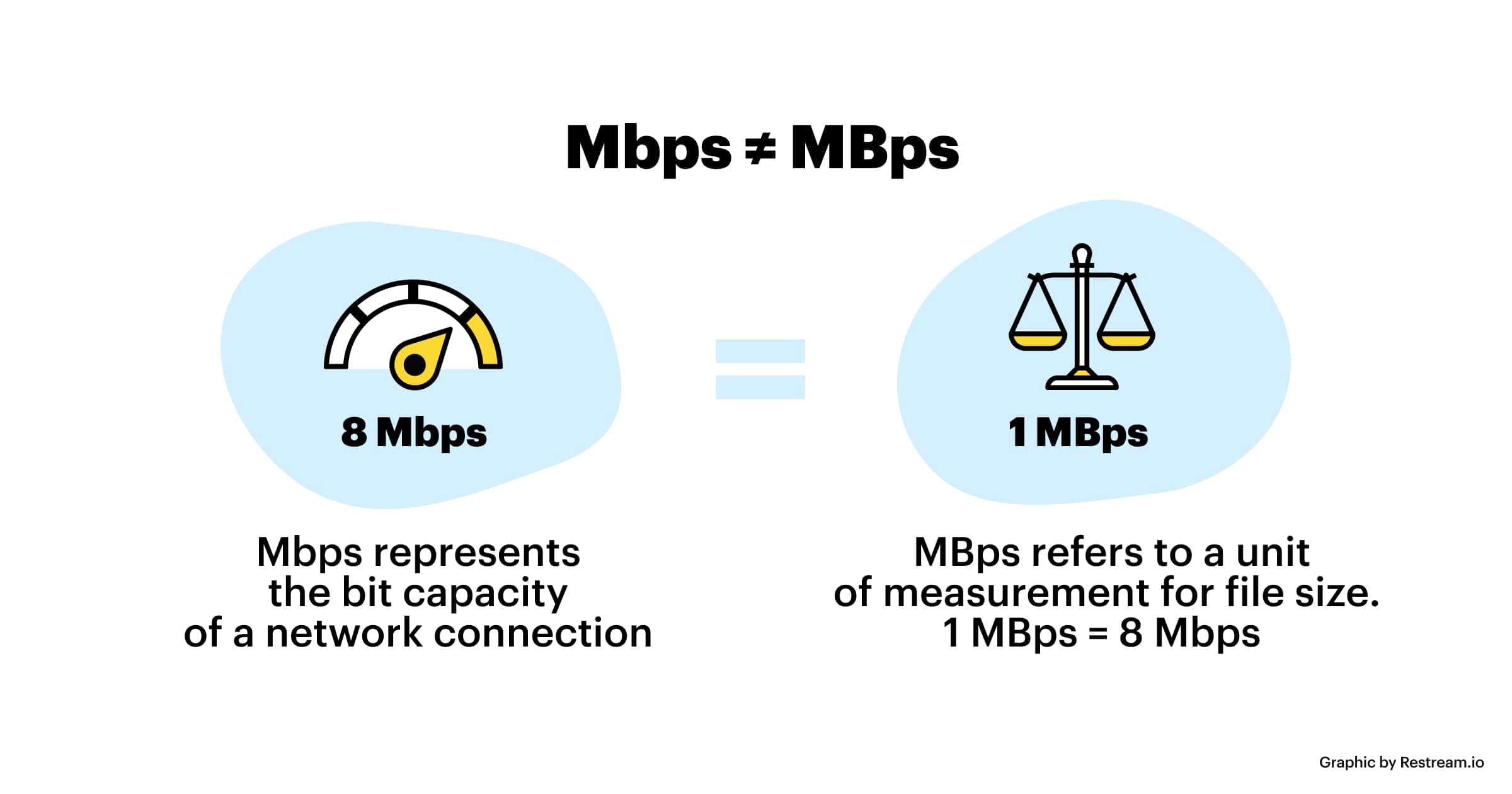
The standard unit for bit rate is bits per second (bps). However, this measurement is often too small to be practical in modern communication technology, as millions of bits can be transmitted per second. To solve this problem, the device is usually prefixed by a different letter indicating its size. For example, kbit / s means kilobits per second or 1000 bits per second. Megabits per second are written as Mbit / s and represent millions of bits per second.

Bit rate is an important measure for a large number of different areas of computing. Broadband, for example, is often specified as a certain number of Mbit / s, with speeds of around 2 Mbit / s being common. Fiber broadband, which is much faster, can deliver speeds of up to 5 Mbps. This measure also describes the speed of mobile connections such as 3G and Bluetooth.

Audio and video quality are commonly reported in terms of bit rate, with higher rates indicating a higher quality picture or sound. In multimedia, this metric is a quick way to show how much information is stored in each second of recording, so higher rates lead to increased quality. The bit rate can depend on a variety of factors, including whether the information has been compressed.

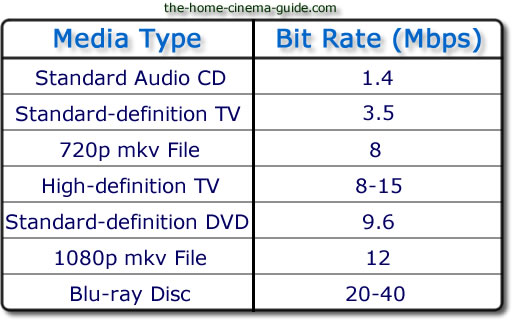
The standard bit rate for audio is between 100 and 160 kbit / s, while higher quality recordings can reach up to 320 kbit / s. Video speeds can be significantly higher for Blu-ray discs with speeds up to 40 Mbps. Standard DVDs are only about 9 Mbit / s, so there is a difference in quality.