Advantages and disadvantages of MP3 technology


Free Download Mp4Gain
picture

Advantages and disadvantages of MP3 technology

In the Internet age, MP3 became a de facto standard for digital audio files. With the popular Napster peer-to-peer application, music lovers can exchange MP3 files so they can get songs without paying for them. This article has been written to highlight the advantages and disadvantages of MP3, as well as to help you decide if you want to convert your existing music files in some other format to MP3 or not.

Advantages of MP3

The advantage of MP3 is its high fidelity. The quality of an MP3 file is determined by its bit rate. The bit rate is measured in kilobits per second. The bit rate of an MP3 file can range from 8 kbps to 320 kbps. You should save your songs at 160kbps if they don’t like it very much and don’t put them at the top of the list of MP3 players. Keep your songs at 192kbps if you like them a little. Use 256kbps for the songs you like. And using 320kbps for your all-time favorite songs. Anyway, even a 320kbps MP3 doesn’t sound as good as the song’s WAV file version. But a 320kbps MP3 takes up four times less space than a WAV file. To use an analogy, an MP3 file is a WAV file, which is a JPEG image to a BMP image.

The second advantage is that it can be played by many types of devices, such as CD players and Apple’s iPod. You can also play MP3 files with multimedia players like Winamp, Windows Media Player or QuickTime. The third advantage of MP3 ID3 tags. The ID3 tag of an MP3 file stores the artist name, song title, year, and genre. You can also create your own playlists.

Another benefit of MP3 is that encoding is easy. It’s easy to rip audio CDs, and as easy as burning custom MP3 CD-R files. The encoding speed is also very fast, it also depends on the speed of the CD drive. It takes very little time to produce MP3 files. You can use lossless audio compression if you have a lot of free disk space and lossy audio compression if you have little free disk space. MP3 LAME encoders, as they are free and open source, so that everyone can contribute to their development.

Another point in favor of MP3 is that the distribution is simple. MP3 files can be downloaded through HTTP or FTP sites. You can also distribute MP3 files through portable storage devices, such as USB flash drives. You can also buy MP3s from online music stores like iTunes and eMusic.

You can also use a server to transmit these files. The MP3 stream uses a playlist format, such as M3U (meaning MP3 URL) or PLS. MP3 Streaming is also used by Internet radio stations. You can embed MP3 streams with the help of a Flash player. You can have different rates of dial-up and broadband connections. MP3 audio is not saved on the hard disk.

Problems with MP3

A downside to MP3 is that it takes up quite a lot of storage space. Since an MP3 file usually takes up to 5 megabytes (MB) of disk space, the number of files that can be stored is limited. Also, the relatively large size of an MP3 file makes downloading the file slow if you have a slow Internet connection.

Another problem is that the song may skip in random places. This occurs especially if you have a slow computer and simultaneously with several programs that are hogging the processor. It is not technically free. You will also need an MP3 decoder if you want to convert audio from MP3 format to WAV format. The MP3 format has very little security available. For example, people using the Morpheus file sharing service had their computers accessible by hackers.

Another limitation is that this file is not the highest format fidelity for audio files. Other audio formats, such as Ogg Vorbis and Advanced Audio Coding (AAC), are superior to MP3 in terms of quality. AAC is the format used in Apple iTunes player. However, MP3 is still the most popular audio format in the world.

The advantages and disadvantages of MP3, which I have listed, will help you make an appropriate decision before going for music download next time.


Free Download Mp4Gain
picture


Mp4Gain Main Window
picture


Mp4Gain Features
picture


Free Download Mp4Gain
picture

How is an mp3 analyzed inside?

How is an mp3 analyzed inside?

MP3 is the acronym for MPEG 1 Layer 3 and is a lossy digital audio format developed by MPEG (Moving Picture Experts Group) in conjunction with the Franunhofer Institute of Technology to include it as an audio format for the MPEG-video format. 1. It is currently an ISO (International Organization for Standardization) standard. The reason it has become so popular is that it allows for high sound quality in very little storage space: About 650 songs can be recorded on a 650MB CDROM, in instead of the 15 that we could store following the format of traditional CD-Audio. Furthermore, it is possible to adjust the quality of the output file by adjusting the bitrate (sampling rate and number of bits per sample), which will be proportional to the size of the output file. Thanks to its small size, high quality and versatility, it became a standard for streaming.

It was said at the beginning that MP3 is a lossy algorithm, this means that the original and encoded sound are not exactly the same. For this, the MP3 takes advantage of the “deficiencies” of the human ear, specifically 3 of them:

Limits of hearing in frequency: The human ear is only capable of hearing frequencies that are approximately between 20 and 20,000 KHz, with which the rest are filtered and discarded as they would not add relevant information to the encoded signal. Also, the closer you are to the 2-4 Khz range (and harder to hear as the frequency gets closer to the extremes of hearing), the more audible it will be.
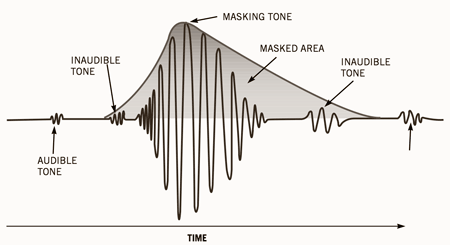
Masking effect: When 2 signals of similar frequency overlap, human hatred is only able to hear the one with the highest power (volume), therefore, the rest can be eliminated without appreciable loss of quality.
Stereo redundancy: Sometimes there is redundancy between the 2 channels and, furthermore, below a certain frequency, the human ear is not able to distinguish the directionality of the sound with which a single channel can be encoded and add to the other certain complementary information to not lose the spatial sensation of the other channel.
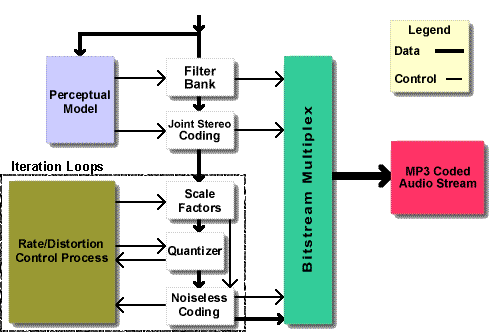
To carry out the three previous proposals, a system based on subbands is used in which the signal is filtered using several filters in order to have the signal separated into sub-signals, each covering a frequency range. Each of these bands is compared to a psychoacoustic model that determines which bands are important and which can be removed.

Specifically, a hybrid polyphase / MDCT (Modified Discrete Cosine Transform) filter bank is used: A filter bank is a set of band-pass filters that aim to separate the original signal into several frequency bands; A multiphase / MDCT hybrid filter bank is nothing more than a normal filter bank together with a block capable of doing the discrete cosine transform (MDCT).

The choice of which bands are maintained and which are removed is made by calculating the masking threshold, that is, it analyzes each audio sub-signal and calculates the amount of noise that can be input (signal is replaced by noise to save storage space) in function of the frequency, taking into account that a frequency masks signals of a higher frequency than yours rather than lower, without being noticeable to the human ear.

The following figure outlines the process described above:

The following figure represents the structure of an mp3 file:

As can be seen, an Mp3 file is made up of different frames which in turn are made up of an Mp3 header and MP3 data. Each of the frames is independent, that is, a person can cut the frames of an MP3 file and then play them back. The graph shows that the header consists of a sync word that is used to indicate the beginning of a valid frame. Following are a series of bits that indicate that the analyzed file is a standard MPEG file and whether or not it uses layer 3.

MP3 undoubtedly owes its success to Internet music downloads and portable audio players capable of playing the format. First, Discman compatible with MP3 were born, which allowed transporting 175 songs per cd instead of the usual 6. Subsequently, MP3 players based on a (small back then) flash memory were born. These had the advantage of being much smaller and lighter than portable CD players, but with the initial disadvantage that flash memory was small and expensive. Initially these devices had 64 or 128 MB memory, which allowed them to store between 16 and 32 songs. Currently these devices are sold with a memory of 1,2,4 or even 8GB. This allows them to store between 256 (for the 1Gb model) and 2048 (for the 8GB model)

How an MP3 compresses music

We all know that MP3 was the audio format that quickly became popular and the main reason is because it took up much less space than the WAV format that has no compression and therefore was very difficult to transfer via internet from one computer to another.

And then it was when the MP3 made its appearance because it had a very good sound and yet it took between 7 and 10 times less space than the original file.

We all know that this caused people to easily exchange music files online and this changed even the way the music industry works thereafter.

But although we all know that MP3 takes up less space, it is very few people who understand that in the first place in MP3 what it does is compress the music. But it also uses some other procedures to make music take up less disk space, Today we will briefly explain how this mp3 performs this compression.

Remove inaudible sounds

One of the first things MP3 does is to analyze the music file and eliminate all those frequencies that are not audible to the human ear but nevertheless occupy a space in the original file. Then the MP3 saves a lot of space without losing quality by eliminating sound frequencies that the human ear cannot hear.

Eliminate redundancy

Another of the mechanics that is used for an mp3 saves space is to eliminate redundant sounds. And with that we understand sounds that sound very similar and basically occupy the same Soundtracks. Therefore, the ear will only perceive some. And then the MP3 eliminates those redundant sounds that will not be heard by the human ear.

Sound masking

Acoustics and audio specialists have long discovered that when the human ear perceives more than one sound simultaneously it is very likely that one of them masks the others.

The Sound perception produces that when a person perceives 2 sounds of different intensity at the same time the weakest sound, with less volume, is inaudible to the one who is listening. This, as we indicated earlier, is what is called the sound perception and the MP3 is based a lot on the sound perception to be able to eliminate sounds under this principle of sound masking.

In other words, in MP3 you decide which sound will mask others and then eliminate these others.

It should be noted that when one decides if the MP3 encodes at 128 kilo bytes per second or at 320 kbs it is modifying the amount of sounds that will be eliminated in the masking. Well, at 320 to eliminate very few sounds and as I lowered the number of kbs it will eliminate more sounds which the person can produce if he can distinguish a difference between the original audio file and the encoded file.

How is an mp3 file compressed?

How is an mp3 file compressed?

The MP3 file takes up less space but loses information from the original recording, so it is a lossy compression. The question is, what is the algorithm for scrapping those details of music? How are they removed from the recording? Don’t they really matter and we don’t perceive those losses?

MP3 and auditory masking

The algorithm for MP3 compression eliminates details of the original music based on the phenomenon of the sound masking of our sense of hearing, a psychoacoustic phenomenon so daily that surely many will not have paid attention before, and that it is necessary to know to understand the MP3 .

Imagine that we are talking to someone on the street, a car passes by and suddenly we stop hearing our interlocutor. Why have we stopped hearing the other person? If we had recorded this situation with a microphone we would see that both sounds, the voice and the car, would have been perfectly recorded …

This phenomenon occurs because there are situations in which our sense of hearing gives prominence to one sound and ignores another if both are simultaneous, what is called sound masking, and that depends on well-defined causes that can be summarized as follows.

A sound can mask another when they reach the ear simultaneously depending on their relative frequencies and volumes. As seen in the figure, at the loudest sound our ear creates a new limit of hearing or masking at that time. If another simultaneous sound is under that frequency environment, we will not perceive it.

Temporary masking

When there is a sound of sufficient power to be masking, there are moments before and after that we will not perceive other sounds, depending on how closely they are in time and their relative volume, with the behavior represented in the figure. As you can see, a sound can be masked whether it occurs immediately after the masking, or if it occurs before!

The MP3 compression algorithm

When we perform an MP3 compression, the coding algorithm divides the music into a multitude of short-lived fragments. Each of these fragments are analyzed individually in many frequency bands, to be able to detect if in any of them there is any masking sound that is masking sounds of the other bands of the fragment, and therefore are inaudible or expendable. In that case, what you will do is encode that fragment with fewer bits than the original fragment, so resolution of the more subtle details (those details that have been dispensable) will be lost and the background noise of the fragment will increase.

The amount of bit reduction for that fragment will depend on the quality sought in the encoding. If we set it to high quality, it will reduce the resolution of the fragment only just enough so that the new background noise is still masked by the masking sound that was detected in that fragment.

Therefore, and according to the masking theory, no change will be perceived after the resolution reduction: neither by the loss of the details that were already originally masked, nor by the new background noise, which will remain imperceptible by also maintaining below that masking sound detected.

After this process, the fragment could have been encoded with fewer bits, occupying less information than the original. Once this attempt at bit reduction has been repeated with all the multitude of fragments into which the original file had been divided, the song is reconstructed and a compressed file is obtained that will now take up less space.

In addition to this masking-based coding, finally an “Huffman” arithmetic coding is applied to the resulting bits, similar to that performed in a “.zip” compression. This process will not entail additional quality losses.

Sound quality in MP3 files

The sound quality of the compression depends on the size that we want the compressed song to occupy, therefore the bitrate we indicate when performing the compression. If we choose a high bitrate, the algorithm will not be forced to eliminate much information, so it will eliminate really inaudible details according to the masking curves. But if we want the file to take up less space and choose a lower bitrate, the algorithm will have to be more drastic overcoming the most imperceptible masking curves, and it will be inevitable that the loss of information will be noticed.

For example, in the most common 128 kbps MP3s a few years ago, the quality is significantly lower than the original for most people, if a direct comparison is made. On the other hand, an MP3 file with the maximum bitrate of 320 kbps hardly loses information, and is practically indistinguishable from the original in most cases.

HOW MP3 COMPRESSION WORKS

Everyone knows MP3 music files. This format occupies less space than the original audio file since when converting to MP3, a compression algorithm is applied that analyzes the original sound and eliminates some details of the recording that are considered expendable, which supposedly our ear was never going to perceive.

The MP3 file takes up less space but loses information from the original recording, so it is a lossy compression. The question is, what is the algorithm for scrapping those details of music? How are they removed from the recording? Don’t they really matter and we don’t perceive those losses?

MP3 and auditory masking

The algorithm for MP3 compression eliminates details of the original music based on the phenomenon of the sound masking of our sense of hearing, a psychoacoustic phenomenon so daily that surely many will not have paid attention before, and that it is necessary to know to understand the MP3 .

Imagine that we are talking to someone on the street, a car passes by and suddenly we stop hearing our interlocutor. Why have we stopped hearing the other person? If we had recorded this situation with a microphone we would see that both sounds, the voice and the car, would have been perfectly recorded …

This phenomenon occurs because there are situations in which our sense of hearing gives prominence to one sound and ignores another if both are simultaneous, what is called sound masking, and that depends on well-defined causes that can be summarized as follows.

Frequency masking

Sound masking

A sound can mask another when they reach the ear simultaneously depending on their relative frequencies and volumes. As seen in the figure, at the loudest sound our ear creates a new limit of hearing or masking at that time. If another simultaneous sound is under that frequency environment, we will not perceive it.

Temporary masking

When there is a sound of sufficient power to be masking, there are moments before and after that we will not perceive other sounds, depending on how closely they are in time and their relative volume, with the behavior represented in the figure. As you can see, a sound can be masked whether it occurs immediately after the masking, or if it occurs before!

The MP3 compression algorithm

MP3 encoding

When we perform an MP3 compression, the coding algorithm divides the music into a multitude of short-lived fragments. Each of these fragments are analyzed individually in many frequency bands, to be able to detect if in any of them there is any masking sound that is masking sounds of the other bands of the fragment, and therefore are inaudible or expendable. In that case, what you will do is encode that fragment with fewer bits than the original fragment, so that resolution of the more subtle details (those details that have been dispensable) will be lost and the background noise of the fragment will increase.

The amount of bit reduction for that fragment will depend on the quality sought in the coding. If we set it to high quality it will reduce the resolution of the fragment only just enough so that the new background noise is still masked by the masking sound that had been detected in that fragment.

Therefore, and according to the masking theory, no change will be perceived after the resolution reduction: neither for the loss of the details that were already originally masked, nor for the new background noise, which will continue to be imperceptible by also maintaining below that masking sound detected.

After this process, the fragment could have been encoded with fewer bits, occupying less information than the original. Once this attempt at bit reduction has been repeated with all the multitude of fragments into which the original file had been divided, the song is reconstructed and a compressed file is obtained that will now take up less space.

In addition to this masking-based coding, finally an “Huffman” arithmetic coding is applied to the resulting bits, similar to that performed in a “.zip” compression. This process will not entail additional quality losses.

Sound quality in MP3 files

MP3 encoding quality

The sound quality of the compression depends on the size that we want the compressed song to occupy, therefore the bitrate that we indicate when performing the compression. If we choose a high bitrate, the algorithm will not be forced to eliminate much information, so it will eliminate really inaudible details according to the masking curves.