H.264 is the leading video compression standard used today in video surveillance and beyond.
H.264, MPEG-4 Part 10, or AVC (Advanced Video Coding) is a licensed video compression standard designed to achieve a high compression ratio of a video stream while maintaining high quality.
Created by ITU-T Video Coding Experts Group (VCEG) together with ISO / IEC Moving Picture Experts Group (MPEG) under the Joint Video Team (JVT) program.
ITU-T H.264 and ISO / IEC MPEG-4 Part 10 (the formal name is ISO / IEC 14496-10) are technically completely identical. The final draft of the first version of the standard was completed in May 2003.
It is used in HDTV digital television and in many other areas of digital video.
A little more about H.264 and why is it popular?
H.264 is a modern compression standard adopted in 2003. Thirteen years is a short time for an industry standard. For comparison, the first version of USB was adopted in 1995 and the second, which everyone uses now, in 2000.
Subscribe to the newsletter
It’s not rubbish! Only the latest news, articles, promotions and discounts. You can always unsubscribe.
Email *
SUBSCRIBE
The H.264 standard is reliable, compatible with almost any device, and provides good compression. HD quality video will be displayed at a bit rate of no more than 7-8 Mbps, while the previous standard (HD, MPG-2) required 12-20 Mbps, roughly double.
There is a more modern H.265 standard, but so far not everyone is ready to use it (developing codecs based on it is a bit more expensive for the software and hardware manufacturer, and the best is the enemy of the good), there is an outdated MPEG-2 (whose use requires more space in media, needs thick channels for traffic). Therefore, in our time it is so important for the universality of software and technology to maintain this compression standard.
H.265 is gradually being introduced to Hikvision cameras and recorders, with support for backward compatibility. This is how USB 3.0 (blue) is now being introduced, appearing more and more frequently on new motherboards and laptops.
Compression standards for video have been around since the advent of the IP Internet Protocol and are used in a variety of areas, from Internet video conferencing and broadband communications networks to digital TV, video surveillance, and mobile IP networks.
At the moment, the most widespread and popular digital video encoding format is H.264, but manufacturers and consumers are paying more and more attention to the H.265 or HEVC (High Efficiency Video Coding) compression standard. Let’s take a look at its advantages and disadvantages.
H.264 and H.265 compression standards
What is the advantage of H.265?
The H.265 compression format uses only half the bit rate of the H.264 format, which means that you can transfer more information over the same bandwidth and reduce the cost of hardware “hardware”.
But despite this clear advantage, the H.265 format is still far from mainstream adoption. Can you do anything with the H.264 format so far? In fact, taking into account the growth of modern technologies and the popularity of video content, the bandwidth requirements of the channel and the amount of data stored are also growing.
The popular H.264 codec now doesn’t stand still, and its bitrate is optimized in three ways: predictive encoding, noise suppression, and “long-term” bitrate control. As a result, we managed to reduce the occupied video memory by up to 75%, which means that the H.264 codec will compete with the new H.265 codec for a long time.
H.265 Complexities
Since the H.264 codec is being finalized and has been used for a long time, manufacturers are in no rush to invest in equipment modernization. And according to the results of tests of the Н.265 codec by various teams, the conclusions turned out to be ambiguous. In a real comparison, the codecs did not differ much in the size of the video stream. But many gamers had trouble playing the new codec. The difference in video quality was noticeable only at the minimum setting (200 kbps). The H.265 image turned out to be more detailed, which can be useful in video surveillance to recognize license plates at the entrance.
An additional difficulty in the implementation of the H.265 codec is the higher cost of the patent, which means that the cost of the final product will also increase for the consumer, not everyone is ready for this. Modern video equipment is constantly evolving, the quality of the video signal is improving, and the cost of components is increasing.
Enhanced H.264 codec
Another reason for postponing H.265 was the introduction of optimized H.264 encoding technologies by popular manufacturers, using various modern technologies.
Optimized H.264 Technologies
Optimized H.264 technologies use predictive coding to reduce the bit rate spent on an unchanging background image.
Predictive coding
In a simplified version, this encoding is explained in the image. The static background is separated from moving objects and simplified, the bit rate is significantly reduced, the optimized encoding reduces the volume of video transmission.
H.264 + technology
Hikvision has developed a next-generation H.264 + compression standard. The video camera detects the moving parts of the frame and encodes them with higher bit rate content; less bit rate is assigned to static parts. In addition, the standard H.264 / AVC codec is used, with which you can view and store videos on compatible devices. The only thing is, H.264 + can’t add or subtract keyframes automatically.
Noise reduction
H.264 encoding can effectively suppress various noises that occur during signal recording and transmission. This could be unwanted electrical signals, blurry pixels caused by fluctuations in light, temperature, or other external interference. By intelligently coding foreground objects, the image becomes sharper and more accurate in color.
So is H.264 encoding better than H.265?
With the above in mind, let’s draw conclusions: H.264 encoding offers nothing less than the offerings of the H.265 standard. Also, H.264 is compatible with all existing systems, is more common, and costs less.
As a result, the H.265 standard offers up to a 50% advantage in video streaming compression: you will save on hard drive size or increase drive life.
The rule of thumb for choosing the sampling frequency … of signals in data acquisition systems.
Information that constantly changes over time is analog information. Computers are digital devices and therefore, to work with information, they must receive information converted from analog to digital format.
The concept of analog-to-digital conversion is simple in principle: an analog-to-digital converter (ADC) samples (samples) the input analog signals at a specific frequency and converts each sample into a digital code, and then transfers these codes to a computer to represent a time-varying analog signal. signal.
A similar process is used in hardware data acquisition and control systems, where analog signals need to be isolated at the physical layer. Signal isolation is often required to eliminate grounding and noise problems, in such situations “sampling” (signal sampling) is used to carry the analog signal across a physical barrier.
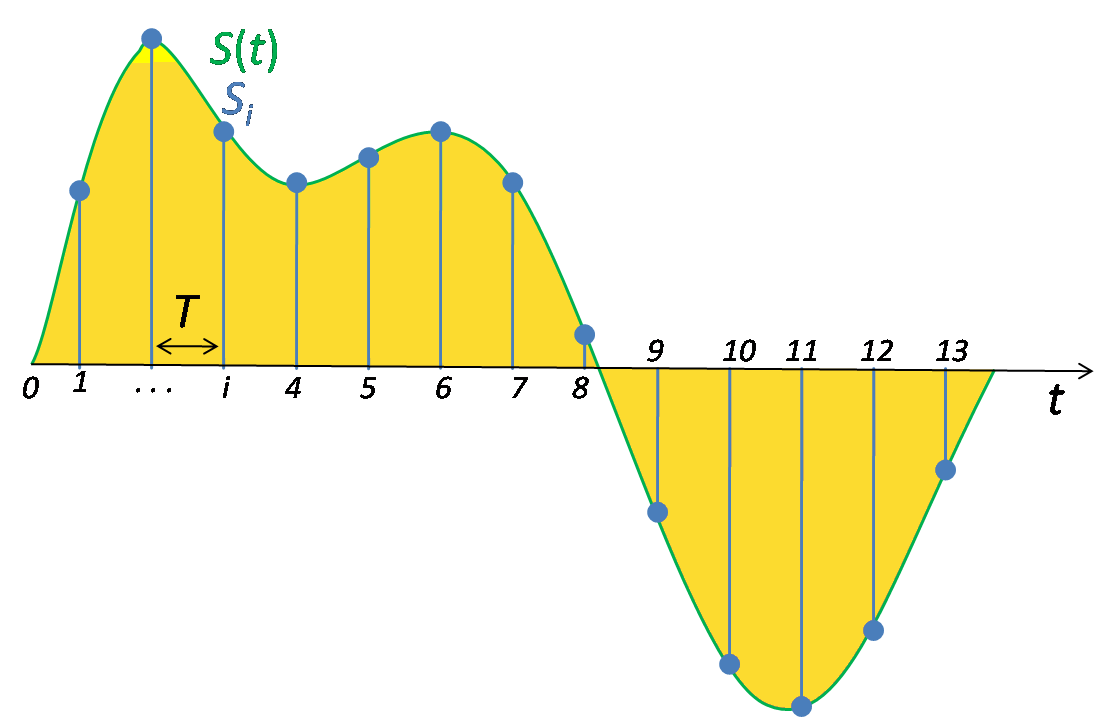
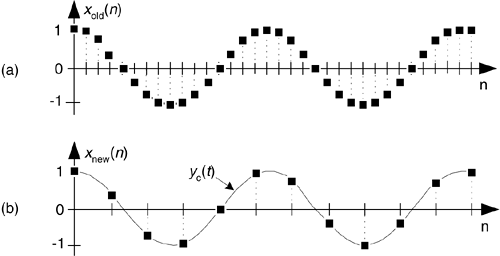
Regardless of where sampling is used, you must choose the correct sample rate. The signals reconstructed from these samples must adequately represent the original analog signal. Obviously, too slow sampling (for example, a 10 Hz signal polled every 30 minutes) can result in the loss of valuable information, while too fast sampling (a 10 Hz signal polled at 300 MHz) will create serious circuitry. Problems. Fortunately, there is an answer to the question about the sample rate. Figure 1 shows a typical sampling process.
Regardless of its original characteristics, data in modern collection systems is stored digitally. Therefore, the analog information must first be converted to digital format using an analog-to-digital converter (ADC). In this type of system, the sampling frequency MUST be higher than the highest frequency contained in the input signal. This is not a wish, but a law! In fact, the Nyquist test (part of the law) requires that we sample at a rate at least twice as high as the highest frequency in the signal fed to the ADC. This is to avoid creating aliases, which can cause serious errors.
(Original signal (a), sample signals (b), input signal samples (c))
The Nyquist criterion defines the minimum sampling frequency required to obtain meaningful information about the content of the signal’s frequency properties. Fourier analysis provides the tools necessary to obtain the relationship between the amplitude of each frequency component and a given waveform. Given this information and the correct processing of the signal, it is possible to ensure the restoration of the original amplitude and shape of the original signal in time (time domain).
Typically, software products are designed to display time-domain data in its original, raw form. As a result, sinusoidal waveforms can be distorted by triangular shapes. This is a presentation problem, not a raw data problem. In these cases, the accuracy of the representation can be improved by using a sample rate that does not meet the Nyquist criterion.
Sometimes the basic physical properties of the input converter determine its maximum frequency response. In other applications, the Nyquist criterion is implemented by applying a low-pass filter to the input of the ADC to block out unwanted high frequencies. In either case, all signal frequencies above half the sample rate must be attenuated so that they are below the ADC quantization step.
Normal bit rate for 1080p. Video encoding for Youtube.
This is a technical article. For non-specialists, we will give you a tip right away: to export videos to Youtube, it would be best to look for a template for youtube in your editing program.
Since 2005, when YouTube appeared, video compression technologies have improved a lot and YouTube has changed the formats in which video is transmitted several times. Now video uploaded to youtube is recoded, stored on servers and displayed to the viewer in H.264 / AVC, WebM / VP9, WebM / VP8, H.263 / Sorenson Spark, H.263 / formats Simple. It makes no sense to encode videos independently in all these formats and all resolutions, youtube does it for us automatically.
The first step is to make the project with the correct parameters
If you are making a video with the aim of publishing it on the Internet, then the first and reasonable way to start a project in your editing program with parameters corresponding to the requirements of youtube (the main thing is that the resolution of the video and the frame rate match: you need to see what vertical and horizontal dimensions of the source material, choose from the standard youtube sizes the one that best suits the parameters of the source material, and in your editing program make a new project with the selected parameters for youtube ).
For example, you have shot a FullHD video with 25 frames per second, in this case you are doing a 1920 x 1080 project, 25 fps, with progressive scan. Second, the option is to mount the project with the parameters corresponding to the source material and export with the settings on YouTube. For example, for HDV camcorder video with dimensions of 1440 x 1080 with one pixel spread, you can create an HDV project, and when exporting you can simply select Full HD 1920 x 1080 dimensions with one pixel square. The third option is to make a video with some own parameters and youtube will transform it by yourself, but if the proportions are distorted, black bars or a black frame appear, then these will be the consequences of your decision. For example, you have a project with the aspect ratio of a widescreen movie, so you edit and export it at 1920×816 or 2560×1080. Another example, you shoot a vertical video and hope that it will also be viewed on mobile devices …. YouTube is moving in this direction, but knowing that it will look different on your phone and on TV is your conscious choice.
Even if you encode the video with compliance with the recommended parameters, when uploading it to YouTube, it may look a little different from your computer. You need to understand that flash player or html5 player can work in browser, each of them can be different version, use or not use video card hardware acceleration. Also, the files played by the player can be h.264 and webm formats. For these reasons alone, the same video can be viewed differently in different browsers on the same computer, and on different computers, different operating systems, different video card drivers, different versions are added flash. Also, videos uploaded to another video hosting service, for example vimeo, will be transcoded differently and played through another player.
You can download avi, mov, mp4, mpg, webm and other formats. These formats are containers in which compressed video with very different codecs can be stored. That is, if an avi or mp4 file is played on your computer, this does not mean that youtube will accept it. Therefore, we will consider only one option: the mp4 container with the h.264 codec.
Youtube player on computer plays video only in 16×9 aspect ratio window, for videos with other aspect ratios, youtube itself adds black bars on the sides as needed. Therefore, you do not need to do it yourself. To avoid black bars, use the following frame sizes (video resolution):
4320p: 7680 x 4320;
2160p: 3840 x 2160;
1440p: 2560 x 1440;
1080p: 1920 x 1080;
720p: 1280 x 720;
480p: 854 x 480;
360p: 640 x 360;
240p: 426 x 240.
Packaging: MP4
Audio codec: AAC-LC; sampling frequency: 96 or 48 kHz; bit rate 384 kb / s for
stereo video codec: H.264, progressive scan (not interlaced; if you have 1080i video, you must convert it to 1080p so there is no “comb”); High profile; variable bit rate with no limitation on maximum size; 4: 2: 0 color subsampling; the frame rate must match the frame rate of the original video, 24, 25, 30, 48, 50 and 60 frames per second are supported, but you can make videos with other rates.
The term high definition video is inaccurate. When people talk about HD, they are generally referring to the widescreen format used in modern cinema. But when you try to figure out exactly how many pixels are in an image, what scanning method is used, and what the frame rate is, you won’t get a definitive answer. There are many different options.
For example, there are 18 different digital television (DTV) standards in the US Not all of these standards are high definition standards. In general, HD standards refer only to so-called “movie-like” standards with a wide 16: 9 aspect ratio. However, you can sometimes hear that 480p is also a high definition format.
How did you achieve all this? The development of the video industry began with the experiments of 1897 and gradually reached the experimental transmission of 1934, with an image format of 300 lines. The first NTSC standard (483 lines, black and white) appeared in 1941. In 1949, the NTSC standard for color images emerged. In 1967, Europe adopted the PAL (Phase Alternation by Line) and SECAM (Systeme Electronique Couleur Avec Memoire) standards.
The aspect ratio of the first NTSC standard was created based on 35mm film, or 4: 3. In the 1950s, the film industry began experimenting with wider formats (in other words, to keep up with color television). Widescreen cinema was meant to “immerse” the viewer in the image on the screen, filling the field of view as much as possible. For the most part, movies were still shown in 4: 3 format, but special masks or lenses were used on both cameras and projectors. Today the entire film industry works with a wide format. In 1968, television took its first steps to create its own widescreen image. The research department of Japan Broadcasting Corporation NHK has started to develop an HDTV system (HDTV, 1125 lines, 60 fields / sec). In 1981, Sony developed the first high definition video system (HDVS).
In 1995, the ATSC (a private organization Advanced Television Systems Committee – Committee for the development of advanced standards in the field of television) proposed a standard for the transmission of digital television signals. This standard was officially approved by the US Federal Communications Commission (FCC) in December 1996. Based on this standard, 18 different combinations of height, width, and frame rate are possible. Widescreen formats form the foundation of modern HD video formats.
Advanced TV Standards Committee (ATSC)
The private organization ATSC was founded in 1982 and had about 25 members. In 1984, their number increased to 50. The membership of the organization has grown rapidly from the moment it opened its doors to all participants in 1996, making it international. In 2001, ATSC had more than 200 members.
Please note that ATSC is a private international organization and should not be confused with the FCC’s Advanced TV Services Advisory Committee (FCC), created in 1987 to assist the FCC with technical issues and public relations.
The ATSC was created to develop arbitrary standards for all premium television systems, including high definition television. As mentioned above, in 1995 ATSC developed a standard for the transmission of digital TV signals and in December 1996 this standard was approved by the US FCC. According to this standard, the data transfer rate must be at 19.39 Mbit / s. The transmission speed of the digital TV signal is higher than the transmission speed of simple data due to digital error correction. ATSC signals (hereinafter referred to as ATSC signals) are still limited to the 6 MHz bandwidth, as in the NTSC standard.
ATSC signals can have different aspect ratios (4: 3 or 16: 9) and a different number of horizontal lines per frame. They can have different frame rates (24.30 or 60 frames per second). These can be odd fields (interlaced half frames) or gradually scanned frames. The sound is digital. The ATSC data transmission standards are based on the MPEG-2 standard. When broadcast on television, the data is compressed, “buffered” and decoded, and can then be viewed. This means that when you change channels, there is a slight delay during which the data goes to the buffer before the image appears.
Analog video is the oldest method of transmitting video signals. One of the first video formats based on the analog method was composite video.
Composite analog video combines all video components (luminance, color, time, etc.) into a single signal. By combining these elements into a single signal, the quality of composite video is far from perfect. As a result, we have inaccurate color reproduction, insufficiently clear image, and other quality loss factors. Composite video quickly gave way to component video, in which multiple video components are represented as separate signals.
The fact is that the human eye, in addition to the light-sensitive elements active at high illumination and perceiving reference colors (R, G, B), has elements that are active even in almost complete darkness and fix only the illumination of the object. As a result, the brightness of the object is much more important to perception than its color characteristics.
Furthermore, the volume of information transmitted is important: the smaller the volume, the cheaper and simpler the transmission systems are. You can reduce the amount of information by reducing the amount of color data. Therefore, in television, not one RGB signal is transmitted and received, but brightness Y and two color difference signals U and V, with U = RY and V = BY. In this case, it is not necessary to code all three colors. It is enough to specify two of them, and the third is easily calculated by arithmetic operations. U and V can have twice the resolution of Y.
However, all the above formats are still essentially analog and therefore have a major drawback: when copying, the shot is always inferior in quality to the original. Loss of quality when copying video material is similar to photocopying: the copy is never as clear and vivid as the original. The inherent disadvantages of analog video led to the development of the digital video format. Unlike analog video, which loses quality when copied, each digital video copy is the same as the original.
Interesting Facts About Analog Video
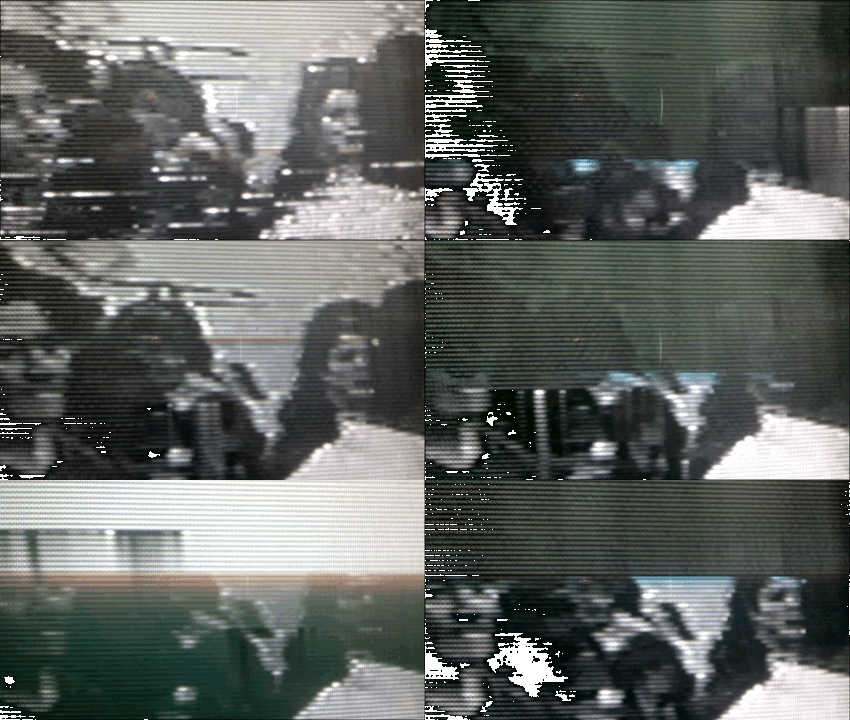
Analog video is a type of video used on television. The image on the screen is created when a beam of electrons moves across a screen covered with a phosphor, a material that emits light of a certain wavelength, that is, a certain color. This process is called scanning and it goes through lines (horizontal) and squares (vertical). To get moving videos, you need to scan multiple frames per second. In televisions, the frames change at a rate of several tens per second. A single image is made up of scan lines that are reproduced in two sets called fields.
In television, an interlaced method is used to form an image on the screen, in which during the first scan cycle of the screen using an electron beam, an image of odd lines is formed, and for the second, the lines pairs, as a result, a complete picture frame is formed from two half frames (fields). The use of this imaging method is due to the need to narrow the spectrum of the television signal. Although these frame rates and scan lines can create smooth motion, they do not eliminate video flicker.
Television standards
Currently three main color television standards are used:
American NTSC (National Television Standards Committee – National Television Standards Committee), the number of lines per frame 525, 60 Hz;
German PAL (Line alternating phase – lines with variable phase), the number of lines per frame 625, frequency 50 Hz;
French SECAM, the number of lines per frame is 525, the scanning frequency is 50 Hz, in Russia the SECAM D / K modification is adopted.
The standards differ in the modulations used and the carrier and subcarrier values.
Digital video at a glance
Digital video is an image or series of images in which information is stored in digital form. It uses digital signals and standards other than international ones to transmit and display images used in analog video.
When creating digital video, the problem arises of converting an analog signal to digital. The standards for video digitization adopted in modern technology are: 10 bits – the digitization depth, 13.5 MHz – the luminance signal sampling rate, 6.75 MHz – the sampling rate of two channels of color difference.
Recently, there has been a trend towards the fusion of television and computer video.
About high definition audio a year or two ago, only lazy people were not talking. Now that the noise has subsided, the process continues as usual. The buyer often does not even suspect that the surprise, the motherboard, was thrown into the load of the new computer.
Intel® High Definition Audio Technology, as envisioned by its creators, should replace the aging architecture of AC-97 computer sound. The latter has become widespread on all types of platforms, including mobile solutions, but sooner or later you will be forced to abandon the race. In fact, the aging of the AC-97 is still not that noticeable. The “veteran” AC-97 can be retained for quite some time, thanks to all the revisions and updates, although the stock of “extensions” is already depleted. The main advantage of the innovative technology promoted by Intel (hereinafter abbreviated as HD Audio) is 32-bit (7.1) multi-channel sound with a sample rate of up to 192 kHz. For specialists, this advantage is very doubtful, but it has a hypnotic effect on people. Therefore, it is time to find out if it is worth taking into account the “novelty” (which has been on sale for a year) when choosing a computer.
HD audio has other benefits as well. For example, support for 16 microphones. This is the microphone grill, which separates the voice from the surrounding noise, which (not without nifty algorithms) helps to recognize continuous speech. It is more of a foundation for a bright corporate future than the realities of modern life. The old AC-97 standard was ready to handle 2 mono microphones (one stereo), but in practice manufacturers were limited to a single mono input, apparently due to a lack of massive demand. Don’t be too quick to use a bunch of microphones and new HD audio devices. So on laptops running Sonoma, potentially supporting HD audio, I’ve personally never known about stereo inputs.
The AC-97’s weakest point was the controllers, which were developed by third-party manufacturers on the principle of “who in what is what”. HD Audio promises to be served by out-of-the-box drivers for the operating system (from MicroSoft of course), but in fact, it will be extremely difficult to limit yourself to system drivers for a device as complex as an audio card (whether you are integrated or not). In either case, additional drivers from the same third-party manufacturers will be required.
As it turned out, the AC-97’s plug’n’play ease of installation was only partially realized. HD Audio is committed to bringing this “to mind”. Recommendable! But it is hard to believe.
What is truly revolutionary about HD Audio is its multithreading support with dynamic allocation of DMA (memory) channels for each stream separately. In other words, it is possible to simultaneously play several sources and with different sample rates (for example, play a movie with Dolby Digital 5.1 and, at the same time, not forget about monophonic voice chat).
Digital audio is a representation of analog sound used by computers and various digital devices to record and reproduce audio information. Like the frames of a movie, a digital audio signal is created from a series of sound fragments that are played when we press the play button. There are many different digital audio formats, they differ from each other in the transmission quality of the audio information.
About Pulse Code Modulation – PCM
If we talk about an acoustic sound or an analog signal, we are always talking about the propagation of sound waves in space. Whereas digital audio is only a rough description of what happens to sound or should happen within computer programs or digital devices.
This article will discuss pulse code modulation (PCM), the most common digital audio decoding system. Besides PCM, there are also DTS and Dolby Digital systems, but these are mainly applicable in the field of film and video production. Today we will not talk about them.
In pulse code modulation, a signal is read many times per second. At each reading moment the amplitude of the sound wave is recorded and reproduced. As mentioned above, a digital signal is just a rough copy of an analog signal, since an analog wave cannot be recreated with perfect precision. The values of each fragment are rounded to the nearest most accurate, then all the fragments are played and we hear a copy of the original analog sound.
“What meanings are we talking about?” – you ask. Just as analog audio is defined by frequency and amplitude, digital audio is determined by two important values: the sample rate and the bit depth. The sample rate means how many times per second the fragments of the audio signal are read, and the bit depth is the value of the dynamic range of each fragment of the audio signal.
Sampling rate
The standard 44.1 kHz sample rate used for recording audio to CDs (remember those?) Might seem like a random number. But this is not the case at all. This value was chosen based on Kotelnikov’s theorem, which essentially states that the sampling frequency must be more than 2 times higher than the maximum value of the reading frequency. As you know, the upper limit of audibility of the human ear’s frequency range is 20 kHz. It turns out that the sampling frequency must be higher than 40 kHz. An additional 4.1 kHz is added to avoid distortion, the so-called aliasing effect. In theory, 44.1 kHz should be sufficient to accurately reproduce an audio signal, however there are higher values.
For example, 48 kHz is the dominant standard in film and video production. As in the case of cinema, sound is synchronized at a frame rate of 24 frames per second. We won’t go into the details of why exactly 24 frames per second was chosen, in other words, this is the minimum frequency at which we can see a smooth, eye-pleasing image. The sample rate must match this frame rate. Using a frequency of 44.1 kHz can cause a noticeable out of sync of the picture and sound. Again, based on Kotelnikov’s theorem.
Even higher sample rates are repelled by these two base frequencies of 44.1 or 48 kHz, multiplying them by multiples of 2. That is, 88.2, 96, 192 kHz are the standard sample rates for all audio equipment. modern audio.
Bit depth
The bitness or bitness of an audio file tells us about its dynamic resolution or, more simply, clarity. You can draw an analogy with digital photography: the higher the resolution of the photo, the clearer and better the image will be.
It is important to note here that we are not talking about the loudness of the signal, but about a more realistic, clean and clear sound. More accurate transmission of the audio signal.
Bit depth can be compared to text in the book. The lower the bit depth, the less meaningful the text will make. That is, lowering the bitness leads to the fact that some letters begin to disappear from words, punctuation marks from sentences. At the moment, we will still be able to grasp the meaning of the text, but if the bit depth continues to decrease, the information will become so distorted that we simply stop understanding what we are talking about. The same goes for sound: the lower the bit depth, the more distorted we hear the sound.
What is the fundamental difference between 44100 and 48000 Hz?
44100 vs 48000 hz
In fact, this is just a question of long-standing standards.
44100 vs 48000 hz
44100 vs 48000 hz
44100 is the CD standard.
48000 is the standard for DVD.
The difference in practice is so small that it will be impossible to notice it (I’ll tell you more: many people feel the difference between mp3 and wav, but they can’t tell which is better).
The stereotype has persisted that if you need to work with TV or movies / soundtracks, it is better to do it in 48000, suddenly some old equipment will not understand sampling.
But this is very, very unlikely these days, so there isn’t much of a difference.
It can record at 96000. There is a small chance that some plug-ins / sound effects can handle such recordings better, but it requires more CPU / RAM and much more hard disk space.
Between 16 and 24 bits, it will also be difficult to feel the difference, but at the request of the sound engineer, we wrote in 24 with the same thoughts (for plug-ins).
In general, write to 44100 if you don’t need to work with a specific television crew.
44100 vs 48000 hz
Choosing the Right Sample Rate: 44100 or 48000 hz
In the world of digital audio, the choice between 44,100 Hz and 48,000 Hz sample rates is a critical one. As an audio expert, I’ve spent years diving deep into this topic, examining the real-world scenarios where this choice can make or break a sound. In this article, I’ll guide you through this audio journey, shedding light on the differences and helping you make an informed choice.
44100 Hz – The Analog Heartbeat
When we talk about 44,100 Hz, it’s like stepping into a cozy vinyl record shop, where the warm crackles and pops surround you. This sample rate mirrors the heartbeats of analog audio, capturing the subtleties of your audio source much like a vintage vinyl record player.
Imagine: You’re in a dimly lit jazz club, and a saxophonist takes the stage. You close your eyes as the music begins. 44,100 Hz is akin to capturing every breath, every emotion, and every nuance of the saxophonist’s performance. It’s the sample rate that preserves the soul of analog sound.
48000 Hz – The Digital Precision
Contrastingly, 48,000 Hz feels like entering a state-of-the-art recording studio with a digital mixing console at the heart of it all. It’s the precision tool for audio in the digital age, where every sound wave is charted with utmost accuracy.
Visualize: You’re in a high-tech laboratory, and a scientist is conducting a finely tuned experiment. 48,000 Hz is like the precise instruments that measure every data point with accuracy. It’s the sample rate that excels in capturing the clarity and detail of digital audio.
The Real-World Decision
The choice between 44,100 Hz and 48,000 Hz ultimately depends on the nature of your audio project.
Subtitle: For Vintage Vibes
If you’re aiming for a warm, nostalgic sound reminiscent of classic records, 44,100 Hz is your choice. It’s like using a vintage camera to capture that old-world charm. This sample rate will maintain the character and imperfections of your audio source.
Subtitle: For Contemporary Clarity
When you require crystal-clear audio for modern projects, such as podcasts, video games, or high-quality music production, 48,000 Hz is your ally. Think of it as upgrading to a high-definition TV for the audio world. This sample rate ensures every detail is captured and reproduced faithfully.
Last words about right sample rate for your digital audio
As an audio expert, my journey has led me to understand that the choice between 44,100 Hz and 48,000 Hz is about preserving the essence of your sound in the most appropriate way. Each sample rate has its place in the vast world of audio, just as a painter chooses different brushes for different strokes on their canvas.
So, whether you’re embracing the warmth of the past or striving for the precision of the future, remember that the right choice of sample rate can be the difference between an audio masterpiece and a missed opportunity. Choose wisely, and let your sound shine in all its glory.
The fundamental difference between them in the coverage of the frequency range on the track (from 20Hz), the 44100 sample rate allows you to work in the range up to 22kHz, 48000 to ~ 25kHz, 96000 to ~ 35kHz, etc. 48 parameters o 96kHz are used in large studios where the reproduction of these frequencies and sound engineers strive for the slightest increase in sound quality, before and after conversion to the 44100 standard, the sound of the track objectively looks better, even though the human ear does not hear these frequencies, the psychoacoustic effect remains (the closest example: if you shoot video and plan to play back in fHD, you will prefer to shoot 4k with rear cropping for the sake of image quality, and no one will say there is no point in shooting 4k, the same is here).
It’s even more interesting in movies … because 44100Hz is the playback frequency at 24fps and 48000Hz is 25fps. If you record a video at 25 fps and the sound is separately on the recorder at 44100Hz, then the length of the tracks will not match and you will have to change the timbre of the original with a small time interval.
Frequency is defined as the number of cycles of periodic motion per unit of time. The SI unit of frequency is called hertz (Hz, after its inventor Heinrich Hertz). One hertz corresponds to one cycle (or complete oscillation) per second.
Example. Sound waves have a frequency in the range of approximately 20 to 20,000 Hz. This means that at any point along the path of the sound wave, the pressure will fluctuate from high to low, 20 to 20,000 times per second.
In digital audio, the maximum frequency that can be successfully recreated is half the sample rate. Therefore, with a sample rate of 44.1 kHz, frequencies up to 22.05 kHz can be recreated. Wave frequency refers to how many times per second a wave moves from its highest point to its lowest point and vice versa. It is usually measured in hertz (Hz) or cycles per second. The frequency of the wave determines its height. High-frequency waves have a high pitch, while lower frequencies have a lower pitch. The average person can hear frequencies from 15 or 20 Hz to about 20,000 Hz (20 kHz).
Analog wave The wave amplitude refers to half the distance between the highest point of the wave and the lowest point. The greater the amplitude of the wave, the greater its volume, which is generally measured in decibels (dB). The decibel range for human hearing is complex and depends on the frequency of the sound in question, the age of the person and the listening environment, but varies from approximately 0 to 120 dB, with each 10 dB change corresponding to a doubling of the perceived volume.
Absolute Threshold: ATH is the volume level at which a certain sound can be detected 50% of the time.
What is the bit rate?
Bit rate refers to the data transfer rate (that is, how many bits are transmitted in a given time), generally expressed in bits per second. Common units of bit rate are kilobits per second (Kbps) and megabits per second (Mbps). The term is also commonly used when talking about digital sampling and sample rates. For example, the MP3 audio compression algorithm is often configured to output files at a bit rate of 128 kbps. This means that the file contains an average of 128 kilobits for every second of audio (960 KB per minute). This is in contrast to CD audio, which is encoded as 44,100 16-bit stereo samples per second: 1411.2 kbps (16-bit x 44100 Hz x 2ch).
Often times, bytes are written in uppercase and are multipliers (for example, “KB” for kilobytes) and lowercase factors are bits (for example, “kb” for kilobytes). All modern computers use 8-bit bytes.
MP3 bit rate
The MP3 bit rate can be misleading. For example, an MP3 “constant bit rate” (CBR) of 128 kbps will use approximately 128 kilobits for every second of encoded audio (so the file size in bits divided by the length of the audio is approximately 128,000), and Your frame headers will appear at regular intervals, but internally, frame-by-frame, you can encode audio at bit rates higher or lower than 128 kbps by using a bit pool (the ability of a frame to use spare bits from a previous block). However, the size of this bucket, and thus the amount of variability, is limited, so 128 kbps will be very close to the effective bit rate throughout the file.
See also: 8D surround sound and how to do it
As another example, “128 kbps VBR MP3” is often incorrect, as the purpose of VBR is to allow each of the internal MP3 sectors to have its own bit rate. When people refer to the VBR MP3 bit rate, they are generally referring to the actual average bit rate of their frames. If the length of the encoded audio is known, then the “bit rate” can be the data size of the file divided by its duration, which will be fairly close to the same number. However, the length of an MP3 VBR cannot be accurately determined without scanning all the frames.