MP3 vs MP4 Audio Quality: Understanding Digital Audio Formats
MP3 vs MP4MP3 vs MP4
What is MP3?
MP3 is a digital audio format that compresses audio files to make them smaller in size without significantly affecting the sound quality. MP3 stands for MPEG-1 Audio Layer 3 and is a type of lossy compression. This means that some audio data is lost during the compression process to reduce the file size. As a result, the audio quality of an MP3 file may not be as good as the original file.
For example, suppose you have a song that is 4 minutes long with a bitrate of 320 kbps. The uncompressed audio file may have a size of around 40 MB, but if you compress it into an MP3 file with a bitrate of 128 kbps, the file size may be reduced to around 3-4 MB. This makes it easier to store and share the audio file, but the audio quality may be affected by the compression process.
What is MP4?
MP4 is a digital multimedia container format that can store audio, video, and other types of data. MP4 uses various codecs, including AAC, to compress audio files while maintaining high quality. Unlike MP3, MP4 is a type of lossless compression, meaning that no audio data is lost during the compression process. As a result, the audio quality of an MP4 file is usually better than that of an MP3 file.
For example, if you compress the same 4-minute song with a bitrate of 128 kbps into an MP4 file, the file size may be larger, around 5-6 MB. However, the audio quality will be better than the MP3 file because no audio data was lost during the compression process.
How Does Audio Quality Compare between MP3 and MP4?
When it comes to audio quality, MP4 generally provides better quality than MP3. This is because MP4 uses a more advanced compression method that preserves more of the original audio data. MP4 can also support higher bitrates, which means that it can provide higher quality audio compared to MP3 at the same file size.
For example, imagine you have a song that is 4 minutes long and has a bitrate of 320 kbps. If you compress this song into an MP3 file with a bitrate of 128 kbps, the file size may be around 3-4 MB. However, if you compress the same song into an MP4 file with a bitrate of 128 kbps, the file size may be around 5-6 MB. Despite the larger file size, the MP4 file will likely sound better because it preserves more of the original audio data.
Another way to compare audio quality between MP3 and MP4 is by using a tool that can analyze the audio spectrum and display the differences between the two formats. For example, you can use a free online tool called “Sonic Visualizer” to compare the waveform and spectrogram of an MP3 file and an MP4 file. The spectrogram displays the frequency content of the audio over time, and you can see that the MP4 file has more high-frequency content and less distortion compared to the MP3 file.
Can Audio Quality be Improved?
Yes, audio quality can be improved for both MP3 and MP4 files using a variety of methods. One method is to increase the bitrate of the audio file during the compression process. This will result in a larger file size but will also improve the audio quality for the same reason – it is a type of lossless compression, meaning that no audio data is lost during the compression process. This is important for professionals in the music and audio industry who require high-quality audio files for their work.
Conclusion
In summary, MP3 and MP4 are both popular digital audio formats used for storing and sharing audio files. MP3 uses a type of lossy compression, while MP4 uses a type of lossless compression. This means that MP4 generally provides better audio quality compared to MP3, but at the cost of a larger file size. However, both formats can be improved through various methods such as increasing the bitrate or using a different codec. Ultimately, the choice of format depends on the specific needs and preferences of the user.
How to Convert MP3 to AAC: Exploring the Technicalities of the Advanced
MP3 to AAC
Audio Codec
MP3 to AAC
The History of AAC
Advanced Audio Coding (AAC) is a widely used audio codec, designed to be the successor of the MP3 format. It was first introduced by the Moving Picture Experts Group (MPEG) as part of MPEG-2 and later extended as MPEG-4 Part 3. Since its release in 1997, AAC has been recognized for its superior audio quality and compression efficiency.
The development of AAC began in 1988 as part of an international collaboration called the Audio Coding Joint Technical Committee (JTC), consisting of experts from several organizations, including AT&T, Fraunhofer Society, and Sony. The goal was to create an audio codec that could deliver high-quality audio while using less bandwidth and storage space than MP3, which was the dominant audio format at the time.
The result of this collaboration was the creation of the MPEG-2 AAC standard in 1994, which was later extended as MPEG-4 Part 3 to include additional features. Today, AAC is supported by a wide range of devices and platforms, including Apple’s iTunes, iPod, and iPhone, as well as Android devices and various media players.
How AAC Works
AAC is a lossy compression codec, meaning that it achieves high compression rates by discarding some of the audio data. However, unlike MP3, which relies on a perceptual coding algorithm to remove irrelevant audio data, AAC uses a more advanced coding algorithm that takes into account the psychoacoustic properties of human hearing.
AAC achieves this by dividing the audio signal into different frequency bands and applying different quantization noise to each band, based on the sensitivity of human hearing at different frequencies. The result is a more efficient use of the available data rate, allowing AAC to deliver higher audio quality at the same bit rate as MP3.
AAC is also a format container, meaning that it can contain audio data encoded in various formats, including stereo, 5.1 surround sound, and even lossless formats like Apple Lossless and FLAC. This flexibility makes AAC a versatile audio format that can be used for a wide range of applications, from music streaming to professional audio production.
Converting MP3 to AAC Using Mp4Gain
Mp4Gain is a versatile audio and video conversion tool that supports a wide range of formats, including MP3 and AAC. With Mp4Gain, you can convert your MP3 files to AAC quickly and easily, without losing any audio quality.
What is a container format?
A container format is a type of file format that can store different types of data in a single file. In the case of audio and video files, a container format is used to package the different types of data that make up the file, including the video and audio streams, metadata, and any subtitles or closed captions.
The benefits of using AAC
AAC has several benefits over other audio formats. Firstly, it offers improved sound quality at lower bitrates than MP3, which means that files can be compressed to a smaller size without sacrificing quality. This is particularly important for mobile devices with limited storage capacity.
Secondly, AAC offers better performance at high bitrates, making it a popular choice for professionals who need high-quality audio, such as musicians, producers, and sound engineers.
Another benefit of using AAC is that it supports up to 48 channels of audio, compared to MP3’s limit of 2 channels. This makes AAC a popular choice for high-end surround sound systems and immersive audio experiences.
Finally, AAC is widely supported by a range of devices and software, including Apple devices, Android devices, and popular media players like VLC and QuickTime.
How to convert MP3 to AAC with Mp4Gain
Now that you understand the benefits of using AAC, you may want to convert your MP3 files to AAC to take advantage of these benefits. Fortunately, Mp4Gain makes it easy to do this.
To convert MP3 to AAC with Mp4Gain, follow these simple steps:
Open Mp4Gain and select the “Audio Converter” option from the main menu.
Click the “Add Files” button and select the MP3 files you want to convert to AAC.
Select “AAC” as the output format from the list of available formats.
Choose the desired bitrate, sampling rate, and channel configuration for the output file. You can also choose to normalize the volume if you want.
Click the “Convert” button to start the conversion process.
Once the conversion process is complete, you will have high-quality AAC files that can be played on a wide range of devices and media players.
Conclusion
AAC is a high-quality audio format that offers several benefits over other formats, including improved sound quality at lower bitrates, better performance at high bitrates, support for multiple channels of audio, and wide compatibility with devices and software.
If you want to take advantage of these benefits, Mp4Gain makes it easy to convert your MP3 files to AAC. With its simple interface and powerful conversion capabilities, Mp4Gain is the perfect tool for anyone who wants to create high-quality, versatile audio files.
Audio compression is a critical component of modern audio production. It allows for the reduction of file sizes while maintaining an acceptable level of sound quality. Lossy audio compression is a popular method that achieves this by removing non-essential information from an audio file. In this article, we will dive deep into the technical details of lossy audio compression and explore its advantages and disadvantages, as well as the impact it has on audio quality.
Lossy Audio Compression
The Technical Basics of Lossy Audio Compression
Lossy audio compression works by removing information that is deemed non-essential to the human ear. This information is often in the form of high-frequency sounds or sounds that are below the threshold of human hearing. Lossy compression achieves this by analyzing the audio file and creating a model of the sounds that the human ear can and cannot hear. This model is then used to remove the non-essential information from the audio file.
There are several popular lossy audio compression formats and codecs, including MP3, AAC, and Ogg Vorbis. Each of these formats has its own strengths and weaknesses, and choosing the right one depends on the specific needs of the user.
The Trade-offs of Lossy Audio Compression
While lossy compression is an effective way to reduce file sizes, it does come with some trade-offs. The most significant trade-off is the loss of audio quality. As non-essential information is removed from the audio file, it can result in a loss of dynamic range and a decrease in overall sound quality. However, the degree of quality loss is often subjective and depends on the specific requirements of the user.
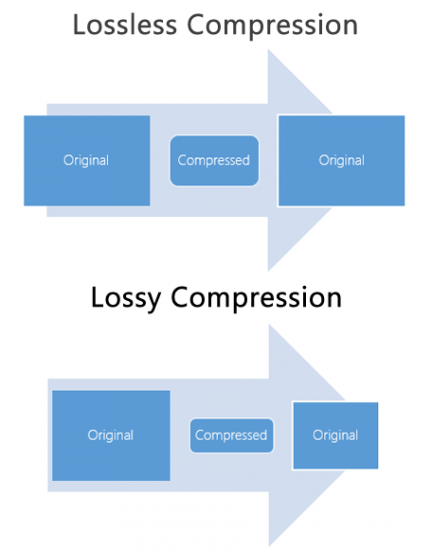
When comparing lossy and lossless compression formats, file size is often a significant factor. Lossy compression generally results in much smaller file sizes than lossless compression, but at the cost of some audio quality loss. However, the size difference between the two formats can be significant, making lossy compression a practical solution for many users.
Advanced Techniques for Lossy Audio Compression
Advanced techniques are available for lossy audio compression that can help to improve audio quality while still achieving significant file size reduction. Perceptual coding is one such technique that uses psychoacoustic models to analyze the audio and remove non-essential information in a way that minimizes the impact on sound quality. Another technique involves the use of metadata, which can help to provide additional information about the audio file that can be used to improve compression.
Best Practices for Lossy Audio Compression
There are several best practices that can be followed to achieve the best results when compressing audio files using a lossy format. Some of these practices include choosing the right codec for the specific needs of the user, ensuring that the encoding settings are appropriate for the file being compressed, and avoiding the use of excessive compression, which can result in a loss of sound quality. Additionally, it is important to avoid common mistakes when compressing audio files, such as encoding at too low of a bit rate or not checking the final output for artifacts or distortion.
Psychoacoustic Models
Psychoacoustic models are mathematical models that simulate the way that the human ear processes sound. They are used in perceptual coding to identify which audio signals can be safely removed without causing a noticeable loss in audio quality.
Psychoacoustic models take into account factors such as frequency masking, temporal masking, and the sensitivity of the human ear to different types of audio signals. They can also take into account more complex factors such as the interaction between different audio signals.
Metadata
Metadata is data that is embedded in an audio file and provides additional information about the audio content. In the context of lossy audio compression, metadata can be used to improve the compression process by providing additional information about the audio content.
One common use of metadata in lossy audio compression is to provide information about the target device or playback environment. For example, metadata can provide information about the type of headphones or speakers that the audio file is intended to be played through. This information can be used by perceptual coders to optimize the compression process for the target device or playback environment.
Another common use of metadata in lossy audio compression is to provide information about the audio content itself. For example, metadata can provide information about the genre, tempo, and key of a song. This information can be used to optimize the compression process for the specific characteristics of the audio content.
Best Practices for Lossy Audio Compression
To achieve the best results in lossy audio compression, there are several best practices that should be followed. These include:
Use the highest quality compression settings available
Use a well-supported and widely-used compression format
Use a lossless format for archiving and backup purposes
Avoid excessive compression, as this can lead to noticeable audio artifacts
Take into account the intended playback environment when compressing audio files
Include appropriate metadata to provide additional information about the audio content
Common Mistakes to Avoid
When compressing audio files, there are several common mistakes that should be avoided. These include:
Using excessively low compression settings, as this can lead to a noticeable loss in audio quality
Using an unsupported or proprietary compression format, as this can lead to compatibility issues
Not taking into account the intended playback environment, which can lead to suboptimal compression settings
Not including appropriate metadata, which can make it difficult to organize and manage large collections of audio files
Using excessive compression, as this can lead to noticeable audio artifacts
Explanation of Audio Compression and Lossy Audio Compression
Audio compression is the process of reducing the size of an audio file without significantly degrading the quality of the sound. Compression is necessary in the world of digital audio because it allows for more efficient storage and transmission of audio files. Without compression, audio files would be prohibitively large, making it difficult to store and share them over the internet.
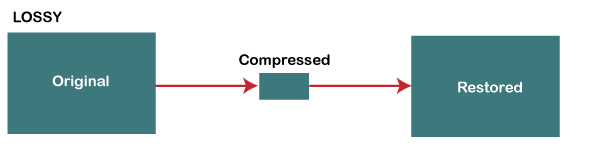
Lossy audio compression is a specific type of audio compression that achieves a high degree of compression by discarding some of the audio data. This means that when you compress an audio file using a lossy compression algorithm, some of the data is permanently lost, and the resulting file is of lower quality than the original. Lossy compression is used widely because it allows for much higher compression ratios than lossless compression, making it more practical for everyday use.
Importance of Audio Compression in Modern Audio Production
Audio compression is an essential tool in modern audio production. The ability to compress audio files allows for more efficient use of storage space and bandwidth, which are essential resources in the world of digital media. Audio compression also makes it possible to stream high-quality audio over the internet, which has revolutionized the way we consume music and other audio content.
However, it’s important to remember that audio compression is not without its downsides. Lossy compression, in particular, can have a significant impact on the quality of the audio, and it’s essential to understand the trade-offs involved when choosing a compression format and level of compression.
The Technical Basics of Lossy Audio Compression
At its most basic level, lossy audio compression works by analyzing the audio file and discarding information that is deemed unnecessary for human perception. This information can include sounds that are too quiet to hear, or frequencies that are outside the range of human hearing. By discarding this information, the compression algorithm can significantly reduce the size of the audio file while still retaining much of the original sound quality.
The specific techniques used in lossy audio compression can vary, but most algorithms use some combination of frequency masking, quantization, and other mathematical techniques to achieve compression. The result is a smaller file size that can be easily stored or transmitted, but with some loss of audio quality.
The Most Commonly Used Lossy Audio Compression Formats and Codecs
There are many different lossy audio compression formats and codecs available, each with its own strengths and weaknesses. Some of the most commonly used formats and codecs include:
MP3 – one of the most widely used audio compression formats, with a high degree of compatibility and a good balance between file size and sound quality
AAC – a newer format that is widely used for streaming audio and has a better sound quality than MP3 at the same bitrate
OGG – an open-source format that is popular for internet radio and streaming
WMA – a format developed by Microsoft that is commonly used for streaming and downloading audio files from the internet
FLAC – a lossless audio compression format that is capable of compressing audio files without any loss of quality, but with larger file sizes than lossy formats
The Fascinating History of Lossy Compression
Lossy compression is a method of data compression that reduces the size of a file by discarding information that is deemed to be unnecessary. This technique has been used for decades in various fields, including image, audio, and video processing, to make files smaller and easier to share or store.
The first significant work on lossy image compression was done in the early 1970s by a group of researchers at the University of Southern California. They developed the first image compression algorithm, called the discrete cosine transform (DCT), which is still used today in the popular JPEG image format.
In the 1980s, the Moving Pictures Experts Group (MPEG) was established to develop standards for digital video compression. They introduced the MPEG-1 and MPEG-2 video formats, which became widely adopted in the industry. The success of these formats led to the creation of newer standards, such as MPEG-4 and H.264, which are still used in modern video streaming services.
Lossy compression has also been essential for audio processing. In the late 1980s, the MP3 format was developed by the Fraunhofer Society in Germany, which used a perceptual coding algorithm to remove information that the human ear cannot detect. MP3 quickly became the standard for digital music distribution, leading to the creation of newer formats such as AAC and OGG Vorbis.
However, lossy compression is not without its drawbacks. Because it removes data, it can lead to a loss of quality, especially if the compression is too aggressive. This can result in artifacts or distortions in the processed image, audio, or video.
Despite these limitations, lossy compression remains an important tool in the modern digital world. It allows for more efficient storage and sharing of multimedia content and has revolutionized industries such as music, film, and photography. As technology continues to evolve, it’s likely that new and more efficient lossy compression techniques will be developed, further enhancing the way we share and consume digital content.
Pulse Code Modulation PCM is short for Pulse Code Modulation.
Pulse code modulation is one of the encoding methods of digital communication. The main process is to sample the voice, image and other analog signals at regular intervals to discretize them, and at the same time, the sampled value is rounded and quantized according to the hierarchical unit, and the sampled value is represented by a set. of binary codes value.
Principles of speech coding
Anyone with any electronic background knows that the audio signal collected by the sensor is an analog quantity, and what we use in the actual transmission process is a digital quantity. And this involves the process of converting from analog to digital. And the digitization of analog signals must go through three processes, namely sampling, quantization and encoding, to realize the pulse code modulation (PCM, pulse code modulation) technology of voice digitization.
Convert analog signal to digital signal
Sampling
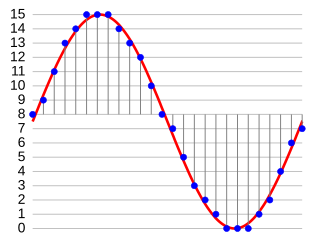
Sampling is the process of extracting sample values from an analog signal at a frequency twice or more of its signal bandwidth and changing it to a discrete sampled signal on the time axis.
Sampling rate (sample): The number of samples per second extracted from a continuous signal to form a discrete signal, expressed in Hertz (Hz).
Example: For example,
the sample rate of the audio signal is 8000 Hz.
It can be understood that the curve of the voltage change with time corresponding to the sampling in the above figure is 1 second, so the following 1 2 3 … 10 must have 1-8000 points, that is, 1 second is divided into 8000 parts, and taken out in turn The voltage value corresponding to the time of 8000 points.
quantizing
Although the sampled signal is a discrete signal on the time axis, it is still an analog signal and its sampled value is within a certain range of values and can have an infinite number of values. Obviously, it is impossible to give a group of digital code to correspond to an infinite number of samples one by one. To express the sample value by a digital code, the “rounding” method must be used to “round up” the sample value by degree, so that the sample value within a certain range of values can be changed from an infinite number of values. to a finite number of values. This process is called quantization.
Compared to the sampled signal before quantization, the quantized sampled signal is, of course, distorted and is no longer an analog signal. This quantization distortion appears as noise when the analog signal is restored at the receiving end and is called quantization noise. The size of the quantization noise depends on how you “round” the sample value.
Sampling bits: refers to the number of bits used to describe the digital signal.
8 bits (8 bits) represent 2 raised to the 8th power = 256, and 16 bits (16 bits) represent 2 raised to the 16th power = 65536; the higher the sampling number, the higher the precision.
The number of samples is indicated here to describe the minimum separation between analog signals.
Assuming our sampling number is 8 and the range of the analog signal is 2, 0, then the minimum interval between digital signals is 2/2^8 = 2/256 = 1/128;
similarly, the sample number is 16, so the minimum interval between digital signals is 2/256/256=1/(128*256)
For example
, the voltage range collected by the audio sensor is 0-3.3V, and the sampling number is 8bit (bit)
, that is, we take 3.3V/ 2^8 = 0.0128 as quantization precision.
We divide 3.3v into 0.0128 as the Y-axis step, as shown in Figure 3, 1 2 … 8 becomes 0 0.0128 0.0256 … 3.3 V. By
For example, the voltage value of a sample point is 1.652V (128 * 0.128 and 129 * 0.128) we round it to 1.65V which corresponds to a quantization level of 128.
In 1950, Bell Labs applied for a patent on Differential Pulse Code Modulation (DPCM). In 1973, P. Cummiskey, Nikil S. Jayant, and James L. Flanagan of Bell Labs introduced Adaptive DPCM (ADPCM).
Perceptual coding was first used for linear predictive coding (LPC) speech coding compression. The original concept of LPC dates back to the work of Fumitada Itakura (Nagoya University) and Saito Saito (Telegraph and Telephone in Japan) in 1966. In the 1970s, Bishnu S. Atal and Manfred R. Schroeder of Bell Labs developed a form of adaptive predictive coding (APC) called LPC, a perceptual coding algorithm that exploited the masking properties of the human ear, and later in 1980 The Code Excited Linear Prediction (CELP) algorithm appeared in the early 1990s , which achieved remarkable compression rates at the time. Perceptual coding is used by modern audio compression formats like MP3 and AAC.
Discrete Cosine Transform (DCT) by Nasir Ahmed, T. Developed by Natarajan and KR Rao in 1974, provides the basis for the Modified Discrete Cosine Transform (MDCT) used by modern audio compression formats such as MP3 and AAC. TCMD by JP Princen, A. W. Johnson, and AB Bradley in 1987, following earlier work by Princen and Bradley in 1986. MDCT is used by modern audio compression formats such as Dolby Digital, MP3, and Advanced Audio Coding (AAC).
list of lossy formats
general
Audio Coding Standard Basic Compression Algorithm abbreviation introduce Market Share (2019) Refer To
Modified Discrete Cosine Transform (MDCT) Dolby Digital (AC-3) AC3 1991 58%
ATRAC 1992 Unknown Adaptive Transformation Vocoding
MPEG layer 3 MP3 1993 49%
Advanced Audio Coding (MPEG-2/MPEG-4) CAA 1997 88%
Windows Media Audio WMA 1999 unknown
Ogg Vorbis Auger 2000 7%
Celtic Restricted Power Overlay Transformation 2011 does not apply
work work 2012 8%
digital to analog converter digital to analog converter 2015 unknown
Adaptive Differential Pulse Code Modulation (ADPCM) aptX / aptX-HD aptX 1989 unknown
DTS digital cinema system 1990 14%
Master of Quality Certification Quality Management Association 2014 unknown
Subband Coding (SBC) Audio Layer MPEG-1 II MP2 1993 unknown
musepack MPC 1997
talks
Further information: Speech coding
Linear Predictive Coding (LPC)
Adaptive Predictive Coding (APC)
Code Excited Linear Prediction (CELP)
Algebraic Code Excited Linear Prediction (ACELP)
Relaxation Code Excited Linear Prediction (RCELP)
Low latency CELP (LD-CELP)
Adaptive Multitariff (for GSM and 3GPP)
Codec2 (famous for lack of patent restrictions)
Speex (famous for lack of patent restrictions)
Modified Discrete Cosine Transform (MDCT)
AAC-LD
Constrained Energy Superposition Transformation (CELT)
Opus (mainly for real-time applications)
Encoding efficiency comparison of popular audio formats.
An audio coding format (or sometimes an audio compression format) is a content representation format used to store or transmit digital audio, such as in digital television, digital radio, and audio and video files. Examples of audio encoding formats include MP3, AAC, Vorbis, FLAC, and Opus. A specific software or hardware implementation capable of compressing and decompressing audio of a specific audio encoding format is called an audio codec; An example of an audio codec is LAME, which is one of several different codecs that implement audio encoding and decoding in MP3 audio encoding software formatting.
Certain audio encoding formats are defined by detailed technical specification documents known as Audio Encoding Specifications. Some of these specifications are written and approved as technical standards by standards bodies and are therefore called Audio Coding Standards. The term “standard” is also sometimes used for the fact that norms and formal standards.
Audio content encoded in a specific audio encoding format is usually encapsulated in a container format. So instead of raw AAC files, users often have .m4a audio files, which are MPEG-4 Part 14 containers that contain AAC-encoded audio. The container also contains metadata such as titles and other tags, and possibly an index for quick searches. One notable exception is MP3 files, which are raw audio encodings and do not have a container format. The de facto standard for adding metadata tags like title and artist to MP3s as ID3s is a hack that works by adding the tag to the MP3 and then relying on the MP3 player to recognize the snippets as malformed audio encoding, so skip the block. In a video with audio file, the encoded audio content is included with the video (in the video encoded format) within the media container format.
An audio encoding format does not specify all of the algorithms used by the codecs that implement the format. According to psychoacoustic models, an important part of how lossy audio compression works is to remove data in a way that humans cannot hear. The encoder implementer is free to choose which data to remove (depending on their psychoacoustic model).
Lossless audio encoding formats reduce the total data needed to represent the sound, but can decode it back to its original uncompressed form. Lossy audio coding formats also reduce the bit resolution of the sound in addition to compression, resulting in much less data, but at the cost of irrecoverable loss of information.
Consumer audio is often compressed using lossy audio codecs because smaller sizes are easier to distribute. The most widely used audio coding formats are MP3 and Advanced Audio Coding (AAC), both of which are lossy formats based on modified discrete cosine transform (MDCT) and perceptual coding algorithms.
Lossless audio encoding formats like FLAC and Apple Lossless are sometimes available, but at the cost of larger files.
Uncompressed audio formats such as pulse code modulation (PCM or .wav) are also sometimes used. PCM is the standard format for Compact Disc Digital Audio (CDDA), and after the introduction of MP3, lossy compression eventually became the standard.