Mp3: Audio Compression.


Free Download Mp4Gain
picture

Audio Digitization.

Sound is a continuous wave that propagates through air or other media, formed by
pressure differences, so that it can be detected by measuring the pressure level in a
point. Sound waves have the proper and measurable characteristics of waves in general,
such as reflection, refraction and diffraction. As it is a continuous wave, a
digitization process to represent it as a series of numbers. Currently, most of
the operations carried out on sound signals are digital, since both storage and
processing and transmission of the signal in digital form offers very significant advantages over
analog methods. Digital technology is more advanced and offers greater possibilities, less
sensitivity to transmission noise and ability to include error protection codes,
as well as encryption. With the appropriate decoding mechanisms, moreover, they can be treated
simultaneously signals of different types transmitted on the same channel. The disadvantage
main aspect of the digital signal is that it requires a much greater bandwidth than that of the signal
analog, hence an exhaustive study is carried out regarding data compression,
some of whose techniques will be the center of our study.
The digitization process consists of two phases: sampling and quantization. In the sampling,
Divide the time axis into discrete segments: the sampling frequency will be the inverse of time
that mediates between one measurement and the next. At this time the quantization is performed, which, in its
In the simplest way, it is simply to measure the signal value in amplitude and save it.
Nyquist’s theorem guarantees that the frequency necessary to sample a signal that has its
Higher components at a given frequency f is at least 2f. Therefore, the range being
higher than human hearing around 20 Khz., the frequency that guarantees a sampling
suitable for any audible sound will be about 40 Khz. Specifically, to get sound
High-quality frequencies of 44.1 Khz are used, in the case of CD, for example, and up to 48 Khz.
in the case of the DAT. Other typical values ​​are submultiples of the first, 22 and 11 Khz. According to
nature of the application of course the appropriate frequencies can be much lower
such that the voice process is usually carried out at a frequency of between 6 and 20 Khz. or
even less. Regarding quantization, it is evident that the more bits used for the
axis division of amplitude, the “finer” the partition will be and therefore the less error in attributing
a concrete amplitude to the sound at every moment. For example, 8 bits offer 256 levels of
quantization and 16, 65536. The dynamic range of human hearing is about 100 dB. The
axis division can be performed at equal intervals or according to a certain density function,
looking for more resolution in certain sections if the signal in question has more components in a certain
intensity zone, as we will see in the coding techniques.
The complete process is usually called PCM (Pulse Code Modulation) and so we
We will refer to it hereinafter. It has been described in a very simplistic way, mainly
because it is widely discussed and is well known, being the field of study of
this work. However, we will go into detail at any time that is necessary for the
development of the exhibition.
1.2 Coding and Compression.
Before describing compression and encoding systems, we must pause briefly.
analysis of human auditory perception, to understand why a quantity
Significant information that the PCM provides can be discarded. The heart of the matter,
as far as we are concerned, it is based on a phenomenon known as masking.
The human ear perceives a frequency range between 20 Hz. And 20 Khz. First of all, the
sensitivity is higher in the area around 2-4 Khz., so that the sound is more
hardly audible the closer to the ends of the scale. Second is the
masking, whose properties exhaustively use the most interesting algorithms:
when the component at a certain frequency of a signal has high energy, the ear cannot
perceive lower energy components at close frequencies, both lower and higher. TO
a certain distance from the masking frequency, the effect is reduced so much that
negligible; the range of frequencies in which the phenomenon occurs is called the critical band
(critical band). Components belonging to the same critical band influence each other and
they do not affect nor are affected by those that appear outside it


Free Download Mp4Gain
picture


Mp4Gain Main Window
picture


Mp4Gain Features
picture


Free Download Mp4Gain
picture

Audio Data compression

Data compression or the technique that changed everything

Without pretending to extend ourselves in the description of this critical concept, it is important to know that compression is understood as a scheme that allows, by means of a “decision” algorithm based on a series of “rules” (which in the case of audio are masking and audibility threshold) reduce the amount of data to transmit a certain message. In other words: if the song “x” occupies, in the format used to encode the sound of a CD, 1 million bits, the data compression allows that song to be reproduced with maximum intelligibility using only 50,000 of those bits.

In this way, the download of a complete CD from a certain website could be carried out in a reasonable period of time. But, of course, the price to pay was high in terms of quality because such “castration” of the original message (which in turn was not “continuous”, analog, but also digital, although “linear”, without compression) meant removing many nuances of music, a disaster that in reality did not care for many consumers but it did worry, and a lot, those who bet on that High Fidelity in the reproduction of the sound that we are so passionate about and who received a wound that was almost fatal . In this sense, it is worth knowing that the “philosophical” keys to data compression are summarized in two terms: redundancy and irrelevance. In the first case, it is about reordering the available data to eliminate the ones that are repeated (for whatever reason: security, etc.), a bit like a “zip” computer file. It is a formal remodeling that does not affect the sound message at all (but it does save space to transmit / save data, making it very practical), so in this case, we are talking about lossless compression or “lossless” ” It is the second term that has the greatest scope in terms of sound quality because the idea of ​​irrelevance implies deleting irrelevant data from a certain message. And, of course, who decides what is relevant or not? Well, an algorithm, a program that, obviously, can be more or less sophisticated but still makes decisions with which everyone will agree. It is easy to understand: what may be irrelevant to such a person and / or the team may not be so to someone else. The fact is that here musical information is deleted, which, fundamentally, can no longer be recovered. Well, the algorithms in which there are losses of musical information are known as “lossy” or lossless coding algorithms. From what has been said, it is easily deduced that the difference between the concepts “lossless” and “lossy” is the one that marks the border between high and low quality digital audio, between high resolution (with recording studio quality formats or “Studio Master” on the cusp) and that “practical” sound (in principle for portable players and cars) and very often unnatural formats like the once ubiquitous MP3, which, we insist, almost ruined with the improvements provided by the CD.
ADSL, the key to accessing High End audio via the Internet
Basically it was a purely technical progress that, logically, had to come. A progress that allowed breaking the limitations that prevented downloading a song recorded in PCM at 16 bits / 44’1 kHz and, over time, the files with much higher resolution than for a good decade and a half are the usual ones in studios of recording. So, thanks to ADSL, the High End in audio via the Internet, and therefore “without physical support” is available to everyone. At this point, it will be good to briefly review the small “soup” of acronyms with which we can find ourselves, otherwise the result of the availability of open and “closed” environments (Windows, Mac), in what CODEC’s (algorithms that compress and decompress data (in this case of music) refers to the fact that compression is the norm.


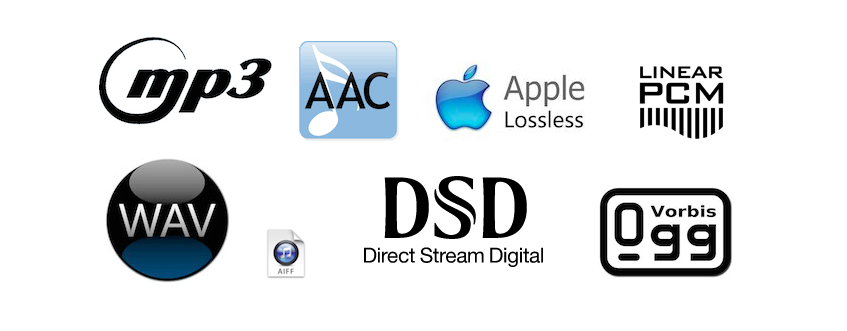
AAC (Advanced Audio Coding): It was designed to be the successor to MP3 and, although it is a lossy CODEC, the results in terms of sound quality are superior to those of MP3 for the same bit rate. The AAC has adopted a wide range of portable audio devices such as the iPod and its derivatives for use.
AIFF (Audio Interchange File Format): It is the version of WAV created by Apple. Works with uncompressed (ie “lossless”) files that maintain full resolution and size.
 

ALE (Apple Lossless Encoder), also known as ALAC (Apple Lossless Audio Codec): Uses lossless compression to save storage space. Once unzipped for listening, the file will be bit by bit identical to a full size WAV or AIFF encoded file. As in AIFF or FLAC, in ALE / A files

Audio compression, an explanation

Audio compression can be somewhat confusing at first due to the fact that the tools to implement it often have many elements that interact with each other and can be a headache.

Added to all this is the fact that audio / sound compression is often confused with compression in terms of digital formats (MP3 for example), which is a much more complex principle.

That is why we made this guide that aims to attack the most common doubts regarding compressors. The ones I had and the ones you probably have at the moment.

Let’s move on to the important:

What are compressors?

They are essentially an automatic volume or level control.

Let me explain: They are the equivalent of the fader of a console operated by a person in real time, that person has the function of lowering the fader when the volume of an element suddenly rises excessively. All this to control the dynamic range of said element and prevent it from going out of plane.

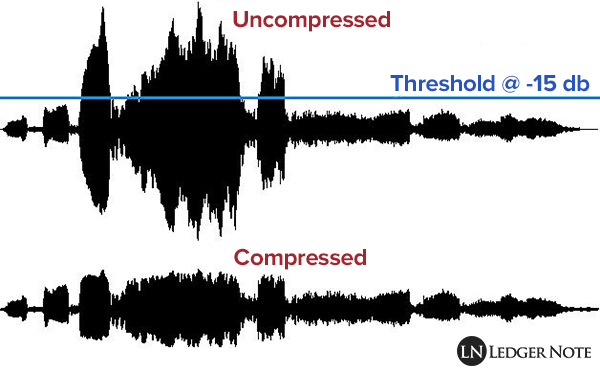
So what the compressor does in essence is reduce the level of a signal with parameters that are set by the user and that modify how it behaves.

How do they work?

Threshold and knee audio compression
An example of an acting audio compressor showing a 4: 1 reduction contrasting it with the signal without any reduction (1: 1)

Comparing signals, that is to say: a signal enters the compressor, for example the voice we were talking about before and we set a certain level (threshold or treshold) which, if exceeded, causes the compressor to act reducing the level of said voice at the output as if it were the fader on a console.

So the compressor is all the time comparing the input signal against this threshold and reducing the signal at the output if it passes it. On the other hand, the amount of reduction at the output is not always the same, but can be modified by the user with another parameter.

What are all those knobs?

Compressors have various user-modifiable parameters that appear in the form of knobs on both digital and hardware models. Let’s see what they are:

Threshold or Treshold: we tell the compressor that if the signal goes above a certain level, it reduces it in gain. The lower the amount of signal enters the compression and therefore there will be greater reduction in gain. A detail to keep in mind is that in digital models the threshold will appear as a negative number, in essence the more negative that number is, the lower the threshold and the more signal is compressed.
Compression ratio or Ratio: here we tell the compressor to reduce the signal that exceeds the threshold by a certain proportion established by us. For example, if our signal passes the threshold by 10 decibels and we want it to decrease by 5 decibels, we put a ratio of 2: 1 (it works as a division). At higher rates, there will be a greater reduction, but also the compression may start to be noticeable, which that we generally don’t want to happen. What is sought is that it be transparent so that the listener does not realize that the signal was manipulated.

Attack or Attack: it is the time in seconds (generally in the order of milli seconds) that the compressor takes from the moment the signal passes the threshold to the complete reduction in gain that we set with the compression ratio. Keep in mind that the compressor essentially acts immediately, but it is this time that determines how it interacts with the envelope of the signal to be compressed.

Release: is the time in milli seconds that the compressor takes to return to unity gain once the signal stops being above the set threshold. In the same way that with the attack the release can modify the envelope of the sound in question and therefore is very important in the operation of the compressor.

Knee: it is a parameter found in some compressors that modifies the way in which the compressor begins to act, the name is due to the fact that the curve that describes the way in which the compressor begins to act is similar to a knee (knee in English ).
So that we understand better when we talk about soft knee we are talking about that the compressor starts to act gradually before the set threshold and reaches its compression ratio established in this way. Instead, a hard knee compressor will only act when the signal goes beyond the established threshold and therefore more aggressively.

Make up gain or output gain: is the parameter that controls the compressor’s output gain, after having activated and reduced the signal by a number of decibels. What is sought in general is that what was reduced in level is re-gained and therefore make the parts that had less volume now approach those that were compressed.

How does file compression work?

It is incredible that many of us not only use but also regularly practice the task of compressing files without understanding very well how this practice really works. The reality is that in a compression everything is transformed.

How does file compression work?

Basically compressing is removing redundant values ​​from a file, or what is the same, removing what is repeated. Suppose a file is composed of “MMMMMM”, compressing it would be “6M”. Being more specific and looking for all these chains, compression programs can compress several megabytes in just KB of files that have not previously been compressed.
The difference between basic and redundant information is called entropy.

Methods used to compress:

1) Without loss:
– EXAMPLE FILES: ZIP, PNG, RAR, H264 and others
This method consists of summarizing the information by removing what is redundant, as we mentioned earlier. It is like saying the same thing but in another way, in a summarized or compressed way. The good thing about this compression is that it is reversible and the files do not lose any quality. When you unzip a file with this technique, it will have exactly the same composition as before compressing it or what is the same as having the original file.

2) With loss:


– EXAMPLE FILES: Mp3, Jpg, MPG
These files lose quality because the compression parameters are removed, although they are not strictly necessary, they remove integrity and quality from the file.

In an image file, brightness, thresholds, and quality are removed, while for example in audio files, spaces, volume, and frequencies not audible by the human ear are removed.

Creating compressed files today is an easy task, any image editor allows you to convert to Jpg for example. In lossless compression, it requires programs such as Winrar or Winzip, programs that have become common in the use of the Internet as they not only compress but also allow a large file to be divided into small parts to facilitate downloading.