Compression encoding method Part 2


Free Download Mp4Gain
picture

Compression encoding method Part 2
Compression encoding method

Other divisions of compression methods

Compression encoding method

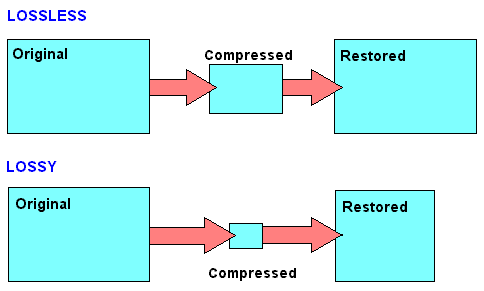
In the field of audio compression, there are two compression methods, lossy compression and lossless compression. Commonly seen MP3, WMA, OGG are called lossy compression As the name suggests, lossy compression reduces the audio sample rate and bit rate, and the output audio file will be smaller than the original file. . Another audio compression is called lossless compression, which is what we’re talking about. Lossless compression can compress the volume of the audio file to a smaller size on the premise of saving 100% of all the data in the original file, and after restoring the compressed audio file, it can achieve the same size and same bitrate as the source file. Lossless compression formats include APE, FLAC, WavPack, LPAC, WMALossless, AppleLossless, La, OptimFROG, Shorten, while common and conventional lossless compression formats are just APE and FLAC. [1]
Main classifications and typical representatives of audio compression algorithms.edit streaming
Generally speaking, audio compression techniques can be divided into two categories: lossless compression and lossy compression, and according to different compression schemes, they can be divided into time-domain compression, transform compression, and time-domain compression. subband, as well as hybrid compression in which multiple technologies are combined with each other. Various compression techniques have large differences in algorithm complexity (including time complexity and space complexity), audio quality, algorithm efficiency (ie compression ratio), and codec delay. The applications of various compression techniques are also different.
Time domain compression technology (or waveform coding)
It directly processes the sample values ​​of the audio PCM code stream and compresses the code stream through silence detection, nonlinear quantization, and difference. Common features of this type of compression technology are low algorithm complexity, average sound quality, small compression ratio (CD quality > 400kbps), and shortest codec delay (relative to other technologies) . This type of compression technology is generally used for voice compression, low bit rate (small source signal bandwidth) applications. Time domain compression technology mainly includes G.711, ADPCM, LPC, CELP, and block compression technology developed on these technologies, such as NICAM, Subband ADPCM (SB-ADPCM) technology.
Subband compression technology
Subband coding theory was first proposed by Crochiere et al. in 1976. The basic idea is to decompose the signal into the sum of components into several subbands and then adopt different compression strategies for each subband component according to its different layout features to reduce code rate. The usual subband compression technology and transform compression technology described below are based on the human perception model (psychoacoustic model) of the sound signal, and the quantization order of the subband samples or the samples The frequency domain is determined by analyzing the spectrum of the signal. other parameters are selected, so it can also be called perceptual compression encoding (Perceptual). Compared with time domain compression technology, these two compression methods are much more complicated. At the same time, the coding efficiency and sound quality are also greatly improved, and the coding delay is correspondingly increased. Generally speaking, the complexity of subband coding is slightly less than that of transform coding and the coding delay is relatively short.


Free Download Mp4Gain
picture


Mp4Gain Main Window
picture


Mp4Gain Features
picture


Free Download Mp4Gain
picture

Compression encoding method

Compression encoding method

Compression encoding

Transmission

Compression encoding

According to different compression principles, audio signal coding is divided into waveform coding, parameter coding, and coding forms that integrate various technologies.
(1) Waveform coding directly samples the time-domain or frequency-domain waveform of the audio signal at a certain rate, and then quantizes the amplitude samples hierarchically, transforms them into digital codes, and outputs a signal coding system reconstructed from the waveform data. , the waveform is as consistent as possible with the original sound waveform, preserving detailed signal changes and various transition characteristics.
(2) Parametric coding First, a feature model based on different signal sources, such as language signals, natural sounds, etc., is established through feature parameter extraction and coding processing, trying to that the reconstructed sound signal is as loud as possible. to keep the semantics of the original sound, but reconstructed. The waveform of the signal may be quite different from the waveform of the original sound signal. Characteristic parameters in common use are formant, linear prediction coefficient, frequency band division filter and other parameter coding technologies, which can realize low-speed sound signal coding, and bit rate. can be compressed to 2 Kbit/s – 4.8 Kbit/s, but the sound quality can only reach moderate naturalness, especially low, only suitable for language transmission and expression.
(3) Hybrid coding The coding way that combines waveform coding and parameter coding overcomes the weaknesses of original waveform coding and parameter coding, and strives to maintain high quality of coding of waveforms and the low rate parameter coding, at a rate of 4 -16Kbit/s A high quality synthetic sound signal can be obtained. The basis of hybrid coding is linear predictive coding (LPC), commonly used coding methods such as pulse-excited linear prediction coding (MPLPC), scheduling pulse-excited linear prediction coding (KPELPC), Codebook Excited Linear Prediction (CELPC), etc.

Audio compression, how it works Part 2

Audio compression, how it works Part 2

Audio compression
Audio compression

Redundant information for transmission signals

Audio compression
Audio compression

Digital audio compression coding compresses the audio data signal as much as possible on the premise of ensuring that the signal is not audibly distorted. Digital audio compression coding is implemented by removing redundant components in sound signals. So-called redundant components refer to signals in the audio that cannot be perceived by the human ear and do not help determine the timbre, pitch, and other information of the sound. Redundant signals include audio signals outside the range of human hearing and masked audio signals. For example, the frequency range of the sound signal that can be perceived by the human ear is 20 Hz to 20 KHz, and frequencies other than this frequency that cannot be detected by the human ear can be considered as redundant signals. In addition, according to the physiological and psychoacoustic phenomena of the human ear, when a strong signal and a weak signal exist at the same time, the weak signal will be masked by the strong signal and cannot be heard, so the weak signal can be regarded as a redundant signal. Do not send. This is the masking effect of human hearing, which is mainly manifested in the spectral masking effect and the time-domain masking effect, which are presented below:
Spectral masking effects.
After the sound energy of a frequency is below a certain threshold, it will not be heard by the human ear, and this threshold is called the minimum audible threshold. When another sound with higher energy appears, the threshold value close to the frequency of the sound will increase considerably, which is known as the masking effect.

Masking effects in the time domain.
When strong and weak signals appear at the same time, there is also a masking effect in the time domain. That is, when the two occur very close in time, the masking effect will also occur. Time-domain masking is divided into three parts: pre-masking, simultaneous masking, and post-masking. Pre-masking refers to the short time before the human ear hears a strong signal, the already existing weak signal will be masked and cannot be heard. Simultaneous masking means that when a strong signal and a weak signal exist at the same time, the weak signal is masked by the strong signal and cannot be heard. Post-masking means that when the strong signal disappears, it takes a long period of time to hear the weak signal again, which is called post-masking. These weak masked signals can be considered redundant signals.

Audio compression, how it works

Audio compression, how it works

Audio compression
Audio compression

audio compression


audio compression
audio compression


Audio compression technology refers to the application of suitable digital signal processing technology to the original digital audio signal stream (PCM encoding), without losing the amount of useful information, or under the condition that the loss introduced be insignificant, reduce (compress) its code rate, and also called compression encoding.

It must have a corresponding inverse transform, called decompression or decoding. The audio signal can introduce a lot of noise and some distortion after passing through a codec system

Audio compression technology refers to the application of suitable digital signal processing technology to the original digital audio signal stream (PCM encoding), without losing the amount of useful information, or under the condition that the loss introduced insignificant, reducing (compressing) its code rate, and also called compression encoding. It must have a corresponding inverse transform, called decompression or decoding. Audio signals can introduce a great deal of noise and some distortion after passing through a codec system. The advantages of digital signal are obvious, but it also has its own corresponding disadvantages, ie increased storage capacity requirements and increased channel capacity requirements during transmission. Taking a CD as an example, the sampling frequency is 44.1KHz and the quantization precision is 16 bits, so a stereo audio signal for 1 minute needs to occupy about 10M bytes of storage capacity, that is, the capacity of a CD turntable is only about 1 hour. Of course, the problem is even more pronounced in the world of much higher bandwidth digital video. Are all these bits necessary? The study found that there is a large redundancy in the direct use of the PCM code stream for storage and transmission. In fact, sound can be compressed at least 4:1 under lossless conditions, that is, only 25% of the digital amount is used to retain all the information, and the compression ratio in the video field can even reach to several hundred times. Therefore, in order to use limited resources, compression technology has received much attention since its inception. The research and application of audio compression technology has a long history, like A-law coding, u-law is a simple almost instant compression technology, and has been applied in ISDN voice transmission. Research on speech signals has been developed before and has matured, and has been widely used, such as adaptive differential PCM (ADPCM), linear predictive coding (LPC), and other technologies.

Audio compression for music lovers

Audio compression for music lovers

Lossy compression


the truth about high bitrate lossy compression

lossy compression

In the opinion of most people, the word music lover is most often associated with a person who not only loves and collects music, but also appreciates high-quality music, and not only in artistic and aesthetic terms, but also the quality of the recording of the phonogram itself. Just think, a few years ago, an audio CD was considered the standard for music quality, whereas a computer, even in dreams, could not compete with the quality of a CD. However, time is a great joker, and he often likes to turn things upside down. It would seem that quite a while, a year or two passed and … that’s it, the CD on the PC went into the background. Don’t ask “why?”, You know the answer to this question yourself. Everything is to blame for the revolution in the world of computer sound: audio compression (hereinafter referred to as audiolo compression which means lossy compression to reduce the size of the audio file), which made it possible to store music on disk hard, lots of music! In addition, it was possible to exchange it over the Internet. New sound cards have been released, capable of almost “squeezing” studio quality out of a piece of hardware that seems useless in terms of music. Today, even having a computer that is not very smart in performance, having bought a Creative SoundBlaster Live! and remembering that since Soviet times there is a good amplifier and good acoustics, you will get nothing but a high-quality music center, the sound of which is inferior only to very expensive audio equipment (average or even the highest Hi-Fi category ). Add to this the general availability of music files and you understand that you have the power in your hands. And then there is a revolution, and you understand that a compact disc is no longer so convenient, you are fascinated by something completely different: the magic “MP3” signs. You cannot eat or sleep; you are faced with the seemingly insoluble “chicken and egg” question: how to “squeeze” and, most importantly, how to “squeeze” …

This is where I will help you. This article is the beginning of my new series of informational materials on music on the computer. For over a year developing OrlSoft MPeg eXtension and maintaining an extensive database of MP3 files, I have accumulated a great deal of research on audio compression. It is these studies that I will try to share with you. Many articles have been written on audio compression by different respected authors, so I will try not to write what I can easily find in other sources of information. I would like to put my position on the subject we are considering simply and clearly. We will not consider audio compression to be as compact a tool as possible put audio information on your hard drive (so that you can record so many hours of music there). Yes, compression allows you to record music more compactly, but my goal is to minimize quality loss by converting “pure” audio to compressed audio. This is why only high bit rates and qualitatively compressing encoders are considered in these modes. So it is much more convenient to work with compressed audio – instant access to any track from any album, convenient software for playback. And, of course, the financial issue has not been forgotten either.

Of the audio compression formats that exist today, in my opinion, three deserve attention: MP3 (or MPEG-1 Audio Layer III), LQT (as representative of the MPEG-2 AAC / MPEG-4 family) and a Completely new OGG format (Ogg Vorbis) developed by a group of enthusiasts:

MP3 is by far the most used of these (mainly because it is free). Let me remind you that it was thanks to the MP3 format that the victorious procession of compressed audio took place. However, as often happens with pioneers, little by little it is losing ground and giving way to new and better formats.
The second format, LQT, is a representative of a new direction of audio coding algorithms, a representative of the AAC family. This is a fairly high quality, but commercial and highly classified format.
OGG became widely known to the public this summer and is currently developing rapidly, soon (with the launch of the Encoder and Decoder) it should beat MP3 with better sound quality with smaller file size.

How to choose the perfect compressor configuration

Compressors and how to use them, explained.

Compression is one of your most powerful mixing tools. It is the essential element behind any good mix.

But for your compressors to work, you must first understand what compression is.

It can seem intimidating to start learning such a broad subject, especially when the controls and how they affect the signal are difficult to understand in relation to the sound.

This article will help you understand what compression does, how to choose the perfect compressor setting, and some common mistakes to avoid.

But before…

What is compression in music?

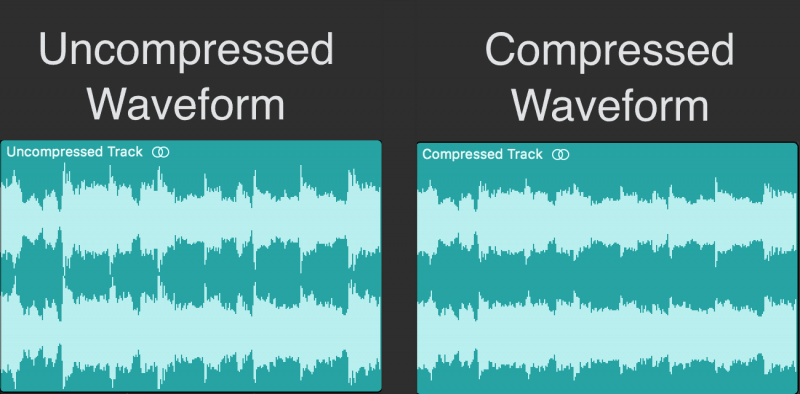
Compression in music is the process of reducing the dynamic range of a signal. Dynamic range is the difference between the loudest and quietest parts of an audio signal.

audio compression

You must reduce the dynamic range of most audio signals to sound natural to a recording.

For example: imagine a whisper and a scream on the same audio track. If they had the same volume difference as they do in real life, it would be very annoying!

Compressors fix all of this by attenuating the loudest parts of the signal and boosting what is output so that the quieter parts are more noticeable.

Imagine a whisper and a scream on the same audio track. If they had the same volume difference as they do in real life, it would be very annoying!
Using compression
Experienced engineers often talk about how one compressor is more “musical” than another.

It is an important concept. Its dynamics is one of the fundamental aspects for its sound to be unique.

When you use a compressor to change the dynamics, the sound engineer becomes part of the musical performance.

If your compressors work properly, they will positively contribute to performance and improve recordings.

Transients: understanding high energy moments.

To understand compression, you need to know what transients are.

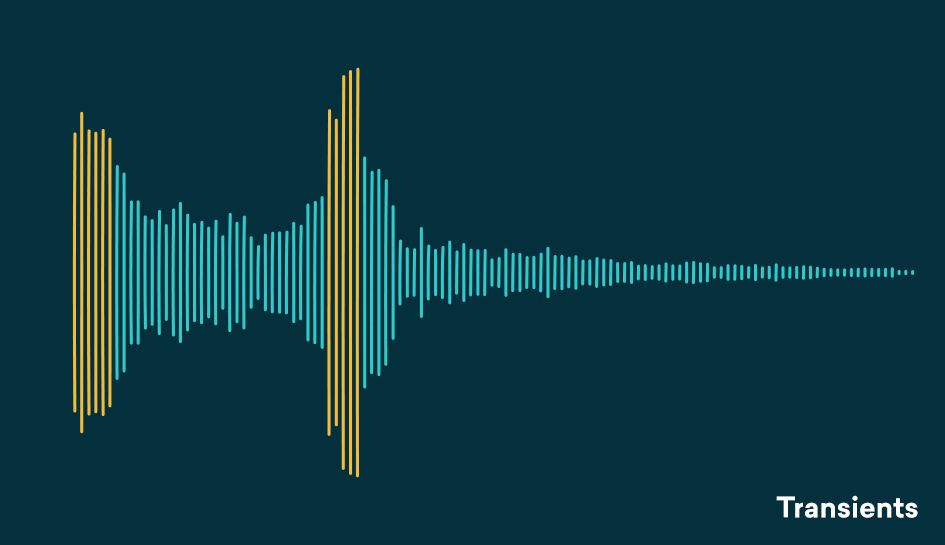
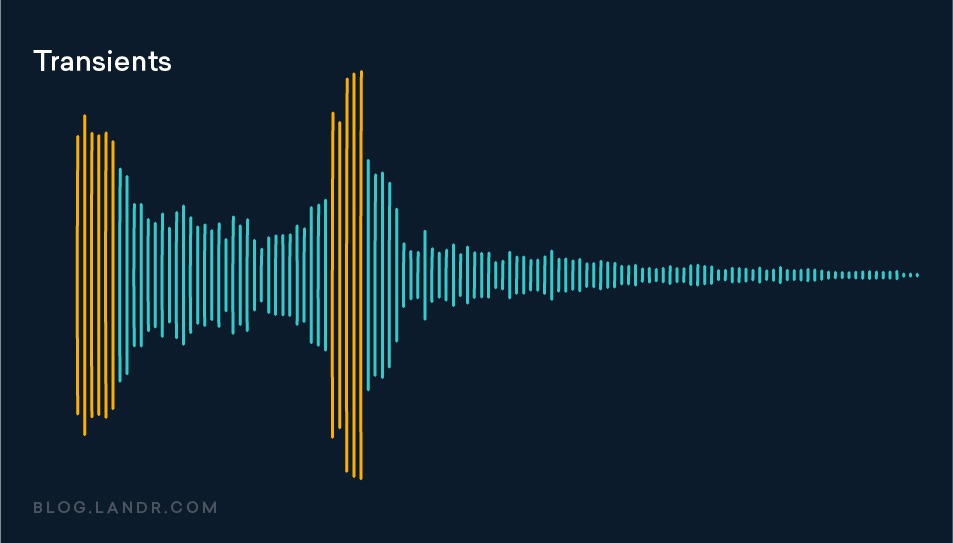
Transients are the first high-energy moments of a certain sound in its waveform. These explosions give our brain a lot of information about the quality of a sound.

Since transients are usually louder than the rest of the waveform, they are greatly influenced by compressors.

For example: think of a nice roaring trap. As soon as the trap enters, there is an initial peak in the waveform that narrows slowly. That initial energy spike is your transient.

transient compresor

Compression helps you find the perfect balance for a track that has good dynamic range with a beautiful, full body.
A waveform with good dynamics will have a lot of transients when some sounds hit and then decay in the composition. Transients and their final decay are what make a waveform similar to a fish bone.

There is even an overly dynamic trail. If your song is transient without a body, its sound will not be of interest to your ear.

The reverse is also true, no dynamics can lead to lifeless, exhausting sound for the human ear and a waveform that looks like a big brick.

Compression helps you find the perfect balance for a track that has good dynamic range with a beautiful, full body.

Limiter

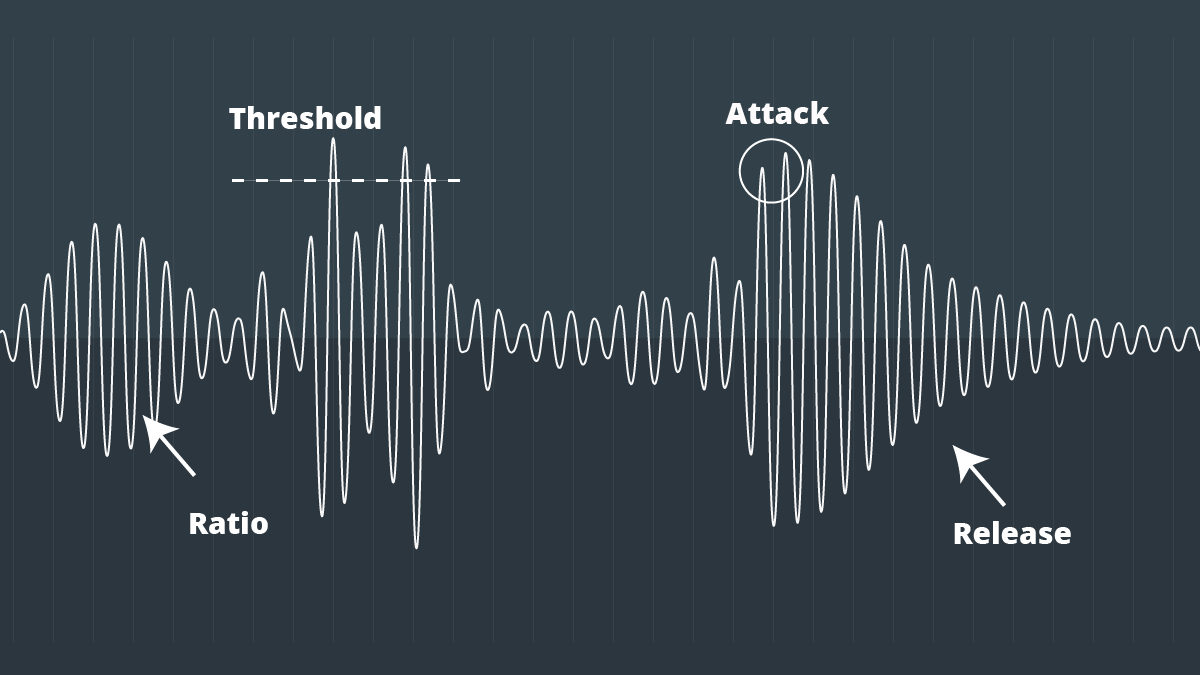
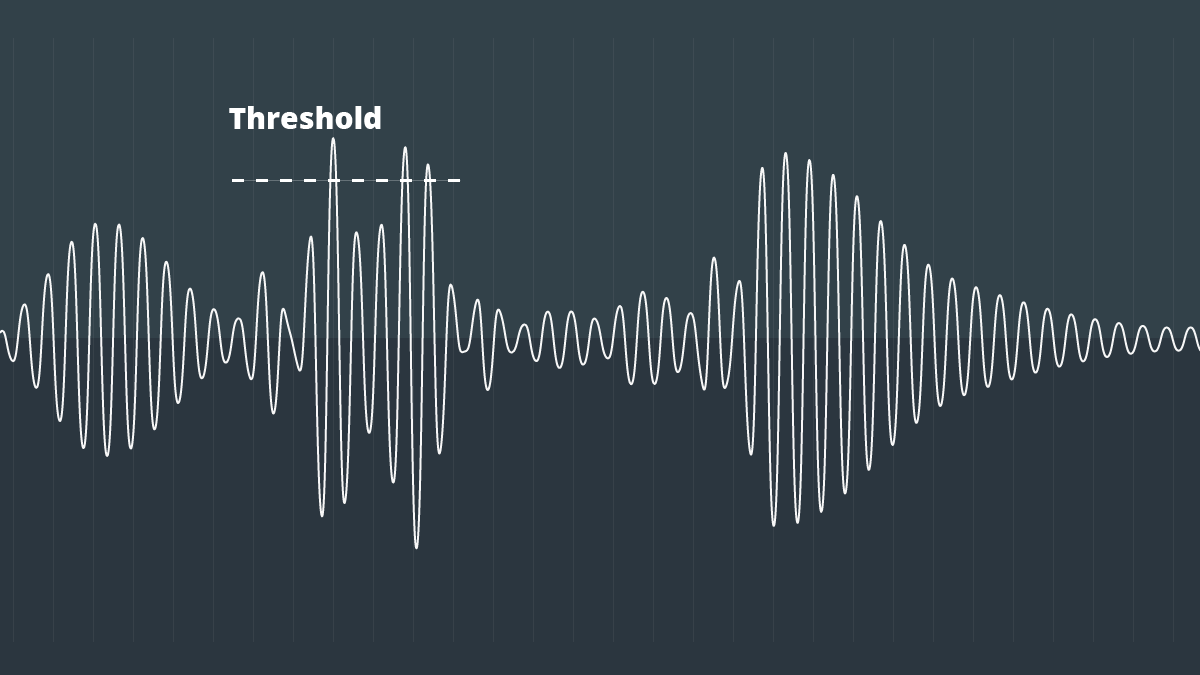
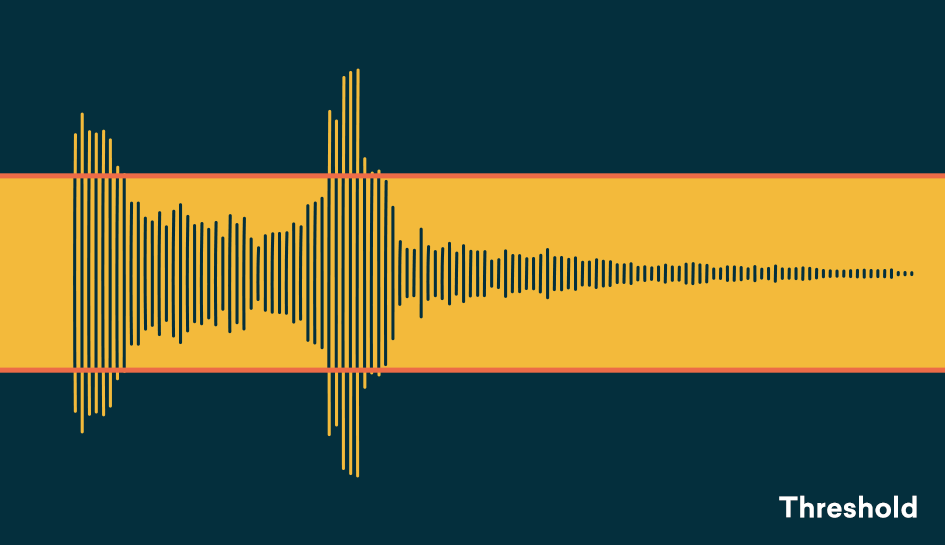
The threshold determines the signal level at which the compressor will start operating. The threshold is measured in dB, therefore any signal above the set threshold will be compressed.

When setting the threshold, decide what part of the signal you want to reduce.
With the threshold low, the compressor gain reduction is applied to a larger portion of the signal. Setting it higher affects only the most aggressive peaks and leaves the rest intact.

To determine what the perfect threshold is, think about what you’re trying to accomplish by compressing the audio and which parts of the signal are the most troublesome.

Are strong signal transients distracting you from the rest of your mix? Or maybe your final decadence is imperceptible in the mix?

A good rule of thumb for compression is “do no harm.”
Set the threshold to hear compressor operation on the part of the signal that needs to be addressed and not lowered.

Setting the perfect threshold will depend on your needs. Play the track and tweak it on the go to find the perfect amount.

Relationship

The ratio determines the amount of gain reduction applied by the compressor when the signal exceeds the threshold. It is called a relationship because it is expressed in comparison with the unaffected signal.

The higher the first number in the report, the greater the gain reduction factor.

For example, we can say that an uncompressed signal would have a 1: 1 ratio

Destructive compression vs non-destructive

Destructive compression is compression obtained by losing information. This means that if you extract the compressed signal with this technique, you will not find the start signal.

Destructive Vs Non-Destructive Audio compression

In destructive compression techniques, there are basically methods that take advantage of the properties of the human ear. The latter listens to frequencies between 20 Hz and 20 kHz. If a song contains frequencies outside this range, we can easily delete them without losing the audio quality because the ear does not hear them. In fact, frequencies between 2 kHz and 5 kHz are generally heard correctly. In fact, less than 5 dB is required to hear frequencies in this band, while more than 20 dB is required to hear frequencies below 100 Hz or above 10 kHz. These results can be used to reduce the size of the files. For example, we can conclude that all frequencies above 15 kHz are suppressed.

audio compression

MP3 also uses the principle of masked frequencies. If in a frequency group some have a much higher noise level than others, it is not necessary to keep the frequencies low – we will not hear them. Imagine yourself in your garden listening to the birds sing. The chord goes over your head (even very high). We no longer listen to birds because the sound they make is much quieter than that of the plane. It is as if the birds no longer exist or have stopped singing. Obviously, it is not necessary to code all the frequencies present in a song so that the human ear can always perceive it well. Finally like the two ways

What do we find among non-destructive techniques?

Mainly coding techniques.

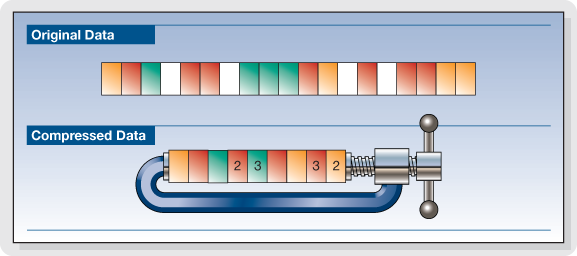
Let’s explain. A sound is a frequency. A second of music is therefore a sequence of frequencies. Imagine that in the series of samples that make up a second of music (remember that there are 44,100), we have the same frequency several times in succession, for example 10 times. If instead of storing these 10 points, we only store 1 and the number of times it is repeated, we must encode 2 digits and not 10. If we also apply this method to frequencies which are no longer identical, but very dense together (so close that the average human ear cannot distinguish them), we can still save space. This time, the compression is destructive because we are replacing one frequency with another frequency (almost identical).

MP3 also uses the algorithm of Huffman (1952) as a method of encoding information. This method is used in all compression algorithms (compression of text files, compression of images, compression of sound). It is based on the use of a variable length code and the probability that an event (in this case a frequency) will occur. The more a frequency appears, the shorter the code (low number of bits to display it). The file is read for the first time and a table appears with the frequencies that appear and the number of times they appear. We derive the right code. This encryption was last used. It is the final phase of compression. This is non-destructive coding.

MP3 works on the properties of the ear, first to reduce the size of a part, then processes the stereo sound and possibly applies encodings which end with Huffman encoding.

The use of all the reduction options mentioned depends on the location you want to give within 1 minute of your tablet and therefore on the compression speed to apply.
To encode MP3 audio files, we are talking more in terms of bit rate than compression rate.
Bit rate is the number of bits allowed in 1 second.
Therefore, we have the following relationship: the more we want to compress a song (so that it takes up the least space possible), the lower the bit rate.

Choice of compression ratio (bit rate)

Obviously, the more you compress, the worse the sound quality.
You have to compromise the file size and audio quality.
This commitment can be dictated by your needs, but also by the use you want to make of your MP3 files. It may not even be demanding if your MP3s are intended for your portable music player and are too demanding to be listened to on a stereo system.

Does MP3 affect the sound quality?

The compression of songs affects the quality, but the losses are not necessarily audible.

mp3 audio quality

Is compression of MP3 songs harmful to the sound quality? Whether it is HD music or “normal” definition, the question of compression remains. The advantage is that the weight of the songs is reduced, so they take up less space in the memory of a phone or a portable music player. With standard MP3 compression, a music album ranges from 500 MB to 45 MB.

But by the way, the music is damaged. The sound seems a little less natural, less precise, less dynamic. Some of the audio information is literally destroyed. It doesn’t always sound good, but for some songs the difference is clear until everyone will notice.

mp3 quality

Fortunately, you can improve the quality of an MP3 song by compressing it with less force. The loss of sound quality becomes less clear, but in return the song weighs more. MP3 isn’t the only compressed music format that corrupts music. The most famous competitors are AAC, Ogg Vorbis and WMA. MP3 is not the most efficient compression format, this title applies to the Ogg Vorbis, but it is still a good option. All music players can play MP3 and online record stores prefer this format.

Lossless compression

However, some music lovers are reluctant to MP3. They swear by “nondestructive” compression, which does not remove sound information. The music has been completely preserved: we hear absolutely no difference. The best known non-destructive formats are Flac, APE and Alac. Unfortunately, not all electronic devices can play music recorded in these formats. Few artists offer their music in “non-destructive” compression. And the weight of the parts thus compressed is still very heavy. An album quickly reaches several hundred megabytes. However, the Flac stands out as the reference format for the most demanding music lovers.

Is it reasonable to keep using MP3? This remains a smart choice for most music lovers, as long as they choose an appropriate compression ratio. Which one to choose: 192 kbit / s, 256 kbit / s or 320 kbit / s? The stronger the compression, the lighter the number, but the lower the quality. With 128 kbit / s, the sound has clearly deteriorated, most of us can hear it. At 192 kbit / s, degradation becomes difficult for most of us to observe except for some rare numbers.

With 256 kbit / s, you have to have a musical ear and good sound equipment to make the difference. With 320 kbit / s, you need a well-trained ear and highly accurate audio equipment to make a difference. We only see a difference in quality in certain titles and only in certain passages. Therefore, most of us can settle for 192 kbit / s recording. Music lovers should expect a minimum of 256 kbit / s. And professionals will choose formats of 320 kbit / s or ‘lossless’.

Data compression techniques

It is evident that coding techniques for multimedia information contain large amounts of data that require memory space for recording and high transmission speed for transfer to other digital systems.

These needs can be met by reducing the space occupied by the data with special compression techniques. Compressed data cannot be used directly for processing, viewing, or playback. Compression techniques are used by special programs immediately before data storage or transmission. During the read or receive phase, similar programs perform decompression. Compression can be done on the basis that information encoding techniques dedicate an always equal amount of memory to each information element (be it a character, a pixel or a sound sample), regardless of their statistical frequency and its significance.

The compression techniques developed so far are more than a hundred but grouped into two categories:

Compression without loss of information.

Lossless compression techniques are based on compact coding of the same data streams or coding with a small number of bits of the most statistically frequent data.

Picture
This compression is completely reversible and the decompression program returns the exact bit sequence as it originally was. For this reason, loss-free technique is applicable to any type of data, including executable texts and programs, although the achievable compression factor is not very high: values ​​usually range from 2: 1 to 4: 1. Of course, these results vary depending on the type of input data.

RLE encoding

Data Compression

The RLE (Run Length Encoding) compression technique is oriented to equal byte sequences. In the original version, it provides the introduction of a special character that indicates the beginning of a sequence, and instead of encoding the same characters in the sequence one by one, it encodes only the first one, followed by a number indicating where many times drawn and repeated. Specifies with the Sc character at the beginning of the sequence, the statement

these ******** are eight stars… these Sc * 8 are eight stars

where 8 is not encoded as an ASCII character but as a binary number.

The decompression program interprets the next byte as a counter and rebuilds the original sequence.

For image compression, RLE encoding only works well with images that contain large areas of uniform color, but are not very effective with complex images.

Compression with loss of information.

Loss-free compression techniques are not sufficient to solve the problem of the huge amount of data generated by encoding multimedia information, e.g. Video images while allowing better use of memory space on disks or data transmission lines. High resolution. , audio or video.

However, to try to solve this problem, it is necessary to remember that multimedia information, although subject to transformation, can remain understandable; This allows for compression factors that are higher in some orders of magnitude than those observed.

These interventions can be studied based on the behavior (vision and hearing) of our sensory systems to reduce the required memory without obvious changes in information content. Compression techniques that do this are called “lossy” since the least significant piece of information is irreversibly suppressed. Therefore, it appears that the bitstream after decompression is different from the original, and therefore these techniques cannot be used for other types of information, e.g. Text. Furthermore, the information thus compressed is not suitable for further processing as the loss introduced with each subsequent step becomes more and more apparent.

What is video encoding and how does it work?

The technique of compressing videos

What do we mean when we talk about video coding or, as industry experts generally call it, video coding?

YOUTUBE VIDEO FORMAT

Simply put, video encoding is the process of compressing and converting video content. The ultimate goal is to use less storage space, use less bandwidth, and make the user experience smoother. It goes without saying that the compression process causes a significant loss of information. The more data that is applied, the more data is deleted in the video. The result is a different version of the original due to missing data.

mp4 videos

Why is video coding so important?

Video encoding is essential for transmission because it simplifies the transmission of video on the Internet through a compression process. Compression reduces the bandwidth required while providing a high quality experience. Without this, raw video content would not allow many users to view content on the Internet due to insufficient connection speeds. The protagonist of this process is the bit rate or the speed of digital data transmission that can be transmitted in a certain time interval in a communication channel. When streaming, the bit rate determines whether users can easily view the content or are exposed to video buffering.

Another fundamental aspect of video coding is compatibility. Indeed, sometimes the content is already compressed to an appropriate size, but it still needs to be encoded to be compatible with different devices and applications, although this is often referred to as transcoding.

The video encoding process is governed by video codecs, which are compression standards that are created through software or hardware applications. Each codec consists of an encoder for compressing the video and a decoder for restoring an approximation of the video for playback. The name codec is actually derived from the merging of the words “encoder” and “decoder”.

But what is the best codec?

It depends on the type of video. On this occasion we will describe the most commonly used.

To stream high quality video over the Internet, H.264 is arguably the most widely used codec for most multimedia traffic. This codec is considered to be of excellent quality, coding speed and compression efficiency, although it is not as efficient as the later HEVC (High Efficiency Video Coding) compression standard, also known as H.265. H.264 also supports 4K video streaming, a real advance for a codec created in 2003.

Now that we have an overview of codecs, let’s look at some compression techniques.

Compression techniques

The most common compression technique is scaling the resolution. The higher the resolution of a video, the more information is contained in each picture. One way to reduce the amount of data is to reduce the size of the image and then scan it again. As a result, fewer pixels are generated, which reduces the level of detail of the image, which has a positive effect on the amount of information required. This process allows you to set multiple quality levels for a video that correspond to different resolutions created. A practical example is if you are watching a movie in streaming before playing it, you can actually choose the resolution at which you want to watch it, provided your device
Support him

One video compression technique that may not be widely used is the interframe. This process reduces “redundant” information from one frame to another.

Another technique is the P-frame, short for predictive frame, which means that it can look back at an i-frame or another P-frame and understand whether the same images are present. In this case, this part is excluded for reasons of space.

B-Frame, on the other hand, is the bidirectional predictive frame that offers good compression without affecting the viewing experience. However, this technique requires a higher coding profile.

Another technique is that which makes it possible to intervene in the color. This process, called “chroma subsampling”, tries to maintain the brightness of the image, which affects the quality of the color. Finally, another method of compressing videos is to reduce the number of frames per second.